
Cross platform Appium tests 
How To
Who? 
Yaroslav 
Pernerovskyy 
• Test Automation Lead 
in Global Logic 
y.pernerovskyy 
y.pernerovskyy@globallogic.com 
www.linkedin.com/pub/yaroslav-pernerovsky/1/9b5/55
What?
Why? 
• Web application 
• Selenium based test framework (Java) 
• iOS and Android clients 
• Reuse framework features for mobile 
• Open Source (Free of charge) 
• Easy setup and configuration 
• Scalable and flexible
Appium Rules 
• Test the same app you submit to the 
marketplace 
• Write your tests in any language, using any 
framework 
• Use a standard automation specification and API 
• Build a large and thriving open-source 
community effort 
http://appium.io/slate/en/master/?ruby#appium-philosophy
iOS 
Android 
Firefox OS 
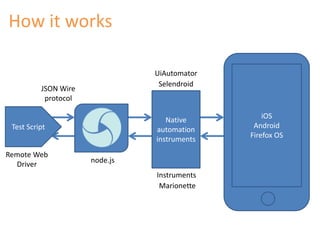
How it works 
JSON Wire 
protocol 
Test Script 
Native 
automation 
instruments 
Remote Web 
Driver 
node.js 
UiAutomator 
Selendroid 
Instruments 
Marionette
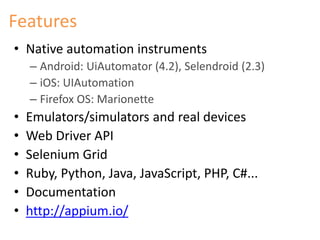
Features 
• Native automation instruments 
– Android: UiAutomator (4.2), Selendroid (2.3) 
– iOS: UIAutomation 
– Firefox OS: Marionette 
• Emulators/simulators and real devices 
• Web Driver API 
• Selenium Grid 
• Ruby, Python, Java, JavaScript, PHP, C#... 
• Documentation 
• http://appium.io/
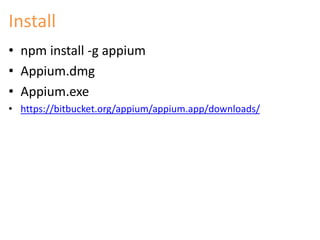
Install 
• npm install -g appium 
• Appium.dmg 
• Appium.exe 
• https://bitbucket.org/appium/appium.app/downloads/
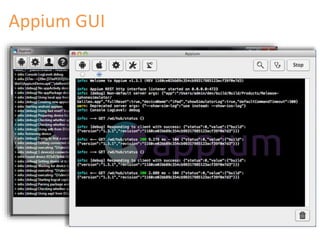
Appium GUI
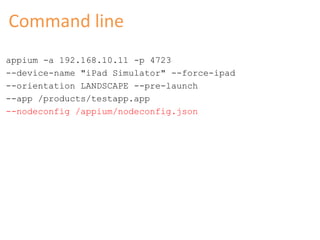
Command line 
appium -a 192.168.10.11 -p 4723 
--device-name "iPad Simulator" --force-ipad 
--orientation LANDSCAPE --pre-launch 
--app /products/testapp.app 
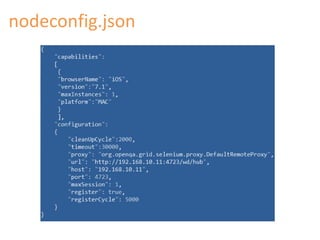
--nodeconfig /appium/nodeconfig.json
nodeconfig.json
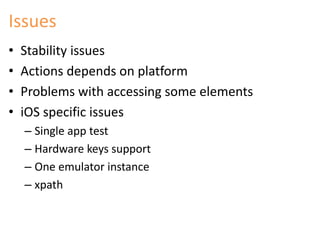
Issues 
• Stability issues 
• Actions depends on platform 
• Problems with accessing some elements 
• iOS specific issues 
– Single app test 
– Hardware keys support 
– One emulator instance 
– xpath
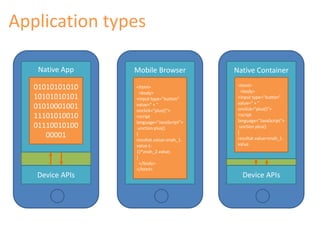
Application types 
Mobile Browser 
Native App 
01010101010 
10101010101 
01010001001 
11101010010 
01110010100 
00001 
Device APIs 
<html> 
<body> 
<input type="button" 
value=" + " 
onclick="plus()"> 
<script 
language="JavaScript"> 
unction plus() 
{ 
rezultat.value=znah_1. 
value-(- 
1)*znah_2.value; 
} 
</body> 
</html> 
Native Container 
<html> 
<body> 
<input type="button" 
value=" + " 
onclick="plus()"> 
<script 
language="JavaScript"> 
unction plus() 
{ 
rezultat.value=znah_1. 
value 
Device APIs
Web apps 
• Similar layouts 
• Same locators 
• Absolutely the same tests can be executed 
• Not require additional efforts
Native apps 
• Different layout 
• Different locators 
• Platform specific UI elements 
• Test cases should be specially designed 
• Require additional efforts
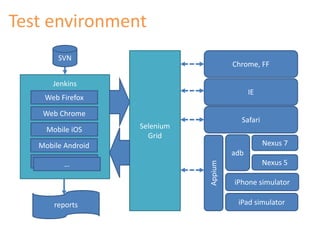
Test environment 
SVN 
Jenkins 
Web Firefox 
Web Chrome 
Mobile iOS 
Mobile Android 
…… 
Selenium 
Grid 
Chrome, FF 
IE 
Safari 
adb 
Nexus 7 
Nexus 5 
iPhone simulator 
iPad simulator 
Appium 
reports
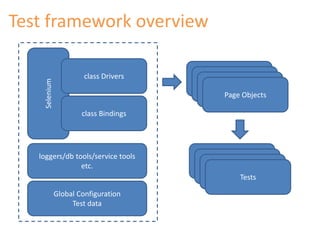
Test framework overview 
Selenium 
class Drivers 
class Bindings 
Page Objects 
Page Objects 
Page Objects 
Page Objects 
Tests 
Tests 
Tests 
Tests 
loggers/db tools/service tools 
etc. 
Global Configuration 
Test data
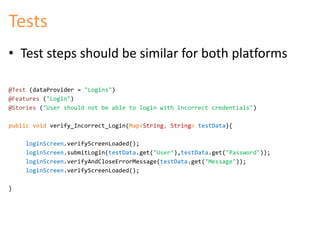
Tests 
• Test steps should be similar for both platforms 
@Test (dataProvider = "Logins") 
@Features ("Login") 
@Stories ("User should not be able to login with incorrect credentials") 
public void verify_Incorrect_Login(Map<String, String> testData){ 
loginScreen.verifyScreenLoaded(); 
loginScreen.submitLogin(testData.get("User"),testData.get("Password")); 
loginScreen.verifyAndCloseErrorMessage(testData.get("Message")); 
loginScreen.verifyScreenLoaded(); 
}
Page Objects 
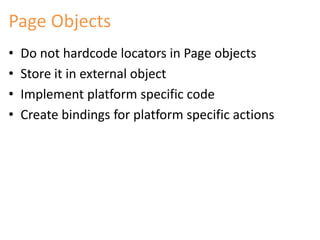
• Do not hardcode locators in Page objects 
• Store it in external object 
• Implement platform specific code 
• Create bindings for platform specific actions
Page Object 
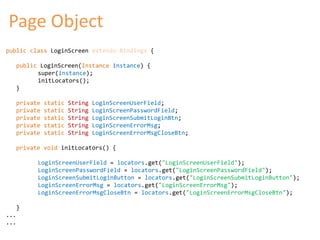
public class LoginScreen extends Bindings { 
public LoginScreen(Instance instance) { 
super(instance); 
initLocators(); 
} 
private static String LoginScreenUserField; 
private static String LoginScreenPasswordField; 
private static String LoginScreenSubmitLoginBtn; 
private static String LoginScreenErrorMsg; 
private static String LoginScreenErrorMsgCloseBtn; 
private void initLocators() { 
LoginScreenUserField = locators.get("LoginScreenUserField"); 
LoginScreenPasswordField = locators.get("LoginScreenPasswordField"); 
LoginScreenSubmitLoginButton = locators.get("LoginScreenSubmitLoginButton"); 
LoginScreenErrorMsg = locators.get("LoginScreenErrorMsg"); 
LoginScreenErrorMsgCloseBtn = locators.get("LoginScreenErrorMsgCloseBtn"); 
} 
... 
...
Page Object 
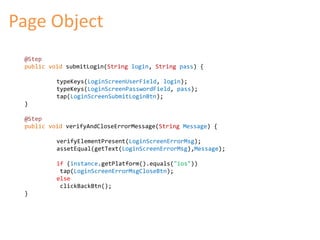
@Step 
public void submitLogin(String login, String pass) { 
typeKeys(LoginScreenUserField, login); 
typeKeys(LoginScreenPasswordField, pass); 
tap(LoginScreenSubmitLoginBtn); 
} 
@Step 
public void verifyAndCloseErrorMessage(String Message) { 
verifyElementPresent(LoginScreenErrorMsg); 
assetEqual(getText(LoginScreenErrorMsg),Message); 
if (instance.getPlatform().equals("ios")) 
tap(LoginScreenErrorMsgCloseBtn); 
else 
clickBackBtn(); 
}
Locators 
<?xml version='1.0' encoding='UTF-8'?> 
<dataset> 
<LOCATORNAME="LoginScreenUserField" 
ANDROID="id=com.example.myapp:id/txtUser" 
IOS="xpath=//window[1]/textfield[1]"/> 
<LOCATORNAME="LoginScreenPasswordField" 
ANDROID="id=com.example.myapp:id/txtPassword" 
IOS="xpath=//window[1]/textfield[2]"/> 
<LOCATORNAME="LoginScreenSubmitLoginButton" 
ANDROID="name=Login " 
IOS="name=Login"/> 
<LOCATORNAME="LoginScreenErrorMsg" 
ANDROID="id=com.example.myapp:id/errText" 
IOS="xpath=//*/UIAPopover[contains(@name,'ErrorText')]"/> 
<LOCATORNAME="LoginScreenErrorMsgCloseBtn" 
IOS="name=Ok"/> 
... 
...
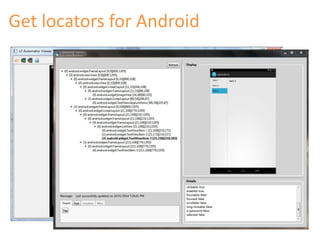
Get locators for Android
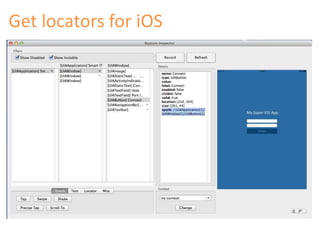
Get locators for iOS
Summary 
• WebDriver concept 
• Cross platform 
• Open Source 
• Easy integration into Selenium based frameworks 
• Supported by community 
• One test for two platforms
KEEP 
CALM 
AND 
ASK 
QUESTIONS

Cross Platform Appium Tests: How To

  • 1.
  • 2.
    Who? Yaroslav Pernerovskyy • Test Automation Lead in Global Logic y.pernerovskyy y.pernerovskyy@globallogic.com www.linkedin.com/pub/yaroslav-pernerovsky/1/9b5/55
  • 3.
  • 4.
    Why? • Webapplication • Selenium based test framework (Java) • iOS and Android clients • Reuse framework features for mobile • Open Source (Free of charge) • Easy setup and configuration • Scalable and flexible
  • 5.
    Appium Rules •Test the same app you submit to the marketplace • Write your tests in any language, using any framework • Use a standard automation specification and API • Build a large and thriving open-source community effort http://appium.io/slate/en/master/?ruby#appium-philosophy
  • 6.
    iOS Android FirefoxOS How it works JSON Wire protocol Test Script Native automation instruments Remote Web Driver node.js UiAutomator Selendroid Instruments Marionette
  • 7.
    Features • Nativeautomation instruments – Android: UiAutomator (4.2), Selendroid (2.3) – iOS: UIAutomation – Firefox OS: Marionette • Emulators/simulators and real devices • Web Driver API • Selenium Grid • Ruby, Python, Java, JavaScript, PHP, C#... • Documentation • http://appium.io/
  • 8.
    Install • npminstall -g appium • Appium.dmg • Appium.exe • https://bitbucket.org/appium/appium.app/downloads/
  • 9.
  • 10.
    Command line appium-a 192.168.10.11 -p 4723 --device-name "iPad Simulator" --force-ipad --orientation LANDSCAPE --pre-launch --app /products/testapp.app --nodeconfig /appium/nodeconfig.json
  • 11.
  • 12.
    Issues • Stabilityissues • Actions depends on platform • Problems with accessing some elements • iOS specific issues – Single app test – Hardware keys support – One emulator instance – xpath
  • 13.
    Application types MobileBrowser Native App 01010101010 10101010101 01010001001 11101010010 01110010100 00001 Device APIs <html> <body> <input type="button" value=" + " onclick="plus()"> <script language="JavaScript"> unction plus() { rezultat.value=znah_1. value-(- 1)*znah_2.value; } </body> </html> Native Container <html> <body> <input type="button" value=" + " onclick="plus()"> <script language="JavaScript"> unction plus() { rezultat.value=znah_1. value Device APIs
  • 14.
    Web apps •Similar layouts • Same locators • Absolutely the same tests can be executed • Not require additional efforts
  • 15.
    Native apps •Different layout • Different locators • Platform specific UI elements • Test cases should be specially designed • Require additional efforts
  • 16.
    Test environment SVN Jenkins Web Firefox Web Chrome Mobile iOS Mobile Android …… Selenium Grid Chrome, FF IE Safari adb Nexus 7 Nexus 5 iPhone simulator iPad simulator Appium reports
  • 17.
    Test framework overview Selenium class Drivers class Bindings Page Objects Page Objects Page Objects Page Objects Tests Tests Tests Tests loggers/db tools/service tools etc. Global Configuration Test data
  • 18.
    Tests • Teststeps should be similar for both platforms @Test (dataProvider = "Logins") @Features ("Login") @Stories ("User should not be able to login with incorrect credentials") public void verify_Incorrect_Login(Map<String, String> testData){ loginScreen.verifyScreenLoaded(); loginScreen.submitLogin(testData.get("User"),testData.get("Password")); loginScreen.verifyAndCloseErrorMessage(testData.get("Message")); loginScreen.verifyScreenLoaded(); }
  • 19.
    Page Objects •Do not hardcode locators in Page objects • Store it in external object • Implement platform specific code • Create bindings for platform specific actions
  • 20.
    Page Object publicclass LoginScreen extends Bindings { public LoginScreen(Instance instance) { super(instance); initLocators(); } private static String LoginScreenUserField; private static String LoginScreenPasswordField; private static String LoginScreenSubmitLoginBtn; private static String LoginScreenErrorMsg; private static String LoginScreenErrorMsgCloseBtn; private void initLocators() { LoginScreenUserField = locators.get("LoginScreenUserField"); LoginScreenPasswordField = locators.get("LoginScreenPasswordField"); LoginScreenSubmitLoginButton = locators.get("LoginScreenSubmitLoginButton"); LoginScreenErrorMsg = locators.get("LoginScreenErrorMsg"); LoginScreenErrorMsgCloseBtn = locators.get("LoginScreenErrorMsgCloseBtn"); } ... ...
  • 21.
    Page Object @Step public void submitLogin(String login, String pass) { typeKeys(LoginScreenUserField, login); typeKeys(LoginScreenPasswordField, pass); tap(LoginScreenSubmitLoginBtn); } @Step public void verifyAndCloseErrorMessage(String Message) { verifyElementPresent(LoginScreenErrorMsg); assetEqual(getText(LoginScreenErrorMsg),Message); if (instance.getPlatform().equals("ios")) tap(LoginScreenErrorMsgCloseBtn); else clickBackBtn(); }
  • 22.
    Locators <?xml version='1.0'encoding='UTF-8'?> <dataset> <LOCATORNAME="LoginScreenUserField" ANDROID="id=com.example.myapp:id/txtUser" IOS="xpath=//window[1]/textfield[1]"/> <LOCATORNAME="LoginScreenPasswordField" ANDROID="id=com.example.myapp:id/txtPassword" IOS="xpath=//window[1]/textfield[2]"/> <LOCATORNAME="LoginScreenSubmitLoginButton" ANDROID="name=Login " IOS="name=Login"/> <LOCATORNAME="LoginScreenErrorMsg" ANDROID="id=com.example.myapp:id/errText" IOS="xpath=//*/UIAPopover[contains(@name,'ErrorText')]"/> <LOCATORNAME="LoginScreenErrorMsgCloseBtn" IOS="name=Ok"/> ... ...
  • 23.
  • 24.
  • 25.
    Summary • WebDriverconcept • Cross platform • Open Source • Easy integration into Selenium based frameworks • Supported by community • One test for two platforms
  • 26.
    KEEP CALM AND ASK QUESTIONS

Editor's Notes

  • #5 1 year with appium Issues add Add slide real and emulators and limitations. Appium + hardware controls
  • #13 Hardware keys iOS only one etc
  • #16 (grid/tablewiew etc.)