












SELENIUM CONFERENCE 2016
BANGALORE
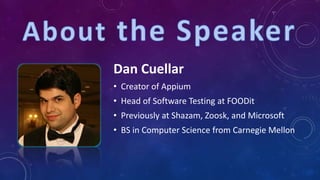
Dan Cuellar
• Creator of Appium
• Head of Software Testing at FOODit
• Previously at Shazam, Zoosk, and Microsoft
• BS in Computer Science from Carnegie Mellon
• Brief Overview
• What’s New in Appium 1.5
• Mac & Windows Apps
• Advanced Appium
• Visual Testing
• Mechanical Testing
• Grab Bag
• Multiple Devices
• How to Read SMS
• Speeding up the iOS Simulator
• Network Conditioning
• Useful Capabilities
• Ask Me Anything
THE MOST TERRIFYING 5 WORDS IN TESTING
THIS ALL SOUNDS FAMILIAR
EVERYTHING IS NOT AWESOME
TIME TO SPREAD THE WORD
• Use standardized and sanctioned APIs and techniques
• Code in the language of your choice
• Java, C#, Python, Ruby, Objective-C, node.js, PHP, and more
• Do not modify the application under test
• Keep it free and open source
• An implementation of the Selenium JSON-wire protocol that
controls native and hybrid iOS and Android application
• The most popular open source mobile functional testing
framework
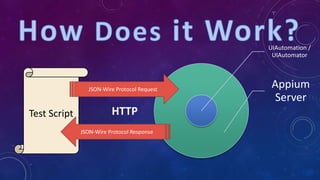
UIAutomation /
UIAutomator
Appium
Server
Test Script
JSON-Wire Protocol Request
JSON-Wire Protocol Response
HTTP
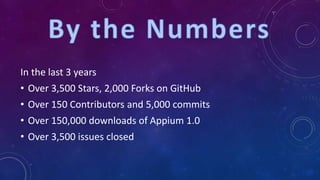
In the last 3 years
• Over 3,500 Stars, 2,000 Forks on GitHub
• Over 150 Contributors and 5,000 commits
• Over 150,000 downloads of Appium 1.0
• Over 3,500 issues closed
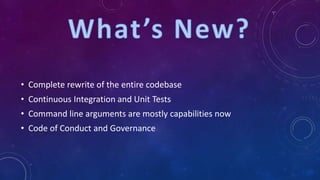
• Complete rewrite of the entire codebase
• Continuous Integration and Unit Tests
• Command line arguments are mostly capabilities now
• Code of Conduct and Governance
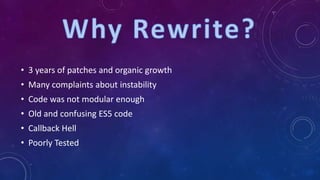
• 3 years of patches and organic growth
• Many complaints about instability
• Code was not modular enough
• Old and confusing ES5 code
• Callback Hell
• Poorly Tested
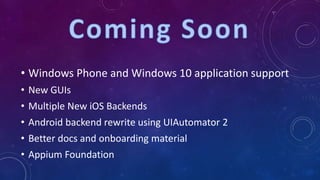
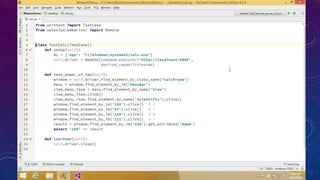
• Windows Phone and Windows 10 application support
• New GUIs
• Multiple New iOS Backends
• Android backend rewrite using UIAutomator 2
• Better docs and onboarding material
• Appium Foundation
https://github.com/Microsoft/WinAppDriver
https://github.com/2gis/Winium
https://github.com/appium/appium-for-mac
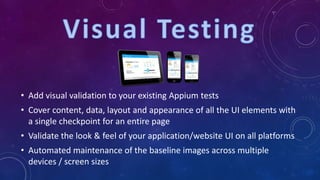
• Add visual validation to your existing Appium tests
• Cover content, data, layout and appearance of all the UI elements with
a single checkpoint for an entire page
• Validate the look & feel of your application/website UI on all platforms
• Automated maintenance of the baseline images across multiple
devices / screen sizes
https://medium.com/@SimonKaz/appium-with-
image-recognition-17a92abaa23d#.cdfhwinzk
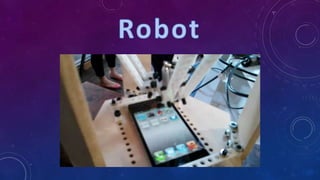
• Calibrate the robot to map points in the physical world to points on a
device screen
• Run an app on the device with Appium that can tell you what
coordinates are being touched
• Touch three places on the device and record the physical and device-
centric coordinates
• Build a matrix to translate any point between the two systems
• Intercept touch actions with the Appium Server and send them to
the robot
• WebDriverAgent
• https://github.com/facebook/WebDriverAgent
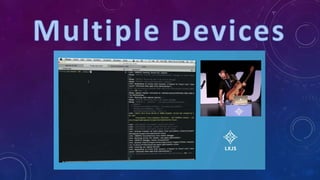
• Multiple Simulators
• All Applications
• XCUITest
• Created by Apple
• Better support for future versions of iOS
• Xcode 7 and iOS 9 do not support installing the speedup tool
automatically that previous versions of Appium used
• No worries, you can install it manually
• https://github.com/appium/appium/blob/master/docs/en/advanced-
concepts/iwd_xcode7.md
• Now your iOS tests will be fast again
• Android
• autoWebView – start in the webview context (really useful for
Cordova apps)
• Android
• ignoreUnimportantViews – can speed up your Android tests
• nativeWebScreenshot – takes the screenshot from UIAutomator
instead of chromedriver
• iOS
• locationServicesAuthorized – pre-authorizes location services
(prevents an alert)
• Auto[Accept|Dismiss]Alerts – useful to prevent alerts
• nativeWebTap – uses non-javascript taps on web content
• safariIgnoreFraudWarning – allows https without proper certs
• interKeyDelay - time between keystrokes
• sendKeyStrategy – (oneByOne, grouped, or setValue)
driver.setNetworkConnection(value) [Android only]
Value (Alias) Data Wifi Airplane Mode
0 (None) 0 0 0
1 (Airplane Mode) 0 0 1
2 (Wifi only) 0 1 0
4 (Data only) 1 0 0
6 (All Network on) 1 1 0
PERSONAL TAKEAWAY
“Life can be much broader once you discover one simple fact:
Everything around you that you call life was made up by people that
were no smarter than you and you can change it, you can influence it,
you can build your own things that other people can use.
Once you learn that, you'll never be the same again.”
-Steve Jobs
Advanced Appium

Advanced Appium

  • 1.
  • 2.
    Dan Cuellar • Creatorof Appium • Head of Software Testing at FOODit • Previously at Shazam, Zoosk, and Microsoft • BS in Computer Science from Carnegie Mellon
  • 4.
    • Brief Overview •What’s New in Appium 1.5 • Mac & Windows Apps • Advanced Appium • Visual Testing • Mechanical Testing • Grab Bag • Multiple Devices • How to Read SMS • Speeding up the iOS Simulator • Network Conditioning • Useful Capabilities • Ask Me Anything
  • 7.
    THE MOST TERRIFYING5 WORDS IN TESTING
  • 8.
  • 9.
  • 10.
  • 11.
    • Use standardizedand sanctioned APIs and techniques • Code in the language of your choice • Java, C#, Python, Ruby, Objective-C, node.js, PHP, and more • Do not modify the application under test • Keep it free and open source
  • 12.
    • An implementationof the Selenium JSON-wire protocol that controls native and hybrid iOS and Android application • The most popular open source mobile functional testing framework
  • 13.
    UIAutomation / UIAutomator Appium Server Test Script JSON-WireProtocol Request JSON-Wire Protocol Response HTTP
  • 14.
    In the last3 years • Over 3,500 Stars, 2,000 Forks on GitHub • Over 150 Contributors and 5,000 commits • Over 150,000 downloads of Appium 1.0 • Over 3,500 issues closed
  • 16.
    • Complete rewriteof the entire codebase • Continuous Integration and Unit Tests • Command line arguments are mostly capabilities now • Code of Conduct and Governance
  • 17.
    • 3 yearsof patches and organic growth • Many complaints about instability • Code was not modular enough • Old and confusing ES5 code • Callback Hell • Poorly Tested
  • 20.
    • Windows Phoneand Windows 10 application support • New GUIs • Multiple New iOS Backends • Android backend rewrite using UIAutomator 2 • Better docs and onboarding material • Appium Foundation
  • 22.
  • 23.
  • 26.
  • 31.
    • Add visualvalidation to your existing Appium tests • Cover content, data, layout and appearance of all the UI elements with a single checkpoint for an entire page • Validate the look & feel of your application/website UI on all platforms • Automated maintenance of the baseline images across multiple devices / screen sizes
  • 32.
  • 34.
    • Calibrate therobot to map points in the physical world to points on a device screen • Run an app on the device with Appium that can tell you what coordinates are being touched • Touch three places on the device and record the physical and device- centric coordinates • Build a matrix to translate any point between the two systems • Intercept touch actions with the Appium Server and send them to the robot
  • 37.
    • WebDriverAgent • https://github.com/facebook/WebDriverAgent •Multiple Simulators • All Applications • XCUITest • Created by Apple • Better support for future versions of iOS
  • 39.
    • Xcode 7and iOS 9 do not support installing the speedup tool automatically that previous versions of Appium used • No worries, you can install it manually • https://github.com/appium/appium/blob/master/docs/en/advanced- concepts/iwd_xcode7.md • Now your iOS tests will be fast again
  • 40.
    • Android • autoWebView– start in the webview context (really useful for Cordova apps) • Android • ignoreUnimportantViews – can speed up your Android tests • nativeWebScreenshot – takes the screenshot from UIAutomator instead of chromedriver
  • 41.
    • iOS • locationServicesAuthorized– pre-authorizes location services (prevents an alert) • Auto[Accept|Dismiss]Alerts – useful to prevent alerts • nativeWebTap – uses non-javascript taps on web content • safariIgnoreFraudWarning – allows https without proper certs • interKeyDelay - time between keystrokes • sendKeyStrategy – (oneByOne, grouped, or setValue)
  • 42.
    driver.setNetworkConnection(value) [Android only] Value(Alias) Data Wifi Airplane Mode 0 (None) 0 0 0 1 (Airplane Mode) 0 0 1 2 (Wifi only) 0 1 0 4 (Data only) 1 0 0 6 (All Network on) 1 1 0
  • 45.
    PERSONAL TAKEAWAY “Life canbe much broader once you discover one simple fact: Everything around you that you call life was made up by people that were no smarter than you and you can change it, you can influence it, you can build your own things that other people can use. Once you learn that, you'll never be the same again.” -Steve Jobs