
Git
The fast version control system
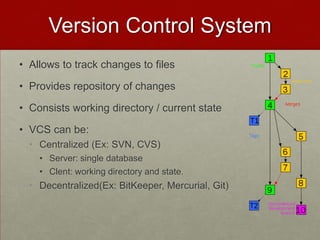
Version Control System
• Allows to track changes to files
• Provides repository of changes
• Consists working directory / current state
• VCS can be:
• Centralized (Ex: SVN, CVS)
• Server: single database
• Clent: working directory and state.
• Decentralized(Ex: BitKeeper, Mercurial, Git)
What is Git?
• free & open source
• distributed version control system
• Anyone can be the server
• Repository coupled with working directory
• Complete history
• Disconnected operation
• No single point of failure
• Designed to be fast and efficient for small and very
large size projects
Git history
• 2002
• Linus Torvalds decided to use BitKeeper for tracking
Linux kernel development
• Linux development scales better
• 2005
• BitMover dropped free license
• Linus writes his own VCS, Git
Getting started with Git
• yum install git-core
• git clone --help
• git config --global user.name
‘Keshavaprasad B S’
• git config --global user.email
kbsbng@gmail.com
Getting started with Git
• Creating new git repo:
• git init
• git add
• git commit
• Cloning from existing repo:
• man git-clone
Git config
• Types
• $(prefix)/etc/gitconfig --> system
• ~/.gitconfig --> global
• .git/config --> local
• Aliases
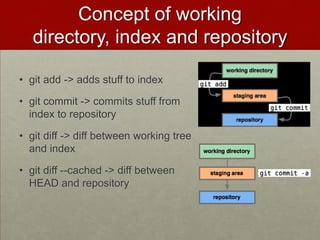
Concept of working
directory, index and repository
• git add -> adds stuff to index
• git commit -> commits stuff from
index to repository
• git diff -> diff between working tree
and index
• git diff --cached -> diff between
HEAD and repository
Concept of working
directory, index and repository
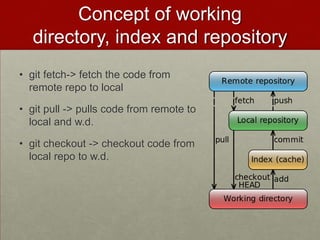
• git fetch-> fetch the code from
remote repo to local
• git pull -> pulls code from remote to
local and w.d.
• git checkout -> checkout code from
local repo to w.d.
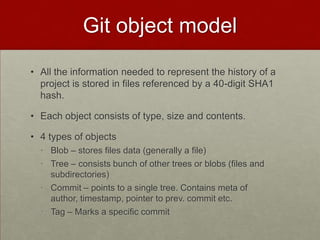
Git object model
• All the information needed to represent the history of a
project is stored in files referenced by a 40-digit SHA1
hash.
• Each object consists of type, size and contents.
• 4 types of objects
• Blob – stores files data (generally a file)
• Tree – consists bunch of other trees or blobs (files and
subdirectories)
• Commit – points to a single tree. Contains meta of
author, timestamp, pointer to prev. commit etc.
• Tag – Marks a specific commit
Git object model
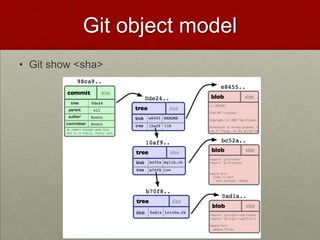
• Git show <sha>
gitk and git log
• Install gitk
• git log --pretty=oneline
• git log --pretty=format:'%h : %s' --topo-order –graph
• git log --no-merges
• git log --stat
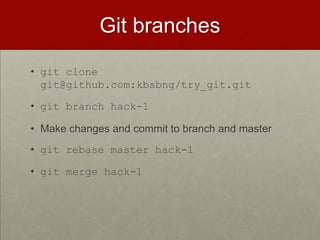
Git branches
• git clone
git@github.com:kbsbng/try_git.git
• git branch hack-1
• Make changes and commit to branch and master
• git rebase master hack-1
• git merge hack-1
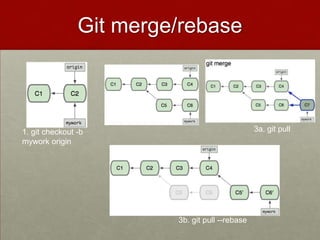
Git merge/rebase
1. git checkout -b
mywork origin
3a. git pull
3b. git pull --rebase
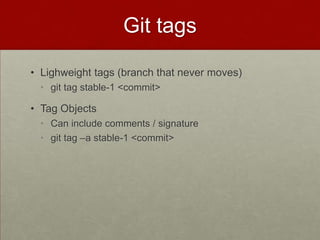
Git tags
• Lighweight tags (branch that never moves)
• git tag stable-1 <commit>
• Tag Objects
• Can include comments / signature
• git tag –a stable-1 <commit>
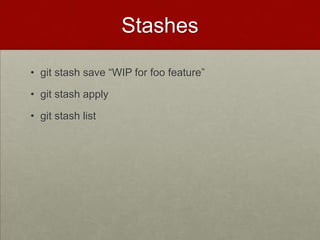
Stashes
• git stash save “WIP for foo feature”
• git stash apply
• git stash list
Some tips
• Git grep can be used search through previous
versions of a project without checking them out.
• master@{yesterday} refers to where the master
branch was yesterday.
Git vs svn
• Cheap local branching
• Everything is Local
• Fast
• Git is small
• Provides staging area
• Distributed
• Any workflow
• Github
References
• http://book.git-scm.com/
• http://whygitisbetterthanx.com
Thank you

Git

  • 1.
    Git The fast versioncontrol system
  • 2.
    Version Control System •Allows to track changes to files • Provides repository of changes • Consists working directory / current state • VCS can be: • Centralized (Ex: SVN, CVS) • Server: single database • Clent: working directory and state. • Decentralized(Ex: BitKeeper, Mercurial, Git)
  • 3.
    What is Git? •free & open source • distributed version control system • Anyone can be the server • Repository coupled with working directory • Complete history • Disconnected operation • No single point of failure • Designed to be fast and efficient for small and very large size projects
  • 4.
    Git history • 2002 •Linus Torvalds decided to use BitKeeper for tracking Linux kernel development • Linux development scales better • 2005 • BitMover dropped free license • Linus writes his own VCS, Git
  • 5.
    Getting started withGit • yum install git-core • git clone --help • git config --global user.name ‘Keshavaprasad B S’ • git config --global user.email kbsbng@gmail.com
  • 6.
    Getting started withGit • Creating new git repo: • git init • git add • git commit • Cloning from existing repo: • man git-clone
  • 7.
    Git config • Types •$(prefix)/etc/gitconfig --> system • ~/.gitconfig --> global • .git/config --> local • Aliases
  • 8.
    Concept of working directory,index and repository • git add -> adds stuff to index • git commit -> commits stuff from index to repository • git diff -> diff between working tree and index • git diff --cached -> diff between HEAD and repository
  • 9.
    Concept of working directory,index and repository • git fetch-> fetch the code from remote repo to local • git pull -> pulls code from remote to local and w.d. • git checkout -> checkout code from local repo to w.d.
  • 10.
    Git object model •All the information needed to represent the history of a project is stored in files referenced by a 40-digit SHA1 hash. • Each object consists of type, size and contents. • 4 types of objects • Blob – stores files data (generally a file) • Tree – consists bunch of other trees or blobs (files and subdirectories) • Commit – points to a single tree. Contains meta of author, timestamp, pointer to prev. commit etc. • Tag – Marks a specific commit
  • 11.
    Git object model •Git show <sha>
  • 12.
    gitk and gitlog • Install gitk • git log --pretty=oneline • git log --pretty=format:'%h : %s' --topo-order –graph • git log --no-merges • git log --stat
  • 13.
    Git branches • gitclone git@github.com:kbsbng/try_git.git • git branch hack-1 • Make changes and commit to branch and master • git rebase master hack-1 • git merge hack-1
  • 14.
    Git merge/rebase 1. gitcheckout -b mywork origin 3a. git pull 3b. git pull --rebase
  • 15.
    Git tags • Lighweighttags (branch that never moves) • git tag stable-1 <commit> • Tag Objects • Can include comments / signature • git tag –a stable-1 <commit>
  • 16.
    Stashes • git stashsave “WIP for foo feature” • git stash apply • git stash list
  • 17.
    Some tips • Gitgrep can be used search through previous versions of a project without checking them out. • master@{yesterday} refers to where the master branch was yesterday.
  • 18.
    Git vs svn •Cheap local branching • Everything is Local • Fast • Git is small • Provides staging area • Distributed • Any workflow • Github
  • 19.
  • 20.