
GIT 
Workshop by @AlSayedGamal
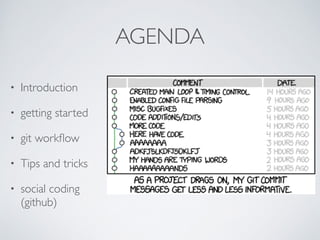
AGENDA 
• Introduction 
• getting started 
• git workflow 
• Tips and tricks 
• social coding 
(github)
INTRODUCTION 
• What’s git and what’s VCS? 
• git history
Sayevt ya Ali 
SH*T HAPPENS 
If it’s not power outage it’s disk failure os failure,etc..
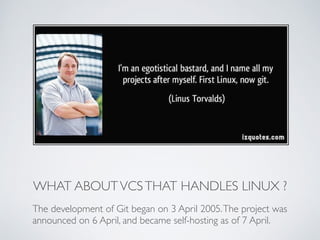
WHAT ABOUT VCS THAT HANDLES LINUX ? 
The development of Git began on 3 April 2005. The project was 
announced on 6 April, and became self-hosting as of 7 April.
GIT CHARACTERISTICS 
• Strong support for non-linear 
development 
• Distributed development 
• Compatibility with existing systems/ 
protocols 
• Efficient handling of large projects 
• Cryptographic authentication of history 
• Pluggable merge strategies 
• Toolkit-based design(C & Shell)
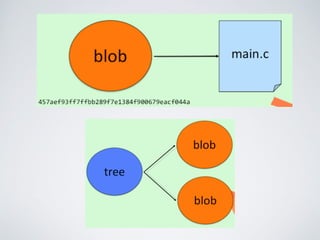
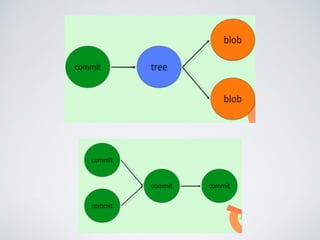
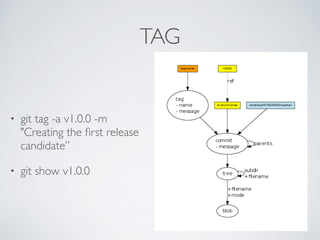
HOW GIT STORES DATA 
• git has three main types 
• blob (binary large object) 
• tree (basically tree of 
blobs) 
• graph (directed graph of 
commits)
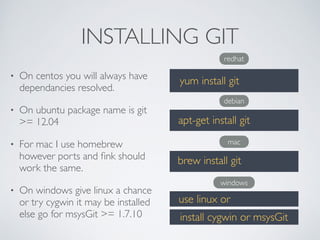
INSTALLING GIT 
• On centos you will always have 
dependancies resolved. 
• On ubuntu package name is git 
>= 12.04 
• For mac I use homebrew 
however ports and fink should 
work the same. 
• On windows give linux a chance 
or try cygwin it may be installed 
else go for msysGit >= 1.7.10 
redhat 
yum install git 
debian 
apt-get install git 
mac 
brew install git 
windows 
use linux or 
install cygwin or msysGit
GETTING STARTED 
• Git the command line 
• New repo 
• New file 
• Basic config 
• First commit 
• View difference 
• Remove and rename files 
• Copy your repo
BRANCHING AND MERGING 
• git branch <branch name> 
• git checkout -b <branch 
name> 
• git checkout <branch 
name> 
• git merge <other branch>
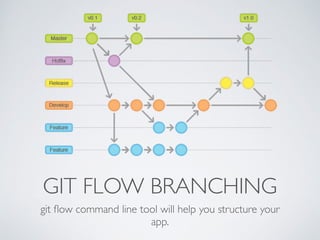
GIT FLOW BRANCHING 
git flow command line tool will help you structure your 
app.
TIPS AND TRICKS 
These tips will be used almost in every project.
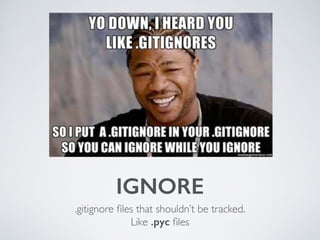
IGNORE 
.gitignore files that shouldn’t be tracked. 
Like .pyc files
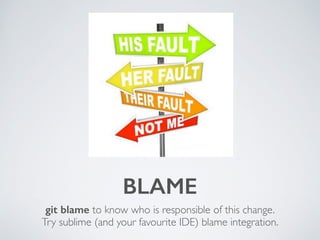
BLAME 
git blame to know who is responsible of this change. 
Try sublime (and your favourite IDE) blame integration.
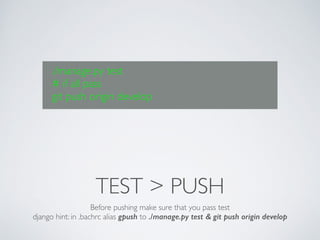
./manage.py test 
# if all pass 
git push origin develop 
TEST > PUSH 
Before pushing make sure that you pass test 
django hint: in .bachrc alias gpush to ./manage.py test & git push origin develop
STASH AND CLEAN 
• git stash will clean your 
stage to the most recent 
commit. 
• git stash apply to bring your 
mess again. 
• Clean untracked files: 
• git clean -d <path>
TAG 
• git tag -a v1.0.0 -m 
"Creating the first release 
candidate” 
• git show v1.0.0
GITHUB 
• Normal Commercial 
membership. 
• Star, watch and follow. 
• pulse.
REFERENCES 
• gitready.com 
• git-scm.com 
• Book: version control with git 2nd edition - O’Reilly. 
• wikipedia | en.wikipedia.org/wiki/Git_(software) 
• github.com
QUESTIONS ?
GIT COMMIT -M “THANK YOU”

Git workshop

  • 2.
    GIT Workshop by@AlSayedGamal
  • 3.
    AGENDA • Introduction • getting started • git workflow • Tips and tricks • social coding (github)
  • 4.
    INTRODUCTION • What’sgit and what’s VCS? • git history
  • 5.
    Sayevt ya Ali SH*T HAPPENS If it’s not power outage it’s disk failure os failure,etc..
  • 6.
    WHAT ABOUT VCSTHAT HANDLES LINUX ? The development of Git began on 3 April 2005. The project was announced on 6 April, and became self-hosting as of 7 April.
  • 7.
    GIT CHARACTERISTICS •Strong support for non-linear development • Distributed development • Compatibility with existing systems/ protocols • Efficient handling of large projects • Cryptographic authentication of history • Pluggable merge strategies • Toolkit-based design(C & Shell)
  • 8.
    HOW GIT STORESDATA • git has three main types • blob (binary large object) • tree (basically tree of blobs) • graph (directed graph of commits)
  • 11.
    INSTALLING GIT •On centos you will always have dependancies resolved. • On ubuntu package name is git >= 12.04 • For mac I use homebrew however ports and fink should work the same. • On windows give linux a chance or try cygwin it may be installed else go for msysGit >= 1.7.10 redhat yum install git debian apt-get install git mac brew install git windows use linux or install cygwin or msysGit
  • 12.
    GETTING STARTED •Git the command line • New repo • New file • Basic config • First commit • View difference • Remove and rename files • Copy your repo
  • 13.
    BRANCHING AND MERGING • git branch <branch name> • git checkout -b <branch name> • git checkout <branch name> • git merge <other branch>
  • 14.
    GIT FLOW BRANCHING git flow command line tool will help you structure your app.
  • 15.
    TIPS AND TRICKS These tips will be used almost in every project.
  • 16.
    IGNORE .gitignore filesthat shouldn’t be tracked. Like .pyc files
  • 17.
    BLAME git blameto know who is responsible of this change. Try sublime (and your favourite IDE) blame integration.
  • 18.
    ./manage.py test #if all pass git push origin develop TEST > PUSH Before pushing make sure that you pass test django hint: in .bachrc alias gpush to ./manage.py test & git push origin develop
  • 19.
    STASH AND CLEAN • git stash will clean your stage to the most recent commit. • git stash apply to bring your mess again. • Clean untracked files: • git clean -d <path>
  • 20.
    TAG • gittag -a v1.0.0 -m "Creating the first release candidate” • git show v1.0.0
  • 21.
    GITHUB • NormalCommercial membership. • Star, watch and follow. • pulse.
  • 22.
    REFERENCES • gitready.com • git-scm.com • Book: version control with git 2nd edition - O’Reilly. • wikipedia | en.wikipedia.org/wiki/Git_(software) • github.com
  • 23.
  • 24.
    GIT COMMIT -M“THANK YOU”