Getting Started With Process
Builder
December 13, 2017
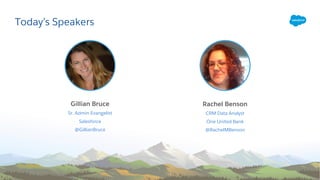
Today’s Speakers
Gillian Bruce
Sr. Admin Evangelist
Salesforce
@GillianBruce
Rachel Benson
CRM Data Analyst
One United Bank
@RachelMBenson
​This presentation may contain forward-looking statements that involve risks, uncertainties, and assumptions. If any such uncertainties materialize or if any
of the assumptions proves incorrect, the results of salesforce.com, inc. could differ materially from the results expressed or implied by the forward-looking
statements we make. All statements other than statements of historical fact could be deemed forward-looking, including any projections of product or
service availability, subscriber growth, earnings, revenues, or other financial items and any statements regarding strategies or plans of management for
future operations, statements of belief, any statements concerning new, planned, or upgraded services or technology developments and customer contracts
or use of our services.
​The risks and uncertainties referred to above include – but are not limited to – risks associated with developing and delivering new functionality for our
service, new products and services, our new business model, our past operating losses, possible fluctuations in our operating results and rate of growth,
interruptions or delays in our Web hosting, breach of our security measures, the outcome of any litigation, risks associated with completed and any possible
mergers and acquisitions, the immature market in which we operate, our relatively limited operating history, our ability to expand, retain, and motivate our
employees and manage our growth, new releases of our service and successful customer deployment, our limited history reselling non-salesforce.com
products, and utilization and selling to larger enterprise customers. Further information on potential factors that could affect the financial results of
salesforce.com, inc. is included in our annual report on Form 10-K for the most recent fiscal year and in our quarterly report on Form 10-Q for the most
recent fiscal quarter. These documents and others containing important disclosures are available on the SEC Filings section of the Investor Information
section of our Web site.
​Any unreleased services or features referenced in this or other presentations, press releases or public statements are not currently available and may not be
delivered on time or at all. Customers who purchase our services should make the purchase decisions based upon features that are currently available.
Salesforce.com, inc. assumes no obligation and does not intend to update these forward-looking statements.
Forward-Looking Statement
​Statement under the Private Securities Litigation Reform Act of 1995
Connect with Us!
Salesforce Admins
@SalesforceAdmns
#AwesomeAdmin
admin.salesforce.com
Salesforce Admins
Salesforce Admins
Watch the Recording
The video will be posted to
YouTube & the webinar recap
page: bit.ly/processbuilderwebinar
This webinar is being recorded!
Join the Admin Webinar Group for Q&A!
​Don’t wait until the end to ask your
question!
• We have team members on hand to answer
questions in the webinar group.
Stick around for live Q&A at the end!
• Speakers will tackle more questions at the end,
time-allowing
bit.ly/AdminWebinarGroup
Today’s Agenda
• Why I learned to Automate
• How I approach Automation
• Process Builder Demo
• Resources
• Q&A
Why I Learned to
Automate
OneUnited Bank Event Management Situation
Situation:
• Manual event and connections tracking on paper
• Time consuming, manual data entry, information got lost in translation
• Slow to no follow up
Solution:
• Make this process accurate and efficient through automation
How:
• Process Builder
Why I Learned to Use Process Builder & You Should Too
• Limitations on traditional workflow rules
• Cuts down on code to reduce development time and
backlog
• Easy-to-use: the visual breakdown enables us to know in a
glance exactly what to expect in every process
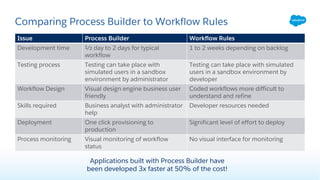
Comparing Process Builder to Workflow Rules
Issue Process Builder Workflow Rules
Development time ½ day to 2 days for typical
workflow
1 to 2 weeks depending on backlog
Testing process Testing can take place with
simulated users in a sandbox
environment by administrator
Testing can take place with simulated
users in a sandbox environment by
developer
Workflow Design Visual design engine business user
friendly
Coded workflows more difficult to
understand and refine
Skills required Business analyst with administrator
help
Developer resources needed
Deployment One click provisioning to
production
Significant level of effort to deploy
Process monitoring Visual monitoring of workflow
status
No visual interface for monitoring
Applications built with Process Builder have
been developed 3x faster at 50% of the cost!
How I Approach
Automation
Translate a Business Process into an Automated Process
• Determine stages in process and the actions within each stage
• Determine stage criteria – what is going to trigger the automations?
• Identify event triggers, notifications and approvals
​Where Do I Begin?
Design the process with your target users in mind:
Benchmark business process before so you
can show increase automation
​White board sessions can
help you determine exactly
what you want to happen
at every stage!
Begin Building the Process
Prototype and test:
• Create any custom objects, fields, or templates needed
• Make sure your process includes the correct criteria and actions to execute as planned
• Test with your stakeholders and a pilot group
• Test, test and test again!
Measure and refine:
• Measure usability and process performance
• Link to business outcomes and organizational objectives
How I Automated My Business Process
​1. Created custom objects:
• Attendee object for tracking attendees and event object for tracking events
• Custom fields on both linked with master detail relationship
• Email templates and chatter actions
​2. Created process:
• Email alerts for sending immediate communication
• Create a campaign member record
• Create opportunity
​Steps Taken
Process Builder
Demo
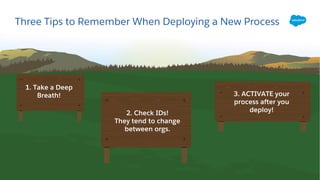
Three Tips to Remember When Deploying a New Process
1. Take a Deep
Breath!
2. Check IDs!
They tend to change
between orgs.
3. ACTIVATE your
process after you
deploy!
1. Process Builder is easy to build and use.
2. Reduces cost and increases efficiencies.
3. Reduce the amount of workflows for easy management.
So What Have We Learned Today?
Resources
Resources
Process Builder Tutorial Site:
bit.ly/processbuildertutorial
admin.salesforce.com:
BLOG: How to Automate Your Entire Business Operation — Without Code
PODCAST:
Document Process in Salesforce with Jennifer Lee
Process First with Benjamin Bolopue
Trailhead Process Automation Module
Trailhead Quick Start: Process Builder
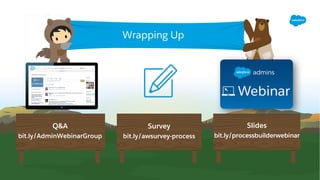
Q&A
bit.ly/AdminWebinarGroup
Slides
bit.ly/processbuilderwebinar
Wrapping Up
Survey
bit.ly/awsurvey-process
Getting Started with Process Builder

Getting Started with Process Builder

  • 1.
    Getting Started WithProcess Builder December 13, 2017
  • 2.
    Today’s Speakers Gillian Bruce Sr.Admin Evangelist Salesforce @GillianBruce Rachel Benson CRM Data Analyst One United Bank @RachelMBenson
  • 3.
    ​This presentation maycontain forward-looking statements that involve risks, uncertainties, and assumptions. If any such uncertainties materialize or if any of the assumptions proves incorrect, the results of salesforce.com, inc. could differ materially from the results expressed or implied by the forward-looking statements we make. All statements other than statements of historical fact could be deemed forward-looking, including any projections of product or service availability, subscriber growth, earnings, revenues, or other financial items and any statements regarding strategies or plans of management for future operations, statements of belief, any statements concerning new, planned, or upgraded services or technology developments and customer contracts or use of our services. ​The risks and uncertainties referred to above include – but are not limited to – risks associated with developing and delivering new functionality for our service, new products and services, our new business model, our past operating losses, possible fluctuations in our operating results and rate of growth, interruptions or delays in our Web hosting, breach of our security measures, the outcome of any litigation, risks associated with completed and any possible mergers and acquisitions, the immature market in which we operate, our relatively limited operating history, our ability to expand, retain, and motivate our employees and manage our growth, new releases of our service and successful customer deployment, our limited history reselling non-salesforce.com products, and utilization and selling to larger enterprise customers. Further information on potential factors that could affect the financial results of salesforce.com, inc. is included in our annual report on Form 10-K for the most recent fiscal year and in our quarterly report on Form 10-Q for the most recent fiscal quarter. These documents and others containing important disclosures are available on the SEC Filings section of the Investor Information section of our Web site. ​Any unreleased services or features referenced in this or other presentations, press releases or public statements are not currently available and may not be delivered on time or at all. Customers who purchase our services should make the purchase decisions based upon features that are currently available. Salesforce.com, inc. assumes no obligation and does not intend to update these forward-looking statements. Forward-Looking Statement ​Statement under the Private Securities Litigation Reform Act of 1995
  • 4.
    Connect with Us! SalesforceAdmins @SalesforceAdmns #AwesomeAdmin admin.salesforce.com Salesforce Admins Salesforce Admins
  • 5.
    Watch the Recording Thevideo will be posted to YouTube & the webinar recap page: bit.ly/processbuilderwebinar This webinar is being recorded!
  • 6.
    Join the AdminWebinar Group for Q&A! ​Don’t wait until the end to ask your question! • We have team members on hand to answer questions in the webinar group. Stick around for live Q&A at the end! • Speakers will tackle more questions at the end, time-allowing bit.ly/AdminWebinarGroup
  • 7.
    Today’s Agenda • WhyI learned to Automate • How I approach Automation • Process Builder Demo • Resources • Q&A
  • 8.
    Why I Learnedto Automate
  • 9.
    OneUnited Bank EventManagement Situation Situation: • Manual event and connections tracking on paper • Time consuming, manual data entry, information got lost in translation • Slow to no follow up Solution: • Make this process accurate and efficient through automation How: • Process Builder
  • 10.
    Why I Learnedto Use Process Builder & You Should Too • Limitations on traditional workflow rules • Cuts down on code to reduce development time and backlog • Easy-to-use: the visual breakdown enables us to know in a glance exactly what to expect in every process
  • 11.
    Comparing Process Builderto Workflow Rules Issue Process Builder Workflow Rules Development time ½ day to 2 days for typical workflow 1 to 2 weeks depending on backlog Testing process Testing can take place with simulated users in a sandbox environment by administrator Testing can take place with simulated users in a sandbox environment by developer Workflow Design Visual design engine business user friendly Coded workflows more difficult to understand and refine Skills required Business analyst with administrator help Developer resources needed Deployment One click provisioning to production Significant level of effort to deploy Process monitoring Visual monitoring of workflow status No visual interface for monitoring Applications built with Process Builder have been developed 3x faster at 50% of the cost!
  • 12.
  • 13.
    Translate a BusinessProcess into an Automated Process • Determine stages in process and the actions within each stage • Determine stage criteria – what is going to trigger the automations? • Identify event triggers, notifications and approvals ​Where Do I Begin? Design the process with your target users in mind: Benchmark business process before so you can show increase automation ​White board sessions can help you determine exactly what you want to happen at every stage!
  • 14.
    Begin Building theProcess Prototype and test: • Create any custom objects, fields, or templates needed • Make sure your process includes the correct criteria and actions to execute as planned • Test with your stakeholders and a pilot group • Test, test and test again! Measure and refine: • Measure usability and process performance • Link to business outcomes and organizational objectives
  • 15.
    How I AutomatedMy Business Process ​1. Created custom objects: • Attendee object for tracking attendees and event object for tracking events • Custom fields on both linked with master detail relationship • Email templates and chatter actions ​2. Created process: • Email alerts for sending immediate communication • Create a campaign member record • Create opportunity ​Steps Taken
  • 16.
  • 17.
    Three Tips toRemember When Deploying a New Process 1. Take a Deep Breath! 2. Check IDs! They tend to change between orgs. 3. ACTIVATE your process after you deploy!
  • 18.
    1. Process Builderis easy to build and use. 2. Reduces cost and increases efficiencies. 3. Reduce the amount of workflows for easy management. So What Have We Learned Today?
  • 19.
  • 20.
    Resources Process Builder TutorialSite: bit.ly/processbuildertutorial admin.salesforce.com: BLOG: How to Automate Your Entire Business Operation — Without Code PODCAST: Document Process in Salesforce with Jennifer Lee Process First with Benjamin Bolopue Trailhead Process Automation Module Trailhead Quick Start: Process Builder
  • 21.