© 2015 EnterpriseDB Corporation. All rights reserved. 1
Getting started with PostGIS
Adam Wright – Database Consultant
© 2015 EnterpriseDB Corporation. All rights reserved. 2
•  Introduction to EDB
•  A little bit about Postgres
•  About PostGIS
•  Geospatial basics
•  Now, let us get started
•  Maintenance
Agenda
© 2015 EnterpriseDB Corporation. All rights reserved. 3
POSTGRES
innovation
ENTERPRISE
reliability
24/7
support
Services
& training
Enterprise-class
features, tools &
compatibility
Indemnification
Product
road-map
Control
Thousands
of developers
Fast
development
cycles
Low cost
No vendor
lock-in
Advanced
features
Enabling commercial
adoption of Postgres
© 2015 EnterpriseDB Corporation. All rights reserved. 4
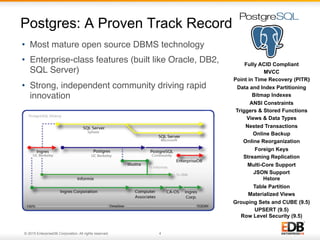
Postgres: A Proven Track Record
•  Most mature open source DBMS technology
•  Enterprise-class features (built like Oracle, DB2,
SQL Server)
•  Strong, independent community driving rapid
innovation
4
Fully ACID Compliant
MVCC
Point in Time Recovery (PITR)‫‏‬
Data and Index Partitioning
Bitmap Indexes
ANSI Constraints
Triggers & Stored Functions
Views & Data Types
Nested Transactions
Online Backup
Online Reorganization
Foreign Keys
Streaming Replication
Multi-Core Support
JSON Support
Hstore
Table Partition
Materialized Views
Grouping Sets and CUBE (9.5)
UPSERT (9.5)
Row Level Security (9.5)
© 2015 EnterpriseDB Corporation. All rights reserved. 5
Scalable
© 2015 EnterpriseDB Corporation. All rights reserved. 6
•  Refractions Research released first version in 2001
under the GNU license
•  Follows the Simple Features for SQL specification
from the Open Geospatial Consortium (OGC)
•  Spatial operators and spatial functions
•  Spatial data types
•  Spatial indexing
•  Spatial reprojection
•  Import / Export Esri shapefiles
•  Commands for importing raster data
•  SQL to render and import data from multiple
formats
About PostGIS
6
© 2015 EnterpriseDB Corporation. All rights reserved. 7
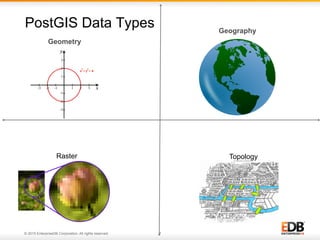
PostGIS Data Types
Geometry
Geography
Raster Topology
© 2015 EnterpriseDB Corporation. All rights reserved. 8
PostGIS Data subtypes
Point
Linestring
Polygon
Multipoint
Multilinestring
Multipolygon
© 2015 EnterpriseDB Corporation. All rights reserved. 9
Spatial Definitions Examples (1 of 5)
Boundary
© 2015 EnterpriseDB Corporation. All rights reserved. 10
Spatial Definitions Examples (2 of 5)
© 2015 EnterpriseDB Corporation. All rights reserved. 11
Spatial Definitions Examples (3 of 5)
Contains
© 2015 EnterpriseDB Corporation. All rights reserved. 12
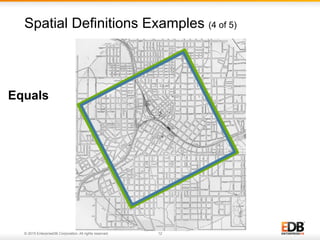
Spatial Definitions Examples (4 of 5)
Equals
© 2015 EnterpriseDB Corporation. All rights reserved. 13
Spatial Definitions Examples (5 of 5)
© 2015 EnterpriseDB Corporation. All rights reserved. 14
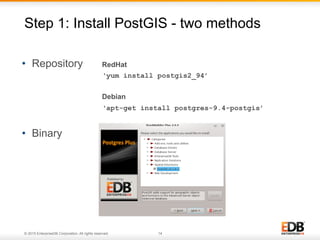
•  Repository
•  Binary
Step 1: Install PostGIS - two methods
14
RedHat
‘yum install postgis2_94’
Debian
‘apt-get install postgres-9.4-postgis’
© 2015 EnterpriseDB Corporation. All rights reserved. 15
•  For a New Database
CREATE DATABASE geodb
WITH template = template_postgis;
•  For an Existing Database
CREATE EXTENSION postgis;
CREATE EXTENSION postgis_toplogy;
•  Verify
SELECT postgis_version();
Step 2: Enable PostGIS
© 2015 EnterpriseDB Corporation. All rights reserved. 16
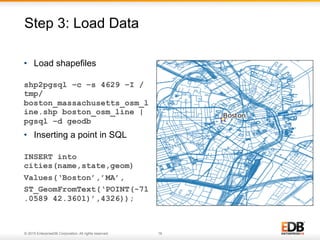
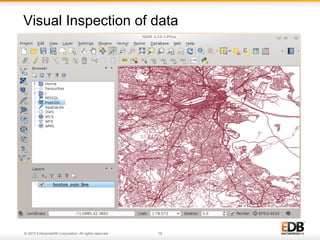
•  Load shapefiles
shp2pgsql –c –s 4629 –I /
tmp/
boston_massachusetts_osm_l
ine.shp boston_osm_line |
pgsql –d geodb
•  Inserting a point in SQL
INSERT into
cities(name,state,geom)
Values(‘Boston’,’MA’,
ST_GeomFromText(‘POINT(-71
.0589 42.3601)’,4326));
Step 3: Load Data
16
© 2015 EnterpriseDB Corporation. All rights reserved. 17
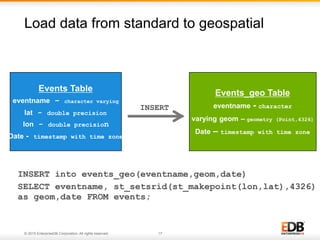
Load data from standard to geospatial
17
INSERT into events_geo(eventname,geom,date)
SELECT eventname, st_setsrid(st_makepoint(lon,lat),4326)
as geom,date FROM events;
Events Table
eventname – character varying
lat - double precision
lon - double precision
Date - timestamp with time zone
Events_geo Table
eventname - character
varying geom – geometry (Point,4326)
Date – timestamp with time zone
INSERT
© 2015 EnterpriseDB Corporation. All rights reserved. 18
Visual Inspection of data
18
© 2015 EnterpriseDB Corporation. All rights reserved. 19
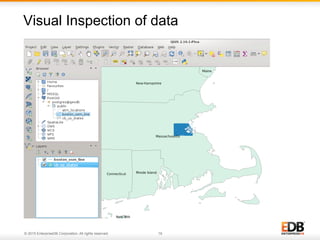
Visual Inspection of data
19
© 2015 EnterpriseDB Corporation. All rights reserved. 20
•  Output geometry data types to other data types
SELECT st_astext(geom), st_asgeojson(geom),
stasgml(geom) FROM atm_locations LIMIT 1;
-[ RECORD 1 ]+----------------------------------
st_astext | POINT(-81.7842060002066 30.2915309995561)
st_asgeojson | {"type":"Point","coordinates":
[-81.7842060002066,30.2915309995561]}
st_asgml | <gml:Point srsName="EPSG:
4629"><gml:coordinates>-81.784206000206609,30.2915309995
5613</gml:coordinates></gml:Point>
Geometry Input and Output Functions
20
© 2015 EnterpriseDB Corporation. All rights reserved. 21
•  Create geometry type from text
Insert into cities (name,state,geom)
Values (‘Bedford’,’MA’,
ST_GeomFromText(‘POINT(-71.248063 42.510547)’,4326));
Geometry Input and Output Functions
21
© 2015 EnterpriseDB Corporation. All rights reserved. 22
•  Write a function to tell whether a given lat/lon pair is
within a Point-Radius ring
IF ST_Dwithin(check_pt, point_pt, outerRadius)
AND NOT ST_Dwithin(chevk_pt, point_pt,
innerRadius)
THEN return 1;
ELSE
Return 0;
END IF;
•  Create a route from a collection of waypoints captured
in sequence
CREATE TABLE PATHS as SELECT routeid, seq, geom
FROM waypoints ORDER BY seq) a GROUP BY routeid;
Power of GIS & SQL
© 2015 EnterpriseDB Corporation. All rights reserved. 23
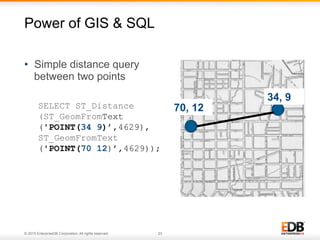
•  Simple distance query
between two points
SELECT ST_Distance
(ST_GeomFromText
('POINT(34 9)’,4629),
ST_GeomFromText
('POINT(70 12)’,4629));
Power of GIS & SQL
34, 9
70, 12
© 2015 EnterpriseDB Corporation. All rights reserved. 24
•  Write a function to tell whether a given lat/lon pair is
within a Point-Radius ring
IF ST_Dwithin(check_pt, point_pt, outerRadius) AND
NOT ST_Dwithin(chevk_pt, point_pt, innerRadius)
THEN return 1;
ELSE
Return 0;
END IF;
•  Create a route from a collection of waypoints captured in
sequence
CREATE TABLE PATHS as SELECT routeid, st_make(gem)
as geom FROM (SELECT routeid, seq, geom FROM
waypoints ORDER BY seq)a GROUP BY routeid;
Power of GIS & SQL
© 2015 EnterpriseDB Corporation. All rights reserved. 25
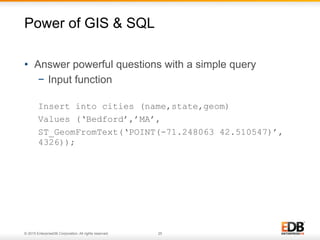
•  Answer powerful questions with a simple query
−  Input function
Insert into cities (name,state,geom)
Values (‘Bedford’,’MA’,
ST_GeomFromText(‘POINT(-71.248063 42.510547)’,
4326));
Power of GIS & SQL
© 2015 EnterpriseDB Corporation. All rights reserved. 26
Power of GIS & SQL
© 2015 EnterpriseDB Corporation. All rights reserved. 27
Power of GIS & SQL
© 2015 EnterpriseDB Corporation. All rights reserved. 28
Maintenance of a PostGIS database
•  After bulk inserts and updates – VACUUM ANALYZE
•  Loading large dataset: Build indexes after
•  Use EXPLAIN
•  Add Indexes on PostGIS columns
•  Backup/Recovery and SR considerations
© 2015 EnterpriseDB Corporation. All rights reserved. 29
•  Power of Postgres
−  Binary replication, Table Partitions, Text search function and operators, PL/SQL, PL/Python,
PLV8, PL/R, Indexes
−  Grouping sets, cube and rollup (now in EDB Postgres Plus, coming in Postgres 9.5)
−  Foreign table inheritance (new in 9.5)
•  ogr2ogr
•  Web Maps
−  Open Layers
−  Map Server
−  GeoServer
Notes:
© 2015 EnterpriseDB Corporation. All rights reserved. 30

Getting Started with PostGIS

  • 1.
    © 2015 EnterpriseDBCorporation. All rights reserved. 1 Getting started with PostGIS Adam Wright – Database Consultant
  • 2.
    © 2015 EnterpriseDBCorporation. All rights reserved. 2 •  Introduction to EDB •  A little bit about Postgres •  About PostGIS •  Geospatial basics •  Now, let us get started •  Maintenance Agenda
  • 3.
    © 2015 EnterpriseDBCorporation. All rights reserved. 3 POSTGRES innovation ENTERPRISE reliability 24/7 support Services & training Enterprise-class features, tools & compatibility Indemnification Product road-map Control Thousands of developers Fast development cycles Low cost No vendor lock-in Advanced features Enabling commercial adoption of Postgres
  • 4.
    © 2015 EnterpriseDBCorporation. All rights reserved. 4 Postgres: A Proven Track Record •  Most mature open source DBMS technology •  Enterprise-class features (built like Oracle, DB2, SQL Server) •  Strong, independent community driving rapid innovation 4 Fully ACID Compliant MVCC Point in Time Recovery (PITR)‫‏‬ Data and Index Partitioning Bitmap Indexes ANSI Constraints Triggers & Stored Functions Views & Data Types Nested Transactions Online Backup Online Reorganization Foreign Keys Streaming Replication Multi-Core Support JSON Support Hstore Table Partition Materialized Views Grouping Sets and CUBE (9.5) UPSERT (9.5) Row Level Security (9.5)
  • 5.
    © 2015 EnterpriseDBCorporation. All rights reserved. 5 Scalable
  • 6.
    © 2015 EnterpriseDBCorporation. All rights reserved. 6 •  Refractions Research released first version in 2001 under the GNU license •  Follows the Simple Features for SQL specification from the Open Geospatial Consortium (OGC) •  Spatial operators and spatial functions •  Spatial data types •  Spatial indexing •  Spatial reprojection •  Import / Export Esri shapefiles •  Commands for importing raster data •  SQL to render and import data from multiple formats About PostGIS 6
  • 7.
    © 2015 EnterpriseDBCorporation. All rights reserved. 7 PostGIS Data Types Geometry Geography Raster Topology
  • 8.
    © 2015 EnterpriseDBCorporation. All rights reserved. 8 PostGIS Data subtypes Point Linestring Polygon Multipoint Multilinestring Multipolygon
  • 9.
    © 2015 EnterpriseDBCorporation. All rights reserved. 9 Spatial Definitions Examples (1 of 5) Boundary
  • 10.
    © 2015 EnterpriseDBCorporation. All rights reserved. 10 Spatial Definitions Examples (2 of 5)
  • 11.
    © 2015 EnterpriseDBCorporation. All rights reserved. 11 Spatial Definitions Examples (3 of 5) Contains
  • 12.
    © 2015 EnterpriseDBCorporation. All rights reserved. 12 Spatial Definitions Examples (4 of 5) Equals
  • 13.
    © 2015 EnterpriseDBCorporation. All rights reserved. 13 Spatial Definitions Examples (5 of 5)
  • 14.
    © 2015 EnterpriseDBCorporation. All rights reserved. 14 •  Repository •  Binary Step 1: Install PostGIS - two methods 14 RedHat ‘yum install postgis2_94’ Debian ‘apt-get install postgres-9.4-postgis’
  • 15.
    © 2015 EnterpriseDBCorporation. All rights reserved. 15 •  For a New Database CREATE DATABASE geodb WITH template = template_postgis; •  For an Existing Database CREATE EXTENSION postgis; CREATE EXTENSION postgis_toplogy; •  Verify SELECT postgis_version(); Step 2: Enable PostGIS
  • 16.
    © 2015 EnterpriseDBCorporation. All rights reserved. 16 •  Load shapefiles shp2pgsql –c –s 4629 –I / tmp/ boston_massachusetts_osm_l ine.shp boston_osm_line | pgsql –d geodb •  Inserting a point in SQL INSERT into cities(name,state,geom) Values(‘Boston’,’MA’, ST_GeomFromText(‘POINT(-71 .0589 42.3601)’,4326)); Step 3: Load Data 16
  • 17.
    © 2015 EnterpriseDBCorporation. All rights reserved. 17 Load data from standard to geospatial 17 INSERT into events_geo(eventname,geom,date) SELECT eventname, st_setsrid(st_makepoint(lon,lat),4326) as geom,date FROM events; Events Table eventname – character varying lat - double precision lon - double precision Date - timestamp with time zone Events_geo Table eventname - character varying geom – geometry (Point,4326) Date – timestamp with time zone INSERT
  • 18.
    © 2015 EnterpriseDBCorporation. All rights reserved. 18 Visual Inspection of data 18
  • 19.
    © 2015 EnterpriseDBCorporation. All rights reserved. 19 Visual Inspection of data 19
  • 20.
    © 2015 EnterpriseDBCorporation. All rights reserved. 20 •  Output geometry data types to other data types SELECT st_astext(geom), st_asgeojson(geom), stasgml(geom) FROM atm_locations LIMIT 1; -[ RECORD 1 ]+---------------------------------- st_astext | POINT(-81.7842060002066 30.2915309995561) st_asgeojson | {"type":"Point","coordinates": [-81.7842060002066,30.2915309995561]} st_asgml | <gml:Point srsName="EPSG: 4629"><gml:coordinates>-81.784206000206609,30.2915309995 5613</gml:coordinates></gml:Point> Geometry Input and Output Functions 20
  • 21.
    © 2015 EnterpriseDBCorporation. All rights reserved. 21 •  Create geometry type from text Insert into cities (name,state,geom) Values (‘Bedford’,’MA’, ST_GeomFromText(‘POINT(-71.248063 42.510547)’,4326)); Geometry Input and Output Functions 21
  • 22.
    © 2015 EnterpriseDBCorporation. All rights reserved. 22 •  Write a function to tell whether a given lat/lon pair is within a Point-Radius ring IF ST_Dwithin(check_pt, point_pt, outerRadius) AND NOT ST_Dwithin(chevk_pt, point_pt, innerRadius) THEN return 1; ELSE Return 0; END IF; •  Create a route from a collection of waypoints captured in sequence CREATE TABLE PATHS as SELECT routeid, seq, geom FROM waypoints ORDER BY seq) a GROUP BY routeid; Power of GIS & SQL
  • 23.
    © 2015 EnterpriseDBCorporation. All rights reserved. 23 •  Simple distance query between two points SELECT ST_Distance (ST_GeomFromText ('POINT(34 9)’,4629), ST_GeomFromText ('POINT(70 12)’,4629)); Power of GIS & SQL 34, 9 70, 12
  • 24.
    © 2015 EnterpriseDBCorporation. All rights reserved. 24 •  Write a function to tell whether a given lat/lon pair is within a Point-Radius ring IF ST_Dwithin(check_pt, point_pt, outerRadius) AND NOT ST_Dwithin(chevk_pt, point_pt, innerRadius) THEN return 1; ELSE Return 0; END IF; •  Create a route from a collection of waypoints captured in sequence CREATE TABLE PATHS as SELECT routeid, st_make(gem) as geom FROM (SELECT routeid, seq, geom FROM waypoints ORDER BY seq)a GROUP BY routeid; Power of GIS & SQL
  • 25.
    © 2015 EnterpriseDBCorporation. All rights reserved. 25 •  Answer powerful questions with a simple query −  Input function Insert into cities (name,state,geom) Values (‘Bedford’,’MA’, ST_GeomFromText(‘POINT(-71.248063 42.510547)’, 4326)); Power of GIS & SQL
  • 26.
    © 2015 EnterpriseDBCorporation. All rights reserved. 26 Power of GIS & SQL
  • 27.
    © 2015 EnterpriseDBCorporation. All rights reserved. 27 Power of GIS & SQL
  • 28.
    © 2015 EnterpriseDBCorporation. All rights reserved. 28 Maintenance of a PostGIS database •  After bulk inserts and updates – VACUUM ANALYZE •  Loading large dataset: Build indexes after •  Use EXPLAIN •  Add Indexes on PostGIS columns •  Backup/Recovery and SR considerations
  • 29.
    © 2015 EnterpriseDBCorporation. All rights reserved. 29 •  Power of Postgres −  Binary replication, Table Partitions, Text search function and operators, PL/SQL, PL/Python, PLV8, PL/R, Indexes −  Grouping sets, cube and rollup (now in EDB Postgres Plus, coming in Postgres 9.5) −  Foreign table inheritance (new in 9.5) •  ogr2ogr •  Web Maps −  Open Layers −  Map Server −  GeoServer Notes:
  • 30.
    © 2015 EnterpriseDBCorporation. All rights reserved. 30