Integrating Map Data with PostGIS


     UK PostgreSQL Conference 2008

            Mark Cave-Ayland
            Sirius Corporation
What is PostGIS?


●   What is PostGIS?
    –   A collection of SQL types, operators and
        functions to “spatially enable” PostgreSQL
    –   Also includes a spatial R-Tree indexing
        scheme
         ●   Implemented using GiST
    –   This allows us to extend PostgreSQL to ask
        questions like:
         ●   How many features lie within 100m?
         ●   What is the total length of a given road?
         ●   What is the total area of water in my city?
How can we use PostGIS?


●   PostGIS can primarily be used in two
    different ways
    –   GIS object data store
         ●   ESRI Shapefiles
         ●   OS MasterMap
    –   Spatial object processing
         ●   Calculate binary predicates such as Crosses(),
             Touches(), and Intersects()
         ●   Calculate the geometric results of Intersection()
             and Union()
PostGIS dependencies


●   PostGIS makes use of two popular
    existing libraries
    –   PROJ.4
         ●   Provides co-ordinate system and on-the-fly
             reprojection support
    –   GEOS
         ●   Provides spatial predicates and geometric
             processing functions
●   But all functions can be accessed using
    SQL
Installation


●   Installation
    –   Very easy with RHEL 5
         ●   http://yum.pgsqlrpms.org/
    –   This installs the libraries required
         ●   All that remains is to load the new functions into
             the database
    –   PostGIS provides 2 files:
         ●   lwpostgis.sql
              –   Main operators and types (ST prefixed)
         ●   spatial_ref_sys.sql
              –   A list of international spatial reference systems
Creating a spatial database


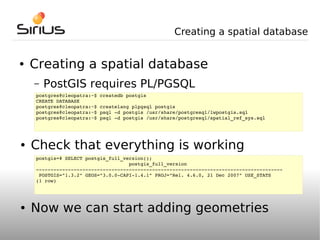
●   Creating a spatial database
    –   PostGIS requires PL/PGSQL
    postgres@cleopatra:~$ createdb postgis
    CREATE DATABASE
    postgres@cleopatra:~$ createlang plpgsql postgis
    postgres@cleopatra:~$ psql ­d postgis /usr/share/postgresql/lwpostgis.sql
    postgres@cleopatra:~$ psql ­d postgis /usr/share/postgresql/spatial_ref_sys.sql


●   Check that everything is working
    postgis=# SELECT postgis_full_version();
                                    postgis_full_version
    ­­­­­­­­­­­­­­­­­­­­­­­­­­­­­­­­­­­­­­­­­­­­­­­­­­­­­­­­­­­­­­­­­­­­­­­­­­­­­­­­­­­­­
     POSTGIS="1.3.2" GEOS="3.0.0­CAPI­1.4.1" PROJ="Rel. 4.6.0, 21 Dec 2007" USE_STATS
    (1 row)


●   Now we can start adding geometries
PostGIS Geometries


●   PostGIS supports OGC-compliant
    geometries
    –   From the Open Geospatial Consortium
         ●   http://www.opengeospatial.org/
         ●   Geometries are defined as part of the “OpenGIS
             Simple Features Implementation Specification for
             SQL”
         ●   The specification can be downloaded for free
    –   PostGIS has been officially certified as OGC
        SFS 1.1 compliant
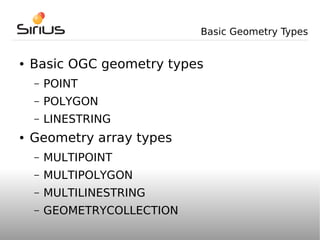
Basic Geometry Types


●   Basic OGC geometry types
    –   POINT
    –   POLYGON
    –   LINESTRING
●   Geometry array types
    –   MULTIPOINT
    –   MULTIPOLYGON
    –   MULTILINESTRING
    –   GEOMETRYCOLLECTION
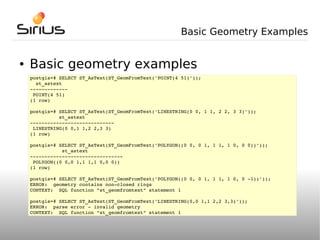
Basic Geometry Examples


●   Basic geometry examples
    postgis=# SELECT ST_AsText(ST_GeomFromText('POINT(4 51)'));
      st_astext
    ­­­­­­­­­­­­­
     POINT(4 51)
    (1 row)

    postgis=# SELECT ST_AsText(ST_GeomFromText('LINESTRING(0 0, 1 1, 2 2, 3 3)'));
              st_astext
    ­­­­­­­­­­­­­­­­­­­­­­­­­­­­­
     LINESTRING(0 0,1 1,2 2,3 3)
    (1 row)

    postgis=# SELECT ST_AsText(ST_GeomFromText('POLYGON((0 0, 0 1, 1 1, 1 0, 0 0))'));
               st_astext
    ­­­­­­­­­­­­­­­­­­­­­­­­­­­­­­­­
     POLYGON((0 0,0 1,1 1,1 0,0 0))
    (1 row)

    postgis=# SELECT ST_AsText(ST_GeomFromText('POLYGON((0 0, 0 1, 1 1, 1 0, 0 ­1))'));
    ERROR:  geometry contains non­closed rings
    CONTEXT:  SQL function "st_geomfromtext" statement 1

    postgis=# SELECT ST_AsText(ST_GeomFromText('LINESTRING(0,0 1,1 2,2 3,3)'));
    ERROR:  parse error ­ invalid geometry
    CONTEXT:  SQL function "st_geomfromtext" statement 1
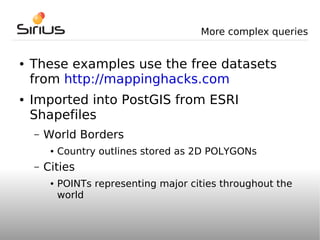
More complex queries


●   These examples use the free datasets
    from http://mappinghacks.com
●   Imported into PostGIS from ESRI
    Shapefiles
    –   World Borders
         ●   Country outlines stored as 2D POLYGONs
    –   Cities
         ●   POINTs representing major cities throughout the
             world
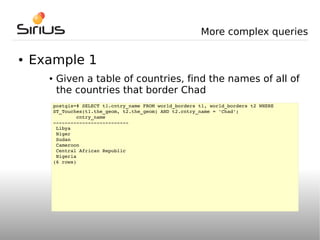
More complex queries

●   Example 1
      ●    Given a table of countries, find the names of all of
           the countries that border Chad
          postgis=# SELECT t1.cntry_name FROM world_borders t1, world_borders t2 WHERE 
          ST_Touches(t1.the_geom, t2.the_geom) AND t2.cntry_name = 'Chad';
                  cntry_name        
          ­­­­­­­­­­­­­­­­­­­­­­­­­­
           Libya
           Niger
           Sudan
           Cameroon
           Central African Republic
           Nigeria
          (6 rows)
More complex queries

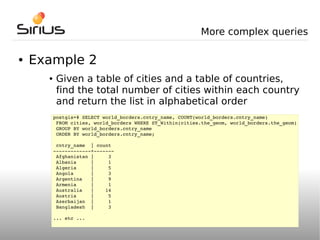
●   Example 2
      ●    Given a table of cities and a table of countries,
           find the total number of cities within each country
           and return the list in alphabetical order
          postgis=# SELECT world_borders.cntry_name, COUNT(world_borders.cntry_name) 
           FROM cities, world_borders WHERE ST_Within(cities.the_geom, world_borders.the_geom)
           GROUP BY world_borders.cntry_name
           ORDER BY world_borders.cntry_name;

           cntry_name  | count
          ­­­­­­­­­­­­­+­­­­­­­
           Afghanistan |     3
           Albania     |     1
           Algeria     |     5
           Angola      |     3
           Argentina   |     9
           Armenia     |     1
           Australia   |    14
           Austria     |     5
           Azerbaijan  |     1
           Bangladesh  |     3

          ... etc ...
Tools that can use PostGIS


●   There are many GIS tools that can access
    data within PostGIS
    –   Open source
         ●   JUMP
         ●   QGIS
         ●   GeoServer
         ●   MapServer
    –   Some proprietary support also exists
         ●   CadCorp SIS
         ●   Safe Software FME
         ●   ESRI
Tools that can use PostGIS


●   Similarly any applications that can
    connect to PostgreSQL can access spatial
    data
    –   Java, PHP, Perl etc.
●   This allows data to loaded into online
    mapping applications such as Google
    Maps
●   Wrapper classes are available for most
    languages
Demonstration & Questions


●   Demonstration & Questions


●   For more information:
    –   http://postgis.refractions.net
●   Or specific enquiries:
    –   http://www.siriusit.co.uk

Post gispguk

  • 1.
    Integrating Map Datawith PostGIS UK PostgreSQL Conference 2008 Mark Cave-Ayland Sirius Corporation
  • 2.
    What is PostGIS? ● What is PostGIS? – A collection of SQL types, operators and functions to “spatially enable” PostgreSQL – Also includes a spatial R-Tree indexing scheme ● Implemented using GiST – This allows us to extend PostgreSQL to ask questions like: ● How many features lie within 100m? ● What is the total length of a given road? ● What is the total area of water in my city?
  • 3.
    How can weuse PostGIS? ● PostGIS can primarily be used in two different ways – GIS object data store ● ESRI Shapefiles ● OS MasterMap – Spatial object processing ● Calculate binary predicates such as Crosses(), Touches(), and Intersects() ● Calculate the geometric results of Intersection() and Union()
  • 4.
    PostGIS dependencies ● PostGIS makes use of two popular existing libraries – PROJ.4 ● Provides co-ordinate system and on-the-fly reprojection support – GEOS ● Provides spatial predicates and geometric processing functions ● But all functions can be accessed using SQL
  • 5.
    Installation ● Installation – Very easy with RHEL 5 ● http://yum.pgsqlrpms.org/ – This installs the libraries required ● All that remains is to load the new functions into the database – PostGIS provides 2 files: ● lwpostgis.sql – Main operators and types (ST prefixed) ● spatial_ref_sys.sql – A list of international spatial reference systems
  • 6.
    Creating a spatialdatabase ● Creating a spatial database – PostGIS requires PL/PGSQL postgres@cleopatra:~$ createdb postgis CREATE DATABASE postgres@cleopatra:~$ createlang plpgsql postgis postgres@cleopatra:~$ psql ­d postgis /usr/share/postgresql/lwpostgis.sql postgres@cleopatra:~$ psql ­d postgis /usr/share/postgresql/spatial_ref_sys.sql ● Check that everything is working postgis=# SELECT postgis_full_version();                                 postgis_full_version ­­­­­­­­­­­­­­­­­­­­­­­­­­­­­­­­­­­­­­­­­­­­­­­­­­­­­­­­­­­­­­­­­­­­­­­­­­­­­­­­­­­­­  POSTGIS="1.3.2" GEOS="3.0.0­CAPI­1.4.1" PROJ="Rel. 4.6.0, 21 Dec 2007" USE_STATS (1 row) ● Now we can start adding geometries
  • 7.
    PostGIS Geometries ● PostGIS supports OGC-compliant geometries – From the Open Geospatial Consortium ● http://www.opengeospatial.org/ ● Geometries are defined as part of the “OpenGIS Simple Features Implementation Specification for SQL” ● The specification can be downloaded for free – PostGIS has been officially certified as OGC SFS 1.1 compliant
  • 8.
    Basic Geometry Types ● Basic OGC geometry types – POINT – POLYGON – LINESTRING ● Geometry array types – MULTIPOINT – MULTIPOLYGON – MULTILINESTRING – GEOMETRYCOLLECTION
  • 9.
    Basic Geometry Examples ● Basic geometry examples postgis=# SELECT ST_AsText(ST_GeomFromText('POINT(4 51)'));   st_astext ­­­­­­­­­­­­­  POINT(4 51) (1 row) postgis=# SELECT ST_AsText(ST_GeomFromText('LINESTRING(0 0, 1 1, 2 2, 3 3)'));           st_astext ­­­­­­­­­­­­­­­­­­­­­­­­­­­­­  LINESTRING(0 0,1 1,2 2,3 3) (1 row) postgis=# SELECT ST_AsText(ST_GeomFromText('POLYGON((0 0, 0 1, 1 1, 1 0, 0 0))'));            st_astext ­­­­­­­­­­­­­­­­­­­­­­­­­­­­­­­­  POLYGON((0 0,0 1,1 1,1 0,0 0)) (1 row) postgis=# SELECT ST_AsText(ST_GeomFromText('POLYGON((0 0, 0 1, 1 1, 1 0, 0 ­1))')); ERROR:  geometry contains non­closed rings CONTEXT:  SQL function "st_geomfromtext" statement 1 postgis=# SELECT ST_AsText(ST_GeomFromText('LINESTRING(0,0 1,1 2,2 3,3)')); ERROR:  parse error ­ invalid geometry CONTEXT:  SQL function "st_geomfromtext" statement 1
  • 10.
    More complex queries ● These examples use the free datasets from http://mappinghacks.com ● Imported into PostGIS from ESRI Shapefiles – World Borders ● Country outlines stored as 2D POLYGONs – Cities ● POINTs representing major cities throughout the world
  • 11.
    More complex queries ● Example 1 ● Given a table of countries, find the names of all of the countries that border Chad postgis=# SELECT t1.cntry_name FROM world_borders t1, world_borders t2 WHERE  ST_Touches(t1.the_geom, t2.the_geom) AND t2.cntry_name = 'Chad';         cntry_name         ­­­­­­­­­­­­­­­­­­­­­­­­­­  Libya  Niger  Sudan  Cameroon  Central African Republic  Nigeria (6 rows)
  • 12.
    More complex queries ● Example 2 ● Given a table of cities and a table of countries, find the total number of cities within each country and return the list in alphabetical order postgis=# SELECT world_borders.cntry_name, COUNT(world_borders.cntry_name)   FROM cities, world_borders WHERE ST_Within(cities.the_geom, world_borders.the_geom)  GROUP BY world_borders.cntry_name  ORDER BY world_borders.cntry_name;  cntry_name  | count ­­­­­­­­­­­­­+­­­­­­­  Afghanistan |     3  Albania     |     1  Algeria     |     5  Angola      |     3  Argentina   |     9  Armenia     |     1  Australia   |    14  Austria     |     5  Azerbaijan  |     1  Bangladesh  |     3 ... etc ...
  • 13.
    Tools that canuse PostGIS ● There are many GIS tools that can access data within PostGIS – Open source ● JUMP ● QGIS ● GeoServer ● MapServer – Some proprietary support also exists ● CadCorp SIS ● Safe Software FME ● ESRI
  • 14.
    Tools that canuse PostGIS ● Similarly any applications that can connect to PostgreSQL can access spatial data – Java, PHP, Perl etc. ● This allows data to loaded into online mapping applications such as Google Maps ● Wrapper classes are available for most languages
  • 15.
    Demonstration & Questions ● Demonstration & Questions ● For more information: – http://postgis.refractions.net ● Or specific enquiries: – http://www.siriusit.co.uk