Come with an idea - go home with
a web map: Tools for sharing
maps and vector data
Prof. Stefan Keller
Tools for sharing maps and
vector data
Programme:
1. Basics of thematic mapping and geovisualization
2. From the idea and collection of data to the

making, publishing and sharing of maps

3. Discussion of some free online map making and

map publishing tools

4. About data access webservices (background

maps) and data formats

5. Excursus about TileMill and CartoCSS
6. Design and publish your own web map (using

TileMill)

7. Tools to extract and transform (i.e. convert)

vector data

Tools for sharing maps and vector data, 31.10.13, Prof. S. Keller HSR @sfkeller

2
Organization
 Who are we?

 Prof. Stefan Keller
 Tobias Schmitz
 Who are you?

 Name, Education, Organization
 Infrastructure/Prerequisites:







Two on one desktop (or your laptop w/Wifi)
A mail account
No programming
Report „Geo-Visualisierungs-Tools“
Register an account at MapBox.com now!

Tools for sharing maps and vector data, 31.10.13, Prof. S. Keller HSR @sfkeller

3
This workshop
 Come with an idea - go home with a web map:

Tools for sharing maps and vector data

 in 7 steps => see programme
 Goals of this workshop:

 Refresh the basics of thematic mapping
 Learn how complex geoviz. still is
 Learn to know some online, free tools
 See demo with own data in action

 Attempt to sketch a solution for own idea
Tools for sharing maps and vector data, 31.10.13, Prof. S. Keller HSR @sfkeller

4
«Come with an idea…“»
 Based on

 Base map CH: Gemeinden, Kantone, wichtige
Orte (‘workshop compilation’)

 ‘Hektarraster’, see http://bit.ly/1cwn3YY
 OpenData, see http://opendata.admin.ch
– Base data: Gemeindegrenzen (polygons)
– Base data: PLZ/Zipcodes (polygons, 300 MB!)
– Zweitwohnungen nach Gemeinden
– Föhnindex nach PLZ

 Either

 follow our lab exercise
 or tell us now!
Tools for sharing maps and vector data, 31.10.13, Prof. S. Keller HSR @sfkeller

5
Thoughts on geosharing…
 What do you expect…? It‘s only 90 min.!
 … sharing is good 

 We all want to share our

 intentions => communication

 knowhow => foursquare, stackoverflow
 data => open data, gov.data/crowsourcing
 Software => open source
Tools for sharing maps and vector data, 31.10.13, Prof. S. Keller HSR @sfkeller

6
1 | Thematic mapping and
geovisualization
 Cartography, (Neo-)Geography, Visualization,

Arts Design, Data Driven Journalism

 Thematic Maps, Infographics
 Most common features of thematic maps:

 map (not graphics)
 online (not printed)
 interactive (not static)
Tools for sharing maps and vector data, 31.10.13, Prof. S. Keller HSR @sfkeller

7
1 | Characteristics of
Geospatial Data (Geodata)
 complex nature/structure/naming
 different formats
 difficult to access
 big data

 difficult to render

 point, polyline, polygon and text
symbols/signatures/styles

 generalization problem
– different content on different zoom levels

Tools for sharing maps and vector data, 31.10.13, Prof. S. Keller HSR @sfkeller

8
1 | Thematic Mapping and
Geovisualization
 Topographic Maps

 Base maps
– OpenStreetMap
– Google Map

 Thematic Maps







Choropleth Map
Proportional or Graduated Symbols
Dot Map
Isarthmic or Contour Map

Dasymetric Mapping
9
1 | Base Maps

OpenEcoMap
OSM Mapnik

Hike & Bike
Tools for sharing maps and vector data, 31.10.13, Prof. S. Keller HSR @sfkeller

10
1 | Thematic Map Examples

NZZ Swiss Maps - Interactive Things
http://work.interactivethings.com/nzz-swiss-maps/
repository (TopoJSON, GeoJSON from publicly available
(but difficult to access) swisstopo
geodata.https://github.com/interactivethings/swissmaps

11
1 | Interactive Maps !=
Google Maps
 Google Maps , provide out-of-the-box

 DB (fusion table) / spread sheet (incl.
geocoding)

 API
 Base Maps
 There are alternatives

 web solutions, out-of-the-box: ArcGIS Online
and MapBox („challengers“)…

 base maps, out-of-the-box: tiles
 other kinds of base maps: customized, part of
own geovisualization config. (see in 4)

Tools for sharing maps and vector data, 31.10.13, Prof. S. Keller HSR @sfkeller

12
1 | Tips about sharing maps
and charts
 "Many Eyes“: www-

958.ibm.com/software/data/cognos/manyeye
s/

 DocumentCloud:

www.documentcloud.org/

 Tableau Public:

http://www.tableausoftware.com/public/

 „Storytelling with maps“ (by ESRI):

http://storymaps.esri.com/

Tools for sharing maps and vector data, 31.10.13, Prof. S. Keller HSR @sfkeller

13
2 | From the idea and collection
of data to the making, publishing
and sharing of maps
 Tasks






Inception: invent, combine
Design: collect, make
Publishing (web): …

Sharing (web): tag it for discovery

 Tips:

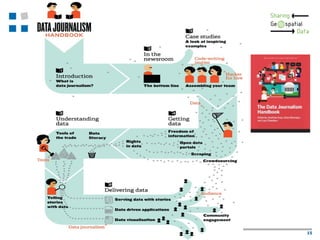
 The Data Journalism Handbook
 Handbook of Geojournalism
 Geovisualization sources
Tools for sharing maps and vector data, 31.10.13, Prof. S. Keller HSR @sfkeller

14
Tools for sharing maps and vector data, 31.10.13, Prof. S. Keller HSR @sfkeller

15
2 | Most difficult tasks…
 Goal: Matching thematic data with geospatial data

(coordinates)

=> „Join“ based on

 Coordinates => within/overlap (overlay,
buffer), nearby

 Postal Adress => Geocoding => Coordinates
 Name => e.g. Community Name, BfS Nr., Zip
Code

 Tools

 Online Tools: Fusion Tables, ArcGIS Online
(other?)

 Desktop Tools SQLite, GIS (QGIS)
Tools for sharing maps and vector data, 31.10.13, Prof. S. Keller HSR @sfkeller

16
3 | Free Online Geovis. Tools
 Report „Geo-Visualisierungs-Tools“ by

Geometa Lab HSR and GeoGR.ch

 mostly online, freely accessible tools
 some open source
 Scenario

 Data source prepared and ready locally
 As well-known formats: CSV, Shapefile
(vector)

 or as databases: SQLite/Spatialite,
PostgreSQL/PostGIS

Tools for sharing maps and vector data, 31.10.13, Prof. S. Keller HSR @sfkeller

17
3 | Free Online Geovis. Tools
 ArcGIS Online, GIS Cloud, CartoDB, QGIS

Cloud, TileMill

 Evaluation criteria (see overview matrix):







Skill prerequisites
Application type (Desktop, Web)
Supported thematic maps types
Predefined base maps

Supported formats (and webservices) for
import and export or publishing

 License
 Remarks (e.g. hosting service avilable?)
GISpunkt-Lunch - Geovisualisierungs-Werkzeuge

18
3 | Free Online Geovis. Tools
 ArcGIS Online

Find relevant and useful basemaps, data,
configurable GIS resources

Manage you organization’s geospatial content
Create maps and apps from APIs, templates,
and tools

Publish maps and data
Collaborate
Data capturing and deploying for
– Smartphones inclusing Windows Mobile
– Tablets (ArcPad)

http://www.arcgis.com/
19
3 | Free Online Geovis. Tools
 GIS Cloud

 Desktop GIS features in the cloud
 Easy and efficient visualization, analysis and
exploration
 Mainly hosting
 http://www.giscloud.com/
 CartoDB

Upload, query, analyze and integrate data
Quickly create and customize maps
Generate fast, interactive and stylish maps (tiles)
hosting – as well as all code based on Open Source
(PostGIS etc.)
 http://cartodb.com/






20
3 | Free Online Geovis. Tools
 QGIS Desktop and QGIS Cloud

Direct viewing of vector and raster data
Mapping and interactive exploration
Create, edit and export
Perform spatial analysis
www.qgis.ch and www.giscloud.com
 TileMill / MapBox

CartoCSS
Shapefiles , SQLite, PostGIS
TileMill for Processing
http://mapbox.com/tilemill/
21
4 | About data access
webservices and data formats


Data access webservices
 Tile API: fast raster tiles (many API variants)
 WMS: data access service for single raster files
 WFS: data access service for vector data



Raster vs. Vector formats
 Raster:
– ‚dull‘, mainly one and only one attribute
– easy to handle
– formats: png, jpg, „tiles“

 Vector:
– ‚intelligent‘, many attributes/any structure
– Complex to handle
– formats: Shapefile, SQLite/Geopackage, GeoJSON

 „Grid“ (like Hektarraster): Special case
Tools for sharing maps and vector data, 31.10.13, Prof. S. Keller HSR @sfkeller

22
4 | Stumbling blocks of geodata
publishing and sharing
 Different formats
 Coordinate Reference System (CRS)

 Spatial Reference System (SRS)
 Tips:
– EPSG:4326 = WGS84 = „GPS“ (default)
– EPSG: 21781 (CH1903/LV03)
– EPSG: 3857 or 900913 (Mercator/Google)
– http://giswiki.hsr.ch/CRS
– www.spatialreference.org

 Geovisualization issues

 …
Tools for sharing maps and vector data, 31.10.13, Prof. S. Keller HSR @sfkeller

23
5 | Excursus about TileMill
and CartoCSS









Map design studio for webdesigner, cartographers and journalists
Integrated with MapBox
Multi platform, Open Source (Mapnik)
Portrayal language CartoCSS
Import formats:
 File Formats: Shapefile, CSV (lat/lon, 'WKT'), GEOJSON
 Databases: Spatialite, PostGIS
 (Raster: see 'raster-colorizer' in dev. version, will be in next
version)
Export formats:
 MapBox Online
 MBTiles (SQlite)
 Raster: PNG, PDF
 SVG (Vector Graphics)
 Mapnik XML

Schöne Karten mit TileMill erstellen...., S. Keller

24
5 | CSS/HTML






CSS = Cascaded Style Sheets
 Nested styling template
 Computer language for style templates (engl.
stylesheets) of structured documents
 Especially with HTML and XML (e.g. SVG)
 Nesting is default, can be overridden
There are rules. There are also rules. Then there are
ids (#poi), classes (.class), selectors ([zoom>3])
A basic CSS rule example:

/* Syntax: SELECTOR { property: Value } */
H1 {
color:red
}
Schöne Karten mit TileMill erstellen...., S. Keller

25
5 | CartoCSS/TileMill (1)


CartoCSS:


Extension of CSS of language elements (rules,
properties, functionen) for cartographic visualization



Doc.: www.mapbox.com/tilemill/docs/manual/carto/



Reference: www.mapbox.com/carto/api/2.1.0/

Example:
#earthquakes {
marker-width:6;
marker-fill:#f45;
marker-line-color:#813;
marker-allow-overlap:true;
}


Schöne Karten mit TileMill erstellen...., S. Keller

26
5 | CartoCSS/TileMill (2)

Schöne Karten mit TileMill erstellen...., S. Keller

27
5 | TileMill Import/Export
 SpatiaLite

 Vector
 Import
 MBTiles

 Raster tiles
 Export
 Info: http://giswiki.hsr.ch/MBTiles
 Upload to MapBox

using your account

Schöne Karten mit TileMill erstellen...., S. Keller

28
6 | Design and publish your
own web map (using TileMill)
 Hands on…

 We have about 40 minutes time
 Project and data on desktop
 Start TileMill
 Help

 Reference in TileMill („{}“)
 Online www.mapbox.com/tilemill/docs/
 See also http://giswiki.hsr.ch/TileMill
Tools for sharing maps and vector data, 31.10.13, Prof. S. Keller HSR @sfkeller

29
6 | Hands-On CartoCSS
(follow instructions…)

Schöne Karten mit TileMill erstellen...., S. Keller

30
7 | Tools to extract and
transform vector data
 Online Geoconverter:






GeoConverter
OGR2KML (small datasets)
See http://giswiki.hsr.ch/Online_Geoconverter
etc..

 Desktop Geoconverter:






Open Source: OGR, GDAL
GIS: QGIS (Open Source), ArcGIS
Tools: FME, Infogrips, Geocom
etc.

Tools for sharing maps and vector data, 31.10.13, Prof. S. Keller HSR @sfkeller

31
7 | Outlook
 Limitations of TileMill and CartoCSS
 Not covered:

 Full power of CartoCSS
 Publication on own server
 Programming
 Publication on own server

 Not yet available
 HSR Project „TinyTileServer“
 Programming, e.g. with Processing (.js)
Schöne Karten mit TileMill erstellen...., S. Keller

32
Agenda (CH/DE related)
 Kurse an der HSR im Januar 2014 u.a. zu

QGIS, Python, PostgreSQL
http://giswiki.hsr.ch/Agenda

 GEOSummit 2014, 3.-5.6.2014, Bern

www.geosummit.ch

 Swiss PGDay - die Schweizer PostgreSQL-

Konferenz, 24.6.2014, HSR Rapperswil
http://pgday.ch/2014/

Tools for sharing maps and vector data, 31.10.13, Prof. S. Keller HSR @sfkeller

33
Thank you!
Prof. Stefan Keller
Geometa Lab at Institute for Software
University of Applied Sciences Rapperswil
Oberseestrasse 10
CH-8640 Rapperswil (Switzerland)
Web
www.gis.hsr.ch
E-Mail sfkeller(at)hsr.ch
Twitter @sfkeller

Tools for sharing maps and vector data, 31.10.13, Prof. S. Keller HSR @sfkeller

34
Sources / Weblinks
 GeoViz:

http://giswiki.hsr.ch/Geovisualisierung

 CSS:

www.bjoernsworld.de/css/grundlagen.html

 Report: http://eprints.hsr.ch
 TileMill: http://giswiki.hsr.ch/TileMill

Schöne Karten mit TileMill erstellen...., S. Keller

35

Come with an idea - go home with a web map: Tools for sharing maps and vector dataGeosharing 2013 bern_ws_keller_hsr_slides

  • 1.
    Come with anidea - go home with a web map: Tools for sharing maps and vector data Prof. Stefan Keller
  • 2.
    Tools for sharingmaps and vector data Programme: 1. Basics of thematic mapping and geovisualization 2. From the idea and collection of data to the making, publishing and sharing of maps 3. Discussion of some free online map making and map publishing tools 4. About data access webservices (background maps) and data formats 5. Excursus about TileMill and CartoCSS 6. Design and publish your own web map (using TileMill) 7. Tools to extract and transform (i.e. convert) vector data Tools for sharing maps and vector data, 31.10.13, Prof. S. Keller HSR @sfkeller 2
  • 3.
    Organization  Who arewe?  Prof. Stefan Keller  Tobias Schmitz  Who are you?  Name, Education, Organization  Infrastructure/Prerequisites:      Two on one desktop (or your laptop w/Wifi) A mail account No programming Report „Geo-Visualisierungs-Tools“ Register an account at MapBox.com now! Tools for sharing maps and vector data, 31.10.13, Prof. S. Keller HSR @sfkeller 3
  • 4.
    This workshop  Comewith an idea - go home with a web map: Tools for sharing maps and vector data  in 7 steps => see programme  Goals of this workshop:  Refresh the basics of thematic mapping  Learn how complex geoviz. still is  Learn to know some online, free tools  See demo with own data in action  Attempt to sketch a solution for own idea Tools for sharing maps and vector data, 31.10.13, Prof. S. Keller HSR @sfkeller 4
  • 5.
    «Come with anidea…“»  Based on  Base map CH: Gemeinden, Kantone, wichtige Orte (‘workshop compilation’)  ‘Hektarraster’, see http://bit.ly/1cwn3YY  OpenData, see http://opendata.admin.ch – Base data: Gemeindegrenzen (polygons) – Base data: PLZ/Zipcodes (polygons, 300 MB!) – Zweitwohnungen nach Gemeinden – Föhnindex nach PLZ  Either  follow our lab exercise  or tell us now! Tools for sharing maps and vector data, 31.10.13, Prof. S. Keller HSR @sfkeller 5
  • 6.
    Thoughts on geosharing… What do you expect…? It‘s only 90 min.!  … sharing is good   We all want to share our  intentions => communication  knowhow => foursquare, stackoverflow  data => open data, gov.data/crowsourcing  Software => open source Tools for sharing maps and vector data, 31.10.13, Prof. S. Keller HSR @sfkeller 6
  • 7.
    1 | Thematicmapping and geovisualization  Cartography, (Neo-)Geography, Visualization, Arts Design, Data Driven Journalism  Thematic Maps, Infographics  Most common features of thematic maps:  map (not graphics)  online (not printed)  interactive (not static) Tools for sharing maps and vector data, 31.10.13, Prof. S. Keller HSR @sfkeller 7
  • 8.
    1 | Characteristicsof Geospatial Data (Geodata)  complex nature/structure/naming  different formats  difficult to access  big data  difficult to render  point, polyline, polygon and text symbols/signatures/styles  generalization problem – different content on different zoom levels Tools for sharing maps and vector data, 31.10.13, Prof. S. Keller HSR @sfkeller 8
  • 9.
    1 | ThematicMapping and Geovisualization  Topographic Maps  Base maps – OpenStreetMap – Google Map  Thematic Maps      Choropleth Map Proportional or Graduated Symbols Dot Map Isarthmic or Contour Map Dasymetric Mapping 9
  • 10.
    1 | BaseMaps OpenEcoMap OSM Mapnik Hike & Bike Tools for sharing maps and vector data, 31.10.13, Prof. S. Keller HSR @sfkeller 10
  • 11.
    1 | ThematicMap Examples NZZ Swiss Maps - Interactive Things http://work.interactivethings.com/nzz-swiss-maps/ repository (TopoJSON, GeoJSON from publicly available (but difficult to access) swisstopo geodata.https://github.com/interactivethings/swissmaps 11
  • 12.
    1 | InteractiveMaps != Google Maps  Google Maps , provide out-of-the-box  DB (fusion table) / spread sheet (incl. geocoding)  API  Base Maps  There are alternatives  web solutions, out-of-the-box: ArcGIS Online and MapBox („challengers“)…  base maps, out-of-the-box: tiles  other kinds of base maps: customized, part of own geovisualization config. (see in 4) Tools for sharing maps and vector data, 31.10.13, Prof. S. Keller HSR @sfkeller 12
  • 13.
    1 | Tipsabout sharing maps and charts  "Many Eyes“: www- 958.ibm.com/software/data/cognos/manyeye s/  DocumentCloud: www.documentcloud.org/  Tableau Public: http://www.tableausoftware.com/public/  „Storytelling with maps“ (by ESRI): http://storymaps.esri.com/ Tools for sharing maps and vector data, 31.10.13, Prof. S. Keller HSR @sfkeller 13
  • 14.
    2 | Fromthe idea and collection of data to the making, publishing and sharing of maps  Tasks     Inception: invent, combine Design: collect, make Publishing (web): … Sharing (web): tag it for discovery  Tips:  The Data Journalism Handbook  Handbook of Geojournalism  Geovisualization sources Tools for sharing maps and vector data, 31.10.13, Prof. S. Keller HSR @sfkeller 14
  • 15.
    Tools for sharingmaps and vector data, 31.10.13, Prof. S. Keller HSR @sfkeller 15
  • 16.
    2 | Mostdifficult tasks…  Goal: Matching thematic data with geospatial data (coordinates) => „Join“ based on  Coordinates => within/overlap (overlay, buffer), nearby  Postal Adress => Geocoding => Coordinates  Name => e.g. Community Name, BfS Nr., Zip Code  Tools  Online Tools: Fusion Tables, ArcGIS Online (other?)  Desktop Tools SQLite, GIS (QGIS) Tools for sharing maps and vector data, 31.10.13, Prof. S. Keller HSR @sfkeller 16
  • 17.
    3 | FreeOnline Geovis. Tools  Report „Geo-Visualisierungs-Tools“ by Geometa Lab HSR and GeoGR.ch  mostly online, freely accessible tools  some open source  Scenario  Data source prepared and ready locally  As well-known formats: CSV, Shapefile (vector)  or as databases: SQLite/Spatialite, PostgreSQL/PostGIS Tools for sharing maps and vector data, 31.10.13, Prof. S. Keller HSR @sfkeller 17
  • 18.
    3 | FreeOnline Geovis. Tools  ArcGIS Online, GIS Cloud, CartoDB, QGIS Cloud, TileMill  Evaluation criteria (see overview matrix):      Skill prerequisites Application type (Desktop, Web) Supported thematic maps types Predefined base maps Supported formats (and webservices) for import and export or publishing  License  Remarks (e.g. hosting service avilable?) GISpunkt-Lunch - Geovisualisierungs-Werkzeuge 18
  • 19.
    3 | FreeOnline Geovis. Tools  ArcGIS Online Find relevant and useful basemaps, data, configurable GIS resources Manage you organization’s geospatial content Create maps and apps from APIs, templates, and tools Publish maps and data Collaborate Data capturing and deploying for – Smartphones inclusing Windows Mobile – Tablets (ArcPad) http://www.arcgis.com/ 19
  • 20.
    3 | FreeOnline Geovis. Tools  GIS Cloud  Desktop GIS features in the cloud  Easy and efficient visualization, analysis and exploration  Mainly hosting  http://www.giscloud.com/  CartoDB Upload, query, analyze and integrate data Quickly create and customize maps Generate fast, interactive and stylish maps (tiles) hosting – as well as all code based on Open Source (PostGIS etc.)  http://cartodb.com/     20
  • 21.
    3 | FreeOnline Geovis. Tools  QGIS Desktop and QGIS Cloud Direct viewing of vector and raster data Mapping and interactive exploration Create, edit and export Perform spatial analysis www.qgis.ch and www.giscloud.com  TileMill / MapBox CartoCSS Shapefiles , SQLite, PostGIS TileMill for Processing http://mapbox.com/tilemill/ 21
  • 22.
    4 | Aboutdata access webservices and data formats  Data access webservices  Tile API: fast raster tiles (many API variants)  WMS: data access service for single raster files  WFS: data access service for vector data  Raster vs. Vector formats  Raster: – ‚dull‘, mainly one and only one attribute – easy to handle – formats: png, jpg, „tiles“  Vector: – ‚intelligent‘, many attributes/any structure – Complex to handle – formats: Shapefile, SQLite/Geopackage, GeoJSON  „Grid“ (like Hektarraster): Special case Tools for sharing maps and vector data, 31.10.13, Prof. S. Keller HSR @sfkeller 22
  • 23.
    4 | Stumblingblocks of geodata publishing and sharing  Different formats  Coordinate Reference System (CRS)  Spatial Reference System (SRS)  Tips: – EPSG:4326 = WGS84 = „GPS“ (default) – EPSG: 21781 (CH1903/LV03) – EPSG: 3857 or 900913 (Mercator/Google) – http://giswiki.hsr.ch/CRS – www.spatialreference.org  Geovisualization issues  … Tools for sharing maps and vector data, 31.10.13, Prof. S. Keller HSR @sfkeller 23
  • 24.
    5 | Excursusabout TileMill and CartoCSS       Map design studio for webdesigner, cartographers and journalists Integrated with MapBox Multi platform, Open Source (Mapnik) Portrayal language CartoCSS Import formats:  File Formats: Shapefile, CSV (lat/lon, 'WKT'), GEOJSON  Databases: Spatialite, PostGIS  (Raster: see 'raster-colorizer' in dev. version, will be in next version) Export formats:  MapBox Online  MBTiles (SQlite)  Raster: PNG, PDF  SVG (Vector Graphics)  Mapnik XML Schöne Karten mit TileMill erstellen...., S. Keller 24
  • 25.
    5 | CSS/HTML    CSS= Cascaded Style Sheets  Nested styling template  Computer language for style templates (engl. stylesheets) of structured documents  Especially with HTML and XML (e.g. SVG)  Nesting is default, can be overridden There are rules. There are also rules. Then there are ids (#poi), classes (.class), selectors ([zoom>3]) A basic CSS rule example: /* Syntax: SELECTOR { property: Value } */ H1 { color:red } Schöne Karten mit TileMill erstellen...., S. Keller 25
  • 26.
    5 | CartoCSS/TileMill(1)  CartoCSS:  Extension of CSS of language elements (rules, properties, functionen) for cartographic visualization  Doc.: www.mapbox.com/tilemill/docs/manual/carto/  Reference: www.mapbox.com/carto/api/2.1.0/ Example: #earthquakes { marker-width:6; marker-fill:#f45; marker-line-color:#813; marker-allow-overlap:true; }  Schöne Karten mit TileMill erstellen...., S. Keller 26
  • 27.
    5 | CartoCSS/TileMill(2) Schöne Karten mit TileMill erstellen...., S. Keller 27
  • 28.
    5 | TileMillImport/Export  SpatiaLite  Vector  Import  MBTiles  Raster tiles  Export  Info: http://giswiki.hsr.ch/MBTiles  Upload to MapBox using your account Schöne Karten mit TileMill erstellen...., S. Keller 28
  • 29.
    6 | Designand publish your own web map (using TileMill)  Hands on…  We have about 40 minutes time  Project and data on desktop  Start TileMill  Help  Reference in TileMill („{}“)  Online www.mapbox.com/tilemill/docs/  See also http://giswiki.hsr.ch/TileMill Tools for sharing maps and vector data, 31.10.13, Prof. S. Keller HSR @sfkeller 29
  • 30.
    6 | Hands-OnCartoCSS (follow instructions…) Schöne Karten mit TileMill erstellen...., S. Keller 30
  • 31.
    7 | Toolsto extract and transform vector data  Online Geoconverter:     GeoConverter OGR2KML (small datasets) See http://giswiki.hsr.ch/Online_Geoconverter etc..  Desktop Geoconverter:     Open Source: OGR, GDAL GIS: QGIS (Open Source), ArcGIS Tools: FME, Infogrips, Geocom etc. Tools for sharing maps and vector data, 31.10.13, Prof. S. Keller HSR @sfkeller 31
  • 32.
    7 | Outlook Limitations of TileMill and CartoCSS  Not covered:  Full power of CartoCSS  Publication on own server  Programming  Publication on own server  Not yet available  HSR Project „TinyTileServer“  Programming, e.g. with Processing (.js) Schöne Karten mit TileMill erstellen...., S. Keller 32
  • 33.
    Agenda (CH/DE related) Kurse an der HSR im Januar 2014 u.a. zu QGIS, Python, PostgreSQL http://giswiki.hsr.ch/Agenda  GEOSummit 2014, 3.-5.6.2014, Bern www.geosummit.ch  Swiss PGDay - die Schweizer PostgreSQL- Konferenz, 24.6.2014, HSR Rapperswil http://pgday.ch/2014/ Tools for sharing maps and vector data, 31.10.13, Prof. S. Keller HSR @sfkeller 33
  • 34.
    Thank you! Prof. StefanKeller Geometa Lab at Institute for Software University of Applied Sciences Rapperswil Oberseestrasse 10 CH-8640 Rapperswil (Switzerland) Web www.gis.hsr.ch E-Mail sfkeller(at)hsr.ch Twitter @sfkeller Tools for sharing maps and vector data, 31.10.13, Prof. S. Keller HSR @sfkeller 34
  • 35.
    Sources / Weblinks GeoViz: http://giswiki.hsr.ch/Geovisualisierung  CSS: www.bjoernsworld.de/css/grundlagen.html  Report: http://eprints.hsr.ch  TileMill: http://giswiki.hsr.ch/TileMill Schöne Karten mit TileMill erstellen...., S. Keller 35