USABILITY TESTING 2
Database Web Application

Test Information
OVERVIEW
TechSmith Morae was used on a laptop computer to conduct usability testing of the recently revised WVU Libraries Database
web application, using test questions from the first round of testing that were still relevant to the web application. This round of
usability testing was internal and focused on Undergraduate Student employees.
Test Information
TARGET AUDIENCE
73%* of WVU Libraries users are undergraduate students who are 48% female or 52% male, are primarily Caucasian,
African American, Hispanic, or Asian in ethnicity, are United States citizens or are international students, are 21 years in their
average age, and are 49% from the state of West Virginia or 51% from other United States, territories, or countries.
Target audience numbers are populated from both survey polls and server statistics.*
Test Information
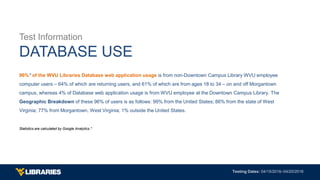
DATABASE USE
96%* of the WVU Libraries Database web application usage is from non-Downtown Campus Library WVU employee
computer users ‒ 64% of which are returning users, and 61% of which are from ages 18 to 34 ‒ on and off Morgantown
campus, whereas 4% of Database web application usage is from WVU employee at the Downtown Campus Library. The
Geographic Breakdown of these 96% of users is as follows: 99% from the United States; 86% from the state of West
Virginia; 77% from Morgantown, West Virginia; 1% outside the United States.
Statistics are calculated by Google Analytics.*
Test Information
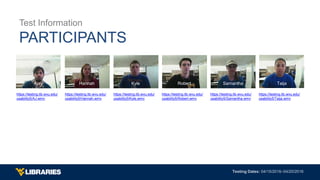
PARTICIPANTS
Ajay Hannah Kyle Robert Samantha Taija
https://testing.lib.wvu.edu/
usability5/AJ.wmv
https://testing.lib.wvu.edu/
usability5/Hannah.wmv
https://testing.lib.wvu.edu/
usability5/Kyle.wmv
https://testing.lib.wvu.edu/
usability5/Robert.wmv
https://testing.lib.wvu.edu/
usability5/Samantha.wmv
https://testing.lib.wvu.edu/
usability5/Taija.wmv
TASK ANALYSIS
Test 1 & Test 2
Test 1 & Test 2
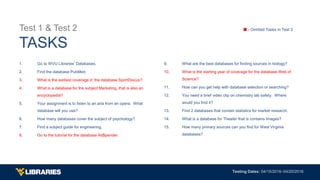
TASKS
1. Go to WVU Libraries’ Databases.
2. Find the database PubMed.
3. What is the earliest coverage in the database SportDiscus?
4. What is a database for the subject Marketing, that is also an
encyclopedia?
5. Your assignment is to listen to an aria from an opera. What
database will you use?
6. How many databases cover the subject of psychology?
7. Find a subject guide for engineering.
8. Go to the tutorial for the database Ad$pender.
9. What are the best databases for finding sources in biology?
10. What is the starting year of coverage for the database Web of
Science?
11. How can you get help with database selection or searching?
12. You need a brief video clip on chemistry lab safety. Where
would you find it?
13. Find 2 databases that contain statistics for market research.
14. What is a database for Theater that is contains Images?
15. How many primary sources can you find for West Virginia
databases?
■ - Omitted Tasks in Test 2
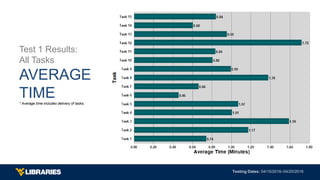
Test 1 Results:
All Tasks
AVERAGE
TIME* Average time includes delivery of tasks.
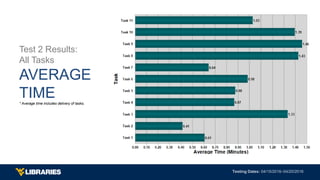
Test 2 Results:
All Tasks
AVERAGE
TIME* Average time includes delivery of tasks.
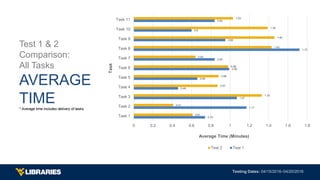
Test 1 & 2
Comparison:
All Tasks
AVERAGE
TIME* Average time includes delivery of tasks.
0.74
1.17
1.07
0.46
0.66
0.99
0.84
1.72
0.95
0.6
0.84
0.61
0.41
1.33
0.87
0.88
0.98
0.64
1.43
1.46
1.39
1.03
0 0.2 0.4 0.6 0.8 1 1.2 1.4 1.6 1.8
Task 1
Task 2
Task 3
Task 4
Task 5
Task 6
Task 7
Task 8
Task 9
Task 10
Task 11
Average Time (Minutes)
Task
Test 2 Test 1
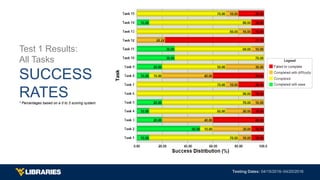
Test 1 Results:
All Tasks
SUCCESS
RATES* Percentages based on a 0 to 3 scoring system.
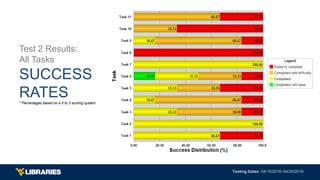
Test 2 Results:
All Tasks
SUCCESS
RATES* Percentages based on a 0 to 3 scoring system.
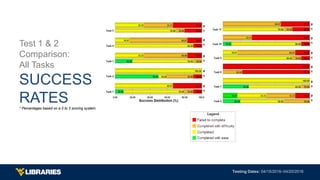
Test 1 & 2
Comparison:
All Tasks
SUCCESS
RATES* Percentages based on a 0 to 3 scoring system.
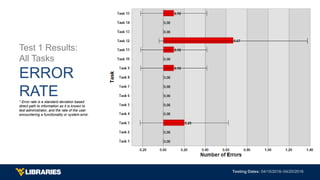
Test 1 Results:
All Tasks
ERROR
RATE* Error rate is a standard deviation based
direct path to information as it is known to
test administrator, and the rate of the user
encountering a functionality or system error.
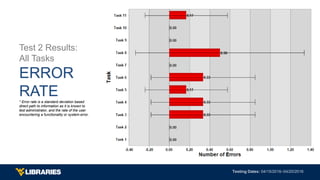
Test 2 Results:
All Tasks
ERROR
RATE* Error rate is a standard deviation based
direct path to information as it is known to
test administrator, and the rate of the user
encountering a functionality or system error.
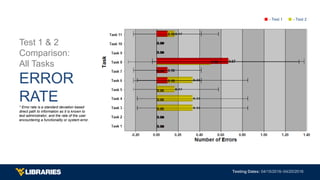
Test 1 & 2
Comparison:
All Tasks
ERROR
RATE* Error rate is a standard deviation based
direct path to information as it is known to
test administrator, and the rate of the user
encountering a functionality or system error.
■ - Test 1 ■ - Test 2
SYSTEM USABILITY SCALE
Test 1 & Test 2
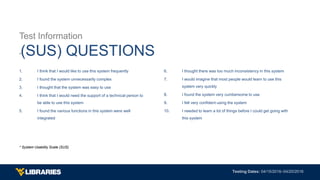
Test Information
*(SUS) QUESTIONS
1. I think that I would like to use this system frequently
2. I found the system unnecessarily complex
3. I thought that the system was easy to use
4. I think that I would need the support of a technical person to
be able to use this system
5. I found the various functions in this system were well
integrated
6. I thought there was too much inconsistency in this system
7. I would imagine that most people would learn to use this
system very quickly
8. I found the system very cumbersome to use
9. I felt very confident using the system
10. I needed to learn a lot of things before I could get going with
this system
* System Usability Scale (SUS)
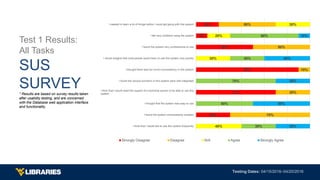
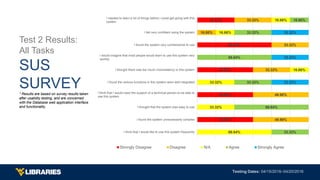
Test 1 Results:
All Tasks
SUS
SURVEY* Results are based on survey results taken
after usability testing, and are concerned
with the Database web application interface
and functionality.
30%
70%
90%
50%
10%
20%
70%
30%
10%
50%
50%
40%
30%
20%
30%
30%
50%
70%
30%
60%
30%
50%
30%
40%
10%
I think that I would like to use this system frequently
I found the system unnecessarily complex
I thought that the system was easy to use
I think that I would need the support of a technical person to be able to use this
system
I found the various functions in this system were well integrated
I thought there was too much inconsistency in this system
I would imagine that most people would learn to use this system very quickly
I found the system very cumbersome to use
I felt very confident using the system
I needed to learn a lot of things before I could get going with this system
Strongly Disagree Disagree N/A Agree Strongly Agree
Test 2 Results:
All Tasks
SUS
SURVEY* Results are based on survey results taken
after usability testing, and are concerned
with the Database web application interface
and functionality.
49.98%
49.98%
49.98%
66.64%
33.32%
49.98%
49.98%
33.32%
33.32%
16.66%
33.32%
66.64%
33.32%
33.32%
16.66%
16.66%
16.66%
33.32%
66.64%
33.32%
66.64%
33.32%
16.66%
33.32%
33.32%
33.32%
I think that I would like to use this system frequently
I found the system unnecessarily complex
I thought that the system was easy to use
I think that I would need the support of a technical person to be able to
use this system
I found the various functions in this system were well integrated
I thought there was too much inconsistency in this system
I would imagine that most people would learn to use this system very
quickly
I found the system very cumbersome to use
I felt very confident using the system
I needed to learn a lot of things before I could get going with this
system
Strongly Disagree Disagree N/A Agree Strongly Agree
SUMMARY
Notes & Observations
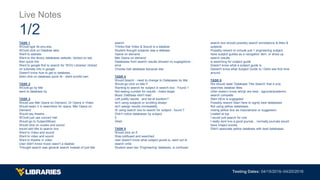
TASK 1
WOuld type lib.wvu.edu
WOuld click on Databse tabs
Went to website
Went to the library databases website, clicked on tab,
then quick link
Went to google first to search for 'WVU Libraries' clicked
on submeta info in google
Doesn't know how to get to databses.
didnt click on databses quick lik - didnt scrolld own
TASK 2
WOuld go by title
went to databses by
TASK 3
Would use Met Opera on Demand, Or Opera in Video
Would searc h in searchbox for opera, Met Opera on
Demand
Would say theatre...
WOuld just use concert hall
Would go to Subject/Music
Would click on viudeo and sound
would add title to search box
Went to Video and sound
Went to video and sound
Went to theatre in video
User didn't know music wasn't a daabse
THought search was general search instead of just title
search
THinks that Video & Sound is a databse
Student thought subjects was a datbase
Opera on demand
Met Opera on demand
Databases from search results showed no sugegstions -
error
Choose trail database because star
TASK 4
Would Search - need to change to Databases by title
Would go click on title P
Wanting to search for subject in search box - Found 1
Not seeing number for results - make larger
Music Dattbase didn't load
Left justify results , and list at boottom?
Isn't using subjects or scrolling dowqn
Isn't seeign results immeadetly
IS using search box to search for subject - found 7
Didn't notice databases by subject
5
24ish
TASK 5
Would click on E
Was cobfused and searched
user doesn't know what subject giuide is, went out to
search onlie
Student sees two 'Engineering' databses, si confused
search box should possibly search annotations & titles &
subjects
Possibly reword to include just 1 engineering subject,
have subject guides as a navigation item, or show up
search results
is searching for subject guide
Doesn't know what a subject guide is
Deosnt't know what Subject Guide is./ Didnt see first time
around
TASK 6
We should state 'Database Title Search' that it only
searches databse titles
USer doesn;t know whicjh are best - agricola/academic
search compelte
Start HEre is sugegsted
Possibly reword Start Here to signfy best databases
Not using yellow databases.
mising yellow box as imporatnace or suggestion
Lisated at top
I would just search for one
I really dont kno a good journal... normally journals would
have imapct scores
Didn't associate yellow databses with best databases.
Live Notes
1/2
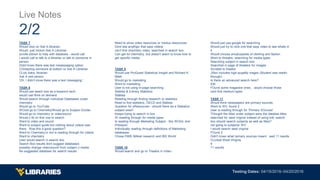
TASK 7
Would click on Ask A librarian
Would just clickon Ask A Librarian
scrolle ddown to help with databses - would call
I would call to talk to a librarian or talk to someone in
person
Didnt knwo there was text measssaging option
COntacting someone at bottom or Ask A Librarian
CLick Aska librarian
Ask A real person
'Oh, I didn't know there was a text messaging.'
TASK 8
Would use seach box as a keyword sech
would use films on demand
Would search through individual Databases under
chemistry
Would go to YouTube
WOuld go to Chemistry/Would go to Subject GUide/
Would go to chemistry or video/sound
Would c lik on first one to search
Went to video and sound
Went to subject guide but nothing about videos was
there. Was this a good question?
Went to Chemistry,m but is reading through for videos
Went to chemistry
User would search in search box
Search Box results dont suggest databases
possibly change video/sound from subject o media
No suggested databses for search results
Need to show video resources or medua resourcces
Dont see anythign that says videos
can't find chemistry video; searched in search box
Can get toi chemistry, but doesn't seem to know how to
get specific media
TASK 9
Would use ProQuest Statistical Insight and Richard K
Milelr
Would go to marketing
Went to marketing
User is not using in-page searching
Statista & iLibrary Statistics
Statista
Reading through finding research or statistics
Read to find statistics, OECD and Statista
Question for eResources-- should there be a Statistics
subject area?
Keeps trying to search in box
IS rreading through for media types
Is reading through Marketing Subject - Ibis WOrld, and
PAssport
Individually reading through definitions of Marketing
databases
Chose EMIS MAket research and IBS World
TASK 10
Would search and go to Theatre in Video
Would just use google for searching
Would just try to click one that says video to see whats in
it
Would choose encylcopedia of cltohing and fashon
Went to threatre, searching for media types
Searching subject in search box
Searched in page of theatere for images
Scroleld to theatre
JStor includes high-quqality mages (Student was readin
through)
Is there an advanced search here?
IDK
FOund some magazine ones... would choose those
cant find medium types
TASK 11
Would think newspapers are primary sources
Went to WV, found 2
User is reading through for 'Primary SOurces'
THought the titles under subject were the databse titles
searched for west virginia instead of using link; search
box should search subjects as well as titles?
not going to subjects/ WV
I would search west virginai
FOund 2
Didn't knwo what rpimary sources meant . said 11 results
CLicked West VIrignia
4
11 results
Live Notes
2/2
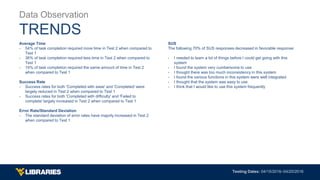
Average Time
- 54% of task completion required more time in Test 2 when compared to
Test 1
- 36% of task completion required less time in Test 2 when compared to
Test 1
- 10% of task completion required the same amount of time in Test 2
when compared to Test 1
Success Rate
- Success rates for both 'Completed with ease' and 'Completed' were
largely reduced in Test 2 when compared to Test 1
- Success rates for both 'Completed with difficulty' and 'Failed to
complete' largely increased in Test 2 when compared to Test 1
Error Rate/Standard Deviation
- The standard deviation of error rates have majorly increased in Test 2
when compared to Test 1
SUS
The following 70% of SUS responses decreased in favorable response:
- I needed to learn a lot of things before I could get going with this
system
- I found the system very cumbersome to use
- I thought there was too much inconsistency in this system
- I found the various functions in this system were well integrated
- I thought that the system was easy to use
- I think that I would like to use this system frequently
Data Observation
TRENDS
ENHANCEMENTS
Suggested
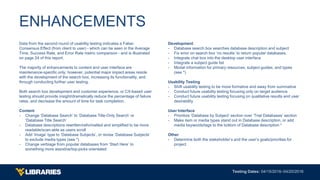
Data from the second round of usability testing indicates a False-
Consensus Effect (from client to user) - which can be seen in the Average
Time, Success Rate, and Error Rate metric comparison - and is illustrated
on page 24 of this report.
The majority of enhancements to content and user interface are
maintenance-specific only; however, potential major impact areas reside
with the development of the search box, increasing its functionality, and
through conducting further user testing.
Both search box development and customer experience, or CX-based user
testing should provide insight/dramatically reduce the percentage of failure
rates, and decrease the amount of time for task completion.
Content
- Change ‘Database Search’ to ‘Database Title-Only Search’ or
‘Database Title Search’
- Database descriptions rewritten/reformatted and simplified to be more
readable/scan-able as users scroll
- Add ‘Image’ type to ‘Database Subjects’, or revise ‘Database Subjects’
to exclude media types (see *)
- Change verbiage from popular databases from ‘Start Here’ to
something more assistive/top-picks orientated
Development
- Database search box searches database description and subject
- Fix error on search box ‘no results’ to return popular databases.
- Integrate chat box into the desktop user interface
- Integrate a subject guide list
- Modal information for primary resources, subject guides, and types
(see *)
Usability Testing
- Shift usability testing to be more formative and away from summative
- Conduct future usability testing focusing only on target audience
- Conduct future usability testing focusing on qualitative results and user
desirability
User Interface
- Prioritize ‘Database by Subject’ section over ‘Trial Databases’ section
- Make item or media types stand out in Database description, or add
media keywords/tags to the bottom of Database description *
Other
- Determine both the stakeholder’s and the user’s goals/priorities for
project
ENHANCEMENTS

Database Web Application User Test 2

  • 1.
    USABILITY TESTING 2 DatabaseWeb Application 
  • 2.
    Test Information OVERVIEW TechSmith Moraewas used on a laptop computer to conduct usability testing of the recently revised WVU Libraries Database web application, using test questions from the first round of testing that were still relevant to the web application. This round of usability testing was internal and focused on Undergraduate Student employees.
  • 3.
    Test Information TARGET AUDIENCE 73%*of WVU Libraries users are undergraduate students who are 48% female or 52% male, are primarily Caucasian, African American, Hispanic, or Asian in ethnicity, are United States citizens or are international students, are 21 years in their average age, and are 49% from the state of West Virginia or 51% from other United States, territories, or countries. Target audience numbers are populated from both survey polls and server statistics.*
  • 4.
    Test Information DATABASE USE 96%*of the WVU Libraries Database web application usage is from non-Downtown Campus Library WVU employee computer users ‒ 64% of which are returning users, and 61% of which are from ages 18 to 34 ‒ on and off Morgantown campus, whereas 4% of Database web application usage is from WVU employee at the Downtown Campus Library. The Geographic Breakdown of these 96% of users is as follows: 99% from the United States; 86% from the state of West Virginia; 77% from Morgantown, West Virginia; 1% outside the United States. Statistics are calculated by Google Analytics.*
  • 5.
    Test Information PARTICIPANTS Ajay HannahKyle Robert Samantha Taija https://testing.lib.wvu.edu/ usability5/AJ.wmv https://testing.lib.wvu.edu/ usability5/Hannah.wmv https://testing.lib.wvu.edu/ usability5/Kyle.wmv https://testing.lib.wvu.edu/ usability5/Robert.wmv https://testing.lib.wvu.edu/ usability5/Samantha.wmv https://testing.lib.wvu.edu/ usability5/Taija.wmv
  • 6.
  • 7.
    Test 1 &Test 2 TASKS 1. Go to WVU Libraries’ Databases. 2. Find the database PubMed. 3. What is the earliest coverage in the database SportDiscus? 4. What is a database for the subject Marketing, that is also an encyclopedia? 5. Your assignment is to listen to an aria from an opera. What database will you use? 6. How many databases cover the subject of psychology? 7. Find a subject guide for engineering. 8. Go to the tutorial for the database Ad$pender. 9. What are the best databases for finding sources in biology? 10. What is the starting year of coverage for the database Web of Science? 11. How can you get help with database selection or searching? 12. You need a brief video clip on chemistry lab safety. Where would you find it? 13. Find 2 databases that contain statistics for market research. 14. What is a database for Theater that is contains Images? 15. How many primary sources can you find for West Virginia databases? ■ - Omitted Tasks in Test 2
  • 8.
    Test 1 Results: AllTasks AVERAGE TIME* Average time includes delivery of tasks.
  • 9.
    Test 2 Results: AllTasks AVERAGE TIME* Average time includes delivery of tasks.
  • 10.
    Test 1 &2 Comparison: All Tasks AVERAGE TIME* Average time includes delivery of tasks. 0.74 1.17 1.07 0.46 0.66 0.99 0.84 1.72 0.95 0.6 0.84 0.61 0.41 1.33 0.87 0.88 0.98 0.64 1.43 1.46 1.39 1.03 0 0.2 0.4 0.6 0.8 1 1.2 1.4 1.6 1.8 Task 1 Task 2 Task 3 Task 4 Task 5 Task 6 Task 7 Task 8 Task 9 Task 10 Task 11 Average Time (Minutes) Task Test 2 Test 1
  • 11.
    Test 1 Results: AllTasks SUCCESS RATES* Percentages based on a 0 to 3 scoring system.
  • 12.
    Test 2 Results: AllTasks SUCCESS RATES* Percentages based on a 0 to 3 scoring system.
  • 13.
    Test 1 &2 Comparison: All Tasks SUCCESS RATES* Percentages based on a 0 to 3 scoring system.
  • 14.
    Test 1 Results: AllTasks ERROR RATE* Error rate is a standard deviation based direct path to information as it is known to test administrator, and the rate of the user encountering a functionality or system error.
  • 15.
    Test 2 Results: AllTasks ERROR RATE* Error rate is a standard deviation based direct path to information as it is known to test administrator, and the rate of the user encountering a functionality or system error.
  • 16.
    Test 1 &2 Comparison: All Tasks ERROR RATE* Error rate is a standard deviation based direct path to information as it is known to test administrator, and the rate of the user encountering a functionality or system error. ■ - Test 1 ■ - Test 2
  • 17.
  • 18.
    Test Information *(SUS) QUESTIONS 1.I think that I would like to use this system frequently 2. I found the system unnecessarily complex 3. I thought that the system was easy to use 4. I think that I would need the support of a technical person to be able to use this system 5. I found the various functions in this system were well integrated 6. I thought there was too much inconsistency in this system 7. I would imagine that most people would learn to use this system very quickly 8. I found the system very cumbersome to use 9. I felt very confident using the system 10. I needed to learn a lot of things before I could get going with this system * System Usability Scale (SUS)
  • 19.
    Test 1 Results: AllTasks SUS SURVEY* Results are based on survey results taken after usability testing, and are concerned with the Database web application interface and functionality. 30% 70% 90% 50% 10% 20% 70% 30% 10% 50% 50% 40% 30% 20% 30% 30% 50% 70% 30% 60% 30% 50% 30% 40% 10% I think that I would like to use this system frequently I found the system unnecessarily complex I thought that the system was easy to use I think that I would need the support of a technical person to be able to use this system I found the various functions in this system were well integrated I thought there was too much inconsistency in this system I would imagine that most people would learn to use this system very quickly I found the system very cumbersome to use I felt very confident using the system I needed to learn a lot of things before I could get going with this system Strongly Disagree Disagree N/A Agree Strongly Agree
  • 20.
    Test 2 Results: AllTasks SUS SURVEY* Results are based on survey results taken after usability testing, and are concerned with the Database web application interface and functionality. 49.98% 49.98% 49.98% 66.64% 33.32% 49.98% 49.98% 33.32% 33.32% 16.66% 33.32% 66.64% 33.32% 33.32% 16.66% 16.66% 16.66% 33.32% 66.64% 33.32% 66.64% 33.32% 16.66% 33.32% 33.32% 33.32% I think that I would like to use this system frequently I found the system unnecessarily complex I thought that the system was easy to use I think that I would need the support of a technical person to be able to use this system I found the various functions in this system were well integrated I thought there was too much inconsistency in this system I would imagine that most people would learn to use this system very quickly I found the system very cumbersome to use I felt very confident using the system I needed to learn a lot of things before I could get going with this system Strongly Disagree Disagree N/A Agree Strongly Agree
  • 21.
  • 22.
    TASK 1 WOuld typelib.wvu.edu WOuld click on Databse tabs Went to website Went to the library databases website, clicked on tab, then quick link Went to google first to search for 'WVU Libraries' clicked on submeta info in google Doesn't know how to get to databses. didnt click on databses quick lik - didnt scrolld own TASK 2 WOuld go by title went to databses by TASK 3 Would use Met Opera on Demand, Or Opera in Video Would searc h in searchbox for opera, Met Opera on Demand Would say theatre... WOuld just use concert hall Would go to Subject/Music Would click on viudeo and sound would add title to search box Went to Video and sound Went to video and sound Went to theatre in video User didn't know music wasn't a daabse THought search was general search instead of just title search THinks that Video & Sound is a databse Student thought subjects was a datbase Opera on demand Met Opera on demand Databases from search results showed no sugegstions - error Choose trail database because star TASK 4 Would Search - need to change to Databases by title Would go click on title P Wanting to search for subject in search box - Found 1 Not seeing number for results - make larger Music Dattbase didn't load Left justify results , and list at boottom? Isn't using subjects or scrolling dowqn Isn't seeign results immeadetly IS using search box to search for subject - found 7 Didn't notice databases by subject 5 24ish TASK 5 Would click on E Was cobfused and searched user doesn't know what subject giuide is, went out to search onlie Student sees two 'Engineering' databses, si confused search box should possibly search annotations & titles & subjects Possibly reword to include just 1 engineering subject, have subject guides as a navigation item, or show up search results is searching for subject guide Doesn't know what a subject guide is Deosnt't know what Subject Guide is./ Didnt see first time around TASK 6 We should state 'Database Title Search' that it only searches databse titles USer doesn;t know whicjh are best - agricola/academic search compelte Start HEre is sugegsted Possibly reword Start Here to signfy best databases Not using yellow databases. mising yellow box as imporatnace or suggestion Lisated at top I would just search for one I really dont kno a good journal... normally journals would have imapct scores Didn't associate yellow databses with best databases. Live Notes 1/2
  • 23.
    TASK 7 Would clickon Ask A librarian Would just clickon Ask A Librarian scrolle ddown to help with databses - would call I would call to talk to a librarian or talk to someone in person Didnt knwo there was text measssaging option COntacting someone at bottom or Ask A Librarian CLick Aska librarian Ask A real person 'Oh, I didn't know there was a text messaging.' TASK 8 Would use seach box as a keyword sech would use films on demand Would search through individual Databases under chemistry Would go to YouTube WOuld go to Chemistry/Would go to Subject GUide/ Would go to chemistry or video/sound Would c lik on first one to search Went to video and sound Went to subject guide but nothing about videos was there. Was this a good question? Went to Chemistry,m but is reading through for videos Went to chemistry User would search in search box Search Box results dont suggest databases possibly change video/sound from subject o media No suggested databses for search results Need to show video resources or medua resourcces Dont see anythign that says videos can't find chemistry video; searched in search box Can get toi chemistry, but doesn't seem to know how to get specific media TASK 9 Would use ProQuest Statistical Insight and Richard K Milelr Would go to marketing Went to marketing User is not using in-page searching Statista & iLibrary Statistics Statista Reading through finding research or statistics Read to find statistics, OECD and Statista Question for eResources-- should there be a Statistics subject area? Keeps trying to search in box IS rreading through for media types Is reading through Marketing Subject - Ibis WOrld, and PAssport Individually reading through definitions of Marketing databases Chose EMIS MAket research and IBS World TASK 10 Would search and go to Theatre in Video Would just use google for searching Would just try to click one that says video to see whats in it Would choose encylcopedia of cltohing and fashon Went to threatre, searching for media types Searching subject in search box Searched in page of theatere for images Scroleld to theatre JStor includes high-quqality mages (Student was readin through) Is there an advanced search here? IDK FOund some magazine ones... would choose those cant find medium types TASK 11 Would think newspapers are primary sources Went to WV, found 2 User is reading through for 'Primary SOurces' THought the titles under subject were the databse titles searched for west virginia instead of using link; search box should search subjects as well as titles? not going to subjects/ WV I would search west virginai FOund 2 Didn't knwo what rpimary sources meant . said 11 results CLicked West VIrignia 4 11 results Live Notes 2/2
  • 24.
    Average Time - 54%of task completion required more time in Test 2 when compared to Test 1 - 36% of task completion required less time in Test 2 when compared to Test 1 - 10% of task completion required the same amount of time in Test 2 when compared to Test 1 Success Rate - Success rates for both 'Completed with ease' and 'Completed' were largely reduced in Test 2 when compared to Test 1 - Success rates for both 'Completed with difficulty' and 'Failed to complete' largely increased in Test 2 when compared to Test 1 Error Rate/Standard Deviation - The standard deviation of error rates have majorly increased in Test 2 when compared to Test 1 SUS The following 70% of SUS responses decreased in favorable response: - I needed to learn a lot of things before I could get going with this system - I found the system very cumbersome to use - I thought there was too much inconsistency in this system - I found the various functions in this system were well integrated - I thought that the system was easy to use - I think that I would like to use this system frequently Data Observation TRENDS
  • 25.
  • 26.
    Data from thesecond round of usability testing indicates a False- Consensus Effect (from client to user) - which can be seen in the Average Time, Success Rate, and Error Rate metric comparison - and is illustrated on page 24 of this report. The majority of enhancements to content and user interface are maintenance-specific only; however, potential major impact areas reside with the development of the search box, increasing its functionality, and through conducting further user testing. Both search box development and customer experience, or CX-based user testing should provide insight/dramatically reduce the percentage of failure rates, and decrease the amount of time for task completion. Content - Change ‘Database Search’ to ‘Database Title-Only Search’ or ‘Database Title Search’ - Database descriptions rewritten/reformatted and simplified to be more readable/scan-able as users scroll - Add ‘Image’ type to ‘Database Subjects’, or revise ‘Database Subjects’ to exclude media types (see *) - Change verbiage from popular databases from ‘Start Here’ to something more assistive/top-picks orientated Development - Database search box searches database description and subject - Fix error on search box ‘no results’ to return popular databases. - Integrate chat box into the desktop user interface - Integrate a subject guide list - Modal information for primary resources, subject guides, and types (see *) Usability Testing - Shift usability testing to be more formative and away from summative - Conduct future usability testing focusing only on target audience - Conduct future usability testing focusing on qualitative results and user desirability User Interface - Prioritize ‘Database by Subject’ section over ‘Trial Databases’ section - Make item or media types stand out in Database description, or add media keywords/tags to the bottom of Database description * Other - Determine both the stakeholder’s and the user’s goals/priorities for project ENHANCEMENTS