
Getting into User Experience Design!
Jess McMullin | Centre for Citizen Experience!
@jessmcmullin!
citizenexperience.com"
Student Design Association OnDesign Series!
Edmonton, October 23rd, 2012!


                                                 1!
WELCOME +
INTRODUCTIONS!
Hi there!!


                           Jess McMullin!
                           1996 – started doing web
                           design & discovered UX!
                           2003 – my company nForm,
                           co-founded IA Institute!
                           2009 – Left nForm to focus
                           on citizen experience!
                           2012 – IA Summit co-chair,
                           Rosenfeld Media Expert,
                           UXCamp Ottawa & here
                           today!


Photo: Heather McMullin!
1. WHAT IS USER EXPERIENCE?"
2. WHAT IS USER EXPERIENCE DESIGN?"
3. CORE UX SKILLS."
4. UX TOOLS AND TECHNIQUES."
5. HOW TO GET STARTED."
6. Q&A."
!
1!

WHAT IS USER EXPERIENCE?!
THE EXPERIENCE!OF
    EXPERIENCE
USING PRODUCTS AND
SERVICES TO MEET A
NEED OR WANT!
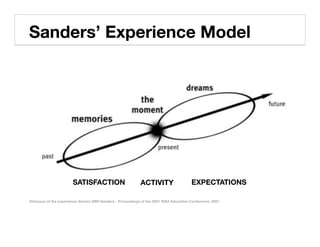
Sanders’ Experience Model!


                       SATISFACTION!                         ACTIVITY!                   EXPECTATIONS!

Virtuosos of the experience domain EBN Sanders - Proceedings of the 2001 IDSA Education Conference, 2001!
Memories!
The Moment!
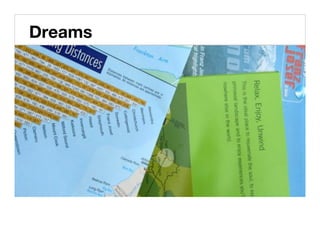
Dreams!
Comparing Expectations to Reality!


Experience Cycle Jess McMullin 2003-2004!
POSITIVE MEMORY
DEPENDS ON HOW
WELL DREAMS ARE MET
IN THE PRESENT
MOMENT!
USER EXPERIENCE
DESIGN IS THE
PRACTICE OF
DESIGNING PRODUCTS
AND SERVICES SO THAT
THE PRESENT MOMENT
MEETS THOSE DREAMS
& EXPECTATIONS!
2!

WHAT IS USER EXPERIENCE
DESIGN?!
User Experience
Design makes things
work better for
people.!
UX DESIGN IS A
COLLECTION OF
DISCIPLINES!
Design Disciplines!


Jess McMullin & Louis Rosenfeld, 2002!
Design Practice(s)!


Liz Sanders, An Evolving Map of Design Practice and Design Research, Interactions, November 2008!
UX DESIGN IS NOT
DECORATION!
Design Maturity!


Jess McMullin, 2005!
Elements of User Experience!


jjg.net/elements!
UX DESIGN IS A
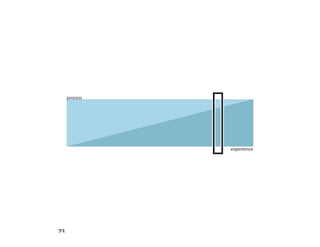
PROCESS!
process


                experience


23!
U.S.E. Design Process!


Jess McMullin, 2004!
Diverge, Converge, and Iterate!
The Double Diamond Design Process!

!"#$%&'(                                    !')"*' !'#"+*                                                               !'&',%-


   Gather Data!                             Frame the Problem!                         Explore Solutions!               Evaluate Solutions!
   Create Concepts!                         Define Scope!                               Evaluate Solutions!              Develop Solutions!
   Collaborative Codesign!                  Set Resources!                             Refine Solutions!                 Document Solutions!
 Based on the UK Design Council’s in depth study of design and innovation approaches at leading firms such as Philips,
 Lego, and IDEO.!
“The Squiggle” Design Process!


Damien Newman, http://v1.centralstory.com/about/squiggle/!
UX DESIGN IS A
MINDSET!
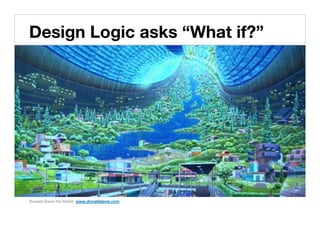
Design Logic asks “What if?”!


Donald Davis for NASA, www.donalddavis.com!
Design Logic says “Yes, and…”!


Flickr user andynew, http://www.flickr.com/photos/92523880@N00/!
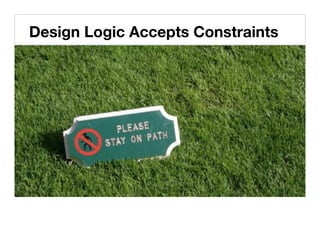
Design Logic Accepts Constraints!
Design Logic Accepts Ambiguity!
Design Logic Considers Systems Across Scales!


http://www.flickr.com/photos/nsalt!
The forest….!


http://www.flickr.com/photos/tambako!
The trees…!
And the detailed structure…!
Design Logic Makes the Abstract Tangible!


Jess McMullin, Business Origami!
Design Logic is Human-Centred!


D Sharon Pruit, http://www.flickr.com/photos/pinksherbet!
UX DESIGN IS A
SKILLSET!
UX Skill Sets!
Core UX Skills!                                Extended UX Skills!
  ‣     Field Research & Finding User Needs!
                                                ‣    Project management & development
  ‣     Facilitation & Codesign!                     approaches!

  ‣     Visual Thinking!                        ‣    Design-to-development documentation!

  ‣     Information Architecture!               ‣    Front End Code!

  ‣     Interaction Design!                     ‣    Back End Technology!

  ‣     Visual Design!                          ‣    Web Analytics!

  ‣     Information Design & Visualization!     ‣    Social Functionality!

  ‣     Copywriting & Content Strategy!         ‣    Marketing!

  ‣     Usability Testing, Evaluation, and      ‣    ROI & Business Value!
        Recommendations!
                                                ‣    Business Acumen!
  ‣     Scope Management!
                                                ‣    Domain Knowledge!
  ‣     Fast Iteration Management!
Based on Jared Spool’s UX skills groupings!
THAT’S A LONG
LIST. WHERE DO I
START?!
UNDERSTANDING"
+SOLVING!
3!

CORE UX SKILLS: BUILDING
BLOCKS!
LISTENING"
NOTICING"
MAKING SENSE OF THINGS"
VISUAL THINKING"
SKETCHING & ITERATION"
CRITIQUE"
!
LISTENING!
Exercise: Active Listening!

                                       ‣  Pair up!
                                       ‣  Ask your partner
                                          what they did over
                                          lunch!
                                       ‣  Use only open-ended
                                          questions (no yes or
                                          no answers).!
                                       ‣  Reflect your
                                          understanding by
                                          restating their
                                          statements!
http://www.flickr.com/photos/liquene!
NOTICING!
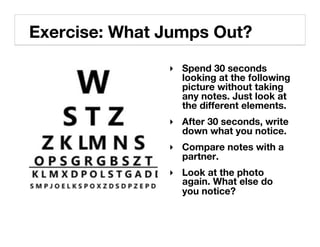
Exercise: What Jumps Out?!
               ‣  Spend 30 seconds
                  looking at the following
                  picture without taking
                  any notes. Just look at
                  the different elements.!
               ‣  After 30 seconds, write
                  down what you notice.!
               ‣  Compare notes with a
                  partner.!
               ‣  Look at the photo
                  again. What else do
                  you notice?!
http://www.flickr.com/photos/srgblog/!
Write & Then Compare Notes!
http://www.flickr.com/photos/srgblog/!
MAKING SENSE
OF THINGS:"
SYNTHESIS!
53!
VISUAL THINKING!
Visual thinking is
about ideas, not
about photorealism.!
Dave Gray’s Visual Alphabet @davegray!


http://www.flickr.com/photos/davegray/110407772!
Ed Emberly: Draw some people!
                               @davegray suggests:!
                               ‣  Start with the body!
                               ‣  Then the head!
                               ‣  Then facial
                                  expression!
                               ‣  Then the legs!
                               ‣  And the arms.!
                              #vizthink!
Ed Emberly people drawings!
Visual Storytelling!


http://www.flickr.com/photos/goodsardine-clean/2998923846!
VISUAL THINKING!


http://www.flickr.com/photos/jonnygoldstein/4109830386!
VISUAL THINKING!


http://www.flickr.com/photos/jonnygoldstein/3586430756/!
SKETCHING"
& ITERATION!
Sketching + Visual Thinking!


 http://www.flickr.com/photos/chatiryworld!
Exercise: The House that Jack (or
Jill) Drew!
‣  Draw a House"
   (20 seconds)!
‣  Draw your Dream
   House (20 sec)!
‣  Pair Up: Explain Your
   Dream House (3 min)!
‣  Draw your Dream
   Home again (2 min)!
‣  Discussion: How did
   your house change?!
CRITIQUE!
Critique accelerates quality!


http://www.flickr.com/photos/drew-harry!
4!

UX TOOLS AND TECHNIQUES!
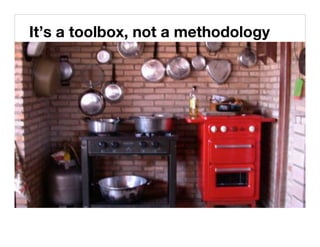
It’s a toolbox, not a methodology!
FIELDWORK!
Field Research!

What !!                        Why!
 ‣  Anthropological
                                ‣  Provides rich insights
    approach focused on
                                   into behavior,
    individual and group
                                   experience, and
    behavior in context.
                                   expectations within a
    Uses contextual
                                   system and can reveal
    observation,
                                   unmet needs and
    interviews, diaries, and
                                   opportunities for teams
    artifact collection to
                                   to differentiate their
    investigate customs,
                                   products and services.!
    rituals, and myths.!
Exercise for Another Time: The Story of Stuff!


                                        ‣  Pair up!
                                        ‣  Rock paper scissors
                                           to decide who is
                                           interviewer & who is
                                           participant!
                                        ‣  Participant shares
                                           the contents of their
                                           bag / backpack /
                                           wallet / pockets!
                                        ‣  Interviewer asks
                                           open ended
                                           questions!
http://www.flickr.com/photos/biscotte!
CODESIGN!
Codesign!

What!                      Why!
 ‣  An approach to design   ‣  Codesign taps into people’s
    that actively involves      sense of the future.
                                Sessions enable people
    stakeholders in the         with different expertise and
    design process as co-       skills to contribute equally.
    creators. Exercises         Helps articulate ideas and
                                issues that will not surface
    help the group to           in other ways. Can be an
    explore the problem         efficient way to get a wide
    space, current and          range of input. May
                                enhance user buy-in by
    ideal experiences, and      making them feel more
    ways of achieving the       included, and giving them a
    ideal.!                     greater sense of ownership.!
Ditch Focus Groups: Get Users and Stakeholders to Make Things!
Values Collage!
Collaborative Experience Mapping!
Business Origami!
PERSONAS!
Personas!

What!                          Why!
 ‣  A composite character
                                ‣  Creates empathy for
    created to personify a          the specific user and
    specific segment of              avoids self-referential
    users. Includes a name,         design. Focus on
    picture, user quotes and        accomplishing specific
    other info with a focus on
    goals, motivation, and          goals allows the
    behavior. Based on user         product to satisfy
    research, personas are          many people with that
    often paired with               goal, whether or not
    representative scenarios."      they match a specific
    !
                                    market segment.!
Persona Example!
Exercise: Empathy Map!
                                                  ‣         Draw a simple head"
                                                            (circle, nose, and a dot for the
                                                            eye)!
                                                  ‣         Divide your page.!
                                                  ‣         Write one thing that your client
                                                            or citizen is:!
                                                       •       Thinking and Feeling!

                                                       •       Hearing!

                                                       •       Gains!

                                                       •       Pains!

                                                       •       Seeing!

                                                  ‣         Share your map with your
                                                            neighbor ! !
XPLANE Empathy Map, via http://gogamestorm.com!
JOURNEY MAPS"
BLUEPRINTS"
UX SWIMLANES!
Journey Map!

What!                       Why!
 ‣  Visualization of
    experience across        ‣  A holistic view of
    locations, time, and         experience through
    channels. Captures           time with specific
    interactions between         touchpoints promotes
    user and product or          better coordination of
    service at touchpoints.      cross-channel design
    May also show                and reveals
    associated emotional         opportunities for new
    states, business             or improved
    objectives, or other
    layers.!                     interactions.!
Journey Map!


nForm!
UX Swimlanes!


        http://nform.com!
MENTAL MODEL!
Mental Model!

What!                            Why!
                                  ‣  Provides gap analysis,
 ‣  Diagram that breaks
                                     shows product
    down user activities into
                                     opportunities, and helps
    discrete tasks, arranges
                                     develop task-based
    these activities in
                                     information architecture.
    columns, and then uses
                                     Serves as a roadmap,
    the same columns to
                                     and anchors
    align the product or
                                     conversations about
    service features,
                                     future features and
    functions, and content
                                     content in actual user
    that support these
                                     needs instead of
    activities. May also align
                                     individual stakeholder
    business objectives.!
                                     agendas.!
Mental Model!
89!
CARD SORTING!
Card Sorting!
What!                            Why!
                                  ‣  Often used to guide
 ‣  Activity where a
    participant sorts labeled         navigation design, card
    cards into similar                sorting analysis shows
    groups. May be an open            how often participants
    sort, where piles are             grouped specific cards
    created based on only             together. Discussing
    on perceived similarity of        why the cards are
    cards, or a closed sort           placed in a particular pile
    where piles are grouped           yields deeper insight into
    according to provided             user expectations for
    categories.!
                                      content.!
A Card Sort!
Exercise: Three of These Things Belong Together!


Please group the items below in at least two
lists.!
•  red!        •  three!     •  macintosh!
•  peach!      •  iphone!    •  spartan!
•  apple!      •  house!     •  Athens!
•  adobe!      •  orange!    •  windows!
•  Arizona!    •  spruce!    •  Georgia!
You can use online card sorting
tools like WebSort.net!
SITE MAP!
Site Map!

What!                        Why!
 ‣  Diagram to show           ‣  Document site
    overall site structure        structure to ensure
    and relationships of          that all content is
    content. For large sites      accounted for. Guides
    may document                  navigation design, site
                                  index, and content
    patterns of                   migration. Good for
    organization that are         hierarchical
    applied across similar        organization, less
    sections, instead of          effective visualizing
    accounting for every          very large sites, facets
    single page.!                 or tags.!
Site Map!


http://www.flickr.com/photos/thefangmonster!
PROTOTYPING"
& WIREFRAMING!
IT’S EASIER TO FIX IT ON THE
DRAFTING TABLE WITH AN
ERASER THAN WITH A
SLEDGEHAMMER ON THE
CONSTRUCTION SITE   "
- FRANK LLOYD WRIGHT!
Wireframing!

What !!                         Why!
 ‣  One step past                ‣  Communicate the
    sketching-- shows the           specifications for
    layout of an interface          individual pages or
    screen. Describes each          templates. Also used as
    element and behavior.           prototype for usability
    Focus is on layout,             testing. Prevents
    labels, and interactions.       premature conversations
    Avoids finished design           about surface issues like
    elements such as color          color, instead focuses
    and photos, instead             discussion on correct
    using placeholders for          and complete content
    images, and sometimes           and functionality.!
    copy.!
A Wireframe!


http://www.flickr.com/photos/24801682@N08/!
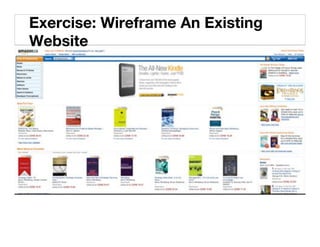
Exercise: Wireframe An Existing
Website!
USABILITY
TESTING!
Usability Testing!

What !!                       Why!
 ‣  Real users test drive a    ‣  Understand what works
    prototype or                  and what doesn’t. Often
    production system.            included in iterative
    Usually one-on-one,
                                  development with each
    with a participant and
                                  cycle so that the product
    moderator, the
                                  continually improves.
    participant thinks out
                                  Excels at finding specific
    loud as they complete
                                  interface problems,
    representative tasks.
                                  including layout, labeling,
    Typically 6-8
                                  flow, navigation and
    participants per user
                                  interaction.!
    segment.!
A Usability Testing Session!
Exercise: Take a Test Drive, Get a Free Reality Check!


Edmonton.ca!
5!

HOW TO GET STARTED!
LEARNING &
DOING!
THEORY!
Books!
                          ‣  Observing the User
‣  The Elements of User      Experience!
   Experience!
                          ‣  Prototyping!
‣  A Project Guide to
   UX Design!             ‣  Designing for People!
‣  Communicating          ‣  The Design of
   Design!                   Everyday Things!
‣  Information
                          ‣  Web Form Design!
   Architecture:
   Blueprints for the     ‣  Don’t Make Me Think!
   Web, 2nd. Ed.!
Online!
‣  UX Magazine"
   uxmag.com!           ‣  IA Institute"
                           iainstitute.org!
‣  Boxes and Arrows"
   boxesandarrows.com! ‣  Interaction
‣  Johnny Holland"
                          Designers
   johnnyholland.org!     Association"
                          ixda.org!
‣  UX Matters"
   uxmatters.com!       ‣  Design Thinking
‣  UX Booth"               Network"
                          designthinkingnetwork.com!
   uxbooth.com!
Events!

‣  IA Summit"
   iasummit.org!           ‣  Local Design
‣  Interaction"               Events!
   interaction.ixda.org!   ‣  Startup Edmonton
‣  UX Week"                   Courses & Talks!
   uxweek.com!             ‣  Guru Digital Arts
‣  UXCamp"                    College Events!
   varies!
& PRACTICE!
Taking time every week to sharpen your skills!


http://www.flickr.com/photos/drew-harry/!
‣  Practice through play!


      116!
‣  Learn to code HTML & CSS!


      117!
‣  Volunteer!


      118!
‣  Find employers who do digital & interactive, not
   just pay lip service!


      119!
‣  Take the opportunity to work on products, not ads!


      120!
‣  Let the world teach you. Notice frustrations, good
   experiences, flow, process, and people!


      121!
‣  Spend time people watching!


      122!
MENTORING!
Where to Find Mentors?!


‣  Among your peers!
‣  Specialists within your organization (UofA)!
‣  Local Community (UX Book Club, Startup
   Edmonton)!
‣  Events!
‣  Online Community (Associations, Discussion
   Groups, and Social Media)!
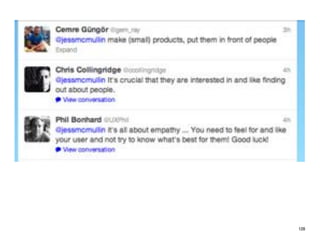
Some advice from
some virtual
mentors.!

                   125!
126!
127!
128!
129!
6!

Q&A!
Discussion!
THANK YOU!!
Getting Into User Experience Design!
October 23, 2012 for SDA OnDesign Series!
!

Jess McMullin!
@jessmcmullin!
Jess AT ctzn DOT ca!
citizenexperience.com!

Getting into User Experience Design

  • 1.
    Getting into UserExperience Design! Jess McMullin | Centre for Citizen Experience! @jessmcmullin! citizenexperience.com" Student Design Association OnDesign Series! Edmonton, October 23rd, 2012! 1!
  • 2.
  • 3.
    Hi there!! Jess McMullin! 1996 – started doing web design & discovered UX! 2003 – my company nForm, co-founded IA Institute! 2009 – Left nForm to focus on citizen experience! 2012 – IA Summit co-chair, Rosenfeld Media Expert, UXCamp Ottawa & here today! Photo: Heather McMullin!
  • 4.
    1. WHAT ISUSER EXPERIENCE?" 2. WHAT IS USER EXPERIENCE DESIGN?" 3. CORE UX SKILLS." 4. UX TOOLS AND TECHNIQUES." 5. HOW TO GET STARTED." 6. Q&A." !
  • 5.
    1! WHAT IS USEREXPERIENCE?!
  • 6.
    THE EXPERIENCE!OF EXPERIENCE USING PRODUCTS AND SERVICES TO MEET A NEED OR WANT!
  • 7.
    Sanders’ Experience Model! SATISFACTION! ACTIVITY! EXPECTATIONS! Virtuosos of the experience domain EBN Sanders - Proceedings of the 2001 IDSA Education Conference, 2001!
  • 8.
  • 9.
  • 10.
  • 11.
    Comparing Expectations toReality! Experience Cycle Jess McMullin 2003-2004!
  • 12.
    POSITIVE MEMORY DEPENDS ONHOW WELL DREAMS ARE MET IN THE PRESENT MOMENT!
  • 13.
    USER EXPERIENCE DESIGN ISTHE PRACTICE OF DESIGNING PRODUCTS AND SERVICES SO THAT THE PRESENT MOMENT MEETS THOSE DREAMS & EXPECTATIONS!
  • 14.
    2! WHAT IS USEREXPERIENCE DESIGN?!
  • 15.
    User Experience Design makesthings work better for people.!
  • 16.
    UX DESIGN ISA COLLECTION OF DISCIPLINES!
  • 17.
    Design Disciplines! Jess McMullin& Louis Rosenfeld, 2002!
  • 18.
    Design Practice(s)! Liz Sanders,An Evolving Map of Design Practice and Design Research, Interactions, November 2008!
  • 19.
    UX DESIGN ISNOT DECORATION!
  • 20.
  • 21.
    Elements of UserExperience! jjg.net/elements!
  • 22.
    UX DESIGN ISA PROCESS!
  • 23.
    process experience 23!
  • 24.
  • 25.
  • 26.
    The Double DiamondDesign Process! !"#$%&'( !')"*' !'#"+* !'&',%- Gather Data! Frame the Problem! Explore Solutions! Evaluate Solutions! Create Concepts! Define Scope! Evaluate Solutions! Develop Solutions! Collaborative Codesign! Set Resources! Refine Solutions! Document Solutions! Based on the UK Design Council’s in depth study of design and innovation approaches at leading firms such as Philips, Lego, and IDEO.!
  • 27.
    “The Squiggle” DesignProcess! Damien Newman, http://v1.centralstory.com/about/squiggle/!
  • 28.
    UX DESIGN ISA MINDSET!
  • 29.
    Design Logic asks“What if?”! Donald Davis for NASA, www.donalddavis.com!
  • 30.
    Design Logic says“Yes, and…”! Flickr user andynew, http://www.flickr.com/photos/92523880@N00/!
  • 31.
  • 32.
  • 33.
    Design Logic ConsidersSystems Across Scales! http://www.flickr.com/photos/nsalt!
  • 34.
  • 35.
  • 36.
    And the detailedstructure…!
  • 37.
    Design Logic Makesthe Abstract Tangible! Jess McMullin, Business Origami!
  • 38.
    Design Logic isHuman-Centred! D Sharon Pruit, http://www.flickr.com/photos/pinksherbet!
  • 39.
    UX DESIGN ISA SKILLSET!
  • 40.
    UX Skill Sets! CoreUX Skills! Extended UX Skills! ‣  Field Research & Finding User Needs! ‣  Project management & development ‣  Facilitation & Codesign! approaches! ‣  Visual Thinking! ‣  Design-to-development documentation! ‣  Information Architecture! ‣  Front End Code! ‣  Interaction Design! ‣  Back End Technology! ‣  Visual Design! ‣  Web Analytics! ‣  Information Design & Visualization! ‣  Social Functionality! ‣  Copywriting & Content Strategy! ‣  Marketing! ‣  Usability Testing, Evaluation, and ‣  ROI & Business Value! Recommendations! ‣  Business Acumen! ‣  Scope Management! ‣  Domain Knowledge! ‣  Fast Iteration Management! Based on Jared Spool’s UX skills groupings!
  • 41.
    THAT’S A LONG LIST.WHERE DO I START?!
  • 42.
  • 43.
    3! CORE UX SKILLS:BUILDING BLOCKS!
  • 44.
    LISTENING" NOTICING" MAKING SENSE OFTHINGS" VISUAL THINKING" SKETCHING & ITERATION" CRITIQUE" !
  • 45.
  • 46.
    Exercise: Active Listening! ‣  Pair up! ‣  Ask your partner what they did over lunch! ‣  Use only open-ended questions (no yes or no answers).! ‣  Reflect your understanding by restating their statements! http://www.flickr.com/photos/liquene!
  • 47.
  • 48.
    Exercise: What JumpsOut?! ‣  Spend 30 seconds looking at the following picture without taking any notes. Just look at the different elements.! ‣  After 30 seconds, write down what you notice.! ‣  Compare notes with a partner.! ‣  Look at the photo again. What else do you notice?!
  • 49.
  • 50.
    Write & ThenCompare Notes!
  • 51.
  • 52.
  • 53.
  • 54.
  • 55.
    Visual thinking is aboutideas, not about photorealism.!
  • 56.
    Dave Gray’s VisualAlphabet @davegray! http://www.flickr.com/photos/davegray/110407772!
  • 57.
    Ed Emberly: Drawsome people! @davegray suggests:! ‣  Start with the body! ‣  Then the head! ‣  Then facial expression! ‣  Then the legs! ‣  And the arms.! #vizthink! Ed Emberly people drawings!
  • 58.
  • 59.
  • 60.
  • 61.
  • 62.
    Sketching + VisualThinking! http://www.flickr.com/photos/chatiryworld!
  • 63.
    Exercise: The Housethat Jack (or Jill) Drew! ‣  Draw a House" (20 seconds)! ‣  Draw your Dream House (20 sec)! ‣  Pair Up: Explain Your Dream House (3 min)! ‣  Draw your Dream Home again (2 min)! ‣  Discussion: How did your house change?!
  • 64.
  • 65.
  • 66.
    4! UX TOOLS ANDTECHNIQUES!
  • 67.
    It’s a toolbox,not a methodology!
  • 68.
  • 69.
    Field Research! What !! Why! ‣  Anthropological ‣  Provides rich insights approach focused on into behavior, individual and group experience, and behavior in context. expectations within a Uses contextual system and can reveal observation, unmet needs and interviews, diaries, and opportunities for teams artifact collection to to differentiate their investigate customs, products and services.! rituals, and myths.!
  • 70.
    Exercise for AnotherTime: The Story of Stuff! ‣  Pair up! ‣  Rock paper scissors to decide who is interviewer & who is participant! ‣  Participant shares the contents of their bag / backpack / wallet / pockets! ‣  Interviewer asks open ended questions! http://www.flickr.com/photos/biscotte!
  • 71.
  • 72.
    Codesign! What! Why! ‣  An approach to design ‣  Codesign taps into people’s that actively involves sense of the future. Sessions enable people stakeholders in the with different expertise and design process as co- skills to contribute equally. creators. Exercises Helps articulate ideas and issues that will not surface help the group to in other ways. Can be an explore the problem efficient way to get a wide space, current and range of input. May enhance user buy-in by ideal experiences, and making them feel more ways of achieving the included, and giving them a ideal.! greater sense of ownership.!
  • 73.
    Ditch Focus Groups:Get Users and Stakeholders to Make Things!
  • 74.
  • 75.
  • 76.
  • 77.
  • 78.
    Personas! What! Why! ‣  A composite character ‣  Creates empathy for created to personify a the specific user and specific segment of avoids self-referential users. Includes a name, design. Focus on picture, user quotes and accomplishing specific other info with a focus on goals, motivation, and goals allows the behavior. Based on user product to satisfy research, personas are many people with that often paired with goal, whether or not representative scenarios." they match a specific ! market segment.!
  • 79.
  • 80.
    Exercise: Empathy Map! ‣  Draw a simple head" (circle, nose, and a dot for the eye)! ‣  Divide your page.! ‣  Write one thing that your client or citizen is:! •  Thinking and Feeling! •  Hearing! •  Gains! •  Pains! •  Seeing! ‣  Share your map with your neighbor ! ! XPLANE Empathy Map, via http://gogamestorm.com!
  • 81.
  • 82.
    Journey Map! What! Why! ‣  Visualization of experience across ‣  A holistic view of locations, time, and experience through channels. Captures time with specific interactions between touchpoints promotes user and product or better coordination of service at touchpoints. cross-channel design May also show and reveals associated emotional opportunities for new states, business or improved objectives, or other layers.! interactions.!
  • 83.
  • 85.
    UX Swimlanes! http://nform.com!
  • 86.
  • 87.
    Mental Model! What! Why! ‣  Provides gap analysis, ‣  Diagram that breaks shows product down user activities into opportunities, and helps discrete tasks, arranges develop task-based these activities in information architecture. columns, and then uses Serves as a roadmap, the same columns to and anchors align the product or conversations about service features, future features and functions, and content content in actual user that support these needs instead of activities. May also align individual stakeholder business objectives.! agendas.!
  • 88.
  • 89.
  • 90.
  • 91.
    Card Sorting! What! Why! ‣  Often used to guide ‣  Activity where a participant sorts labeled navigation design, card cards into similar sorting analysis shows groups. May be an open how often participants sort, where piles are grouped specific cards created based on only together. Discussing on perceived similarity of why the cards are cards, or a closed sort placed in a particular pile where piles are grouped yields deeper insight into according to provided user expectations for categories.! content.!
  • 92.
  • 93.
    Exercise: Three ofThese Things Belong Together! Please group the items below in at least two lists.! •  red! •  three! •  macintosh! •  peach! •  iphone! •  spartan! •  apple! •  house! •  Athens! •  adobe! •  orange! •  windows! •  Arizona! •  spruce! •  Georgia!
  • 94.
    You can useonline card sorting tools like WebSort.net!
  • 95.
  • 96.
    Site Map! What! Why! ‣  Diagram to show ‣  Document site overall site structure structure to ensure and relationships of that all content is content. For large sites accounted for. Guides may document navigation design, site index, and content patterns of migration. Good for organization that are hierarchical applied across similar organization, less sections, instead of effective visualizing accounting for every very large sites, facets single page.! or tags.!
  • 97.
  • 98.
  • 99.
    IT’S EASIER TOFIX IT ON THE DRAFTING TABLE WITH AN ERASER THAN WITH A SLEDGEHAMMER ON THE CONSTRUCTION SITE " - FRANK LLOYD WRIGHT!
  • 100.
    Wireframing! What !! Why! ‣  One step past ‣  Communicate the sketching-- shows the specifications for layout of an interface individual pages or screen. Describes each templates. Also used as element and behavior. prototype for usability Focus is on layout, testing. Prevents labels, and interactions. premature conversations Avoids finished design about surface issues like elements such as color color, instead focuses and photos, instead discussion on correct using placeholders for and complete content images, and sometimes and functionality.! copy.!
  • 101.
  • 102.
    Exercise: Wireframe AnExisting Website!
  • 103.
  • 104.
    Usability Testing! What !! Why! ‣  Real users test drive a ‣  Understand what works prototype or and what doesn’t. Often production system. included in iterative Usually one-on-one, development with each with a participant and cycle so that the product moderator, the continually improves. participant thinks out Excels at finding specific loud as they complete interface problems, representative tasks. including layout, labeling, Typically 6-8 flow, navigation and participants per user interaction.! segment.!
  • 105.
  • 106.
    Exercise: Take aTest Drive, Get a Free Reality Check! Edmonton.ca!
  • 108.
    5! HOW TO GETSTARTED!
  • 109.
  • 110.
  • 111.
    Books! ‣  Observing the User ‣  The Elements of User Experience! Experience! ‣  Prototyping! ‣  A Project Guide to UX Design! ‣  Designing for People! ‣  Communicating ‣  The Design of Design! Everyday Things! ‣  Information ‣  Web Form Design! Architecture: Blueprints for the ‣  Don’t Make Me Think! Web, 2nd. Ed.!
  • 112.
    Online! ‣  UX Magazine" uxmag.com! ‣  IA Institute" iainstitute.org! ‣  Boxes and Arrows" boxesandarrows.com! ‣  Interaction ‣  Johnny Holland" Designers johnnyholland.org! Association" ixda.org! ‣  UX Matters" uxmatters.com! ‣  Design Thinking ‣  UX Booth" Network" designthinkingnetwork.com! uxbooth.com!
  • 113.
    Events! ‣  IA Summit" iasummit.org! ‣  Local Design ‣  Interaction" Events! interaction.ixda.org! ‣  Startup Edmonton ‣  UX Week" Courses & Talks! uxweek.com! ‣  Guru Digital Arts ‣  UXCamp" College Events! varies!
  • 114.
  • 115.
    Taking time everyweek to sharpen your skills! http://www.flickr.com/photos/drew-harry/!
  • 116.
  • 117.
    ‣  Learn tocode HTML & CSS! 117!
  • 118.
  • 119.
    ‣  Find employerswho do digital & interactive, not just pay lip service! 119!
  • 120.
    ‣  Take theopportunity to work on products, not ads! 120!
  • 121.
    ‣  Let theworld teach you. Notice frustrations, good experiences, flow, process, and people! 121!
  • 122.
    ‣  Spend timepeople watching! 122!
  • 123.
  • 124.
    Where to FindMentors?! ‣  Among your peers! ‣  Specialists within your organization (UofA)! ‣  Local Community (UX Book Club, Startup Edmonton)! ‣  Events! ‣  Online Community (Associations, Discussion Groups, and Social Media)!
  • 125.
    Some advice from somevirtual mentors.! 125!
  • 126.
  • 127.
  • 128.
  • 129.
  • 130.
  • 131.
  • 132.
    THANK YOU!! Getting IntoUser Experience Design! October 23, 2012 for SDA OnDesign Series! ! Jess McMullin! @jessmcmullin! Jess AT ctzn DOT ca! citizenexperience.com!