Get Organised Power Hour

       Kirsty Thomson
      Subject Librarian


                           October 2012
Today’s Power Hour
• Organising paper.
  – lecture notes, printouts, etc.
• Organising electronic material.
  – on your computer.
  – online tools.
What year are you in?
0%   1. First year of an undergraduate (first)
        degree.
0%
     2. Other year of undergraduate degree.
0%   3. Postgraduate student.
0%   4. Research assistant/staff.
Key point for today’s session
• Stop thinking about how to organise your files
  and paperwork.
• Start thinking about how you use this
  material.
• Thinking about how and why you use
  something should influence how store it.
Lecture Notes


  http://www.flickr.com/photos/pschwager/5300647684/
Lecture notes
• In small groups, come up with three reasons
  why we keep lecture notes.
• PGs/researchers – think about notes from
  meetings.
Why do we keep our lecture notes?
• [Class discussion].
Main reason for keeping
         lecture notes


So that you can use them again.
How do you take lecture notes?
0%   1.   Annotate printout of slides
0%   2.   Write notes in a jotter/spiral bound pad.
0%   3.   Write notes on loose paper.
0%   4.    Take notes directly onto laptop/tablet.
0%   5.   I don’t take any extra notes in lectures.
Organising your notes
• Can’t study two different subjects at exactly the
  same time.
   – therefore arrange your notes in separate folders for
     each subject.
• Pad of paper?
   – can interfile with VLE printouts, revision notes, etc.
• Spiral bound notebook for each course?
   – advantage is that you don’t lose any pages of notes.
   – if using a notebook, write details of any loose
     handouts in your notebook.
Tips
• Put the date on everything!
• Write course, title of lecture, date, and page
  number onto every loose sheet of paper.
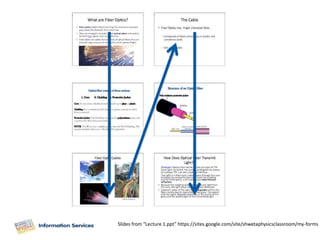
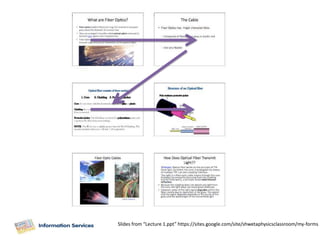
• If you are using a PowerPoint that goes the
  “wrong way”, mark this on the sheet.
Slides from “Lecture 1.ppt” https://sites.google.com/site/shwetaphysicsclassroom/my-forms
• File things soon after the lecture.
• Don’t waste time copying out lecture notes
  just so that you can store them neatly:
  – are you thinking about what you are re-writing?
• Use your original notes.
OR
• Turn them into study notes:
  – add summaries of sections; definitions; extra
    notes.
Colour
• Make use of colour to find things more easily.
• In folders:
  – different coloured paper for your revision notes.
  – easier to find within folder when you are studying.
• In notes:
  – coloured pens for types of notes, e.g., red for
    summaries.
  – Usefulness depends on your learning style:
     • does this make it easier to find things within notes ..
     • … or is it “busywork”?
• See http://www.paperlovestory.com/2011/06/how-i-organise-my-
  lecture-notes.html for an example of colour in lecture
  notes.
   – would this help you?
   – or would you spend a lot of time making your
     notes look attractive instead of learning!
   – usefulness depends on your learning style.
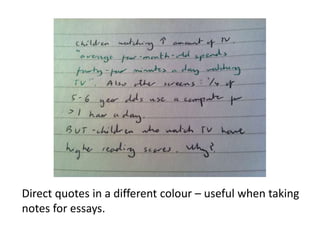
• Note use of red pen to make words stand out.
   – useful for section headings and keywords.
   – aids studying.
Direct quotes in a different colour – useful when taking
notes for essays.
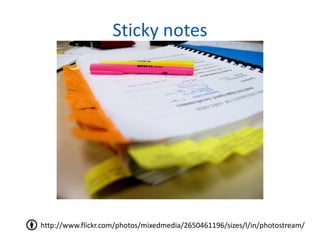
Sticky notes


http://www.flickr.com/photos/mixedmedia/2650461196/sizes/l/in/photostream/
Paper
•   Journal articles.
•   Lecture notes.
•   Course handbooks ...
•   Think before you print:
    – do you need it on paper?
• How will you use it?
    – this should influence how you store it.
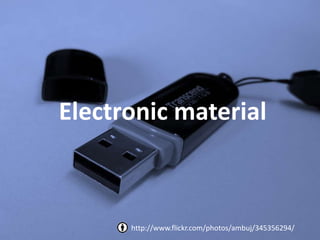
Electronic material


      http://www.flickr.com/photos/ambuj/345356294/
Electronic material
• Electronic material could be:
  – downloaded journal articles.
  – downloads from Vision.
  – websites you want to use again.
  – essays that you’ve written.
  – lecture notes that you’ve written.
Organising electronic material
• Same principle applies:
     Think about how you will use it again.

• Electronic material could be online or on your
  computer.
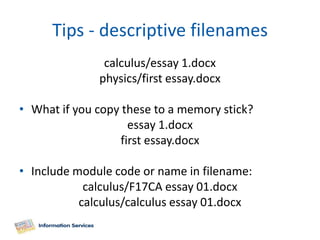
Tips - descriptive filenames
               calculus/essay 1.docx
              physics/first essay.docx

• What if you copy these to a memory stick?
                    essay 1.docx
                  first essay.docx

• Include module code or name in filename:
            calculus/F17CA essay 01.docx
           calculus/calculus essay 01.docx
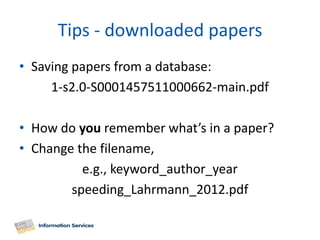
Tips - downloaded papers
• Saving papers from a database:
     1-s2.0-S0001457511000662-main.pdf

• How do you remember what’s in a paper?
• Change the filename,
          e.g., keyword_author_year
        speeding_Lahrmann_2012.pdf
Online material
• Lots of apps and websites to help you store
  and relocate online material.
• Usefulness of these depends on your study
  style.
• Online doesn’t mean better:
  – do you work more effectively with folders of
    paper/saving things on your computer?
Online Tools and Apps
Are you already using an online
tool or app to organise your notes?
E.g., Delicious; Evernote; Instapaper.


                                           0%
                                           0%
    1. Yes
    2. No


                                     Yes   No
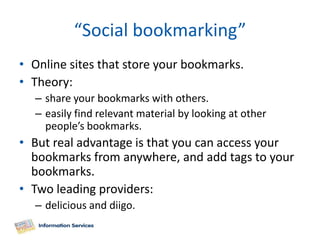
“Social bookmarking”
• Online sites that store your bookmarks.
• Theory:
  – share your bookmarks with others.
  – easily find relevant material by looking at other
    people’s bookmarks.
• But real advantage is that you can access your
  bookmarks from anywhere, and add tags to your
  bookmarks.
• Two leading providers:
  – delicious and diigo.
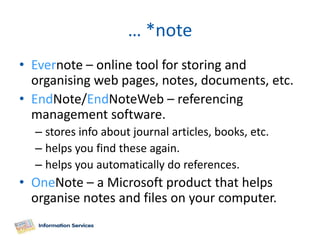
… *note
• Evernote – online tool for storing and
  organising web pages, notes, documents, etc.
• EndNote/EndNoteWeb – referencing
  management software.
  – stores info about journal articles, books, etc.
  – helps you find these again.
  – helps you automatically do references.
• OneNote – a Microsoft product that helps
  organise notes and files on your computer.
Evernote
• Very popular – good “buzz” online.
• But not supported, owned or backed-up by
  the university.
• If you are going to use Evernote you must
  make back-ups.
• Lots of help using Evernote online.
Instapaper
• Free online service via browser add-on.
• Two main features:
• Read Now
  – removes adverts, fonts, colours, etc., from webpages.
• Read Later
  – Stores a “cleaned” version of the webpage in your
    Instapaper account.
  – Can read later via Instapaper website or sync with
    smart phone/Kindle/iPad etc
  – Using this could reduce your printing out?
  – Works with HTML but not with PDF.
Have you used reference
       management software
0%   1.   No, never heard of it.
0%   2.   Have had a quick look but not used.
0%   3.   Used EndNote Web.
0%   4.   Used something else.
EndNoteWeb
• Reference management software.
• Use this to store information about what you
  are reading.
• Also helps you add references to your work.
Summary
• Think about how you will use the information:
  – this should dictate how you store it.
• Online tools not necessarily better for
  everyone/everything, but do have some
  advantages.
• Everyone will have a different system:
  – find something that works for you.
  – only use methods that save you time.
Other useful Power Hours
•   EndNoteWeb.
•   Time Management.
•   Tips for Effective Study.
•   Be Prepared! The Exam Survival Guide.
•   http://isguides.hw.ac.uk/powerhours

Get Organised IS Power Hour

  • 1.
    Get Organised PowerHour Kirsty Thomson Subject Librarian October 2012
  • 2.
    Today’s Power Hour •Organising paper. – lecture notes, printouts, etc. • Organising electronic material. – on your computer. – online tools.
  • 3.
    What year areyou in? 0% 1. First year of an undergraduate (first) degree. 0% 2. Other year of undergraduate degree. 0% 3. Postgraduate student. 0% 4. Research assistant/staff.
  • 4.
    Key point fortoday’s session • Stop thinking about how to organise your files and paperwork. • Start thinking about how you use this material. • Thinking about how and why you use something should influence how store it.
  • 5.
    Lecture Notes http://www.flickr.com/photos/pschwager/5300647684/
  • 6.
    Lecture notes • Insmall groups, come up with three reasons why we keep lecture notes. • PGs/researchers – think about notes from meetings.
  • 7.
    Why do wekeep our lecture notes? • [Class discussion].
  • 8.
    Main reason forkeeping lecture notes So that you can use them again.
  • 9.
    How do youtake lecture notes? 0% 1. Annotate printout of slides 0% 2. Write notes in a jotter/spiral bound pad. 0% 3. Write notes on loose paper. 0% 4. Take notes directly onto laptop/tablet. 0% 5. I don’t take any extra notes in lectures.
  • 10.
    Organising your notes •Can’t study two different subjects at exactly the same time. – therefore arrange your notes in separate folders for each subject. • Pad of paper? – can interfile with VLE printouts, revision notes, etc. • Spiral bound notebook for each course? – advantage is that you don’t lose any pages of notes. – if using a notebook, write details of any loose handouts in your notebook.
  • 11.
    Tips • Put thedate on everything! • Write course, title of lecture, date, and page number onto every loose sheet of paper. • If you are using a PowerPoint that goes the “wrong way”, mark this on the sheet.
  • 12.
    Slides from “Lecture1.ppt” https://sites.google.com/site/shwetaphysicsclassroom/my-forms
  • 13.
    Slides from “Lecture1.ppt” https://sites.google.com/site/shwetaphysicsclassroom/my-forms
  • 14.
    • File thingssoon after the lecture. • Don’t waste time copying out lecture notes just so that you can store them neatly: – are you thinking about what you are re-writing? • Use your original notes. OR • Turn them into study notes: – add summaries of sections; definitions; extra notes.
  • 15.
    Colour • Make useof colour to find things more easily. • In folders: – different coloured paper for your revision notes. – easier to find within folder when you are studying. • In notes: – coloured pens for types of notes, e.g., red for summaries. – Usefulness depends on your learning style: • does this make it easier to find things within notes .. • … or is it “busywork”?
  • 16.
    • See http://www.paperlovestory.com/2011/06/how-i-organise-my- lecture-notes.html for an example of colour in lecture notes. – would this help you? – or would you spend a lot of time making your notes look attractive instead of learning! – usefulness depends on your learning style. • Note use of red pen to make words stand out. – useful for section headings and keywords. – aids studying.
  • 17.
    Direct quotes ina different colour – useful when taking notes for essays.
  • 18.
  • 19.
    Paper • Journal articles. • Lecture notes. • Course handbooks ... • Think before you print: – do you need it on paper? • How will you use it? – this should influence how you store it.
  • 20.
    Electronic material http://www.flickr.com/photos/ambuj/345356294/
  • 21.
    Electronic material • Electronicmaterial could be: – downloaded journal articles. – downloads from Vision. – websites you want to use again. – essays that you’ve written. – lecture notes that you’ve written.
  • 22.
    Organising electronic material •Same principle applies: Think about how you will use it again. • Electronic material could be online or on your computer.
  • 23.
    Tips - descriptivefilenames calculus/essay 1.docx physics/first essay.docx • What if you copy these to a memory stick? essay 1.docx first essay.docx • Include module code or name in filename: calculus/F17CA essay 01.docx calculus/calculus essay 01.docx
  • 24.
    Tips - downloadedpapers • Saving papers from a database: 1-s2.0-S0001457511000662-main.pdf • How do you remember what’s in a paper? • Change the filename, e.g., keyword_author_year speeding_Lahrmann_2012.pdf
  • 25.
    Online material • Lotsof apps and websites to help you store and relocate online material. • Usefulness of these depends on your study style. • Online doesn’t mean better: – do you work more effectively with folders of paper/saving things on your computer?
  • 26.
  • 27.
    Are you alreadyusing an online tool or app to organise your notes? E.g., Delicious; Evernote; Instapaper. 0% 0% 1. Yes 2. No Yes No
  • 28.
    “Social bookmarking” • Onlinesites that store your bookmarks. • Theory: – share your bookmarks with others. – easily find relevant material by looking at other people’s bookmarks. • But real advantage is that you can access your bookmarks from anywhere, and add tags to your bookmarks. • Two leading providers: – delicious and diigo.
  • 29.
    … *note • Evernote– online tool for storing and organising web pages, notes, documents, etc. • EndNote/EndNoteWeb – referencing management software. – stores info about journal articles, books, etc. – helps you find these again. – helps you automatically do references. • OneNote – a Microsoft product that helps organise notes and files on your computer.
  • 30.
    Evernote • Very popular– good “buzz” online. • But not supported, owned or backed-up by the university. • If you are going to use Evernote you must make back-ups. • Lots of help using Evernote online.
  • 31.
    Instapaper • Free onlineservice via browser add-on. • Two main features: • Read Now – removes adverts, fonts, colours, etc., from webpages. • Read Later – Stores a “cleaned” version of the webpage in your Instapaper account. – Can read later via Instapaper website or sync with smart phone/Kindle/iPad etc – Using this could reduce your printing out? – Works with HTML but not with PDF.
  • 32.
    Have you usedreference management software 0% 1. No, never heard of it. 0% 2. Have had a quick look but not used. 0% 3. Used EndNote Web. 0% 4. Used something else.
  • 33.
    EndNoteWeb • Reference managementsoftware. • Use this to store information about what you are reading. • Also helps you add references to your work.
  • 34.
    Summary • Think abouthow you will use the information: – this should dictate how you store it. • Online tools not necessarily better for everyone/everything, but do have some advantages. • Everyone will have a different system: – find something that works for you. – only use methods that save you time.
  • 35.
    Other useful PowerHours • EndNoteWeb. • Time Management. • Tips for Effective Study. • Be Prepared! The Exam Survival Guide. • http://isguides.hw.ac.uk/powerhours