GEOMETRIC
DIMENSIONING
AND
TOLERANCING
Table of
Contents
Purposes / Elements of Engg Drawings / Layout
01
02
03
04
05
06
07
08
Introduction to
Engineering Drawings
Standard Drawing
Practices
Introduction to
GD&T
Basic Definitions
Symbology
Rules of GD&T
Form Tolerances
Orientation
Tolerances
What? / Why? / How?
Feature of Size / Boundary Conditions / DRF / etc.
Symbols used in GD&T
Rule # 1 / Rule # 2 / Rule # 3
Tolerance Zones / Application
Guidelines / Dimensioning Strategies
Table of
Contents
09
10
11
12
Location Tolerances
Runout Tolerances
Measurements
of GD&T
Advanced Concepts
Standard Practices
Composite Tolerancing / Boundary Conditions on Datums
Tolerance Zones / Application
01
Purposes / Lines / Projections / Layout
01
02
03
04
05
06
07
08
Introduction to
Engineering Drawings
Standard Drawing
Practices
Introduction to
GD&T
Basic Definitions
Symbology
Rules of GD&T
Form Tolerances
Orientation
Tolerances
What? / Why? / How?
Feature of Size / Boundary Conditions / DRF / etc.
Symbols used in GD&T
Rule # 1 / Rule # 2 / Rule # 3
Tolerance Zones / Application
Guidelines / Dimensioning Strategies
Purpose
“A graphical representation of a part, assembly, or system, containing the necessary
information to manufacture and verify the item. The drawing includes views, dimensions,
tolerances, material specifications, surface finishes, and other technical data.”
BS 8888:2017
Engineering Drawing
01
Purpose
Engineering Drawing
01
The drawing should convey the following very clearly:
o Design Intent / Functional Requirements
o Manufacturing Information
o Verification / Inspection Information
o Assembly / Integration Information
Purpose
Engineering Drawing
01
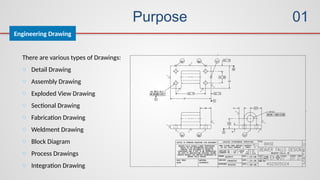
There are various types of Drawings:
o Detail Drawing
o Assembly Drawing
o Exploded View Drawing
o Sectional Drawing
o Fabrication Drawing
o Weldment Drawing
o Block Diagram
o Process Drawings
o Integration Drawing
Elements of Engg. Drawings
Elements
01
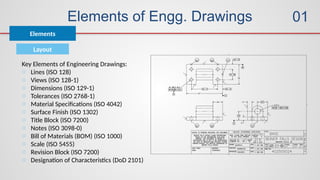
Key Elements of Engineering Drawings:
o Lines (ISO 128)
o Views (ISO 128-1)
o Dimensions (ISO 129-1)
o Tolerances (ISO 2768-1)
o Material Specifications (ISO 4042)
o Surface Finish (ISO 1302)
o Title Block (ISO 7200)
o Notes (ISO 3098-0)
o Bill of Materials (BOM) (ISO 1000)
o Scale (ISO 5455)
o Revision Block (ISO 7200)
o Designation of Characteristics (DoD 2101)
Layout
Elements of Engg. Drawings
Elements
01
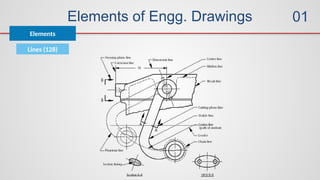
Lines (128)
Elements of Engg. Drawings
Elements
01
Lines
• Visible Lines – solid thick lines that represent visible edges or contours
• Hidden Lines – short evenly spaced dashes that depict hidden features
• Section Lines – solid thin lines that indicate cut surfaces
• Center Lines – alternating long and short dashes
• Dimensioning
– Dimension Lines - solid thin lines showing dimension extent/direction
– Extension Lines - solid thin lines showing point or line to which dimension applies
– Leaders – direct notes, dimensions, symbols, part numbers, etc. to features on
drawing
• Break Lines – indicate only portion of object is drawn. May be random “squiggled” line

or thin dashes joined by zigzags.
• Phantom Lines – long thin dashes separated by pairs of short dashes indicate alternate
positions of moving parts, adjacent position of related parts and repeated detail
• Chain Line – Lines or surfaces with special requirements
Elements of Engg. Drawings
Elements
01
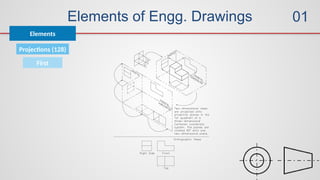
Projections (128)
First
Elements of Engg. Drawings
Elements
01
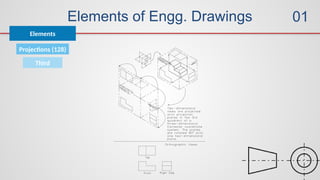
Third
Projections (128)
Elements of Engg. Drawings
Elements
01
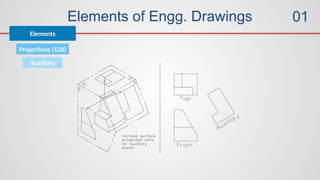
Auxiliary
Projections (128)
Elements of Engg. Drawings
Elements
01
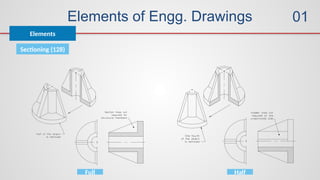
Sectioning (128)
Full Half
Elements of Engg. Drawings
Elements
01
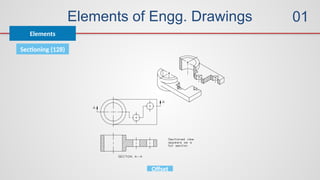
Sectioning (128)
Offset
Elements of Engg. Drawings
Elements
01
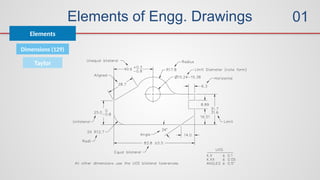
Dimensions (129)
Taylor
Elements of Engg. Drawings
Elements
01
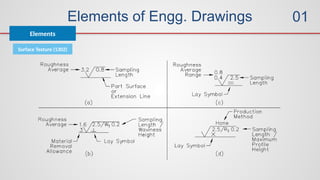
Surface Texture (1302)
02
Purposes / Elements of Engg Drawings / Layout
01
02
03
04
05
06
07
08
Introduction to
Engineering Drawings
Standard Drawing
Practices
Introduction to
GD&T
Basic Definitions
Symbology
Rules of GD&T
Form Tolerances
Orientation
Tolerances
Guidelines / Dimensioning Strategies
What? / Why? / How?
Feature of Size / Boundary Conditions / DRF / etc.
Symbols used in GD&T
Rule # 1 / Rule # 2 / Rule # 3
Tolerance Zones / Application
Standard Drawing Practices
Guidelines
02
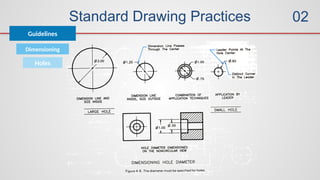
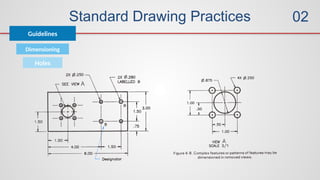
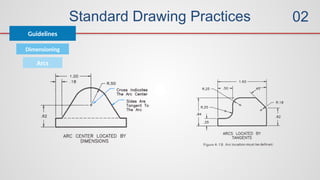
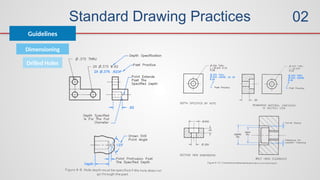
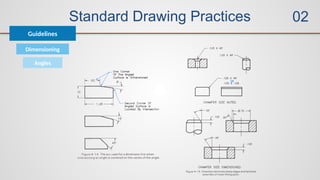
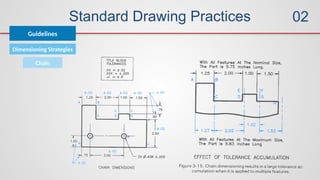
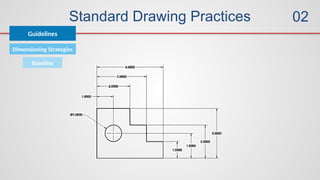
The term “feature” refers to surfaces, faces, holes, slots, corners, bends, arcs and fillets that
add up to form an engineering part.
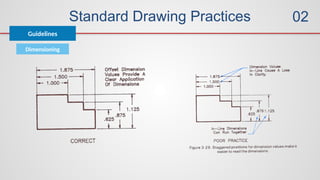
Dimensions define the size of a feature or its location relative to other features or a frame of
reference, called a datum.
The basic rules of dimensioning are:
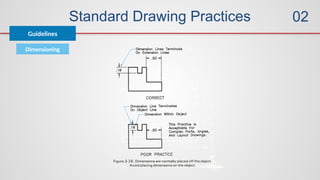
1. Dimension where the feature contour is shown;
2. Place dimensions between the views;
3. Dimension off the views;
4. Dimension mating features for assembly;
5. Do not dimension to hidden lines;
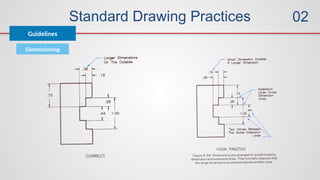
6. Stagger dimensioning values;
7. Create a logical arrangement of dimensions;
8. Consider fabrication processes and capabilities;
9. Consider inspection processes and capabilities.
Standard Drawing Practices
Guidelines
02
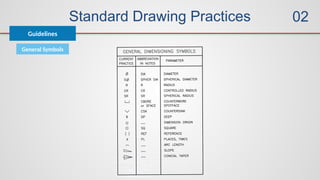
General Symbols
Standard Drawing Practices
Guidelines
02
Dimensioning
Standard Drawing Practices
Guidelines
02
Dimensioning
Standard Drawing Practices
Guidelines
02
Dimensioning
Standard Drawing Practices
Guidelines
02
Dimensioning
Holes
Standard Drawing Practices
Guidelines
02
Dimensioning
Holes
Standard Drawing Practices
Guidelines
02
Dimensioning
Arcs
Standard Drawing Practices
Guidelines
02
Dimensioning
Drilled Holes
Standard Drawing Practices
Guidelines
02
Dimensioning
Angles
Standard Drawing Practices
Guidelines
02
Dimensioning Strategies
Chain
Standard Drawing Practices
Guidelines
02
Dimensioning Strategies
Baseline
Standard Drawing Practices
Guidelines
02
Dimensioning Strategies
Inch / metric
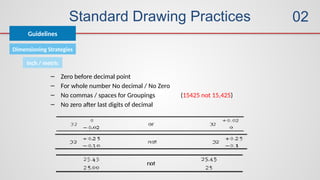
– Zero before decimal point
– For whole number No decimal / No Zero
– No commas / spaces for Groupings (15425 not 15,425)
– No zero after last digits of decimal
Standard Drawing Practices
Guidelines
02
Dimensioning Strategies
Inch
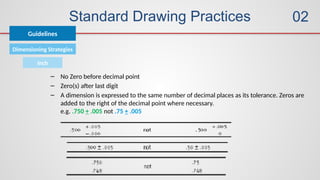
– No Zero before decimal point
– Zero(s) after last digit
– A dimension is expressed to the same number of decimal places as its tolerance. Zeros are
added to the right of the decimal point where necessary.
e.g. .750 + .005 not .75 + .005
03
Purposes / Elements of Engg Drawings / Layout
01
02
03
04
05
06
07
08
Introduction to
Engineering Drawings
Standard Drawing
Practices
Introduction to
GD&T
Basic Definitions
Symbology
Rules of GD&T
Form Tolerances
Orientation
Tolerances
What? / Why? / How?
Feature of Size / Boundary Conditions / DRF / etc.
Symbols used in GD&T
Rule # 1 / Rule # 2 / Rule # 3
Tolerance Zones / Application
Guidelines / Dimensioning Strategies
Introduction to GD&T
What?
03
Geometric Dimensioning and Tolerancing (GD&T) is a language for communicating engineering
design specifications. GD&T includes all the symbols, definitions, mathematical formulae, and
application rules necessary to embody a viable engineering language. As its name implies, it conveys
both the nominal dimensions (ideal geometry), and the tolerances for a part.
ASME Y14.5: 2009
Introduction to GD&T
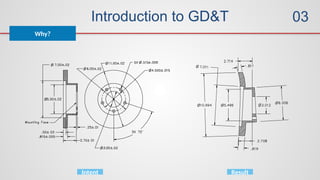
Why?
03
Intent Result
Introduction to GD&T
Why?
03
o Programmers wasting time trying to interpret drawings and questioning the
designers
o Rework of manufactured parts due to misunderstandings
o Inspectors spinning their wheels, deriving meaningless data from parts while
failing to check critical relationships
o Handling and documentation of functional parts that are rejected
o Sorting, reworking, filing, shimming, etc., of parts in assembly, often in added
operations
o Assemblies failing to operate, failure analysis, quality problems, customer
complaints, loss of market share and customer loyalty
o The meetings, corrective actions, debates, drawing changes, and
interdepartmental vendettas that result from each of the above failures
Introduction to GD&T
How?
03
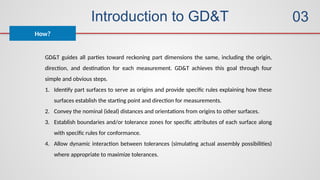
GD&T guides all parties toward reckoning part dimensions the same, including the origin,
direction, and destination for each measurement. GD&T achieves this goal through four
simple and obvious steps.
1. Identify part surfaces to serve as origins and provide specific rules explaining how these
surfaces establish the starting point and direction for measurements.
2. Convey the nominal (ideal) distances and orientations from origins to other surfaces.
3. Establish boundaries and/or tolerance zones for specific attributes of each surface along
with specific rules for conformance.
4. Allow dynamic interaction between tolerances (simulating actual assembly possibilities)
where appropriate to maximize tolerances.
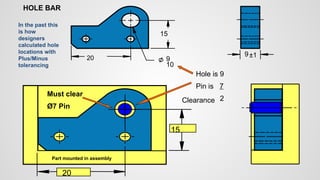
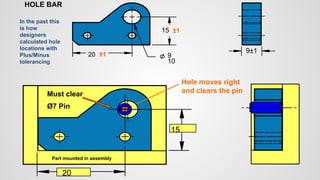
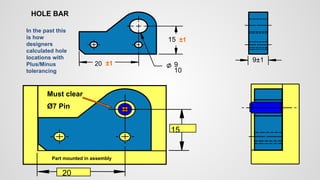
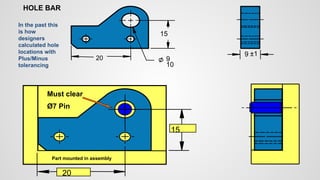
20
15
Must clear
Ø7 Pin
20
10
9
15
9 ±1
In the past this
is how
designers
calculated hole
locations with
Plus/Minus
tolerancing
HOLE BAR
Part mounted in assembly
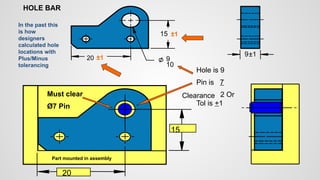
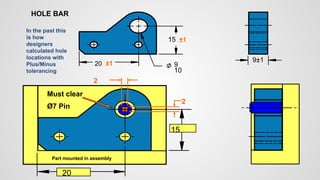
20
15
Must clear
Ø7 Pin
Hole is 9
Pin is 7
2
Clearance
20
10
9
15
9±1
In the past this
is how
designers
calculated hole
locations with
Plus/Minus
tolerancing
HOLE BAR
Part mounted in assembly
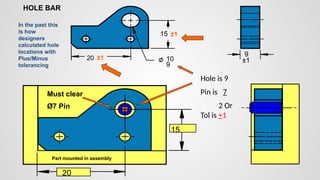
20
15
Must clear
Ø7 Pin
20
10
9
15
9±1
In the past this
is how
designers
calculated hole
locations with
Plus/Minus
tolerancing
HOLE BAR
±1
±1
Part mounted in assembly
Hole is 9
Pin is 7
2 Or
Tol is +1
Clearance
20
15
Must clear
Ø7 Pin
20
9
10
15
9
±1
In the past this
is how
designers
calculated hole
locations with
Plus/Minus
tolerancing
HOLE BAR
±1
±1
Part mounted in assembly
Hole is 9
Pin is 7
2 Or
Tol is +1
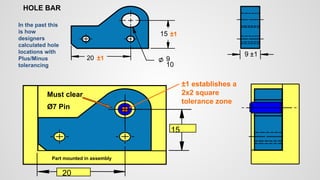
20
15
Must clear
Ø7 Pin
20
10
9
15
9 ±1
In the past this
is how
designers
calculated hole
locations with
Plus/Minus
tolerancing
HOLE BAR
±1 establishes a
2x2 square
tolerance zone
±1
±1
Part mounted in assembly
20
15
Hole moves right
and clears the pin
Must clear
Ø7 Pin
20
10
9
15
9±1
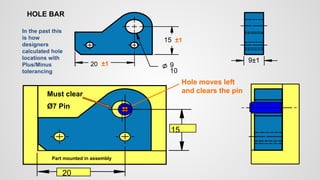
In the past this
is how
designers
calculated hole
locations with
Plus/Minus
tolerancing
HOLE BAR
±1
±1
Part mounted in assembly
20
15
Hole moves left
and clears the pin
Must clear
Ø7 Pin
Part mounted in assembly
20
10
9
15
9±1
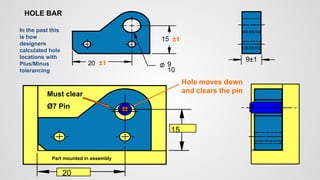
In the past this
is how
designers
calculated hole
locations with
Plus/Minus
tolerancing
HOLE BAR
±1
±1
20
15
Hole moves down
and clears the pin
Must clear
Ø7 Pin
Part mounted in assembly
20
10
9
15
9±1
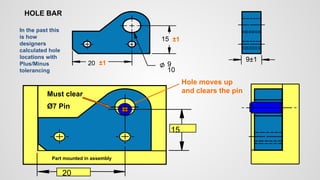
In the past this
is how
designers
calculated hole
locations with
Plus/Minus
tolerancing
HOLE BAR
±1
±1
20
15
Hole moves up
and clears the pin
Must clear
Ø7 Pin
Part mounted in assembly
20
10
9
15
9±1
In the past this
is how
designers
calculated hole
locations with
Plus/Minus
tolerancing
HOLE BAR
±1
±1
20
15
Must clear
Ø7 Pin
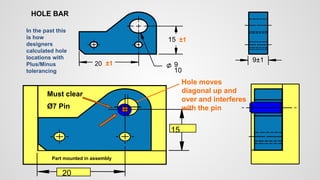
Hole moves
diagonal up and
over and interferes
with the pin
Part mounted in assembly
20
10
9
15
9±1
In the past this
is how
designers
calculated hole
locations with
Plus/Minus
tolerancing
HOLE BAR
±1
±1
20
15
Must clear
Ø7 Pin
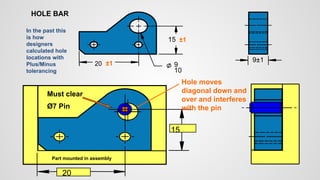
Hole moves
diagonal down and
over and interferes
with the pin
Part mounted in assembly
20
10
9
15
9±1
In the past this
is how
designers
calculated hole
locations with
Plus/Minus
tolerancing
HOLE BAR
±1
±1
20
15
Must clear
Ø7 Pin
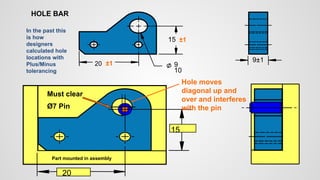
Hole moves
diagonal up and
over and interferes
with the pin
Part mounted in assembly
20
10
9
15
9±1
In the past this
is how
designers
calculated hole
locations with
Plus/Minus
tolerancing
HOLE BAR
±1
±1
20
15
Must clear
Ø7 Pin
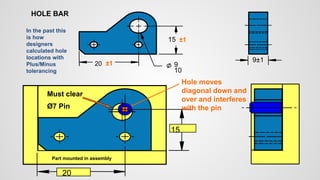
Hole moves
diagonal down and
over and interferes
with the pin
Part mounted in assembly
20
10
9
15
9±1
In the past this
is how
designers
calculated hole
locations with
Plus/Minus
tolerancing
HOLE BAR
±1
±1
20
15
Must clear
Ø7 Pin
Part mounted in assembly
20
10
9
15
9±1
In the past this
is how
designers
calculated hole
locations with
Plus/Minus
tolerancing
HOLE BAR
±1
±1
20
15
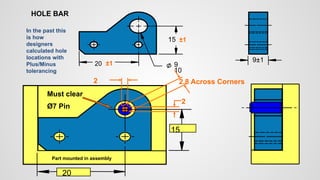
2
2
Must clear
Ø7 Pin
Part mounted in assembly
20
10
9
15
9±1
In the past this
is how
designers
calculated hole
locations with
Plus/Minus
tolerancing
HOLE BAR
±1
±1
20
15
2
2 2.8 Across Corners
Must clear
Ø7 Pin
Part mounted in assembly
20
10
9
15
9±1
In the past this
is how
designers
calculated hole
locations with
Plus/Minus
tolerancing
HOLE BAR
±1
±1
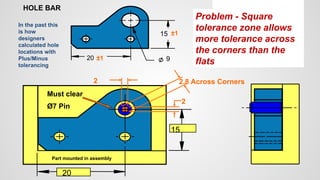
20
15
2
2 2.8 Across Corners
20 9
15
9
±1
In the past this
is how
designers
calculated hole
locations with
Plus/Minus
tolerancing
HOLE BAR
Must clear
Ø7 Pin
±1
±1
Part mounted in assembly
Problem - Square
tolerance zone allows
more tolerance across
the corners than the
flats
Table of
Contents
Purposes / Elements of Engg Drawings / Layout
01
02
03
04
05
06
07
08
Introduction to
Engineering Drawings
Standard Drawing
Practices
Introduction to
GD&T
Basic Definitions
Symbology
Rules of GD&T
Form Tolerances
Orientation
Tolerances
What? / Why? / How?
Feature of Size / Boundary Conditions / DRF / etc.
Symbols used in GD&T
Rule # 1 / Rule # 2 / Rule # 3
Tolerance Zones / Application
Guidelines / Dimensioning Strategies
Basic Definitions
Definitions
04
Feature
Feature is the general term applied to a physical portion of a
part, such as a surface, pin, tab, hole, or slot.
Basic Definitions
Definitions
04
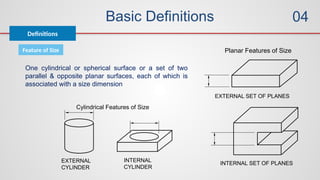
Feature of Size
EXTERNAL
CYLINDER
INTERNAL
CYLINDER
Cylindrical Features of Size
EXTERNAL SET OF PLANES
INTERNAL SET OF PLANES
Planar Features of Size
One cylindrical or spherical surface or a set of two
parallel & opposite planar surfaces, each of which is
associated with a size dimension
Basic Definitions
Definitions
04
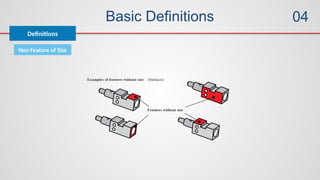
Non Feature of Size
Basic Definitions
Definitions
04
Material Conditions
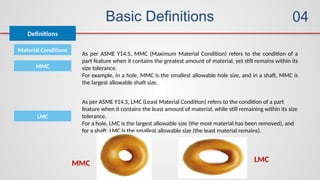
As per ASME Y14.5, MMC (Maximum Material Condition) refers to the condition of a
part feature when it contains the greatest amount of material, yet still remains within its
size tolerance.
For example, in a hole, MMC is the smallest allowable hole size, and in a shaft, MMC is
the largest allowable shaft size.
MMC
As per ASME Y14.5, LMC (Least Material Condition) refers to the condition of a part
feature when it contains the least amount of material, while still remaining within its size
tolerance.
For a hole, LMC is the largest allowable size (the most material has been removed), and
for a shaft, LMC is the smallest allowable size (the least material remains).
LMC
MMC LMC
Basic Definitions
Definitions
04
Material Conditions
In ASME Y14.5, RFS (Regardless of Feature Size) refers to the condition in which the
geometric tolerance of a feature applies regardless of its actual size within the allowable
size limits. This means the tolerance is constant, and the feature's variation in size does
not provide additional tolerance or flexibility.
RFS
Basic Definitions
Definitions
04
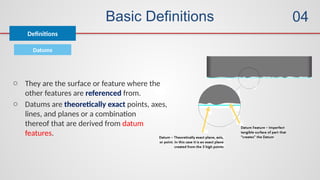
Datums
o They are the surface or feature where the
other features are referenced from.
o Datums are theoretically exact points, axes,
lines, and planes or a combination
thereof that are derived from datum
features.
Basic Definitions
Definitions
04
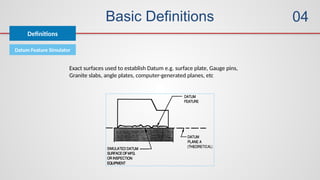
Datum Feature Simulator
Exact surfaces used to establish Datum e.g. surface plate, Gauge pins,
Granite slabs, angle plates, computer-generated planes, etc
Basic Definitions
Definitions
04
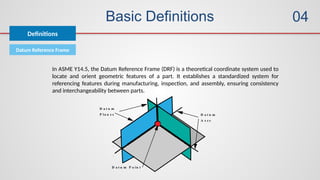
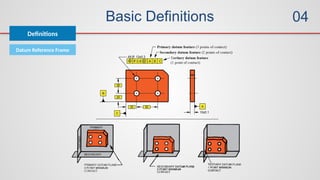
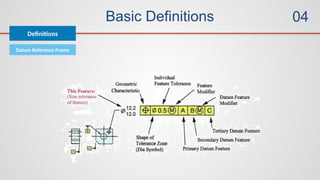
Datum Reference Frame
In ASME Y14.5, the Datum Reference Frame (DRF) is a theoretical coordinate system used to
locate and orient geometric features of a part. It establishes a standardized system for
referencing features during manufacturing, inspection, and assembly, ensuring consistency
and interchangeability between parts.
Basic Definitions
Definitions
04
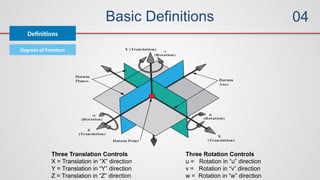
Degrees of Freedom
Three Rotation Controls
u = Rotation in “u” direction
v = Rotation in “v” direction
w = Rotation in “w” direction
Three Translation Controls
X = Translation in “X” direction
Y = Translation in “Y” direction
Z = Translation in “Z” direction
Basic Definitions
Definitions
04
Datum Reference Frame
Basic Definitions
Definitions
04
Datum Reference Frame
Basic Definitions
Definitions
04
Datums Selection
o Datums should be chosen based on functional requirements
o Seating / Aligning surfaces are made primary datum features
(largest surface area)
o Toleranced for form (repeatable)
o Making them flat gives stable surfaces
o Suggested order of manufacturing
o Sec & Tertiary datum are controlled w.r.to primary
Basic Definitions
Definitions
04
Theoretically Exact Dimension
o In ASME Y14.5, a Theoretically Exact Dimension (TED), also known as a Basic Dimension, is a
dimension that represents the ideal or exact size, location, orientation, or form of a feature, without
any tolerance. These dimensions are typically enclosed in a rectangular box on a drawing.
o No Tolerance: TEDs are considered exact, and no tolerance is directly applied to them. Instead,
geometric tolerances (e.g., position, perpendicularity, profile) are applied to control the allowable
variation from the TED.
o Used with Geometric Tolerances: TEDs are usually used in conjunction with GD&T tolerances that
control the actual allowable variation, such as position, profile, or orientation tolerances.
o The TED specifies the ideal target, and the GD&T symbol defines the permissible variation around
that target.
Basic Definitions
Definitions
04
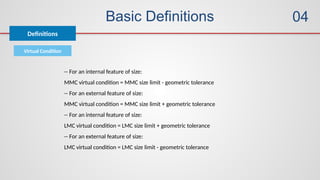
Virtual Condition
-- For an internal feature of size:
MMC virtual condition = MMC size limit - geometric tolerance
-- For an external feature of size:
MMC virtual condition = MMC size limit + geometric tolerance
-- For an internal feature of size:
LMC virtual condition = LMC size limit + geometric tolerance
-- For an external feature of size:
LMC virtual condition = LMC size limit - geometric tolerance
Basic Definitions
Definitions
04
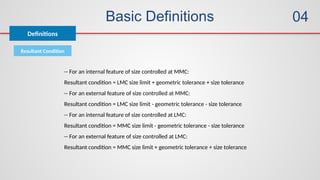
Resultant Condition
-- For an internal feature of size controlled at MMC:
Resultant condition = LMC size limit + geometric tolerance + size tolerance
-- For an external feature of size controlled at MMC:
Resultant condition = LMC size limit - geometric tolerance - size tolerance
-- For an internal feature of size controlled at LMC:
Resultant condition = MMC size limit - geometric tolerance - size tolerance
-- For an external feature of size controlled at LMC:
Resultant condition = MMC size limit + geometric tolerance + size tolerance
Basic Definitions
Definitions
04
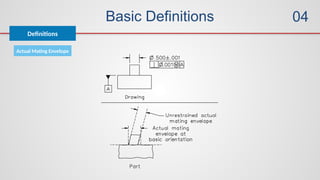
Actual Mating Envelope
Table of
Contents
Purposes / Elements of Engg Drawings / Layout
01
02
03
04
05
06
07
08
Introduction to
Engineering Drawings
Standard Drawing
Practices
Introduction to
GD&T
Basic Definitions
Symbology
Rules of GD&T
Form Tolerances
Orientation
Tolerances
What? / Why? / How?
Feature of Size / Boundary Conditions / DRF / etc.
Symbols used in GD&T
Rule # 1 / Rule # 2 / Rule # 3
Tolerance Zones / Application
Guidelines / Dimensioning Strategies
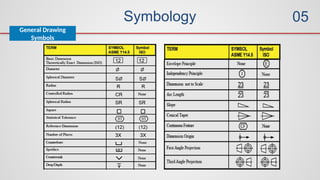
Symbology
General Drawing
Symbols
05
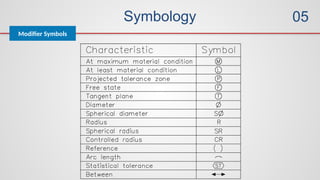
Symbology
GD&T
05
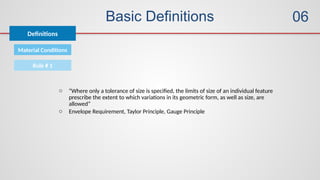
Symbology
Modifier Symbols
05
Table of
Contents
Purposes / Elements of Engg Drawings / Layout
01
02
03
04
05
06
07
08
Introduction to
Engineering Drawings
Standard Drawing
Practices
Introduction to
GD&T
Basic Definitions
Symbology
Rules of GD&T
Form Tolerances
Orientation
Tolerances
What? / Why? / How?
Feature of Size / Boundary Conditions / DRF / etc.
Symbols used in GD&T
Rule # 1 / Rule # 2 / Rule # 3
Tolerance Zones / Application
Guidelines / Dimensioning Strategies
Basic Definitions
Definitions
06
Material Conditions
Rule # 1
o “Where only a tolerance of size is specified, the limits of size of an individual feature
prescribe the extent to which variations in its geometric form, as well as size, are
allowed”
o Envelope Requirement, Taylor Principle, Gauge Principle
Basic Definitions
Definitions
06
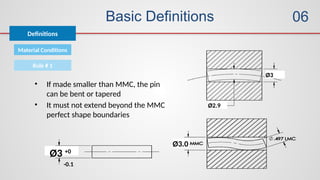
Material Conditions
Rule # 1
Ø3 +0
-0.1
Ø3
Ø2.9
Ø3.0
• If made smaller than MMC, the pin
can be bent or tapered
• It must not extend beyond the MMC
perfect shape boundaries
Basic Definitions
Definitions
06
Material Conditions
Rule # 2
o Regardless of Feature Size (RFS) applies, with respect to the individual
tolerance, datum reference, or both, where no modifying symbol is specified
o This will be discussed further with regards to MMC and LMC modifiers in later
sections.
Basic Definitions
Definitions
06
Material Conditions
Rule # 3
o Rule Three applies to all screw threads, gears, and splines
o “For each tolerance of orientation or position and datum reference
specified for screw threads applies to the axis of the thread derived
from the pitch cylinder”
o For gears and splines, the MAJOR DIA, PITCH DIA, or MINOR DIA
must be specified"
Table of
Contents
Purposes / Elements of Engg Drawings / Layout
01
02
03
04
05
06
07
08
Introduction to
Engineering Drawings
Standard Drawing
Practices
Introduction to
GD&T
Basic Definitions
Symbology
Rules of GD&T
Form Tolerances
Orientation
Tolerances
What? / Why? / How?
Feature of Size / Boundary Conditions / DRF / etc.
Symbols used in GD&T
Rule # 1 / Rule # 2 / Rule # 3
Tolerance Zones / Application
Guidelines / Dimensioning Strategies
Form Tolerances
Form
07
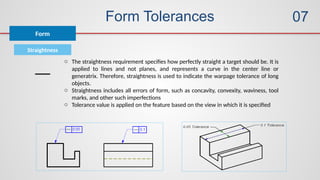
Straightness
o The straightness requirement specifies how perfectly straight a target should be. It is
applied to lines and not planes, and represents a curve in the center line or
generatrix. Therefore, straightness is used to indicate the warpage tolerance of long
objects.
o Straightness includes all errors of form, such as concavity, convexity, waviness, tool
marks, and other such imperfections
o Tolerance value is applied on the feature based on the view in which it is specified
Form Tolerances
Form
07
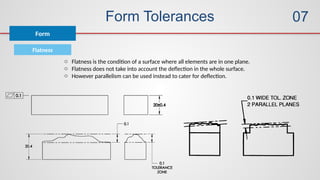
Flatness
o Flatness is the condition of a surface where all elements are in one plane.
o Flatness does not take into account the deflection in the whole surface.
o However parallelism can be used instead to cater for deflection.
Form Tolerances
Form
07
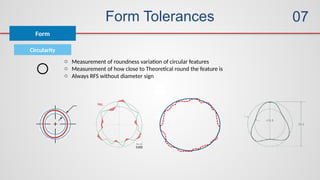
Circularity
o Measurement of roundness variation of circular features
o Measurement of how close to Theoretical round the feature is
o Always RFS without diameter sign
Form Tolerances
Form
07
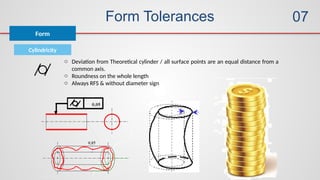
Cylindricity
o Deviation from Theoretical cylinder / all surface points are an equal distance from a
common axis.
o Roundness on the whole length
o Always RFS & without diameter sign
Table of
Contents
Purposes / Elements of Engg Drawings / Layout
01
02
03
04
05
06
07
08
Introduction to
Engineering Drawings
Standard Drawing
Practices
Introduction to
GD&T
Basic Definitions
Symbology
Rules of GD&T
Form Tolerances
Orientation
Tolerances
What? / Why? / How?
Feature of Size / Boundary Conditions / DRF / etc.
Symbols used in GD&T
Rule # 1 / Rule # 2 / Rule # 3
Tolerance Zones / Application
Guidelines / Dimensioning Strategies
Orientation Tolerances
Orientation
08
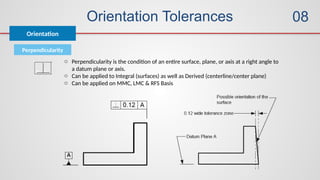
Perpendicularity
o Perpendicularity is the condition of an entire surface, plane, or axis at a right angle to
a datum plane or axis.
o Can be applied to Integral (surfaces) as well as Derived (centerline/center plane)
o Can be applied on MMC, LMC & RFS Basis
Orientation Tolerances
Orientation
08
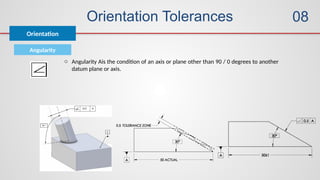
Angularity
o Angularity Ais the condition of an axis or plane other than 90 / 0 degrees to another
datum plane or axis.
Orientation Tolerances
Orientation
08
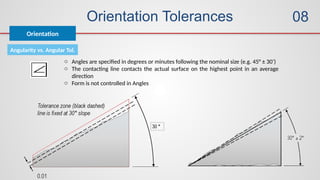
Angularity vs. Angular Tol.
o Angles are specified in degrees or minutes following the nominal size (e.g. 45° ± 30’)
o The contacting line contacts the actual surface on the highest point in an average
direction
o Form is not controlled in Angles
Orientation Tolerances
Orientation
08
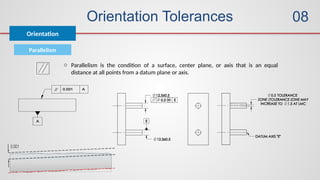
Parallelism
o Parallelism is the condition of a surface, center plane, or axis that is an equal
distance at all points from a datum plane or axis.
Orientation Tolerances
Orientation
08
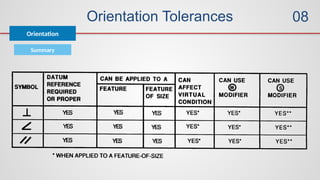
Summary
09
09
10
11
12
Location Tolerances
Runout Tolerances
Measurements
of GD&T
Advanced Concepts
Standard Practices
Composite Tolerancing / Boundary Conditions on Datums
Tolerance Zones / Application
Location Tolerances
Location
09
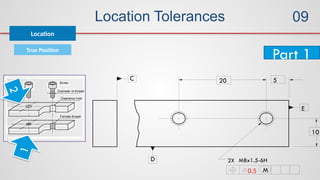
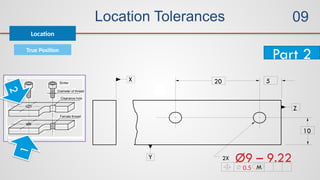
True Position
o True Position is the exact or perfect location of a point, line or plane in relationship
to a datum reference frame.
o True Position Tolerance A specified area or zone, within which the center, axis, or
center plane of a feature of size is permitted to vary from its theoretically exact or
‘true’ position.
o Position tolerances must be applied to FoS
o Basic dimensions are used to locate and establish the location with ref to DRF
o Basic dimensions are not toleranced on the drawing, Location tolerances for the size
features are called out in feature control frames.
o In most cases, datum references are required.
Location Tolerances
True Position
o Reasons to use True Position
o Control the theoretically exact location of features
o Simulate mating part (worst case) relationships
o May be modified to MMC and LMC
o Provide flexibility in verification and simulation
o May be used to control coaxial features
o Provide symmetrical controls of features
o Frequently provide generous margins of cost & time savings
Location
09
Location Tolerances
True Position
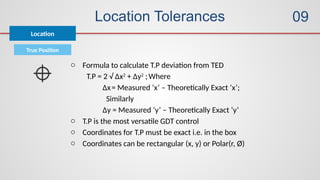
o Formula to calculate T.P deviation from TED
T.P = 2 √ ∆x2
+ ∆y2
;Where
∆x= Measured ‘x’ – Theoretically Exact ‘x’;
Similarly
∆y = Measured ‘y’ – Theoretically Exact ‘y’
o T.P is the most versatile GDT control
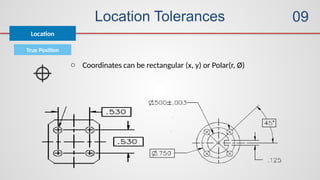
o Coordinates for T.P must be exact i.e. in the box
o Coordinates can be rectangular (x, y) or Polar(r, Ø)
Location
09
Location Tolerances
True Position
o Coordinates can be rectangular (x, y) or Polar(r, Ø)
Location
09
Location Tolerances
True Position
Location
Implied Datums
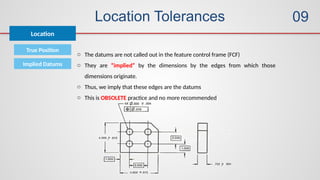
o The datums are not called out in the feature control frame (FCF)
o They are “implied” by the dimensions by the edges from which those
dimensions originate.
o Thus, we imply that these edges are the datums
o This is OBSOLETE practice and no more recommended
09
Location Tolerances
True Position
Location
Implied Datums Problems with implied Datums
o We do not know the order in which they are used.
o We know the parts are not perfect.
o None of the edges are perfectly square.
o The 90o corners will not be perpendicular.
o Very difficult to decide conformance / non-conformance; as result will vary
from person to person
09
Location Tolerances
True Position
Location
09
Location Tolerances
True Position
Location
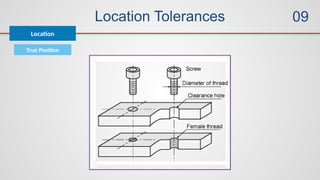
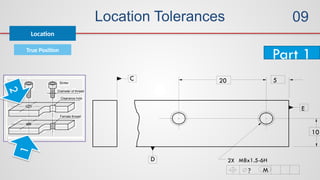
5
10
2X
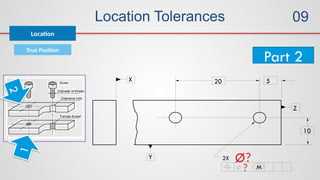
20
? M
M8x1.5-6H
C
D
E
Part 1
1
2
09
Location Tolerances
True Position
Location
5
10
2X
20
? M
Ø?
X
Y
Z
Part 2
1
2
09
Location Tolerances
True Position
Location
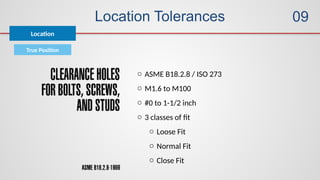
o ASME B18.2.8 / ISO 273
o M1.6 to M100
o #0 to 1-1/2 inch
o 3 classes of fit
o Loose Fit
o Normal Fit
o Close Fit
09
Location Tolerances
True Position
Location
09
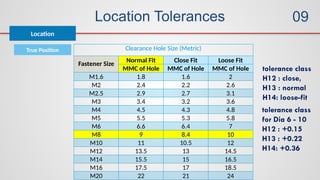
Clearance Hole Size (Metric)
Fastener Size
Normal Fit Close Fit Loose Fit
MMC of Hole MMC of Hole MMC of Hole
M1.6 1.8 1.6 2
M2 2.4 2.2 2.6
M2.5 2.9 2.7 3.1
M3 3.4 3.2 3.6
M4 4.5 4.3 4.8
M5 5.5 5.3 5.8
M6 6.6 6.4 7
M8 9 8.4 10
M10 11 10.5 12
M12 13.5 13 14.5
M14 15.5 15 16.5
M16 17.5 17 18.5
M20 22 21 24
tolerance class
H12 : close,
H13 : normal
H14: loose-fit
tolerance class
for Dia 6 - 10
H12 : +0.15
H13 : +0.22
H14: +0.36
Location Tolerances
True Position
Location
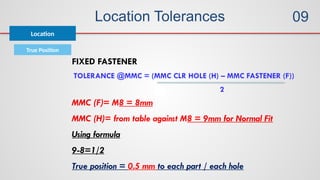
TOLERANCE @MMC = (MMC CLR HOLE (H) – MMC FASTENER (F))
2
FIXED FASTENER
MMC (F)= M8 = 8mm
MMC (H)= from table against M8 = 9mm for Normal Fit
Using formula
9-8=1/2
True position = 0.5 mm to each part / each hole
09
Location Tolerances
True Position
Location
09
5
10
2X
20
0.5 M
M8x1.5-6H
C
D
E
Part 1
1
2
Location Tolerances
True Position
Location
09
Part 2
1
2
5
10
2X
20
0.5 M
Ø9 – 9.22
X
Y
Z
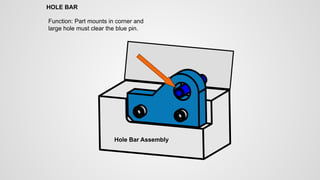
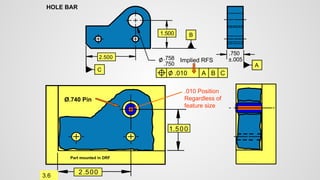
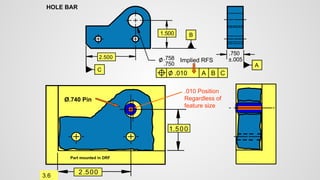
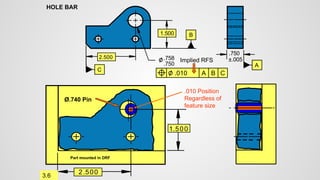
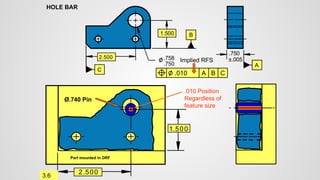
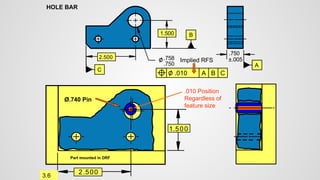
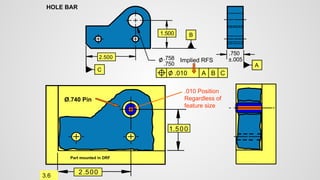
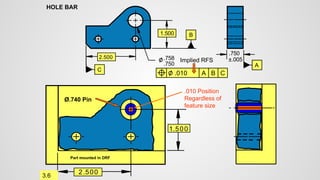
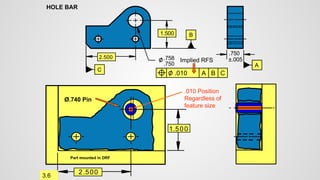
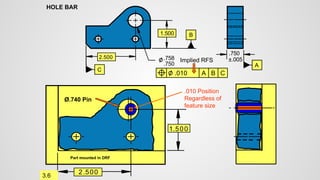
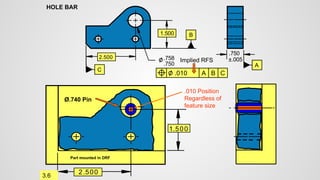
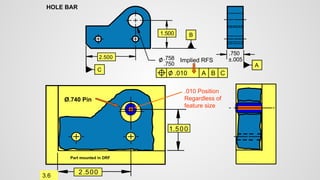
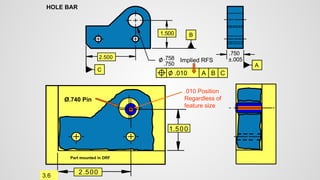
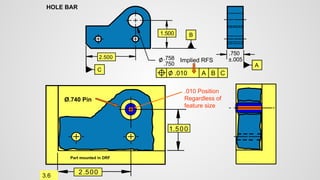
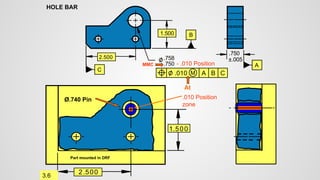
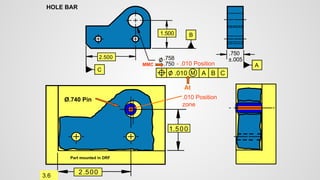
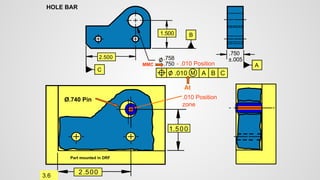
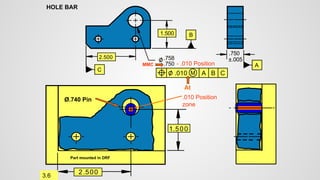
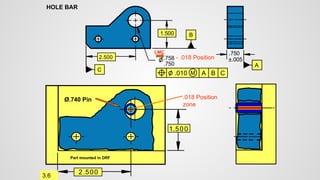
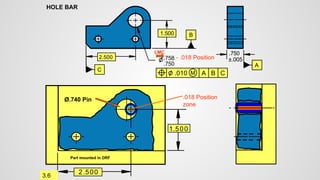
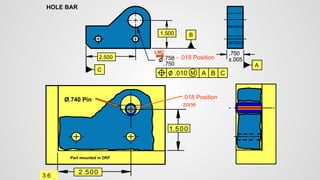
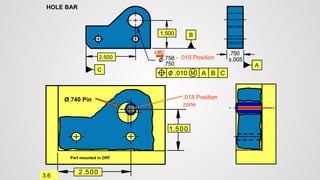
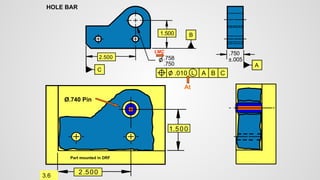
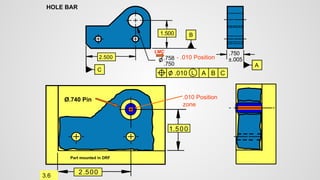
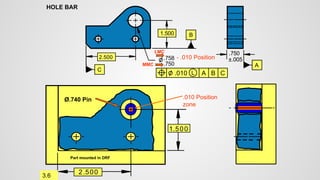
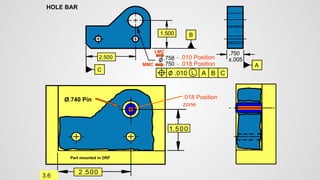
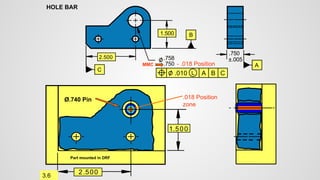
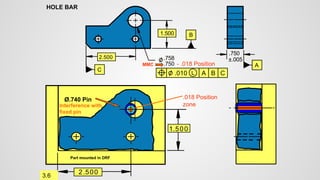
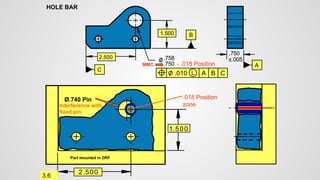
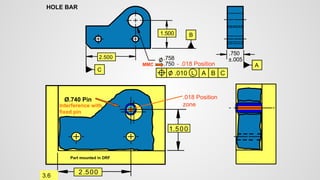
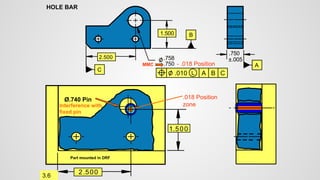
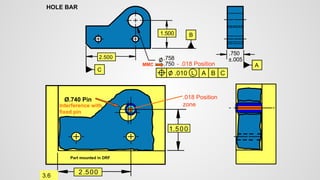
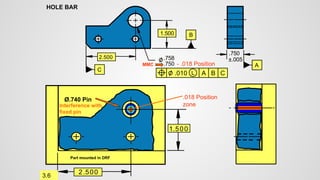
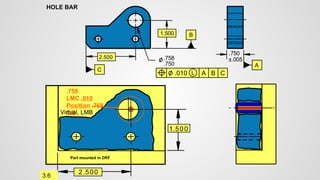
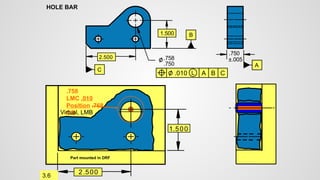
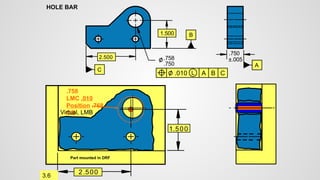
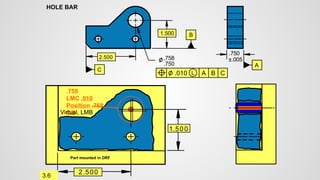
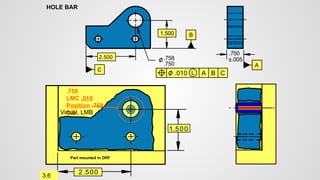
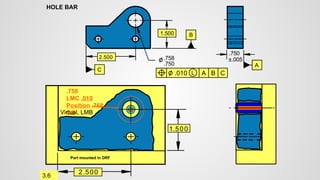
Hole Bar Assembly
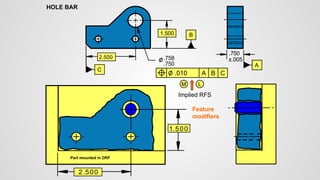
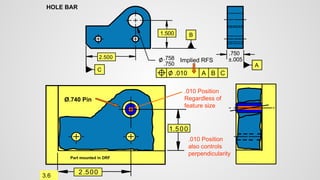
Function: Part mounts in corner and
large hole must clear the blue pin.
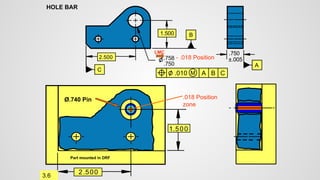
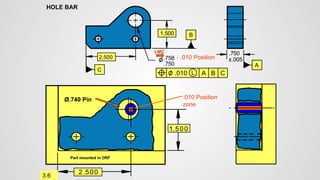
HOLE BAR
2.500
.750
.758
1.500
HOLE BAR
C
B
A
.010
2.500
1.500
Part mounted in DRF
.750
±.005
A
B
C
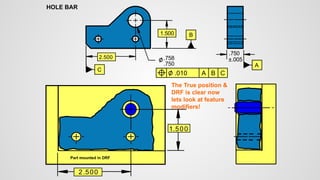
The True position &
DRF is clear now
lets look at feature
modifiers!
2.500
.750
.758
1.500
HOLE BAR
C
B
A
.010
2.500
1.500
Part mounted in DRF
.750
±.005
A
B
C
Feature
modifiers
M L
Implied RFS
2.500
.750
.758
1.500
HOLE BAR
C
B
A
.010
2.500
1.500
Part mounted in DRF
.750
±.005
A
B
C
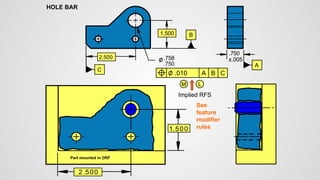
See
feature
modifier
rules
M L
Implied RFS
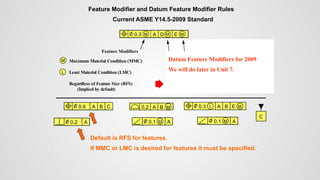
Feature Modifier and Datum Feature Modifier Rules
Current ASME Y14.5-2009 Standard
0.3 M A D E M
M
Feature Modifiers Datum Feature Modifiers
Maximum Material Condition (MMC)
Least Material Condition (LMC)
Regardless of Feature Size (RFS)
Maximum Material Boundary (MMB)
Least Material Boundary (LMB)
Regardless of Material Boundary (RMB)
M
L
M
L
(Implied by default) (Implied by default)
Default is RFS for features.
If MMC or LMC is desired for features it must be specified.
0.6 MA B C
A
0.2
0.6 A B C 0.3 L A B E M
A
M
0.1
B
A
0.2 M
C
A
M
0.1
Datum Feature Modifiers for 2009
We will do later in Unit 7.
2.500
.750
.758
1.500
HOLE BAR
C
B
A
.010
2.500
1.500
Part mounted in DRF
.750
±.005
A
B
C
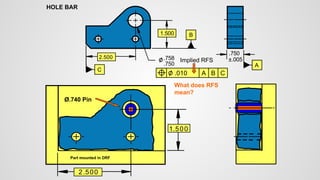
What does RFS
mean?
Implied RFS
Ø.740 Pin
2.500
.750
.758
1.500
HOLE BAR
C
B
A
.010
2.500
1.500
Part mounted in DRF
.750
±.005
A
B
C
Implied RFS
3.6
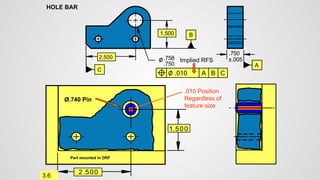
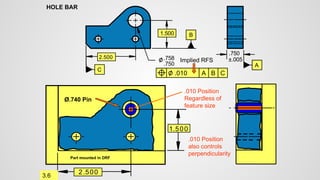
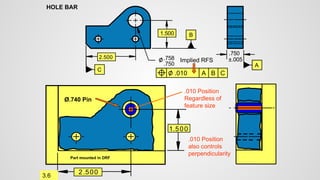
.010 Position
Regardless of
feature size
Ø.740 Pin
2.500
.750
.758
1.500
HOLE BAR
C
B
A
.010
2.500
1.500
Part mounted in DRF
.750
±.005
A
B
C
Implied RFS
3.6
.010 Position
Regardless of
feature size
Ø.740 Pin
2.500
.750
.758
1.500
HOLE BAR
C
B
A
.010
2.500
1.500
Part mounted in DRF
.750
±.005
A
B
C
Implied RFS
3.6
.010 Position
Regardless of
feature size
Ø.740 Pin
2.500
.750
.758
1.500
HOLE BAR
C
B
A
.010
2.500
1.500
Part mounted in DRF
.750
±.005
A
B
C
Implied RFS
3.6
.010 Position
Regardless of
feature size
Ø.740 Pin
2.500
.750
.758
1.500
HOLE BAR
C
B
A
.010
2.500
1.500
Part mounted in DRF
.750
±.005
A
B
C
Implied RFS
3.6
.010 Position
Regardless of
feature size
Ø.740 Pin
2.500
.750
.758
1.500
HOLE BAR
C
B
A
.010
2.500
1.500
Part mounted in DRF
.750
±.005
A
B
C
Implied RFS
3.6
.010 Position
Regardless of
feature size
Ø.740 Pin
2.500
.750
.758
1.500
HOLE BAR
C
B
A
.010
2.500
1.500
Part mounted in DRF
.750
±.005
A
B
C
Implied RFS
3.6
.010 Position
Regardless of
feature size
Ø.740 Pin
2.500
.750
.758
1.500
HOLE BAR
C
B
A
.010
2.500
1.500
Part mounted in DRF
.750
±.005
A
B
C
Implied RFS
3.6
.010 Position
Regardless of
feature size
Ø.740 Pin
2.500
.750
.758
1.500
HOLE BAR
C
B
A
.010
2.500
1.500
Part mounted in DRF
.750
±.005
A
B
C
Implied RFS
3.6
.010 Position
Regardless of
feature size
Ø.740 Pin
2.500
.750
.758
1.500
HOLE BAR
C
B
A
.010
2.500
1.500
Part mounted in DRF
.750
±.005
A
B
C
Implied RFS
3.6
.010 Position
Regardless of
feature size
Ø.740 Pin
2.500
.750
.758
1.500
HOLE BAR
C
B
A
.010
2.500
1.500
Part mounted in DRF
.750
±.005
A
B
C
Implied RFS
3.6
.010 Position
Regardless of
feature size
Ø.740 Pin
2.500
.750
.758
1.500
HOLE BAR
C
B
A
.010
2.500
1.500
Part mounted in DRF
.750
±.005
A
B
C
Implied RFS
3.6
.010 Position
Regardless of
feature size
Ø.740 Pin
2.500
.750
.758
1.500
HOLE BAR
C
B
A
.010
2.500
1.500
Part mounted in DRF
.750
±.005
A
B
C
Implied RFS
3.6
.010 Position
Regardless of
feature size
Ø.740 Pin
2.500
.750
.758
1.500
HOLE BAR
C
B
A
.010
2.500
1.500
Part mounted in DRF
.750
±.005
A
B
C
Implied RFS
3.6
.010 Position
Regardless of
feature size
Ø.740 Pin
2.500
.750
.758
1.500
HOLE BAR
C
B
A
.010
2.500
1.500
Part mounted in DRF
.750
±.005
A
B
C
Implied RFS
3.6
.010 Position
Regardless of
feature size
Ø.740 Pin
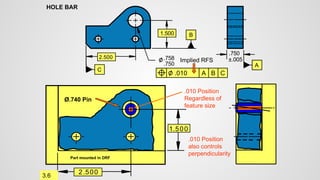
.010 Position
also controls
perpendicularity
2.500
.750
.758
1.500
HOLE BAR
C
B
A
.010
2.500
1.500
Part mounted in DRF
.750
±.005
A
B
C
Implied RFS
3.6
.010 Position
Regardless of
feature size
Ø.740 Pin
.010 Position
also controls
perpendicularity
2.500
.750
.758
1.500
HOLE BAR
C
B
A
.010
2.500
1.500
Part mounted in DRF
.750
±.005
A
B
C
Implied RFS
3.6
.010 Position
Regardless of
feature size
Ø.740 Pin
.010 Position
also controls
perpendicularity
2.500
.750
.758
1.500
HOLE BAR
C
B
A
.010
2.500
1.500
Part mounted in DRF
.750
±.005
A
B
C
Implied RFS
3.6
.010 Position
Regardless of
feature size
Ø.740 Pin
.010 Position
also controls
perpendicularity
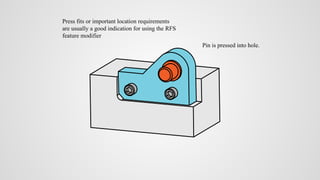
What is RFS used for?
Press fits or important location requirements
are usually a good indication for using the RFS
feature modifier
Pin is pressed into hole.
2.500
.750
.758
1.500
HOLE BAR
C
B
A
.010
2.500
1.500
Part mounted in DRF
.750
±.005
A
B
C
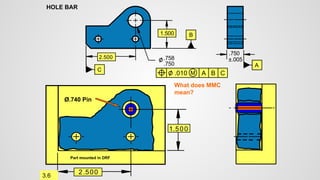
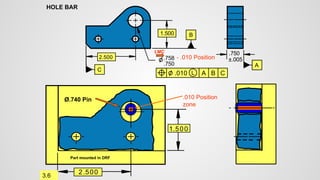
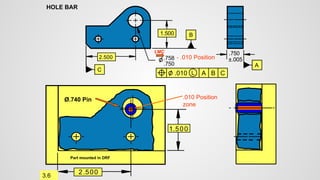
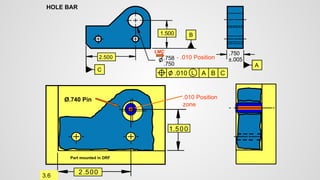
What does MMC
mean?
M
3.6
Ø.740 Pin
2.500
.750
.758
1.500
HOLE BAR
C
B
A
.010
2.500
1.500
Part mounted in DRF
.750
±.005
A
B
C
M
3.6
At
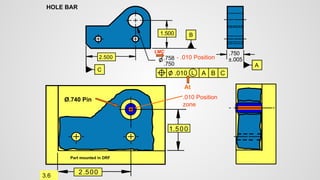
- .010 Position
MMC
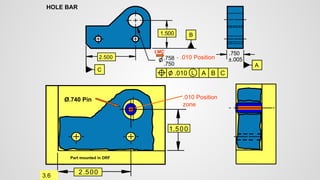
.010 Position
zone
Ø.740 Pin
2.500
.750
.758
1.500
HOLE BAR
C
B
A
.010
2.500
1.500
Part mounted in DRF
.750
±.005
A
B
C
M
3.6
At
- .010 Position
MMC
.010 Position
zone
Ø.740 Pin
2.500
.750
.758
1.500
HOLE BAR
C
B
A
.010
2.500
1.500
Part mounted in DRF
.750
±.005
A
B
C
M
3.6
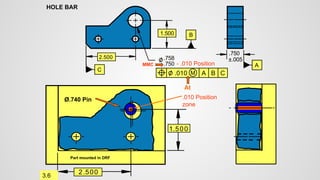
At
- .010 Position
MMC
.010 Position
zone
Ø.740 Pin
2.500
.750
.758
1.500
HOLE BAR
C
B
A
.010
2.500
1.500
Part mounted in DRF
.750
±.005
A
B
C
M
3.6
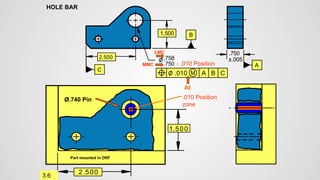
At
- .010 Position
MMC
.010 Position
zone
Ø.740 Pin
2.500
.750
.758
1.500
HOLE BAR
C
B
A
.010
2.500
1.500
Part mounted in DRF
.750
±.005
A
B
C
M
3.6
At
- .010 Position
MMC
.010 Position
zone
Ø.740 Pin
2.500
.750
.758
1.500
HOLE BAR
C
B
A
.010
2.500
1.500
Part mounted in DRF
.750
±.005
A
B
C
M
3.6
At
- .010 Position
MMC
.010 Position
zone
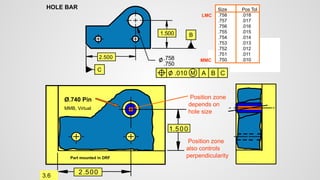
LMC
Ø.740 Pin
2.500
.750
.758
1.500
HOLE BAR
C
B
A
.010
2.500
1.500
Part mounted in DRF
.750
±.005
A
B
C
M
3.6
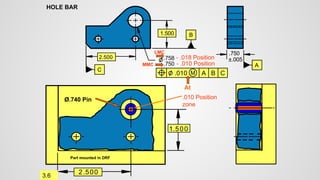
At
LMC
- .018 Position
MMC
.010 Position
zone
- .010 Position
Ø.740 Pin
2.500
.750
.758
1.500
HOLE BAR
C
B
A
.010
2.500
1.500
Part mounted in DRF
.750
±.005
A
B
C
M
3.6
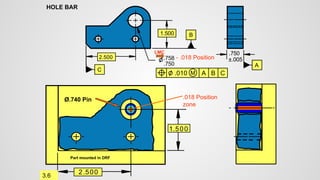
.018 Position
zone
- .018 Position
LMC
Ø.740 Pin
2.500
.750
.758
1.500
HOLE BAR
C
B
A
.010
2.500
1.500
Part mounted in DRF
.750
±.005
A
B
C
M
3.6
.018 Position
zone
LMC
- .018 Position
Ø.740 Pin
2.500
.750
.758
1.500
HOLE BAR
C
B
A
.010
2.500
1.500
Part mounted in DRF
.750
±.005
A
B
C
M
3.6
- .018 Position
LMC
.018 Position
zone
Ø.740 Pin
2.500
.750
.758
1.500
HOLE BAR
C
B
A
.010
2.500
1.500
Part mounted in DRF
.750
±.005
A
B
C
M
3.6
- .018 Position
LMC
.018 Position
zone
Ø.740 Pin
2.500
.750
.758
1.500
HOLE BAR
C
B
A
.010
2.500
1.500
Part mounted in DRF
.750
±.005
A
B
C
M
3.6
- .018 Position
LMC
.018 Position
zone
Ø.740 Pin
2.500
.750
.758
1.500
HOLE BAR
C
B
A
.010
2.500
1.500
Part mounted in DRF
.750
±.005
A
B
C
M
3.6
- .018 Position
LMC
.018 Position
zone
Ø.740 Pin
2.500
.750
.758
1.500
HOLE BAR
C
B
A
.010
2.500
1.500
Part mounted in DRF
A
B
C
M
3.6
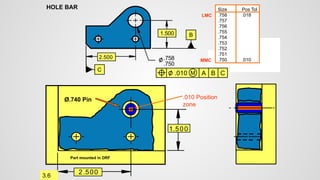
Size Pos Tol
.758 .018
.757 .017
.756 .016
.755 .015
.754 .014
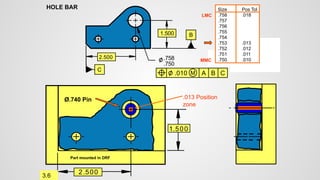
.753 .013
.752 .012
.751 .011
.750 .010
MMC
LMC
.010 Position
zone
Ø.740 Pin
2.500
.750
.758
1.500
HOLE BAR
C
B
A
.010
2.500
1.500
Part mounted in DRF
A
B
C
M
3.6
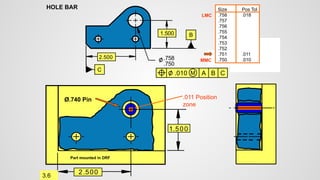
Size Pos Tol
.758 .018
.757 .017
.756 .016
.755 .015
.754 .014
.753 .013
.752 .012
.751 .011
.750 .010
.011 Position
zone
Ø.740 Pin
MMC
LMC
2.500
.750
.758
1.500
HOLE BAR
C
B
A
.010
2.500
1.500
Part mounted in DRF
A
B
C
M
3.6
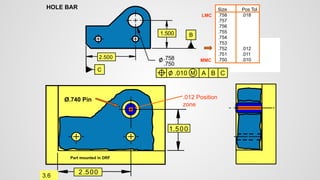
Size Pos Tol
.758 .018
.757 .017
.756 .016
.755 .015
.754 .014
.753 .013
.752 .012
.751 .011
.750 .010
.012 Position
zone
Ø.740 Pin
MMC
LMC
2.500
.750
.758
1.500
HOLE BAR
C
B
A
.010
2.500
1.500
Part mounted in DRF
A
B
C
M
3.6
Size Pos Tol
.758 .018
.757 .017
.756 .016
.755 .015
.754 .014
.753 .013
.752 .012
.751 .011
.750 .010
.013 Position
zone
Ø.740 Pin
MMC
LMC
2.500
.750
.758
1.500
HOLE BAR
C
B
A
.010
2.500
1.500
Part mounted in DRF
A
B
C
M
3.6
Size Pos Tol
.758 .018
.757 .017
.756 .016
.755 .015
.754 .014
.753 .013
.752 .012
.751 .011
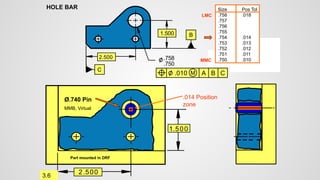
.750 .010
.014 Position
zone
Ø.740 Pin
MMC
LMC
MMB, Virtual
2.500
.750
.758
1.500
HOLE BAR
C
B
A
.010
2.500
1.500
Part mounted in DRF
A
B
C
M
3.6
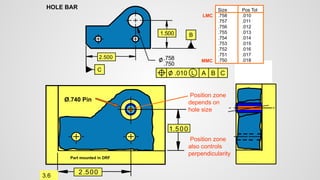
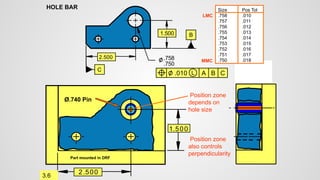
Size Pos Tol
.758 .018
.757 .017
.756 .016
.755 .015
.754 .014
.753 .013
.752 .012
.751 .011
.750 .010
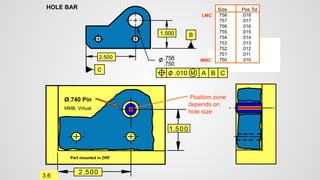
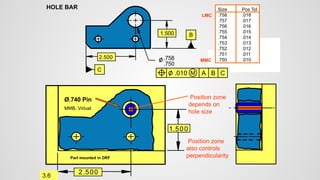
Position zone
depends on
hole size
Ø.740 Pin
MMC
LMC
MMB, Virtual
2.500
.750
.758
1.500
HOLE BAR
C
B
A
.010
2.500
1.500
Part mounted in DRF
A
B
C
M
3.6
Size Pos Tol
.758 .018
.757 .017
.756 .016
.755 .015
.754 .014
.753 .013
.752 .012
.751 .011
.750 .010
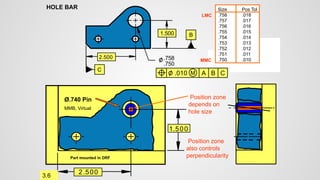
Position zone
depends on
hole size
Ø.740 Pin
MMC
LMC
MMB, Virtual
Position zone
also controls
perpendicularity
2.500
.750
.758
1.500
HOLE BAR
C
B
A
.010
2.500
1.500
Part mounted in DRF
A
B
C
M
3.6
Size Pos Tol
.758 .018
.757 .017
.756 .016
.755 .015
.754 .014
.753 .013
.752 .012
.751 .011
.750 .010
Position zone
depends on
hole size
Ø.740 Pin
MMC
LMC
MMB, Virtual
Position zone
also controls
perpendicularity
2.500
.750
.758
1.500
HOLE BAR
C
B
A
.010
2.500
1.500
Part mounted in DRF
A
B
C
M
3.6
Size Pos Tol
.758 .018
.757 .017
.756 .016
.755 .015
.754 .014
.753 .013
.752 .012
.751 .011
.750 .010
Position zone
depends on
hole size
Ø.740 Pin
MMC
LMC
MMB, Virtual
Position zone
also controls
perpendicularity
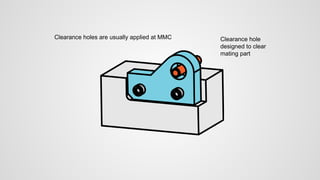
What is MMC used for?
Clearance holes are usually applied at MMC Clearance hole
designed to clear
mating part
2.500
.750
.758
1.500
HOLE BAR
C
B
A
.010
2.500
1.500
Part mounted in DRF
.750
±.005
A
B
C
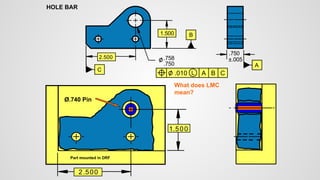
What does LMC
mean?
L
Ø.740 Pin
2.500
.750
.758
1.500
HOLE BAR
C
B
A
.010
2.500
1.500
Part mounted in DRF
.750
±.005
A
B
C
L
3.6
At
LMC
Ø.740 Pin
2.500
.750
.758
1.500
HOLE BAR
C
B
A
.010
2.500
1.500
Part mounted in DRF
.750
±.005
A
B
C
L
3.6
At
LMC
Ø.740 Pin
2.500
.750
.758
1.500
HOLE BAR
C
B
A
.010
2.500
1.500
Part mounted in DRF
.750
±.005
A
B
C
L
3.6
At
LMC
- .010 Position
.010 Position
zone
Ø.740 Pin
2.500
.750
.758
1.500
HOLE BAR
C
B
A
.010
2.500
1.500
Part mounted in DRF
.750
±.005
A
B
C
L
3.6
LMC
- .010 Position
.010 Position
zone
Ø.740 Pin
2.500
.750
.758
1.500
HOLE BAR
C
B
A
.010
2.500
1.500
Part mounted in DRF
.750
±.005
A
B
C
L
3.6
LMC
- .010 Position
.010 Position
zone
Ø.740 Pin
2.500
.750
.758
1.500
HOLE BAR
C
B
A
.010
2.500
1.500
Part mounted in DRF
.750
±.005
A
B
C
L
3.6
LMC
- .010 Position
.010 Position
zone
Ø.740 Pin
2.500
.750
.758
1.500
HOLE BAR
C
B
A
.010
2.500
1.500
Part mounted in DRF
.750
±.005
A
B
C
L
3.6
LMC
- .010 Position
.010 Position
zone
Ø.740 Pin
2.500
.750
.758
1.500
HOLE BAR
C
B
A
.010
2.500
1.500
Part mounted in DRF
.750
±.005
A
B
C
L
3.6
LMC
- .010 Position
.010 Position
zone
Ø.740 Pin
2.500
.750
.758
1.500
HOLE BAR
C
B
A
.010
2.500
1.500
Part mounted in DRF
.750
±.005
A
B
C
L
3.6
LMC
- .010 Position
.010 Position
zone
Ø.740 Pin
2.500
.750
.758
1.500
HOLE BAR
C
B
A
.010
2.500
1.500
Part mounted in DRF
.750
±.005
A
B
C
L
3.6
LMC
- .010 Position
.010 Position
zone
MMC
Ø.740 Pin
2.500
.750
.758
1.500
HOLE BAR
C
B
A
.010
2.500
1.500
Part mounted in DRF
.750
±.005
A
B
C
L
3.6
MMC
LMC
- .010 Position
- .018 Position
.018 Position
zone
Ø.740 Pin
2.500
.750
.758
1.500
HOLE BAR
C
B
A
.010
2.500
1.500
Part mounted in DRF
.750
±.005
A
B
C
L
3.6
.018 Position
zone
MMC - .018 Position
Ø.740 Pin
2.500
.750
.758
1.500
HOLE BAR
C
B
A
.010
2.500
1.500
Part mounted in DRF
.750
±.005
A
B
C
L
3.6
.018 Position
zone
MMC - .018 Position
Ø.740 Pin
Interference with
fixed pin
2.500
.750
.758
1.500
HOLE BAR
C
B
A
.010
2.500
1.500
Part mounted in DRF
.750
±.005
A
B
C
L
3.6
.018 Position
zone
MMC - .018 Position
Ø.740 Pin
Interference with
fixed pin
2.500
.750
.758
1.500
HOLE BAR
C
B
A
.010
2.500
1.500
Part mounted in DRF
.750
±.005
A
B
C
L
3.6
.018 Position
zone
MMC - .018 Position
Ø.740 Pin
Interference with
fixed pin
2.500
.750
.758
1.500
HOLE BAR
C
B
A
.010
2.500
1.500
Part mounted in DRF
.750
±.005
A
B
C
L
3.6
.018 Position
zone
MMC - .018 Position
Ø.740 Pin
Interference with
fixed pin
2.500
.750
.758
1.500
HOLE BAR
C
B
A
.010
2.500
1.500
Part mounted in DRF
.750
±.005
A
B
C
L
3.6
.018 Position
zone
MMC - .018 Position
Ø.740 Pin
Interference with
fixed pin
2.500
.750
.758
1.500
HOLE BAR
C
B
A
.010
2.500
1.500
Part mounted in DRF
.750
±.005
A
B
C
L
3.6
.018 Position
zone
MMC - .018 Position
Ø.740 Pin
Interference with
fixed pin
2.500
.750
.758
1.500
HOLE BAR
2.500
1.500
Part mounted in DRF
B
C
3.6
.010 Position
zone at LMC
C
B
A
.010 L
.750
±.005
A
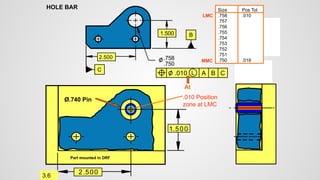
Size Pos Tol
.758 .010
.757
.756
.755
.754
.753
.752
.751
.750 .018
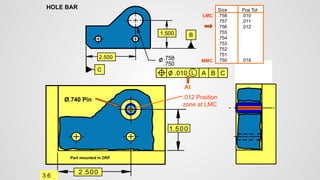
At
Ø.740 Pin
MMC
LMC
2.500
.750
.758
1.500
HOLE BAR
2.500
1.500
Part mounted in DRF
B
C
3.6
.011 Position
zone at LMC
C
B
A
.010 L
.750
±.005
A
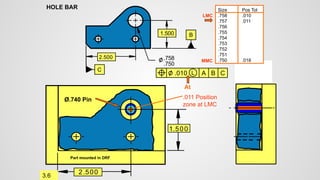
Size Pos Tol
.758 .010
.757 .011
.756 .012
.755 .013
.754 .014
.753 .015
.752 .016
.751 .017
.750 .018
MMC
Ø.740 Pin
LMC
At
2.500
.750
.758
1.500
HOLE BAR
2.500
1.500
Part mounted in DRF
B
C
3.6
.012 Position
zone at LMC
C
B
A
.010 L
.750
±.005
A
Size Pos Tol
.758 .010
.757 .011
.756 .012
.755 .013
.754 .014
.753 .015
.752 .016
.751 .017
.750 .018
Ø.740 Pin
MMC
LMC
At
2.500
.750
.758
1.500
HOLE BAR
2.500
1.500
Part mounted in DRF
B
C
3.6
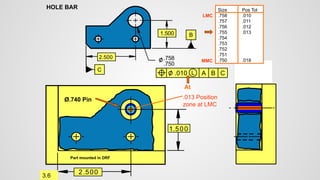
.013 Position
zone at LMC
C
B
A
.010 L
.750
±.005
A
Size Pos Tol
.758 .010
.757 .011
.756 .012
.755 .013
.754 .014
.753 .015
.752 .016
.751 .017
.750 .018
Ø.740 Pin
MMC
LMC
At
2.500
.750
.758
1.500
HOLE BAR
2.500
1.500
Part mounted in DRF
B
C
3.6
C
B
A
.010 L
.750
±.005
A
Size Pos Tol
.758 .010
.757 .011
.756 .012
.755 .013
.754 .014
.753 .015
.752 .016
.751 .017
.750 .018
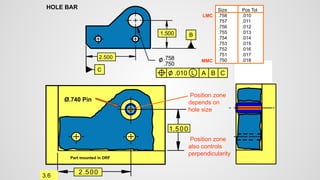
Position zone
depends on
hole size
Ø.740 Pin
MMC
LMC
Position zone
also controls
perpendicularity
2.500
.750
.758
1.500
HOLE BAR
2.500
1.500
Part mounted in DRF
B
C
3.6
C
B
A
.010 L
.750
±.005
A
Size Pos Tol
.758 .010
.757 .011
.756 .012
.755 .013
.754 .014
.753 .015
.752 .016
.751 .017
.750 .018
Position zone
depends on
hole size
Ø.740 Pin
MMC
LMC
Position zone
also controls
perpendicularity
2.500
.750
.758
1.500
HOLE BAR
2.500
1.500
Part mounted in DRF
B
C
3.6
C
B
A
.010 L
.750
±.005
A
Size Pos Tol
.758 .010
.757 .011
.756 .012
.755 .013
.754 .014
.753 .015
.752 .016
.751 .017
.750 .018
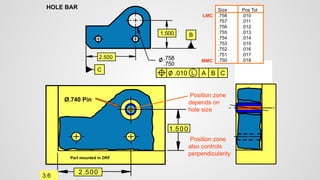
Position zone
depends on
hole size
Ø.740 Pin
MMC
LMC
Position zone
also controls
perpendicularity
2.500
.750
.758
1.500
HOLE BAR
2.500
1.500
Part mounted in DRF
B
C
3.6
C
B
A
.010 L
.750
±.005
A
Size Pos Tol
.758 .010
.757 .011
.756 .012
.755 .013
.754 .014
.753 .015
.752 .016
.751 .017
.750 .018
Position zone
depends on
hole size
Ø.740 Pin
MMC
LMC
Position zone
also controls
perpendicularity
What is LMC used for?
3.6
2.500
.750
.758
1.500
HOLE BAR
C
B
A
.010
2.500
1.500
Part mounted in DRF
.750
±.005
A
B
C
L
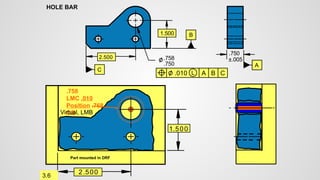
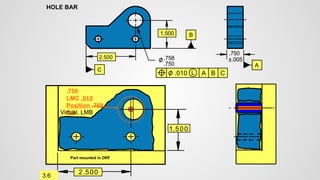
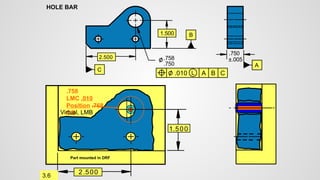
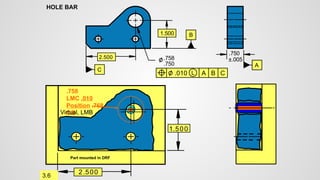
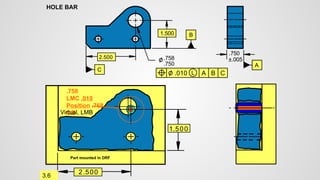
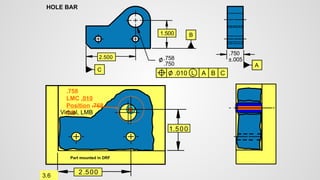
.758
LMC .010
Position .768
OB
3.6
Virtual, LMB
2.500
.750
.758
1.500
HOLE BAR
C
B
A
.010
2.500
1.500
Part mounted in DRF
.750
±.005
A
B
C
L
.758
LMC .010
Position .768
OB
3.6
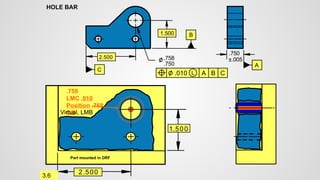
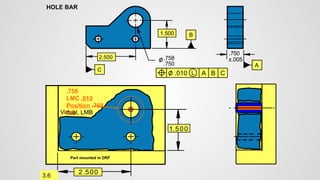
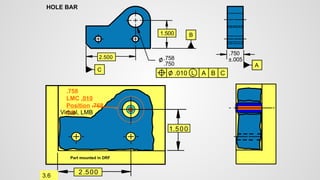
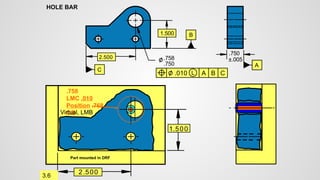
Virtual, LMB
2.500
.750
.758
1.500
HOLE BAR
C
B
A
.010
2.500
1.500
Part mounted in DRF
.750
±.005
A
B
C
L
.758
LMC .010
Position .768
OB
3.6
Virtual, LMB
2.500
.750
.758
1.500
HOLE BAR
C
B
A
.010
2.500
1.500
Part mounted in DRF
.750
±.005
A
B
C
L
.758
LMC .010
Position .768
OB
3.6
Virtual, LMB
2.500
.750
.758
1.500
HOLE BAR
C
B
A
.010
2.500
1.500
Part mounted in DRF
.750
±.005
A
B
C
L
.758
LMC .010
Position .768
OB
3.6
Virtual, LMB
2.500
.750
.758
1.500
HOLE BAR
C
B
A
.010
2.500
1.500
Part mounted in DRF
.750
±.005
A
B
C
L
.758
LMC .010
Position .768
OB
3.6
Virtual, LMB
2.500
.750
.758
1.500
HOLE BAR
C
B
A
.010
2.500
1.500
Part mounted in DRF
.750
±.005
A
B
C
L
.758
LMC .010
Position .768
OB
3.6
Virtual, LMB
2.500
.750
.758
1.500
HOLE BAR
C
B
A
.010
2.500
1.500
Part mounted in DRF
.750
±.005
A
B
C
L
.758
LMC .010
Position .768
OB
3.6
Virtual, LMB
2.500
.750
.758
1.500
HOLE BAR
C
B
A
.010
2.500
1.500
Part mounted in DRF
.750
±.005
A
B
C
L
.758
LMC .010
Position .768
OB
3.6
Virtual, LMB
2.500
.750
.758
1.500
HOLE BAR
C
B
A
.010
2.500
1.500
Part mounted in DRF
.750
±.005
A
B
C
L
.758
LMC .010
Position .768
OB
3.6
Virtual, LMB
2.500
.750
.758
1.500
HOLE BAR
C
B
A
.010
2.500
1.500
Part mounted in DRF
.750
±.005
A
B
C
L
.758
LMC .010
Position .768
OB
3.6
Virtual, LMB
2.500
.750
.758
1.500
HOLE BAR
C
B
A
.010
2.500
1.500
Part mounted in DRF
.750
±.005
A
B
C
L
.758
LMC .010
Position .768
OB
3.6
Virtual, LMB
2.500
.750
.758
1.500
HOLE BAR
C
B
A
.010
2.500
1.500
Part mounted in DRF
.750
±.005
A
B
C
L
.758
LMC .010
Position .768
OB
3.6
Virtual, LMB
2.500
.750
.758
1.500
HOLE BAR
C
B
A
.010
2.500
1.500
Part mounted in DRF
.750
±.005
A
B
C
L
.758
LMC .010
Position .768
OB
3.6
Virtual, LMB
2.500
.750
.758
1.500
HOLE BAR
C
B
A
.010
2.500
1.500
Part mounted in DRF
.750
±.005
A
B
C
L
.758
LMC .010
Position .768
OB
3.6
Virtual, LMB
2.500
.750
.758
1.500
HOLE BAR
C
B
A
.010
2.500
1.500
Part mounted in DRF
.750
±.005
A
B
C
L
.758
LMC .010
Position .768
OB
3.6
Virtual, LMB
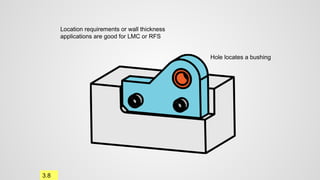
Location requirements or wall thickness
applications are good for LMC or RFS
Hole locates a bushing
3.8
2.500
.750
.758
1.500
HOLE BAR
C
B
A
.010
2.500
1.500
Part mounted in DRF
.750
±.005
A
B
C
L
.758
MMC .010
Position .768
OB
3.6
Virtual, LMB
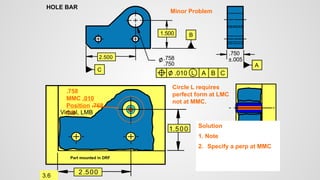
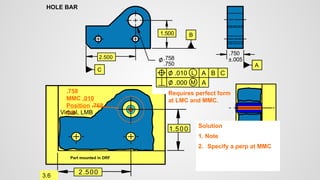
Circle L requires
perfect form at LMC
not at MMC.
Solution
1. Note
2. Specify a perp at MMC
Minor Problem
2.500
.750
.758
1.500
HOLE BAR
2.500
1.500
Part mounted in DRF
.750
±.005
A
B
C
.758
MMC .010
Position .768
OB
3.6
Virtual, LMB
Requires perfect form
at LMC and MMC.
Solution
1. Note
2. Specify a perp at MMC
C
B
A
.010 L
A
.000 M
0.4
L
A B C
A
B
C
20
30
15.1
15.0
M Implied
RFS
Plate
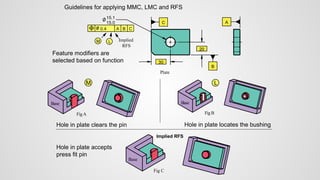
Guidelines for applying MMC, LMC and RFS
FigA
Base
M
Hole in plate clears the pin
FigB
Base
L
Hole in plate locates the bushing
Fig C
Base
Implied RFS
Hole in plate accepts
press fit pin
Feature modifiers are
selected based on function
Location Tolerances
Concentricity
Location
09
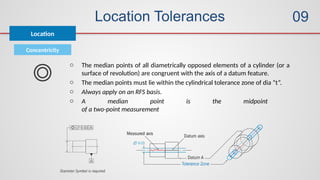
o The median points of all diametrically opposed elements of a cylinder (or a
surface of revolution) are congruent with the axis of a datum feature.
o The median points must lie within the cylindrical tolerance zone of dia “t”.
o Always apply on an RFS basis.
o A median point is the midpoint
of a two-point measurement
Location Tolerances
Concentricity
Location
09
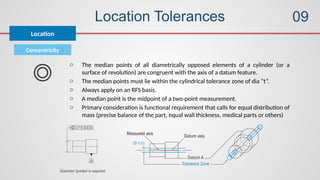
o The median points of all diametrically opposed elements of a cylinder (or a
surface of revolution) are congruent with the axis of a datum feature.
o The median points must lie within the cylindrical tolerance zone of dia “t”.
o Always apply on an RFS basis.
o A median point is the midpoint of a two-point measurement.
o Primary consideration is functional requirement that calls for equal distribution of
mass (precise balance of the part, equal wall thickness, medical parts or others)
Location Tolerances
Symmetry
Location
09
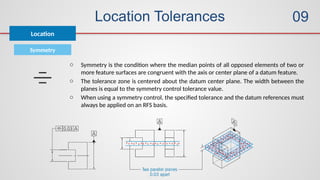
o Symmetry is the condition where the median points of all opposed elements of two or
more feature surfaces are congruent with the axis or center plane of a datum feature.
o The tolerance zone is centered about the datum center plane. The width between the
planes is equal to the symmetry control tolerance value.
o When using a symmetry control, the specified tolerance and the datum references must
always be applied on an RFS basis.
Location Tolerances
Profile of Line
Location
09
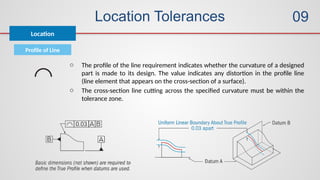
o The profile of the line requirement indicates whether the curvature of a designed
part is made to its design. The value indicates any distortion in the profile line
(line element that appears on the cross-section of a surface).
o The cross-section line cutting across the specified curvature must be within the
tolerance zone.
Location Tolerances
Profile of Surface
Location
09
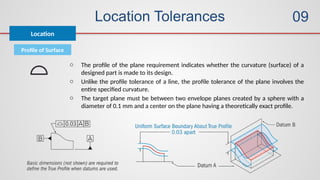
o The profile of the plane requirement indicates whether the curvature (surface) of a
designed part is made to its design.
o Unlike the profile tolerance of a line, the profile tolerance of the plane involves the
entire specified curvature.
o The target plane must be between two envelope planes created by a sphere with a
diameter of 0.1 mm and a center on the plane having a theoretically exact profile.
10
09
10
11
12
Location Tolerances
Runout Tolerances
Measurements
of GD&T
Advanced Concepts
Standard Practices
Composite Tolerancing / Boundary Conditions on Datums
Tolerance Zones / Application
Runout Tolerances
Circular Runout
Runout
10
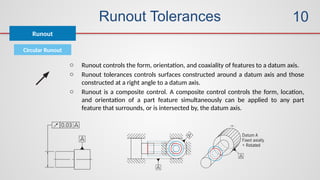
o Runout controls the form, orientation, and coaxiality of features to a datum axis.
o Runout tolerances controls surfaces constructed around a datum axis and those
constructed at a right angle to a datum axis.
o Runout is a composite control. A composite control controls the form, location,
and orientation of a part feature simultaneously can be applied to any part
feature that surrounds, or is intersected by, the datum axis.
Runout Tolerances
Circular Runout
Runout
10
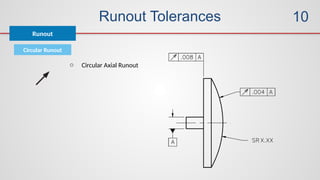
o Circular Axial Runout
Runout Tolerances
Total Runout
Runout
10
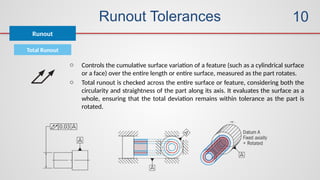
o Controls the cumulative surface variation of a feature (such as a cylindrical surface
or a face) over the entire length or entire surface, measured as the part rotates.
o Total runout is checked across the entire surface or feature, considering both the
circularity and straightness of the part along its axis. It evaluates the surface as a
whole, ensuring that the total deviation remains within tolerance as the part is
rotated.
11
09
10
11
12
Location Tolerances
Runout Tolerances
Measurements
of GD&T
Advanced Concepts
Standard Practices
Composite Tolerancing / Boundary Conditions on Datums
Tolerance Zones / Application
Measurements of GD&T
Straightness
Form
11
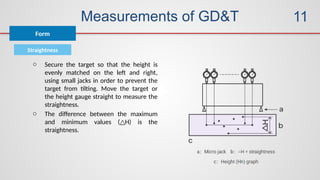
o Secure the target so that the height is
evenly matched on the left and right,
using small jacks in order to prevent the
target from tilting. Move the target or
the height gauge straight to measure the
straightness.
o The difference between the maximum
and minimum values ( H) is the
△
straightness.
Measurements of GD&T
Flatness
Form
11
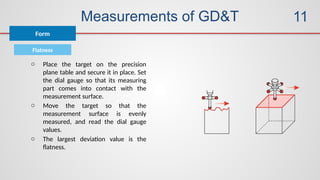
o Place the target on the precision
plane table and secure it in place. Set
the dial gauge so that its measuring
part comes into contact with the
measurement surface.
o Move the target so that the
measurement surface is evenly
measured, and read the dial gauge
values.
o The largest deviation value is the
flatness.
Measurements of GD&T
Roundness
Form
11
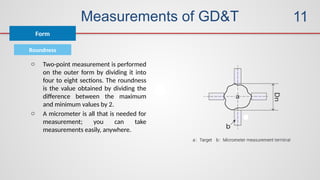
o Two-point measurement is performed
on the outer form by dividing it into
four to eight sections. The roundness
is the value obtained by dividing the
difference between the maximum
and minimum values by 2.
o A micrometer is all that is needed for
measurement; you can take
measurements easily, anywhere.
Measurements of GD&T
Cylindricity
Form
11
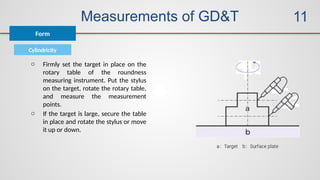
o Firmly set the target in place on the
rotary table of the roundness
measuring instrument. Put the stylus
on the target, rotate the rotary table,
and measure the measurement
points.
o If the target is large, secure the table
in place and rotate the stylus or move
it up or down.
Measurements of GD&T
Perpendicularity
Orientation
11
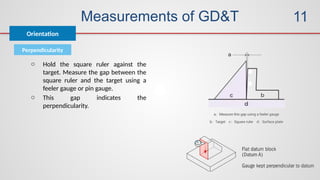
o Hold the square ruler against the
target. Measure the gap between the
square ruler and the target using a
feeler gauge or pin gauge.
o This gap indicates the
perpendicularity.
Measurements of GD&T
Angularity
Orientation
11
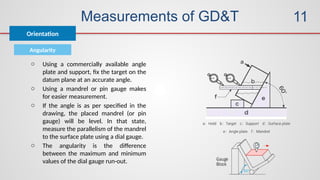
o Using a commercially available angle
plate and support, fix the target on the
datum plane at an accurate angle.
o Using a mandrel or pin gauge makes
for easier measurement.
o If the angle is as per specified in the
drawing, the placed mandrel (or pin
gauge) will be level. In that state,
measure the parallelism of the mandrel
to the surface plate using a dial gauge.
o The angularity is the difference
between the maximum and minimum
values of the dial gauge run-out.
Measurements of GD&T
Parallelism
Orientation
11
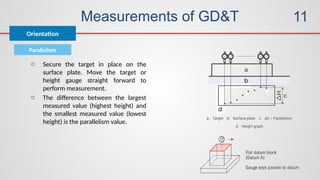
o Secure the target in place on the
surface plate. Move the target or
height gauge straight forward to
perform measurement.
o The difference between the largest
measured value (highest height) and
the smallest measured value (lowest
height) is the parallelism value.
Measurements of GD&T
True Position
Location
11
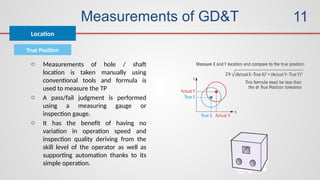
o Measurements of hole / shaft
location is taken manually using
conventional tools and formula is
used to measure the TP
o A pass/fail judgment is performed
using a measuring gauge or
inspection gauge.
o It has the benefit of having no
variation in operation speed and
inspection quality deriving from the
skill level of the operator as well as
supporting automation thanks to its
simple operation.
Measurements of GD&T
Concentricity
Location
11
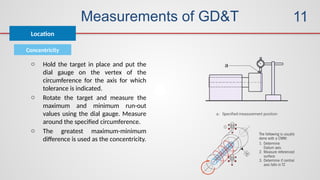
o Hold the target in place and put the
dial gauge on the vertex of the
circumference for the axis for which
tolerance is indicated.
o Rotate the target and measure the
maximum and minimum run-out
values using the dial gauge. Measure
around the specified circumference.
o The greatest maximum-minimum
difference is used as the concentricity.
Measurements of GD&T
Symmetry
Location
11
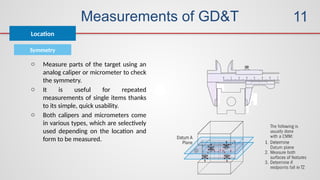
o Measure parts of the target using an
analog caliper or micrometer to check
the symmetry.
o It is useful for repeated
measurements of single items thanks
to its simple, quick usability.
o Both calipers and micrometers come
in various types, which are selectively
used depending on the location and
form to be measured.
Measurements of GD&T
Profile of Line
Location
11
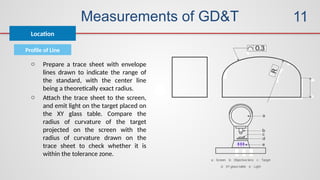
o Prepare a trace sheet with envelope
lines drawn to indicate the range of
the standard, with the center line
being a theoretically exact radius.
o Attach the trace sheet to the screen,
and emit light on the target placed on
the XY glass table. Compare the
radius of curvature of the target
projected on the screen with the
radius of curvature drawn on the
trace sheet to check whether it is
within the tolerance zone.
Measurements of GD&T
Profile of Surface
Location
11
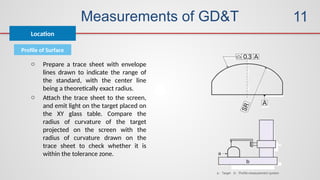
o Prepare a trace sheet with envelope
lines drawn to indicate the range of
the standard, with the center line
being a theoretically exact radius.
o Attach the trace sheet to the screen,
and emit light on the target placed on
the XY glass table. Compare the
radius of curvature of the target
projected on the screen with the
radius of curvature drawn on the
trace sheet to check whether it is
within the tolerance zone.
12
09
10
11
12
Location Tolerances
Runout Tolerances
Measurements
of GD&T
Advanced Concepts
Standard Practices
Composite Tolerancing / Boundary Conditions on Datums
Tolerance Zones / Application
Advanced Topics
Topics
12
o Composite Tolerancing
o Details of Boundaries
o Projected Tolerance Zones
o Mating Envelopes
o Measurement Methodologies on CMM
o Datum Targets
o Zero Tolerance at MMC
o Simultaneous and Separate Requirements
Geometric dimensioning  and tolerancing.pptx

Geometric dimensioning and tolerancing.pptx

Editor's Notes

  • #38 To help understand the need for geometric tolerancing it is important to understand what we have done in the past This simple angle block will first use plus/minus tolerances to locate the hole Afterwards we will apply position tolerancing along with using datums to establish a datum reference frame (DRF) For the next few slides you can read the text on the slide to help as a guide The forward and backward button can be used as necessary to help explain and reinforce the principles
  • #39 For the next few slides you can read the text on the slide to help as a guide The forward and backward button can be used as necessary to help explain and reinforce the principles
  • #107 Before we start, look at this assemble and study the assembly mounting of the hole bar. In Geometric Tolerancing it is important to understand the function of the part and how it mates in the assembly. The remaining slides of this unit tell a story and will take the angle part above and apply geometric tolerancing. The object of this lesson is to apply a variety of geometric specifications to the blue Hole bar according to function. We will examine why each specification was applied and its interpretation. This unit will give the student a overall view on “How the Geometric Tolerance System Works”. This drawing is to show how the part mounts in the assembly. Notice the Hole bar fits on a shelf or a corner in the mating part. It is a very simple example to help us all get the idea of how to apply geometric tolerancing to a simple part. We will work on more complex examples later in the program. The instructor should refer unit 3 in GeoTol Pro. There is discussion on this part and a step by step discussion of all the geometric characteristics applied in the following slides. The following slides will provide an animated example of the text.
  • #110 Remember we must have the hole in the part clear the pin in the assembly. The DRF is clear, the position tolerance zone is clear. Lets now consider the feature modifier. Should the modifier be RFS, MMC, or LMC? How do we know which modifier is specified? There are rules for modifiers. Let us look a the modifier rules.
  • #111 These are the modifier rules for the ASME Y14.5-2009 std
  • #112 Now that we understand the modifier rules lets go on and understand the effect of the feature modifiers, RFS, MMC and LMC. Click back and forth thru the next group of slides to explain the RFS concept. See the GeoTol Pro book for details. MMC and RFS are certainly the most common modifiers. LMC is not that common and the students should be advised not to use it until they know what they are doing.
  • #132 This is just a general discussion on RFS application. We will discuss more RFS applications later in the program. This is just an introduction.
  • #133 Click back and forth thru the next group of slides to explain the MMC concept. See the GeoTol Pro book for details.
  • #158 If a L modifier were placed in the compartment with the feature tolerance it would invoke the LMC concept. What would it mean? Clicking the following slides back /forth will allow the instructor to explain the effect of the L modifier. MMC and RFS are certainly the most common modifiers. LMC is not that common and the students should be advised not to use it until they know what they are doing. Spend less time on the LMC modifier and stress the other modifiers RFS and MMC.
  • #186 LMC is not that common and the students should be advised not to use it until they know what they are doing. MMC and RFS are certainly the most common modifiers. Notice that LMC applied to a position tolerance provides a virtual condition boundary of which no portion of the feature may exit. LMC applied to a hole will provide this virtual boundary at .768. Clicking back and forth thru the following slides will show the edge of the hole will never enter this virtual boundary even as the hole gets larger and smaller with multiple locations. If this hole were designed not to clear a pin but to locate a pin or pilot, the LMC virtual boundary would be important.
  • #203 Notice that LMC applied to a position tolerance provides a virtual condition boundary of which no portion of the feature may exit. LMC applied to a hole will provide this virtual boundary at .768. Clicking back and forth thru the following slides will show the edge of the hole will never enter this virtual boundary even as the hole gets larger and smaller with multiple locations. If this hole were designed not to clear a pin but to locate a pin or pilot, the LMC virtual boundary would be important. See GeoTol Pro for more info.
  • #205 This is a slide to discuss guidelines for applying the feature modifiers. See GeoTol Pro for discussion on this topic. This is still general in nature and students have this info in the text and can read it over in more detail. The extent of the coverage of this material depends on the audience. If the group is alive and well and full of questions it can be covered now. If the group is not to interested in this material it can be assigned for homework review or covered when the group is further along in the course and has the need and are ready to learn the material in detail. Note; The next few slides are intended more towards design and the application of modifiers. If there is the need to discuss the interpretation of modifiers with manufacturing or inspection in more detail consider the slides following this group. The group can also suggest application of the modifiers to some company parts.