Geocaching
•1
Geocaching Merit BadgeGeocaching Merit Badge
Merit Badge CamporeeMerit Badge Camporee
• Do you have a completed Blue Card?Do you have a completed Blue Card?
• Are you in the right class?Are you in the right class?
• Do you have a Workbook?Do you have a Workbook?
Chuck VohsChuck Vohs
41 Linda Drive41 Linda Drive
Mechanicsburg, PA 17050Mechanicsburg, PA 17050
(717) 385-2570(717) 385-2570
fuzzie@vohslaw.comfuzzie@vohslaw.com
Requirement #3
3. Explain the following terms used in3. Explain the following terms used in
geocaching: waypoint, log, cache, accuracy,geocaching: waypoint, log, cache, accuracy,
difficulty and terrain ratings, attributes, trackable.difficulty and terrain ratings, attributes, trackable.
Choose five additional terms to explain to yourChoose five additional terms to explain to your
counselor.counselor.
3
What is Geocaching
“Geocaching is a sport where you use a multi
billion dollar satellite system to locate
rubbermaid containers in middle of the woods.”
~ Anonymous
What is Geocaching?
Nature meets Technology
•GPS (Global Positioning Device)
•Maps
•Hidden Containers
•Latitude/Longitude
•Friends and Family Time
•geocaching.com
•Adventures
•FUN FOR ALL
History of Geocaching
• GPS was developed by the US Dept of Defense
• May 1, 2000 the Government made these GPS
signals available to the public
• On May 3, 2000, Dave Ulmer hid a 5 gallon
pail out in woods in Oregon “The Great
American Stash Hunt”
• The first finder, Jeremy Irish, created
geocaching.com to document geocaches
• Geocaching was originally similar to the 160-
year-old game letterboxing, which uses clues
and references to landmarks embedded in
stories
• Today almost 3 Million are hidden around the
Types of Geocaches
• Traditional
• Multi-Cache
• Puzzle
• Virtual
• Earthcache
• Event
• Letterbox
• Wherigo
• Webcam
• Benchmarking
• Waymarking
7
Geocache Sizes
Micro: Nano, film containers, magnetic key holder
•Typically only a logbook
Small : Sandwich size lock-n-lock, small peanut
butter container
•Can fit logbook, pencil and small trade items
Regular: Ammo can, large lock-n-lock, “shoebox
size”
Large: 5 gallon pail, big wooden box
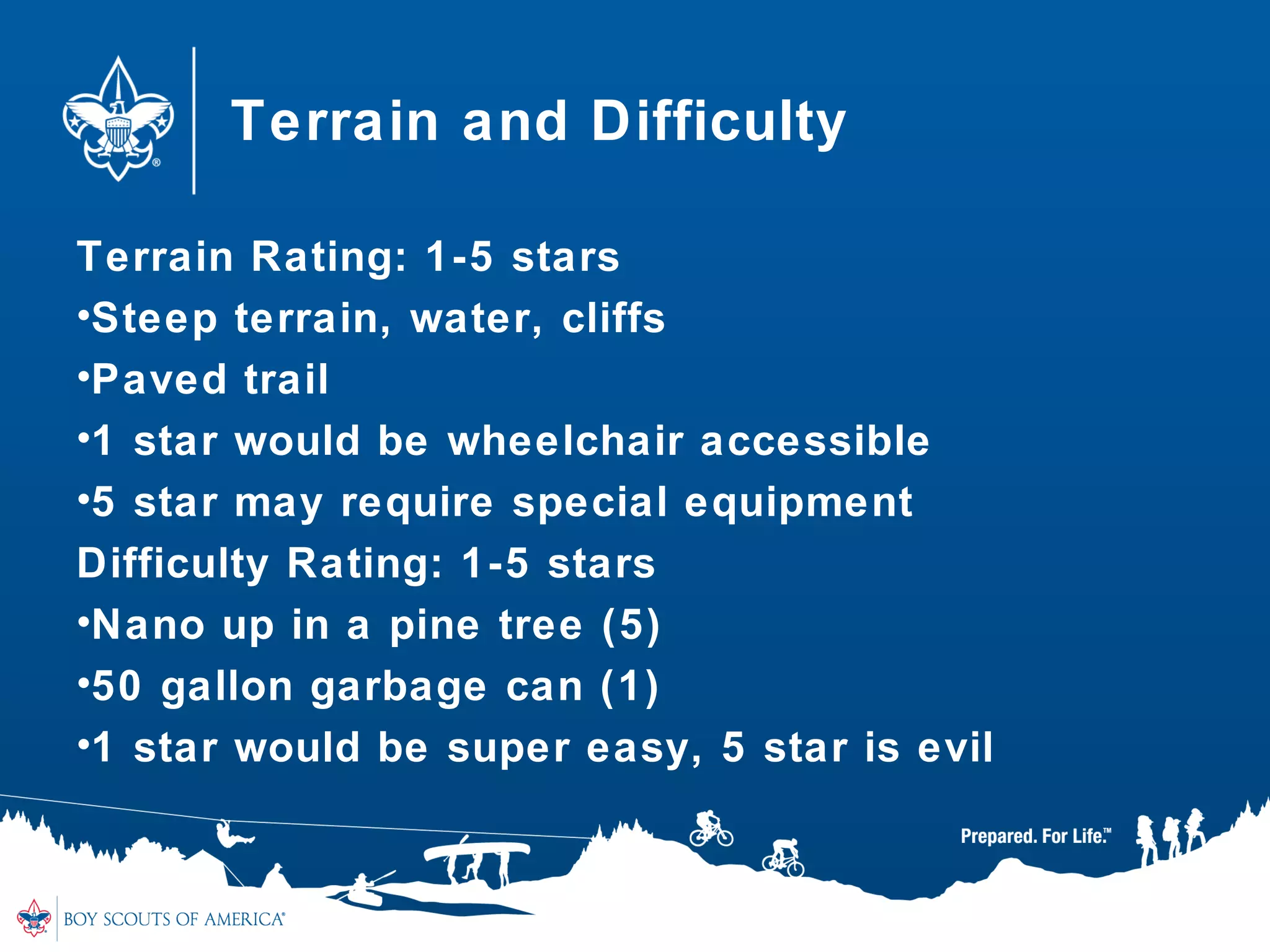
Terrain and Difficulty
Terrain Rating: 1-5 stars
•Steep terrain, water, cliffs
•Paved trail
•1 star would be wheelchair accessible
•5 star may require special equipment
Difficulty Rating: 1-5 stars
•Nano up in a pine tree (5)
•50 gallon garbage can (1)
•1 star would be super easy, 5 star is evil
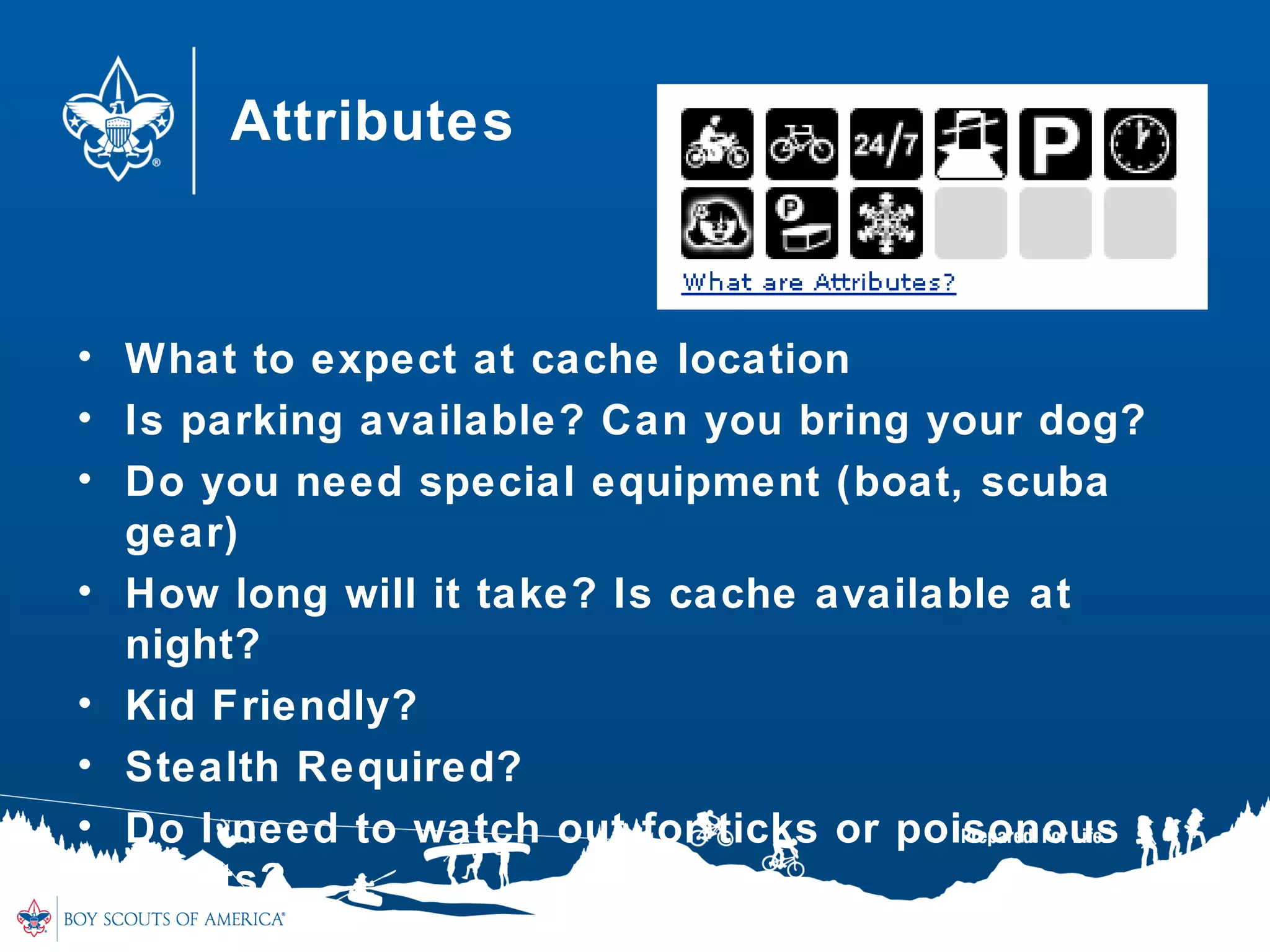
Attributes
• What to expect at cache location
• Is parking available? Can you bring your dog?
• Do you need special equipment (boat, scuba
gear)
• How long will it take? Is cache available at
night?
• Kid Friendly?
• Stealth Required?
• Do I need to watch out for ticks or poisonous
plants?
Requirement #1
1. Do the following:1. Do the following:
a.a.Explain to your counselor the most likelyExplain to your counselor the most likely
hazards you may encounter while participating inhazards you may encounter while participating in
geocaching activities and what you should do togeocaching activities and what you should do to
anticipate, help prevent, mitigate, and respond toanticipate, help prevent, mitigate, and respond to
these hazards.these hazards.
11
Potential Hazards
• Anticipate & Prevent
• Mitigate & Respond
Hazards
• Poisonous plants
• Sunburn
• Heatstroke
• Hypothermia
• Ticks
• Mosquitoes
• Holes in the ground
• Uneven terrain
• Disorientation
Requirement #1
1. Do the following:1. Do the following:
b.b.Discuss first aid and prevention for the types ofDiscuss first aid and prevention for the types of
injuries or illnesses that could occur whileinjuries or illnesses that could occur while
participating in geocaching activities, includingparticipating in geocaching activities, including
cuts, scrapes, snakebite, insect stings, tick bites,cuts, scrapes, snakebite, insect stings, tick bites,
exposure to poisonous plants, heat and coldexposure to poisonous plants, heat and cold
reactions (sunburn, heatstroke, heat exhaustion,reactions (sunburn, heatstroke, heat exhaustion,
hypothermia), and dehydration.hypothermia), and dehydration.
c.c.Discuss how to properly plan an activity thatDiscuss how to properly plan an activity that
uses GPS, including using the buddy system,uses GPS, including using the buddy system,
sharing your plan with others, and considering thesharing your plan with others, and considering the
weather, route, and proper attire.weather, route, and proper attire.
14
First Aid and Prevention
• Cuts & Scrapes
• Snakebites
• Insect Stings
• Tick Bites
• Poisonous Plants
• Sunburn
• Heatstroke
• Heat Exhaustion
• Hypothermia
• Dehydration
Requirement #1
1. Do the following:1. Do the following:
c.c.Discuss how to properly plan an activity thatDiscuss how to properly plan an activity that
uses GPS, including using the buddy system,uses GPS, including using the buddy system,
sharing your plan with others, and considering thesharing your plan with others, and considering the
weather, route, and proper attire.weather, route, and proper attire.
16
Proper Planning
• Bring a buddy
• Tell someone where you are going and when
you expect to be back
• Carry a compass, whistle and first aid kit
• Dress for weather and terrain
• Be aware of your surroundings
• Wear blaze orange during hunting season
Requirement #2
2. Discuss the following with your counselor:2. Discuss the following with your counselor:
a.a.Why you should never bury a cache.Why you should never bury a cache.
b.b.How to use proper geocaching etiquette whenHow to use proper geocaching etiquette when
hiding or seeking a cache, and how to properlyhiding or seeking a cache, and how to properly
hide, post, maintain, and dismantle a geocache.hide, post, maintain, and dismantle a geocache.
c.c.The principles of Leave No Trace as they applyThe principles of Leave No Trace as they apply
to geocaching.to geocaching.
18
Geocaching Rules and Etiquette
Rule No. 1: Keep Safe
•Stay far away from road traffic and railroad
crossings.
•Don’t place a cache higher than 6 feet or require
any dangerous climbing to reach it.
•Don’t require Scouts to swim to reach the cache.
•Public caches are often magnetic containers
stuck onto electrical switch boxes.
•Common sense says to avoid these as well!
•Always enforce the buddy system.
Geocaching Rules and Etiquette
Rule No. 2: Respect the Environment
•Never bury a cache in the ground
•Avoid sensitive ecosystems. Place caches so
that they can be reached by existing trail access
•Don’t place caches in archaeological or historic
sites
•Don’t deface any object, natural or manmade
•Don’t hide caches in lightpost bases, sprinkler
heads, etc
Geocaching Rules and Etiquette
Rule No. 3: Respect Private Property
•Get permission from land managers to use parks,
Scout camps, etc., for your events
•It is unlawful to put caches on National Park land
or national wildlife refuges
•Local laws and policies vary so check with any
relevant agency before placing caches
– Caches in or near military installations are not allowed
– Caches are not allowed on elementary and secondary schools
– Avoid possible targets for terrorist attacks, including highway
bridges, dams, government buildings, and airports
Geocaching Rules and Etiquette
Rule No. 4: Be a Positive Ambassador for
Scouting
•As with all else we do, cache using the Scout
Oath and Law.
Geocaching Rules and Etiquette
• Practice cache-in-trash-out (CITO). Always
carry a trash bag and remove litter along your
route.
• Follow Leave No Trace guidelines in the natural
environment.
• Be careful of the area around the cache—don’t
trample the ground, rip up sprinkler heads, etc.,
in your frenzy to find the cache.
• Follow all laws and regulations. Never enter
private property without permission.
• Write an entry in the logbook at the cache.
Leave No Trace
• Follow 7 Leave No Trace Principles
1. Plan Ahead and Prepare
• Check weather, be safe, follow land policies, know how to use
GPS
1. Travel and Cache on durable surfaces
• Stay on the trail, avoid creating new geotrails, avoid sensitive
areas
1. Dispose of Waste Properly
• Cache in, Trash Out
1. Leave What you Find
• “See it as it is, leave it as it was”
24
Leave No Trace
5. Minimize Campfire Impacts
• Typically doesn’t apply with Geocaching, but know area
regulations
5. Respect Wildlife
• Never leave food in a geocache
• Dogs on a leash
• Observe wildlife from a distance
5. Be Considerate of other Visitors
• Yield to those on a trail
• Avoid loud noises
• Do not trespass
25
Geocaching Rules and Etiquette
• Cache items are there for fun and for trade
• Try to leave something of equal value to what
you take for yourself
• Respect other visitors around the area
Requirement #4
Explain how the Global Positioning System (GPS)Explain how the Global Positioning System (GPS)
works. Then, using Scouting’s Teaching EDGE,works. Then, using Scouting’s Teaching EDGE,
demonstrate the use of a GPS unit to yourdemonstrate the use of a GPS unit to your
counselor. Include marking and editing acounselor. Include marking and editing a
waypoint, changing field functions, and changingwaypoint, changing field functions, and changing
the coordinate system in the unit.the coordinate system in the unit.
N 39 46.263 W 076 40.929N 39 46.263 W 076 40.929
27
Global Positioning System
What does a GPS do?
•Tells you where to go
•Tracks where you have been
•Stores maps: topo, trails, streets
•Stores coordinates (waypoints, points of interest)
•Communicates with satellites in space
How does GPS work?
• Space
– 24-30 satellites orbit around the earth at about 12,550 miles
– Transmits position, orbit, location, and altitude
• Control
– Satellites are tracked by US Air Force Monitoring Stations
– Ground stations send updates to the satellites
• User
– GPS
– Uses data from satellites to calculate user’s position, altitude and
other data
How does GPS work?
• GPS uses the time it receives the signal from
the satellites to determine location and altitude
• The GPS only needs to receive data from 4
satellites to determine location.
• The more received, the better the accuracy
GPS
Interference: Factors that prevent GPS from
receiving information from satellites
• Weather
• Buildings
• Trees
• Canyons
•Takes longer for GPS to receive satellite signal
•No GPS is 100% Accurate
•Most GPS units will get you within 15 - 25 feet of
a Geocache
How to use a GPS
• Get to know your GPS before you head out
– Where is the Enter button, move up or down, zoom in or out, find
the menu, turn on backlight
• How to switch between the map and the
compass
• Check battery levels
• “Mark” a Waypoint
– A waypoint is a location entered in your GPS
• “Find” a waypoint (location) or point of interest
• Edit/Change coordinates
• The Compass
– The arrow will not move until you begin to move
32
Requirement #5
5. Do the following:5. Do the following:
a.a.Show you know how to use a map and compassShow you know how to use a map and compass
and explain why this is important for geocaching.and explain why this is important for geocaching.
b.b.Explain the similarities and differences betweenExplain the similarities and differences between
GPS navigation and standard map reading skillsGPS navigation and standard map reading skills
and describe the benefits of each.and describe the benefits of each.
c.c.Explain the UTM (Universal Transverse Mercator)Explain the UTM (Universal Transverse Mercator)
system and how it differs from the latitude/longitudesystem and how it differs from the latitude/longitude
system used for public geocaches.system used for public geocaches.
d.d.Show how to plot a UTM waypoint on a map.Show how to plot a UTM waypoint on a map.
Compare the accuracy to that found with a GPSCompare the accuracy to that found with a GPS
unit.unit.
33
Maps & Compass
Why should you bring a Map and Compass with
you?
• GPS batteries go dead
• Satellite signal is not good
• Enter in the wrong coordinates
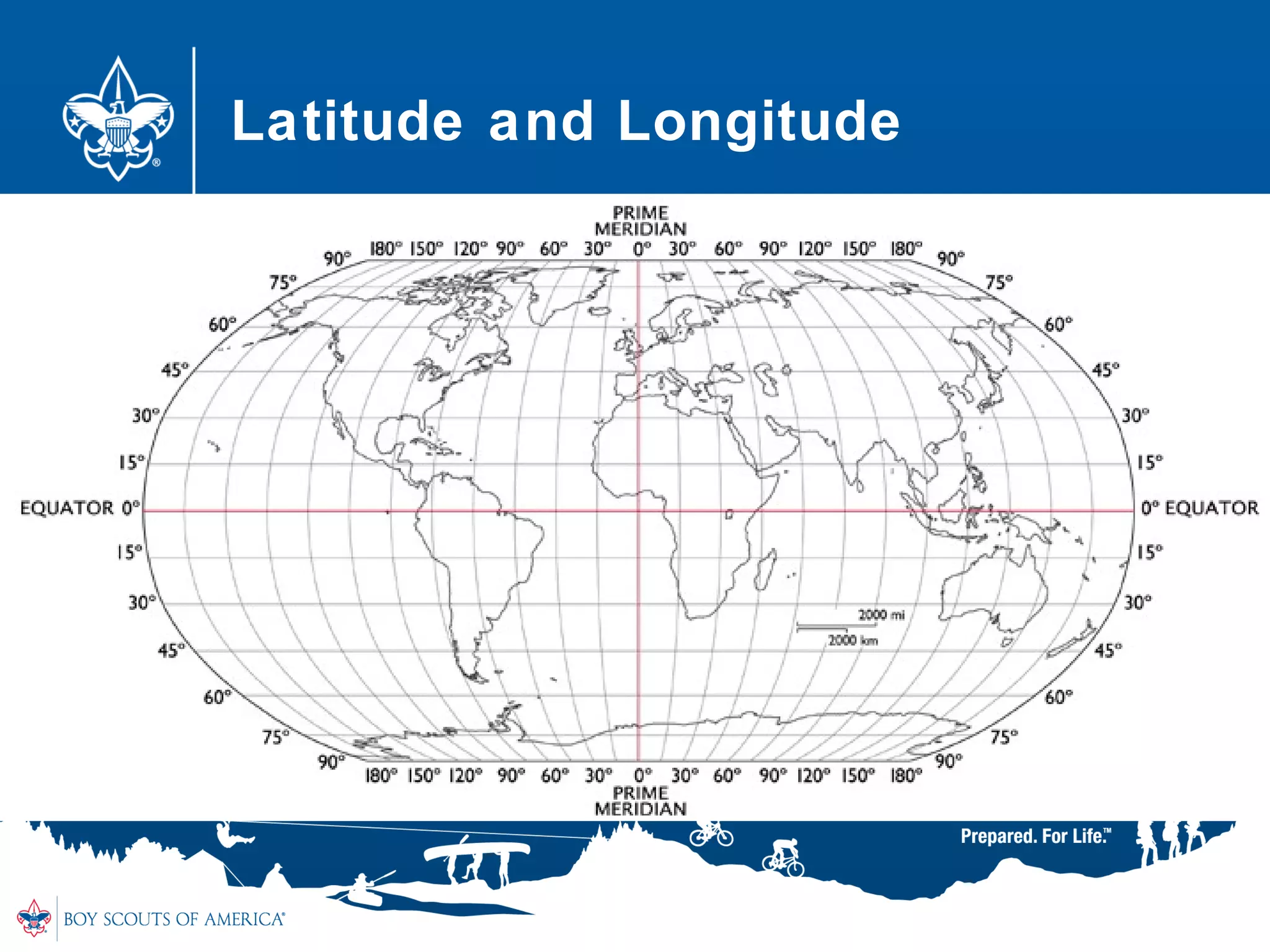
How to Determine Coordinates
The globe is divided into vertical and horizontal
lines called: Latitude and Longitude
•Latitude (parallels)
– Horizontal lines around the globe
– North Pole is 90 degrees north
– South Pole is 90 degrees south
•Longitude (meridians)
– Vertical lines around the globe
– East to West
– 0 degrees = Prime Meridian; goes through Greenwich, England
Latitude and Longitude
• Each degree is divided into 60 minutes
• Each minute of latitude and longitude = 60
seconds
• Format used for Coordinates:
– Degrees, Minutes, Seconds
– Coordinates at Baldy Mountain at Philmont are
– N 360 37’ 45’’ W 1050 12’ 48’’
• Geocaching.com and most GPS uses different
format: Degrees and Decimal Minutes
– Coordinates above would read:
– N 36 37.750 W 105 12.800
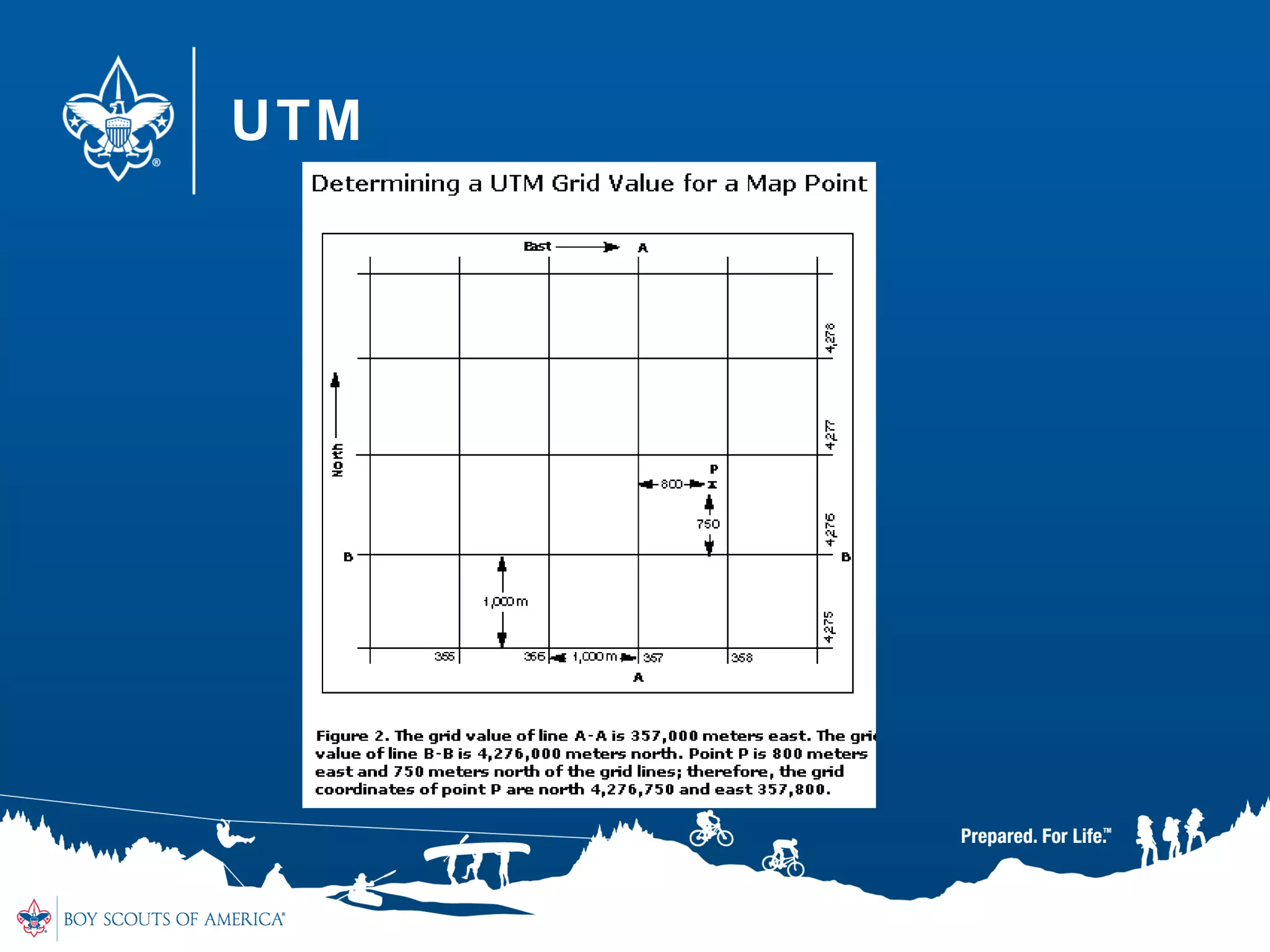
Universal Transverse Mercator
(UTM)
• Rectangular grid-based map overlay
• Divides Earth into 60 zones
– Each zone = 6 degrees of latitude
• 20 Latitude bands, each 8 degrees high
– Each band is lettered from C to X (no I or O)
– Ends at 84 degrees N Latitude
• “Easting” – measured from central meridian
• “Northing” – measured from the equator
• Always read coordinates East and then North
UTM
UTM
Requirement #6
Describe the four steps to finding your first cacheDescribe the four steps to finding your first cache
to your counselor. Then mark and edit a waypoint.to your counselor. Then mark and edit a waypoint.
41
Four Steps to finding your 1st
Cache
• Step 1: Research
• Step 2: Safety
• Step 3: The Hunt
• Step 4: The Actual Find
Step 1 : Research
• Sign up for free account on Geocaching.com
(Requirement #7)
• Click “Hide and Seek a Cache”, enter a zip
code
• Select the Geocache you want to find
– distance, difficulty, terrain, type and size
• Enter coordinates in your GPS device
• Look at map of area to determine your best
approach
– In the city, use a city map
– In rural areas, use a topographic map
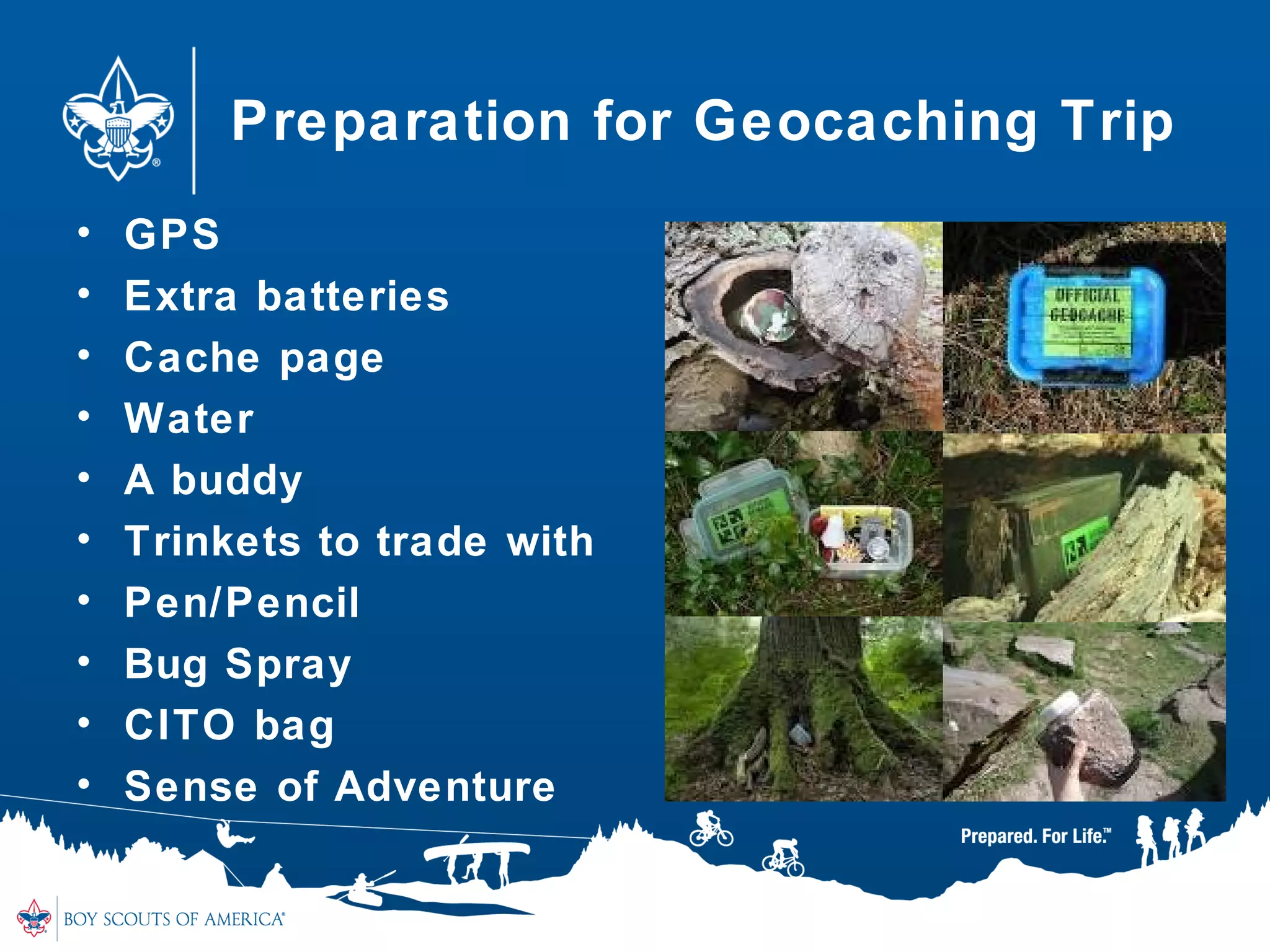
Preparation for Geocaching Trip
• GPS
• Extra batteries
• Cache page
• Water
• A buddy
• Trinkets to trade with
• Pen/Pencil
• Bug Spray
• CITO bag
• Sense of Adventure
Step 2: Safety
• Bring a buddy
• Tell someone where you are going and when
you expect to be back
• Carry a compass, whistle and first aid kit
• Dress for weather and terrain
• Be aware of your surroundings
• Wear blaze orange during hunting season
Internet Safety
• Obtain parent permission and follow the rules
• Never give out your email, phone number or
other personal information
• Never open e-mail or files if you don’t the
sender
• Tell a parent if you see or receive anything that
makes you feel uncomfortable
• Never agree to meet with anybody you meet
online
• Don’t share passwords
• Don’t believe everything you read online
• Obey the laws
46
Step 3: The Hunt
• Mark your car and/or trailhead
• Stay on the trail
• Watch your footing
• Use your GPS compass to lead you towards the
cache
• Slow down when you get to about 300 feet
• Once you get to about 30 feet, start your
search
• Sometimes it helps to just put the GPS away
and use your geosense
Step 4: The Actual Find
• Once you find it, write about it in logbook
– Use your geocaching name (handle) and date
• Take something, Leave something
• Only take a trackable if you intend on moving it
– Trackables are Geocoins, Travel Bugs and tracked on
Geocaching.com
• Put Geocache back, better than how you found
it
– Many times, geocaches “move” or camo disappears
– Make sure lid is on tight
• Log it on Geocaching.com and share your
experience.
Hiding a Geocache
• Read the guidelines on Geocaching.com
• Many parks and cities have special rules
• Same steps as finding:
– Step 1: Research
– Step 2: Safety
– Step 3: The Hunt
– Step 4: The Actual Find
49
Step 1: Research
• Where would be a good place to hide a
Geocache?
– Geocaches must be .10 miles (528 feet) away from
others.
– Think “Where would I like to FIND a Geocache?”
• Hide Geocache where there will be
minimal risk to the environment
50
Step 2: Safety
• Geocaches must be safe to get to
• If on private property, obtain permission
• Geocaches are not allowed near
railroads, bridges, school property or
military bases
51
Step 3: The Hunt
• Make sure coordinates are accurate
• Supply a hint
• Write “Geocache” on outside of container
• You want to be sure Geocachers can find
your hide
52
Step 4: The Actual Find
• Be sure to use a watertight container
– Lock N Locks
– Ammo Cans
– Do not use: “gladware”, they do not hold up to Pennsylvania
winters
• Put a “Cache Note” in the geocache
– This can be printed off Geocaching.com
• Put logbook in a plastic baggie
– Leave the pencil out, they tend to poke holes in the baggie
• Load the cache up with swag
– Do not put in food, fireworks, or other dangerous materials
53
Submitting your Geocache
• Go to Geocaching.com
• On “Hide and Seek” page, click on the Online
Form
• Complete all information on the form and
Submit
• Add Attributes
• Volunteer reviewers will review your listing
– If there are questions, they will email you
– If no questions and all guidelines were followed, they will publish
your new Geocache on Geocaching.com
• Wait for that first Geocacher to log the “FTF”
(First to Find)
54
Maintain it!
• When you hide a Geocache, you maintain it!
• Read the logs that geocachers will send you
– They will let you know if your Geocache is “wet” or the logbook is
full
– If you get a few “DNF” logs (Did Not Find), you may want to
check to see if the geocache has been “Muggled” (a non-
geocacher may have found it and removed it)
• When you visit the area, make sure
environment around isn’t being damaged in
anyway
• If you can no longer maintain, you need to
“archive” and remove the geocache
55
Requirement #8d
d.d. Explain what Cache In Trash Out (CITO) means,Explain what Cache In Trash Out (CITO) means,
and describe how you have practiced CITO atand describe how you have practiced CITO at
public geocaches or at a CITO event. Then,public geocaches or at a CITO event. Then,
either create CITO containers to leave at publiceither create CITO containers to leave at public
caches, or host a CITO event for your unit or forcaches, or host a CITO event for your unit or for
the public.the public.
56
CITO
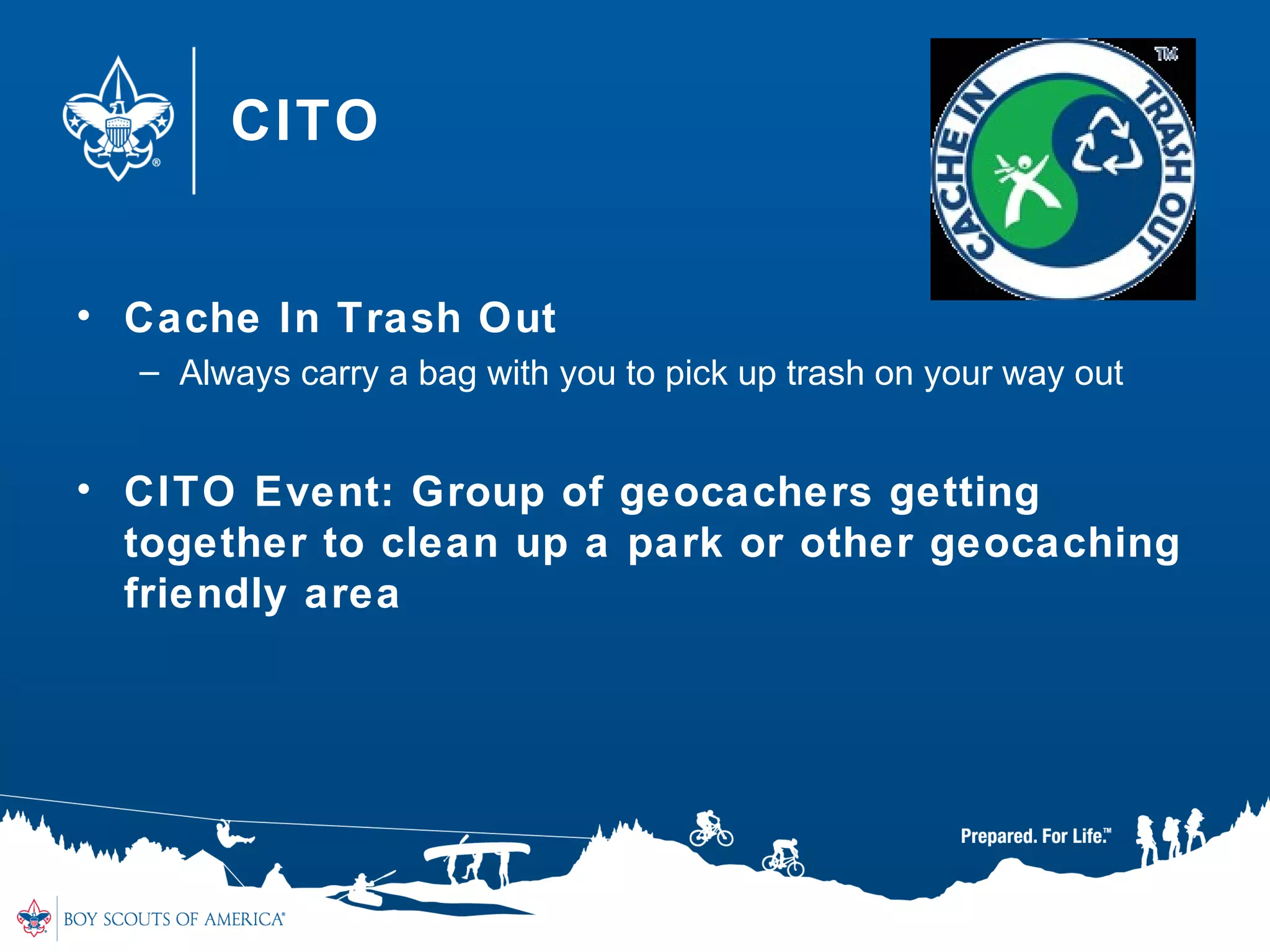
• Cache In Trash Out
– Always carry a bag with you to pick up trash on your way out
• CITO Event: Group of geocachers getting
together to clean up a park or other geocaching
friendly area
Requirement #9
9. Plan a geohunt for a youth group such as your9. Plan a geohunt for a youth group such as your
troop or a neighboring pack, at school, or yourtroop or a neighboring pack, at school, or your
place of worship. Choose a theme, set up a courseplace of worship. Choose a theme, set up a course
with at least four waypoints, teach the players howwith at least four waypoints, teach the players how
to use a GPS unit, and play the game. Tell yourto use a GPS unit, and play the game. Tell your
counselor about your experience, and share thecounselor about your experience, and share the
materials you used and developed for this event.materials you used and developed for this event.
58
Geocachers Creed
When placing or seeking geocaches, I will:
• Not endanger myself or others
• Observe all laws & rules of the area
• Respect property rights and seek permission
where appropriate
• Avoid causing disruptions or public alarm
• Minimize my and others' impact on the
environment
• Be considerate of others
• Protect the integrity of the game pieces
59
Resources
• www.geoscouting.com
• www.geocaching.com
• www.cacheintrashout.com
• www.mngca.org
• References:
– Geocaching Merit Badge Handbook
– http://geocaching.coollibrarian.com
– http://egsc.usgs.gov/isb/pubs/factsheets/fs07701.html
– http://www.maptools.com/UsingUTM
– http://www.geocreed.info/index.html
60
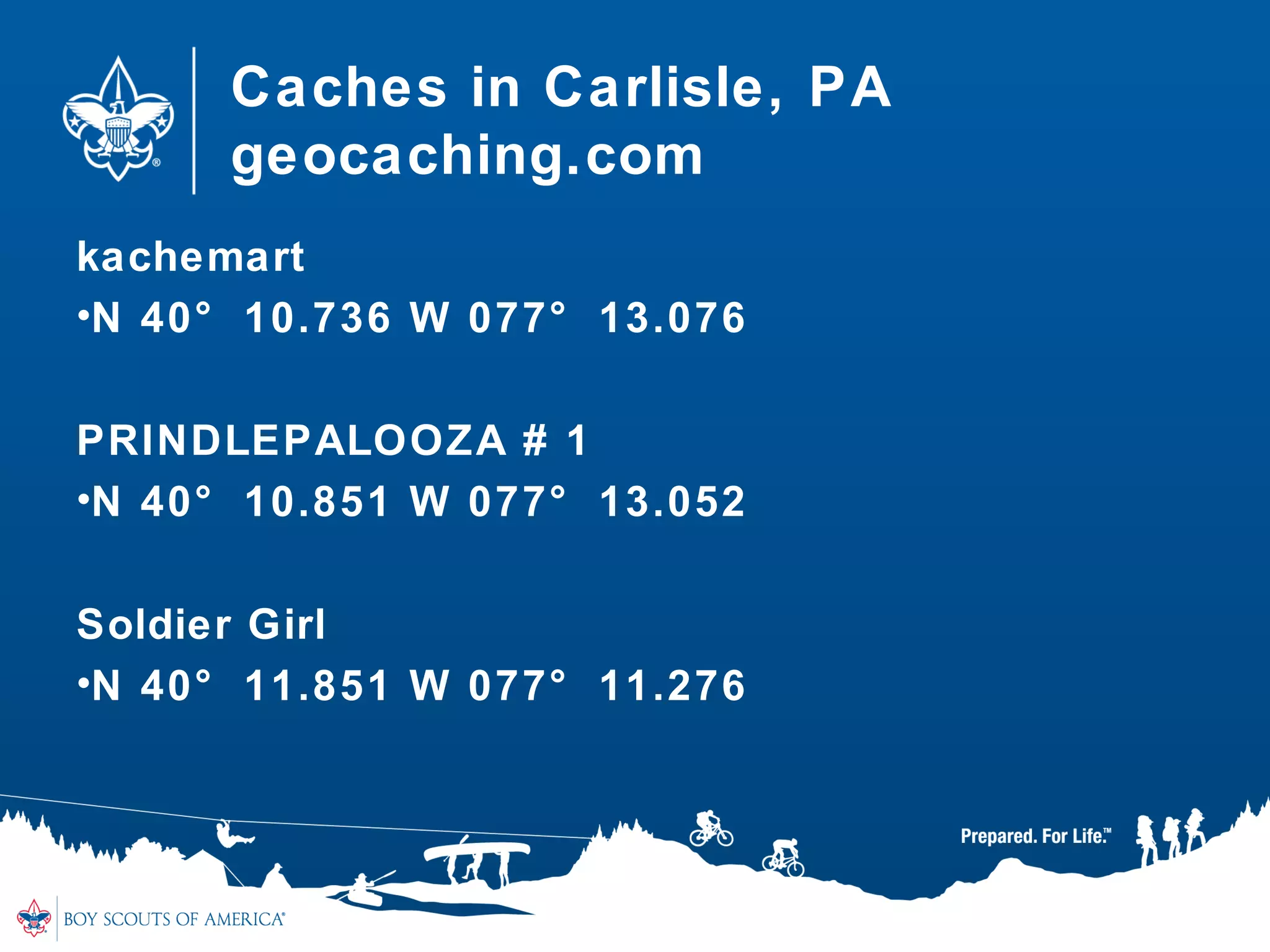
Caches in Carlisle, PA
geocaching.com
kachemart
•N 40° 10.736 W 077° 13.076
PRINDLEPALOOZA # 1
•N 40° 10.851 W 077° 13.052
Soldier Girl
•N 40° 11.851 W 077° 11.276

Geocaching Merit Badge 2016

  • 1.
  • 2.
    Geocaching Merit BadgeGeocachingMerit Badge Merit Badge CamporeeMerit Badge Camporee • Do you have a completed Blue Card?Do you have a completed Blue Card? • Are you in the right class?Are you in the right class? • Do you have a Workbook?Do you have a Workbook? Chuck VohsChuck Vohs 41 Linda Drive41 Linda Drive Mechanicsburg, PA 17050Mechanicsburg, PA 17050 (717) 385-2570(717) 385-2570 fuzzie@vohslaw.comfuzzie@vohslaw.com
  • 3.
    Requirement #3 3. Explainthe following terms used in3. Explain the following terms used in geocaching: waypoint, log, cache, accuracy,geocaching: waypoint, log, cache, accuracy, difficulty and terrain ratings, attributes, trackable.difficulty and terrain ratings, attributes, trackable. Choose five additional terms to explain to yourChoose five additional terms to explain to your counselor.counselor. 3
  • 4.
    What is Geocaching “Geocachingis a sport where you use a multi billion dollar satellite system to locate rubbermaid containers in middle of the woods.” ~ Anonymous
  • 5.
    What is Geocaching? Naturemeets Technology •GPS (Global Positioning Device) •Maps •Hidden Containers •Latitude/Longitude •Friends and Family Time •geocaching.com •Adventures •FUN FOR ALL
  • 6.
    History of Geocaching •GPS was developed by the US Dept of Defense • May 1, 2000 the Government made these GPS signals available to the public • On May 3, 2000, Dave Ulmer hid a 5 gallon pail out in woods in Oregon “The Great American Stash Hunt” • The first finder, Jeremy Irish, created geocaching.com to document geocaches • Geocaching was originally similar to the 160- year-old game letterboxing, which uses clues and references to landmarks embedded in stories • Today almost 3 Million are hidden around the
  • 7.
    Types of Geocaches •Traditional • Multi-Cache • Puzzle • Virtual • Earthcache • Event • Letterbox • Wherigo • Webcam • Benchmarking • Waymarking 7
  • 8.
    Geocache Sizes Micro: Nano,film containers, magnetic key holder •Typically only a logbook Small : Sandwich size lock-n-lock, small peanut butter container •Can fit logbook, pencil and small trade items Regular: Ammo can, large lock-n-lock, “shoebox size” Large: 5 gallon pail, big wooden box
  • 9.
    Terrain and Difficulty TerrainRating: 1-5 stars •Steep terrain, water, cliffs •Paved trail •1 star would be wheelchair accessible •5 star may require special equipment Difficulty Rating: 1-5 stars •Nano up in a pine tree (5) •50 gallon garbage can (1) •1 star would be super easy, 5 star is evil
  • 10.
    Attributes • What toexpect at cache location • Is parking available? Can you bring your dog? • Do you need special equipment (boat, scuba gear) • How long will it take? Is cache available at night? • Kid Friendly? • Stealth Required? • Do I need to watch out for ticks or poisonous plants?
  • 11.
    Requirement #1 1. Dothe following:1. Do the following: a.a.Explain to your counselor the most likelyExplain to your counselor the most likely hazards you may encounter while participating inhazards you may encounter while participating in geocaching activities and what you should do togeocaching activities and what you should do to anticipate, help prevent, mitigate, and respond toanticipate, help prevent, mitigate, and respond to these hazards.these hazards. 11
  • 12.
    Potential Hazards • Anticipate& Prevent • Mitigate & Respond
  • 13.
    Hazards • Poisonous plants •Sunburn • Heatstroke • Hypothermia • Ticks • Mosquitoes • Holes in the ground • Uneven terrain • Disorientation
  • 14.
    Requirement #1 1. Dothe following:1. Do the following: b.b.Discuss first aid and prevention for the types ofDiscuss first aid and prevention for the types of injuries or illnesses that could occur whileinjuries or illnesses that could occur while participating in geocaching activities, includingparticipating in geocaching activities, including cuts, scrapes, snakebite, insect stings, tick bites,cuts, scrapes, snakebite, insect stings, tick bites, exposure to poisonous plants, heat and coldexposure to poisonous plants, heat and cold reactions (sunburn, heatstroke, heat exhaustion,reactions (sunburn, heatstroke, heat exhaustion, hypothermia), and dehydration.hypothermia), and dehydration. c.c.Discuss how to properly plan an activity thatDiscuss how to properly plan an activity that uses GPS, including using the buddy system,uses GPS, including using the buddy system, sharing your plan with others, and considering thesharing your plan with others, and considering the weather, route, and proper attire.weather, route, and proper attire. 14
  • 15.
    First Aid andPrevention • Cuts & Scrapes • Snakebites • Insect Stings • Tick Bites • Poisonous Plants • Sunburn • Heatstroke • Heat Exhaustion • Hypothermia • Dehydration
  • 16.
    Requirement #1 1. Dothe following:1. Do the following: c.c.Discuss how to properly plan an activity thatDiscuss how to properly plan an activity that uses GPS, including using the buddy system,uses GPS, including using the buddy system, sharing your plan with others, and considering thesharing your plan with others, and considering the weather, route, and proper attire.weather, route, and proper attire. 16
  • 17.
    Proper Planning • Bringa buddy • Tell someone where you are going and when you expect to be back • Carry a compass, whistle and first aid kit • Dress for weather and terrain • Be aware of your surroundings • Wear blaze orange during hunting season
  • 18.
    Requirement #2 2. Discussthe following with your counselor:2. Discuss the following with your counselor: a.a.Why you should never bury a cache.Why you should never bury a cache. b.b.How to use proper geocaching etiquette whenHow to use proper geocaching etiquette when hiding or seeking a cache, and how to properlyhiding or seeking a cache, and how to properly hide, post, maintain, and dismantle a geocache.hide, post, maintain, and dismantle a geocache. c.c.The principles of Leave No Trace as they applyThe principles of Leave No Trace as they apply to geocaching.to geocaching. 18
  • 19.
    Geocaching Rules andEtiquette Rule No. 1: Keep Safe •Stay far away from road traffic and railroad crossings. •Don’t place a cache higher than 6 feet or require any dangerous climbing to reach it. •Don’t require Scouts to swim to reach the cache. •Public caches are often magnetic containers stuck onto electrical switch boxes. •Common sense says to avoid these as well! •Always enforce the buddy system.
  • 20.
    Geocaching Rules andEtiquette Rule No. 2: Respect the Environment •Never bury a cache in the ground •Avoid sensitive ecosystems. Place caches so that they can be reached by existing trail access •Don’t place caches in archaeological or historic sites •Don’t deface any object, natural or manmade •Don’t hide caches in lightpost bases, sprinkler heads, etc
  • 21.
    Geocaching Rules andEtiquette Rule No. 3: Respect Private Property •Get permission from land managers to use parks, Scout camps, etc., for your events •It is unlawful to put caches on National Park land or national wildlife refuges •Local laws and policies vary so check with any relevant agency before placing caches – Caches in or near military installations are not allowed – Caches are not allowed on elementary and secondary schools – Avoid possible targets for terrorist attacks, including highway bridges, dams, government buildings, and airports
  • 22.
    Geocaching Rules andEtiquette Rule No. 4: Be a Positive Ambassador for Scouting •As with all else we do, cache using the Scout Oath and Law.
  • 23.
    Geocaching Rules andEtiquette • Practice cache-in-trash-out (CITO). Always carry a trash bag and remove litter along your route. • Follow Leave No Trace guidelines in the natural environment. • Be careful of the area around the cache—don’t trample the ground, rip up sprinkler heads, etc., in your frenzy to find the cache. • Follow all laws and regulations. Never enter private property without permission. • Write an entry in the logbook at the cache.
  • 24.
    Leave No Trace •Follow 7 Leave No Trace Principles 1. Plan Ahead and Prepare • Check weather, be safe, follow land policies, know how to use GPS 1. Travel and Cache on durable surfaces • Stay on the trail, avoid creating new geotrails, avoid sensitive areas 1. Dispose of Waste Properly • Cache in, Trash Out 1. Leave What you Find • “See it as it is, leave it as it was” 24
  • 25.
    Leave No Trace 5.Minimize Campfire Impacts • Typically doesn’t apply with Geocaching, but know area regulations 5. Respect Wildlife • Never leave food in a geocache • Dogs on a leash • Observe wildlife from a distance 5. Be Considerate of other Visitors • Yield to those on a trail • Avoid loud noises • Do not trespass 25
  • 26.
    Geocaching Rules andEtiquette • Cache items are there for fun and for trade • Try to leave something of equal value to what you take for yourself • Respect other visitors around the area
  • 27.
    Requirement #4 Explain howthe Global Positioning System (GPS)Explain how the Global Positioning System (GPS) works. Then, using Scouting’s Teaching EDGE,works. Then, using Scouting’s Teaching EDGE, demonstrate the use of a GPS unit to yourdemonstrate the use of a GPS unit to your counselor. Include marking and editing acounselor. Include marking and editing a waypoint, changing field functions, and changingwaypoint, changing field functions, and changing the coordinate system in the unit.the coordinate system in the unit. N 39 46.263 W 076 40.929N 39 46.263 W 076 40.929 27
  • 28.
    Global Positioning System Whatdoes a GPS do? •Tells you where to go •Tracks where you have been •Stores maps: topo, trails, streets •Stores coordinates (waypoints, points of interest) •Communicates with satellites in space
  • 29.
    How does GPSwork? • Space – 24-30 satellites orbit around the earth at about 12,550 miles – Transmits position, orbit, location, and altitude • Control – Satellites are tracked by US Air Force Monitoring Stations – Ground stations send updates to the satellites • User – GPS – Uses data from satellites to calculate user’s position, altitude and other data
  • 30.
    How does GPSwork? • GPS uses the time it receives the signal from the satellites to determine location and altitude • The GPS only needs to receive data from 4 satellites to determine location. • The more received, the better the accuracy
  • 31.
    GPS Interference: Factors thatprevent GPS from receiving information from satellites • Weather • Buildings • Trees • Canyons •Takes longer for GPS to receive satellite signal •No GPS is 100% Accurate •Most GPS units will get you within 15 - 25 feet of a Geocache
  • 32.
    How to usea GPS • Get to know your GPS before you head out – Where is the Enter button, move up or down, zoom in or out, find the menu, turn on backlight • How to switch between the map and the compass • Check battery levels • “Mark” a Waypoint – A waypoint is a location entered in your GPS • “Find” a waypoint (location) or point of interest • Edit/Change coordinates • The Compass – The arrow will not move until you begin to move 32
  • 33.
    Requirement #5 5. Dothe following:5. Do the following: a.a.Show you know how to use a map and compassShow you know how to use a map and compass and explain why this is important for geocaching.and explain why this is important for geocaching. b.b.Explain the similarities and differences betweenExplain the similarities and differences between GPS navigation and standard map reading skillsGPS navigation and standard map reading skills and describe the benefits of each.and describe the benefits of each. c.c.Explain the UTM (Universal Transverse Mercator)Explain the UTM (Universal Transverse Mercator) system and how it differs from the latitude/longitudesystem and how it differs from the latitude/longitude system used for public geocaches.system used for public geocaches. d.d.Show how to plot a UTM waypoint on a map.Show how to plot a UTM waypoint on a map. Compare the accuracy to that found with a GPSCompare the accuracy to that found with a GPS unit.unit. 33
  • 34.
    Maps & Compass Whyshould you bring a Map and Compass with you? • GPS batteries go dead • Satellite signal is not good • Enter in the wrong coordinates
  • 35.
    How to DetermineCoordinates The globe is divided into vertical and horizontal lines called: Latitude and Longitude •Latitude (parallels) – Horizontal lines around the globe – North Pole is 90 degrees north – South Pole is 90 degrees south •Longitude (meridians) – Vertical lines around the globe – East to West – 0 degrees = Prime Meridian; goes through Greenwich, England
  • 36.
  • 37.
    Latitude and Longitude •Each degree is divided into 60 minutes • Each minute of latitude and longitude = 60 seconds • Format used for Coordinates: – Degrees, Minutes, Seconds – Coordinates at Baldy Mountain at Philmont are – N 360 37’ 45’’ W 1050 12’ 48’’ • Geocaching.com and most GPS uses different format: Degrees and Decimal Minutes – Coordinates above would read: – N 36 37.750 W 105 12.800
  • 38.
    Universal Transverse Mercator (UTM) •Rectangular grid-based map overlay • Divides Earth into 60 zones – Each zone = 6 degrees of latitude • 20 Latitude bands, each 8 degrees high – Each band is lettered from C to X (no I or O) – Ends at 84 degrees N Latitude • “Easting” – measured from central meridian • “Northing” – measured from the equator • Always read coordinates East and then North
  • 39.
  • 40.
  • 41.
    Requirement #6 Describe thefour steps to finding your first cacheDescribe the four steps to finding your first cache to your counselor. Then mark and edit a waypoint.to your counselor. Then mark and edit a waypoint. 41
  • 42.
    Four Steps tofinding your 1st Cache • Step 1: Research • Step 2: Safety • Step 3: The Hunt • Step 4: The Actual Find
  • 43.
    Step 1 :Research • Sign up for free account on Geocaching.com (Requirement #7) • Click “Hide and Seek a Cache”, enter a zip code • Select the Geocache you want to find – distance, difficulty, terrain, type and size • Enter coordinates in your GPS device • Look at map of area to determine your best approach – In the city, use a city map – In rural areas, use a topographic map
  • 44.
    Preparation for GeocachingTrip • GPS • Extra batteries • Cache page • Water • A buddy • Trinkets to trade with • Pen/Pencil • Bug Spray • CITO bag • Sense of Adventure
  • 45.
    Step 2: Safety •Bring a buddy • Tell someone where you are going and when you expect to be back • Carry a compass, whistle and first aid kit • Dress for weather and terrain • Be aware of your surroundings • Wear blaze orange during hunting season
  • 46.
    Internet Safety • Obtainparent permission and follow the rules • Never give out your email, phone number or other personal information • Never open e-mail or files if you don’t the sender • Tell a parent if you see or receive anything that makes you feel uncomfortable • Never agree to meet with anybody you meet online • Don’t share passwords • Don’t believe everything you read online • Obey the laws 46
  • 47.
    Step 3: TheHunt • Mark your car and/or trailhead • Stay on the trail • Watch your footing • Use your GPS compass to lead you towards the cache • Slow down when you get to about 300 feet • Once you get to about 30 feet, start your search • Sometimes it helps to just put the GPS away and use your geosense
  • 48.
    Step 4: TheActual Find • Once you find it, write about it in logbook – Use your geocaching name (handle) and date • Take something, Leave something • Only take a trackable if you intend on moving it – Trackables are Geocoins, Travel Bugs and tracked on Geocaching.com • Put Geocache back, better than how you found it – Many times, geocaches “move” or camo disappears – Make sure lid is on tight • Log it on Geocaching.com and share your experience.
  • 49.
    Hiding a Geocache •Read the guidelines on Geocaching.com • Many parks and cities have special rules • Same steps as finding: – Step 1: Research – Step 2: Safety – Step 3: The Hunt – Step 4: The Actual Find 49
  • 50.
    Step 1: Research •Where would be a good place to hide a Geocache? – Geocaches must be .10 miles (528 feet) away from others. – Think “Where would I like to FIND a Geocache?” • Hide Geocache where there will be minimal risk to the environment 50
  • 51.
    Step 2: Safety •Geocaches must be safe to get to • If on private property, obtain permission • Geocaches are not allowed near railroads, bridges, school property or military bases 51
  • 52.
    Step 3: TheHunt • Make sure coordinates are accurate • Supply a hint • Write “Geocache” on outside of container • You want to be sure Geocachers can find your hide 52
  • 53.
    Step 4: TheActual Find • Be sure to use a watertight container – Lock N Locks – Ammo Cans – Do not use: “gladware”, they do not hold up to Pennsylvania winters • Put a “Cache Note” in the geocache – This can be printed off Geocaching.com • Put logbook in a plastic baggie – Leave the pencil out, they tend to poke holes in the baggie • Load the cache up with swag – Do not put in food, fireworks, or other dangerous materials 53
  • 54.
    Submitting your Geocache •Go to Geocaching.com • On “Hide and Seek” page, click on the Online Form • Complete all information on the form and Submit • Add Attributes • Volunteer reviewers will review your listing – If there are questions, they will email you – If no questions and all guidelines were followed, they will publish your new Geocache on Geocaching.com • Wait for that first Geocacher to log the “FTF” (First to Find) 54
  • 55.
    Maintain it! • Whenyou hide a Geocache, you maintain it! • Read the logs that geocachers will send you – They will let you know if your Geocache is “wet” or the logbook is full – If you get a few “DNF” logs (Did Not Find), you may want to check to see if the geocache has been “Muggled” (a non- geocacher may have found it and removed it) • When you visit the area, make sure environment around isn’t being damaged in anyway • If you can no longer maintain, you need to “archive” and remove the geocache 55
  • 56.
    Requirement #8d d.d. Explainwhat Cache In Trash Out (CITO) means,Explain what Cache In Trash Out (CITO) means, and describe how you have practiced CITO atand describe how you have practiced CITO at public geocaches or at a CITO event. Then,public geocaches or at a CITO event. Then, either create CITO containers to leave at publiceither create CITO containers to leave at public caches, or host a CITO event for your unit or forcaches, or host a CITO event for your unit or for the public.the public. 56
  • 57.
    CITO • Cache InTrash Out – Always carry a bag with you to pick up trash on your way out • CITO Event: Group of geocachers getting together to clean up a park or other geocaching friendly area
  • 58.
    Requirement #9 9. Plana geohunt for a youth group such as your9. Plan a geohunt for a youth group such as your troop or a neighboring pack, at school, or yourtroop or a neighboring pack, at school, or your place of worship. Choose a theme, set up a courseplace of worship. Choose a theme, set up a course with at least four waypoints, teach the players howwith at least four waypoints, teach the players how to use a GPS unit, and play the game. Tell yourto use a GPS unit, and play the game. Tell your counselor about your experience, and share thecounselor about your experience, and share the materials you used and developed for this event.materials you used and developed for this event. 58
  • 59.
    Geocachers Creed When placingor seeking geocaches, I will: • Not endanger myself or others • Observe all laws & rules of the area • Respect property rights and seek permission where appropriate • Avoid causing disruptions or public alarm • Minimize my and others' impact on the environment • Be considerate of others • Protect the integrity of the game pieces 59
  • 60.
    Resources • www.geoscouting.com • www.geocaching.com •www.cacheintrashout.com • www.mngca.org • References: – Geocaching Merit Badge Handbook – http://geocaching.coollibrarian.com – http://egsc.usgs.gov/isb/pubs/factsheets/fs07701.html – http://www.maptools.com/UsingUTM – http://www.geocreed.info/index.html 60
  • 61.
    Caches in Carlisle,PA geocaching.com kachemart •N 40° 10.736 W 077° 13.076 PRINDLEPALOOZA # 1 •N 40° 10.851 W 077° 13.052 Soldier Girl •N 40° 11.851 W 077° 11.276

Editor's Notes

  • #7 Removing “Selective Availability” “The Great American Stash Hunt” – to test the accuracy of new system GPS technology is used in surveying, geology, hiking, environmental research, air and sea travel, etc.
  • #8 Briefly explain each type. Letterbox/Letterbox hybrid: has a stamp, NOT swag Wherigo: game using cartridges you download from wherigo.com, virtual video game
  • #29 GPS will time the signals of these satellites to calculate your position. Satellites continuously transmits data that indicates it’s time and location
  • #36 Latitude: how far north and south you are Longitude: how far east and west you are
  • #41 To use the UTM grid, you can place a transparent grid overlay on the map to subdivide the grid, or you can draw lines on the map connecting corresponding ticks on opposite edges. The distances can be measured in meters at the map scale between any map point and the nearest grid lines to the south and west. The northing of the point is the value of the nearest grid line south of it plus its distance north of that line; its easting is the value of the nearest grid line west of it plus its distance east of that line (see fig. 2). On maps at 1:100,000 and 1:250,000 scale, a full UTM grid is shown at intervals of 10,000 meters and is numbered and used in the same way.
  • #60 ..Not Endanger Myself or Others: Like any outdoor activity, geocaching involves some inherent risk and many geocachers enjoy manageable risks. Minimize inordinate risks. When creating a cache, describe any hidden dangers and, if possible, arrange the hunt to minimize these dangers. When seeking a cache, know your limitations and be aware of your surroundings. Don't attempt anything beyond your abilities. A cache you own, or one you're trading out of, could be found by children or even a prisoner work crew - consider the location of the cache and those likely to find it when deciding what to leave as a trade item. ...Observe All Laws and Rules of the Area Don’t break the law or rules of an area, or encourage others to do so, when placing or seeking a cache. Don't leave illegal items in a cache. ...Respect Property Rights and Seek Permission Where Appropriate Check if permission is required before placing a cache on private property, and respect the landowner's wishes. Check if public land has a geocaching policy and respect existing policies. Promptly remove your cache if the land manager or steward asks. Do not damage, or interfere with the function of, buildings, structures, or signage. ...Avoid Causing Disruptions or Public Alarm Don’t place a cache near schools or government buildings unless the administration and staff are fully aware of the placement. Use caution where children play. Parents are understandably concerned when strangers are near their children. Don’t place a cache near critical infrastructure that might be considered a terrorist target, or create a cache that could be mistaken for a terrorist device (e.g. a pipe bomb). ...Minimize My and Others' Impact on the Environment Follow Leave No Trace ethics whenever possible. When seeking a cache, practice "Lift, Look, Replace" - put all stones or logs back where you found them. Leave the area as you found it or better (e.g. pick up litter). Obtain the best possible coordinates for your cache to reduce unwarranted wear on the area. Recheck and correct your coordinates if finders report significant errors. Do not abandon a cache. If you stop maintaining a cache, remove the container, archive its listing and explain the disposition of the cache in your archive note, or put it up for adoption or rescue. If you de-list a cache on one host, but keep it on another, make sure you mention this in the archive note to prevent rescues of active caches. ...Be Considerate of Others Treat other geocachers civilly - in the field, in the forums, or wherever your paths may cross. Don't spoil the hunt for others - allow them to experience the cache as its owner intended. Avoid leaving tracks to the cache. Do not disrupt the cache area or mark the hiding spot. Minimize giving unsolicited clues that reveal the cache (i.e. "spoilers"). Don't provide any hints if the cache description asks you not to. In all other cases, be cryptic or encrypt any hints or spoilers you enter in online logs. Edit your log if the cache owner requests that you remove spoilers. Promptly alert the owner of any issues with their cache. Make minor repairs if you can, it will save the owner a trip. Cache owners appreciate feedback - write an online log, send an email, or otherwise let the owner know about your experience with their cache. Only place caches you can maintain and respond promptly to problem reports. If you exchange trade items, trade kindly: Consider what future finders would like and leave something equal to or better than what you take. If you place a traveling item into the game, attach a tag that describes its goal, so that others can help it along. If you pick up a traveling item with a tag describing its goal, move the item toward its goal if possible. Contact the owner if you hold a traveling item for more than a couple of weeks or so. Obtain permission from the originator before copying unique themes and techniques, adding to an existing series of caches, or placing a cache close to another. ...Protect the Integrity of the Game Pieces The owner entrusts you to not damage or jeopardize the cache. Try to ensure the cache is ready for the next finder and is as good as or better than you found it. Make sure the container is properly closed to prevent the contents from getting wet or destroyed. Be inconspicuous in retrieving, signing in, and replacing a cache to avoid vandalism. Put the cache back where you found it and hide it well. Don’t move a cache - if you suspect the cache is not in the intended spot, hide it the best you can and alert the owner as soon as possible. Don’t collect traveling items meant to stay in the game. This is tantamount to stealing. Don’t tamper with or involve a game piece in "alternate" games without the owner’s permission.