Electronics Merit Badge 
Boy Scouts of America 
Module 1 – Electronic Components 
and What They Do 
2014
Key Topics in This Module 
1. Basic Electronics 
2. Electronic Components 
3. Schematics
What are Electronics? 
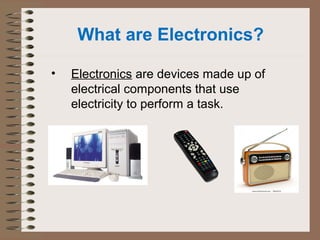
• Electronics are devices made up of 
electrical components that use 
electricity to perform a task.
What is Electricity? 
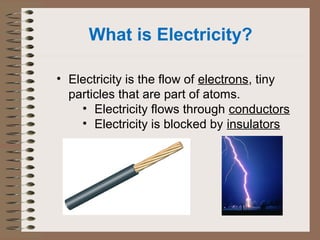
• Electricity is the flow of electrons, tiny 
particles that are part of atoms. 
• Electricity flows through conductors 
• Electricity is blocked by insulators
Conductors & Insulators 
• Conductors conduct (carry) electricity. 
– Most Metals (Gold, Silver, Aluminum, Copper) 
– Many Liquids (Water) 
• Insulators insulate (don’t carry) electricity. 
– Air 
– Most Rubbers and Plastics 
– Most Ceramics 
– Wood and cloth (when dry)
How do we measure electricity? 
• Current is the flow of electrons in a 
conductor. Electrical current is 
measured in amperes, or amps. 
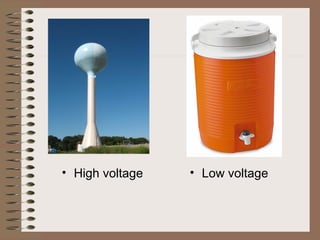
• Voltage is the electrical pressure that 
pushes current to flow in a wire. The 
unit of voltage is the volt. 
• Electricity can do work. Electrical 
power is measured in watts.
• High voltage • Low voltage
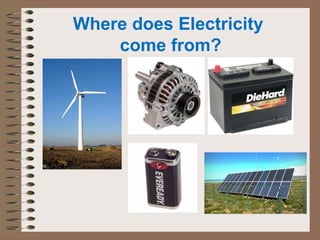
Where does Electricity 
come from?
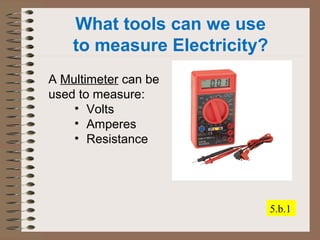
What tools can we use 
to measure Electricity? 
A Multimeter can be 
used to measure: 
• Volts 
• Amperes 
• Resistance 
5.b.1
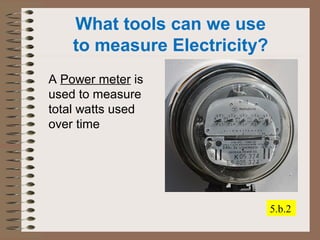
What tools can we use 
to measure Electricity? 
A Power meter is 
used to measure 
total watts used 
over time 
5.b.2
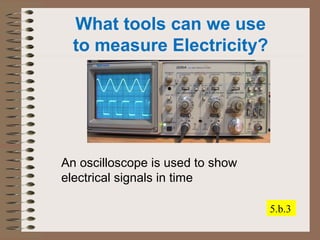
What tools can we use 
to measure Electricity? 
An oscilloscope is used to show 
electrical signals in time 
5.b.3
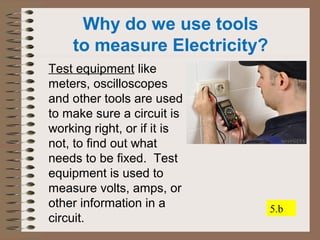
Why do we use tools 
to measure Electricity? 
Test equipment like 
meters, oscilloscopes 
and other tools are used 
to make sure a circuit is 
working right, or if it is 
not, to find out what 
needs to be fixed. Test 
equipment is used to 
measure volts, amps, or 
other information in a 
circuit. 
5.b
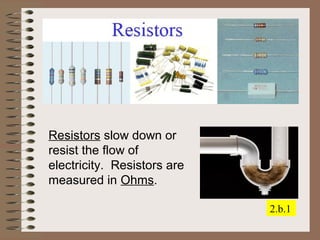
Resistors slow down or 
resist the flow of 
electricity. Resistors are 
measured in Ohms. 
2.b.1
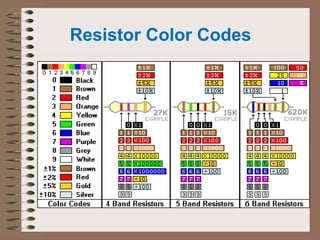
Resistor Color Codes
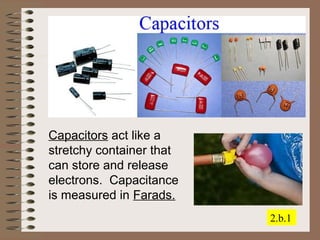
Capacitors act like a 
stretchy container that 
can store and release 
electrons. Capacitance 
is measured in Farads. 
2.b.1
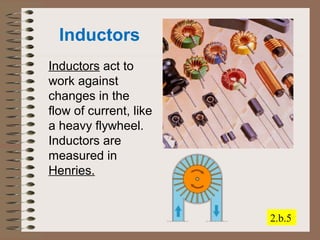
Inductors 
Inductors act to 
work against 
changes in the 
flow of current, like 
a heavy flywheel. 
Inductors are 
measured in 
Henries. 
2.b.5
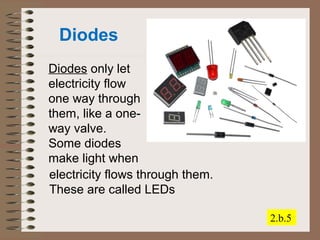
Diodes 
Diodes only let 
electricity flow 
one way through 
them, like a one-way 
valve. 
Some diodes 
make light when 
2.b.5 
electricity flows through them. 
These are called LEDs
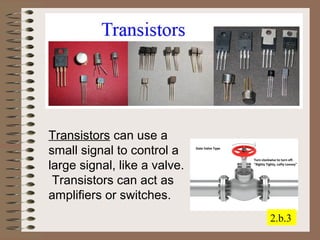
Transistors can use a 
small signal to control a 
large signal, like a valve. 
Transistors can act as 
amplifiers or switches. 
2.b.3
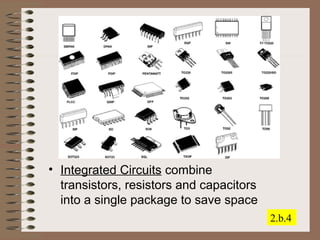
• Integrated Circuits combine 
transistors, resistors and capacitors 
into a single package to save space 
2.b.4
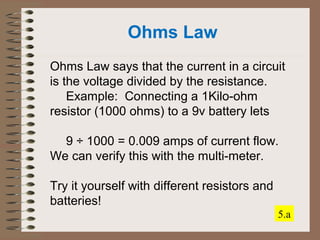
Ohms Law 
Ohms Law says that the current in a circuit 
is the voltage divided by the resistance. 
Example: Connecting a 1Kilo-ohm 
resistor (1000 ohms) to a 9v battery lets 
9 ÷ 1000 = 0.009 amps of current flow. 
We can verify this with the multi-meter. 
Try it yourself with different resistors and 
batteries! 
5.a
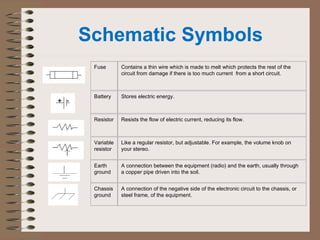
Schematic Symbols 
Fuse Contains a thin wire which is made to melt which protects the rest of the 
circuit from damage if there is too much current from a short circuit. 
Battery Stores electric energy. 
Resistor Resists the flow of electric current, reducing its flow. 
Variable 
resistor 
Like a regular resistor, but adjustable. For example, the volume knob on 
your stereo. 
Earth 
ground 
A connection between the equipment (radio) and the earth, usually through 
a copper pipe driven into the soil. 
Chassis 
ground 
A connection of the negative side of the electronic circuit to the chassis, or 
steel frame, of the equipment.
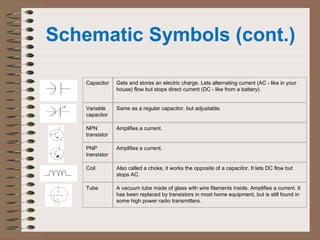
Schematic Symbols (cont.) 
Capacitor Gets and stores an electric charge. Lets alternating current (AC - like in your 
house) flow but stops direct current (DC - like from a battery). 
Variable 
capacitor 
Same as a regular capacitor, but adjustable. 
NPN 
transistor 
Amplifies a current. 
PNP 
transistor 
Amplifies a current. 
Coil Also called a choke, it works the opposite of a capacitor. It lets DC flow but 
stops AC. 
Tube A vacuum tube made of glass with wire filaments inside. Amplifies a current. It 
has been replaced by transistors in most home equipment, but is still found in 
some high power radio transmitters.
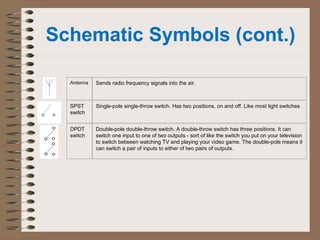
Schematic Symbols (cont.) 
Antenna Sends radio frequency signals into the air. 
SPST 
switch 
Single-pole single-throw switch. Has two positions, on and off. Like most light switches 
DPDT 
switch 
Double-pole double-throw switch. A double-throw switch has three positions. It can 
switch one input to one of two outputs - sort of like the switch you put on your television 
to switch between watching TV and playing your video game. The double-pole means it 
can switch a pair of inputs to either of two pairs of outputs.
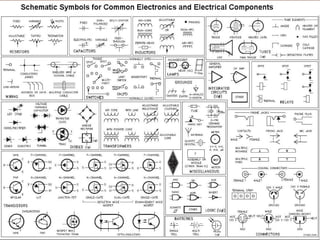
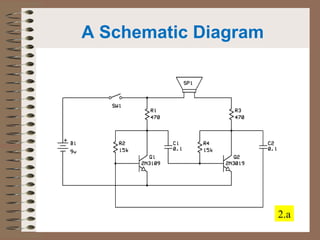
A Schematic Diagram 
Requirement 1 
2.a
Electronics Merit Badge 
Boy Scouts of America 
Module 2 
Soldering and Safety 
2014
Safety 
• When working on electronics, it is 
important to: 
• Protect yourself! 
• Protect the electronics! 
• Protect the work area!
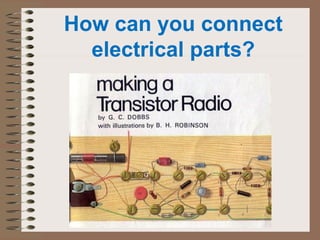
How can you connect 
electrical parts?
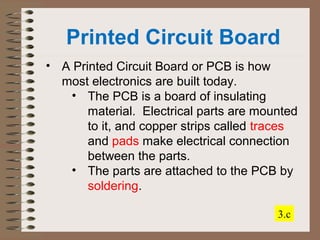
Printed Circuit Board 
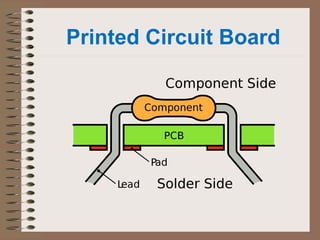
• A Printed Circuit Board or PCB is how 
most electronics are built today. 
• The PCB is a board of insulating 
material. Electrical parts are mounted 
to it, and copper strips called traces 
and pads make electrical connection 
between the parts. 
• The parts are attached to the PCB by 
soldering. 
3.c
Printed Circuit Board
Soldering 
• Soldering is a way to connect electronic 
parts together to make a circuit 
• Solder is a kind of metal that melts 
at a ‘low’ temperature: 600ºF. 
• It acts as a kind of glue that holds 
the parts to the board and makes 
an electrical connection. 
• A Soldering Iron is used to heat up 
the parts to melt the solder.
Soldering Safety 
• There are things that you must do to be 
safe when soldering: 
• The soldering iron is HOT. Protect 
the work surface so that nothing 
can get melted or burned. 
• Use a stand or holder to hold the 
iron when not in use. 
• Solder can sometimes splatter. 
Make sure you wear EYE 
PROTECTION. 
1.
Soldering Safety 
• There are things that you must do to be 
safe when soldering: 
• Solder contains LEAD which is 
toxic. Always wash your hands 
after soldering! 
• Do not solder where food will be 
prepared or eaten. 
• Avoid breathing the solder fumes. 
• Make sure a hot soldering iron is 
NEVER left unattended! 
1.
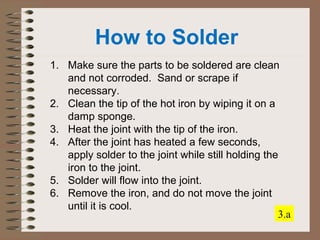
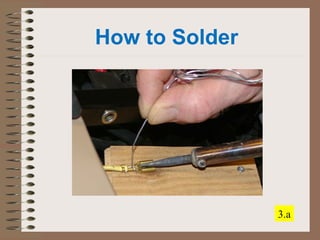
How to Solder 
1. Make sure the parts to be soldered are clean 
and not corroded. Sand or scrape if 
necessary. 
2. Clean the tip of the hot iron by wiping it on a 
damp sponge. 
3. Heat the joint with the tip of the iron. 
4. After the joint has heated a few seconds, 
apply solder to the joint while still holding the 
iron to the joint. 
5. Solder will flow into the joint. 
6. Remove the iron, and do not move the joint 
until it is cool. 
3.a
How to Solder 
3.a
How to Solder 
1. The finished joint should be shiny, and have 
the shape of a ‘Hershey’s Kiss’. If the solder 
is dull looking or ball-shaped you have what is 
called a ‘cold joint’, which is not a good 
connection. 
2. Use diagonal cutting pliers to cut the extra 
lead from the component. Hold the end of the 
lead so it does not go flying, and WEAR EYE 
PROTECTION! 
3.a
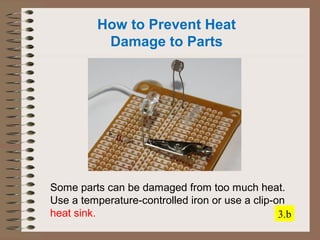
How to Prevent Heat 
Damage to Parts 
Some parts can be damaged from too much heat. 
Use a temperature-controlled iron or use a clip-on 
heat sink. 3.b
Precautions when 
Soldering PCBs 
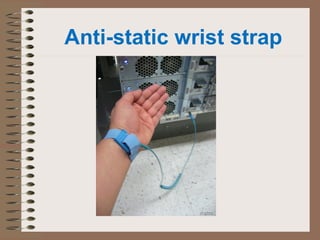
• NEVER solder a PCB that has power 
applied! Unplug everything first! 
• Static electricity can damage some 
electronic parts. Use a grounded 
soldering iron and a anti-static wrist 
strap to protect the board if needed. 
• Too hot an iron can cause damage to 
the PC board. Use the right wattage 
soldering iron: 20 to 30 watts. 
3.d
Anti-static wrist strap
How to Desolder 
• Everyone makes mistakes! If you need to 
desolder a part, there are ways to do it. 
• If it is a part in a PCB, heat the 
solder joint and pull the lead out of 
the PCB hole. 
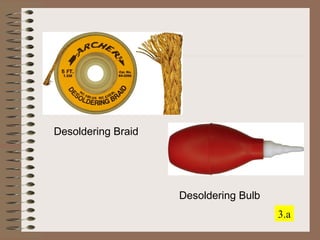
• Use a desoldering bulb or 
desoldering braid to remove hot 
solder from the PCB hole. 
3.a
Desoldering Braid 
Desoldering Bulb 
3.a
Electronics Merit Badge 
Boy Scouts of America 
Module 3 
Audio Circuits 
2014
Audio Circuits 
Many electronics circuits are used for 
audio. Any device that makes a sound or 
processes a sound signal is an audio 
circuit. 
Audio circuits are found almost everywhere 
you look. How many can you find?
Audio Circuits 
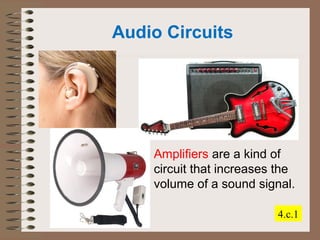
Amplifiers are a kind of 
circuit that increases the 
volume of a sound signal. 
4.c.1
Audio Circuits 
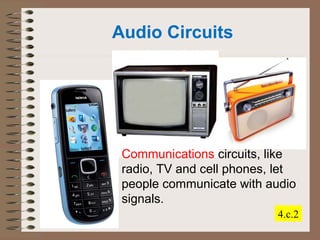
Communications circuits, like 
radio, TV and cell phones, let 
people communicate with audio 
signals. 
4.c.2
4.c.3 
Audio Circuits 
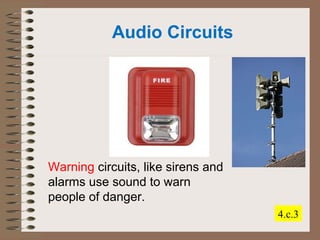
Warning circuits, like sirens and 
alarms use sound to warn 
people of danger.
Audio Circuits 
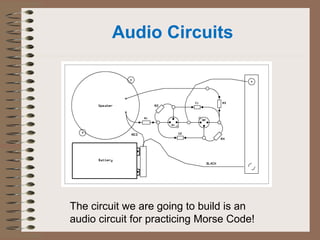
The circuit we are going to build is an 
audio circuit for practicing Morse Code!
Electronics Merit Badge 
Boy Scouts of America 
Module 4 
Electronic Careers 
2014
Electronics Careers 
There are literally thousands of different 
careers available in Electronics. Each one 
requires different amounts of training and 
education. 
Many people in Electronics careers got 
their start in Electronics through Boy 
Scouts!
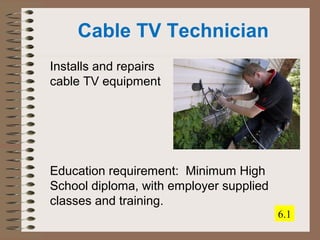
Cable TV Technician 
Installs and repairs 
cable TV equipment 
Education requirement: Minimum High 
School diploma, with employer supplied 
classes and training. 
6.1
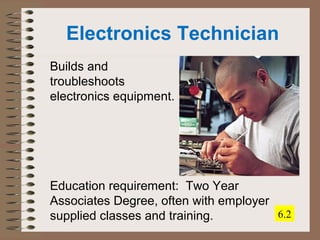
Electronics Technician 
Builds and 
troubleshoots 
electronics equipment. 
Education requirement: Two Year 
Associates Degree, often with employer 
supplied classes and training. 6.2
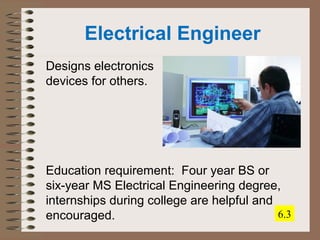
Electrical Engineer 
Designs electronics 
devices for others. 
Education requirement: Four year BS or 
six-year MS Electrical Engineering degree, 
internships during college are helpful and 
encouraged. 6.3

Embslides1

  • 1.
    Electronics Merit Badge Boy Scouts of America Module 1 – Electronic Components and What They Do 2014
  • 2.
    Key Topics inThis Module 1. Basic Electronics 2. Electronic Components 3. Schematics
  • 3.
    What are Electronics? • Electronics are devices made up of electrical components that use electricity to perform a task.
  • 4.
    What is Electricity? • Electricity is the flow of electrons, tiny particles that are part of atoms. • Electricity flows through conductors • Electricity is blocked by insulators
  • 5.
    Conductors & Insulators • Conductors conduct (carry) electricity. – Most Metals (Gold, Silver, Aluminum, Copper) – Many Liquids (Water) • Insulators insulate (don’t carry) electricity. – Air – Most Rubbers and Plastics – Most Ceramics – Wood and cloth (when dry)
  • 6.
    How do wemeasure electricity? • Current is the flow of electrons in a conductor. Electrical current is measured in amperes, or amps. • Voltage is the electrical pressure that pushes current to flow in a wire. The unit of voltage is the volt. • Electricity can do work. Electrical power is measured in watts.
  • 7.
    • High voltage• Low voltage
  • 8.
  • 9.
    What tools canwe use to measure Electricity? A Multimeter can be used to measure: • Volts • Amperes • Resistance 5.b.1
  • 10.
    What tools canwe use to measure Electricity? A Power meter is used to measure total watts used over time 5.b.2
  • 11.
    What tools canwe use to measure Electricity? An oscilloscope is used to show electrical signals in time 5.b.3
  • 12.
    Why do weuse tools to measure Electricity? Test equipment like meters, oscilloscopes and other tools are used to make sure a circuit is working right, or if it is not, to find out what needs to be fixed. Test equipment is used to measure volts, amps, or other information in a circuit. 5.b
  • 13.
    Resistors slow downor resist the flow of electricity. Resistors are measured in Ohms. 2.b.1
  • 14.
  • 15.
    Capacitors act likea stretchy container that can store and release electrons. Capacitance is measured in Farads. 2.b.1
  • 16.
    Inductors Inductors actto work against changes in the flow of current, like a heavy flywheel. Inductors are measured in Henries. 2.b.5
  • 17.
    Diodes Diodes onlylet electricity flow one way through them, like a one-way valve. Some diodes make light when 2.b.5 electricity flows through them. These are called LEDs
  • 18.
    Transistors can usea small signal to control a large signal, like a valve. Transistors can act as amplifiers or switches. 2.b.3
  • 19.
    • Integrated Circuitscombine transistors, resistors and capacitors into a single package to save space 2.b.4
  • 21.
    Ohms Law OhmsLaw says that the current in a circuit is the voltage divided by the resistance. Example: Connecting a 1Kilo-ohm resistor (1000 ohms) to a 9v battery lets 9 ÷ 1000 = 0.009 amps of current flow. We can verify this with the multi-meter. Try it yourself with different resistors and batteries! 5.a
  • 22.
    Schematic Symbols FuseContains a thin wire which is made to melt which protects the rest of the circuit from damage if there is too much current from a short circuit. Battery Stores electric energy. Resistor Resists the flow of electric current, reducing its flow. Variable resistor Like a regular resistor, but adjustable. For example, the volume knob on your stereo. Earth ground A connection between the equipment (radio) and the earth, usually through a copper pipe driven into the soil. Chassis ground A connection of the negative side of the electronic circuit to the chassis, or steel frame, of the equipment.
  • 23.
    Schematic Symbols (cont.) Capacitor Gets and stores an electric charge. Lets alternating current (AC - like in your house) flow but stops direct current (DC - like from a battery). Variable capacitor Same as a regular capacitor, but adjustable. NPN transistor Amplifies a current. PNP transistor Amplifies a current. Coil Also called a choke, it works the opposite of a capacitor. It lets DC flow but stops AC. Tube A vacuum tube made of glass with wire filaments inside. Amplifies a current. It has been replaced by transistors in most home equipment, but is still found in some high power radio transmitters.
  • 24.
    Schematic Symbols (cont.) Antenna Sends radio frequency signals into the air. SPST switch Single-pole single-throw switch. Has two positions, on and off. Like most light switches DPDT switch Double-pole double-throw switch. A double-throw switch has three positions. It can switch one input to one of two outputs - sort of like the switch you put on your television to switch between watching TV and playing your video game. The double-pole means it can switch a pair of inputs to either of two pairs of outputs.
  • 25.
    A Schematic Diagram Requirement 1 2.a
  • 26.
    Electronics Merit Badge Boy Scouts of America Module 2 Soldering and Safety 2014
  • 27.
    Safety • Whenworking on electronics, it is important to: • Protect yourself! • Protect the electronics! • Protect the work area!
  • 28.
    How can youconnect electrical parts?
  • 29.
    Printed Circuit Board • A Printed Circuit Board or PCB is how most electronics are built today. • The PCB is a board of insulating material. Electrical parts are mounted to it, and copper strips called traces and pads make electrical connection between the parts. • The parts are attached to the PCB by soldering. 3.c
  • 30.
  • 31.
    Soldering • Solderingis a way to connect electronic parts together to make a circuit • Solder is a kind of metal that melts at a ‘low’ temperature: 600ºF. • It acts as a kind of glue that holds the parts to the board and makes an electrical connection. • A Soldering Iron is used to heat up the parts to melt the solder.
  • 32.
    Soldering Safety •There are things that you must do to be safe when soldering: • The soldering iron is HOT. Protect the work surface so that nothing can get melted or burned. • Use a stand or holder to hold the iron when not in use. • Solder can sometimes splatter. Make sure you wear EYE PROTECTION. 1.
  • 33.
    Soldering Safety •There are things that you must do to be safe when soldering: • Solder contains LEAD which is toxic. Always wash your hands after soldering! • Do not solder where food will be prepared or eaten. • Avoid breathing the solder fumes. • Make sure a hot soldering iron is NEVER left unattended! 1.
  • 34.
    How to Solder 1. Make sure the parts to be soldered are clean and not corroded. Sand or scrape if necessary. 2. Clean the tip of the hot iron by wiping it on a damp sponge. 3. Heat the joint with the tip of the iron. 4. After the joint has heated a few seconds, apply solder to the joint while still holding the iron to the joint. 5. Solder will flow into the joint. 6. Remove the iron, and do not move the joint until it is cool. 3.a
  • 35.
  • 36.
    How to Solder 1. The finished joint should be shiny, and have the shape of a ‘Hershey’s Kiss’. If the solder is dull looking or ball-shaped you have what is called a ‘cold joint’, which is not a good connection. 2. Use diagonal cutting pliers to cut the extra lead from the component. Hold the end of the lead so it does not go flying, and WEAR EYE PROTECTION! 3.a
  • 37.
    How to PreventHeat Damage to Parts Some parts can be damaged from too much heat. Use a temperature-controlled iron or use a clip-on heat sink. 3.b
  • 38.
    Precautions when SolderingPCBs • NEVER solder a PCB that has power applied! Unplug everything first! • Static electricity can damage some electronic parts. Use a grounded soldering iron and a anti-static wrist strap to protect the board if needed. • Too hot an iron can cause damage to the PC board. Use the right wattage soldering iron: 20 to 30 watts. 3.d
  • 39.
  • 40.
    How to Desolder • Everyone makes mistakes! If you need to desolder a part, there are ways to do it. • If it is a part in a PCB, heat the solder joint and pull the lead out of the PCB hole. • Use a desoldering bulb or desoldering braid to remove hot solder from the PCB hole. 3.a
  • 41.
  • 42.
    Electronics Merit Badge Boy Scouts of America Module 3 Audio Circuits 2014
  • 43.
    Audio Circuits Manyelectronics circuits are used for audio. Any device that makes a sound or processes a sound signal is an audio circuit. Audio circuits are found almost everywhere you look. How many can you find?
  • 44.
    Audio Circuits Amplifiersare a kind of circuit that increases the volume of a sound signal. 4.c.1
  • 45.
    Audio Circuits Communicationscircuits, like radio, TV and cell phones, let people communicate with audio signals. 4.c.2
  • 46.
    4.c.3 Audio Circuits Warning circuits, like sirens and alarms use sound to warn people of danger.
  • 47.
    Audio Circuits Thecircuit we are going to build is an audio circuit for practicing Morse Code!
  • 48.
    Electronics Merit Badge Boy Scouts of America Module 4 Electronic Careers 2014
  • 49.
    Electronics Careers Thereare literally thousands of different careers available in Electronics. Each one requires different amounts of training and education. Many people in Electronics careers got their start in Electronics through Boy Scouts!
  • 50.
    Cable TV Technician Installs and repairs cable TV equipment Education requirement: Minimum High School diploma, with employer supplied classes and training. 6.1
  • 51.
    Electronics Technician Buildsand troubleshoots electronics equipment. Education requirement: Two Year Associates Degree, often with employer supplied classes and training. 6.2
  • 52.
    Electrical Engineer Designselectronics devices for others. Education requirement: Four year BS or six-year MS Electrical Engineering degree, internships during college are helpful and encouraged. 6.3