Digital Image Processing
Content
• What is Digital Image ?
• What is Digital Image Processing ?
• Application of Digital Image Processing
• Scope of Digital Image Processing
• Fundamental steps of Digital Image Processing
• Conclusion
Image
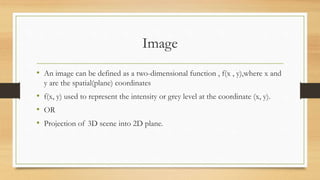
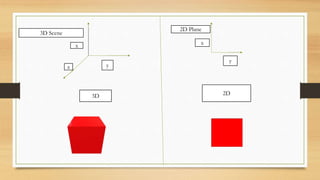
• An image can be defined as a two-dimensional function , f(x , y),where x and
y are the spatial(plane) coordinates
• f(x, y) used to represent the intensity or grey level at the coordinate (x, y).
• OR
• Projection of 3D scene into 2D plane.
x
y
z
x
y
3D 2D
3D Scene
2D Plane
Type of image
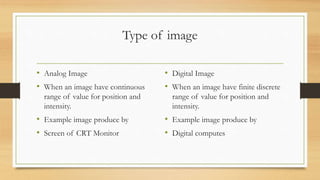
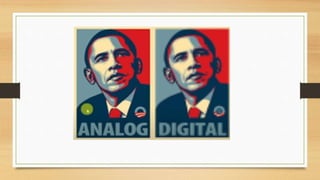
• Analog Image
• When an image have continuous
range of value for position and
intensity.
• Example image produce by
• Screen of CRT Monitor
• Digital Image
• When an image have finite discrete
range of value for position and
intensity.
• Example image produce by
• Digital computes
Analog to Digital Image
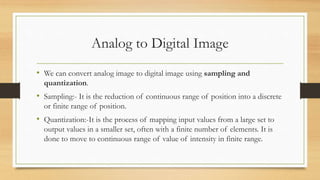
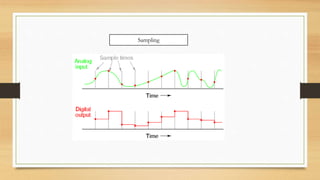
• We can convert analog image to digital image using sampling and
quantization.
• Sampling:- It is the reduction of continuous range of position into a discrete
or finite range of position.
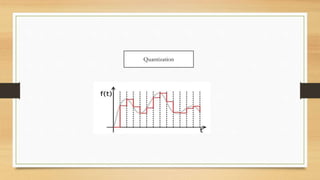
• Quantization:-It is the process of mapping input values from a large set to
output values in a smaller set, often with a finite number of elements. It is
done to move to continuous range of value of intensity in finite range.
Sampling
Quantization
Digital Image
• Digital image contains finite number of elements ,each of which have
particular location and value.
• This elements are called image elements , pixels.
Advantages of Digital Images
• Fast processing(As have finite value)
• Efficient storage
• Efficient Transmission
• Scope for versatile image manipulation
Disadvantage of Digital Image
• High memory for good quality of images and hence require fast processor.
• As the quality of image improve the digital image become more and more
less efficient in terms of storage and transmission.
Digital Image Processing
• The process of manipulating digital images with a computer is called as
digital image processing.
Advantage of Digital Image Processing
• Human being are limited to visual band of electromagnetic spectrum.
• But machine imaging can cover the entire electromagnetic spectrum from
radio waves to gamma waves.
Advantage of Digital Image Processing
• Image processing is applied in recognition of images as in quality assurance
systems
• Image enhancement as in satellite reconnaissance systems
• Image synthesis as in law enforcement suspect identification systems
• Image construction as in plastic surgery design systems.
Scope of Digital Image Processing
• Computer Vision- Computer uses to emulate human vision through which
machine could learn and take action according to the visual input.
• Image sharpening and restoration - To create a better image.
• Image retrieval - Seek for the image of interest.
• Measurement of pattern – Measures various objects in an image.
• Image Recognition – Distinguish the objects in an image.
Fundamental Steps of Digital Image Processing
• There two methods to divide fundamental steps of digital Image Processing
• Method whose input and output are image.
• Method whose input is image but output are attributes extracted from the
image.
Image Acquiring
• Generally image acquiring is the process getting image and performing some
preprocessing such as scaling.
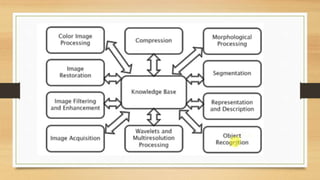
Image enhancement
• The process of manipulating an image such that it is suitable for some
specific application.
• Such as while creating a pdf from Cam Scanner or other such application.
Image Restoration
• The process of improving the image based on some mathematical model
and probability of image degradation.
• Image Restoration is done so that original image which have degrade due to
weather or other phenomena can be improved for use.
Color Image Processing
• As the name suggest the process of adding or modifying the intensity of the
image.
• Widely used to improve the image and it more attractive .
Compression
• As name suggest reducing the amount of space require to store the image.
• Which led to the reduce in the amount of bandwidth require to transmit
image
Morphological process
• It deals with the tools for extracting image component that are useful in the
representation and description of shape.
Segmentation
• Partition an image into constitute parts or object
Representation and Description
• As the name suggest the conversation of image data into suitable form for
Computer processing.
Object Recognition
• It is the process of assign labels to object based on description
• Part of Computer Vision.
Wavelet
• A wavelet is a wave-like oscillation with an amplitude that begins at zero
• The foundation of representing image in various degree of resolution
Knowledge Based
• A prior Knowledge about the problem domain is coded into image
processing machine
Conclusion
• Using image processing techniques,
• We can sharpen the images
• We can contrast to make a graphic display more useful for display
• We can reduce amount of memory requirement for storing image
information, etc.
• We can transmit the images more faster
Conclusion
• There is no limit to the scope of Digital Image processing.
• There is a future of digital image processing.
• We all are in midst of revolution ignited by fast development in computer
technology and imaging.
• Against common belief, computers are not able to match humans in calculation
related to image processing and analysis.
• But with increasing sophistication and power of the modern computing,
computation will go beyond conventional, Von Neumann sequential architecture
and would contemplate the optical execution too.
Thank you

Digital image processing

  • 1.
  • 2.
    Content • What isDigital Image ? • What is Digital Image Processing ? • Application of Digital Image Processing • Scope of Digital Image Processing • Fundamental steps of Digital Image Processing • Conclusion
  • 3.
    Image • An imagecan be defined as a two-dimensional function , f(x , y),where x and y are the spatial(plane) coordinates • f(x, y) used to represent the intensity or grey level at the coordinate (x, y). • OR • Projection of 3D scene into 2D plane.
  • 4.
  • 5.
    Type of image •Analog Image • When an image have continuous range of value for position and intensity. • Example image produce by • Screen of CRT Monitor • Digital Image • When an image have finite discrete range of value for position and intensity. • Example image produce by • Digital computes
  • 6.
    Analog to DigitalImage • We can convert analog image to digital image using sampling and quantization. • Sampling:- It is the reduction of continuous range of position into a discrete or finite range of position. • Quantization:-It is the process of mapping input values from a large set to output values in a smaller set, often with a finite number of elements. It is done to move to continuous range of value of intensity in finite range.
  • 7.
  • 9.
  • 10.
    Digital Image • Digitalimage contains finite number of elements ,each of which have particular location and value. • This elements are called image elements , pixels.
  • 11.
    Advantages of DigitalImages • Fast processing(As have finite value) • Efficient storage • Efficient Transmission • Scope for versatile image manipulation
  • 12.
    Disadvantage of DigitalImage • High memory for good quality of images and hence require fast processor. • As the quality of image improve the digital image become more and more less efficient in terms of storage and transmission.
  • 13.
    Digital Image Processing •The process of manipulating digital images with a computer is called as digital image processing.
  • 14.
    Advantage of DigitalImage Processing • Human being are limited to visual band of electromagnetic spectrum. • But machine imaging can cover the entire electromagnetic spectrum from radio waves to gamma waves.
  • 15.
    Advantage of DigitalImage Processing • Image processing is applied in recognition of images as in quality assurance systems • Image enhancement as in satellite reconnaissance systems • Image synthesis as in law enforcement suspect identification systems • Image construction as in plastic surgery design systems.
  • 16.
    Scope of DigitalImage Processing • Computer Vision- Computer uses to emulate human vision through which machine could learn and take action according to the visual input. • Image sharpening and restoration - To create a better image. • Image retrieval - Seek for the image of interest. • Measurement of pattern – Measures various objects in an image. • Image Recognition – Distinguish the objects in an image.
  • 17.
    Fundamental Steps ofDigital Image Processing • There two methods to divide fundamental steps of digital Image Processing • Method whose input and output are image. • Method whose input is image but output are attributes extracted from the image.
  • 19.
    Image Acquiring • Generallyimage acquiring is the process getting image and performing some preprocessing such as scaling.
  • 20.
    Image enhancement • Theprocess of manipulating an image such that it is suitable for some specific application. • Such as while creating a pdf from Cam Scanner or other such application.
  • 21.
    Image Restoration • Theprocess of improving the image based on some mathematical model and probability of image degradation. • Image Restoration is done so that original image which have degrade due to weather or other phenomena can be improved for use.
  • 22.
    Color Image Processing •As the name suggest the process of adding or modifying the intensity of the image. • Widely used to improve the image and it more attractive .
  • 23.
    Compression • As namesuggest reducing the amount of space require to store the image. • Which led to the reduce in the amount of bandwidth require to transmit image
  • 24.
    Morphological process • Itdeals with the tools for extracting image component that are useful in the representation and description of shape.
  • 25.
    Segmentation • Partition animage into constitute parts or object
  • 26.
    Representation and Description •As the name suggest the conversation of image data into suitable form for Computer processing.
  • 27.
    Object Recognition • Itis the process of assign labels to object based on description • Part of Computer Vision.
  • 28.
    Wavelet • A waveletis a wave-like oscillation with an amplitude that begins at zero • The foundation of representing image in various degree of resolution
  • 29.
    Knowledge Based • Aprior Knowledge about the problem domain is coded into image processing machine
  • 30.
    Conclusion • Using imageprocessing techniques, • We can sharpen the images • We can contrast to make a graphic display more useful for display • We can reduce amount of memory requirement for storing image information, etc. • We can transmit the images more faster
  • 31.
    Conclusion • There isno limit to the scope of Digital Image processing. • There is a future of digital image processing. • We all are in midst of revolution ignited by fast development in computer technology and imaging. • Against common belief, computers are not able to match humans in calculation related to image processing and analysis. • But with increasing sophistication and power of the modern computing, computation will go beyond conventional, Von Neumann sequential architecture and would contemplate the optical execution too.
  • 32.