Functional Overview of
iStore
2
• Oracle iStore – An Overview
• Key Features of Oracle iStore
• Demonstration-Order Creation and Tracking Order
• Summary
Agenda
3
Oracle iStore-An Overview
• Oracle iStore is a packaged e-commerce application that
gives organizations the components necessary to create
powerful Internet store sites for selling products and
services in a secure and personalized environment
• Oracle iStore allows businesses from all industries to
establish
• business-to-business (B2B) and
• business-to-consumer (B2C) electronic commerce
• In addition, integration with other Oracle applications
provides a broad range of e-commerce capabilities.
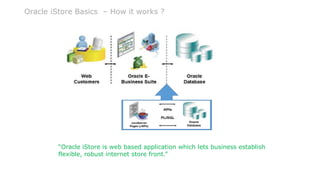
Oracle iStore Basics – How it works ?
4
“Oracle iStore is web based application which lets business establish
flexible, robust internet store front.”
5
Oracle iStore-An Overview
Implementing Oracle iStore lets you:
• Build, test, and launch sophisticated online stores in multiple
languages and currencies
• Provide a full range of online purchasing capabilities, including
flexible pricing, sales assistance, storage of customer data,
shared carts, shopping lists, warranties, order tracking and
returns, and more
• Deploy sites in business partner, business-to-business (B2B) and
business-to-consumer (B2C) scenarios
• Target different customer segments and/or organizations
• Capture and track customer information and activities
• View reports about the activities in the online stores
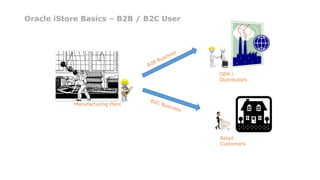
Oracle iStore Basics – B2B / B2C User
6
Manufacturing Plant
OEM /
Distributors
Retail
Customers
7
• Product Catalog and Content Management
Unlimited products and product attributes
Associate any multimedia content to products
Inventory independent hierarchies
Rule based categorization of products in the
hierarchy
Targeted specialty stores
Oracle iStore-Key Features
8
• Interactive and Complex Selling
Guided Selling
Configure Complex Products
Shopping Lists¸ Saved, Shared, and Sales Rep
Assisted
Shopping Carts
Collaborative buying with Sales Reps
Web Call-back
Oracle iStore-Key Features
9
• Flexible Checkout
Express or Regular checkout
Merchant configurable checkout
• Advanced and personalized pricing
Unlimited price lists available in multiple
currencies
Volume, bundled, and tiered discounts
Modifiers, qualifiers, and formulas
Pricing Agreements
Oracle iStore-Key Features
10
• Personalization and One-to-One Marketing
Rules-based interface and engine
User profiling and personalization
Campaigns and offers across all touch points and
channels
Item, Order, and Volume discounts
• Merchandising
User-defined relationships between products
Product affinity based delivery of products, offers,
ads, content
Cross-sells, Up-sells, and Substitutions
Oracle iStore-Key Features
11
• Globalization Support
Multi-lingual, Multi-Org, Multi-Store, Multi-Currency
Global tax calculation
Localized messages and alerts
Restrict Bill-to/Ship-to countries
• Inventory Checks
Real-time Available to Promise (ATP) checks across
multiple Orgs
Real-time inventory Reservations
Display Substitute Products if unavailable
Oracle iStore-Key Features
12
• Order Processing and Shipping
Instant order capture in backend ERP system
Address validation
Different ship-to/bill-to customer, contact, and
address
Tax Exemption
Supports variety of shipping methods
Split shipment by line item¸ Requested
delivery date
Oracle iStore-Key Features
13
• Post Sales Service
Order Tracker
Order and shipping notifications
Shipment status, invoices, and payment
information available across organizations
• Account Management
Self-service B2B user account management
Multiple roles and permissions
Detailed contact information
Address book, Payment book, User preferences
Access restrictions to specialty stores
Oracle iStore-Key Features
14
• Automated Notifications
 Order placement/cancellation
 Registration Confirmation
 Sales Assistance Requests
• Reporting
 Number of orders placed for a given duration
 Top customers
 Top selling products
• 360 Degree Customer View
 Unified customer model across all sales channels (Web, Call
Center, Direct Sales Force, Resellers)
Oracle iStore-Key Features
15
• Complete Payment Processing
Support for credit cards, purchase orders, invoicing
Online and offline authorizations
Leverages Oracle E-Business Suite payment engine
(iPayment)
• Security
Application-level security through roles and
permissions
Out-of-the-box integration with other E-Business
Suite applications for complete customer tracking,
order capture, order management, and streamlined
order fulfillment
Oracle iStore-Key Features
16
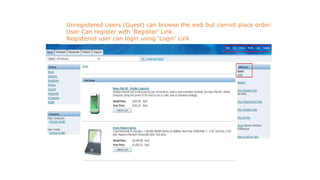
Oracle iStore-User Registration
Unregistered Users (Guest) can browse the web but cannot place order.
User Can register with ‘Register’ Link.
Registered user can login using ‘Login’ Link
17
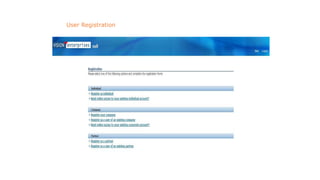
Oracle iStore-User Registration
User Registration
18
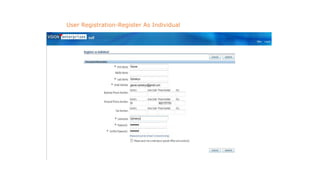
Oracle iStore-User Registration
User Registration-Register As Individual
19
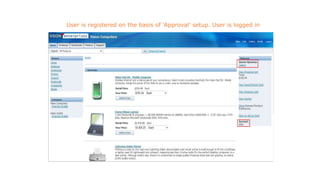
Oracle iStore-User Registration
User is registered on the basis of ‘Approval’ setup. User is logged in
20
Oracle iStore-User Registration
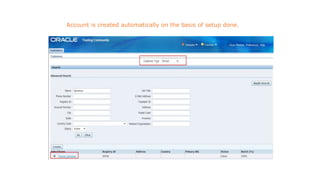
Account is created automatically on the basis of setup done.
21
Oracle iStore-User Registration
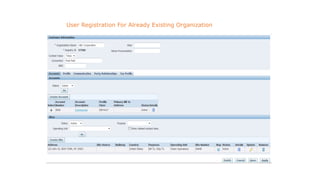
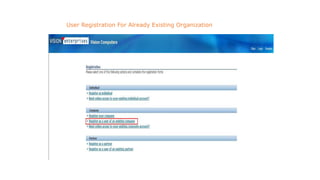
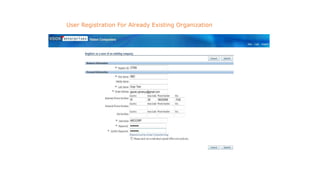
User Registration For Already Existing Organization
22
Oracle iStore-User Registration
User Registration For Already Existing Organization
23
Oracle iStore-User Registration
User Registration For Already Existing Organization
24
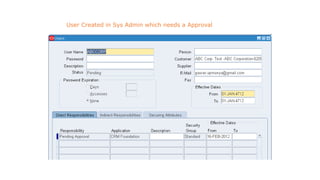
Oracle iStore-User Registration
User Created in Sys Admin which needs a Approval
25
Oracle iStore-User Registration
New User can register Or existing user can login during check out
process also.
26
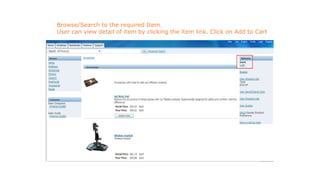
Oracle iStore-Placing Order through iStore
Browse/Search to the required Item.
User can view detail of item by clicking the item link. Click on Add to Cart
27
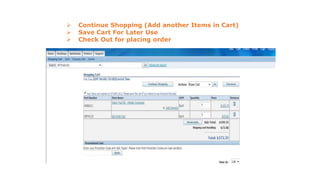
Oracle iStore-Placing Order through iStore
 Continue Shopping (Add another Items in Cart)
 Save Cart For Later Use
 Check Out for placing order
28
Oracle iStore-Placing Order through iStore
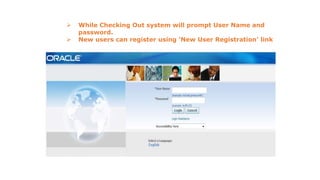
 While Checking Out system will prompt User Name and
password.
 New users can register using ‘New User Registration’ link
29
Oracle iStore-Placing Order through iStore
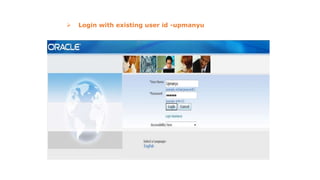
 Login with existing user id -upmanyu
30
Oracle iStore-Placing Order through iStore
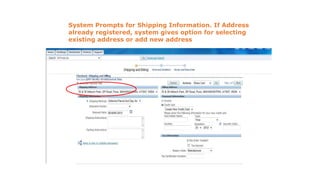
System Prompts for Shipping Information. If Address
already registered, system gives option for selecting
existing address or add new address
31
Oracle iStore-Placing Order through iStore
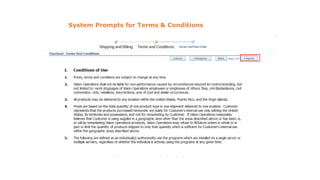
System Prompts for Terms & Conditions
32
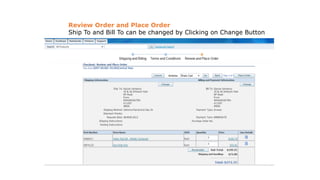
Oracle iStore-Placing Order through iStore
Review Order and Place Order
Ship To and Bill To can be changed by Clicking on Change Button
33
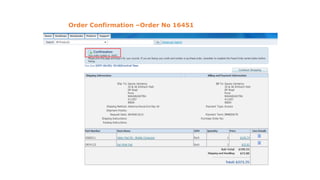
Oracle iStore-Placing Order through iStore
Order Confirmation –Order No 16451
34
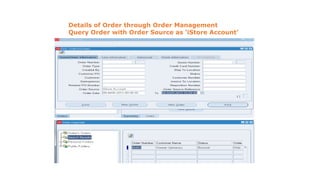
Oracle iStore-Placing Order through iStore
Details of Order through Order Management
Query Order with Order Source as ‘iStore Account’
35
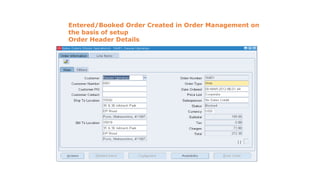
Oracle iStore-Placing Order through iStore
Entered/Booked Order Created in Order Management on
the basis of setup
Order Header Details
36
Oracle iStore-Placing Order through iStore
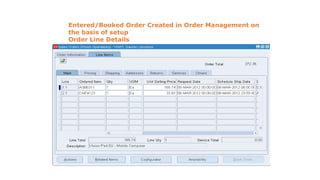
Entered/Booked Order Created in Order Management on
the basis of setup
Order Line Details
37
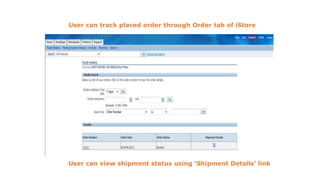
Oracle iStore-Tracking Placed Order Through iStore
User can track placed order through Order tab of iStore
User can view shipment status using ‘Shipment Details’ link
38
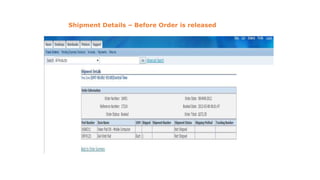
Oracle iStore-Tracking Placed Order Through iStore
Shipment Details – Before Order is released
39
Oracle iStore-Tracking Placed Order Through iStore
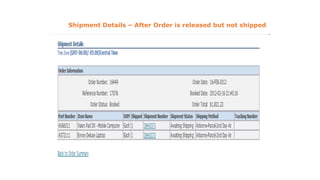
Shipment Details – After Order is released but not shipped
40
Oracle iStore-Tracking Placed Order Through iStore
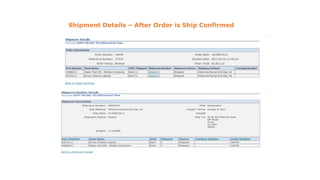
Shipment Details – After Order is Ship Confirmed
41
What is iStore –Implementation Point of View
• Oracle iStore consists of two distinct but integrated user
interfaces viz. Administrative Application and Customer
Application
• Administrative Application is used for :
• Create Unlimited Number of Sites
• Setup Pricelists, Shipping Methods etc.
• Build Product Catalog using Oracle Inventory
• Change site look and Feel by selecting different Section
Templates and Product Display Templates
• View and Configure Workflow notifications
• View Business and Operational Reports
42
What is iStore ? Contd..
• Customer Application is full web based Shopping
Application. It has various features viz.
• Online shopping and orders processed into Oracle
Order Management
• Saves and Share Carts, Quotes etc
• Track Orders
• Cancel Orders
• Submit Return Orders
• Store and access user addresses and credit card data
• Order iStore is an integrated part of E-Business Suite
43
What is iStore ? Contd..
• Oracle iStore Include following components
• Business Objects- The schema for storing customer orders,
product catalog and presentation element (IBE & ASO
Database Schema)
• Runtime Services & APIs- These include PLSQL and Java
based APIs which manipulate the Business Objects (Data)
• Configurable Customer Application Templates- All customer
application menus and pages are customizable using logical
template names
• Processing and Routing Templates- In combination with
display templates, these templates contain logic and
appropriate business flows
• Oracle BLAF (Browse Look And Feel) compliant user interface
for Administrative and customer application
44
Mandatory Modules for iStore
• Oracle Receivables
• Customer Information
• Calculate Taxes
• Generates Invoices
• Oracle General Ledger
• Provides Business Unit Information to iStore
• Tasks include setting up of Chart of Account , Calendar,
Currencies and Business Unit
• Oracle Human Resources
• Stores information related to organization
• Tasks include setting up of Business Group, Locations, Legal
Entities, Operating Unit, Employees, Bill-To and Ship-To
Countries
45
Mandatory Modules for iStore
• Oracle Inventory
• Stores all products (also called as items in inventory
terminology)
• Oracle Order Management
• iStore uses OM to track and process customer orders
and shipping details. iStore uses Order Capture APIs
and Schema to communicate with OM
• Tasks include setting of System Parameters,
Transaction Types, Workflows, Order Number
sequence, defaulting rules, flag shipping methods as
web enables, payment types
• Oracle CRM Technology Foundation
This must be implemented in order for iStore to work
properly
46
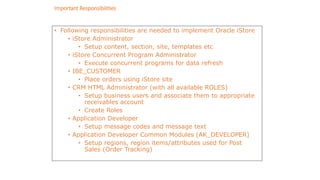
Important Responsibilities
• Following responsibilities are needed to implement Oracle iStore
• iStore Administrator
• Setup content, section, site, templates etc
• iStore Concurrent Program Administrator
• Execute concurrent programs for data refresh
• IBE_CUSTOMER
• Place orders using iStore site
• CRM HTML Administrator (with all available ROLES)
• Setup business users and associate them to appropriate
receivables account
• Create Roles
• Application Developer
• Setup message codes and message text
• Application Developer Common Modules (AK_DEVELOPER)
• Setup regions, region items/attributes used for Post
Sales (Order Tracking)
47
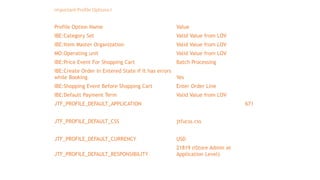
Important Profile Options-I
Profile Option Name Value
IBE:Category Set Valid Value from LOV
IBE:Item Master Organization Valid Value from LOV
MO:Operating unit Valid Value from LOV
IBE:Price Event For Shopping Cart Batch Processing
IBE:Create Order In Entered State if It has errors
while Booking Yes
IBE:Shopping Event Before Shopping Cart Enter Order Line
IBE:Default Payment Term Valid Value from LOV
JTF_PROFILE_DEFAULT_APPLICATION 671
JTF_PROFILE_DEFAULT_CSS jtfucss.css
JTF_PROFILE_DEFAULT_CURRENCY USD
JTF_PROFILE_DEFAULT_RESPONSIBILITY
21819 (iStore Admin at
Application Level)
48
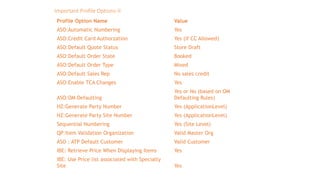
Important Profile Options-II
Profile Option Name Value
ASO:Automatic Numbering Yes
ASO:Credit Card Authorzation Yes (if CC Allowed)
ASO:Default Quote Status Store Draft
ASO:Default Order State Booked
ASO:Default Order Type Mixed
ASO:Default Sales Rep No sales credit
ASO:Enable TCA Changes Yes
ASO:OM Defaulting
Yes or No (based on OM
Defaulting Rules)
HZ:Generate Party Number Yes (ApplicationLevel)
HZ:Generate Party Site Number Yes (ApplicationLevel)
Sequential Numbering Yes (Site Level)
QP:Item Validation Organization Valid Master Org
ASO : ATP Default Customer Valid Customer
IBE: Retrieve Price When Displaying Items Yes
IBE: Use Price list associated with Specialty
Site Yes
49
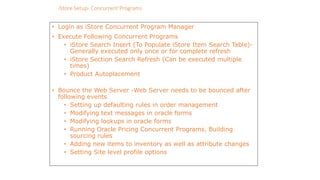
iStore Setup- Concurrent Programs
• Login as iStore Concurrent Program Manager
• Execute Following Concurrent Programs
• iStore Search Insert (To Populate iStore Item Search Table)-
Generally executed only once or for complete refresh
• iStore Section Search Refresh (Can be executed multiple
times)
• Product Autoplacement
• Bounce the Web Server -Web Server needs to be bounced after
following events
• Setting up defaulting rules in order management
• Modifying text messages in oracle forms
• Modifying lookups in oracle forms
• Running Oracle Pricing Concurrent Programs, Building
sourcing rules
• Adding new items to inventory as well as attribute changes
• Setting Site level profile options
50
iStore Setup- Bouncing Web server (Apache)
• Bounce the Web Server -Web Server needs to be bounced after
following events
• Setting up defaulting rules in order management
• Modifying text messages in oracle forms
• Modifying lookups in oracle forms
• Running Oracle Pricing Concurrent Programs, Building
sourcing rules
• Adding new items to inventory as well as attribute changes
• Setting Site level profile options
• Setting up discoverer reports
• Applying Patches
51
Customer Application Display Components
• iStore utilizes JSPs (java server pages) along with APIs to retrieve
dynamic data along with static HTML data
• iStore uses templates and other components to present customer
application viz.
• Display Templates
• Section and Product Hierarchy
• Content – images and HTML content
52
iStore Setup- Catalog Creation
• Login as iStore Administrator using regular oracle applications link
• Navigate to Catalog Tab to see Hierarchy
• Click Section image in Accessories Section which is root section. This will create
a new section and open up a page to set the various properties.
• Select Accessories as parent section and mark the Status as Published
• Update other fields viz. Section name, Section Code, Description etc.
• Keep Featured Section as De-Selected
53
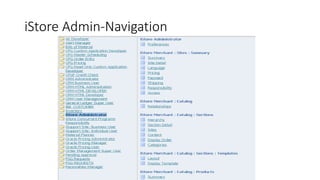
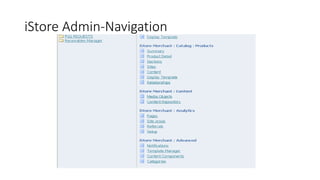
iStore Admin-Navigation
54
iStore Admin-Navigation
55
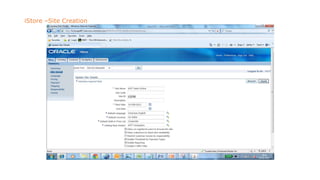
iStore –Site Creation
56
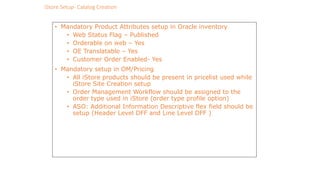
iStore Setup- Catalog Creation
• Mandatory Product Attributes setup in Oracle inventory
• Web Status Flag – Published
• Orderable on web – Yes
• OE Translatable – Yes
• Customer Order Enabled- Yes
• Mandatory setup in OM/Pricing
• All iStore products should be present in pricelist used while
iStore Site Creation setup
• Order Management Workflow should be assigned to the
order type used in iStore (order type profile option)
• ASO: Additional Information Descriptive flex field should be
setup (Header Level DFF and Line Level DFF )
57
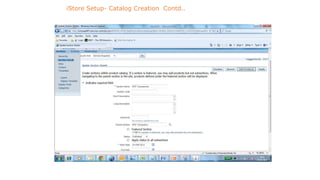
iStore Setup- Catalog Creation Contd..
58
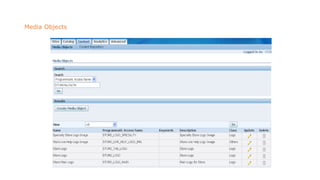
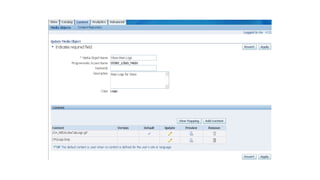
Media Objects
59
60
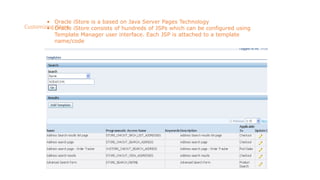
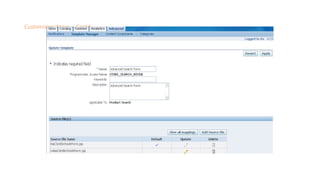
Customizing iStore
• Oracle iStore is a based on Java Server Pages Technology
• Oracle iStore consists of hundreds of JSPs which can be configured using
Template Manager user interface. Each JSP is attached to a template
name/code
61
Customizing iStore … Contd..
62
iStore Customizations- Tips
• If User Interface requirements are not fulfilled by seeded templates
the JSP customizations will be required.
• The new JSPs will be created based on seeded JSPs which will be
attached to seeded Display Templates using Template Manager
screen of iStore Administrative site
• To reflect any changes in JSPs, Item Attributes, Prices etc. Web
server will have to be bounced.
63
iStore Customizations -Tips
• To view source code of class files used in JSPs developer needs
to have following tools
• Java Decompilers e.g.
• DJ Java Decompiler 3.9
• Jcavaj (Java Decompiler with look and feel of directory
structure)
• JSP editor like JDeveloper or even text editor editplus is
sufficient
64
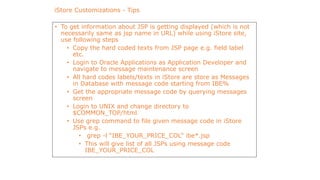
iStore Customizations - Tips
• To get information about JSP is getting displayed (which is not
necessarily same as jsp name in URL) while using iStore site,
use following steps
• Copy the hard coded texts from JSP page e.g. field label
etc.
• Login to Oracle Applications as Application Developer and
navigate to message maintenance screen
• All hard codes labels/texts in iStore are store as Messages
in Database with message code starting from IBE%
• Get the appropriate message code by querying messages
screen
• Login to UNIX and change directory to
$COMMON_TOP/html
• Use grep command to file given message code in iStore
JSPs e.g.
• grep -l “IBE_YOUR_PRICE_COL” ibe*.jsp
• This will give list of all JSPs using message code
IBE_YOUR_PRICE_COL
65
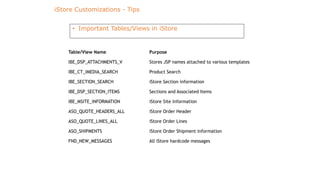
iStore Customizations - Tips
• Important Tables/Views in iStore
Table/View Name Purpose
IBE_DSP_ATTACHMENTS_V Stores JSP names attached to various templates
IBE_CT_IMEDIA_SEARCH Product Search
IBE_SECTION_SEARCH iStore Section information
IBE_DSP_SECTION_ITEMS Sections and Associated Items
IBE_MSITE_INFORMATION iStore Site Information
ASO_QUOTE_HEADERS_ALL iStore Order Header
ASO_QUOTE_LINES_ALL iStore Order Lines
ASO_SHIPMENTS iStore Order Shipment information
FND_NEW_MESSAGES All iStore hardcode messages
Thanks

Functional i store overview knoworacle

  • 1.
  • 2.
    2 • Oracle iStore– An Overview • Key Features of Oracle iStore • Demonstration-Order Creation and Tracking Order • Summary Agenda
  • 3.
    3 Oracle iStore-An Overview •Oracle iStore is a packaged e-commerce application that gives organizations the components necessary to create powerful Internet store sites for selling products and services in a secure and personalized environment • Oracle iStore allows businesses from all industries to establish • business-to-business (B2B) and • business-to-consumer (B2C) electronic commerce • In addition, integration with other Oracle applications provides a broad range of e-commerce capabilities.
  • 4.
    Oracle iStore Basics– How it works ? 4 “Oracle iStore is web based application which lets business establish flexible, robust internet store front.”
  • 5.
    5 Oracle iStore-An Overview ImplementingOracle iStore lets you: • Build, test, and launch sophisticated online stores in multiple languages and currencies • Provide a full range of online purchasing capabilities, including flexible pricing, sales assistance, storage of customer data, shared carts, shopping lists, warranties, order tracking and returns, and more • Deploy sites in business partner, business-to-business (B2B) and business-to-consumer (B2C) scenarios • Target different customer segments and/or organizations • Capture and track customer information and activities • View reports about the activities in the online stores
  • 6.
    Oracle iStore Basics– B2B / B2C User 6 Manufacturing Plant OEM / Distributors Retail Customers
  • 7.
    7 • Product Catalogand Content Management Unlimited products and product attributes Associate any multimedia content to products Inventory independent hierarchies Rule based categorization of products in the hierarchy Targeted specialty stores Oracle iStore-Key Features
  • 8.
    8 • Interactive andComplex Selling Guided Selling Configure Complex Products Shopping Lists¸ Saved, Shared, and Sales Rep Assisted Shopping Carts Collaborative buying with Sales Reps Web Call-back Oracle iStore-Key Features
  • 9.
    9 • Flexible Checkout Expressor Regular checkout Merchant configurable checkout • Advanced and personalized pricing Unlimited price lists available in multiple currencies Volume, bundled, and tiered discounts Modifiers, qualifiers, and formulas Pricing Agreements Oracle iStore-Key Features
  • 10.
    10 • Personalization andOne-to-One Marketing Rules-based interface and engine User profiling and personalization Campaigns and offers across all touch points and channels Item, Order, and Volume discounts • Merchandising User-defined relationships between products Product affinity based delivery of products, offers, ads, content Cross-sells, Up-sells, and Substitutions Oracle iStore-Key Features
  • 11.
    11 • Globalization Support Multi-lingual,Multi-Org, Multi-Store, Multi-Currency Global tax calculation Localized messages and alerts Restrict Bill-to/Ship-to countries • Inventory Checks Real-time Available to Promise (ATP) checks across multiple Orgs Real-time inventory Reservations Display Substitute Products if unavailable Oracle iStore-Key Features
  • 12.
    12 • Order Processingand Shipping Instant order capture in backend ERP system Address validation Different ship-to/bill-to customer, contact, and address Tax Exemption Supports variety of shipping methods Split shipment by line item¸ Requested delivery date Oracle iStore-Key Features
  • 13.
    13 • Post SalesService Order Tracker Order and shipping notifications Shipment status, invoices, and payment information available across organizations • Account Management Self-service B2B user account management Multiple roles and permissions Detailed contact information Address book, Payment book, User preferences Access restrictions to specialty stores Oracle iStore-Key Features
  • 14.
    14 • Automated Notifications Order placement/cancellation  Registration Confirmation  Sales Assistance Requests • Reporting  Number of orders placed for a given duration  Top customers  Top selling products • 360 Degree Customer View  Unified customer model across all sales channels (Web, Call Center, Direct Sales Force, Resellers) Oracle iStore-Key Features
  • 15.
    15 • Complete PaymentProcessing Support for credit cards, purchase orders, invoicing Online and offline authorizations Leverages Oracle E-Business Suite payment engine (iPayment) • Security Application-level security through roles and permissions Out-of-the-box integration with other E-Business Suite applications for complete customer tracking, order capture, order management, and streamlined order fulfillment Oracle iStore-Key Features
  • 16.
    16 Oracle iStore-User Registration UnregisteredUsers (Guest) can browse the web but cannot place order. User Can register with ‘Register’ Link. Registered user can login using ‘Login’ Link
  • 17.
  • 18.
    18 Oracle iStore-User Registration UserRegistration-Register As Individual
  • 19.
    19 Oracle iStore-User Registration Useris registered on the basis of ‘Approval’ setup. User is logged in
  • 20.
    20 Oracle iStore-User Registration Accountis created automatically on the basis of setup done.
  • 21.
    21 Oracle iStore-User Registration UserRegistration For Already Existing Organization
  • 22.
    22 Oracle iStore-User Registration UserRegistration For Already Existing Organization
  • 23.
    23 Oracle iStore-User Registration UserRegistration For Already Existing Organization
  • 24.
    24 Oracle iStore-User Registration UserCreated in Sys Admin which needs a Approval
  • 25.
    25 Oracle iStore-User Registration NewUser can register Or existing user can login during check out process also.
  • 26.
    26 Oracle iStore-Placing Orderthrough iStore Browse/Search to the required Item. User can view detail of item by clicking the item link. Click on Add to Cart
  • 27.
    27 Oracle iStore-Placing Orderthrough iStore  Continue Shopping (Add another Items in Cart)  Save Cart For Later Use  Check Out for placing order
  • 28.
    28 Oracle iStore-Placing Orderthrough iStore  While Checking Out system will prompt User Name and password.  New users can register using ‘New User Registration’ link
  • 29.
    29 Oracle iStore-Placing Orderthrough iStore  Login with existing user id -upmanyu
  • 30.
    30 Oracle iStore-Placing Orderthrough iStore System Prompts for Shipping Information. If Address already registered, system gives option for selecting existing address or add new address
  • 31.
    31 Oracle iStore-Placing Orderthrough iStore System Prompts for Terms & Conditions
  • 32.
    32 Oracle iStore-Placing Orderthrough iStore Review Order and Place Order Ship To and Bill To can be changed by Clicking on Change Button
  • 33.
    33 Oracle iStore-Placing Orderthrough iStore Order Confirmation –Order No 16451
  • 34.
    34 Oracle iStore-Placing Orderthrough iStore Details of Order through Order Management Query Order with Order Source as ‘iStore Account’
  • 35.
    35 Oracle iStore-Placing Orderthrough iStore Entered/Booked Order Created in Order Management on the basis of setup Order Header Details
  • 36.
    36 Oracle iStore-Placing Orderthrough iStore Entered/Booked Order Created in Order Management on the basis of setup Order Line Details
  • 37.
    37 Oracle iStore-Tracking PlacedOrder Through iStore User can track placed order through Order tab of iStore User can view shipment status using ‘Shipment Details’ link
  • 38.
    38 Oracle iStore-Tracking PlacedOrder Through iStore Shipment Details – Before Order is released
  • 39.
    39 Oracle iStore-Tracking PlacedOrder Through iStore Shipment Details – After Order is released but not shipped
  • 40.
    40 Oracle iStore-Tracking PlacedOrder Through iStore Shipment Details – After Order is Ship Confirmed
  • 41.
    41 What is iStore–Implementation Point of View • Oracle iStore consists of two distinct but integrated user interfaces viz. Administrative Application and Customer Application • Administrative Application is used for : • Create Unlimited Number of Sites • Setup Pricelists, Shipping Methods etc. • Build Product Catalog using Oracle Inventory • Change site look and Feel by selecting different Section Templates and Product Display Templates • View and Configure Workflow notifications • View Business and Operational Reports
  • 42.
    42 What is iStore? Contd.. • Customer Application is full web based Shopping Application. It has various features viz. • Online shopping and orders processed into Oracle Order Management • Saves and Share Carts, Quotes etc • Track Orders • Cancel Orders • Submit Return Orders • Store and access user addresses and credit card data • Order iStore is an integrated part of E-Business Suite
  • 43.
    43 What is iStore? Contd.. • Oracle iStore Include following components • Business Objects- The schema for storing customer orders, product catalog and presentation element (IBE & ASO Database Schema) • Runtime Services & APIs- These include PLSQL and Java based APIs which manipulate the Business Objects (Data) • Configurable Customer Application Templates- All customer application menus and pages are customizable using logical template names • Processing and Routing Templates- In combination with display templates, these templates contain logic and appropriate business flows • Oracle BLAF (Browse Look And Feel) compliant user interface for Administrative and customer application
  • 44.
    44 Mandatory Modules foriStore • Oracle Receivables • Customer Information • Calculate Taxes • Generates Invoices • Oracle General Ledger • Provides Business Unit Information to iStore • Tasks include setting up of Chart of Account , Calendar, Currencies and Business Unit • Oracle Human Resources • Stores information related to organization • Tasks include setting up of Business Group, Locations, Legal Entities, Operating Unit, Employees, Bill-To and Ship-To Countries
  • 45.
    45 Mandatory Modules foriStore • Oracle Inventory • Stores all products (also called as items in inventory terminology) • Oracle Order Management • iStore uses OM to track and process customer orders and shipping details. iStore uses Order Capture APIs and Schema to communicate with OM • Tasks include setting of System Parameters, Transaction Types, Workflows, Order Number sequence, defaulting rules, flag shipping methods as web enables, payment types • Oracle CRM Technology Foundation This must be implemented in order for iStore to work properly
  • 46.
    46 Important Responsibilities • Followingresponsibilities are needed to implement Oracle iStore • iStore Administrator • Setup content, section, site, templates etc • iStore Concurrent Program Administrator • Execute concurrent programs for data refresh • IBE_CUSTOMER • Place orders using iStore site • CRM HTML Administrator (with all available ROLES) • Setup business users and associate them to appropriate receivables account • Create Roles • Application Developer • Setup message codes and message text • Application Developer Common Modules (AK_DEVELOPER) • Setup regions, region items/attributes used for Post Sales (Order Tracking)
  • 47.
    47 Important Profile Options-I ProfileOption Name Value IBE:Category Set Valid Value from LOV IBE:Item Master Organization Valid Value from LOV MO:Operating unit Valid Value from LOV IBE:Price Event For Shopping Cart Batch Processing IBE:Create Order In Entered State if It has errors while Booking Yes IBE:Shopping Event Before Shopping Cart Enter Order Line IBE:Default Payment Term Valid Value from LOV JTF_PROFILE_DEFAULT_APPLICATION 671 JTF_PROFILE_DEFAULT_CSS jtfucss.css JTF_PROFILE_DEFAULT_CURRENCY USD JTF_PROFILE_DEFAULT_RESPONSIBILITY 21819 (iStore Admin at Application Level)
  • 48.
    48 Important Profile Options-II ProfileOption Name Value ASO:Automatic Numbering Yes ASO:Credit Card Authorzation Yes (if CC Allowed) ASO:Default Quote Status Store Draft ASO:Default Order State Booked ASO:Default Order Type Mixed ASO:Default Sales Rep No sales credit ASO:Enable TCA Changes Yes ASO:OM Defaulting Yes or No (based on OM Defaulting Rules) HZ:Generate Party Number Yes (ApplicationLevel) HZ:Generate Party Site Number Yes (ApplicationLevel) Sequential Numbering Yes (Site Level) QP:Item Validation Organization Valid Master Org ASO : ATP Default Customer Valid Customer IBE: Retrieve Price When Displaying Items Yes IBE: Use Price list associated with Specialty Site Yes
  • 49.
    49 iStore Setup- ConcurrentPrograms • Login as iStore Concurrent Program Manager • Execute Following Concurrent Programs • iStore Search Insert (To Populate iStore Item Search Table)- Generally executed only once or for complete refresh • iStore Section Search Refresh (Can be executed multiple times) • Product Autoplacement • Bounce the Web Server -Web Server needs to be bounced after following events • Setting up defaulting rules in order management • Modifying text messages in oracle forms • Modifying lookups in oracle forms • Running Oracle Pricing Concurrent Programs, Building sourcing rules • Adding new items to inventory as well as attribute changes • Setting Site level profile options
  • 50.
    50 iStore Setup- BouncingWeb server (Apache) • Bounce the Web Server -Web Server needs to be bounced after following events • Setting up defaulting rules in order management • Modifying text messages in oracle forms • Modifying lookups in oracle forms • Running Oracle Pricing Concurrent Programs, Building sourcing rules • Adding new items to inventory as well as attribute changes • Setting Site level profile options • Setting up discoverer reports • Applying Patches
  • 51.
    51 Customer Application DisplayComponents • iStore utilizes JSPs (java server pages) along with APIs to retrieve dynamic data along with static HTML data • iStore uses templates and other components to present customer application viz. • Display Templates • Section and Product Hierarchy • Content – images and HTML content
  • 52.
    52 iStore Setup- CatalogCreation • Login as iStore Administrator using regular oracle applications link • Navigate to Catalog Tab to see Hierarchy • Click Section image in Accessories Section which is root section. This will create a new section and open up a page to set the various properties. • Select Accessories as parent section and mark the Status as Published • Update other fields viz. Section name, Section Code, Description etc. • Keep Featured Section as De-Selected
  • 53.
  • 54.
  • 55.
  • 56.
    56 iStore Setup- CatalogCreation • Mandatory Product Attributes setup in Oracle inventory • Web Status Flag – Published • Orderable on web – Yes • OE Translatable – Yes • Customer Order Enabled- Yes • Mandatory setup in OM/Pricing • All iStore products should be present in pricelist used while iStore Site Creation setup • Order Management Workflow should be assigned to the order type used in iStore (order type profile option) • ASO: Additional Information Descriptive flex field should be setup (Header Level DFF and Line Level DFF )
  • 57.
    57 iStore Setup- CatalogCreation Contd..
  • 58.
  • 59.
  • 60.
    60 Customizing iStore • OracleiStore is a based on Java Server Pages Technology • Oracle iStore consists of hundreds of JSPs which can be configured using Template Manager user interface. Each JSP is attached to a template name/code
  • 61.
  • 62.
    62 iStore Customizations- Tips •If User Interface requirements are not fulfilled by seeded templates the JSP customizations will be required. • The new JSPs will be created based on seeded JSPs which will be attached to seeded Display Templates using Template Manager screen of iStore Administrative site • To reflect any changes in JSPs, Item Attributes, Prices etc. Web server will have to be bounced.
  • 63.
    63 iStore Customizations -Tips •To view source code of class files used in JSPs developer needs to have following tools • Java Decompilers e.g. • DJ Java Decompiler 3.9 • Jcavaj (Java Decompiler with look and feel of directory structure) • JSP editor like JDeveloper or even text editor editplus is sufficient
  • 64.
    64 iStore Customizations -Tips • To get information about JSP is getting displayed (which is not necessarily same as jsp name in URL) while using iStore site, use following steps • Copy the hard coded texts from JSP page e.g. field label etc. • Login to Oracle Applications as Application Developer and navigate to message maintenance screen • All hard codes labels/texts in iStore are store as Messages in Database with message code starting from IBE% • Get the appropriate message code by querying messages screen • Login to UNIX and change directory to $COMMON_TOP/html • Use grep command to file given message code in iStore JSPs e.g. • grep -l “IBE_YOUR_PRICE_COL” ibe*.jsp • This will give list of all JSPs using message code IBE_YOUR_PRICE_COL
  • 65.
    65 iStore Customizations -Tips • Important Tables/Views in iStore Table/View Name Purpose IBE_DSP_ATTACHMENTS_V Stores JSP names attached to various templates IBE_CT_IMEDIA_SEARCH Product Search IBE_SECTION_SEARCH iStore Section information IBE_DSP_SECTION_ITEMS Sections and Associated Items IBE_MSITE_INFORMATION iStore Site Information ASO_QUOTE_HEADERS_ALL iStore Order Header ASO_QUOTE_LINES_ALL iStore Order Lines ASO_SHIPMENTS iStore Order Shipment information FND_NEW_MESSAGES All iStore hardcode messages
  • 66.