Dynamic Instrumentation
AN ⇊ DRIOD
(101)
Tony Thomas
15th September 2018
ABOUT ME
Name: Tony Thomas
Current: Assoc. Consultant at Cigital
Certifications: OSCP
Domain: Web and Mobile Application Security
#currentlyWorkingWithCigital
#cigitalAcquiredBySynopsys
#soWorkingwithSynopsys
#previouslyWorkedWithLucideus
#OSCP
#mobileSecurityIsSoCool
#iDoWebMobileAndNetwork
2 Introduction to FRIDA in Android
THE STORY
OF HOW IT
ALL BEGAN
Although the term Dynamic
Instrumentation is a mouthful it simply
refers to injecting foreign code into
existing (running) binaries to make
them do things they didn’t do before.Introduction to FRIDA in Android3
TYPES OF DYNAMIC
INSTRUMENTATION
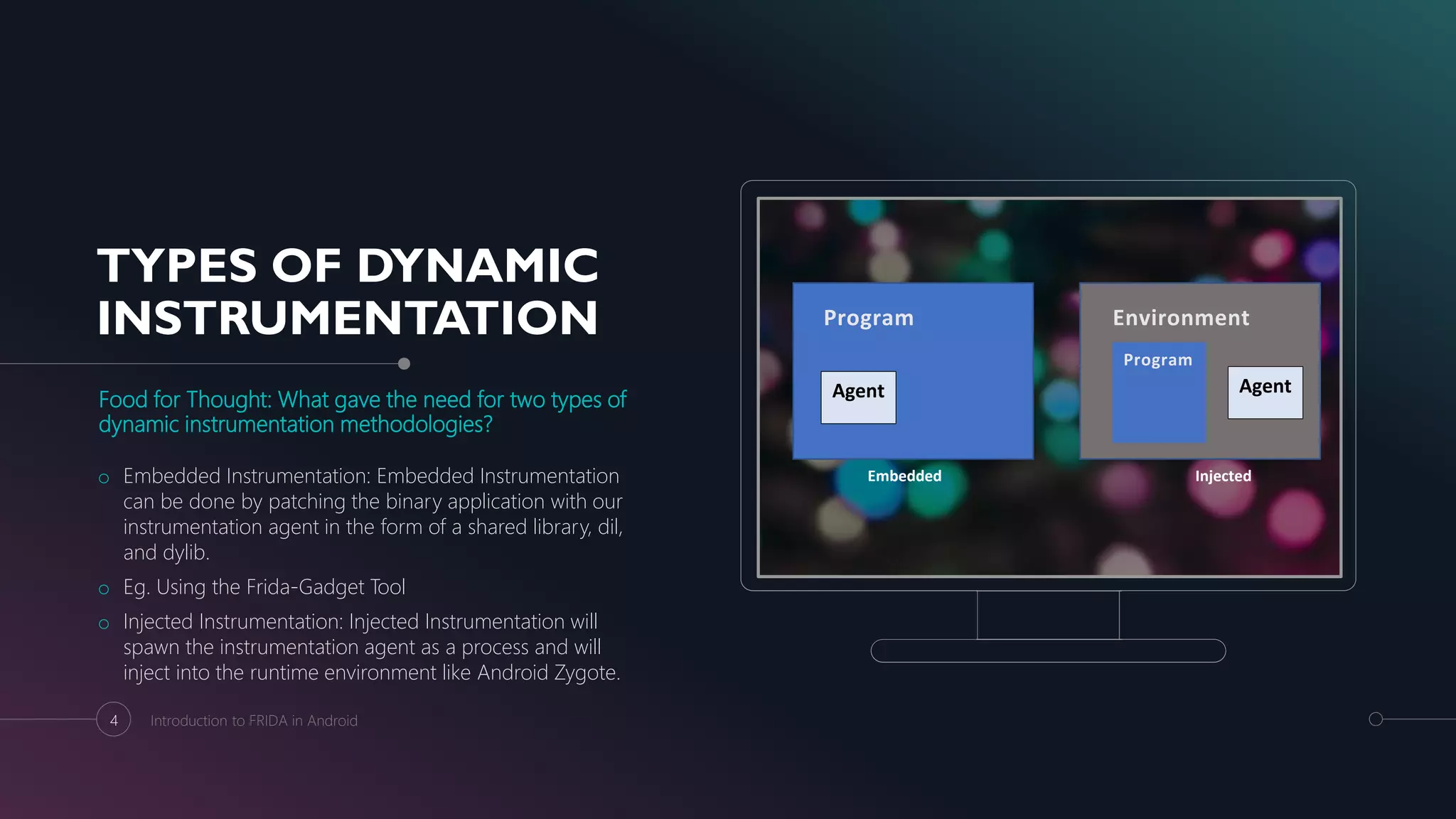
Food for Thought: What gave the need for two types of
dynamic instrumentation methodologies?
o Embedded Instrumentation: Embedded Instrumentation
can be done by patching the binary application with our
instrumentation agent in the form of a shared library, dil,
and dylib.
o Eg. Using the Frida-Gadget Tool
o Injected Instrumentation: Injected Instrumentation will
spawn the instrumentation agent as a process and will
inject into the runtime environment like Android Zygote.
4 Introduction to FRIDA in Android
Embedded Injected
Program
Agent
Environment
Agent
Program
GENISIS
Deep diving into Frida Test Cases
Section 1
Installation
Installing and setting up Frida on
rooted and non-rooted devices.
Section 2
Enumeration
In built and custom Frida Scripts to
enumerate classes, methods and
Functions.
Section 3
Bypassing Root
Detection
Bypassing root detection
mechanisms by hooking onto the
functions.
Section 4
Bypassing SSL
Pinning
Bypassing SSL Pinning by using the
universal Un-Pin script.
5 Introduction to FRIDA in Android
WHATS SO SPECIAL
ABOUT FRIDA?
Using Frida the following can be performed
namely:
o Accessing the process memory
o Overwriting Functions during Runtime
o Hooking Functions
o Calling and Tracing Functions
o Enumerating Functions
o Bypassing Client-Side Security
6 Introduction to FRIDA in Android
FRIDA
INSTALLATION
(Difficult but sure
shot way)
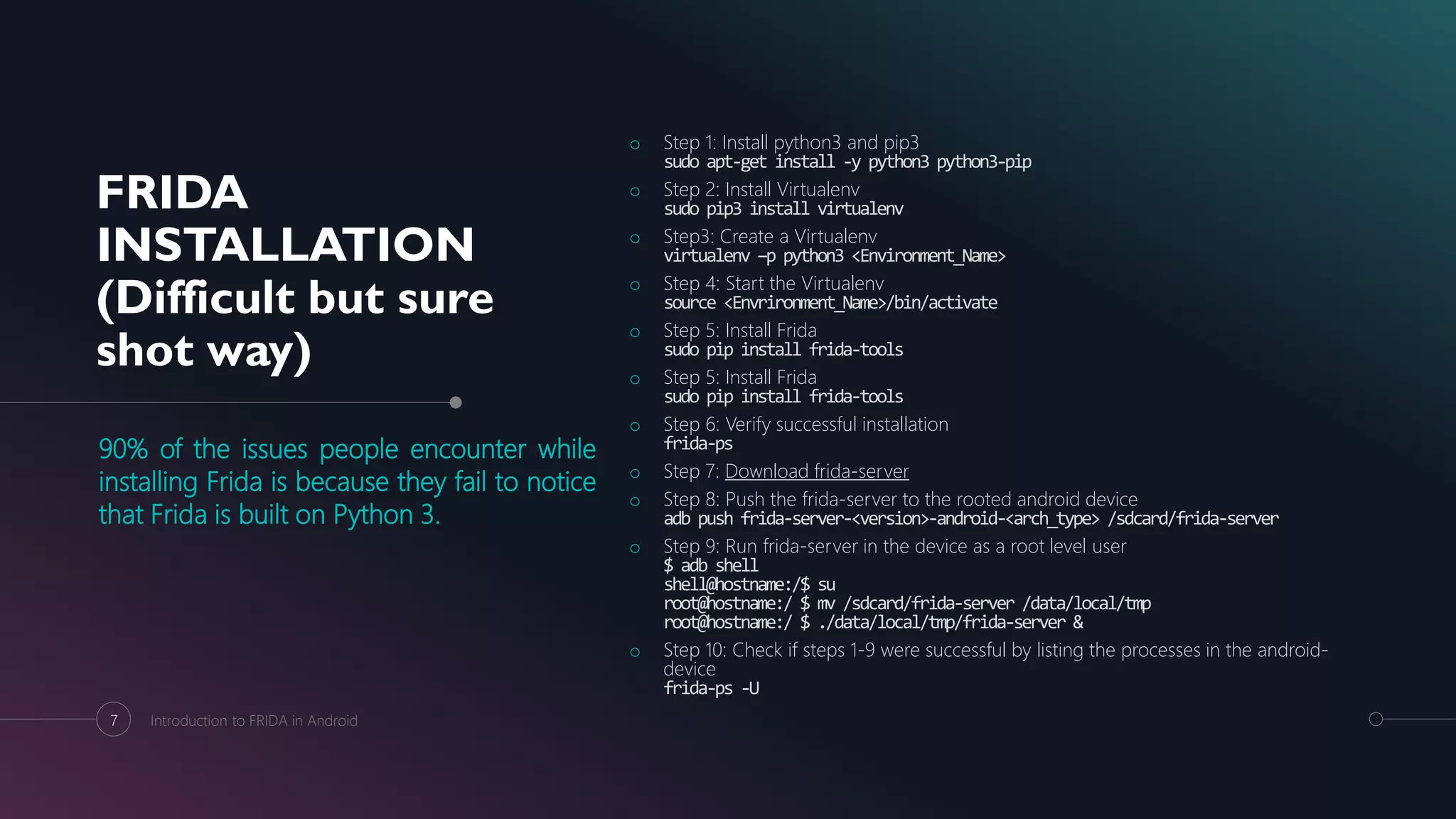
90% of the issues people encounter while
installing Frida is because they fail to notice
that Frida is built on Python 3.
o Step 1: Install python3 and pip3
sudo apt-get install -y python3 python3-pip
o Step 2: Install Virtualenv
sudo pip3 install virtualenv
o Step3: Create a Virtualenv
virtualenv –p python3 <Environment_Name>
o Step 4: Start the Virtualenv
source <Envrironment_Name>/bin/activate
o Step 5: Install Frida
sudo pip install frida-tools
o Step 5: Install Frida
sudo pip install frida-tools
o Step 6: Verify successful installation
frida-ps
o Step 7: Download frida-server
o Step 8: Push the frida-server to the rooted android device
adb push frida-server-<version>-android-<arch_type> /sdcard/frida-server
o Step 9: Run frida-server in the device as a root level user
$ adb shell
shell@hostname:/$ su
root@hostname:/ $ mv /sdcard/frida-server /data/local/tmp
root@hostname:/ $ ./data/local/tmp/frida-server &
o Step 10: Check if steps 1-9 were successful by listing the processes in the android-
device
frida-ps -U
7 Introduction to FRIDA in Android
FRIDA
INSTALLATION
(Easy and almost
always works)
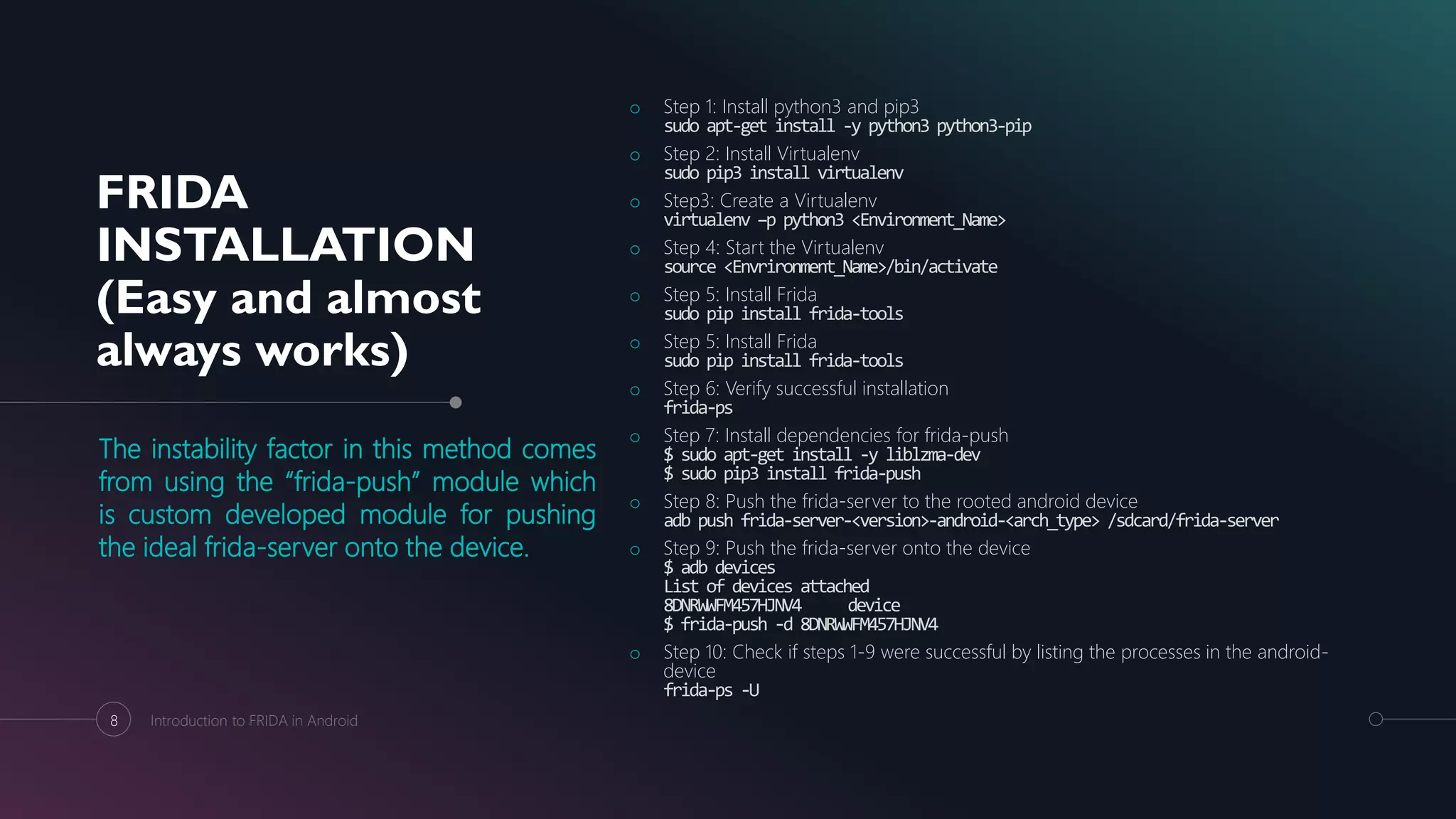
The instability factor in this method comes
from using the “frida-push” module which
is custom developed module for pushing
the ideal frida-server onto the device.
o Step 1: Install python3 and pip3
sudo apt-get install -y python3 python3-pip
o Step 2: Install Virtualenv
sudo pip3 install virtualenv
o Step3: Create a Virtualenv
virtualenv –p python3 <Environment_Name>
o Step 4: Start the Virtualenv
source <Envrironment_Name>/bin/activate
o Step 5: Install Frida
sudo pip install frida-tools
o Step 5: Install Frida
sudo pip install frida-tools
o Step 6: Verify successful installation
frida-ps
o Step 7: Install dependencies for frida-push
$ sudo apt-get install -y liblzma-dev
$ sudo pip3 install frida-push
o Step 8: Push the frida-server to the rooted android device
adb push frida-server-<version>-android-<arch_type> /sdcard/frida-server
o Step 9: Push the frida-server onto the device
$ adb devices
List of devices attached
8DNRWWFM457HJNV4 device
$ frida-push -d 8DNRWWFM457HJNV4
o Step 10: Check if steps 1-9 were successful by listing the processes in the android-
device
frida-ps -U
8 Introduction to FRIDA in Android
FRIDA INSTALLATION
ON NON-ROOTED
DEVICES
(The StandardWay)
Interesting Read:
An interesting blog post by John Kozyrakis shows how the frida-
gadget can be injected into an application in a step by step
process.
9 Introduction to FRIDA in Android
FRIDA
INSTALLATION
(Easy and almost
always works)
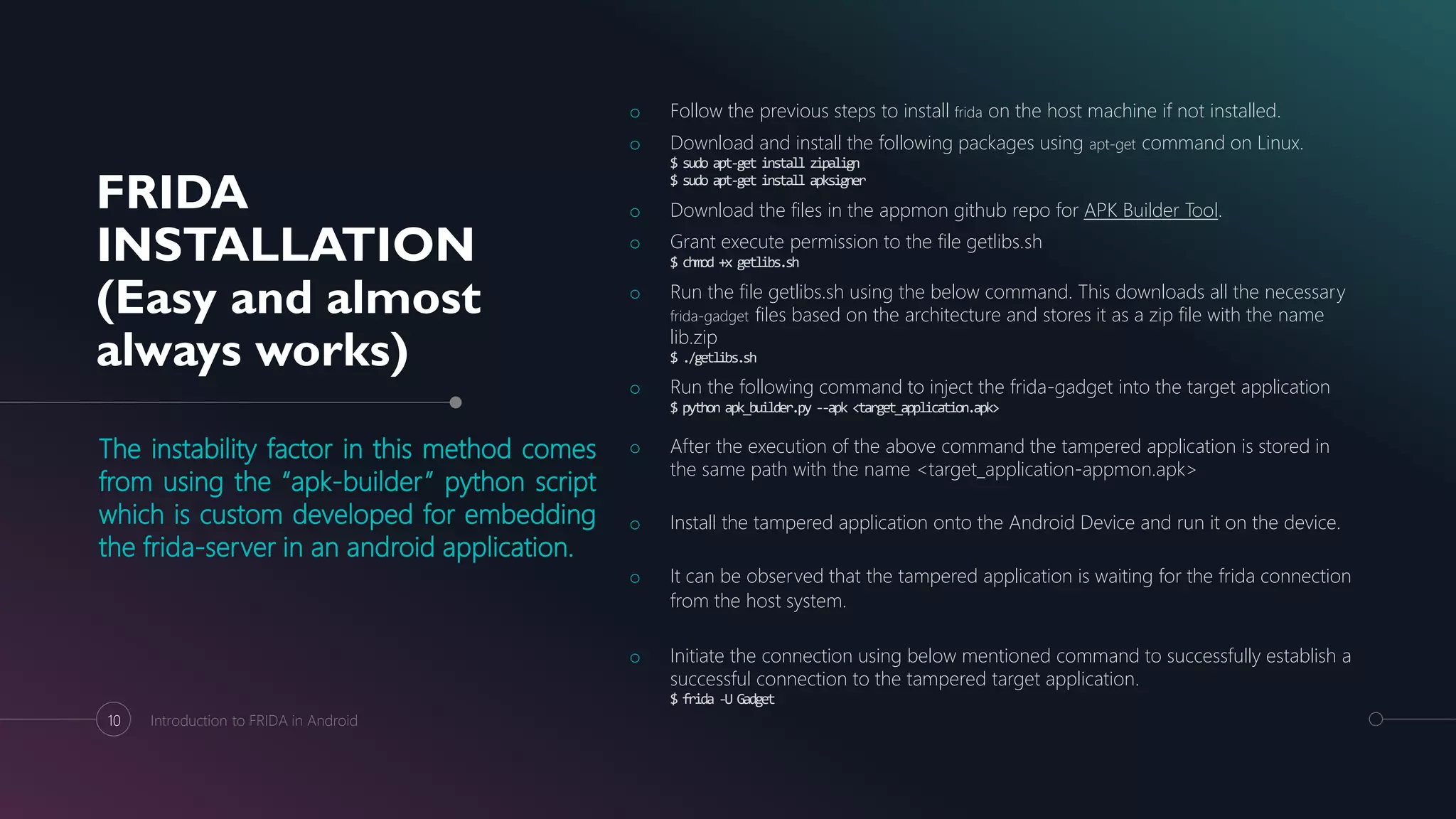
The instability factor in this method comes
from using the “apk-builder” python script
which is custom developed for embedding
the frida-server in an android application.
o Follow the previous steps to install frida on the host machine if not installed.
o Download and install the following packages using apt-get command on Linux.
$ sudo apt-get install zipalign
$ sudo apt-get install apksigner
o Download the files in the appmon github repo for APK Builder Tool.
o Grant execute permission to the file getlibs.sh
$ chmod +x getlibs.sh
o Run the file getlibs.sh using the below command. This downloads all the necessary
frida-gadget files based on the architecture and stores it as a zip file with the name
lib.zip
$ ./getlibs.sh
o Run the following command to inject the frida-gadget into the target application
$ python apk_builder.py --apk <target_application.apk>
o After the execution of the above command the tampered application is stored in
the same path with the name <target_application-appmon.apk>
o Install the tampered application onto the Android Device and run it on the device.
o It can be observed that the tampered application is waiting for the frida connection
from the host system.
o Initiate the connection using below mentioned command to successfully establish a
successful connection to the tampered target application.
$ frida -U Gadget
10 Introduction to FRIDA in Android
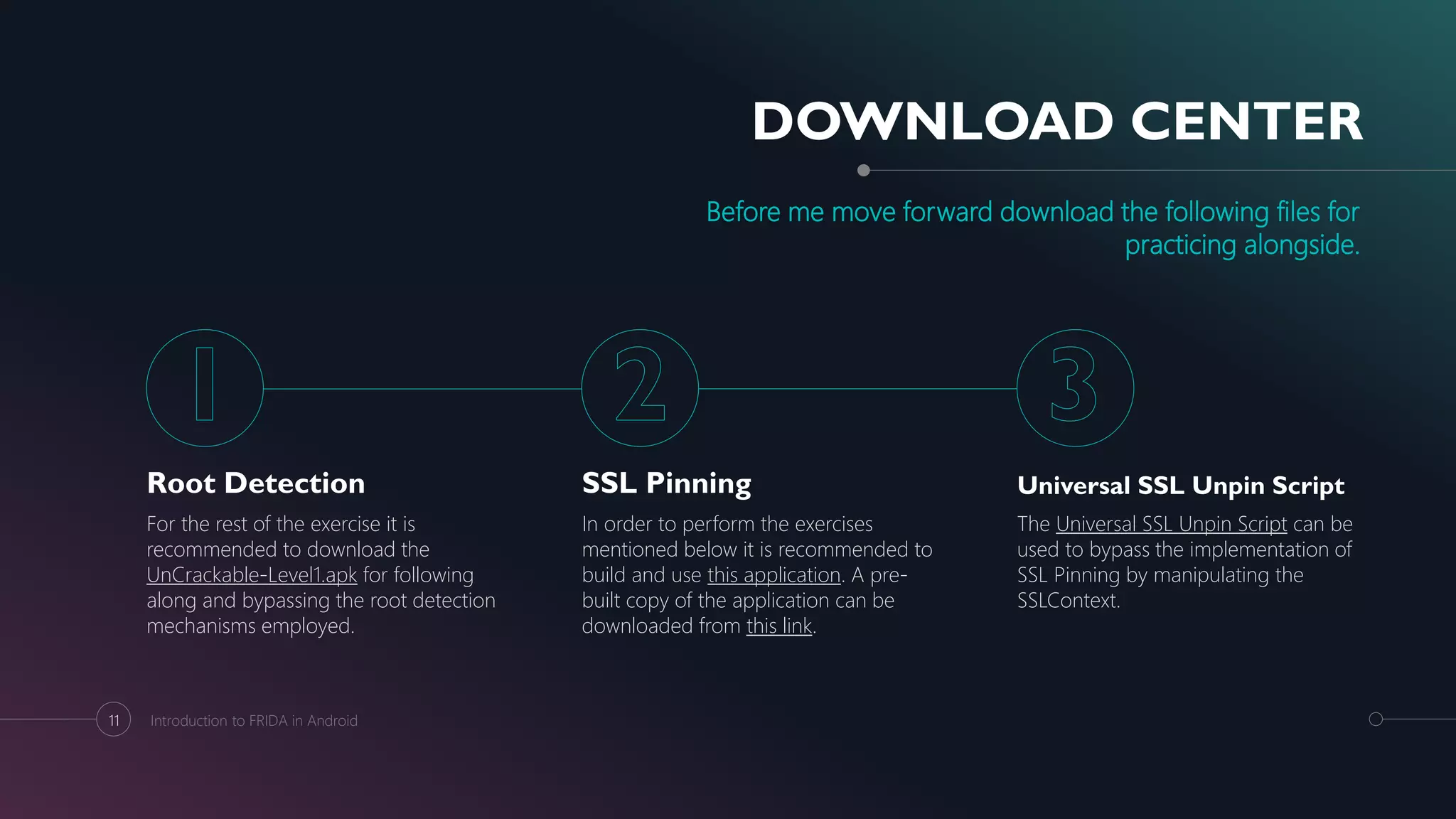
DOWNLOAD CENTER
Before me move forward download the following files for
practicing alongside.
Root Detection
For the rest of the exercise it is
recommended to download the
UnCrackable-Level1.apk for following
along and bypassing the root detection
mechanisms employed.
SSL Pinning
In order to perform the exercises
mentioned below it is recommended to
build and use this application. A pre-
built copy of the application can be
downloaded from this link.
Universal SSL Unpin Script
The Universal SSL Unpin Script can be
used to bypass the implementation of
SSL Pinning by manipulating the
SSLContext.
11 Introduction to FRIDA in Android
ROOT DETECTION
public static boolean c() {
for (String file : new String[]{"/system/app/Superuser.apk",
"/system/xbin/daemonsu", "/system/etc/init.d/99SuperSUDaemon",
"/system/bin/.ext/.su", "/system/etc/.has_su_daemon",
"/system/etc/.installed_su_daemon",
"/dev/com.koushikdutta.superuser.daemon/"}) {
if (new File(file).exists()) {
return true;
}
}
return false;
}
12 Introduction to FRIDA in Android
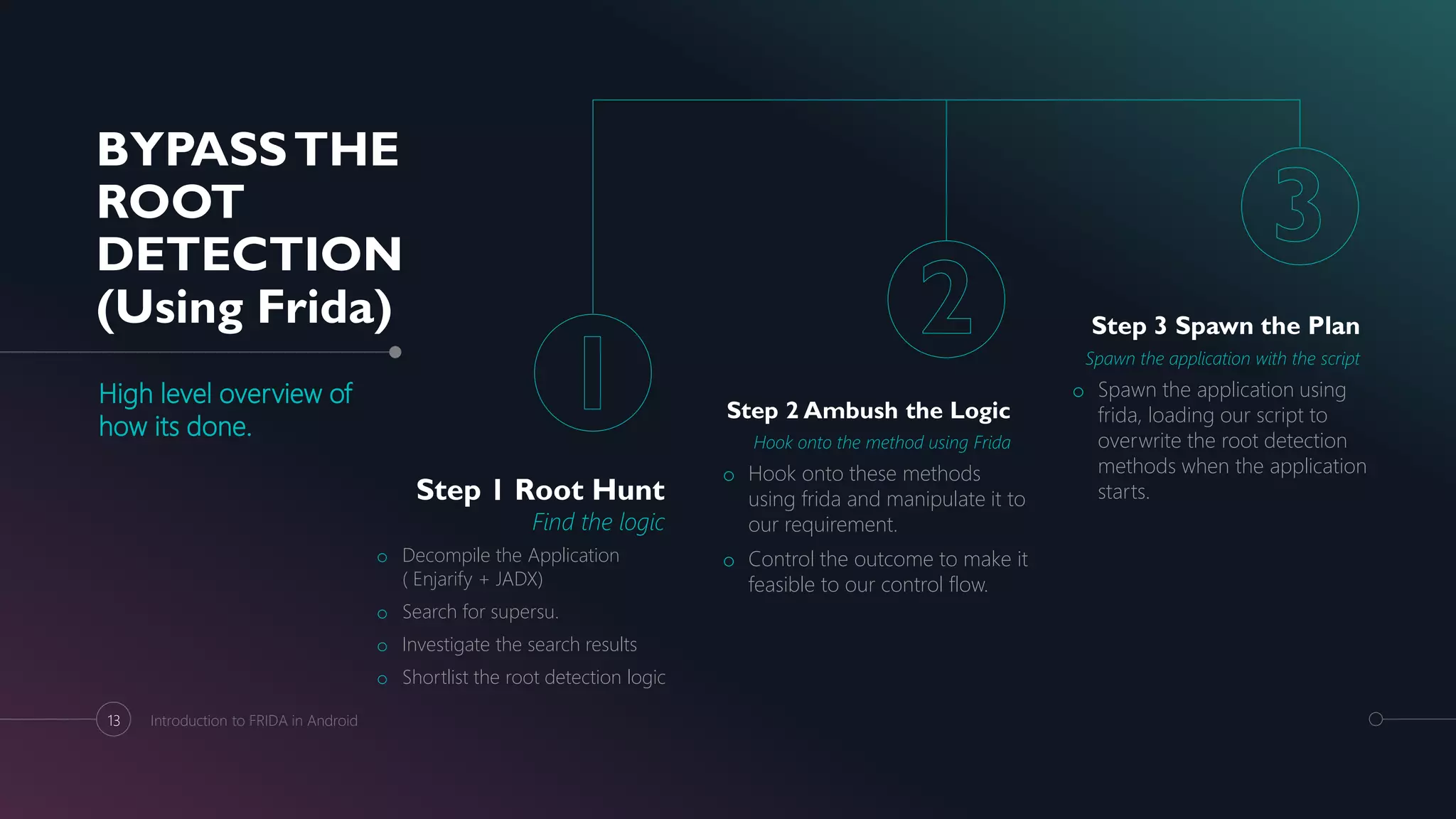
BYPASSTHE
ROOT
DETECTION
(Using Frida)
High level overview of
how its done.
Step 1 Root Hunt
Find the logic
o Decompile the Application
( Enjarify + JADX)
o Search for supersu.
o Investigate the search results
o Shortlist the root detection logic
Step 2 Ambush the Logic
Hook onto the method using Frida
o Hook onto these methods
using frida and manipulate it to
our requirement.
o Control the outcome to make it
feasible to our control flow.
Step 3 Spawn the Plan
Spawn the application with the script
o Spawn the application using
frida, loading our script to
overwrite the root detection
methods when the application
starts.
13 Introduction to FRIDA in Android
ROOT DETECTION
(The Complete Plan)
Assumed to know the already existing methods to
decompile the application
Hint: Enjarify -> JADX / JD-GUI -> Text Editor
The Plan
o Decompile the OWASP Uncrackable application using a
combination of enjarify + jd-gui/jadx.
o Open the decompiled code using a text editor like sublime
text or notepad++ and trace the class responsible for root
detection from the main class.
o It is identified that the class responsible for root detection is
sg.vantagepoint.a.c
o It is also observed that class c has 3 functions that check for
root namely a(), b() and c().
o The return value for functions a(), b() and c() will be true for a
root device and false for a non-rooted device.
o Hence our objective would be to write the corresponding
frida script for hooking onto these functions and
manipulating their return value to false.
o Spawn the Uncrackable application using the below
command:
frida -U -f sg.vantagepoint.uncrackable1 -l uncrackable_root_detection.js
o Once the frida CLI starts up and the script has finished
executing input %resume into the frida prompt. This will
spawn the application with our modified methods.
Uncrackable_root_Detection.js
setImmediate(function() {
console.log("[*] Starting Script")
Java.perform(function() {
rootClass = Java.use("sg.vantagepoint.a.c")
rootClass.a.implementation = function() {
console.log("[*] Inside Method 1")
return false}
rootClass.b.implementation = function() {
console.log("[*] Inside Method 2")
return false}
rootClass.c.implementation = function() {
console.log("[*] Inside Method 3")
return false}
})
console.log("[*] Root Method Modified")
})
14 Introduction to FRIDA in Android
FOOD FORTHOUGHT
What are the different ways of implementing SSL Pinning?
Matthew Dolan wonderfully addresses in his blog the
different methods used to implement SSL Pinning.
15 Introduction to FRIDA in Android
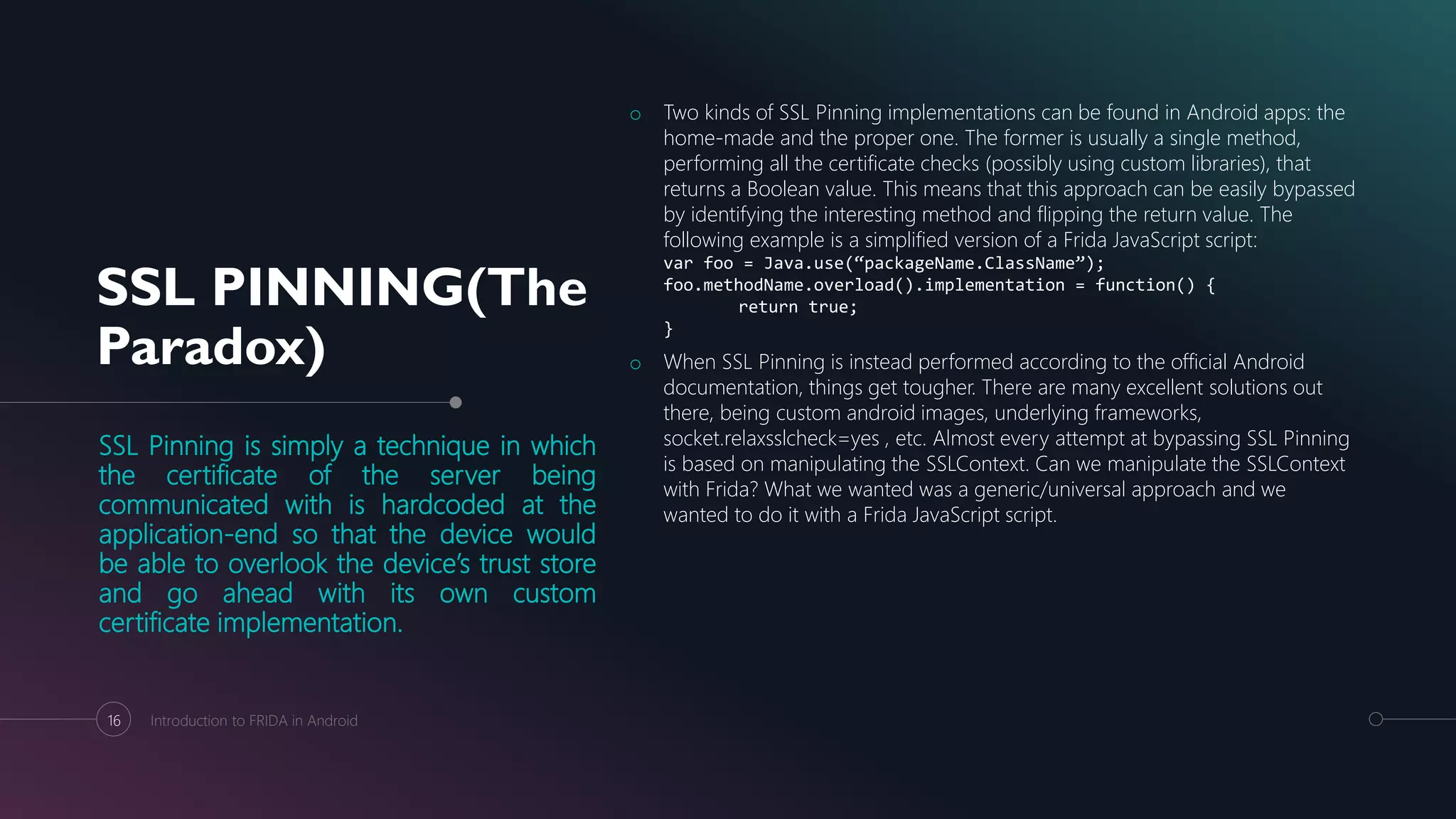
SSL PINNING(The
Paradox)
SSL Pinning is simply a technique in which
the certificate of the server being
communicated with is hardcoded at the
application-end so that the device would
be able to overlook the device’s trust store
and go ahead with its own custom
certificate implementation.
o Two kinds of SSL Pinning implementations can be found in Android apps: the
home-made and the proper one. The former is usually a single method,
performing all the certificate checks (possibly using custom libraries), that
returns a Boolean value. This means that this approach can be easily bypassed
by identifying the interesting method and flipping the return value. The
following example is a simplified version of a Frida JavaScript script:
var foo = Java.use(“packageName.ClassName”);
foo.methodName.overload().implementation = function() {
return true;
}
o When SSL Pinning is instead performed according to the official Android
documentation, things get tougher. There are many excellent solutions out
there, being custom android images, underlying frameworks,
socket.relaxsslcheck=yes , etc. Almost every attempt at bypassing SSL Pinning
is based on manipulating the SSLContext. Can we manipulate the SSLContext
with Frida? What we wanted was a generic/universal approach and we
wanted to do it with a Frida JavaScript script.
16 Introduction to FRIDA in Android
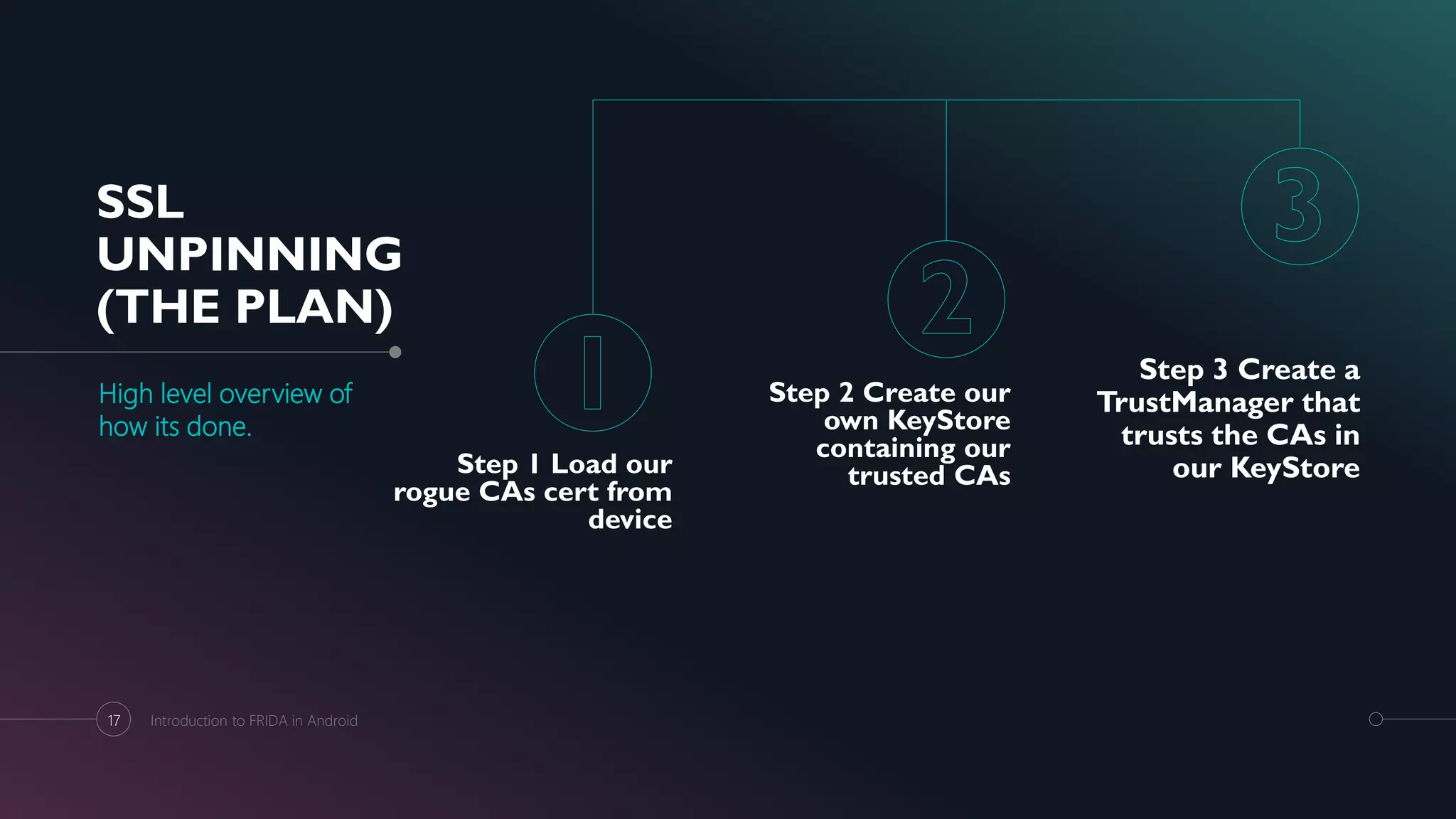
SSL
UNPINNING
(THE PLAN)
High level overview of
how its done.
Step 1 Load our
rogue CAs cert from
device
Step 2 Create our
own KeyStore
containing our
trusted CAs
Step 3 Create a
TrustManager that
trusts the CAs in
our KeyStore
17 Introduction to FRIDA in Android
SSL UNPINNING USING
FRIDA
The demo is centered around the files present in the
Download Center.
The Plan
o Install the “Pinned SSL Demo” application on the device.
adb install SSL_Pinned_Application.apk
o Start the Frida Server on the Android Device.
user@hostname:~$ adb shell
shell@XT1663:/ $ su
root@XT1663:/ # cd /data/local/tmp/
root@XT1663:/data/local/tmp # ./frida-server &
o Push the burp certificate onto the device which would
serve as the rouge CA.
adb push burpca-cert-der.crt
/data/local/tmp/cert-der.crt
o Run the Universal SSL Unpin script downloaded earlier
through Frida
frida -U -f smuldr.sslpin -l frida-android-
repinning.js --no-pause
o We notice that every time the application accesses the
SSLContent.init function it is overwritten with our
custom implementation.
This way we basically re-pin the
application to our own CA!
18 Introduction to FRIDA in Android
REFERENCES
APOLOGIES IF I HAVE USED YOUR WORK
AND NOT GIVEN YOU DUE CREDIT!
o https://koz.io/using-frida-on-android-without-root/
o https://www.codemetrix.net/hacking-android-apps-with-frida-
1/
o http://pentestcorner.com/introduction-to-fridump/
o https://github.com/dweinstein/awesome-frida
o https://techblog.mediaservice.net/2017/07/universal-android-
ssl-pinning-bypass-with-frida/
o http://www.ryantzj.com/introduction-to-dynamic-
instrumentation-in-mobile-security.html
o https://gist.github.com/Geoyi/d9fab4f609e9f75941946be4500
0632b
19 Introduction to FRIDA in Android
THANKYOU!
TonyThomas
Phone:
NTMzMzcwNzI2NTQ1NmM0NTYxN2RlYWRiZWVmYTRhNGY1Mj
Q1MzEzNjU0NTg3MDUyNjU0NTMxMzY1NzU0MzAzZA==
Email:
tony@tonythomasv.com
Handle:
@tonythomasv
Introduction to FRIDA in Android20

FRIDA 101 Android

  • 1.
    Dynamic Instrumentation AN ⇊DRIOD (101) Tony Thomas 15th September 2018
  • 2.
    ABOUT ME Name: TonyThomas Current: Assoc. Consultant at Cigital Certifications: OSCP Domain: Web and Mobile Application Security #currentlyWorkingWithCigital #cigitalAcquiredBySynopsys #soWorkingwithSynopsys #previouslyWorkedWithLucideus #OSCP #mobileSecurityIsSoCool #iDoWebMobileAndNetwork 2 Introduction to FRIDA in Android
  • 3.
    THE STORY OF HOWIT ALL BEGAN Although the term Dynamic Instrumentation is a mouthful it simply refers to injecting foreign code into existing (running) binaries to make them do things they didn’t do before.Introduction to FRIDA in Android3
  • 4.
    TYPES OF DYNAMIC INSTRUMENTATION Foodfor Thought: What gave the need for two types of dynamic instrumentation methodologies? o Embedded Instrumentation: Embedded Instrumentation can be done by patching the binary application with our instrumentation agent in the form of a shared library, dil, and dylib. o Eg. Using the Frida-Gadget Tool o Injected Instrumentation: Injected Instrumentation will spawn the instrumentation agent as a process and will inject into the runtime environment like Android Zygote. 4 Introduction to FRIDA in Android Embedded Injected Program Agent Environment Agent Program
  • 5.
    GENISIS Deep diving intoFrida Test Cases Section 1 Installation Installing and setting up Frida on rooted and non-rooted devices. Section 2 Enumeration In built and custom Frida Scripts to enumerate classes, methods and Functions. Section 3 Bypassing Root Detection Bypassing root detection mechanisms by hooking onto the functions. Section 4 Bypassing SSL Pinning Bypassing SSL Pinning by using the universal Un-Pin script. 5 Introduction to FRIDA in Android
  • 6.
    WHATS SO SPECIAL ABOUTFRIDA? Using Frida the following can be performed namely: o Accessing the process memory o Overwriting Functions during Runtime o Hooking Functions o Calling and Tracing Functions o Enumerating Functions o Bypassing Client-Side Security 6 Introduction to FRIDA in Android
  • 7.
    FRIDA INSTALLATION (Difficult but sure shotway) 90% of the issues people encounter while installing Frida is because they fail to notice that Frida is built on Python 3. o Step 1: Install python3 and pip3 sudo apt-get install -y python3 python3-pip o Step 2: Install Virtualenv sudo pip3 install virtualenv o Step3: Create a Virtualenv virtualenv –p python3 <Environment_Name> o Step 4: Start the Virtualenv source <Envrironment_Name>/bin/activate o Step 5: Install Frida sudo pip install frida-tools o Step 5: Install Frida sudo pip install frida-tools o Step 6: Verify successful installation frida-ps o Step 7: Download frida-server o Step 8: Push the frida-server to the rooted android device adb push frida-server-<version>-android-<arch_type> /sdcard/frida-server o Step 9: Run frida-server in the device as a root level user $ adb shell shell@hostname:/$ su root@hostname:/ $ mv /sdcard/frida-server /data/local/tmp root@hostname:/ $ ./data/local/tmp/frida-server & o Step 10: Check if steps 1-9 were successful by listing the processes in the android- device frida-ps -U 7 Introduction to FRIDA in Android
  • 8.
    FRIDA INSTALLATION (Easy and almost alwaysworks) The instability factor in this method comes from using the “frida-push” module which is custom developed module for pushing the ideal frida-server onto the device. o Step 1: Install python3 and pip3 sudo apt-get install -y python3 python3-pip o Step 2: Install Virtualenv sudo pip3 install virtualenv o Step3: Create a Virtualenv virtualenv –p python3 <Environment_Name> o Step 4: Start the Virtualenv source <Envrironment_Name>/bin/activate o Step 5: Install Frida sudo pip install frida-tools o Step 5: Install Frida sudo pip install frida-tools o Step 6: Verify successful installation frida-ps o Step 7: Install dependencies for frida-push $ sudo apt-get install -y liblzma-dev $ sudo pip3 install frida-push o Step 8: Push the frida-server to the rooted android device adb push frida-server-<version>-android-<arch_type> /sdcard/frida-server o Step 9: Push the frida-server onto the device $ adb devices List of devices attached 8DNRWWFM457HJNV4 device $ frida-push -d 8DNRWWFM457HJNV4 o Step 10: Check if steps 1-9 were successful by listing the processes in the android- device frida-ps -U 8 Introduction to FRIDA in Android
  • 9.
    FRIDA INSTALLATION ON NON-ROOTED DEVICES (TheStandardWay) Interesting Read: An interesting blog post by John Kozyrakis shows how the frida- gadget can be injected into an application in a step by step process. 9 Introduction to FRIDA in Android
  • 10.
    FRIDA INSTALLATION (Easy and almost alwaysworks) The instability factor in this method comes from using the “apk-builder” python script which is custom developed for embedding the frida-server in an android application. o Follow the previous steps to install frida on the host machine if not installed. o Download and install the following packages using apt-get command on Linux. $ sudo apt-get install zipalign $ sudo apt-get install apksigner o Download the files in the appmon github repo for APK Builder Tool. o Grant execute permission to the file getlibs.sh $ chmod +x getlibs.sh o Run the file getlibs.sh using the below command. This downloads all the necessary frida-gadget files based on the architecture and stores it as a zip file with the name lib.zip $ ./getlibs.sh o Run the following command to inject the frida-gadget into the target application $ python apk_builder.py --apk <target_application.apk> o After the execution of the above command the tampered application is stored in the same path with the name <target_application-appmon.apk> o Install the tampered application onto the Android Device and run it on the device. o It can be observed that the tampered application is waiting for the frida connection from the host system. o Initiate the connection using below mentioned command to successfully establish a successful connection to the tampered target application. $ frida -U Gadget 10 Introduction to FRIDA in Android
  • 11.
    DOWNLOAD CENTER Before memove forward download the following files for practicing alongside. Root Detection For the rest of the exercise it is recommended to download the UnCrackable-Level1.apk for following along and bypassing the root detection mechanisms employed. SSL Pinning In order to perform the exercises mentioned below it is recommended to build and use this application. A pre- built copy of the application can be downloaded from this link. Universal SSL Unpin Script The Universal SSL Unpin Script can be used to bypass the implementation of SSL Pinning by manipulating the SSLContext. 11 Introduction to FRIDA in Android
  • 12.
    ROOT DETECTION public staticboolean c() { for (String file : new String[]{"/system/app/Superuser.apk", "/system/xbin/daemonsu", "/system/etc/init.d/99SuperSUDaemon", "/system/bin/.ext/.su", "/system/etc/.has_su_daemon", "/system/etc/.installed_su_daemon", "/dev/com.koushikdutta.superuser.daemon/"}) { if (new File(file).exists()) { return true; } } return false; } 12 Introduction to FRIDA in Android
  • 13.
    BYPASSTHE ROOT DETECTION (Using Frida) High leveloverview of how its done. Step 1 Root Hunt Find the logic o Decompile the Application ( Enjarify + JADX) o Search for supersu. o Investigate the search results o Shortlist the root detection logic Step 2 Ambush the Logic Hook onto the method using Frida o Hook onto these methods using frida and manipulate it to our requirement. o Control the outcome to make it feasible to our control flow. Step 3 Spawn the Plan Spawn the application with the script o Spawn the application using frida, loading our script to overwrite the root detection methods when the application starts. 13 Introduction to FRIDA in Android
  • 14.
    ROOT DETECTION (The CompletePlan) Assumed to know the already existing methods to decompile the application Hint: Enjarify -> JADX / JD-GUI -> Text Editor The Plan o Decompile the OWASP Uncrackable application using a combination of enjarify + jd-gui/jadx. o Open the decompiled code using a text editor like sublime text or notepad++ and trace the class responsible for root detection from the main class. o It is identified that the class responsible for root detection is sg.vantagepoint.a.c o It is also observed that class c has 3 functions that check for root namely a(), b() and c(). o The return value for functions a(), b() and c() will be true for a root device and false for a non-rooted device. o Hence our objective would be to write the corresponding frida script for hooking onto these functions and manipulating their return value to false. o Spawn the Uncrackable application using the below command: frida -U -f sg.vantagepoint.uncrackable1 -l uncrackable_root_detection.js o Once the frida CLI starts up and the script has finished executing input %resume into the frida prompt. This will spawn the application with our modified methods. Uncrackable_root_Detection.js setImmediate(function() { console.log("[*] Starting Script") Java.perform(function() { rootClass = Java.use("sg.vantagepoint.a.c") rootClass.a.implementation = function() { console.log("[*] Inside Method 1") return false} rootClass.b.implementation = function() { console.log("[*] Inside Method 2") return false} rootClass.c.implementation = function() { console.log("[*] Inside Method 3") return false} }) console.log("[*] Root Method Modified") }) 14 Introduction to FRIDA in Android
  • 15.
    FOOD FORTHOUGHT What arethe different ways of implementing SSL Pinning? Matthew Dolan wonderfully addresses in his blog the different methods used to implement SSL Pinning. 15 Introduction to FRIDA in Android
  • 16.
    SSL PINNING(The Paradox) SSL Pinningis simply a technique in which the certificate of the server being communicated with is hardcoded at the application-end so that the device would be able to overlook the device’s trust store and go ahead with its own custom certificate implementation. o Two kinds of SSL Pinning implementations can be found in Android apps: the home-made and the proper one. The former is usually a single method, performing all the certificate checks (possibly using custom libraries), that returns a Boolean value. This means that this approach can be easily bypassed by identifying the interesting method and flipping the return value. The following example is a simplified version of a Frida JavaScript script: var foo = Java.use(“packageName.ClassName”); foo.methodName.overload().implementation = function() { return true; } o When SSL Pinning is instead performed according to the official Android documentation, things get tougher. There are many excellent solutions out there, being custom android images, underlying frameworks, socket.relaxsslcheck=yes , etc. Almost every attempt at bypassing SSL Pinning is based on manipulating the SSLContext. Can we manipulate the SSLContext with Frida? What we wanted was a generic/universal approach and we wanted to do it with a Frida JavaScript script. 16 Introduction to FRIDA in Android
  • 17.
    SSL UNPINNING (THE PLAN) High leveloverview of how its done. Step 1 Load our rogue CAs cert from device Step 2 Create our own KeyStore containing our trusted CAs Step 3 Create a TrustManager that trusts the CAs in our KeyStore 17 Introduction to FRIDA in Android
  • 18.
    SSL UNPINNING USING FRIDA Thedemo is centered around the files present in the Download Center. The Plan o Install the “Pinned SSL Demo” application on the device. adb install SSL_Pinned_Application.apk o Start the Frida Server on the Android Device. user@hostname:~$ adb shell shell@XT1663:/ $ su root@XT1663:/ # cd /data/local/tmp/ root@XT1663:/data/local/tmp # ./frida-server & o Push the burp certificate onto the device which would serve as the rouge CA. adb push burpca-cert-der.crt /data/local/tmp/cert-der.crt o Run the Universal SSL Unpin script downloaded earlier through Frida frida -U -f smuldr.sslpin -l frida-android- repinning.js --no-pause o We notice that every time the application accesses the SSLContent.init function it is overwritten with our custom implementation. This way we basically re-pin the application to our own CA! 18 Introduction to FRIDA in Android
  • 19.
    REFERENCES APOLOGIES IF IHAVE USED YOUR WORK AND NOT GIVEN YOU DUE CREDIT! o https://koz.io/using-frida-on-android-without-root/ o https://www.codemetrix.net/hacking-android-apps-with-frida- 1/ o http://pentestcorner.com/introduction-to-fridump/ o https://github.com/dweinstein/awesome-frida o https://techblog.mediaservice.net/2017/07/universal-android- ssl-pinning-bypass-with-frida/ o http://www.ryantzj.com/introduction-to-dynamic- instrumentation-in-mobile-security.html o https://gist.github.com/Geoyi/d9fab4f609e9f75941946be4500 0632b 19 Introduction to FRIDA in Android
  • 20.