Development diaries-
Production
Caleb Wilcox
Production
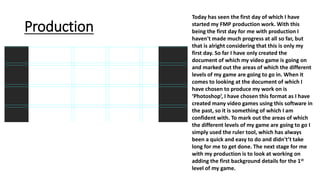
Today has seen the first day of which I have
started my FMP production work. With this
being the first day for me with production I
haven't made much progress at all so far, but
that is alright considering that this is only my
first day. So far I have only created the
document of which my video game is going on
and marked out the areas of which the different
levels of my game are going to go in. When it
comes to looking at the document of which I
have chosen to produce my work on is
‘Photoshop’, I have chosen this format as I have
created many video games using this software in
the past, so it is something of which I am
confident with. To mark out the areas of which
the different levels of my game are going to go I
simply used the ruler tool, which has always
been a quick and easy to do and didn't’t take
long for me to get done. The next stage for me
with my production is to look at working on
adding the first background details for the 1st
level of my game.
Production
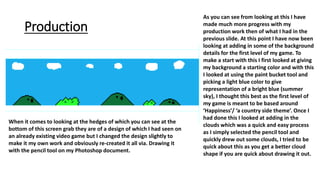
As you can see from looking at this I have
made much more progress with my
production work then of what I had in the
previous slide. At this point I have now been
looking at adding in some of the background
details for the first level of my game. To
make a start with this I first looked at giving
my background a starting color and with this
I looked at using the paint bucket tool and
picking a light blue color to give
representation of a bright blue (summer
sky), I thought this best as the first level of
my game is meant to be based around
‘Happiness’/ ‘a country side theme’. Once I
had done this I looked at adding in the
clouds which was a quick and easy process
as I simply selected the pencil tool and
quickly drew out some clouds, I tried to be
quick about this as you get a better cloud
shape if you are quick about drawing it out.
When it comes to looking at the hedges of which you can see at the
bottom of this screen grab they are of a design of which I had seen on
an already existing video game but I changed the design slightly to
make it my own work and obviously re-created it all via. Drawing it
with the pencil tool on my Photoshop document.
Production
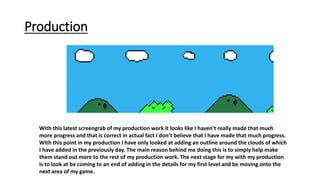
With this latest screengrab of my production work it looks like I haven't really made that much
more progress and that is correct in actual fact I don’t believe that I have made that much progress.
With this point in my production I have only looked at adding an outline around the clouds of which
I have added in the previously day. The main reason behind me doing this is to simply help make
them stand out more to the rest of my production work. The next stage for my with my production
is to look at be coming to an end of adding in the details for my first level and be moving onto the
next area of my game.
Production
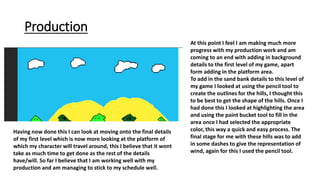
At this point I feel I am making much more
progress with my production work and am
coming to an end with adding in background
details to the first level of my game, apart
form adding in the platform area.
To add in the sand bank details to this level of
my game I looked at using the pencil tool to
create the outlines for the hills, I thought this
to be best to get the shape of the hills. Once I
had done this I looked at highlighting the area
and using the paint bucket tool to fill in the
area once I had selected the appropriate
color, this way a quick and easy process. The
final stage for me with these hills was to add
in some dashes to give the representation of
wind, again for this I used the pencil tool.
Having now done this I can look at moving onto the final details
of my first level which is now more looking at the platform of
which my character will travel around, this I believe that it wont
take as much time to get done as the rest of the details
have/will. So far I believe that I am working well with my
production and am managing to stick to my schedule well.
production
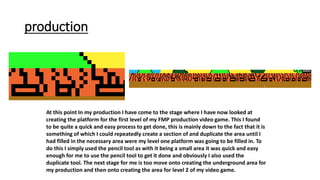
At this point In my production I have come to the stage where I have now looked at
creating the platform for the first level of my FMP production video game. This I found
to be quite a quick and easy process to get done, this is mainly down to the fact that it is
something of which I could repeatedly create a section of and duplicate the area until I
had filled in the necessary area were my level one platform was going to be filled in. To
do this I simply used the pencil tool as with it being a small area it was quick and easy
enough for me to use the pencil tool to get it done and obviously I also used the
duplicate tool. The next stage for me is too move onto creating the underground area for
my production and then onto creating the area for level 2 of my video game.
Production
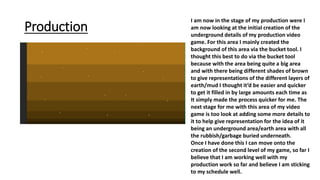
I am now in the stage of my production were I
am now looking at the initial creation of the
underground details of my production video
game. For this area I mainly created the
background of this area via the bucket tool. I
thought this best to do via the bucket tool
because with the area being quite a big area
and with there being different shades of brown
to give representations of the different layers of
earth/mud I thought it’d be easier and quicker
to get it filled in by large amounts each time as
It simply made the process quicker for me. The
next stage for me with this area of my video
game is too look at adding some more details to
it to help give representation for the idea of it
being an underground area/earth area with all
the rubbish/garbage buried underneath.
Once I have done this I can move onto the
creation of the second level of my game, so far I
believe that I am working well with my
production work so far and believe I am sticking
to my schedule well.
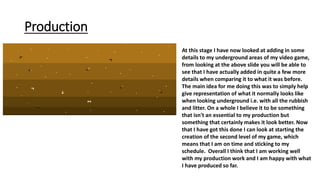
Production
At this stage I have now looked at adding in some
details to my underground areas of my video game,
from looking at the above slide you will be able to
see that I have actually added in quite a few more
details when comparing it to what it was before.
The main idea for me doing this was to simply help
give representation of what it normally looks like
when looking underground i.e. with all the rubbish
and litter. On a whole I believe it to be something
that isn't an essential to my production but
something that certainly makes it look better. Now
that I have got this done I can look at starting the
creation of the second level of my game, which
means that I am on time and sticking to my
schedule. Overall I think that I am working well
with my production work and I am happy with what
I have produced so far.
Production
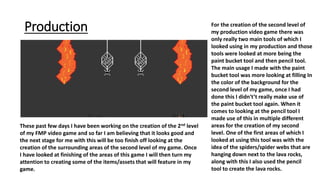
These past few days I have been working on the creation of the 2nd level
of my FMP video game and so far I am believing that it looks good and
the next stage for me with this will be too finish off looking at the
creation of the surrounding areas of the second level of my game. Once
I have looked at finishing of the areas of this game I will then turn my
attention to creating some of the items/assets that will feature in my
game.
For the creation of the second level of
my production video game there was
only really two main tools of which I
looked using in my production and those
tools were looked at more being the
paint bucket tool and then pencil tool.
The main usage I made with the paint
bucket tool was more looking at filling In
the color of the background for the
second level of my game, once I had
done this I didn't’t really make use of
the paint bucket tool again. When it
comes to looking at the pencil tool I
made use of this in multiple different
areas for the creation of my second
level. One of the first areas of which I
looked at using this tool was with the
idea of the spiders/spider webs that are
hanging down next to the lava rocks,
along with this I also used the pencil
tool to create the lava rocks.
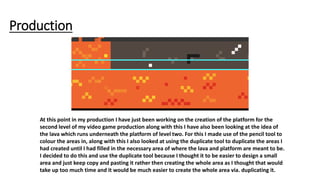
Production
At this point in my production I have just been working on the creation of the platform for the
second level of my video game production along with this I have also been looking at the idea of
the lava which runs underneath the platform of level two. For this I made use of the pencil tool to
colour the areas in, along with this I also looked at using the duplicate tool to duplicate the areas I
had created until I had filled in the necessary area of where the lava and platform are meant to be.
I decided to do this and use the duplicate tool because I thought it to be easier to design a small
area and just keep copy and pasting it rather then creating the whole area as I thought that would
take up too much time and it would be much easier to create the whole area via. duplicating it.
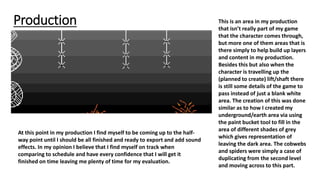
Production This is an area in my production
that isn’t really part of my game
that the character comes through,
but more one of them areas that is
there simply to help build up layers
and content in my production.
Besides this but also when the
character is travelling up the
(planned to create) lift/shaft there
is still some details of the game to
pass instead of just a blank white
area. The creation of this was done
similar as to how I created my
underground/earth area via using
the paint bucket tool to fill in the
area of different shades of grey
which gives representation of
leaving the dark area. The cobwebs
and spiders were simply a case of
duplicating from the second level
and moving across to this part.
At this point in my production I find myself to be coming up to the half-
way point until I should be all finished and ready to export and add sound
effects. In my opinion I believe that I find myself on track when
comparing to schedule and have every confidence that I will get it
finished on time leaving me plenty of time for my evaluation.
Production
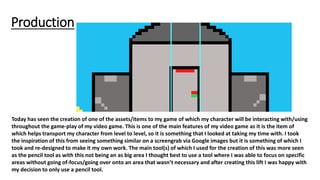
Today has seen the creation of one of the assets/items to my game of which my character will be interacting with/using
throughout the game-play of my video game. This is one of the main features of my video game as it is the item of
which helps transport my character from level to level, so it is something that I looked at taking my time with. I took
the inspiration of this from seeing something similar on a screengrab via Google images but it is something of which I
took and re-designed to make it my own work. The main tool(s) of which I used for the creation of this was more seen
as the pencil tool as with this not being an as big area I thought best to use a tool where I was able to focus on specific
areas without going of-focus/going over onto an area that wasn’t necessary and after creating this lift I was happy with
my decision to only use a pencil tool.
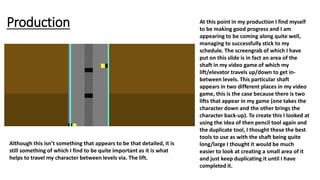
Production At this point in my production I find myself
to be making good progress and I am
appearing to be coming along quite well,
managing to successfully stick to my
schedule. The screengrab of which I have
put on this slide is in fact an area of the
shaft in my video game of which my
lift/elevator travels up/down to get in-
between levels. This particular shaft
appears in two different places in my video
game, this is the case because there is two
lifts that appear in my game (one takes the
character down and the other brings the
character back-up). To create this I looked at
using the idea of then pencil tool again and
the duplicate tool, I thought these the best
tools to use as with the shaft being quite
long/large I thought it would be much
easier to look at creating a small area of it
and just keep duplicating it until I have
completed it.
Although this isn’t something that appears to be that detailed, it is
still something of which I find to be quite important as it is what
helps to travel my character between levels via. The lift.
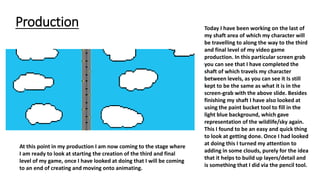
Production Today I have been working on the last of
my shaft area of which my character will
be travelling to along the way to the third
and final level of my video game
production. In this particular screen grab
you can see that I have completed the
shaft of which travels my character
between levels, as you can see it Is still
kept to be the same as what it is in the
screen-grab with the above slide. Besides
finishing my shaft I have also looked at
using the paint bucket tool to fill in the
light blue background, which gave
representation of the wildlife/sky again.
This I found to be an easy and quick thing
to look at getting done. Once I had looked
at doing this I turned my attention to
adding in some clouds, purely for the idea
that it helps to build up layers/detail and
is something that I did via the pencil tool.
At this point in my production I am now coming to the stage where
I am ready to look at starting the creation of the third and final
level of my game, once I have looked at doing that I will be coming
to an end of creating and moving onto animating.
Production
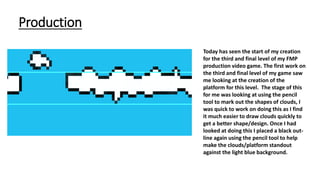
Today has seen the start of my creation
for the third and final level of my FMP
production video game. The first work on
the third and final level of my game saw
me looking at the creation of the
platform for this level. The stage of this
for me was looking at using the pencil
tool to mark out the shapes of clouds, I
was quick to work on doing this as I find
it much easier to draw clouds quickly to
get a better shape/design. Once I had
looked at doing this I placed a black out-
line again using the pencil tool to help
make the clouds/platform standout
against the light blue background.
Production
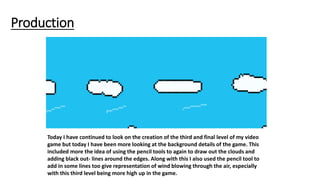
Today I have continued to look on the creation of the third and final level of my video
game but today I have been more looking at the background details of the game. This
included more the idea of using the pencil tools to again to draw out the clouds and
adding black out- lines around the edges. Along with this I also used the pencil tool to
add in some lines too give representation of wind blowing through the air, especially
with this third level being more high up in the game.
Production
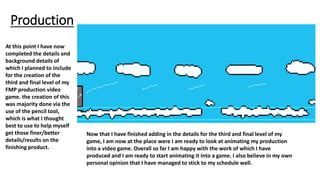
At this point I have now
completed the details and
background details of
which I planned to include
for the creation of the
third and final level of my
FMP production video
game. the creation of this
was majority done via the
use of the pencil tool,
which is what I thought
best to use to help myself
get those finer/better
details/results on the
finishing product.
Now that I have finished adding in the details for the third and final level of my
game, I am now at the place were I am ready to look at animating my production
into a video game. Overall so far I am happy with the work of which I have
produced and I am ready to start animating it into a game. I also believe in my own
personal opinion that I have managed to stick to my schedule well.
Production
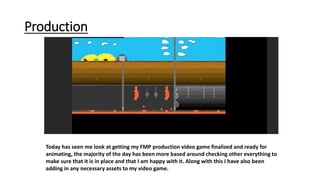
Today has seen me look at getting my FMP production video game finalized and ready for
animating, the majority of the day has been more based around checking other everything to
make sure that it is in place and that I am happy with it. Along with this I have also been
adding in any necessary assets to my video game.
production
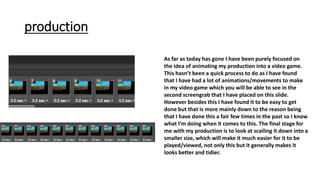
As far as today has gone I have been purely focused on
the idea of animating my production into a video game.
This hasn’t been a quick process to do as I have found
that I have had a lot of animations/movements to make
in my video game which you will be able to see in the
second screengrab that I have placed on this slide.
However besides this I have found it to be easy to get
done but that is more mainly down to the reason being
that I have done this a fair few times in the past so I know
what I’m doing when it comes to this. The final stage for
me with my production is to look at scailing it down into a
smaller size, which will make it much easier for it to be
played/viewed, not only this but it generally makes it
looks better and tidier.
production
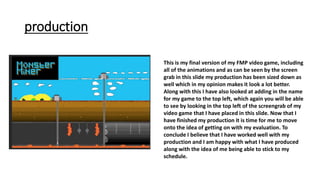
This is my final version of my FMP video game, including
all of the animations and as can be seen by the screen
grab in this slide my production has been sized down as
well which in my opinion makes it look a lot better.
Along with this I have also looked at adding in the name
for my game to the top left, which again you will be able
to see by looking in the top left of the screengrab of my
video game that I have placed in this slide. Now that I
have finished my production it is time for me to move
onto the idea of getting on with my evaluation. To
conclude I believe that I have worked well with my
production and I am happy with what I have produced
along with the idea of me being able to stick to my
schedule.

FMP-Development diaries production

  • 1.
  • 2.
    Production Today has seenthe first day of which I have started my FMP production work. With this being the first day for me with production I haven't made much progress at all so far, but that is alright considering that this is only my first day. So far I have only created the document of which my video game is going on and marked out the areas of which the different levels of my game are going to go in. When it comes to looking at the document of which I have chosen to produce my work on is ‘Photoshop’, I have chosen this format as I have created many video games using this software in the past, so it is something of which I am confident with. To mark out the areas of which the different levels of my game are going to go I simply used the ruler tool, which has always been a quick and easy to do and didn't’t take long for me to get done. The next stage for me with my production is to look at working on adding the first background details for the 1st level of my game.
  • 3.
    Production As you cansee from looking at this I have made much more progress with my production work then of what I had in the previous slide. At this point I have now been looking at adding in some of the background details for the first level of my game. To make a start with this I first looked at giving my background a starting color and with this I looked at using the paint bucket tool and picking a light blue color to give representation of a bright blue (summer sky), I thought this best as the first level of my game is meant to be based around ‘Happiness’/ ‘a country side theme’. Once I had done this I looked at adding in the clouds which was a quick and easy process as I simply selected the pencil tool and quickly drew out some clouds, I tried to be quick about this as you get a better cloud shape if you are quick about drawing it out. When it comes to looking at the hedges of which you can see at the bottom of this screen grab they are of a design of which I had seen on an already existing video game but I changed the design slightly to make it my own work and obviously re-created it all via. Drawing it with the pencil tool on my Photoshop document.
  • 4.
    Production With this latestscreengrab of my production work it looks like I haven't really made that much more progress and that is correct in actual fact I don’t believe that I have made that much progress. With this point in my production I have only looked at adding an outline around the clouds of which I have added in the previously day. The main reason behind me doing this is to simply help make them stand out more to the rest of my production work. The next stage for my with my production is to look at be coming to an end of adding in the details for my first level and be moving onto the next area of my game.
  • 5.
    Production At this pointI feel I am making much more progress with my production work and am coming to an end with adding in background details to the first level of my game, apart form adding in the platform area. To add in the sand bank details to this level of my game I looked at using the pencil tool to create the outlines for the hills, I thought this to be best to get the shape of the hills. Once I had done this I looked at highlighting the area and using the paint bucket tool to fill in the area once I had selected the appropriate color, this way a quick and easy process. The final stage for me with these hills was to add in some dashes to give the representation of wind, again for this I used the pencil tool. Having now done this I can look at moving onto the final details of my first level which is now more looking at the platform of which my character will travel around, this I believe that it wont take as much time to get done as the rest of the details have/will. So far I believe that I am working well with my production and am managing to stick to my schedule well.
  • 6.
    production At this pointIn my production I have come to the stage where I have now looked at creating the platform for the first level of my FMP production video game. This I found to be quite a quick and easy process to get done, this is mainly down to the fact that it is something of which I could repeatedly create a section of and duplicate the area until I had filled in the necessary area were my level one platform was going to be filled in. To do this I simply used the pencil tool as with it being a small area it was quick and easy enough for me to use the pencil tool to get it done and obviously I also used the duplicate tool. The next stage for me is too move onto creating the underground area for my production and then onto creating the area for level 2 of my video game.
  • 7.
    Production I am nowin the stage of my production were I am now looking at the initial creation of the underground details of my production video game. For this area I mainly created the background of this area via the bucket tool. I thought this best to do via the bucket tool because with the area being quite a big area and with there being different shades of brown to give representations of the different layers of earth/mud I thought it’d be easier and quicker to get it filled in by large amounts each time as It simply made the process quicker for me. The next stage for me with this area of my video game is too look at adding some more details to it to help give representation for the idea of it being an underground area/earth area with all the rubbish/garbage buried underneath. Once I have done this I can move onto the creation of the second level of my game, so far I believe that I am working well with my production work so far and believe I am sticking to my schedule well.
  • 8.
    Production At this stageI have now looked at adding in some details to my underground areas of my video game, from looking at the above slide you will be able to see that I have actually added in quite a few more details when comparing it to what it was before. The main idea for me doing this was to simply help give representation of what it normally looks like when looking underground i.e. with all the rubbish and litter. On a whole I believe it to be something that isn't an essential to my production but something that certainly makes it look better. Now that I have got this done I can look at starting the creation of the second level of my game, which means that I am on time and sticking to my schedule. Overall I think that I am working well with my production work and I am happy with what I have produced so far.
  • 9.
    Production These past fewdays I have been working on the creation of the 2nd level of my FMP video game and so far I am believing that it looks good and the next stage for me with this will be too finish off looking at the creation of the surrounding areas of the second level of my game. Once I have looked at finishing of the areas of this game I will then turn my attention to creating some of the items/assets that will feature in my game. For the creation of the second level of my production video game there was only really two main tools of which I looked using in my production and those tools were looked at more being the paint bucket tool and then pencil tool. The main usage I made with the paint bucket tool was more looking at filling In the color of the background for the second level of my game, once I had done this I didn't’t really make use of the paint bucket tool again. When it comes to looking at the pencil tool I made use of this in multiple different areas for the creation of my second level. One of the first areas of which I looked at using this tool was with the idea of the spiders/spider webs that are hanging down next to the lava rocks, along with this I also used the pencil tool to create the lava rocks.
  • 10.
    Production At this pointin my production I have just been working on the creation of the platform for the second level of my video game production along with this I have also been looking at the idea of the lava which runs underneath the platform of level two. For this I made use of the pencil tool to colour the areas in, along with this I also looked at using the duplicate tool to duplicate the areas I had created until I had filled in the necessary area of where the lava and platform are meant to be. I decided to do this and use the duplicate tool because I thought it to be easier to design a small area and just keep copy and pasting it rather then creating the whole area as I thought that would take up too much time and it would be much easier to create the whole area via. duplicating it.
  • 11.
    Production This isan area in my production that isn’t really part of my game that the character comes through, but more one of them areas that is there simply to help build up layers and content in my production. Besides this but also when the character is travelling up the (planned to create) lift/shaft there is still some details of the game to pass instead of just a blank white area. The creation of this was done similar as to how I created my underground/earth area via using the paint bucket tool to fill in the area of different shades of grey which gives representation of leaving the dark area. The cobwebs and spiders were simply a case of duplicating from the second level and moving across to this part. At this point in my production I find myself to be coming up to the half- way point until I should be all finished and ready to export and add sound effects. In my opinion I believe that I find myself on track when comparing to schedule and have every confidence that I will get it finished on time leaving me plenty of time for my evaluation.
  • 12.
    Production Today has seenthe creation of one of the assets/items to my game of which my character will be interacting with/using throughout the game-play of my video game. This is one of the main features of my video game as it is the item of which helps transport my character from level to level, so it is something that I looked at taking my time with. I took the inspiration of this from seeing something similar on a screengrab via Google images but it is something of which I took and re-designed to make it my own work. The main tool(s) of which I used for the creation of this was more seen as the pencil tool as with this not being an as big area I thought best to use a tool where I was able to focus on specific areas without going of-focus/going over onto an area that wasn’t necessary and after creating this lift I was happy with my decision to only use a pencil tool.
  • 13.
    Production At thispoint in my production I find myself to be making good progress and I am appearing to be coming along quite well, managing to successfully stick to my schedule. The screengrab of which I have put on this slide is in fact an area of the shaft in my video game of which my lift/elevator travels up/down to get in- between levels. This particular shaft appears in two different places in my video game, this is the case because there is two lifts that appear in my game (one takes the character down and the other brings the character back-up). To create this I looked at using the idea of then pencil tool again and the duplicate tool, I thought these the best tools to use as with the shaft being quite long/large I thought it would be much easier to look at creating a small area of it and just keep duplicating it until I have completed it. Although this isn’t something that appears to be that detailed, it is still something of which I find to be quite important as it is what helps to travel my character between levels via. The lift.
  • 14.
    Production Today Ihave been working on the last of my shaft area of which my character will be travelling to along the way to the third and final level of my video game production. In this particular screen grab you can see that I have completed the shaft of which travels my character between levels, as you can see it Is still kept to be the same as what it is in the screen-grab with the above slide. Besides finishing my shaft I have also looked at using the paint bucket tool to fill in the light blue background, which gave representation of the wildlife/sky again. This I found to be an easy and quick thing to look at getting done. Once I had looked at doing this I turned my attention to adding in some clouds, purely for the idea that it helps to build up layers/detail and is something that I did via the pencil tool. At this point in my production I am now coming to the stage where I am ready to look at starting the creation of the third and final level of my game, once I have looked at doing that I will be coming to an end of creating and moving onto animating.
  • 15.
    Production Today has seenthe start of my creation for the third and final level of my FMP production video game. The first work on the third and final level of my game saw me looking at the creation of the platform for this level. The stage of this for me was looking at using the pencil tool to mark out the shapes of clouds, I was quick to work on doing this as I find it much easier to draw clouds quickly to get a better shape/design. Once I had looked at doing this I placed a black out- line again using the pencil tool to help make the clouds/platform standout against the light blue background.
  • 16.
    Production Today I havecontinued to look on the creation of the third and final level of my video game but today I have been more looking at the background details of the game. This included more the idea of using the pencil tools to again to draw out the clouds and adding black out- lines around the edges. Along with this I also used the pencil tool to add in some lines too give representation of wind blowing through the air, especially with this third level being more high up in the game.
  • 17.
    Production At this pointI have now completed the details and background details of which I planned to include for the creation of the third and final level of my FMP production video game. the creation of this was majority done via the use of the pencil tool, which is what I thought best to use to help myself get those finer/better details/results on the finishing product. Now that I have finished adding in the details for the third and final level of my game, I am now at the place were I am ready to look at animating my production into a video game. Overall so far I am happy with the work of which I have produced and I am ready to start animating it into a game. I also believe in my own personal opinion that I have managed to stick to my schedule well.
  • 18.
    Production Today has seenme look at getting my FMP production video game finalized and ready for animating, the majority of the day has been more based around checking other everything to make sure that it is in place and that I am happy with it. Along with this I have also been adding in any necessary assets to my video game.
  • 19.
    production As far astoday has gone I have been purely focused on the idea of animating my production into a video game. This hasn’t been a quick process to do as I have found that I have had a lot of animations/movements to make in my video game which you will be able to see in the second screengrab that I have placed on this slide. However besides this I have found it to be easy to get done but that is more mainly down to the reason being that I have done this a fair few times in the past so I know what I’m doing when it comes to this. The final stage for me with my production is to look at scailing it down into a smaller size, which will make it much easier for it to be played/viewed, not only this but it generally makes it looks better and tidier.
  • 20.
    production This is myfinal version of my FMP video game, including all of the animations and as can be seen by the screen grab in this slide my production has been sized down as well which in my opinion makes it look a lot better. Along with this I have also looked at adding in the name for my game to the top left, which again you will be able to see by looking in the top left of the screengrab of my video game that I have placed in this slide. Now that I have finished my production it is time for me to move onto the idea of getting on with my evaluation. To conclude I believe that I have worked well with my production and I am happy with what I have produced along with the idea of me being able to stick to my schedule.