INVENTIONHILL PVT LTD
NAME :- LIMBACHIYA VINIT DHARMENDRAKUMAR
ENROLLMENT NO :- 200780107006
BRANCH :- COMPUTER ENGINEERING
SEMESTER :- 8th
COMPANY PROFILE
• Company Name: InventionHill
• Company Working Area: UI/UX Design, Application Development,
Web Development, QA Testing
• Company Address: B-1203, Ganesh Glory 11, Jagatpur road,
Sarkhej - Gandhinagar Hwy, Ahmedabad, Gujarat 382481
• Company Contact No: 9909595299
• Company Owner Name: Jayesh Maradiya
CONTENTS
• Introduction to Flutter
• Flutter Architecture
• Flutter Widgets
• Stateless and Stateful Widgets
• Dart Programming Language
• Navigation and Routing
• Platform Integration
• Project
• Conclusion
Introduction to Flutter
• Flutter was introduced by Google in May 2017 and initially released as a beta
version.
• It allows developers to build natively compiled applications for mobile, web, and
desktop from a single codebase.
• Flutter uses the Dart programming language and offers a rich set of customizable
widgets, enabling fast development, expressive UIs, and high-performance
applications.
Introduction to Flutter
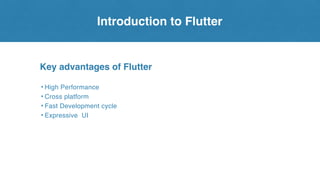
Key advantages of Flutter
• High Performance
• Cross platform
• Fast Development cycle
• Expressive UI
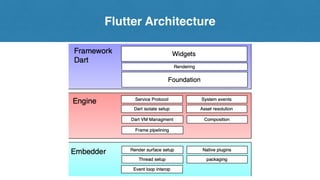
Flutter Architecture
Framework Dart
1. Widgets: Flutter's widget-based architecture enables efficient construction and
customization of user interfaces for visually appealing cross-platform applications.
2. Rendering: Flutter's widget-based architecture facilitates efficient composition
and customization of visually appealing.
3. Foundation: provides core functionalities and classes for building applications,
including low-level APIs for platform interaction and services
Flutter Architecture
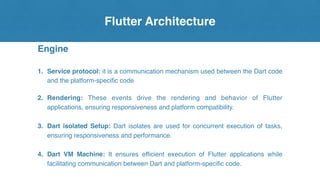
Engine
1. Service protocol: it is a communication mechanism used between the Dart code
and the platform-specific code
2. Rendering: These events drive the rendering and behavior of Flutter
applications, ensuring responsiveness and platform compatibility.
3. Dart isolated Setup: Dart isolates are used for concurrent execution of tasks,
ensuring responsiveness and performance.
4. Dart VM Machine: It ensures efficient execution of Flutter applications while
facilitating communication between Dart and platform-specific code.
Flutter Architecture
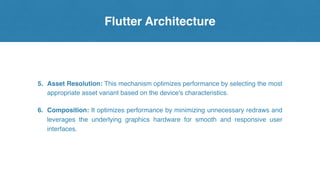
5. Asset Resolution: This mechanism optimizes performance by selecting the most
appropriate asset variant based on the device's characteristics.
6. Composition: It optimizes performance by minimizing unnecessary redraws and
leverages the underlying graphics hardware for smooth and responsive user
interfaces.
Flutter Architecture
Embedder
• Embedders in the Flutter framework are platform-specific code responsible for
integrating Flutter's Dart runtime with native platforms, enabling seamless
execution across iOS, Android, and the web.
• They initialize the Dart VM, manage isolates, establish communication channels
with platform APIs, and provide access to platform-specific features, ensuring
compatibility, performance, and rich user experiences.
Flutter Widgets
Flutter Widgets
Flutter Widgets
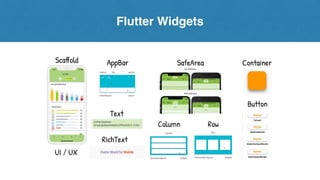
• Flutter widgets are the building blocks of Flutter UI, offering a wide range of
functionalities and visual elements.
• They encapsulate UI components such as buttons, text fields, and images,
allowing developers to create rich and interactive interfaces.
Stateless and Stateful Widgets
Dart Programming Language
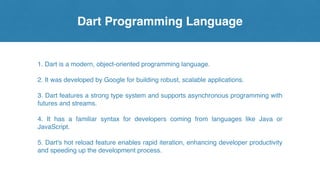
1. Dart is a modern, object-oriented programming language.
2. It was developed by Google for building robust, scalable applications.
3. Dart features a strong type system and supports asynchronous programming with
futures and streams.
4. It has a familiar syntax for developers coming from languages like Java or
JavaScript.
5. Dart's hot reload feature enables rapid iteration, enhancing developer productivity
and speeding up the development process.
Navigation and Routing
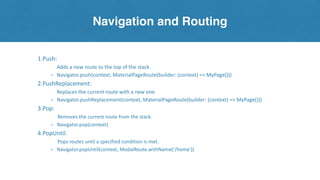
1.Push:
Adds a new route to the top of the stack.
⚬ Navigator.push(context, MaterialPageRoute(builder: (context) => MyPage()))
2.PushReplacement:
Replaces the current route with a new one.
⚬ Navigator.pushReplacement(context, MaterialPageRoute(builder: (context) => MyPage()))
3.Pop:
Removes the current route from the stack.
⚬ Navigator.pop(context)
4.PopUntil:
Pops routes until a specified condition is met.
⚬ Navigator.popUntil(context, ModalRoute.withName('/home'))
Platform Integration
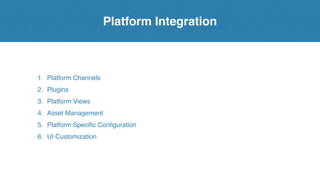
1. Platform Channels
2. Plugins
3. Platform Views
4. Asset Management
5. Platform Specific Configuration
6. UI Customization
Project
[Splash Screen]
• A splash screen in Flutter serves as the initial visual cue upon app launch,
offering a brief glimpse of branding or loading animation.
• It enhances user experience by providing a seamless transition from the
launch phase to the main interface, reducing perceived load times and
engaging users from the start.
• Customization options allow developers to tailor the splash screen to reflect
the app's branding, reinforcing its identity and making a memorable first
impression.
Project
[Loin And Register Screen]
Login Page:
• Design a UI for the login page with Flutter widgets like TextFormField, RaisedButton,
etc.
• Implement Firebase authentication methods for email/password login.
• Validate user input for email and password fields.
• Implement features like "Forgot Password" with Firebase's password reset
functionality.
Register Page:
• Design a UI for the registration page with input fields for email, password, and
possibly other user details.
• Implement Firebase authentication methods for email/password registration.
• Validate user input for email and password fields.
Project
[Dashboard Screen]
Dashboard Screen:
• Design a visually appealing dashboard layout with Flutter widgets like
ListView, GridView, ListTile, etc.
Activity:
• Show recent activities, updates, or notifications relevant to the user or the
app.
News:
• Fetch and display news articles or updates from an external API or a local
database.
Members:
• Display a list of members or users registered with the app.
Business:
• Stocks analysis and details.
Project
[Activity Screen]
1.Activity Screen:
• Based on Date You can see the Activity and also
upload your Activity.
• Here's an outline for a settings screen in Flutter where
users can edit their profile, change their password,
view app information, terms and conditions, privacy
policy, and manage notification preferences.
2. Settings Screen:
• Profile: Edit profile details like name and bio.
• Security: Change password with validation.
• App Info: View app details and access terms/privacy
policy.
• Notifications: Enable/disable notifications for different
events.
[Setting Screen]
Project
[News Screen]
Dashboard Screen:
• Design a visually appealing dashboard layout with Flutter widgets like
ListView, GridView, ListTile, etc.
Activity:
• Show recent activities, updates, or notifications relevant to the user or the
app.
News:
• Fetch and display news articles or updates from an external API or a local
database.
Members:
• Display a list of members or users registered with the app.
Business:
• Stocks analysis and details.
Project
[Business Screen]
Business Screen:
• Fetch stock data from an API using packages like http or dio.
• Display the stock data using a graph library like fl_chart or
syncfusion_flutter_charts.
• Customize the graph to show relevant details such as stock price over time,
volume, etc.
• Implement features like zooming and panning for detailed analysis of the
stock data.
• Include interactive elements like tooltips to display additional information on
data points.
• Optionally, provide options to switch between different timeframes (e.g.,
daily, weekly, monthly).
• Ensure the graph is responsive and adjusts to different screen sizes.
• Test the business screen thoroughly to ensure the graph displays accurate
and up-to-date stock data.
Conclusion
In conclusion, Flutter offers comprehensive support for platform integration, allowing
developers to seamlessly access and leverage platform-specific features and
capabilities within their applications. By utilizing platform channels, plugins, platform
views, asset management, platform-specific configuration, and UI customization,
Flutter enables developers to build high-quality, feature-rich mobile applications that
provide a native-like experience on both Android and iOS platforms. With Flutter's
robust tools and ecosystem, developers can streamline the development process,
reduce code duplication, and deliver polished, cross-platform applications efficiently.
Conclusion
Thank You!

Flutter_GTU 8th Sem Gtu Format PPT for Presentation

  • 1.
    INVENTIONHILL PVT LTD NAME:- LIMBACHIYA VINIT DHARMENDRAKUMAR ENROLLMENT NO :- 200780107006 BRANCH :- COMPUTER ENGINEERING SEMESTER :- 8th
  • 2.
    COMPANY PROFILE • CompanyName: InventionHill • Company Working Area: UI/UX Design, Application Development, Web Development, QA Testing • Company Address: B-1203, Ganesh Glory 11, Jagatpur road, Sarkhej - Gandhinagar Hwy, Ahmedabad, Gujarat 382481 • Company Contact No: 9909595299 • Company Owner Name: Jayesh Maradiya
  • 3.
    CONTENTS • Introduction toFlutter • Flutter Architecture • Flutter Widgets • Stateless and Stateful Widgets • Dart Programming Language • Navigation and Routing • Platform Integration • Project • Conclusion
  • 4.
    Introduction to Flutter •Flutter was introduced by Google in May 2017 and initially released as a beta version. • It allows developers to build natively compiled applications for mobile, web, and desktop from a single codebase. • Flutter uses the Dart programming language and offers a rich set of customizable widgets, enabling fast development, expressive UIs, and high-performance applications.
  • 5.
    Introduction to Flutter Keyadvantages of Flutter • High Performance • Cross platform • Fast Development cycle • Expressive UI
  • 6.
  • 7.
    Flutter Architecture Framework Dart 1.Widgets: Flutter's widget-based architecture enables efficient construction and customization of user interfaces for visually appealing cross-platform applications. 2. Rendering: Flutter's widget-based architecture facilitates efficient composition and customization of visually appealing. 3. Foundation: provides core functionalities and classes for building applications, including low-level APIs for platform interaction and services
  • 8.
    Flutter Architecture Engine 1. Serviceprotocol: it is a communication mechanism used between the Dart code and the platform-specific code 2. Rendering: These events drive the rendering and behavior of Flutter applications, ensuring responsiveness and platform compatibility. 3. Dart isolated Setup: Dart isolates are used for concurrent execution of tasks, ensuring responsiveness and performance. 4. Dart VM Machine: It ensures efficient execution of Flutter applications while facilitating communication between Dart and platform-specific code.
  • 9.
    Flutter Architecture 5. AssetResolution: This mechanism optimizes performance by selecting the most appropriate asset variant based on the device's characteristics. 6. Composition: It optimizes performance by minimizing unnecessary redraws and leverages the underlying graphics hardware for smooth and responsive user interfaces.
  • 10.
    Flutter Architecture Embedder • Embeddersin the Flutter framework are platform-specific code responsible for integrating Flutter's Dart runtime with native platforms, enabling seamless execution across iOS, Android, and the web. • They initialize the Dart VM, manage isolates, establish communication channels with platform APIs, and provide access to platform-specific features, ensuring compatibility, performance, and rich user experiences.
  • 11.
  • 12.
    Flutter Widgets Flutter Widgets •Flutter widgets are the building blocks of Flutter UI, offering a wide range of functionalities and visual elements. • They encapsulate UI components such as buttons, text fields, and images, allowing developers to create rich and interactive interfaces.
  • 13.
  • 14.
    Dart Programming Language 1.Dart is a modern, object-oriented programming language. 2. It was developed by Google for building robust, scalable applications. 3. Dart features a strong type system and supports asynchronous programming with futures and streams. 4. It has a familiar syntax for developers coming from languages like Java or JavaScript. 5. Dart's hot reload feature enables rapid iteration, enhancing developer productivity and speeding up the development process.
  • 15.
    Navigation and Routing 1.Push: Addsa new route to the top of the stack. ⚬ Navigator.push(context, MaterialPageRoute(builder: (context) => MyPage())) 2.PushReplacement: Replaces the current route with a new one. ⚬ Navigator.pushReplacement(context, MaterialPageRoute(builder: (context) => MyPage())) 3.Pop: Removes the current route from the stack. ⚬ Navigator.pop(context) 4.PopUntil: Pops routes until a specified condition is met. ⚬ Navigator.popUntil(context, ModalRoute.withName('/home'))
  • 16.
    Platform Integration 1. PlatformChannels 2. Plugins 3. Platform Views 4. Asset Management 5. Platform Specific Configuration 6. UI Customization
  • 17.
    Project [Splash Screen] • Asplash screen in Flutter serves as the initial visual cue upon app launch, offering a brief glimpse of branding or loading animation. • It enhances user experience by providing a seamless transition from the launch phase to the main interface, reducing perceived load times and engaging users from the start. • Customization options allow developers to tailor the splash screen to reflect the app's branding, reinforcing its identity and making a memorable first impression.
  • 18.
    Project [Loin And RegisterScreen] Login Page: • Design a UI for the login page with Flutter widgets like TextFormField, RaisedButton, etc. • Implement Firebase authentication methods for email/password login. • Validate user input for email and password fields. • Implement features like "Forgot Password" with Firebase's password reset functionality. Register Page: • Design a UI for the registration page with input fields for email, password, and possibly other user details. • Implement Firebase authentication methods for email/password registration. • Validate user input for email and password fields.
  • 19.
    Project [Dashboard Screen] Dashboard Screen: •Design a visually appealing dashboard layout with Flutter widgets like ListView, GridView, ListTile, etc. Activity: • Show recent activities, updates, or notifications relevant to the user or the app. News: • Fetch and display news articles or updates from an external API or a local database. Members: • Display a list of members or users registered with the app. Business: • Stocks analysis and details.
  • 20.
    Project [Activity Screen] 1.Activity Screen: •Based on Date You can see the Activity and also upload your Activity. • Here's an outline for a settings screen in Flutter where users can edit their profile, change their password, view app information, terms and conditions, privacy policy, and manage notification preferences. 2. Settings Screen: • Profile: Edit profile details like name and bio. • Security: Change password with validation. • App Info: View app details and access terms/privacy policy. • Notifications: Enable/disable notifications for different events. [Setting Screen]
  • 21.
    Project [News Screen] Dashboard Screen: •Design a visually appealing dashboard layout with Flutter widgets like ListView, GridView, ListTile, etc. Activity: • Show recent activities, updates, or notifications relevant to the user or the app. News: • Fetch and display news articles or updates from an external API or a local database. Members: • Display a list of members or users registered with the app. Business: • Stocks analysis and details.
  • 22.
    Project [Business Screen] Business Screen: •Fetch stock data from an API using packages like http or dio. • Display the stock data using a graph library like fl_chart or syncfusion_flutter_charts. • Customize the graph to show relevant details such as stock price over time, volume, etc. • Implement features like zooming and panning for detailed analysis of the stock data. • Include interactive elements like tooltips to display additional information on data points. • Optionally, provide options to switch between different timeframes (e.g., daily, weekly, monthly). • Ensure the graph is responsive and adjusts to different screen sizes. • Test the business screen thoroughly to ensure the graph displays accurate and up-to-date stock data.
  • 23.
    Conclusion In conclusion, Flutteroffers comprehensive support for platform integration, allowing developers to seamlessly access and leverage platform-specific features and capabilities within their applications. By utilizing platform channels, plugins, platform views, asset management, platform-specific configuration, and UI customization, Flutter enables developers to build high-quality, feature-rich mobile applications that provide a native-like experience on both Android and iOS platforms. With Flutter's robust tools and ecosystem, developers can streamline the development process, reduce code duplication, and deliver polished, cross-platform applications efficiently.
  • 24.