The Flutter
Framework
Mobile Computing
1
Mobile Computing
APM@FEUP
What is Flutter
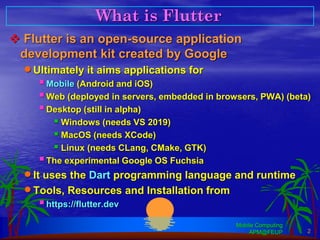
❖ Flutter is an open-source application
development kit created by Google
•Ultimately it aims applications for
▪Mobile (Android and iOS)
▪Web (deployed in servers, embedded in browsers, PWA) (beta)
▪Desktop (still in alpha)
▪ Windows (needs VS 2019)
▪ MacOS (needs XCode)
▪ Linux (needs CLang, CMake, GTK)
▪The experimental Google OS Fuchsia
•It uses the Dart programming language and runtime
•Tools, Resources and Installation from
▪https://flutter.dev
Mobile Computing
APM@FEUP 2
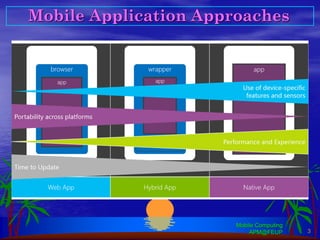
Mobile Application Approaches
Mobile Computing
APM@FEUP 3
Web Applications for Mobile
❖ Same technologies as other web applications
•Run on the device browser and a remote server
•Limited in some features
▪Use of device hardware and controls
▪UX different from native
▪Performance
Mobile Computing
APM@FEUP 4
Popular Hybrid Frameworks
❖ Hybrid Apps run on the device and off-line
•More integrated but still with some drawbacks
▪Non-native experience
▪Performance problems concerning certain components
Mobile Computing
APM@FEUP 5
+ RhoMobile
(Tau technologies)
Near Native (Hybrid-native) technologies
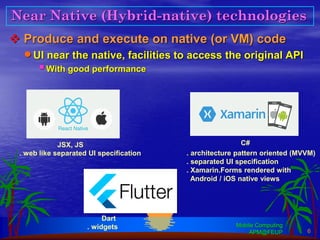
❖ Produce and execute on native (or VM) code
•UI near the native, facilities to access the original API
▪With good performance
Mobile Computing
APM@FEUP 6
JSX, JS C#
Dart
. architecture pattern oriented (MVVM)
. separated UI specification
. Xamarin.Forms rendered with
Android / iOS native views
. web like separated UI specification
. widgets
Flutter Development Tools
❖ You can install your development tools
•Windows, MacOS, or Linux
▪Flutter SDK, Dart SDK, Android and/or iOS SDK
▪CLI tools
•With plugins, high level IDEs
•Android app can be tested and executed in any OS
with the Android SDK
•iOS app can only be completed and executed through
a Mac with XCode and the iOS SDK
▪A paid development license from Apple is needed (for devices)
Mobile Computing
APM@FEUP 7
Android Studio IntelliJ Idea Visual Studio Code Emacs
Flutter Layered Architecture
Mobile Computing
APM@FEUP 8
Flutter Framework – Developer interface
Main app code uses the 2 top layers
(everything is a widget)
Customizations can involve classes from the
previous-to-last layer (animations, input gestures,
drawing, …)
Flutter Engine – Set of primitives used by the
Framework. It comprises graphics (Skia), text
rendering, file and network I/O, plugin
architecture, and the Dart run-time.
This layer is exposed in the Framework as the
low-level dart:ui package
Flutter Embedder – code layer that interfaces the
native OS and their services. It provides a
connection with the native message loop, allowing
the flutter app to run on the top of a native app.
It is written in Java (Android) or Objective-C (iOS),
and C++ (all OS’s)
(https://flutter.dev/docs/resources/architectural-overview)
Flutter follows a reactive model of UI. The UI is a tree of widgets,
with a separated associated state. A change in state automatically
triggers a UI update.
UI = f( state )
Flutter and Native OS
Mobile Computing
APM@FEUP 9
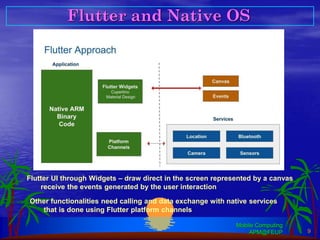
Flutter UI through Widgets – draw direct in the screen represented by a canvas
receive the events generated by the user interaction
Other functionalities need calling and data exchange with native services
that is done using Flutter platform channels
Flutter Side App and Widgets
❖ Flutter apps start from the Dart main() function
•A call to the Framework runApp(…) should be made
▪The parameter should be a widget derived object, with the UI
of the app’s home page
▪The top widget is usually one of the App widgets of the
Framework
Mobile Computing
APM@FEUP 10
import ‘package:flutter/… ‘; // needed Dart and Flutter imports
void main() => runApp(MyApp());
class MyApp extends StatelessWidget {
@override
Widget build(BuildContext context) {
return MaterialApp (
…
);
}
}
one of the Framework top level widgets:
WidgetApp
CupertinoApp
MaterialApp
Flutter project structure
Widgets
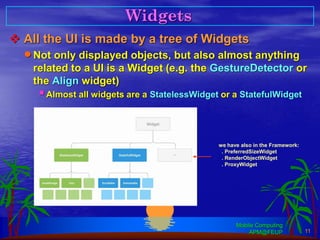
❖ All the UI is made by a tree of Widgets
•Not only displayed objects, but also almost anything
related to a UI is a Widget (e.g. the GestureDetector or
the Align widget)
▪Almost all widgets are a StatelessWidget or a StatefulWidget
Mobile Computing
APM@FEUP 11
we have also in the Framework:
. PreferredSizeWidget
. RenderObjectWidget
. ProxyWidget
Stateless Widgets
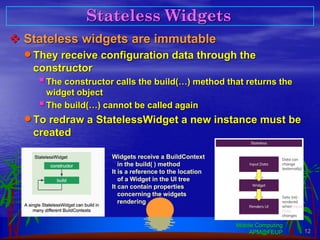
❖ Stateless widgets are immutable
•They receive configuration data through the
constructor
▪The constructor calls the build(…) method that returns the
widget object
▪The build(…) cannot be called again
•To redraw a StatelessWidget a new instance must be
created
Mobile Computing
APM@FEUP 12
Widgets receive a BuildContext
in the build( ) method
It is a reference to the location
of a Widget in the UI tree
It can contain properties
concerning the widgets
rendering
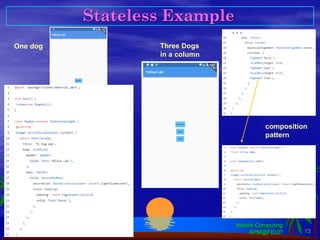
Stateless Example
Mobile Computing
APM@FEUP 13
. . .
One dog Three Dogs
in a column
composition
pattern
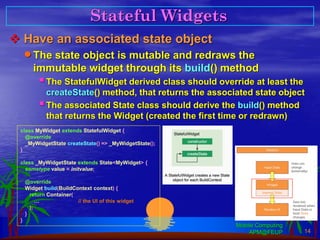
Stateful Widgets
❖ Have an associated state object
•The state object is mutable and redraws the
immutable widget through its build() method
▪The StatefulWidget derived class should override at least the
createState() method, that returns the associated state object
▪The associated State class should derive the build() method
that returns the Widget (created the first time or redrawn)
Mobile Computing
APM@FEUP 14
class MyWidget extends StatefulWidget {
@override
_MyWidgetState createState() => _MyWidgetState();
}
class _MyWidgetState extends State<MyWidget> {
sometype value = initvalue;
@override
Widget build(BuildContext context) {
return Container(
… // the UI of this widget
);
}
}
Mobile Computing
APM@FEUP 15
Stateful Lyfecycle
createState() call Immediately after construction
initState() call Called after creation if overridden
build() call To create or redraw a widget tree
dependent on the state
Automatically called if state changes
(using setState() or didUpdateWidget()
setState() call Should be called with a function
parameter that changes the state
and makes a rebuild
State object
Stateful Widget Example
Mobile Computing
APM@FEUP 16
When the user clicks
the Switch the
onChanged method
runs.
It calls setState() on
_MyHomePageState
changing the property
value.
The widgets that depend
on it (Scaffold, Switch)
are rebuilt.
Some Generic Layout Widgets
Mobile Computing
APM@FEUP 17
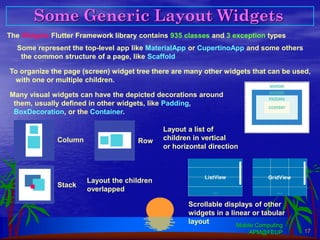
The Widgets Flutter Framework library contains 935 classes and 3 exception types
Some represent the top-level app like MaterialApp or CupertinoApp and some others
the common structure of a page, like Scaffold
To organize the page (screen) widget tree there are many other widgets that can be used,
with one or multiple children.
Many visual widgets can have the depicted decorations around
them, usually defined in other widgets, like Padding,
BoxDecoration, or the Container.
Column Row
Layout a list of
children in vertical
or horizontal direction
Stack
Layout the children
overlapped
Scrollable displays of other
widgets in a linear or tabular
layout
An Example
Mobile Computing
APM@FEUP 18
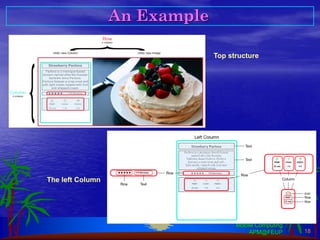
Top structure
The left Column
Some Other Widgets
Mobile Computing
APM@FEUP 19
Page Navigation
Mobile Computing
APM@FEUP 20
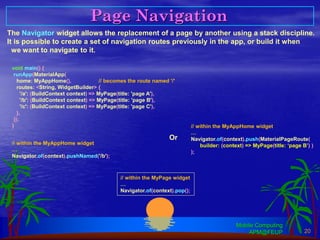
The Navigator widget allows the replacement of a page by another using a stack discipline.
It is possible to create a set of navigation routes previously in the app, or build it when
we want to navigate to it.
void main() {
runApp(MaterialApp(
home: MyAppHome(), // becomes the route named '/'
routes: <String, WidgetBuilder> {
'/a': (BuildContext context) => MyPage(title: 'page A'),
'/b': (BuildContext context) => MyPage(title: 'page B'),
'/c': (BuildContext context) => MyPage(title: 'page C'),
},
));
}
// within the MyAppHome widget
…
Navigator.of(context).pushNamed('/b');
// within the MyAppHome widget
…
Navigator.of(context).push(MaterialPageRoute(
builder: (context) => MyPage(title: ‘page B’) )
);
Or
// within the MyPage widget
…
Navigator.of(context).pop();
Platform Specific Code
Mobile Computing
APM@FEUP 21
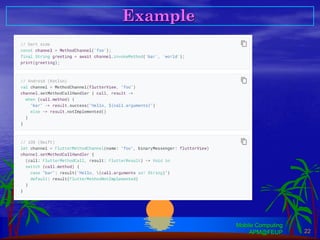
It is possible to call any native
functionality using MethodChanels
The concrete MethodChannel must
be implemented both in the Flutter
side, and the native side in the
interfacing FlutterView
Example
Mobile Computing
APM@FEUP 22
App Architecture
Mobile Computing
APM@FEUP 23
. There are some difficulties in managing State and Business Logic (Domain Logic,
linked to data, and Application Logic, linked to functionalities/user operations) in
Flutter applications.
. It is not easy to adapt well known architectures, like MVC, to the Flutter app structure.
. Many architectural patterns have been proposed with corresponding plugins …
(https://flutter.dev/docs/development/data-and-backend/state-mgmt/options)
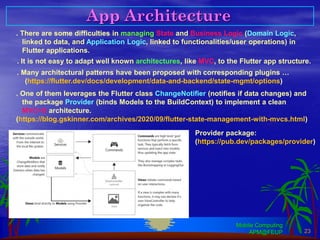
. One of them leverages the Flutter class ChangeNotifier (notifies if data changes) and
the package Provider (binds Models to the BuildContext) to implement a clean
MVC+S architecture.
(https://blog.gskinner.com/archives/2020/09/flutter-state-management-with-mvcs.html)
Provider package:
(https://pub.dev/packages/provider)

22Flutter.pdf

  • 1.
  • 2.
    What is Flutter ❖Flutter is an open-source application development kit created by Google •Ultimately it aims applications for ▪Mobile (Android and iOS) ▪Web (deployed in servers, embedded in browsers, PWA) (beta) ▪Desktop (still in alpha) ▪ Windows (needs VS 2019) ▪ MacOS (needs XCode) ▪ Linux (needs CLang, CMake, GTK) ▪The experimental Google OS Fuchsia •It uses the Dart programming language and runtime •Tools, Resources and Installation from ▪https://flutter.dev Mobile Computing APM@FEUP 2
  • 3.
  • 4.
    Web Applications forMobile ❖ Same technologies as other web applications •Run on the device browser and a remote server •Limited in some features ▪Use of device hardware and controls ▪UX different from native ▪Performance Mobile Computing APM@FEUP 4
  • 5.
    Popular Hybrid Frameworks ❖Hybrid Apps run on the device and off-line •More integrated but still with some drawbacks ▪Non-native experience ▪Performance problems concerning certain components Mobile Computing APM@FEUP 5 + RhoMobile (Tau technologies)
  • 6.
    Near Native (Hybrid-native)technologies ❖ Produce and execute on native (or VM) code •UI near the native, facilities to access the original API ▪With good performance Mobile Computing APM@FEUP 6 JSX, JS C# Dart . architecture pattern oriented (MVVM) . separated UI specification . Xamarin.Forms rendered with Android / iOS native views . web like separated UI specification . widgets
  • 7.
    Flutter Development Tools ❖You can install your development tools •Windows, MacOS, or Linux ▪Flutter SDK, Dart SDK, Android and/or iOS SDK ▪CLI tools •With plugins, high level IDEs •Android app can be tested and executed in any OS with the Android SDK •iOS app can only be completed and executed through a Mac with XCode and the iOS SDK ▪A paid development license from Apple is needed (for devices) Mobile Computing APM@FEUP 7 Android Studio IntelliJ Idea Visual Studio Code Emacs
  • 8.
    Flutter Layered Architecture MobileComputing APM@FEUP 8 Flutter Framework – Developer interface Main app code uses the 2 top layers (everything is a widget) Customizations can involve classes from the previous-to-last layer (animations, input gestures, drawing, …) Flutter Engine – Set of primitives used by the Framework. It comprises graphics (Skia), text rendering, file and network I/O, plugin architecture, and the Dart run-time. This layer is exposed in the Framework as the low-level dart:ui package Flutter Embedder – code layer that interfaces the native OS and their services. It provides a connection with the native message loop, allowing the flutter app to run on the top of a native app. It is written in Java (Android) or Objective-C (iOS), and C++ (all OS’s) (https://flutter.dev/docs/resources/architectural-overview) Flutter follows a reactive model of UI. The UI is a tree of widgets, with a separated associated state. A change in state automatically triggers a UI update. UI = f( state )
  • 9.
    Flutter and NativeOS Mobile Computing APM@FEUP 9 Flutter UI through Widgets – draw direct in the screen represented by a canvas receive the events generated by the user interaction Other functionalities need calling and data exchange with native services that is done using Flutter platform channels
  • 10.
    Flutter Side Appand Widgets ❖ Flutter apps start from the Dart main() function •A call to the Framework runApp(…) should be made ▪The parameter should be a widget derived object, with the UI of the app’s home page ▪The top widget is usually one of the App widgets of the Framework Mobile Computing APM@FEUP 10 import ‘package:flutter/… ‘; // needed Dart and Flutter imports void main() => runApp(MyApp()); class MyApp extends StatelessWidget { @override Widget build(BuildContext context) { return MaterialApp ( … ); } } one of the Framework top level widgets: WidgetApp CupertinoApp MaterialApp Flutter project structure
  • 11.
    Widgets ❖ All theUI is made by a tree of Widgets •Not only displayed objects, but also almost anything related to a UI is a Widget (e.g. the GestureDetector or the Align widget) ▪Almost all widgets are a StatelessWidget or a StatefulWidget Mobile Computing APM@FEUP 11 we have also in the Framework: . PreferredSizeWidget . RenderObjectWidget . ProxyWidget
  • 12.
    Stateless Widgets ❖ Statelesswidgets are immutable •They receive configuration data through the constructor ▪The constructor calls the build(…) method that returns the widget object ▪The build(…) cannot be called again •To redraw a StatelessWidget a new instance must be created Mobile Computing APM@FEUP 12 Widgets receive a BuildContext in the build( ) method It is a reference to the location of a Widget in the UI tree It can contain properties concerning the widgets rendering
  • 13.
    Stateless Example Mobile Computing APM@FEUP13 . . . One dog Three Dogs in a column composition pattern
  • 14.
    Stateful Widgets ❖ Havean associated state object •The state object is mutable and redraws the immutable widget through its build() method ▪The StatefulWidget derived class should override at least the createState() method, that returns the associated state object ▪The associated State class should derive the build() method that returns the Widget (created the first time or redrawn) Mobile Computing APM@FEUP 14 class MyWidget extends StatefulWidget { @override _MyWidgetState createState() => _MyWidgetState(); } class _MyWidgetState extends State<MyWidget> { sometype value = initvalue; @override Widget build(BuildContext context) { return Container( … // the UI of this widget ); } }
  • 15.
    Mobile Computing APM@FEUP 15 StatefulLyfecycle createState() call Immediately after construction initState() call Called after creation if overridden build() call To create or redraw a widget tree dependent on the state Automatically called if state changes (using setState() or didUpdateWidget() setState() call Should be called with a function parameter that changes the state and makes a rebuild State object
  • 16.
    Stateful Widget Example MobileComputing APM@FEUP 16 When the user clicks the Switch the onChanged method runs. It calls setState() on _MyHomePageState changing the property value. The widgets that depend on it (Scaffold, Switch) are rebuilt.
  • 17.
    Some Generic LayoutWidgets Mobile Computing APM@FEUP 17 The Widgets Flutter Framework library contains 935 classes and 3 exception types Some represent the top-level app like MaterialApp or CupertinoApp and some others the common structure of a page, like Scaffold To organize the page (screen) widget tree there are many other widgets that can be used, with one or multiple children. Many visual widgets can have the depicted decorations around them, usually defined in other widgets, like Padding, BoxDecoration, or the Container. Column Row Layout a list of children in vertical or horizontal direction Stack Layout the children overlapped Scrollable displays of other widgets in a linear or tabular layout
  • 18.
    An Example Mobile Computing APM@FEUP18 Top structure The left Column
  • 19.
    Some Other Widgets MobileComputing APM@FEUP 19
  • 20.
    Page Navigation Mobile Computing APM@FEUP20 The Navigator widget allows the replacement of a page by another using a stack discipline. It is possible to create a set of navigation routes previously in the app, or build it when we want to navigate to it. void main() { runApp(MaterialApp( home: MyAppHome(), // becomes the route named '/' routes: <String, WidgetBuilder> { '/a': (BuildContext context) => MyPage(title: 'page A'), '/b': (BuildContext context) => MyPage(title: 'page B'), '/c': (BuildContext context) => MyPage(title: 'page C'), }, )); } // within the MyAppHome widget … Navigator.of(context).pushNamed('/b'); // within the MyAppHome widget … Navigator.of(context).push(MaterialPageRoute( builder: (context) => MyPage(title: ‘page B’) ) ); Or // within the MyPage widget … Navigator.of(context).pop();
  • 21.
    Platform Specific Code MobileComputing APM@FEUP 21 It is possible to call any native functionality using MethodChanels The concrete MethodChannel must be implemented both in the Flutter side, and the native side in the interfacing FlutterView
  • 22.
  • 23.
    App Architecture Mobile Computing APM@FEUP23 . There are some difficulties in managing State and Business Logic (Domain Logic, linked to data, and Application Logic, linked to functionalities/user operations) in Flutter applications. . It is not easy to adapt well known architectures, like MVC, to the Flutter app structure. . Many architectural patterns have been proposed with corresponding plugins … (https://flutter.dev/docs/development/data-and-backend/state-mgmt/options) . One of them leverages the Flutter class ChangeNotifier (notifies if data changes) and the package Provider (binds Models to the BuildContext) to implement a clean MVC+S architecture. (https://blog.gskinner.com/archives/2020/09/flutter-state-management-with-mvcs.html) Provider package: (https://pub.dev/packages/provider)