Aayush Paigwar
Lead Flutter Developer
GDSC GHRCE
Flutter Fire
Sahil Banswani
Co-Lead Flutter Developer
GDSC GHRCE
Pawan Bhayde
Flutter Volunteer
GDSC GHRCE
INTRODUCTION TO
FLUTTER
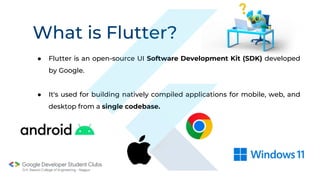
What is Flutter?
What is Flutter?
● Flutter is an open-source UI Software Development Kit (SDK) developed
by Google.
● It's used for building natively compiled applications for mobile, web, and
desktop from a single codebase.
Why Flutter?
Why Flutter?
1. Open Source 2. Faster Development cycle 3. Super Productive
● Flutter is Open-Source
framework
● Therefore, anyone can
use it for any given
purpose.
● Flutter is so fast that it
takes less than 30 sec
for first full compilation.
● Comes with Hot-Reload
& Hot-Restart.
● Make apps fast due to
its library & packages
● Due to Stateful widget
hot-reload feature
Flutter is very fast
iterative coding style.
4. Ease to learn & code sharing 5. Widget Libraries 6. Community Support
● Any one who have basic
knowledge of OOP & UI
Designing can easily
learn Flutter.
● Ready to use widget,
Flutter have many widget
that you can use to build
flutter application.
● Such as : http, get, share
plus, toggle switch etc.
● Flutter Community is bit
small if we compare with
other framework like React.
● But Flutter is growing very
fast then other framework.
Why Flutter?
PUB.DEV
Do you want to know Companies
that use Flutter?
Companies & Apps that use Flutter
Dream 11 eBay
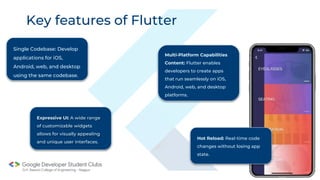
Key features of Flutter
Single Codebase: Develop
applications for iOS,
Android, web, and desktop
using the same codebase.
Expressive UI: A wide range
of customizable widgets
allows for visually appealing
and unique user interfaces.
Hot Reload: Real-time code
changes without losing app
state.
Multi-Platform Capabilities
Content: Flutter enables
developers to create apps
that run seamlessly on iOS,
Android, web, and desktop
platforms.
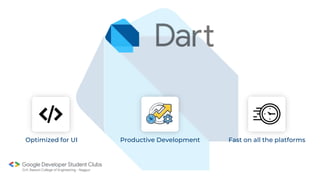
Which Language?
Optimized for UI Productive Development Fast on all the platforms
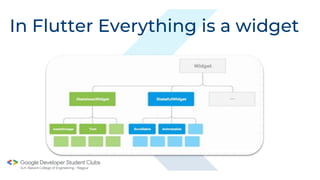
In Flutter Everything is a widget
● Immutable views (widgets)
● Only one time in built
● Example: Text, Icon,
IconsButton, etc
Stateless Widgets
● Still immutable, but…
● Contains State<w>
● Redraw after setState( () => {} )
calls
● Example : Appbar, Scaffold,
TextField, etc
Stateful Widgets
Scaffold Widget
Design Visual Layout
Structure. Create a base of
your application.
Properties: Appbar, Drawer,
FloatingActionButton, etc.
Container, Rows and Columns
Custom Packages
● Every Flutter project includes a pubspec.yaml
file, often referred to as the pubspec.
● A basic pubspec is generated when you
create a new Flutter project. It’s located at
the top of the project tree.
Thankyou!
Aayush Paigwar
Flutter Developer @GDSC GHRCE
Google DSC GHRCE
GHRCE
Pawan Bhayde
Flutter Volunteer
GDSC GHRCE
GDSC GHRCE
GHRCE
Let’s see what we are
building?
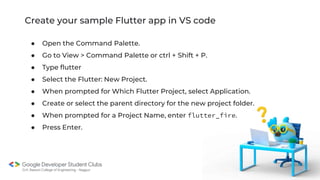
Create your sample Flutter app in VS code
● Open the Command Palette.
● Go to View > Command Palette or ctrl + Shift + P.
● Type flutter
● Select the Flutter: New Project.
● When prompted for Which Flutter Project, select Application.
● Create or select the parent directory for the new project folder.
● When prompted for a Project Name, enter flutter_fire.
● Press Enter.
Create your sample Flutter app in terminal
● Run the flutter create command.
flutter create flutter_fire
● Change to the Flutter project directory.
cd flutter_fire
● To verify that you have a running target device, run the following
command.
flutter devices
● To run your app, run the following command.
flutter run
Creating loginpage.dart file
● Write click on lib folder.
● Select the New File
● Enter loginpage.dart
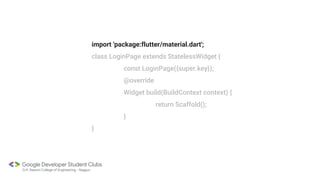
import 'package:flutter/material.dart';
class LoginPage extends StatelessWidget {
const LoginPage({super.key});
@override
Widget build(BuildContext context) {
return Scaffold();
}
}
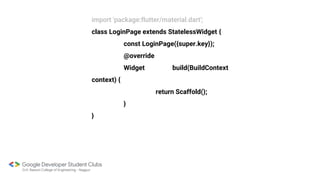
import 'package:flutter/material.dart';
class LoginPage extends StatelessWidget {
const LoginPage({super.key});
@override
Widget build(BuildContext
context) {
return Scaffold();
}
}
Scaffold widget
In Flutter, the Scaffold widget is a basic skeletal structure that provides a visual
framework for building the structure of a typical material design app. It includes
the AppBar, Body, FloatingActionButton, Drawer, BottomNavigationBar, and other
structural elements.
const LoginPage({super.key});
@override
Widget build(BuildContext context) {
return Scaffold(
body: Padding(
padding: const
EdgeInsets.all(20.0),
child: ,
),
);
}
}
return Scaffold(
body: Padding(
padding: const EdgeInsets.all(20.0),
child: Column(
mainAxisAlignment:
MainAxisAlignment.center,
children: [
],
),
),
);
}
}
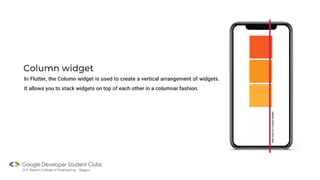
Column widget
In Flutter, the Column widget is used to create a vertical arrangement of widgets.
It allows you to stack widgets on top of each other in a columnar fashion.
child: Column(
mainAxisAlignment:
MainAxisAlignment.center,
children: [
const Image(
image:
AssetImage('images/logo.png'),
height: 200,
),
],
),
),
);
}
}
child: Column(
mainAxisAlignment:
MainAxisAlignment.center,
children: [
const Image(
image:
AssetImage('images/logo.png'),
height: 200,
),
],
),
),
);
}
}
height: 200,
),
const SizedBox(
height: 20,
),
const Text(
'Welcome to our
app',
style:
TextStyle(fontSize: 20),
),
],
),
),
);
height: 20,
),
const TextField(
decoration:
InputDecoration(
border: OutlineInputBorder(),
labelText: 'Email',
),
),
],
),
),
);
const TextField(
obscureText:
true,
decoration:
InputDecoration(
border: OutlineInputBorder(),
labelText: 'Password',
),
),
],
),
),
);
),
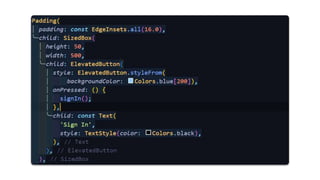
Container(
width: double.infinity,
child: ElevatedButton(
onPressed: () {},
child: const Text(
'Login',
style:
TextStyle(fontSize: 20, color: Colors.white),
),
),
),
],
),
),
style:
ElevatedButton.styleFrom(
padding:
const EdgeInsets.all(20),
backgroundColor: Colors.deepPurple,
),
child: const Text(
'Login',
style:
TextStyle(fontSize: 20, color: Colors.white),
),
),
),
],
Thankyou!
Pawan Bhayde
Flutter Volunteer @GDSC GHRCE
Google DSC GHRCE
Sahil Banswani
Flutter @Co-Lead
Introduction to
Firebase
Firebase is Google’s mobile application
development platform that helps you build, improve,
and grow your app.
G.H. Raisoni College of Engineering, Nagpur
Backend
Reference: MDN Web Docs
G.H. Raisoni College of Engineering, Nagpur
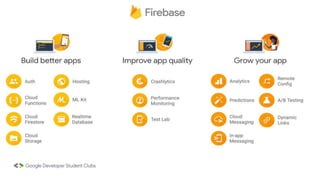
Firebase
● Firebase is a Backend-as-a-Service(BaaS).
● It is a suite of tools for building apps on top of Google
Cloud Platform.
● It has three main services, i.e., a real-time database, user
authentication, and hosting.
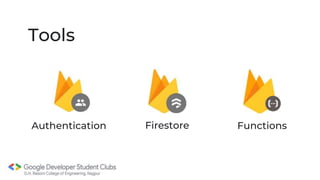
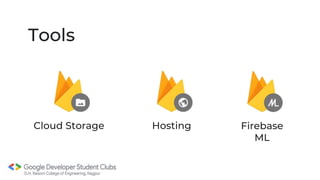
Tools
Authentication Functions
Firestore
Tools
Cloud Storage Firebase
ML
Hosting
G.H. Raisoni College of Engineering, Nagpur
Installing firebase CLI tools
● To install firebase CLI, run the following command:
npm install -g firebase-tools
● Then run,
firebase login
To connect firebase CLI to your account.
G.H. Raisoni College of Engineering, Nagpur
Firebase Auth
● Firebase Authentication provides backend services to
authenticate users to your app.
● It supports authentication using passwords, phone
numbers, popular federated identity providers like
Google, Facebook and Twitter, and more.
G.H. Raisoni College of Engineering, Nagpur
Flutter Packages (pub.dev)
● firebase_core
● firebase_auth
G.H. Raisoni College of Engineering, Nagpur
Firestore
● It is a NoSQL database.
● Hosted on cloud.
● Easily accessible.
● Data is stored in JSON format.
G.H. Raisoni College of Engineering, Nagpur
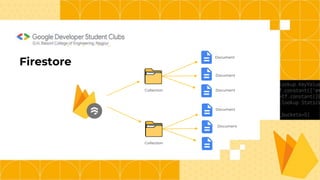
Firestore
Collection
Collection
Document
Document
Document
Document
Document
G.H. Raisoni College of Engineering, Nagpur
Cloud Storage
● Cloud storage in firebase is used to store and serve user-
generated content, such as photos or videos.
● It can perform uploads and downloads regardless of
network quality.
● Files are stored in Google cloud storage Bucket.
G.H. Raisoni College of Engineering, Nagpur
Want to learn More?
Refer to: Firebase Docs
https://bitly.ws/3e4kU
Thank You :)
Google DSC GHRCE

GoogleDSC_ GHRCE_ flutter_firebase.pptx