EENG-PPT/T-SPEISCM-34
Implementation: Tutorial
Title of Lesson
ECAM LASALLE - POLE C2MI
1
Bertrand MARCONNET
bertrand.marconnet@ecam.fr
- Industrial Engineering and
Supply Chain Management -
Implementation:
Tutorial 2
with Flexsim
1
EENG-PPT/T-SPEISCM-34
Implementation: Tutorial
Deliverables
2
1. New flow simulation with Flexsim
2. 3d Model of your update manufacturing plant with Sketchup
EENG-PPT/T-SPEISCM-34
Implementation: Tutorial
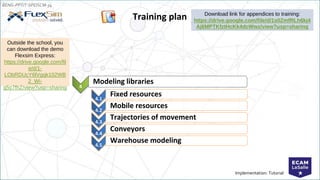
Training plan
4
Modeling libraries
Download link for appendices to training:
https://drive.google.com/file/d/1s0ZmfRLh6kj4
Aj6MPTKfztHcKk4dcWwz/view?usp=sharing
4.1
Fixed resources
4.2
Mobile resources
4.3
Trajectories of movement
4.4
Conveyors
4.5
Warehouse modeling
Outside the school, you
can download the demo
Flexsim Express:
https://drive.google.com/fil
e/d/1-
LObRDUcY6lVgqk102WB
2_Wi-
g5c7fhZ/view?usp=sharing
EENG-PPT/T-SPEISCM-34
Implementation: Tutorial
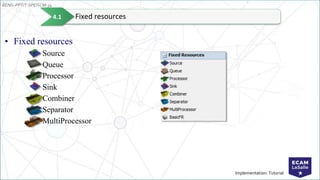
• Fixed resources
Source
Queue
Processor
Sink
Combiner
Separator
MultiProcessor
Fixed resources
4.1
EENG-PPT/T-SPEISCM-34
Implementation: Tutorial
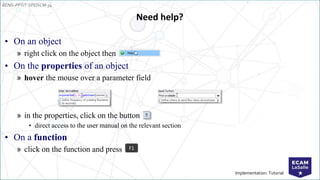
Need help?
• On an object
» right click on the object then
• On the properties of an object
» hover the mouse over a parameter field
» in the properties, click on the button
• direct access to the user manual on the relevant section
• On a function
» click on the function and press F1
EENG-PPT/T-SPEISCM-34
Implementation: Tutorial
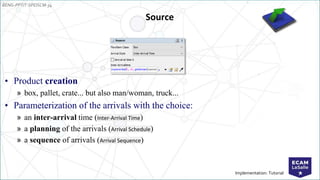
Source
• Product creation
» box, pallet, crate... but also man/woman, truck...
• Parameterization of the arrivals with the choice:
» an inter-arrival time (Inter-Arrival Time)
» a planning of the arrivals (Arrival Schedule)
» a sequence of arrivals (Arrival Sequence)
EENG-PPT/T-SPEISCM-34
Implementation: Tutorial
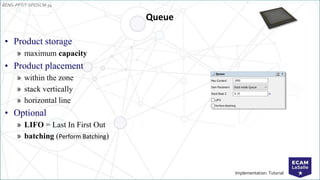
• Product storage
» maximum capacity
• Product placement
» within the zone
» stack vertically
» horizontal line
• Optional
» LIFO = Last In First Out
» batching (Perform Batching)
Queue
EENG-PPT/T-SPEISCM-34
Implementation: Tutorial
Processor
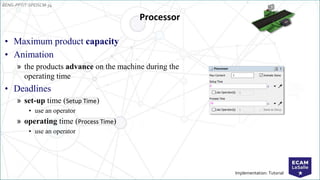
• Maximum product capacity
• Animation
» the products advance on the machine during the
operating time
• Deadlines
» set-up time (Setup Time)
• use an operator
» operating time (Process Time)
• use an operator
EENG-PPT/T-SPEISCM-34
Implementation: Tutorial
Sink
• The Sink object is used to destroy products that leave the model
EENG-PPT/T-SPEISCM-34
Implementation: Tutorial
Creation of a straight conveyor
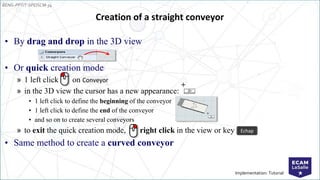
• By drag and drop in the 3D view
• Or quick creation mode
» 1 left click on Conveyor
» in the 3D view the cursor has a new appearance:
• 1 left click to define the beginning of the conveyor
• 1 left click to define the end of the conveyor
• and so on to create several conveyors
» to exit the quick creation mode, right click in the view or key
• Same method to create a curved conveyor
Echap
EENG-PPT/T-SPEISCM-34
Implementation: Tutorial
Visual rendering of conveyors
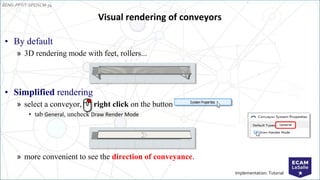
• By default
» 3D rendering mode with feet, rollers...
• Simplified rendering
» select a conveyor, right click on the button
• tab General, uncheck Draw Render Mode
» more convenient to see the direction of conveyance.
EENG-PPT/T-SPEISCM-34
Implementation: Tutorial
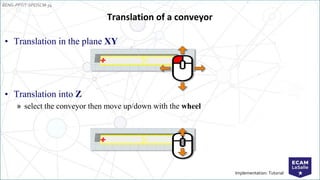
• Translation in the plane XY
• Translation into Z
» select the conveyor then move up/down with the wheel
Translation of a conveyor
EENG-PPT/T-SPEISCM-34
Implementation: Tutorial
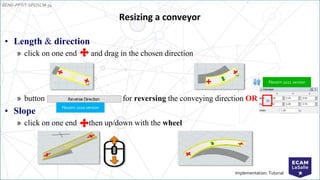
• Length & direction
» click on one end and drag in the chosen direction
» button for reversing the conveying direction OR
• Slope
» click on one end then up/down with the wheel
Resizing a conveyor
Flexsim 2020 version
Flexsim 2021 version
EENG-PPT/T-SPEISCM-34
Implementation: Tutorial
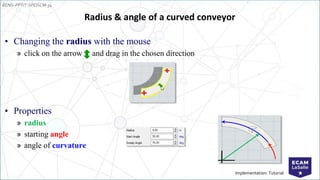
• Changing the radius with the mouse
» click on the arrow and drag in the chosen direction
• Properties
» radius
» starting angle
» angle of curvature
Radius & angle of a curved conveyor
EENG-PPT/T-SPEISCM-34
Implementation: Tutorial
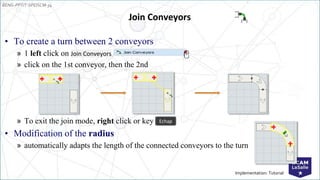
• To create a turn between 2 conveyors
» 1 left click on Join Conveyors
» click on the 1st conveyor, then the 2nd
» To exit the join mode, right click or key
• Modification of the radius
» automatically adapts the length of the connected conveyors to the turn
Join Conveyors
Echap
EENG-PPT/T-SPEISCM-34
Implementation: Tutorial
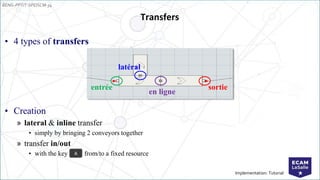
• 4 types of transfers
• Creation
» lateral & inline transfer
• simply by bringing 2 conveyors together
» transfer in/out
• with the key from/to a fixed resource
Transfers
A
entrée sortie
latéral
en ligne
EENG-PPT/T-SPEISCM-34
Implementation: Tutorial
Model 2
• Description
» the pieces arrive at intervals of about 30 s (exponential law)
» 4 types of pieces arrive in the following proportions: 20% type 1, 30% type 2, 40% type 3, 10% type 4
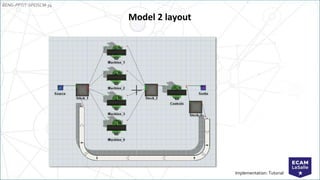
» there are 4 machines, one for each type of part
» after machining, the parts are put on hold to be controlled. The duration of the inspection is constant: 10
seconds. If the quality of the part is good, it leaves this workshop. Defective parts (10%) are sent back to
production to be rectified.
» The machining times are identical for all machines: uniform (100, 120). For a defective part to be ground,
the machining time is longer: uniform (120, 130).
» defective parts have priority over other parts
• Question
» Where is the bottleneck? How can it be solved?
EENG-PPT/T-SPEISCM-34
Implementation: Tutorial
Model 2 layout
EENG-PPT/T-SPEISCM-34
Implementation: Tutorial
Triggers
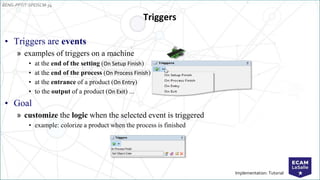
• Triggers are events
» examples of triggers on a machine
• at the end of the setting (On Setup Finish)
• at the end of the process (On Process Finish)
• at the entrance of a product (On Entry)
• to the output of a product (On Exit) ...
• Goal
» customize the logic when the selected event is triggered
• example: colorize a product when the process is finished
EENG-PPT/T-SPEISCM-34
Implementation: Tutorial
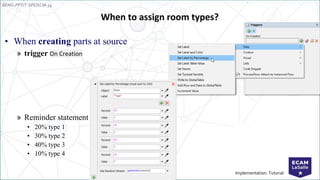
When to assign room types?
• When creating parts at source
» trigger On Creation
» Reminder statement
• 20% type 1
• 30% type 2
• 40% type 3
• 10% type 4
EENG-PPT/T-SPEISCM-34
Implementation: Tutorial
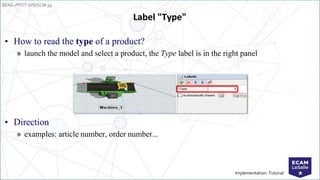
Label "Type"
• How to read the type of a product?
» launch the model and select a product, the Type label is in the right panel
• Direction
» examples: article number, order number...
EENG-PPT/T-SPEISCM-34
Implementation: Tutorial
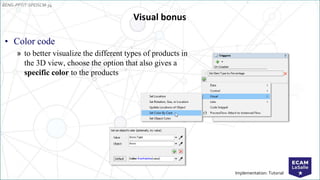
Visual bonus
• Color code
» to better visualize the different types of products in
the 3D view, choose the option that also gives a
specific color to the products
EENG-PPT/T-SPEISCM-34
Implementation: Tutorial
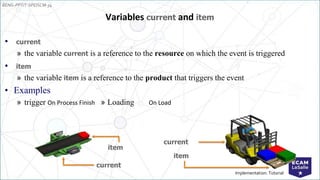
Variables current and item
• current
» the variable current is a reference to the resource on which the event is triggered
• item
» the variable item is a reference to the product that triggers the event
• Examples
» trigger On Process Finish » Loading On Load
current
item
item
current
EENG-PPT/T-SPEISCM-34
Implementation: Tutorial
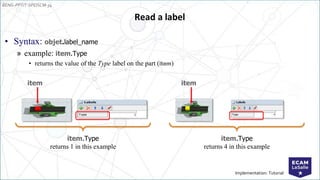
• Syntax: objet.label_name
» example: item.Type
• returns the value of the Type label on the part (item)
Read a label
item
item.Type
returns 1 in this example
item
item.Type
returns 4 in this example
EENG-PPT/T-SPEISCM-34
Implementation: Tutorial
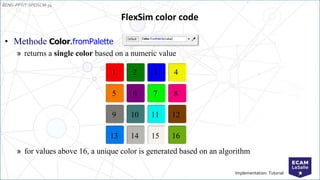
FlexSim color code
• Methode Color.fromPalette
» returns a single color based on a numeric value
» for values above 16, a unique color is generated based on an algorithm
1 2 3 4
5 6 7 8
9 10 11 12
13 14 15 16
EENG-PPT/T-SPEISCM-34
Implementation: Tutorial
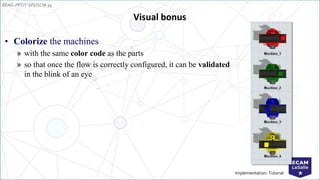
Visual bonus
• Colorize the machines
» with the same color code as the parts
» so that once the flow is correctly configured, it can be validated
in the blink of an eye
EENG-PPT/T-SPEISCM-34
Implementation: Tutorial
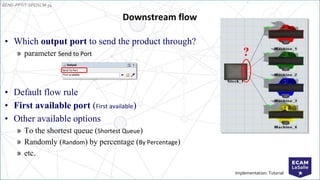
• Which output port to send the product through?
» parameter Send to Port
• Default flow rule
• First available port (First available)
• Other available options
» To the shortest queue (Shortest Queue)
» Randomly (Random) by percentage (By Percentage)
» etc.
Downstream flow
?
EENG-PPT/T-SPEISCM-34
Implementation: Tutorial
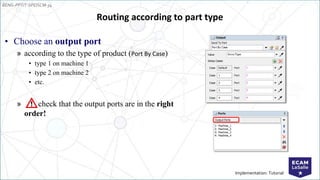
Routing according to part type
• Choose an output port
» according to the type of product (Port By Case)
• type 1 on machine 1
• type 2 on machine 2
• etc.
» check that the output ports are in the right
order!
EENG-PPT/T-SPEISCM-34
Implementation: Tutorial
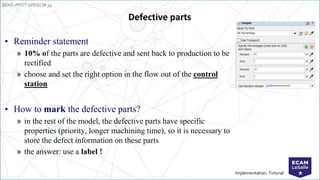
Defective parts
• Reminder statement
» 10% of the parts are defective and sent back to production to be
rectified
» choose and set the right option in the flow out of the control
station
• How to mark the defective parts?
» in the rest of the model, the defective parts have specific
properties (priority, longer machining time), so it is necessary to
store the defect information on these parts
» the answer: use a label !
EENG-PPT/T-SPEISCM-34
Implementation: Tutorial
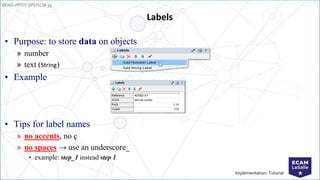
Labels
• Purpose: to store data on objects
» number
» text (String)
• Example
• Tips for label names
» no accents, no ç
» no spaces → use an underscore_
• example: step_1 instead step 1
EENG-PPT/T-SPEISCM-34
Implementation: Tutorial
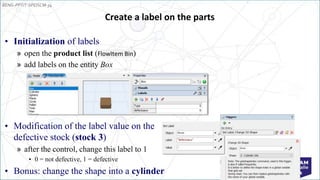
Create a label on the parts
• Initialization of labels
» open the product list (FlowItem Bin)
» add labels on the entity Box
• Modification of the label value on the
defective stock (stock 3)
» after the control, change this label to 1
• 0 = not defective, 1 = defective
• Bonus: change the shape into a cylinder
EENG-PPT/T-SPEISCM-34
Implementation: Tutorial
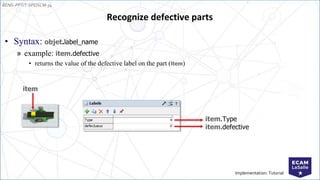
• Syntax: objet.label_name
» example: item.defective
• returns the value of the defective label on the part (item)
Recognize defective parts
item
item.Type
item.defective
EENG-PPT/T-SPEISCM-34
Implementation: Tutorial
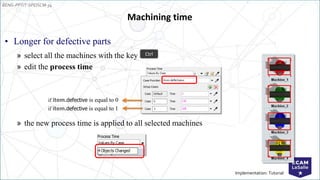
» select all the machines with the key
» edit the process time
» the new process time is applied to all selected machines
Machining time
• Longer for defective parts
if item.defective is equal to 1
if item.defective is equal to 0
Ctrl
EENG-PPT/T-SPEISCM-34
Implementation: Tutorial
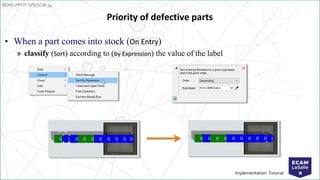
Priority of defective parts
• When a part comes into stock (On Entry)
» classify (Sort) according to (by Expression) the value of the label
0 1 0 0 0 0 0 0 0 0 0 0 0 0 0 0 0 0 0 1
EENG-PPT/T-SPEISCM-34
Implementation: Tutorial
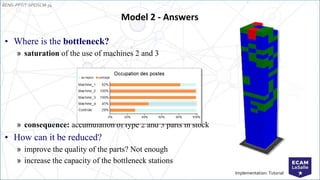
Model 2 - Answers
• Where is the bottleneck?
» saturation of the use of machines 2 and 3
» consequence: accumulation of type 2 and 3 parts in stock
• How can it be reduced?
» improve the quality of the parts? Not enough
» increase the capacity of the bottleneck stations
EENG-PPT/T-SPEISCM-34
Implementation: Tutorial
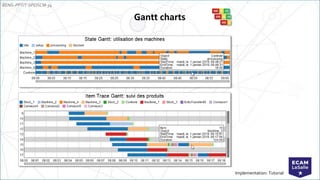
Gantt charts
EENG-PPT/T-SPEISCM-34
Implementation: Tutorial
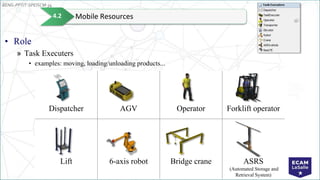
• Role
» Task Executers
• examples: moving, loading/unloading products...
Dispatcher AGV Operator Forklift operator
Lift 6-axis robot Bridge crane ASRS
(Automated Storage and
Retrieval System)
Mobile Resources
4.2
EENG-PPT/T-SPEISCM-34
Implementation: Tutorial
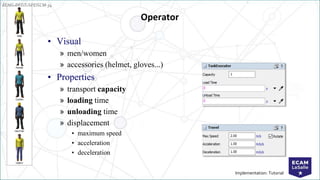
Operator
• Visual
» men/women
» accessories (helmet, gloves...)
• Properties
» transport capacity
» loading time
» unloading time
» displacement
• maximum speed
• acceleration
• deceleration
EENG-PPT/T-SPEISCM-34
Implementation: Tutorial
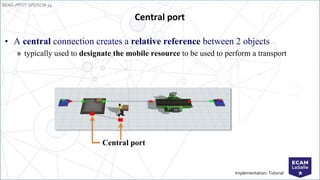
Central port
• A central connection creates a relative reference between 2 objects
» typically used to designate the mobile resource to be used to perform a transport
Central port
EENG-PPT/T-SPEISCM-34
Implementation: Tutorial
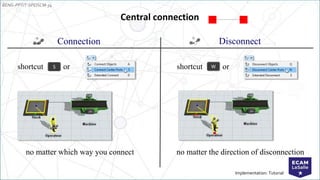
Connection
Central connection
no matter which way you connect
Disconnect
no matter the direction of disconnection
shortcut or
shortcut or
S W
EENG-PPT/T-SPEISCM-34
Implementation: Tutorial
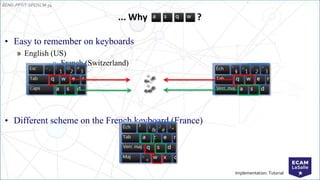
• Easy to remember on keyboards
» English (US)
» French (Switzerland)
• Different scheme on the French keyboard (France)
... Why ?
EENG-PPT/T-SPEISCM-34
Implementation: Tutorial
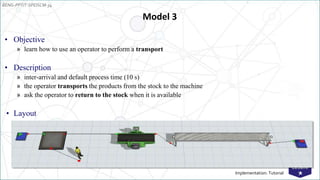
Model 3
• Objective
» learn how to use an operator to perform a transport
• Description
» inter-arrival and default process time (10 s)
» the operator transports the products from the stock to the machine
» ask the operator to return to the stock when it is available
• Layout
EENG-PPT/T-SPEISCM-34
Implementation: Tutorial
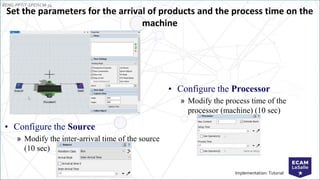
• Configure the Source
» Modify the inter-arrival time of the source
(10 sec)
Set the parameters for the arrival of products and the process time on the
machine
• Configure the Processor
» Modify the process time of the
processor (machine) (10 sec)
EENG-PPT/T-SPEISCM-34
Implementation: Tutorial
• Method
» create a central connection between the stock and the operator
» select the stock and check Use Transport
• by default, the resource used for transport is the object connected to the central port n°1 of the stock,
designated by the expression current.centerObjects[1]
Transport by a mobile resource
S
EENG-PPT/T-SPEISCM-34
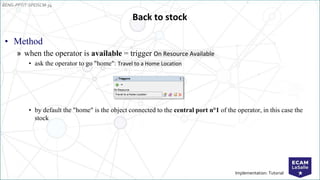
Implementation: Tutorial
• Method
» when the operator is available = trigger On Resource Available
• ask the operator to go "home": Travel to a Home Location
• by default the "home" is the object connected to the central port n°1 of the operator, in this case the
stock
Back to stock
EENG-PPT/T-SPEISCM-34
Implementation: Tutorial
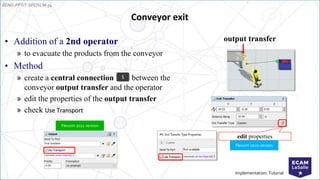
Conveyor exit
• Addition of a 2nd operator
» to evacuate the products from the conveyor
• Method
» create a central connection between the
conveyor output transfer and the operator
» edit the properties of the output transfer
» check Use Transport
S
output transfer
edit properties
Flexsim 2020 version
Flexsim 2021 version
EENG-PPT/T-SPEISCM-34
Implementation: Tutorial
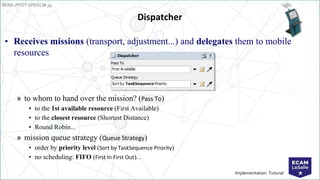
Dispatcher
• Receives missions (transport, adjustment...) and delegates them to mobile
resources
» to whom to hand over the mission? (Pass To)
• to the 1st available resource (First Available)
• to the closest resource (Shortest Distance)
• Round Robin...
» mission queue strategy (Queue Strategy)
• order by priority level (Sort by TaskSequence Priority)
• no scheduling: FIFO (First In First Out)...
EENG-PPT/T-SPEISCM-34
Implementation: Tutorial
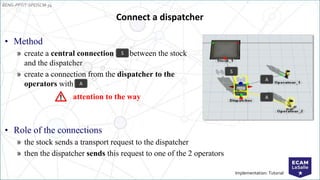
Connect a dispatcher
• Method
» create a central connection between the stock
and the dispatcher
» create a connection from the dispatcher to the
operators with
S
A
A
S
A
attention to the way
• Role of the connections
» the stock sends a transport request to the dispatcher
» then the dispatcher sends this request to one of the 2 operators
EENG-PPT/T-SPEISCM-34
Implementation: Tutorial
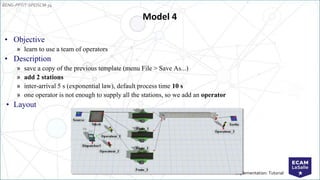
Model 4
• Objective
» learn to use a team of operators
• Description
» save a copy of the previous template (menu File > Save As...)
» add 2 stations
» inter-arrival 5 s (exponential law), default process time 10 s
» one operator is not enough to supply all the stations, so we add an operator
• Layout
EENG-PPT/T-SPEISCM-34
Implementation: Tutorial
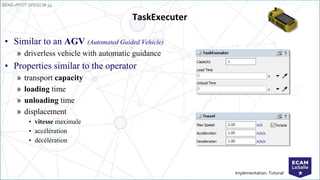
TaskExecuter
• Similar to an AGV (Automated Guided Vehicle)
» driverless vehicle with automatic guidance
• Properties similar to the operator
» transport capacity
» loading time
» unloading time
» displacement
• vitesse maximale
• accélération
• décélération
EENG-PPT/T-SPEISCM-34
Implementation: Tutorial
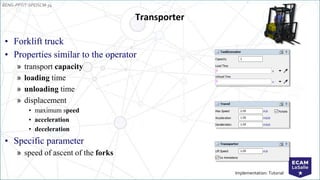
Transporter
• Forklift truck
• Properties similar to the operator
» transport capacity
» loading time
» unloading time
» displacement
• maximum speed
• acceleration
• deceleration
• Specific parameter
» speed of ascent of the forks
EENG-PPT/T-SPEISCM-34
Implementation: Tutorial
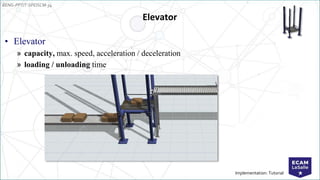
Elevator
• Elevator
» capacity, max. speed, acceleration / deceleration
» loading / unloading time
EENG-PPT/T-SPEISCM-34
Implementation: Tutorial
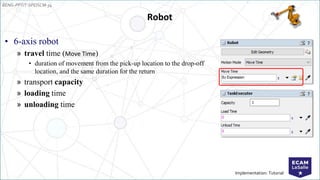
Robot
• 6-axis robot
» travel time (Move Time)
• duration of movement from the pick-up location to the drop-off
location, and the same duration for the return
» transport capacity
» loading time
» unloading time
EENG-PPT/T-SPEISCM-34
Implementation: Tutorial
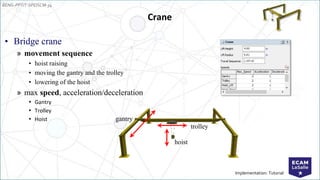
Crane
• Bridge crane
» movement sequence
• hoist raising
• moving the gantry and the trolley
• lowering of the hoist
» max speed, acceleration/deceleration
• Gantry
• Trolley
• Hoist gantry
trolley
hoist
EENG-PPT/T-SPEISCM-34
Implementation: Tutorial
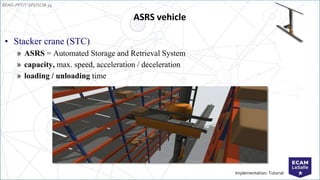
ASRS vehicle
• Stacker crane (STC)
» ASRS = Automated Storage and Retrieval System
» capacity, max. speed, acceleration / deceleration
» loading / unloading time
EENG-PPT/T-SPEISCM-34
Implementation: Tutorial
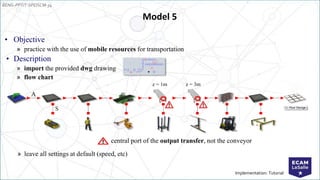
• Objective
» practice with the use of mobile resources for transportation
• Description
» import the provided dwg drawing
» flow chart
» leave all settings at default (speed, etc)
Model 5
z = 1m z = 3m
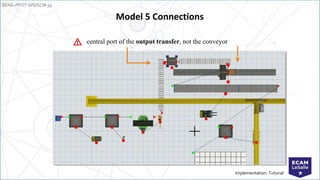
central port of the output transfer, not the conveyor
A
S
EENG-PPT/T-SPEISCM-34
Implementation: Tutorial
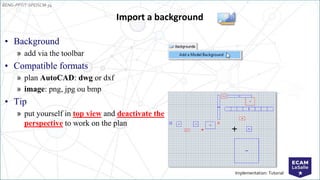
• Background
» add via the toolbar
• Compatible formats
» plan AutoCAD: dwg or dxf
» image: png, jpg ou bmp
• Tip
» put yourself in top view and deactivate the
perspective to work on the plan
Import a background
EENG-PPT/T-SPEISCM-34
Implementation: Tutorial
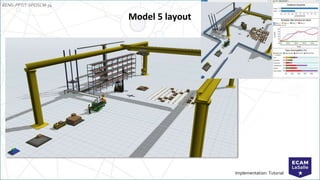
Model 5 layout
EENG-PPT/T-SPEISCM-34
Implementation: Tutorial
Model 5 Connections
central port of the output transfer, not the conveyor
EENG-PPT/T-SPEISCM-34
Implementation: Tutorial
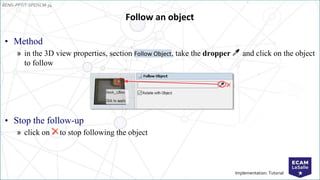
Follow an object
• Method
» in the 3D view properties, section Follow Object, take the dropper and click on the object
to follow
• Stop the follow-up
» click on to stop following the object
EENG-PPT/T-SPEISCM-34
Implementation: Tutorial
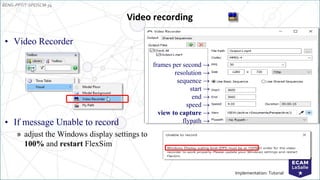
• Video Recorder
• If message Unable to record
» adjust the Windows display settings to
100% and restart FlexSim
Video recording
frames per second →
resolution →
sequence →
start →
end →
speed →
view to capture →
flypath →
EENG-PPT/T-SPEISCM-34
Implementation: Tutorial
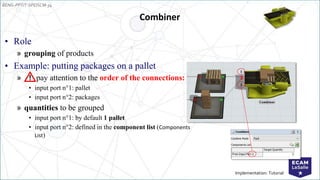
Combiner
• Role
» grouping of products
• Example: putting packages on a pallet
» pay attention to the order of the connections:
• input port n°1: pallet
• input port n°2: packages
» quantities to be grouped
• input port n°1: by default 1 pallet
• input port n°2: defined in the component list (Components
List)
1
2
EENG-PPT/T-SPEISCM-34
Implementation: Tutorial
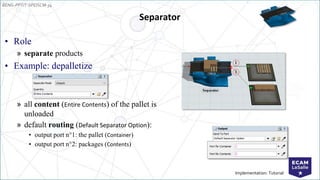
Separator
• Role
» separate products
• Example: depalletize
» all content (Entire Contents) of the pallet is
unloaded
» default routing (Default Separator Option):
• output port n°1: the pallet (Container)
• output port n°2: packages (Contents)
EENG-PPT/T-SPEISCM-34
Implementation: Tutorial
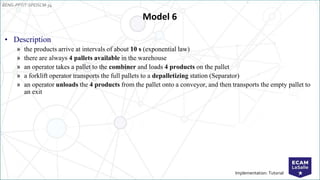
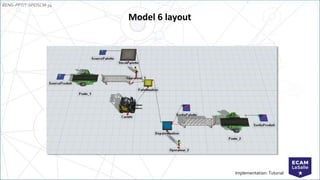
Model 6
• Description
» the products arrive at intervals of about 10 s (exponential law)
» there are always 4 pallets available in the warehouse
» an operator takes a pallet to the combiner and loads 4 products on the pallet
» a forklift operator transports the full pallets to a depalletizing station (Separator)
» an operator unloads the 4 products from the pallet onto a conveyor, and then transports the empty pallet to
an exit
EENG-PPT/T-SPEISCM-34
Implementation: Tutorial
Model 6 layout
EENG-PPT/T-SPEISCM-34
Implementation: Tutorial
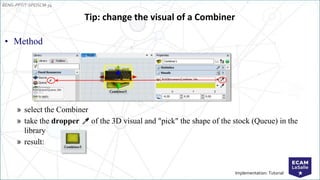
• Method
» select the Combiner
» take the dropper of the 3D visual and "pick" the shape of the stock (Queue) in the
library
» result:
Tip: change the visual of a Combiner
EENG-PPT/T-SPEISCM-34
Implementation: Tutorial
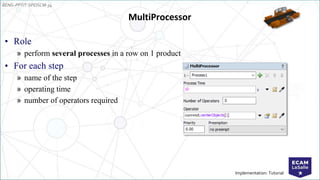
MultiProcessor
• Role
» perform several processes in a row on 1 product
• For each step
» name of the step
» operating time
» number of operators required
EENG-PPT/T-SPEISCM-34
Implementation: Tutorial
End of the training... and after?
• Ways to continue to progress
» in autonomy
• tutorials: menu Help > User Manual
• forum: answers.flexsim.com
» in accompaniment
• technical support: support@flexsim.fr, +33 (0)9 70 406 405
● Tutoriel 21.0: https://tutoriels.flexsim.fr/21.0/
● Tutoriel 21.1: https://tutoriels.flexsim.fr/21.1/
EENG-PPT/T-SPEISCM-34
Implementation: Tutorial 69
Deliverables for your
project
To be presented in the report:
● Update your manufacturing plant (flow and 3d model) with new
technologies 4.0 (robot, agv, …)
EENG-PPT/T-SPEISCM-34
Implementation: Tutorial
THANKS FOR YOUR
ATTENTION
ECAM LASALLE - Engineering school since 1900
40, montée Saint-Barthélemy - 69321 LYON cedex 05 N° : 04 72 77 06 00 - info@ecam.fr
ECAM LASALLE - PÔLE C2MI
70

FLexsim 2 Car vehicle automotive engine.pptx