Presenter: Kartik Iyer
MetaCAM Enterprise is an Integrated Production
Environment (IPE) that manages and automates
production from a single window
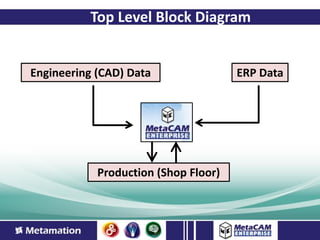
Top Level Block Diagram


Engineering (CAD) Data                ERP Data


            Production (Shop Floor)
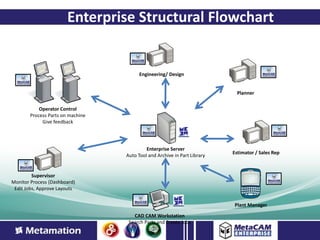
Enterprise Structural Flowchart


                                        Engineering/ Design


                                                                            Planner


           Operator Control
       Process Parts on machine
            Give feedback


                                           Enterprise Server
                                                                          Estimator / Sales Rep
                                  Auto Tool and Archive in Part Library


         Supervisor
Monitor Process (Dashboard)
 Edit Jobs, Approve Layouts


                                                                          Plant Manager

                                     CAD CAM Workstation
                                   Search Parts and Create Jobs
Traditional Part Tooling Process


• Involves a Trained Programmer
Limitations
• Programmer manually programs the part
• Repetitive tasks that can often result in errors
• Time consuming process
• Often a specialist skill developed creates
  dependencies
• 9 -5, M – F, not a lights out process
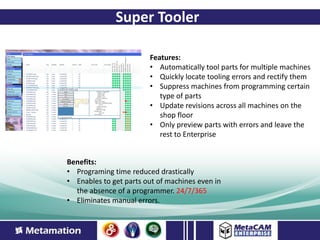
Super Tooler

                        Features:
                        • Automatically tool parts for multiple machines
                        • Quickly locate tooling errors and rectify them
                        • Suppress machines from programming certain
                           type of parts
                        • Update revisions across all machines on the
                           shop floor
                        • Only preview parts with errors and leave the
                           rest to Enterprise


Benefits:
• Programing time reduced drastically
• Enables to get parts out of machines even in
  the absence of a programmer. 24/7/365
• Eliminates manual errors.
Traditional File Storage

• On windows file servers
Limitations
• Slow Access
• Large Volumes of Data
• Opening a CAM file can take up to a few
  minutes.
• Sometimes searching for the file takes longer
  than actual tooling time.
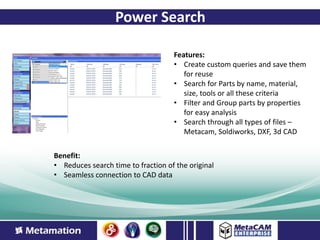
Power Search

                                    Features:
                                    • Create custom queries and save them
                                       for reuse
                                    • Search for Parts by name, material,
                                       size, tools or all these criteria
                                    • Filter and Group parts by properties
                                       for easy analysis
                                    • Search through all types of files –
                                       Metacam, Soldiworks, DXF, 3d CAD


Benefit:
• Reduces search time to fraction of the original
• Seamless connection to CAD data
Traditional Revision Tracking

• Mostly non-existant in CAM systems
• Driven by the CAD software

Limitations
• History of old data unavailable
• Difficult to spot the changes
• Redo complex manual tooling with every tool
  change
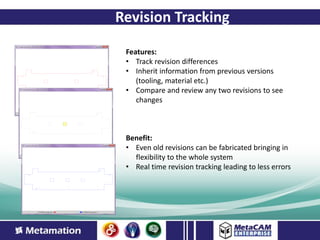
Revision Tracking

 Features:
 • Track revision differences
 • Inherit information from previous versions
    (tooling, material etc.)
 • Compare and review any two revisions to see
    changes


 Benefit:
 • Even old revisions can be fabricated bringing in
   flexibility to the whole system
 • Real time revision tracking leading to less errors
Traditional Operator Interface
• Paper packets with job information

Limitations
• Limited Data with limited detail
• Wastage of large amounts of paper
• Difficult to search through completed jobs or
  in process jobs.
• No graphical or video priviews.
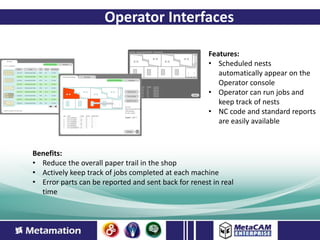
Operator Interfaces

                                                      Features:
                                                      • Scheduled nests
                                                         automatically appear on the
                                                         Operator console
                                                      • Operator can run jobs and
                                                         keep track of nests
                                                      • NC code and standard reports
                                                         are easily available


Benefits:
• Reduce the overall paper trail in the shop
• Actively keep track of jobs completed at each machine
• Error parts can be reported and sent back for renest in real
  time
Traditional Scheduler Interface


• Performed by planning department

Limitations
• Involves several levels of human verification.
• Unsure of reliability of data.
• Difficult to get a overview of total picture
• Data is not real time.
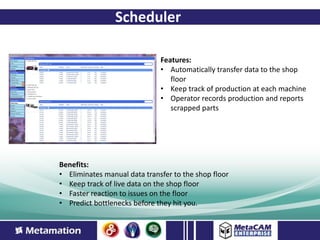
Scheduler

                              Features:
                              • Automatically transfer data to the shop
                                 floor
                              • Keep track of production at each machine
                              • Operator records production and reports
                                 scrapped parts


Benefits:
• Eliminates manual data transfer to the shop floor
• Keep track of live data on the shop floor
• Faster reaction to issues on the floor
• Predict bottlenecks before they hit you.
Traditional Design Data


• Independent department with less to do with
  production

Limitations
• Design changes take time to propagate to the
  floor.
• Disconnect between manufacturing and
  design.
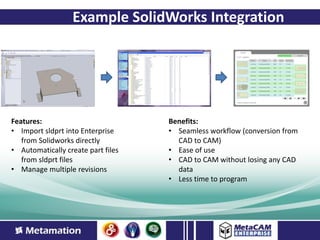
Example SolidWorks Integration


Features:                           Benefits:
• Import sldprt into Enterprise     • Seamless workflow (conversion from
   from Solidworks directly           CAD to CAM)
• Automatically create part files   • Ease of use
   from sldprt files                • CAD to CAM without losing any CAD
• Manage multiple revisions           data
                                    • Less time to program
Traditional Data Analysis


• Typically no data recorded results hence no
  data analysis.

Limitations
• Unable to identify bottlenecks
• Results in lower productivity
• Dependent on feedback from the floor that is
  not reliable.
Enterprise – Next Step


• Operator Console - Press Brakes
  – Flat Development View
  – Press Brake program / Simulation
  – Track the production status by work cell.
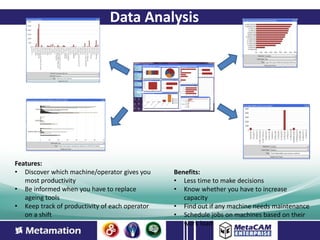
Data Analysis


Features:
• Discover which machine/operator gives you     Benefits:
   most productivity                            • Less time to make decisions
• Be informed when you have to replace          • Know whether you have to increase
   ageing tools                                    capacity
• Keep track of productivity of each operator   • Find out if any machine needs maintenance
   on a shift                                   • Schedule jobs on machines based on their
                                                   work load
THANK YOU
Website: www.metamation.com
Youtube: www.youtube.com/user/metacamenterprise
Google+: plus.google.com/110284986567071464417

1698 Meadow Wood Lane,                15, Medavakkam Road, Shollinganallur,
Suite 202, Reno, NV 89502, USA        Chennai – 600 119, Tamilnadu, India
P (775) 826-1717 | F (775) 826-1723   P (91)44-24506030 | F (91) 44-2450 6113
E sales@metamation-us.com             E sales@metamation-us.com

Enterprise presentation

  • 1.
  • 2.
    MetaCAM Enterprise isan Integrated Production Environment (IPE) that manages and automates production from a single window
  • 3.
    Top Level BlockDiagram Engineering (CAD) Data ERP Data Production (Shop Floor)
  • 4.
    Enterprise Structural Flowchart Engineering/ Design Planner Operator Control Process Parts on machine Give feedback Enterprise Server Estimator / Sales Rep Auto Tool and Archive in Part Library Supervisor Monitor Process (Dashboard) Edit Jobs, Approve Layouts Plant Manager CAD CAM Workstation Search Parts and Create Jobs
  • 5.
    Traditional Part ToolingProcess • Involves a Trained Programmer Limitations • Programmer manually programs the part • Repetitive tasks that can often result in errors • Time consuming process • Often a specialist skill developed creates dependencies • 9 -5, M – F, not a lights out process
  • 6.
    Super Tooler Features: • Automatically tool parts for multiple machines • Quickly locate tooling errors and rectify them • Suppress machines from programming certain type of parts • Update revisions across all machines on the shop floor • Only preview parts with errors and leave the rest to Enterprise Benefits: • Programing time reduced drastically • Enables to get parts out of machines even in the absence of a programmer. 24/7/365 • Eliminates manual errors.
  • 7.
    Traditional File Storage •On windows file servers Limitations • Slow Access • Large Volumes of Data • Opening a CAM file can take up to a few minutes. • Sometimes searching for the file takes longer than actual tooling time.
  • 8.
    Power Search Features: • Create custom queries and save them for reuse • Search for Parts by name, material, size, tools or all these criteria • Filter and Group parts by properties for easy analysis • Search through all types of files – Metacam, Soldiworks, DXF, 3d CAD Benefit: • Reduces search time to fraction of the original • Seamless connection to CAD data
  • 9.
    Traditional Revision Tracking •Mostly non-existant in CAM systems • Driven by the CAD software Limitations • History of old data unavailable • Difficult to spot the changes • Redo complex manual tooling with every tool change
  • 10.
    Revision Tracking Features: • Track revision differences • Inherit information from previous versions (tooling, material etc.) • Compare and review any two revisions to see changes Benefit: • Even old revisions can be fabricated bringing in flexibility to the whole system • Real time revision tracking leading to less errors
  • 11.
    Traditional Operator Interface •Paper packets with job information Limitations • Limited Data with limited detail • Wastage of large amounts of paper • Difficult to search through completed jobs or in process jobs. • No graphical or video priviews.
  • 12.
    Operator Interfaces Features: • Scheduled nests automatically appear on the Operator console • Operator can run jobs and keep track of nests • NC code and standard reports are easily available Benefits: • Reduce the overall paper trail in the shop • Actively keep track of jobs completed at each machine • Error parts can be reported and sent back for renest in real time
  • 13.
    Traditional Scheduler Interface •Performed by planning department Limitations • Involves several levels of human verification. • Unsure of reliability of data. • Difficult to get a overview of total picture • Data is not real time.
  • 14.
    Scheduler Features: • Automatically transfer data to the shop floor • Keep track of production at each machine • Operator records production and reports scrapped parts Benefits: • Eliminates manual data transfer to the shop floor • Keep track of live data on the shop floor • Faster reaction to issues on the floor • Predict bottlenecks before they hit you.
  • 15.
    Traditional Design Data •Independent department with less to do with production Limitations • Design changes take time to propagate to the floor. • Disconnect between manufacturing and design.
  • 16.
    Example SolidWorks Integration Features: Benefits: • Import sldprt into Enterprise • Seamless workflow (conversion from from Solidworks directly CAD to CAM) • Automatically create part files • Ease of use from sldprt files • CAD to CAM without losing any CAD • Manage multiple revisions data • Less time to program
  • 17.
    Traditional Data Analysis •Typically no data recorded results hence no data analysis. Limitations • Unable to identify bottlenecks • Results in lower productivity • Dependent on feedback from the floor that is not reliable.
  • 18.
    Enterprise – NextStep • Operator Console - Press Brakes – Flat Development View – Press Brake program / Simulation – Track the production status by work cell.
  • 19.
    Data Analysis Features: • Discoverwhich machine/operator gives you Benefits: most productivity • Less time to make decisions • Be informed when you have to replace • Know whether you have to increase ageing tools capacity • Keep track of productivity of each operator • Find out if any machine needs maintenance on a shift • Schedule jobs on machines based on their work load
  • 20.
    THANK YOU Website: www.metamation.com Youtube:www.youtube.com/user/metacamenterprise Google+: plus.google.com/110284986567071464417 1698 Meadow Wood Lane, 15, Medavakkam Road, Shollinganallur, Suite 202, Reno, NV 89502, USA Chennai – 600 119, Tamilnadu, India P (775) 826-1717 | F (775) 826-1723 P (91)44-24506030 | F (91) 44-2450 6113 E sales@metamation-us.com E sales@metamation-us.com