FLAVOURS
BDD Flavours (Cucumber/Gherkin)/Karate
D. Harrison
March 2021
© 2021, David Harrison, All Rights Reserved
Table of
CONTENTS
Introduction.............................................................................1
The Classic Form ......................................................................2
The Technical Form ..................................................................5
Test Runner.............................................................................8
Test Execution .........................................................................9
Remarks ............................................................................... 11
INTRODUCTION
Behaviour Driven Development [here], which in the case of test automation
might be better termed Behaviour Driven Test Automation (BDTA), relies on the
use of a spoken language-style set of statements as the starting point in the
development of tests for an application.
However, in today’s landscape of test automation there appears to be two
flavours of BTDA; one that can usefully be termed the Classic, and one that
might be termed Technical.
The fundamental technology in both cases is the use of the Gherkin [here]
language to describe a unit of testing, a Scenario, which in the case of the
classic form, via a Step Definition file, enact the appropriate actions and
validations. In the technical form no such code-behind is required.
In the Java world this Gherkin language form is hosted in an environment called
Cucumber [here]. Alternatively, in the C# world this Gherkin syntax is hosted in
an environment called SpecFlow [here].
The technical form of BDD is exemplified by the tests written using the Karate
framework [here]. This framework can be used in both Java (IntelliJ) [here] and
C# (VSCode) [here] development environments.
Let us look at these two BDD forms, in the context of crud operations in a
target application and identify and compare their key characteristics.
2
The Classic Form
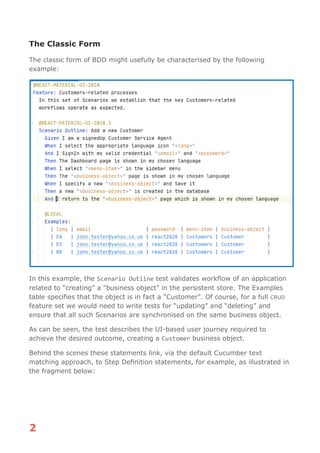
The classic form of BDD might usefully be characterised by the following
example:
In this example, the Scenario Outline test validates workflow of an application
related to “creating” a “business object” in the persistent store. The Examples
table specifies that the object is in fact a “Customer”. Of course, for a full CRUD
feature set we would need to write tests for “updating” and “deleting” and
ensure that all such Scenarios are synchronised on the same business object.
As can be seen, the test describes the UI-based user journey required to
achieve the desired outcome, creating a Customer business object.
Behind the scenes these statements link, via the default Cucumber text
matching approach, to Step Definition statements, for example, as illustrated in
the fragment below:
3
The solution shown here reflects the pattern described in the earlier article “UI
Testing Pattern” [here].
The testing focusses on the user workflow to assert that a “business-object” has
been successfully added to the persistent store of the application. The assertion
necessarily needs to be made in the “@After” method associated with the
4
executing Cucumber test and uses a utility class to query the back-end
database for a specific entry, the details of which are held in the
testContextJava object.
Further Scenarios will necessarily need to be written to cover the workflows
associated with the update and delete aspects of “CRUD”. These additional
Scenarios would need to be synchronised to focus on the appropriate common
data. As normal in testing we should aim to delete what we add to a system
when we test.
In the target application the front end is connected to the back end via RESTful
services, so, given this, we could assert the correctness of this business
operation in a more fundamental way than that offered by exercising the front-
end – enter Karate and API testing.
5
The Technical Form
The technical form of BDD is characterised by tests written using the Karate
framework [here]. The focus of Karate is to permit fast and consistent testing of
APIs and has the bonus that it does not require code-behind Step Definitions to
be written. It should be noted that this framework cannot co-exist with the
classic form in a project.
We will be using the backend RESTful API of the application that was used
above and that was introduced in “UI Testing Pattern” [here], as the basis of
our tests. Specifically, we will look at the CRUD operation for the Customer
business object.
An example Karate test is as shown below, testing the CRUD operations
associated with “customers”:
6
7
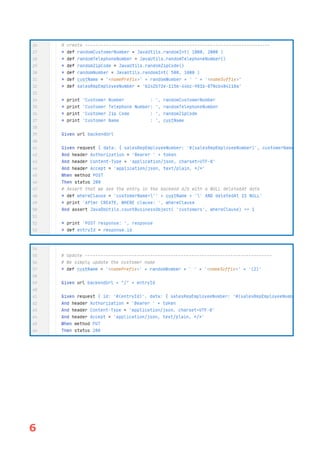
Here we see a Feature, “Customers-related CRUD process”, together with a
Background section and single Scenario Outline “Customers CRUD operations”, in
which the (create/update/delete) operations offered by a RESTful API are being
exercised. This API is one of those offered by the backend of the application
introduced in the article “UI Testing Pattern” [here]. In this API it is necessary
to firstly get an identity token which will be used in the header of subsequent
calls, and this is what is happening in the initial block (lines 14-24). Once this
is obtained, it is used as a “bearer” token in the header of the “create” call
configured and initiated in the following block (lines 27-53).
We then see a block that performs the “update” action (lines 54-66) followed
by one that performs the “delete” (lines 68-86).
In lines 27-30 it should be noted how we make use of Karate’s Java interop
mechanism to construct random data for our Customers object. The class,
JavaUtils, is in the Karate project and provides a range of static helper
methods.
In line 50, 80 and 85 we use another supporting Java type, JavaDbUtils, which
provides database-related methods, to enable assertions to be made related to
record counting as well as table entry deletion. It should be noted that the
application currently only marks “deleted” table entries with a non-null
8
deletedAt field value corresponding to the (GMT) delete-time. To actually clean
up after our test we need to perform a SQL delete operation with an
appropriate where clause.
In this test we see keywords like “Given”, “And”, “When” and “Then”, echoing the
classic BDD form, but now they act as prefixes to more technically focused
statements. No code-behind is needed in order to have a functioning test case.
We can also see how the “* def”, definitional statement is quite prevalent,
setting up the various data elements used in requests and so on.
In our case, using the business object Customers, the API does not provide data
in the responses, hence we do not need to use the powerful matcher
capabilities of the framework to assert the correctness of response fields.
However, we do need to assert that the “create” and “delete” work as expected,
we do not want to just rely on getting an API success status. In these cases, as
noted earlier, we use, special Java types to directly query the backend database
and ensure that these operations are indeed successful.
Test Runner
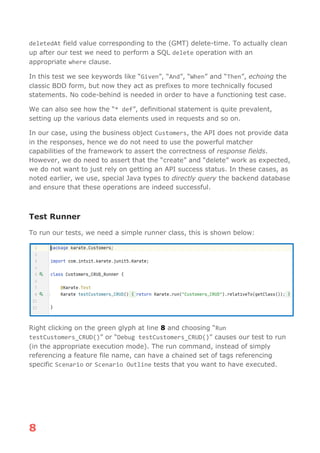
To run our tests, we need a simple runner class, this is shown below:
Right clicking on the green glyph at line 8 and choosing “Run
testCustomers_CRUD()” or “Debug testCustomers_CRUD()” causes our test to run
(in the appropriate execution mode). The run command, instead of simply
referencing a feature file name, can have a chained set of tags referencing
specific Scenario or Scenario Outline tests that you want to have executed.
9
Test Execution
The tests as shown here where developed and run within the IntelliJ IDE. In the
console, the most basic form of test output, we see:
20:36:22.390 [main] INFO com.intuit.karate - [print] Token URL: http://localhost:8080/api/auth/sign-in
20:36:23.734 [main] INFO com.intuit.karate - [print] Token rqst response:
eyJhbGciOiJIUzI1NiIsInR5cCI6IkpXVCJ9.eyJpZCI6ImIyNGI4YTQwLWE1MmItNDIxNi05MmZmLWZhYjYwMmNhNTZjMiIsImlhdCI6MTYxO
TExNjU4MywiZXhwIjoxNjE5NzIxMzgzfQ.UpAmVLfCV4zkZkX42ttr4rkvZofHSVrDX4EpPhvacos
20:36:23.777 [main] INFO com.intuit.karate - [print] Customer Number : 1258
20:36:23.780 [main] INFO com.intuit.karate - [print] Customer Telephone Number: 0048596849309
20:36:23.782 [main] INFO com.intuit.karate - [print] Customer Zip Code : 4331
20:36:23.786 [main] INFO com.intuit.karate - [print] Customer Name : Harrison Models635 AG
20:36:24.038 [main] INFO com.intuit.karate - [print] After CREATE, WHERE clause: customerName='Harrison
Models635 AG' AND deletedAt IS NULL
20:36:25.117 [main] INFO com.intuit.karate - [print] POST response: {
"country": "Switzerland",
"city": "Elgg",
"contactFirstName": "David",
"postalCode": "4331",
"salesRepEmployeeNumber": {
"officeCodeId": null,
"lastName": "Jones",
"extension": null,
"jobTitle": null,
"reportsToId": null,
"updatedById": "b24b8a40-a52b-4216-92ff-fab602ca56c2",
"employeeNumber": 1504,
"firstName": "Barry",
"createdAt": "2021-04-21T13:45:19.000Z",
"deletedAt": null,
"importHash": null,
"tenantId": "7c4ac4a7-c1ad-4e02-b3ff-974693ae8719",
"id": "b242b72e-115e-44bc-981b-870cb404118a",
"email": null,
"createdById": "b24b8a40-a52b-4216-92ff-fab602ca56c2",
"updatedAt": "2021-04-21T13:45:19.000Z"
},
"customerNumber": 1258,
"updatedById": "b24b8a40-a52b-4216-92ff-fab602ca56c2",
"customerName": "Harrison Models635 AG",
"createdAt": "2021-04-22T18:36:23.000Z",
"deletedAt": null,
"importHash": null,
"phone": "0048596849309",
"salesRepEmployeeNumberId": "b242b72e-115e-44bc-981b-870cb404118a",
"tenantId": "7c4ac4a7-c1ad-4e02-b3ff-974693ae8719",
"addressLine1": "Stutzstrasse 10a",
"creditLimit": "3500.00",
"addressLine2": null,
"id": "5ad1e62f-5676-4258-805a-6dd0b8fdcf28",
"state": "Zurich",
"createdById": "b24b8a40-a52b-4216-92ff-fab602ca56c2",
"updatedAt": "2021-04-22T18:36:23.000Z"
}
20:36:25.547 [main] INFO com.intuit.karate - [print] After DELETE(1), WHERE clause: customerName='Harrison
Models635 AG(2)' AND deletedAt IS NOT NULL
20:36:25.623 [main] INFO com.intuit.karate - [print] After DELETE(2), WHERE clause: customerName='Harrison
Models635 AG(2)'
---------------------------------------------------------
feature: classpath:karate/Customers/Customers_CRUD.feature
scenarios: 1 | passed: 1 | failed: 0 | time: 3.2691
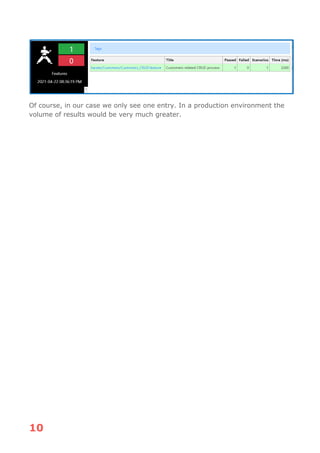
However, as with the classic BDD form, Karate produces an HTML report which
is referenced in the console and this looks much more visual:
10
Of course, in our case we only see one entry. In a production environment the
volume of results would be very much greater.
11
Remarks
We have shown how the two forms of BDD style, classic and technical, can be
used for automated testing. The two forms apply in quite distinct areas of
testing, one, the classic, is particularly good at expressing business-level
workflow, user-journeys. The technical form, on the other hand, is particularly
good at the testing of APIs, whether SOAP or RESTful. It can also be used for
testing GraphQL [here] interfaces. Its use of the Cucumber/Gherkin keywords is
rather a case of syntactic sugar and should not be taken to indicate any wider
conformity with the classic approach.
We have shown how identity tokens, required as part of the header in each API
call, can be handled as well as how Java types can be factored into a test case,
thus providing more complex operations than offered by the framework. As well
as RESTful, SOAP APIs and GraphQL, Karate has been extended to provide
testing support for gRPC interfaces [here]. This topic will be specifically covered
in a later article.
The two approaches complement each other perfectly – a great pair of tools for
any test automation toolbox.

Flavours - Classic/Technical BDD

  • 1.
    FLAVOURS BDD Flavours (Cucumber/Gherkin)/Karate D.Harrison March 2021 © 2021, David Harrison, All Rights Reserved
  • 2.
    Table of CONTENTS Introduction.............................................................................1 The ClassicForm ......................................................................2 The Technical Form ..................................................................5 Test Runner.............................................................................8 Test Execution .........................................................................9 Remarks ............................................................................... 11
  • 3.
    INTRODUCTION Behaviour Driven Development[here], which in the case of test automation might be better termed Behaviour Driven Test Automation (BDTA), relies on the use of a spoken language-style set of statements as the starting point in the development of tests for an application. However, in today’s landscape of test automation there appears to be two flavours of BTDA; one that can usefully be termed the Classic, and one that might be termed Technical. The fundamental technology in both cases is the use of the Gherkin [here] language to describe a unit of testing, a Scenario, which in the case of the classic form, via a Step Definition file, enact the appropriate actions and validations. In the technical form no such code-behind is required. In the Java world this Gherkin language form is hosted in an environment called Cucumber [here]. Alternatively, in the C# world this Gherkin syntax is hosted in an environment called SpecFlow [here]. The technical form of BDD is exemplified by the tests written using the Karate framework [here]. This framework can be used in both Java (IntelliJ) [here] and C# (VSCode) [here] development environments. Let us look at these two BDD forms, in the context of crud operations in a target application and identify and compare their key characteristics.
  • 4.
    2 The Classic Form Theclassic form of BDD might usefully be characterised by the following example: In this example, the Scenario Outline test validates workflow of an application related to “creating” a “business object” in the persistent store. The Examples table specifies that the object is in fact a “Customer”. Of course, for a full CRUD feature set we would need to write tests for “updating” and “deleting” and ensure that all such Scenarios are synchronised on the same business object. As can be seen, the test describes the UI-based user journey required to achieve the desired outcome, creating a Customer business object. Behind the scenes these statements link, via the default Cucumber text matching approach, to Step Definition statements, for example, as illustrated in the fragment below:
  • 5.
    3 The solution shownhere reflects the pattern described in the earlier article “UI Testing Pattern” [here]. The testing focusses on the user workflow to assert that a “business-object” has been successfully added to the persistent store of the application. The assertion necessarily needs to be made in the “@After” method associated with the
  • 6.
    4 executing Cucumber testand uses a utility class to query the back-end database for a specific entry, the details of which are held in the testContextJava object. Further Scenarios will necessarily need to be written to cover the workflows associated with the update and delete aspects of “CRUD”. These additional Scenarios would need to be synchronised to focus on the appropriate common data. As normal in testing we should aim to delete what we add to a system when we test. In the target application the front end is connected to the back end via RESTful services, so, given this, we could assert the correctness of this business operation in a more fundamental way than that offered by exercising the front- end – enter Karate and API testing.
  • 7.
    5 The Technical Form Thetechnical form of BDD is characterised by tests written using the Karate framework [here]. The focus of Karate is to permit fast and consistent testing of APIs and has the bonus that it does not require code-behind Step Definitions to be written. It should be noted that this framework cannot co-exist with the classic form in a project. We will be using the backend RESTful API of the application that was used above and that was introduced in “UI Testing Pattern” [here], as the basis of our tests. Specifically, we will look at the CRUD operation for the Customer business object. An example Karate test is as shown below, testing the CRUD operations associated with “customers”:
  • 8.
  • 9.
    7 Here we seea Feature, “Customers-related CRUD process”, together with a Background section and single Scenario Outline “Customers CRUD operations”, in which the (create/update/delete) operations offered by a RESTful API are being exercised. This API is one of those offered by the backend of the application introduced in the article “UI Testing Pattern” [here]. In this API it is necessary to firstly get an identity token which will be used in the header of subsequent calls, and this is what is happening in the initial block (lines 14-24). Once this is obtained, it is used as a “bearer” token in the header of the “create” call configured and initiated in the following block (lines 27-53). We then see a block that performs the “update” action (lines 54-66) followed by one that performs the “delete” (lines 68-86). In lines 27-30 it should be noted how we make use of Karate’s Java interop mechanism to construct random data for our Customers object. The class, JavaUtils, is in the Karate project and provides a range of static helper methods. In line 50, 80 and 85 we use another supporting Java type, JavaDbUtils, which provides database-related methods, to enable assertions to be made related to record counting as well as table entry deletion. It should be noted that the application currently only marks “deleted” table entries with a non-null
  • 10.
    8 deletedAt field valuecorresponding to the (GMT) delete-time. To actually clean up after our test we need to perform a SQL delete operation with an appropriate where clause. In this test we see keywords like “Given”, “And”, “When” and “Then”, echoing the classic BDD form, but now they act as prefixes to more technically focused statements. No code-behind is needed in order to have a functioning test case. We can also see how the “* def”, definitional statement is quite prevalent, setting up the various data elements used in requests and so on. In our case, using the business object Customers, the API does not provide data in the responses, hence we do not need to use the powerful matcher capabilities of the framework to assert the correctness of response fields. However, we do need to assert that the “create” and “delete” work as expected, we do not want to just rely on getting an API success status. In these cases, as noted earlier, we use, special Java types to directly query the backend database and ensure that these operations are indeed successful. Test Runner To run our tests, we need a simple runner class, this is shown below: Right clicking on the green glyph at line 8 and choosing “Run testCustomers_CRUD()” or “Debug testCustomers_CRUD()” causes our test to run (in the appropriate execution mode). The run command, instead of simply referencing a feature file name, can have a chained set of tags referencing specific Scenario or Scenario Outline tests that you want to have executed.
  • 11.
    9 Test Execution The testsas shown here where developed and run within the IntelliJ IDE. In the console, the most basic form of test output, we see: 20:36:22.390 [main] INFO com.intuit.karate - [print] Token URL: http://localhost:8080/api/auth/sign-in 20:36:23.734 [main] INFO com.intuit.karate - [print] Token rqst response: eyJhbGciOiJIUzI1NiIsInR5cCI6IkpXVCJ9.eyJpZCI6ImIyNGI4YTQwLWE1MmItNDIxNi05MmZmLWZhYjYwMmNhNTZjMiIsImlhdCI6MTYxO TExNjU4MywiZXhwIjoxNjE5NzIxMzgzfQ.UpAmVLfCV4zkZkX42ttr4rkvZofHSVrDX4EpPhvacos 20:36:23.777 [main] INFO com.intuit.karate - [print] Customer Number : 1258 20:36:23.780 [main] INFO com.intuit.karate - [print] Customer Telephone Number: 0048596849309 20:36:23.782 [main] INFO com.intuit.karate - [print] Customer Zip Code : 4331 20:36:23.786 [main] INFO com.intuit.karate - [print] Customer Name : Harrison Models635 AG 20:36:24.038 [main] INFO com.intuit.karate - [print] After CREATE, WHERE clause: customerName='Harrison Models635 AG' AND deletedAt IS NULL 20:36:25.117 [main] INFO com.intuit.karate - [print] POST response: { "country": "Switzerland", "city": "Elgg", "contactFirstName": "David", "postalCode": "4331", "salesRepEmployeeNumber": { "officeCodeId": null, "lastName": "Jones", "extension": null, "jobTitle": null, "reportsToId": null, "updatedById": "b24b8a40-a52b-4216-92ff-fab602ca56c2", "employeeNumber": 1504, "firstName": "Barry", "createdAt": "2021-04-21T13:45:19.000Z", "deletedAt": null, "importHash": null, "tenantId": "7c4ac4a7-c1ad-4e02-b3ff-974693ae8719", "id": "b242b72e-115e-44bc-981b-870cb404118a", "email": null, "createdById": "b24b8a40-a52b-4216-92ff-fab602ca56c2", "updatedAt": "2021-04-21T13:45:19.000Z" }, "customerNumber": 1258, "updatedById": "b24b8a40-a52b-4216-92ff-fab602ca56c2", "customerName": "Harrison Models635 AG", "createdAt": "2021-04-22T18:36:23.000Z", "deletedAt": null, "importHash": null, "phone": "0048596849309", "salesRepEmployeeNumberId": "b242b72e-115e-44bc-981b-870cb404118a", "tenantId": "7c4ac4a7-c1ad-4e02-b3ff-974693ae8719", "addressLine1": "Stutzstrasse 10a", "creditLimit": "3500.00", "addressLine2": null, "id": "5ad1e62f-5676-4258-805a-6dd0b8fdcf28", "state": "Zurich", "createdById": "b24b8a40-a52b-4216-92ff-fab602ca56c2", "updatedAt": "2021-04-22T18:36:23.000Z" } 20:36:25.547 [main] INFO com.intuit.karate - [print] After DELETE(1), WHERE clause: customerName='Harrison Models635 AG(2)' AND deletedAt IS NOT NULL 20:36:25.623 [main] INFO com.intuit.karate - [print] After DELETE(2), WHERE clause: customerName='Harrison Models635 AG(2)' --------------------------------------------------------- feature: classpath:karate/Customers/Customers_CRUD.feature scenarios: 1 | passed: 1 | failed: 0 | time: 3.2691 However, as with the classic BDD form, Karate produces an HTML report which is referenced in the console and this looks much more visual:
  • 12.
    10 Of course, inour case we only see one entry. In a production environment the volume of results would be very much greater.
  • 13.
    11 Remarks We have shownhow the two forms of BDD style, classic and technical, can be used for automated testing. The two forms apply in quite distinct areas of testing, one, the classic, is particularly good at expressing business-level workflow, user-journeys. The technical form, on the other hand, is particularly good at the testing of APIs, whether SOAP or RESTful. It can also be used for testing GraphQL [here] interfaces. Its use of the Cucumber/Gherkin keywords is rather a case of syntactic sugar and should not be taken to indicate any wider conformity with the classic approach. We have shown how identity tokens, required as part of the header in each API call, can be handled as well as how Java types can be factored into a test case, thus providing more complex operations than offered by the framework. As well as RESTful, SOAP APIs and GraphQL, Karate has been extended to provide testing support for gRPC interfaces [here]. This topic will be specifically covered in a later article. The two approaches complement each other perfectly – a great pair of tools for any test automation toolbox.