TYPE LANDSCAPES
Discovering type dependencies with Schema Studio
D. Harrison
January 2024
© 2024, David Harrison, All Rights Reserved
2
CONTENTS
INTRODUCTION........................................................................... 3
LANDSCAPE DISCOVERY............................................................... 3
AN EXAMPLE ............................................................................... 4
SCHEMA STUDIO IMPLEMENTATION............................................... 8
SUMMARY................................................................................. 12
3
INTRODUCTION
In an earlier article1 the broad notion of the generation of a type being related
to a landscape of dependent types, was introduced. Additionally, in the related
articles in the “Xsd Generation” series2, the application Schema Studio was
shown in the context of the overall W3C schema to strong type generation
process.
In a yet more recent article3, where the central topic was the current
refactoring of the processor which forms the central “engine” of Schema
Studio, we delved a little deeper into the type landscape. Having shown the
base generated form of the Open Travel Alliance message definition represented
by OTA_PingRQ (arguably the simplest message in the Open Travel message
ecosystem), the “next step” was touched upon. This involved taking the much
more complex OTA_CancelRQ as the source for further refactoring of the
processor codebase.
As before, for simplicity, we will be taking schema examples from the Open
Travel Alliance4 set as a basis for our journey.
LANDSCAPE DISCOVERY
In the earlier discussion3 about generating the Open Travel type OTA_CancelRQ ,
we set out the range of types that would need to be to hand in order have a
working class representing the message OTA_CancelRQ. The identification of
these dependent types was a manual, tedious and error-prone process.
It is the focus of this article to show the refactoring of the Schema Studio
application itself aiming to provide an automated way of generating a type
dependency tree for any selected top-level item.
The process of discovery is not along the lines adopted for the first pass of the
processor, walking the schema in detail and building a so-called Structure
Element repository. Instead, we take the top-level item and recursively drill
down from this as the root looking for manifest types, thus building a tree of
type names at the different levels It is the types thus identified that must
necessarily be generated to support the execution (and testing) of the specified
top-level item.
1
Generation_XSD_Article.docx (slideshare.net)
2
Generation_XSD_Article - Part 2.pdf (slideshare.net)
3
Processor Refactoring.pdf (slideshare.net)
4
OpenTravel | OpenTravel
4
AN EXAMPLE
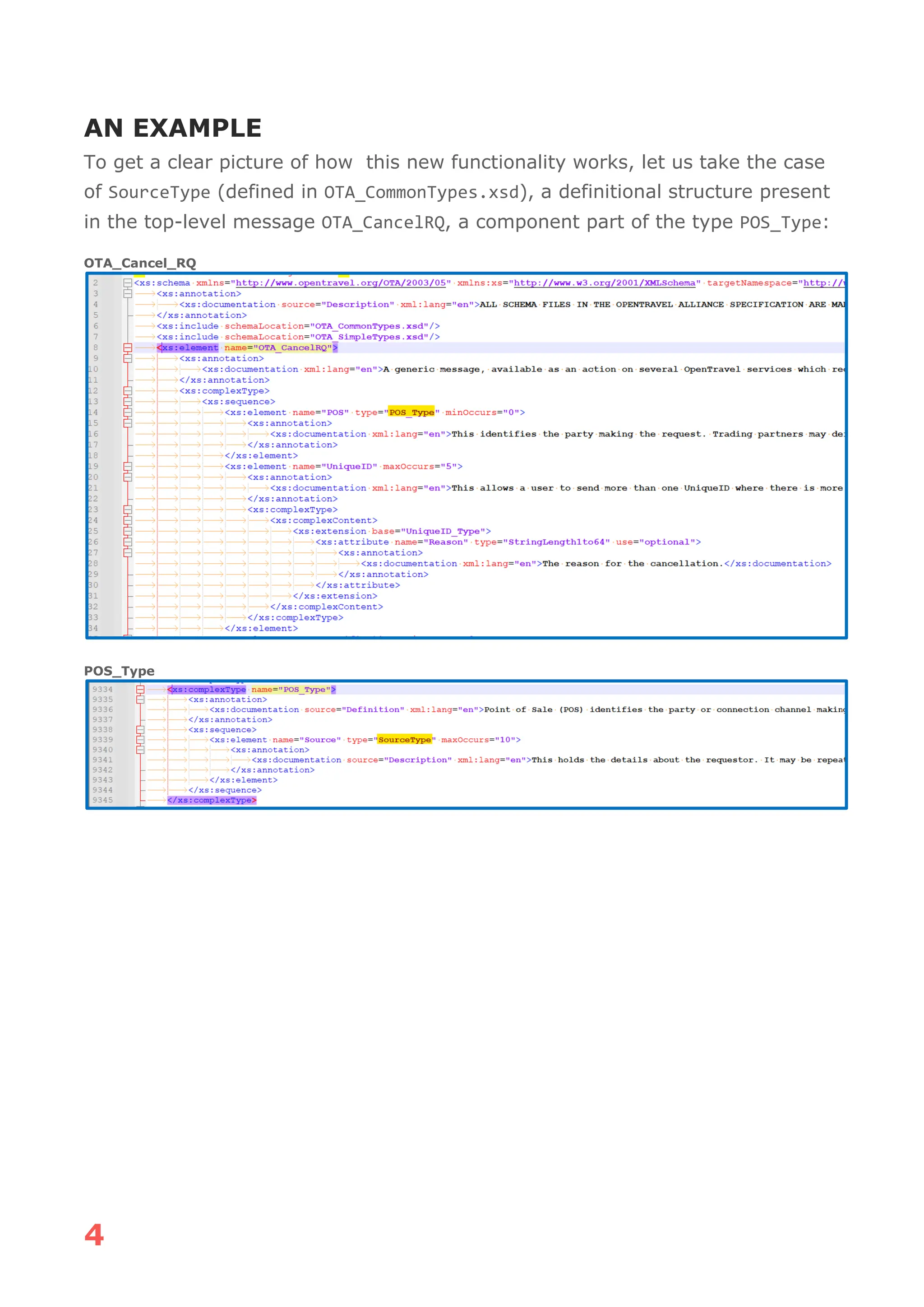
To get a clear picture of how this new functionality works, let us take the case
of SourceType (defined in OTA_CommonTypes.xsd), a definitional structure present
in the top-level message OTA_CancelRQ, a component part of the type POS_Type:
OTA_Cancel_RQ
POS_Type
5
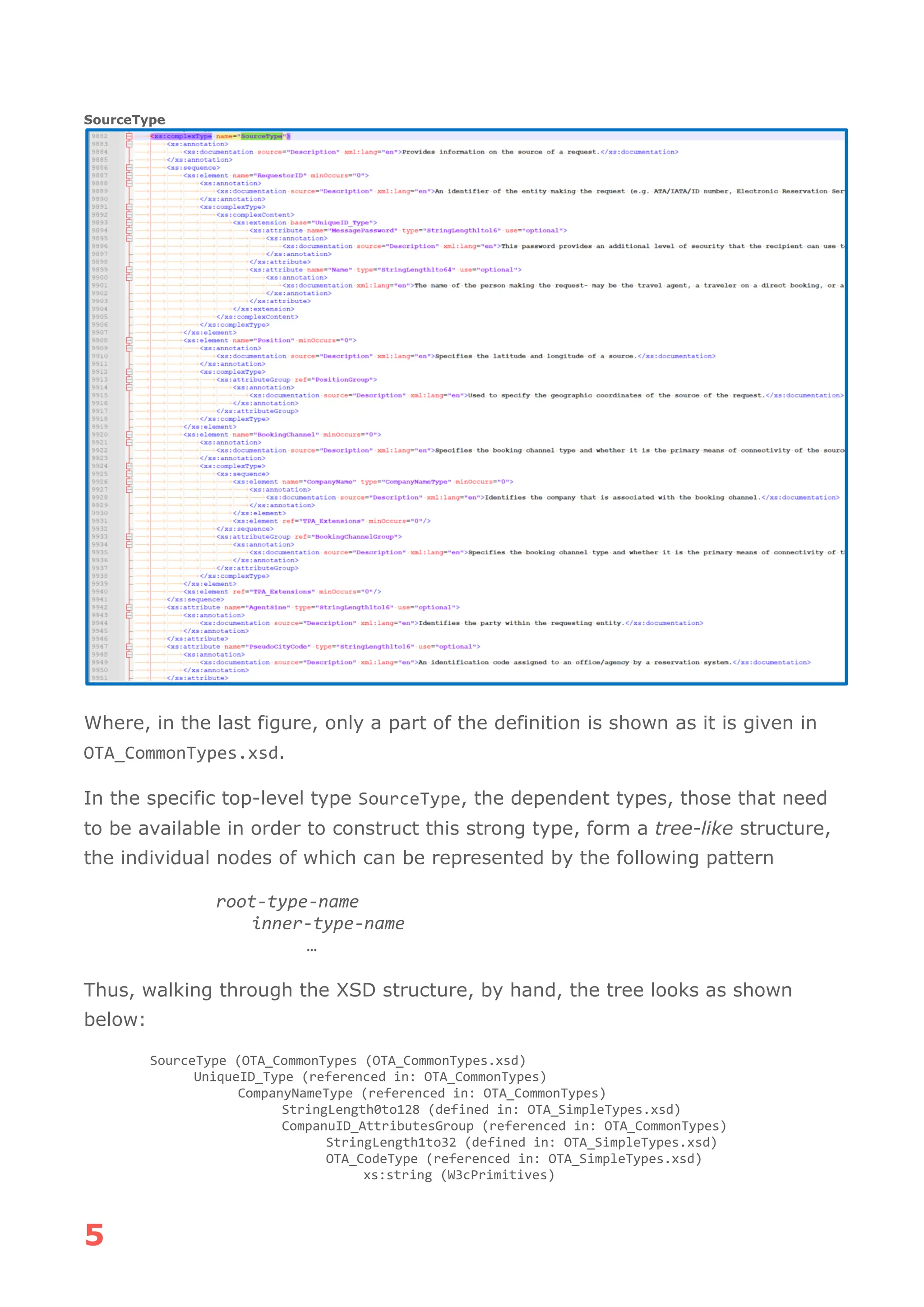
SourceType
Where, in the last figure, only a part of the definition is shown as it is given in
OTA_CommonTypes.xsd.
In the specific top-level type SourceType, the dependent types, those that need
to be available in order to construct this strong type, form a tree-like structure,
the individual nodes of which can be represented by the following pattern
root-type-name
inner-type-name
…
Thus, walking through the XSD structure, by hand, the tree looks as shown
below:
SourceType (OTA_CommonTypes (OTA_CommonTypes.xsd)
UniqueID_Type (referenced in: OTA_CommonTypes)
CompanyNameType (referenced in: OTA_CommonTypes)
StringLength0to128 (defined in: OTA_SimpleTypes.xsd)
CompanuID_AttributesGroup (referenced in: OTA_CommonTypes)
StringLength1to32 (defined in: OTA_SimpleTypes.xsd)
OTA_CodeType (referenced in: OTA_SimpleTypes.xsd)
xs:string (W3cPrimitives)
6
StringLength1to16 (referenced in: OTA_SimpleTypes.xsd)
StringLength1to32 (referenced in: OTA_SimpleTypes.xsd)
ISO3166 (referenced in: OTA_SimpleTypes.xsd)
xs:string (W3cPrimitive)
StringLength1to32 (referenced in: OTA_SimpleTypes.xsd)
TPA_Extensions (referenced in: OTA_CommonTypes.xsd)
TPA_ExtensionsType (defined in: OTA_CommonTypes.xsd)
UniqueID_Group (referenced in: OTA_CommonTypes.xsd)
xs:anyURI (W3cPrimitives)
OTA_CodeType (referenced in: OTA_CommonTypes.xsd)
xs:string (W3cPrimitive)
StringLength1to32 (referenced in: OTA_CommonTypes.xsd)
StringLength1to16 (referenced in: OTA_CommonTypes.xsd)
StringLength1to64 (referenced in: OTA_CommonTypes.xsd)
PositionGroup (referenced in: OTA_CommonTypes.xsd)
StringLength1to16 (referenced in: OTA_CommonTypes.xsd)
OTA_CodeType (referenced in: OTA_SimpleTypes.xsd)
xs:string (W3cPrimitives)
OTA_CodeType (referenced in: OTA_SimpleTypes.xsd)
xs:string (W3cPrimitives)
CompanyNameType (defined in: OTA_CommonTypes.xsd)
StringLength0to128 (defined in: OTA_SimpleTypes.xsd)
CompanyID_AttributesGroup (referenced in: OTA_CommonTypes.xsd)
StringLength1to32 (defined in: OTA_SimpleTypes.xsd)
OTA_CodeType (referenced in: OTA_SimpleTypes.xsd)
xs:string (W3cPrimitives)
StringLength1to16 (defined in: OTA_SimpleTypes.xsd)
StringLength1to32 (defined in: OTA_SimpleTypes.xsd)
ISO3166 (referenced in: OTA_CommonTypes.xsd)
xs:string (W3cPrimitives)
StringLength1to32 (defined in: OTA_SimpleTypes.xsd)
TPA_Extensions (referenced in: OTA_CommonTypes)
TPA_ExtensionsType (defined in: OTA_CommonTypes.xsd)
BookingChannelGoup (referenced in: OTA_CommonTypes)
OTA_ CodeType (referenced in OTA_SimpleTypes.xsd)
xs:string (W3cPrimitives)
xs:Boolean (W3cPrimitives)
TPA_Extensions (referenced in: OTA_CommonTypes)
TPA_ExtensionsType (defined in: OTA_CommonTypes.xsd)
StringLength1to16 (referenced in: OTA_SimpleTypes.xsd)
ISO3166 (referenced in: OTA_SimpleTypes.xsd)
xs:string (W3cPrimitives)
AlphaLength3 (referenced in: OTA_SimpleTypes.xsd)
StringLength1to16 (referenced in: OTA_SimpleTypes.xsd)
UpperCaseAlphaNumericLength2to3 (referenced in: OTA_SimpleTypes.xsd)
UpperCaseAlphaNumericLength3to5 (referenced in: OTA_SimpleTypes.xsd)
StringLength3 (referenced in: OTA_SimpleTypes.xsd)
StringLength1to16 (referenced in: OTA_SimpleTypes.xsd)
StringLength1to32 (referenced in: OTA_SimpleTypes.xsd)
The structure above contains a range of repeated types, such as
StringLength1to16, OTA_CodeType and TPA_Extensions. In addition, the structure
contains the W3c primitives, such as xs:boolean and xs:string, these having
concrete implementations named W3cBoolean and W3cString, respectively, in the
type landscape within the scope of Schema Studio.
7
The types specified in SourceType can be found either in OTA_CommonTypes.xsd,
or any of the “include” files, OTA_SimpleTypes.xsd or OTA_Lists.xsd. The
discovery algorithm needs to take account of this possibility and move through
the changing “include” landscape when a named type cannot be found in the
schema currently in scope.
It is the types shown in this diagram that need to have their equivalent strong
type generated and available, to fully build (and test) the single part of
OTA_CancelRQ, SourceType.
Having such a dependency list, related to any top-level type of interest, the
user of Schema Studio can optimise the work of code generation. Rather than
generate all the types defined in a schema set or silo, it is now possible to be
more efficient.
In practice, this need to be selective of types when performing a generation
step might be as a response to changes within individual schemas, in which
case many of the dependent strong types will already exist in the scope of a
development process.
However, the above diagram was a result of manually walking the type of
interest and drilling down until a “leaf” type was reached. This is a tedious and
error-prone process. Schema Studio, thankfully, has the functionality to
produce this type landscape for us.
8
Schema Studio Implementation
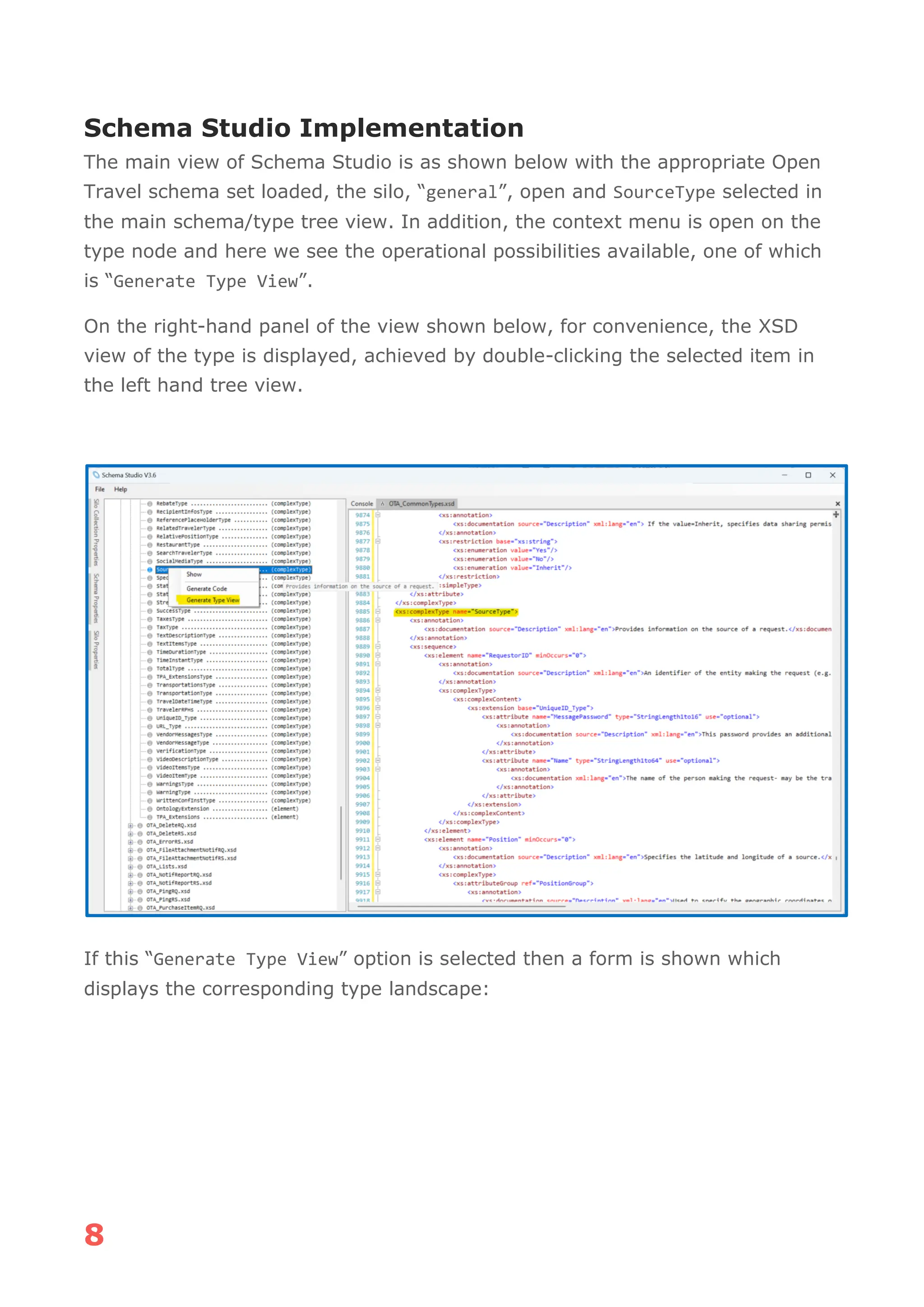
The main view of Schema Studio is as shown below with the appropriate Open
Travel schema set loaded, the silo, “general”, open and SourceType selected in
the main schema/type tree view. In addition, the context menu is open on the
type node and here we see the operational possibilities available, one of which
is “Generate Type View”.
On the right-hand panel of the view shown below, for convenience, the XSD
view of the type is displayed, achieved by double-clicking the selected item in
the left hand tree view.
If this “Generate Type View” option is selected then a form is shown which
displays the corresponding type landscape:
9
In this panel view, the landscape, as in our manual diagram, is shown as a tree
with each node having a checkbox. This allows the user to record which types
have been generated. The panel also has a button which allows the tree view to
be fully expanded (as in the above view). Additionally, the user can signal that
all child nodes are to be checked, via the “Auto check child nodes” checkbox.
When checked, and the “UniqueD_Type” tree node checkbox is checked (and
“expand all” is checked):
10
The diagram can be saved and re-loaded via the buttons on the right hand
panel. It should be noted that the W3c primitive types such as “xs:boolean” and
“xs:string” have concrete strong types within the scope of Schema Studio
(separate library), being represented as W3cBoolean and W3cString.
The saved form is XML, and in the case of SourceType, has the content shown in
the following fragment:
11
As can be seen, each of the nodes also records the checkbox state.
This file is saved to a specific named folder in the same place as the
corresponding schema silo and specialised by the type name, e.g.:
C:...OpenTravelOTAV2014BgeneralTypeLandscapesSourceType-TypeLandscape.xml
12
Summary
The foregoing has presented a mechanism in Schema Studio which allows the
landscape of types, needed to satisfy the build-time requirements for any top-
level type, to be established.
The user can easily interact with the type landscape view and record what types
have been generated, saving and loading the diagram as generation proceeds.

SchemaStudioTypeLandscape_Article.pdf

  • 1.
    TYPE LANDSCAPES Discovering typedependencies with Schema Studio D. Harrison January 2024 © 2024, David Harrison, All Rights Reserved
  • 2.
    2 CONTENTS INTRODUCTION........................................................................... 3 LANDSCAPE DISCOVERY...............................................................3 AN EXAMPLE ............................................................................... 4 SCHEMA STUDIO IMPLEMENTATION............................................... 8 SUMMARY................................................................................. 12
  • 3.
    3 INTRODUCTION In an earlierarticle1 the broad notion of the generation of a type being related to a landscape of dependent types, was introduced. Additionally, in the related articles in the “Xsd Generation” series2, the application Schema Studio was shown in the context of the overall W3C schema to strong type generation process. In a yet more recent article3, where the central topic was the current refactoring of the processor which forms the central “engine” of Schema Studio, we delved a little deeper into the type landscape. Having shown the base generated form of the Open Travel Alliance message definition represented by OTA_PingRQ (arguably the simplest message in the Open Travel message ecosystem), the “next step” was touched upon. This involved taking the much more complex OTA_CancelRQ as the source for further refactoring of the processor codebase. As before, for simplicity, we will be taking schema examples from the Open Travel Alliance4 set as a basis for our journey. LANDSCAPE DISCOVERY In the earlier discussion3 about generating the Open Travel type OTA_CancelRQ , we set out the range of types that would need to be to hand in order have a working class representing the message OTA_CancelRQ. The identification of these dependent types was a manual, tedious and error-prone process. It is the focus of this article to show the refactoring of the Schema Studio application itself aiming to provide an automated way of generating a type dependency tree for any selected top-level item. The process of discovery is not along the lines adopted for the first pass of the processor, walking the schema in detail and building a so-called Structure Element repository. Instead, we take the top-level item and recursively drill down from this as the root looking for manifest types, thus building a tree of type names at the different levels It is the types thus identified that must necessarily be generated to support the execution (and testing) of the specified top-level item. 1 Generation_XSD_Article.docx (slideshare.net) 2 Generation_XSD_Article - Part 2.pdf (slideshare.net) 3 Processor Refactoring.pdf (slideshare.net) 4 OpenTravel | OpenTravel
  • 4.
    4 AN EXAMPLE To geta clear picture of how this new functionality works, let us take the case of SourceType (defined in OTA_CommonTypes.xsd), a definitional structure present in the top-level message OTA_CancelRQ, a component part of the type POS_Type: OTA_Cancel_RQ POS_Type
  • 5.
    5 SourceType Where, in thelast figure, only a part of the definition is shown as it is given in OTA_CommonTypes.xsd. In the specific top-level type SourceType, the dependent types, those that need to be available in order to construct this strong type, form a tree-like structure, the individual nodes of which can be represented by the following pattern root-type-name inner-type-name … Thus, walking through the XSD structure, by hand, the tree looks as shown below: SourceType (OTA_CommonTypes (OTA_CommonTypes.xsd) UniqueID_Type (referenced in: OTA_CommonTypes) CompanyNameType (referenced in: OTA_CommonTypes) StringLength0to128 (defined in: OTA_SimpleTypes.xsd) CompanuID_AttributesGroup (referenced in: OTA_CommonTypes) StringLength1to32 (defined in: OTA_SimpleTypes.xsd) OTA_CodeType (referenced in: OTA_SimpleTypes.xsd) xs:string (W3cPrimitives)
  • 6.
    6 StringLength1to16 (referenced in:OTA_SimpleTypes.xsd) StringLength1to32 (referenced in: OTA_SimpleTypes.xsd) ISO3166 (referenced in: OTA_SimpleTypes.xsd) xs:string (W3cPrimitive) StringLength1to32 (referenced in: OTA_SimpleTypes.xsd) StringLength1to32 (referenced in: OTA_SimpleTypes.xsd) TPA_Extensions (referenced in: OTA_CommonTypes.xsd) TPA_ExtensionsType (defined in: OTA_CommonTypes.xsd) UniqueID_Group (referenced in: OTA_CommonTypes.xsd) xs:anyURI (W3cPrimitives) OTA_CodeType (referenced in: OTA_CommonTypes.xsd) xs:string (W3cPrimitive) StringLength1to32 (referenced in: OTA_CommonTypes.xsd) StringLength1to32 (referenced in: OTA_CommonTypes.xsd) StringLength1to32 (referenced in: OTA_CommonTypes.xsd) StringLength1to16 (referenced in: OTA_CommonTypes.xsd) StringLength1to64 (referenced in: OTA_CommonTypes.xsd) PositionGroup (referenced in: OTA_CommonTypes.xsd) StringLength1to16 (referenced in: OTA_CommonTypes.xsd) StringLength1to16 (referenced in: OTA_CommonTypes.xsd) StringLength1to16 (referenced in: OTA_CommonTypes.xsd) OTA_CodeType (referenced in: OTA_SimpleTypes.xsd) xs:string (W3cPrimitives) OTA_CodeType (referenced in: OTA_SimpleTypes.xsd) xs:string (W3cPrimitives) CompanyNameType (defined in: OTA_CommonTypes.xsd) StringLength0to128 (defined in: OTA_SimpleTypes.xsd) CompanyID_AttributesGroup (referenced in: OTA_CommonTypes.xsd) StringLength1to32 (defined in: OTA_SimpleTypes.xsd) OTA_CodeType (referenced in: OTA_SimpleTypes.xsd) xs:string (W3cPrimitives) StringLength1to16 (defined in: OTA_SimpleTypes.xsd) StringLength1to32 (defined in: OTA_SimpleTypes.xsd) ISO3166 (referenced in: OTA_CommonTypes.xsd) xs:string (W3cPrimitives) StringLength1to32 (defined in: OTA_SimpleTypes.xsd) StringLength1to32 (defined in: OTA_SimpleTypes.xsd) TPA_Extensions (referenced in: OTA_CommonTypes) TPA_ExtensionsType (defined in: OTA_CommonTypes.xsd) BookingChannelGoup (referenced in: OTA_CommonTypes) OTA_ CodeType (referenced in OTA_SimpleTypes.xsd) xs:string (W3cPrimitives) xs:Boolean (W3cPrimitives) TPA_Extensions (referenced in: OTA_CommonTypes) TPA_ExtensionsType (defined in: OTA_CommonTypes.xsd) StringLength1to16 (referenced in: OTA_SimpleTypes.xsd) StringLength1to16 (referenced in: OTA_SimpleTypes.xsd) ISO3166 (referenced in: OTA_SimpleTypes.xsd) xs:string (W3cPrimitives) AlphaLength3 (referenced in: OTA_SimpleTypes.xsd) StringLength1to16 (referenced in: OTA_SimpleTypes.xsd) UpperCaseAlphaNumericLength2to3 (referenced in: OTA_SimpleTypes.xsd) UpperCaseAlphaNumericLength3to5 (referenced in: OTA_SimpleTypes.xsd) StringLength3 (referenced in: OTA_SimpleTypes.xsd) StringLength1to16 (referenced in: OTA_SimpleTypes.xsd) StringLength1to32 (referenced in: OTA_SimpleTypes.xsd) The structure above contains a range of repeated types, such as StringLength1to16, OTA_CodeType and TPA_Extensions. In addition, the structure contains the W3c primitives, such as xs:boolean and xs:string, these having concrete implementations named W3cBoolean and W3cString, respectively, in the type landscape within the scope of Schema Studio.
  • 7.
    7 The types specifiedin SourceType can be found either in OTA_CommonTypes.xsd, or any of the “include” files, OTA_SimpleTypes.xsd or OTA_Lists.xsd. The discovery algorithm needs to take account of this possibility and move through the changing “include” landscape when a named type cannot be found in the schema currently in scope. It is the types shown in this diagram that need to have their equivalent strong type generated and available, to fully build (and test) the single part of OTA_CancelRQ, SourceType. Having such a dependency list, related to any top-level type of interest, the user of Schema Studio can optimise the work of code generation. Rather than generate all the types defined in a schema set or silo, it is now possible to be more efficient. In practice, this need to be selective of types when performing a generation step might be as a response to changes within individual schemas, in which case many of the dependent strong types will already exist in the scope of a development process. However, the above diagram was a result of manually walking the type of interest and drilling down until a “leaf” type was reached. This is a tedious and error-prone process. Schema Studio, thankfully, has the functionality to produce this type landscape for us.
  • 8.
    8 Schema Studio Implementation Themain view of Schema Studio is as shown below with the appropriate Open Travel schema set loaded, the silo, “general”, open and SourceType selected in the main schema/type tree view. In addition, the context menu is open on the type node and here we see the operational possibilities available, one of which is “Generate Type View”. On the right-hand panel of the view shown below, for convenience, the XSD view of the type is displayed, achieved by double-clicking the selected item in the left hand tree view. If this “Generate Type View” option is selected then a form is shown which displays the corresponding type landscape:
  • 9.
    9 In this panelview, the landscape, as in our manual diagram, is shown as a tree with each node having a checkbox. This allows the user to record which types have been generated. The panel also has a button which allows the tree view to be fully expanded (as in the above view). Additionally, the user can signal that all child nodes are to be checked, via the “Auto check child nodes” checkbox. When checked, and the “UniqueD_Type” tree node checkbox is checked (and “expand all” is checked):
  • 10.
    10 The diagram canbe saved and re-loaded via the buttons on the right hand panel. It should be noted that the W3c primitive types such as “xs:boolean” and “xs:string” have concrete strong types within the scope of Schema Studio (separate library), being represented as W3cBoolean and W3cString. The saved form is XML, and in the case of SourceType, has the content shown in the following fragment:
  • 11.
    11 As can beseen, each of the nodes also records the checkbox state. This file is saved to a specific named folder in the same place as the corresponding schema silo and specialised by the type name, e.g.: C:...OpenTravelOTAV2014BgeneralTypeLandscapesSourceType-TypeLandscape.xml
  • 12.
    12 Summary The foregoing haspresented a mechanism in Schema Studio which allows the landscape of types, needed to satisfy the build-time requirements for any top- level type, to be established. The user can easily interact with the type landscape view and record what types have been generated, saving and loading the diagram as generation proceeds.