TEST DATA
BDD (Cucumber/Gherkin)/React/Java
D. Harrison
November 2021
© 2021, David Harrison, All Rights Reserved
TABLE OF
CONTENTS
Introduction.............................................................................1
Searching the Blockchain...........................................................2
Specifying our Search ...............................................................3
Test Data Value Store ...............................................................4
Scenario Examples ...................................................................4
The Data Store.........................................................................5
Accessing the Data Store...........................................................6
Initialising the Data Store..........................................................6
Using the Test Data Value Store.................................................9
Remarks ............................................................................... 10
Appendix............................................................................... 11
INTRODUCTION
When testing modern Web applications, using a Test Automation approach, we are
often faced with the need to assert correctness of dynamic data that is displayed on
pages, in tables, grids and so on.
A particular use case for needing to validate such data is that of searching. Even
when the application has used a commercial control, such that the test automator
does need to assert correctness of such micro-workflow as sorting, column ordering
or row manipulation, we are still faced with the need to validate that the results of a
particular search are as expected. Of course, to do this we should be testing in a
nominated test the environment, which is seeded with such data that specific
searches render a specific result set.
Whilst searching is perhaps the key use case for test automation to deal with, the
general case of needing to assert correctness of data display is of much wider
concern.
In this article we will look at a specific pattern of handling test data in the context of
a BDD-driven test automation solution. The application, for the purpose of
illustration is the public WhatsOnChain application (here), a BSV blockchain (here)
viewing/searching application.
2
SEARCHING THE BLOCKCHAIN
If the user enters an appropriate valid value in the central search textbox of the
landing page, and clicks the search spyglass, an appropriate summary page is
displayed. So, for example, if the blockchain address value of
“1HZJ3kKqhsHgz7oyK52GG2QkzyrtPPwcvx” is entered and the search is initiated, we
see the Address Summary page:
It happens that the value entered was the public Address of a blockchain user.
On this Address Summary page, we see not only a table, listing the Transactions
related to the entered Address, but some associated values like Script Public Key,
First Seen data and Script Hash.
Whilst we could specify in our BDD (here) statements, a partial expected search
outcome as a Data Table or Scenario Example table (here), there still remains the
problem of how we should define data of the type we see above. It should be
remembered that both Data Tables, as well as Scenario Outlines Example table have
a limit in regard to the number of columns that can be specified.
In addition, the overuse of Data Tables can disturb the clean flow of the BDD
statements and would imply that the business actors on a project should be
3
involved in specifying all this additional data. This over-complexity of the BDD is to
be avoided.
SPECIFYING OUR SEARCH
When using BDD for the expression of test workflow, we have two ways to define
data to be consumed in our tests, as noted earlier; Scenario Outline tables (here) or
Data Tables (here). Some care must be taken when using these approaches,
however, as they have size limitations and if used too extensively the clarity and
flow of the test narrative would be adversely affected.
In addition, it is sometimes the case, that our data needs do not really fit with the
flow of the BDD statements. It is just such a case that concerns us in this article.
In order to test the search functionality, we might specify a Feature and Scenario
Outline as shown below:
@APP_UI_REACT_UI_1000
Feature: User Searching processes
In this Scenario we establish that the Search operates
as expected.
Background:
Given [1000.0] I navigate to the main landing page
Then [1000.0] The Landing page is displayed
@APP_UI_REACT_UI_1000.1
Scenario Outline: User searches by Address
Given [1000.1] I want to search by "<search-type>"
When [1000.1] I enter the "<search-value>"
And [1000.1] I click the search button
Then [1000.1] The appropriate summary page is displayed
Examples:
| search-type | search-value |
| address | 1HZJ3kKqhsHgz7oyK52GG2QkzyrtPPwcvx |
| script-hash | be04048a79b0087832cab8b91c84fd0817c4a285904f167f5d3adc5ea7d3a33a |
| transaction-id | 09d34aa616872e601d06a05fd85d789d73865b039bf65d59192277ce9734e147 |
Some aspects to note here are, we use specific style annotations at both the
Feature and Scenario levels. @APP_REACT_UI_1000 and @APP_REACT_UI_1000.1. The
main rational for this annotation style is described elsewhere (“UI Testing Pattern”,
D. Harrison, October 2020 here). These annotations play a key role in the test data
architecture we will now present.
4
TEST DATA VALUE STORE
As with our general Test Automation pattern, in the provision of test data we are
concerned with extensibility and maintainability. Also, we need to have a solution
that embraces data that (potentially) changes with the spoken language. With this
in mind, what is required is an approach to storing and accessing test data that is
similar to that described in the earlier Article (“Babble”, D. Harrison, March 2021
here) as it relates to the validation of textual elements that depend on spoken
language.
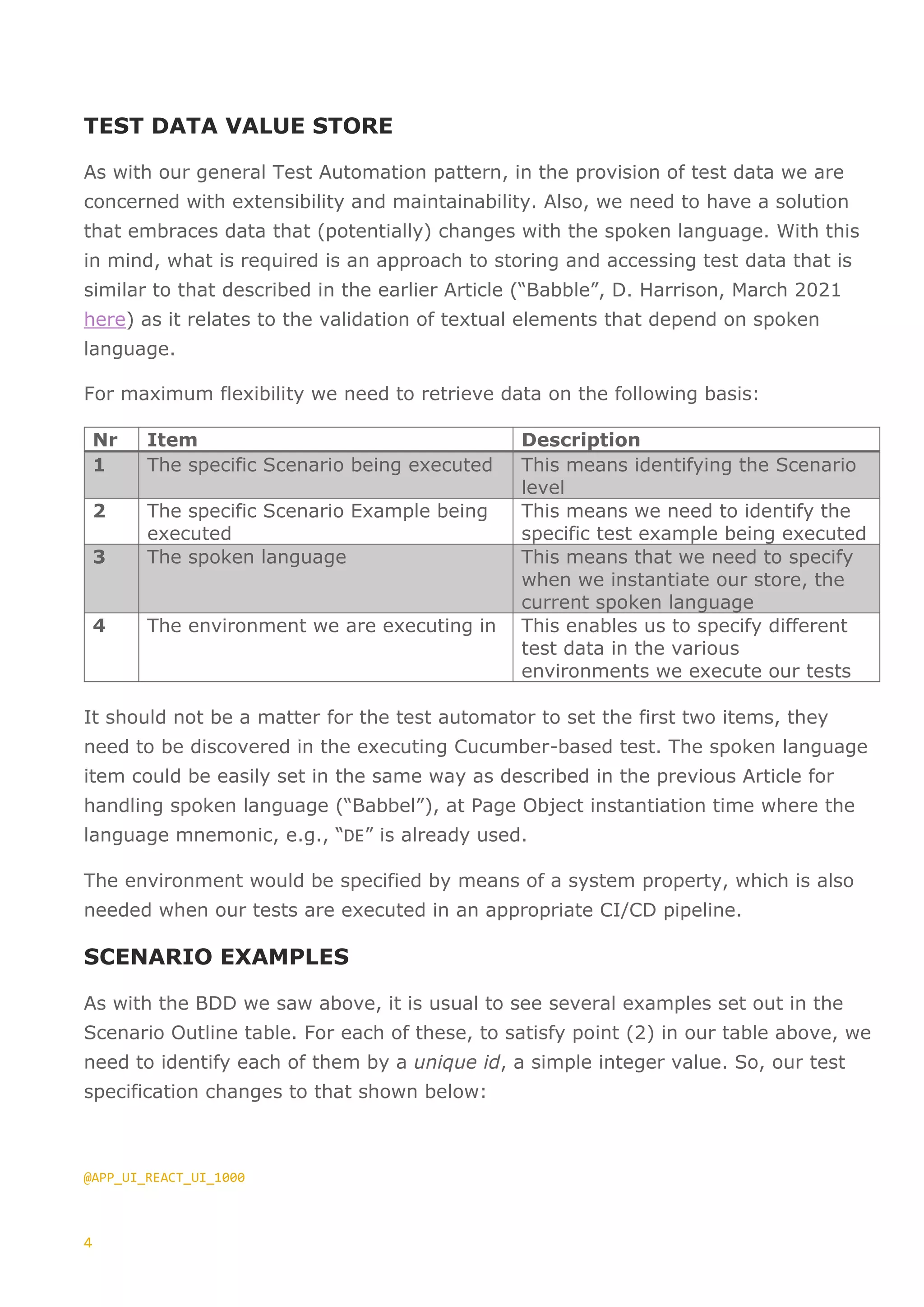
For maximum flexibility we need to retrieve data on the following basis:
Nr Item Description
1 The specific Scenario being executed This means identifying the Scenario
level
2 The specific Scenario Example being
executed
This means we need to identify the
specific test example being executed
3 The spoken language This means that we need to specify
when we instantiate our store, the
current spoken language
4 The environment we are executing in This enables us to specify different
test data in the various
environments we execute our tests
It should not be a matter for the test automator to set the first two items, they
need to be discovered in the executing Cucumber-based test. The spoken language
item could be easily set in the same way as described in the previous Article for
handling spoken language (“Babbel”), at Page Object instantiation time where the
language mnemonic, e.g., “DE” is already used.
The environment would be specified by means of a system property, which is also
needed when our tests are executed in an appropriate CI/CD pipeline.
SCENARIO EXAMPLES
As with the BDD we saw above, it is usual to see several examples set out in the
Scenario Outline table. For each of these, to satisfy point (2) in our table above, we
need to identify each of them by a unique id, a simple integer value. So, our test
specification changes to that shown below:
@APP_UI_REACT_UI_1000
5
Feature: User Searching processes
In this Scenario we establish that the Search operates
as expected.
Background:
Given [1000.0] I navigate to the main landing page
Then [1000.0] The Landing page is displayed
@APP_UI_REACT_UI_1000.1
Scenario Outline: User searches by Address
Given [1000.1] “<case>” I want to search by "<search-type>"
When [1000.1] I enter the "<search-value>"
And [1000.1] I click the search button
Then [1000.1] The appropriate summary page is displayed
Examples:
| case | search-type | search-value |
| 1 | address | 1HZJ3kKqhsHgz7oyK52GG2QkzyrtPPwcvx |
| 2 | script-hash | be04048a79b0087832cab8b91c84fd0817c4a285904f167f5d3adc5ea7d3a33a |
| 3 | transaction-id | 09d34aa616872e601d06a05fd85d789d73865b039bf65d59192277ce9734e147 |
THE DATA STORE
The data store is a JSON file placed in a specific resource location within our IntelliJ
project, “…resourcesenvironmentsenv-nameapp-mnemonicTestDataStore.json”.
This file has the content as shown in the fragment below:
{
"APP_UI_REACT_UI_4000": {
"1": {
"1": {
"address-summary-details-page": {
"EN": {
"status-label": "CONFIRMED",
"bsv-value-label": "0 BSV",
"first-seen-date-time-label": "2021-09-19 10:35:47",
"transaction-count-label": "292",
"table-header-label": "292 Transactions",
"script-hash-key-value": "7af376ffecd572cf9a5f9899471f0f0d2afd6465b338cdeffc31ba86f2216475",
"script-public-key-value": "76a914b59d8dc1d07ac9ea019895175477b0a2df4ebc2788ac"
},
"DE": {
"status-label": "…",
"bsv-value-label": "0 BSV",
"first-seen-date-time-label": "2021-09-19 10:35:47",
"transaction-count-label": "292",
"table-header-label": "292 …",
"script-hash-key-value": "7af376ffecd572cf9a5f9899471f0f0d2afd6465b338cdeffc31ba86f2216475",
"script-public-key-value": "76a914b59d8dc1d07ac9ea019895175477b0a2df4ebc2788ac"
},
…
}
},
"2": {
6
"script-hash-summary-details-page": {
"EN": {
"status-label": "CONFIRMED",
…
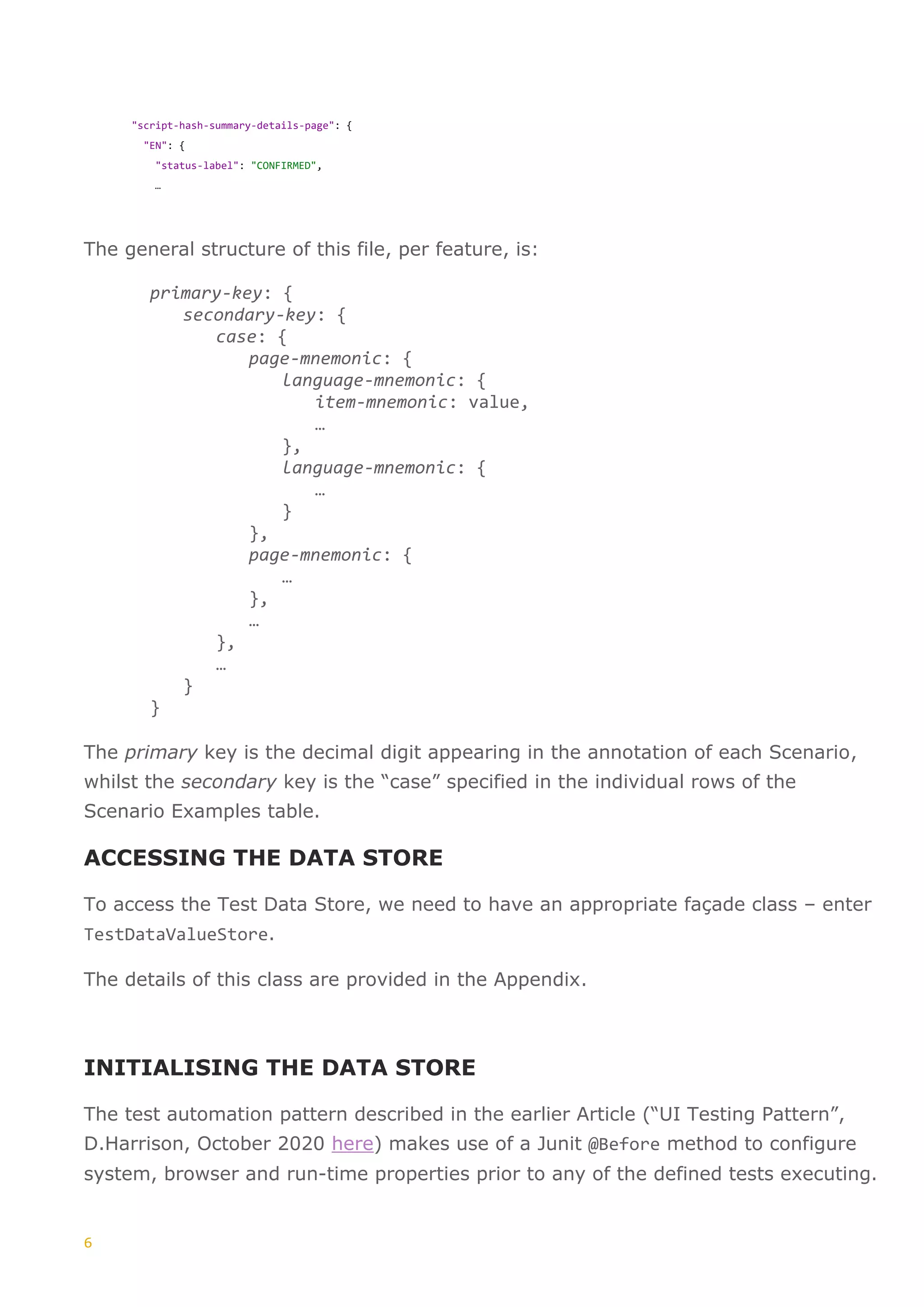
The general structure of this file, per feature, is:
primary-key: {
secondary-key: {
case: {
page-mnemonic: {
language-mnemonic: {
item-mnemonic: value,
…
},
language-mnemonic: {
…
}
},
page-mnemonic: {
…
},
…
},
…
}
}
The primary key is the decimal digit appearing in the annotation of each Scenario,
whilst the secondary key is the “case” specified in the individual rows of the
Scenario Examples table.
ACCESSING THE DATA STORE
To access the Test Data Store, we need to have an appropriate façade class – enter
TestDataValueStore.
The details of this class are provided in the Appendix.
INITIALISING THE DATA STORE
The test automation pattern described in the earlier Article (“UI Testing Pattern”,
D.Harrison, October 2020 here) makes use of a Junit @Before method to configure
system, browser and run-time properties prior to any of the defined tests executing.
7
This is the place where we instantiate our new Test Data Store class, as the
fragment shown below illustrates:
public class APP_UI_JourneysSetup {
private TestContextJava;
private static final String DEFAULT_LANGUAGE = "EN";
public static final String TEST_DATA_STORE_PRIMARY_KEY =
"TestDataStorePrimaryKey";
public static final String TEST_DATA_STORE_SECONDARY_KEY =
"TestDataStoreSecondaryKey";
…
public App_UI_JourneysSetup( TestContextJava context ) {
testContextJava = context;
}
@Before
public void setUp( Scenario ) {
// We need to have properties setup, either from the
// test initiator (command line or test runner)
// or as specified in this method
setupEnvironmentParameters();
// In our tests we use a test data store
// The keys are stored in the Test Context
setTestDataValueStoreKeys( testContextJava,
scenario.getSourceTagNames());
…
// Setup the default language in the test context
testContextJava.put("LANGUAGE", DEFAULT_LANGUAGE );
// Configure the Test Data Store - must be setup AFTER
// setting up the environment parameters - check that
// the primary & secondary keys have been setup
String primaryKey =
(String)testContextJava.get( TEST_DATA_STORE_PRIMARY_KEY, "");
String secondaryKey =
(String)testContextJava.get( TEST_DATA_STORE_SECONDARY_KEY, "");
if ( primaryKey.length() == 0 ||
secondaryKey.length() == 0)
Assert.fail("Primary/Secondary key of Test Data Store was empty");
String lang =
(String)testContextJava.get( "LANGUAGE", DEFAULT_LANGUAGE );
// To configure the TestDataValueStore, we need to have set
// the following in the test context:
// "APP" - the name of the app under test as it appears
// in the project structure
// "ENV" - the name of the environment in which we are
// testing as it appears in the project structure
TestDataValueStore testDataStoreValueStore =
new TestDataValueStore( primaryKey,
secondaryKey,
lang,
8
testContextJava);
// Save the Test Data Store in the Test context
testContextJava.put( "TestDataValueStore",
testDataStoreValueStore);
…
}
Some things are to be noted here; firstly the call to the method
setTestDataValueStoreKeys(…) - this is the method in which we resolve point (1) in
our earlier table, specifically:
private void setTestDataValueStoreKeys( TestContextJava,
Collection<String> tagNames ) {
Iterator<String> iterator = tagNames.iterator();
if ( tagNames.size() == 2 ) {
// we have a Feature AND a Scenario (Outline) Tag
// The first relates to the Feature, the second the Scenario (Outline)
// The first entry should look like:
// "@APP_UI_REACT_UI_4000" -> as per the Feature annotation
// The second entry should look like:
// "@APP_UI_REACT_UI_4000.1" -> as per the Scenario (Outline) annotation
// The form of these annotations is directly ours, not imposed by Cucumber
while (iterator.hasNext()) {
String s = iterator.next();
if ( s.contains(".")) {
String[] parts = s.split(".");
if (parts.length == 2) {
testContextJava.put( TEST_DATA_STORE_PRIMARY_KEY,
parts[0].substring(1));
testContextJava.put( TEST_DATA_STORE_SECONDARY_KEY,
parts[1]);
}
}
}
} else {
String s = iterator.next();
if (s.contains(".") ) {
String[] parts = s.split(".");
if (parts.length == 2) {
testContextJava.put( TEST_DATA_STORE_PRIMARY_KEY, parts[0]);
testContextJava.put( TEST_DATA_STORE_SECONDARY_KEY, parts[1]);
}
}
}
// if neither of the above cases apply then when a test goes to
// get the test data they will get a null value returned, so a hard
// failure indicating that something structural is wrong
}
Secondly, the @Before method, in comparison with the “standard” case, now carries
a parameter scenario, of type io.cucumber.java.Scenario. This parameter is used
to establish the so-called primary and secondary keys of the store, which are unique
for the test being executed and reflect the test case annotation used. So, for
9
example, in relation to the figure above, which showed a fragment of the test data
store, we would see:
• Primary key: APP_UI_REACT_UI_4000
• Secondary Key: 1
• Case: 1
• Language mnemonic: DE
• Item mnemonic: status-label
USING THE TEST DATA VALUE STORE
Throughout our code-behind, we can now acquire data using the
TestDataValueStore object with appropriate keys. The data store object itself has
been saved in the test context at the time of its instantiation (see earlier section),
so we can very conveniently retrieve it from there.
Below is a code fragment which shows the process:
// The item-mnemonic of an element we want to validate
private static String STATUS_LABEL_DATA_PATH = "status-label";
…
// The case number of the test in the Scenario Examples table
String caseValue =
(String)testContextJava.get( "CaseValue",
null);
Assert.assertNotNull( "The CaseValue was not found in the test context",
caseValue );
…
// Retrieve the TestDataValueStore object
TestDataValueStore =
(TestDataValueStore)testContextJava.get( "TestDataValueStore",
null );
Assert.assertNotNull( "Failed to retrieve the TestDataValueStore object from the test
context",
testDataValueStore );
…
// Perform appropriate validation on the element value
// This is a “service” of the appropriate Page Object
Assert.assertTrue( "Validation failed for Status Label",
summaryPage.validateStatusLabel( testDataValueStore.getValue( caseValue,
STATUS_LABEL_DATA_PATH) ) );
10
REMARKS
In this article we have presented an approach to the acquisition of small- to
medium-scale test data, which has the following characteristics:
• The data is persisted “external” to the test infrastructure, BDD and code-
behind
• It is subject to spoken-language translation
• It contains items that are uniquely referenced to the BDD Scenario and
Scenario Example table items - individual test executions
One of the key benefits of this approach is that the natural flow and clarity of the
BDD statements, describing a user journey in the application, is not cluttered with
extraneous data, and is therefore not negatively impacted by test data that needs
to be validated.
Ideally the BDD statements will have been developed in conjunction with a project
business actor (PO/PM/BA) and clarity of expression, in this important project
context, is a very valuable attribute. In a previous Article (“Show and Tell” here) an
approach to extending the BDD statements to show key facts from the code-behind
is described, which further enhances the expressiveness of the test design
statements.
Should the volume of required test data increase, then an approach involving
database storage might well prove beneficial. In this case the Test
TestDataValueStore class, presented in the Appendix, should be appropriately
refactored.
11
APPENDIX
The TestDataValueStore Class
In order not to disturb the narrative of the foregoing sections, we present here the
TestDataValueStore class details:
/**
* This class represents a project-level test data store service.
*/
public class TestDataValueStore {
private String spokenLanguageMnemonic;
private String primaryKey;
private String secondaryKey;
public static String NAME_RESOURCE_PACKAGE;
public static final String NAME_RESOURCE_FILE_NAME =
"TestDataStore.json";
private static Reader = null;
private static ObjectMapper objectMapper = null;
private static String resourceFilePathFinal = null;
private TestDataValueStore() {}
public TestDataValueStore( String primaryKey,
String secondaryKey,
String langMnemonic,
TestContextJava ) {
this.spokenLanguageMnemonic = langMnemonic;
this.primaryKey = primaryKey;
this.secondaryKey = secondaryKey;
String environment = (String)testContextJava.get("ENV", "");
Assert.assertTrue( "The Environment name was not set in the Test Context",
environment.length() > 0 );
String app = (String)testContextJava.get("APP", "");
Assert.assertTrue("The Application name was not set in the Test Context",
environment.length() > 0 );
NAME_RESOURCE_PACKAGE =
"environments/UI-Tests/" +
environment +
"/translation/" +
app;
resourceFilePathFinal = getResourceAbsoluteFilePath( NAME_RESOURCE_PACKAGE,
NAME_RESOURCE_FILE_NAME);
}
12
/**
* Get the appropriate textual value for a specified key
* @param caseValue = the case value specified in the BDD
* Scenario Example table (can be null)
* @param dataElementName = the data element name
* @return the textual value for the specified key in
* the current specified spoken language.
*/
public String getValue( String caseValue, String dataElementName ) {
String dataValueText = Constants.MISSING_VALUE;
try {
if (reader == null ) {
// instantiate the reader and object mapper objects
reader = Files.newBufferedReader( Paths.get(resourceFilePathFinal));
objectMapper = new ObjectMapper();
}
try {
JsonNode parser = objectMapper.readTree(reader);
dataValueText = parser.at( finaliseKeyPath(caseValue,
dataElementName)).textValue();
} catch (JsonProcessingException ex ) {
System.out.print(" *** TestDataValueStore.getValue: Saw
JsonProcessingException: " + ex.getMessage());
}
catch (IOException ex) {
System.out.print(" *** TestDataValueStore.getValue: Saw IOException: "
+ ex.getMessage());
}
if ( dataValueText == null ) {
throw new NullPointerException(" Failed to locate the specified
translation key for data element name: [" + dataElementName + "] Check the JSON
data.");
}
} catch ( IOException ignored) {}
finally {
if ( reader != null ) {
try {
reader.close();
reader = null;
} catch ( IOException ignored ) {}
}
}
return dataValueText;
}
13
/**
* Finalise the JSON key path to the data element
* e.g. APP_UI_REACT_UI_2000.1.DE.first-seen-date-time-label
* @param caseValue the value of the case as given in the BDD
* Scenario Example table
* @param dataElementName the data element name, e.g. table-header-label
* @return
*/
private String finaliseKeyPath( String caseValue, String dataElementName ) {
String ret;
// The two possible forms of keypath are:
// APP_UI_REACT_UI_4000.1/1/EN/status-label
// APP_UI_REACT_UI_4000.2/EN/status-label
if ( caseValue == null ) {
ret = "/" +
this.primaryKey + "." + this.secondaryKey +
"/" +
spokenLanguageMnemonic +
"/" +
dataElementName;
} else {
ret = "/" +
this.primaryKey + "." + this.secondaryKey +
"/" +
caseValue +
"/" +
spokenLanguageMnemonic +
"/" +
dataElementName;
}
return ret;
}
}

Test data article

  • 1.
    TEST DATA BDD (Cucumber/Gherkin)/React/Java D.Harrison November 2021 © 2021, David Harrison, All Rights Reserved
  • 2.
    TABLE OF CONTENTS Introduction.............................................................................1 Searching theBlockchain...........................................................2 Specifying our Search ...............................................................3 Test Data Value Store ...............................................................4 Scenario Examples ...................................................................4 The Data Store.........................................................................5 Accessing the Data Store...........................................................6 Initialising the Data Store..........................................................6 Using the Test Data Value Store.................................................9 Remarks ............................................................................... 10 Appendix............................................................................... 11
  • 3.
    INTRODUCTION When testing modernWeb applications, using a Test Automation approach, we are often faced with the need to assert correctness of dynamic data that is displayed on pages, in tables, grids and so on. A particular use case for needing to validate such data is that of searching. Even when the application has used a commercial control, such that the test automator does need to assert correctness of such micro-workflow as sorting, column ordering or row manipulation, we are still faced with the need to validate that the results of a particular search are as expected. Of course, to do this we should be testing in a nominated test the environment, which is seeded with such data that specific searches render a specific result set. Whilst searching is perhaps the key use case for test automation to deal with, the general case of needing to assert correctness of data display is of much wider concern. In this article we will look at a specific pattern of handling test data in the context of a BDD-driven test automation solution. The application, for the purpose of illustration is the public WhatsOnChain application (here), a BSV blockchain (here) viewing/searching application.
  • 4.
    2 SEARCHING THE BLOCKCHAIN Ifthe user enters an appropriate valid value in the central search textbox of the landing page, and clicks the search spyglass, an appropriate summary page is displayed. So, for example, if the blockchain address value of “1HZJ3kKqhsHgz7oyK52GG2QkzyrtPPwcvx” is entered and the search is initiated, we see the Address Summary page: It happens that the value entered was the public Address of a blockchain user. On this Address Summary page, we see not only a table, listing the Transactions related to the entered Address, but some associated values like Script Public Key, First Seen data and Script Hash. Whilst we could specify in our BDD (here) statements, a partial expected search outcome as a Data Table or Scenario Example table (here), there still remains the problem of how we should define data of the type we see above. It should be remembered that both Data Tables, as well as Scenario Outlines Example table have a limit in regard to the number of columns that can be specified. In addition, the overuse of Data Tables can disturb the clean flow of the BDD statements and would imply that the business actors on a project should be
  • 5.
    3 involved in specifyingall this additional data. This over-complexity of the BDD is to be avoided. SPECIFYING OUR SEARCH When using BDD for the expression of test workflow, we have two ways to define data to be consumed in our tests, as noted earlier; Scenario Outline tables (here) or Data Tables (here). Some care must be taken when using these approaches, however, as they have size limitations and if used too extensively the clarity and flow of the test narrative would be adversely affected. In addition, it is sometimes the case, that our data needs do not really fit with the flow of the BDD statements. It is just such a case that concerns us in this article. In order to test the search functionality, we might specify a Feature and Scenario Outline as shown below: @APP_UI_REACT_UI_1000 Feature: User Searching processes In this Scenario we establish that the Search operates as expected. Background: Given [1000.0] I navigate to the main landing page Then [1000.0] The Landing page is displayed @APP_UI_REACT_UI_1000.1 Scenario Outline: User searches by Address Given [1000.1] I want to search by "<search-type>" When [1000.1] I enter the "<search-value>" And [1000.1] I click the search button Then [1000.1] The appropriate summary page is displayed Examples: | search-type | search-value | | address | 1HZJ3kKqhsHgz7oyK52GG2QkzyrtPPwcvx | | script-hash | be04048a79b0087832cab8b91c84fd0817c4a285904f167f5d3adc5ea7d3a33a | | transaction-id | 09d34aa616872e601d06a05fd85d789d73865b039bf65d59192277ce9734e147 | Some aspects to note here are, we use specific style annotations at both the Feature and Scenario levels. @APP_REACT_UI_1000 and @APP_REACT_UI_1000.1. The main rational for this annotation style is described elsewhere (“UI Testing Pattern”, D. Harrison, October 2020 here). These annotations play a key role in the test data architecture we will now present.
  • 6.
    4 TEST DATA VALUESTORE As with our general Test Automation pattern, in the provision of test data we are concerned with extensibility and maintainability. Also, we need to have a solution that embraces data that (potentially) changes with the spoken language. With this in mind, what is required is an approach to storing and accessing test data that is similar to that described in the earlier Article (“Babble”, D. Harrison, March 2021 here) as it relates to the validation of textual elements that depend on spoken language. For maximum flexibility we need to retrieve data on the following basis: Nr Item Description 1 The specific Scenario being executed This means identifying the Scenario level 2 The specific Scenario Example being executed This means we need to identify the specific test example being executed 3 The spoken language This means that we need to specify when we instantiate our store, the current spoken language 4 The environment we are executing in This enables us to specify different test data in the various environments we execute our tests It should not be a matter for the test automator to set the first two items, they need to be discovered in the executing Cucumber-based test. The spoken language item could be easily set in the same way as described in the previous Article for handling spoken language (“Babbel”), at Page Object instantiation time where the language mnemonic, e.g., “DE” is already used. The environment would be specified by means of a system property, which is also needed when our tests are executed in an appropriate CI/CD pipeline. SCENARIO EXAMPLES As with the BDD we saw above, it is usual to see several examples set out in the Scenario Outline table. For each of these, to satisfy point (2) in our table above, we need to identify each of them by a unique id, a simple integer value. So, our test specification changes to that shown below: @APP_UI_REACT_UI_1000
  • 7.
    5 Feature: User Searchingprocesses In this Scenario we establish that the Search operates as expected. Background: Given [1000.0] I navigate to the main landing page Then [1000.0] The Landing page is displayed @APP_UI_REACT_UI_1000.1 Scenario Outline: User searches by Address Given [1000.1] “<case>” I want to search by "<search-type>" When [1000.1] I enter the "<search-value>" And [1000.1] I click the search button Then [1000.1] The appropriate summary page is displayed Examples: | case | search-type | search-value | | 1 | address | 1HZJ3kKqhsHgz7oyK52GG2QkzyrtPPwcvx | | 2 | script-hash | be04048a79b0087832cab8b91c84fd0817c4a285904f167f5d3adc5ea7d3a33a | | 3 | transaction-id | 09d34aa616872e601d06a05fd85d789d73865b039bf65d59192277ce9734e147 | THE DATA STORE The data store is a JSON file placed in a specific resource location within our IntelliJ project, “…resourcesenvironmentsenv-nameapp-mnemonicTestDataStore.json”. This file has the content as shown in the fragment below: { "APP_UI_REACT_UI_4000": { "1": { "1": { "address-summary-details-page": { "EN": { "status-label": "CONFIRMED", "bsv-value-label": "0 BSV", "first-seen-date-time-label": "2021-09-19 10:35:47", "transaction-count-label": "292", "table-header-label": "292 Transactions", "script-hash-key-value": "7af376ffecd572cf9a5f9899471f0f0d2afd6465b338cdeffc31ba86f2216475", "script-public-key-value": "76a914b59d8dc1d07ac9ea019895175477b0a2df4ebc2788ac" }, "DE": { "status-label": "…", "bsv-value-label": "0 BSV", "first-seen-date-time-label": "2021-09-19 10:35:47", "transaction-count-label": "292", "table-header-label": "292 …", "script-hash-key-value": "7af376ffecd572cf9a5f9899471f0f0d2afd6465b338cdeffc31ba86f2216475", "script-public-key-value": "76a914b59d8dc1d07ac9ea019895175477b0a2df4ebc2788ac" }, … } }, "2": {
  • 8.
    6 "script-hash-summary-details-page": { "EN": { "status-label":"CONFIRMED", … The general structure of this file, per feature, is: primary-key: { secondary-key: { case: { page-mnemonic: { language-mnemonic: { item-mnemonic: value, … }, language-mnemonic: { … } }, page-mnemonic: { … }, … }, … } } The primary key is the decimal digit appearing in the annotation of each Scenario, whilst the secondary key is the “case” specified in the individual rows of the Scenario Examples table. ACCESSING THE DATA STORE To access the Test Data Store, we need to have an appropriate façade class – enter TestDataValueStore. The details of this class are provided in the Appendix. INITIALISING THE DATA STORE The test automation pattern described in the earlier Article (“UI Testing Pattern”, D.Harrison, October 2020 here) makes use of a Junit @Before method to configure system, browser and run-time properties prior to any of the defined tests executing.
  • 9.
    7 This is theplace where we instantiate our new Test Data Store class, as the fragment shown below illustrates: public class APP_UI_JourneysSetup { private TestContextJava; private static final String DEFAULT_LANGUAGE = "EN"; public static final String TEST_DATA_STORE_PRIMARY_KEY = "TestDataStorePrimaryKey"; public static final String TEST_DATA_STORE_SECONDARY_KEY = "TestDataStoreSecondaryKey"; … public App_UI_JourneysSetup( TestContextJava context ) { testContextJava = context; } @Before public void setUp( Scenario ) { // We need to have properties setup, either from the // test initiator (command line or test runner) // or as specified in this method setupEnvironmentParameters(); // In our tests we use a test data store // The keys are stored in the Test Context setTestDataValueStoreKeys( testContextJava, scenario.getSourceTagNames()); … // Setup the default language in the test context testContextJava.put("LANGUAGE", DEFAULT_LANGUAGE ); // Configure the Test Data Store - must be setup AFTER // setting up the environment parameters - check that // the primary & secondary keys have been setup String primaryKey = (String)testContextJava.get( TEST_DATA_STORE_PRIMARY_KEY, ""); String secondaryKey = (String)testContextJava.get( TEST_DATA_STORE_SECONDARY_KEY, ""); if ( primaryKey.length() == 0 || secondaryKey.length() == 0) Assert.fail("Primary/Secondary key of Test Data Store was empty"); String lang = (String)testContextJava.get( "LANGUAGE", DEFAULT_LANGUAGE ); // To configure the TestDataValueStore, we need to have set // the following in the test context: // "APP" - the name of the app under test as it appears // in the project structure // "ENV" - the name of the environment in which we are // testing as it appears in the project structure TestDataValueStore testDataStoreValueStore = new TestDataValueStore( primaryKey, secondaryKey, lang,
  • 10.
    8 testContextJava); // Save theTest Data Store in the Test context testContextJava.put( "TestDataValueStore", testDataStoreValueStore); … } Some things are to be noted here; firstly the call to the method setTestDataValueStoreKeys(…) - this is the method in which we resolve point (1) in our earlier table, specifically: private void setTestDataValueStoreKeys( TestContextJava, Collection<String> tagNames ) { Iterator<String> iterator = tagNames.iterator(); if ( tagNames.size() == 2 ) { // we have a Feature AND a Scenario (Outline) Tag // The first relates to the Feature, the second the Scenario (Outline) // The first entry should look like: // "@APP_UI_REACT_UI_4000" -> as per the Feature annotation // The second entry should look like: // "@APP_UI_REACT_UI_4000.1" -> as per the Scenario (Outline) annotation // The form of these annotations is directly ours, not imposed by Cucumber while (iterator.hasNext()) { String s = iterator.next(); if ( s.contains(".")) { String[] parts = s.split("."); if (parts.length == 2) { testContextJava.put( TEST_DATA_STORE_PRIMARY_KEY, parts[0].substring(1)); testContextJava.put( TEST_DATA_STORE_SECONDARY_KEY, parts[1]); } } } } else { String s = iterator.next(); if (s.contains(".") ) { String[] parts = s.split("."); if (parts.length == 2) { testContextJava.put( TEST_DATA_STORE_PRIMARY_KEY, parts[0]); testContextJava.put( TEST_DATA_STORE_SECONDARY_KEY, parts[1]); } } } // if neither of the above cases apply then when a test goes to // get the test data they will get a null value returned, so a hard // failure indicating that something structural is wrong } Secondly, the @Before method, in comparison with the “standard” case, now carries a parameter scenario, of type io.cucumber.java.Scenario. This parameter is used to establish the so-called primary and secondary keys of the store, which are unique for the test being executed and reflect the test case annotation used. So, for
  • 11.
    9 example, in relationto the figure above, which showed a fragment of the test data store, we would see: • Primary key: APP_UI_REACT_UI_4000 • Secondary Key: 1 • Case: 1 • Language mnemonic: DE • Item mnemonic: status-label USING THE TEST DATA VALUE STORE Throughout our code-behind, we can now acquire data using the TestDataValueStore object with appropriate keys. The data store object itself has been saved in the test context at the time of its instantiation (see earlier section), so we can very conveniently retrieve it from there. Below is a code fragment which shows the process: // The item-mnemonic of an element we want to validate private static String STATUS_LABEL_DATA_PATH = "status-label"; … // The case number of the test in the Scenario Examples table String caseValue = (String)testContextJava.get( "CaseValue", null); Assert.assertNotNull( "The CaseValue was not found in the test context", caseValue ); … // Retrieve the TestDataValueStore object TestDataValueStore = (TestDataValueStore)testContextJava.get( "TestDataValueStore", null ); Assert.assertNotNull( "Failed to retrieve the TestDataValueStore object from the test context", testDataValueStore ); … // Perform appropriate validation on the element value // This is a “service” of the appropriate Page Object Assert.assertTrue( "Validation failed for Status Label", summaryPage.validateStatusLabel( testDataValueStore.getValue( caseValue, STATUS_LABEL_DATA_PATH) ) );
  • 12.
    10 REMARKS In this articlewe have presented an approach to the acquisition of small- to medium-scale test data, which has the following characteristics: • The data is persisted “external” to the test infrastructure, BDD and code- behind • It is subject to spoken-language translation • It contains items that are uniquely referenced to the BDD Scenario and Scenario Example table items - individual test executions One of the key benefits of this approach is that the natural flow and clarity of the BDD statements, describing a user journey in the application, is not cluttered with extraneous data, and is therefore not negatively impacted by test data that needs to be validated. Ideally the BDD statements will have been developed in conjunction with a project business actor (PO/PM/BA) and clarity of expression, in this important project context, is a very valuable attribute. In a previous Article (“Show and Tell” here) an approach to extending the BDD statements to show key facts from the code-behind is described, which further enhances the expressiveness of the test design statements. Should the volume of required test data increase, then an approach involving database storage might well prove beneficial. In this case the Test TestDataValueStore class, presented in the Appendix, should be appropriately refactored.
  • 13.
    11 APPENDIX The TestDataValueStore Class Inorder not to disturb the narrative of the foregoing sections, we present here the TestDataValueStore class details: /** * This class represents a project-level test data store service. */ public class TestDataValueStore { private String spokenLanguageMnemonic; private String primaryKey; private String secondaryKey; public static String NAME_RESOURCE_PACKAGE; public static final String NAME_RESOURCE_FILE_NAME = "TestDataStore.json"; private static Reader = null; private static ObjectMapper objectMapper = null; private static String resourceFilePathFinal = null; private TestDataValueStore() {} public TestDataValueStore( String primaryKey, String secondaryKey, String langMnemonic, TestContextJava ) { this.spokenLanguageMnemonic = langMnemonic; this.primaryKey = primaryKey; this.secondaryKey = secondaryKey; String environment = (String)testContextJava.get("ENV", ""); Assert.assertTrue( "The Environment name was not set in the Test Context", environment.length() > 0 ); String app = (String)testContextJava.get("APP", ""); Assert.assertTrue("The Application name was not set in the Test Context", environment.length() > 0 ); NAME_RESOURCE_PACKAGE = "environments/UI-Tests/" + environment + "/translation/" + app; resourceFilePathFinal = getResourceAbsoluteFilePath( NAME_RESOURCE_PACKAGE, NAME_RESOURCE_FILE_NAME); }
  • 14.
    12 /** * Get theappropriate textual value for a specified key * @param caseValue = the case value specified in the BDD * Scenario Example table (can be null) * @param dataElementName = the data element name * @return the textual value for the specified key in * the current specified spoken language. */ public String getValue( String caseValue, String dataElementName ) { String dataValueText = Constants.MISSING_VALUE; try { if (reader == null ) { // instantiate the reader and object mapper objects reader = Files.newBufferedReader( Paths.get(resourceFilePathFinal)); objectMapper = new ObjectMapper(); } try { JsonNode parser = objectMapper.readTree(reader); dataValueText = parser.at( finaliseKeyPath(caseValue, dataElementName)).textValue(); } catch (JsonProcessingException ex ) { System.out.print(" *** TestDataValueStore.getValue: Saw JsonProcessingException: " + ex.getMessage()); } catch (IOException ex) { System.out.print(" *** TestDataValueStore.getValue: Saw IOException: " + ex.getMessage()); } if ( dataValueText == null ) { throw new NullPointerException(" Failed to locate the specified translation key for data element name: [" + dataElementName + "] Check the JSON data."); } } catch ( IOException ignored) {} finally { if ( reader != null ) { try { reader.close(); reader = null; } catch ( IOException ignored ) {} } } return dataValueText; }
  • 15.
    13 /** * Finalise theJSON key path to the data element * e.g. APP_UI_REACT_UI_2000.1.DE.first-seen-date-time-label * @param caseValue the value of the case as given in the BDD * Scenario Example table * @param dataElementName the data element name, e.g. table-header-label * @return */ private String finaliseKeyPath( String caseValue, String dataElementName ) { String ret; // The two possible forms of keypath are: // APP_UI_REACT_UI_4000.1/1/EN/status-label // APP_UI_REACT_UI_4000.2/EN/status-label if ( caseValue == null ) { ret = "/" + this.primaryKey + "." + this.secondaryKey + "/" + spokenLanguageMnemonic + "/" + dataElementName; } else { ret = "/" + this.primaryKey + "." + this.secondaryKey + "/" + caseValue + "/" + spokenLanguageMnemonic + "/" + dataElementName; } return ret; } }