SHOW & TELL
BDD Documentation for the Team
D. Harrison
December 2020
© 2020, David Harrison, All Rights Reserved
Table of
CONTENTS
Introduction.............................................................................1
The Context.............................................................................1
We Are Testing ........................................................................4
First Steps...............................................................................4
Under the Hood........................................................................5
Telling the Whole Story ........................................................... 13
Bdd Documenter .................................................................... 13
Does the Filter Work? ............................................................. 15
Searching by Filter ................................................................. 19
The Time Has Come… ............................................................. 24
Remarks ............................................................................... 25
INTRODUCTION
In the publication “UI Testing Pattern” (here) an approach to agile test
automation was described. One of the components of the proposal, along with
the use of the Se34 tool, was the use of BDD (Behaviour Driven Development,
Cucumber [here]).
Behaviour Driven Development, which in the case of test automation might be
better termed Behaviour Driven Test Automation (BDTA), relies on the use of a
spoken language-style set of statements as the starting point in the
development of an application test functionality.
In writing BDD the test automator is attempting to capture, at a high level, a
key piece of business functionality exposed by the target application. The
beauty of this approach is that it reads very well for business actors, they can
see clearly what is being tested, and how key pieces of data enter the picture
during testing. Of course, this relative simplicity of test specification acts like a
façade over code which enacts in the application what is described.
To understand clearly what is actually happening behind this façade, the project
team need a different description geared to the coding side of things, what
actions are being taken in the test and what assertions are being performed to
assert that a step in the specification is actually successfully completed.
In project-level discussions both sides, the business and developer actors, need
to be able to understand test automation stories using different viewports which
help them clearly understand what is happening. The challenge, that this
publication addresses, is how to bring together these markedly different views
into a single narrative that serves both parties at the project table. Satisfying
both parties needs would be a major assistance to the test automator when
required to describe what has been achieved in a sprint or test campaign,
perhaps as part of a demo or retrospective session.
The Context
In the earlier work we looked at a single area of a business application and
developed UI tests to exemplify a proposed general pattern of test
development. The application under test was one based on the React
development framework [here]. In addition, the UI makes use of the Material-
UI [here] element library. The tests and the associated Page Objects are
written/generated in Kotlin [here]. The main landing page of this multi-lingual
application is shown below:
2
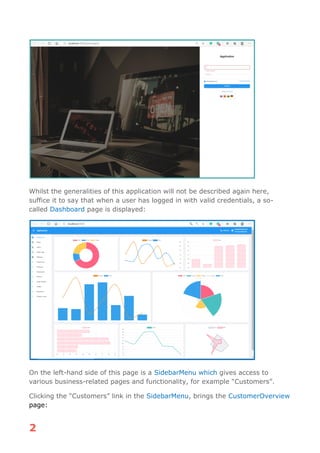
Whilst the generalities of this application will not be described again here,
suffice it to say that when a user has logged in with valid credentials, a so-
called Dashboard page is displayed:
On the left-hand side of this page is a SidebarMenu which gives access to
various business-related pages and functionality, for example “Customers”.
Clicking the “Customers” link in the SidebarMenu, brings the CustomerOverview
page:
3
As noted in the earlier publication, one of the key functionalities of CRUD
applications is that of searching. In this respect, the application we have in view
here is no different. Searching is a topic that is often defective in early-day
product increments, so testing needs to give it some focus as early as possible
in the project testing timetable.
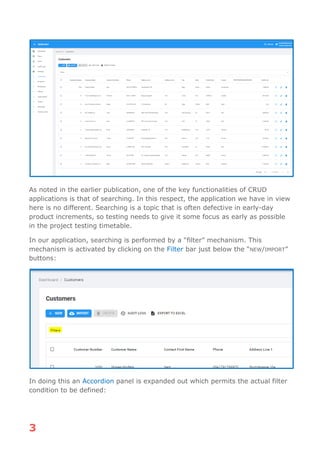
In our application, searching is performed by a “filter” mechanism. This
mechanism is activated by clicking on the Filter bar just below the “NEW/IMPORT”
buttons:
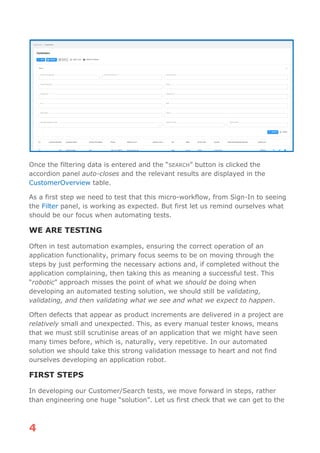
In doing this an Accordion panel is expanded out which permits the actual filter
condition to be defined:
4
Once the filtering data is entered and the “SEARCH” button is clicked the
accordion panel auto-closes and the relevant results are displayed in the
CustomerOverview table.
As a first step we need to test that this micro-workflow, from Sign-In to seeing
the Filter panel, is working as expected. But first let us remind ourselves what
should be our focus when automating tests.
WE ARE TESTING
Often in test automation examples, ensuring the correct operation of an
application functionality, primary focus seems to be on moving through the
steps by just performing the necessary actions and, if completed without the
application complaining, then taking this as meaning a successful test. This
“robotic” approach misses the point of what we should be doing when
developing an automated testing solution, we should still be validating,
validating, and then validating what we see and what we expect to happen.
Often defects that appear as product increments are delivered in a project are
relatively small and unexpected. This, as every manual tester knows, means
that we must still scrutinise areas of an application that we might have seen
many times before, which is, naturally, very repetitive. In our automated
solution we should take this strong validation message to heart and not find
ourselves developing an application robot.
FIRST STEPS
In developing our Customer/Search tests, we move forward in steps, rather
than engineering one huge “solution”. Let us first check that we can get to the
5
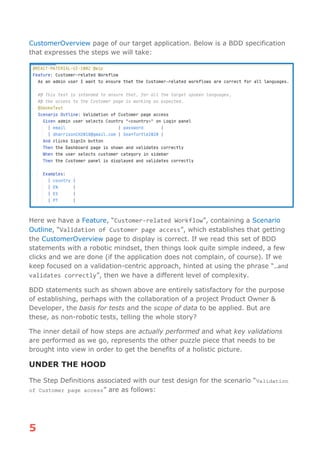
CustomerOverview page of our target application. Below is a BDD specification
that expresses the steps we will take:
Here we have a Feature, “Customer-related Workflow”, containing a Scenario
Outline, “Validation of Customer page access”, which establishes that getting
the CustomerOverview page to display is correct. If we read this set of BDD
statements with a robotic mindset, then things look quite simple indeed, a few
clicks and we are done (if the application does not complain, of course). If we
keep focused on a validation-centric approach, hinted at using the phrase “…and
validates correctly”, then we have a different level of complexity.
BDD statements such as shown above are entirely satisfactory for the purpose
of establishing, perhaps with the collaboration of a project Product Owner &
Developer, the basis for tests and the scope of data to be applied. But are
these, as non-robotic tests, telling the whole story?
The inner detail of how steps are actually performed and what key validations
are performed as we go, represents the other puzzle piece that needs to be
brought into view in order to get the benefits of a holistic picture.
UNDER THE HOOD
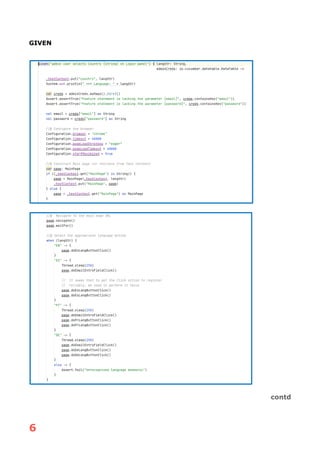
The Step Definitions associated with our test design for the scenario “Validation
of Customer page access” are as follows:
6
GIVEN
contd
7
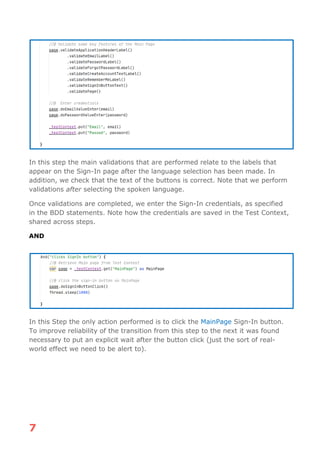
In this step the main validations that are performed relate to the labels that
appear on the Sign-In page after the language selection has been made. In
addition, we check that the text of the buttons is correct. Note that we perform
validations after selecting the spoken language.
Once validations are completed, we enter the Sign-In credentials, as specified
in the BDD statements. Note how the credentials are saved in the Test Context,
shared across steps.
AND
In this Step the only action performed is to click the MainPage Sign-In button.
To improve reliability of the transition from this step to the next it was found
necessary to put an explicit wait after the button click (just the sort of real-
world effect we need to be alert to).
8
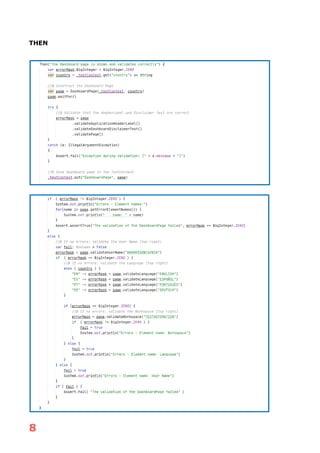
THEN
9
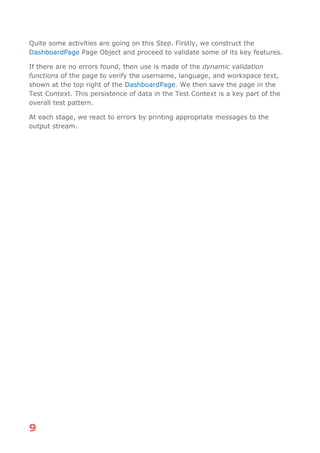
Quite some activities are going on this Step. Firstly, we construct the
DashboardPage Page Object and proceed to validate some of its key features.
If there are no errors found, then use is made of the dynamic validation
functions of the page to verify the username, language, and workspace text,
shown at the top right of the DashboardPage. We then save the page in the
Test Context. This persistence of data in the Test Context is a key part of the
overall test pattern.
At each stage, we react to errors by printing appropriate messages to the
output stream.
10
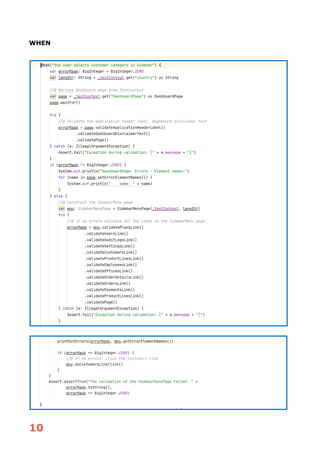
WHEN
11
This step is another quite substantial piece of code. It starts by retrieving the
DashboardPage object from the Test Context and validating some of its key
features. If this shows no errors, we then proceed to construct the
SidebarMenuPage and validate all the links that we expect to be there. These
allow access to the individual business-related sections of the applications, so
represents a key aspect of the application that we need to validate. Our focus is
on the Customers part.
If the latter check produces no errors, we then click the Customers link. This is
expected to bring us to the CustomerOverview page, as shown above in the
section “INTRODUCTION”.
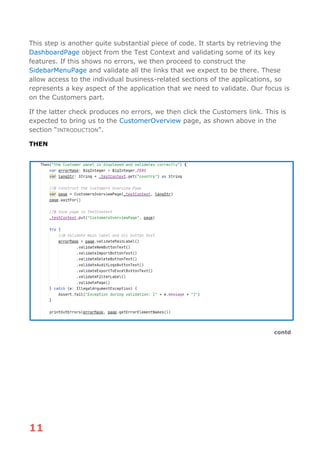
THEN
contd
12
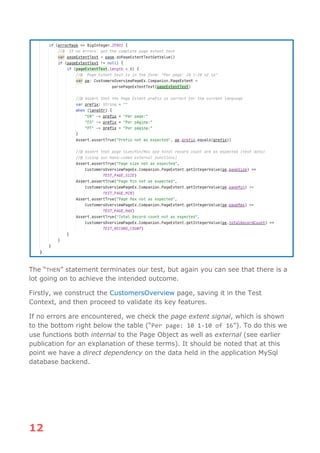
The “THEN” statement terminates our test, but again you can see that there is a
lot going on to achieve the intended outcome.
Firstly, we construct the CustomersOverview page, saving it in the Test
Context, and then proceed to validate its key features.
If no errors are encountered, we check the page extent signal, which is shown
to the bottom right below the table (“Per page: 10 1-10 of 16”). To do this we
use functions both internal to the Page Object as well as external (see earlier
publication for an explanation of these terms). It should be noted that at this
point we have a direct dependency on the data held in the application MySql
database backend.
13
Telling the Whole Story
From the previous section and comparing the Step Definition view with the
corresponding BDD statements it should be clear that there is quite a gulf
between the two. When discussing with business stakeholders any test using
BDD view, which would be quite natural, of course, we need somehow to be
able to talk through what is happening “under the hood”, to achieve the
workflow. This would allow the “developer” side of any such discussion (3-
Amigos) to be able to explain the underlying details and, indeed, comment on
their appropriateness to the test automation engineer.
The question now is, how to bring these two views into harmonious conjunction.
Bdd Documenter
The eagle-eyed reader will have noticed that in the Step Definitions we have
been looking at, there appeared, throughout, what one might call “decorated
comments”, i.e., statements with the prefix “//@”. In addition, the BDD
specification contains a similar form, “#@”.
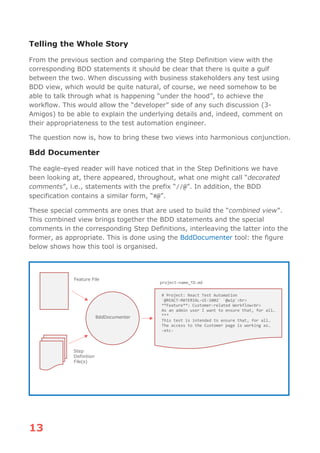
These special comments are ones that are used to build the “combined view”.
This combined view brings together the BDD statements and the special
comments in the corresponding Step Definitions, interleaving the latter into the
former, as appropriate. This is done using the BddDocumenter tool: the figure
below shows how this tool is organised.
Feature File
Step
Definition
File(s)
BddDocumenter
# Project: React Test Automation
`@REACT-MATERIAL-UI-1002` `@wip`<br>
**Feature**: Customer-related Workflow<br>
As an admin user I want to ensure that, for all…
***
This test is intended to ensure that, for all…
The access to the Customer page is working as…
-etc-
project-name_TD.md
14
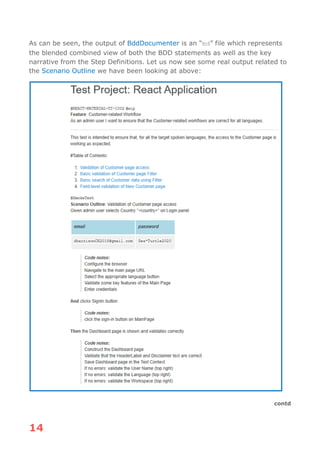
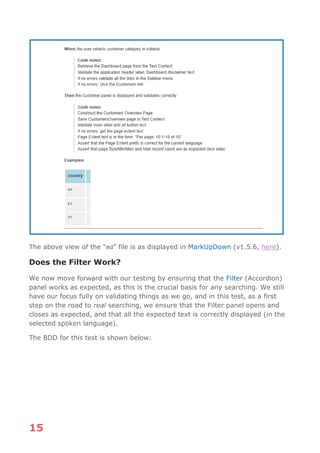
As can be seen, the output of BddDocumenter is an “md” file which represents
the blended combined view of both the BDD statements as well as the key
narrative from the Step Definitions. Let us now see some real output related to
the Scenario Outline we have been looking at above:
contd
15
The above view of the “md” file is as displayed in MarkUpDown (v1.5.6, here).
Does the Filter Work?
We now move forward with our testing by ensuring that the Filter (Accordion)
panel works as expected, as this is the crucial basis for any searching. We still
have our focus fully on validating things as we go, and in this test, as a first
step on the road to real searching, we ensure that the Filter panel opens and
closes as expected, and that all the expected text is correctly displayed (in the
selected spoken language).
The BDD for this test is shown below:
16
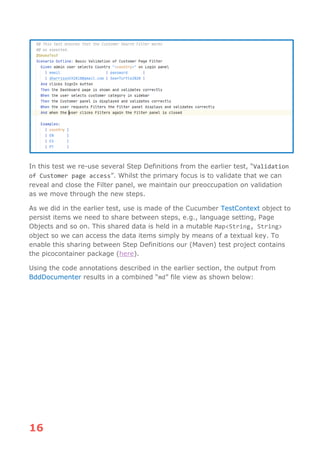
In this test we re-use several Step Definitions from the earlier test, “Validation
of Customer page access”. Whilst the primary focus is to validate that we can
reveal and close the Filter panel, we maintain our preoccupation on validation
as we move through the new steps.
As we did in the earlier test, use is made of the Cucumber TestContext object to
persist items we need to share between steps, e.g., language setting, Page
Objects and so on. This shared data is held in a mutable Map<String, String>
object so we can access the data items simply by means of a textual key. To
enable this sharing between Step Definitions our (Maven) test project contains
the picocontainer package (here).
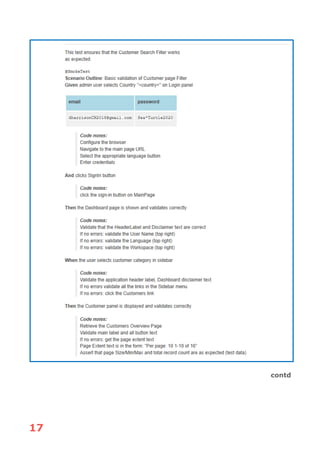
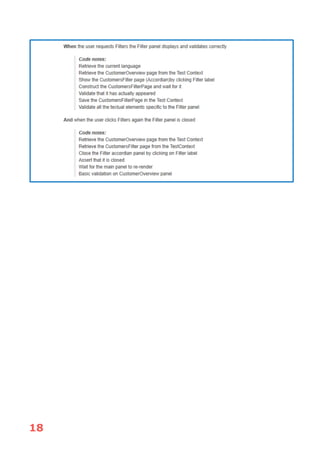
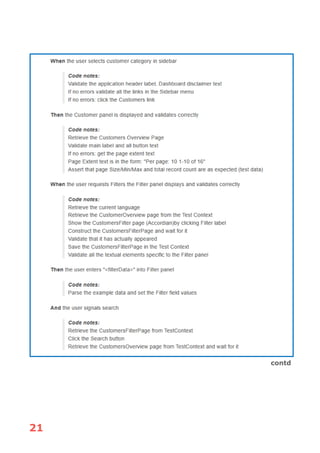
Using the code annotations described in the earlier section, the output from
BddDocumenter results in a combined “md” file view as shown below:
17
contd
18
19
Searching by Filter
Our target for our testing was the searching of customers by using the Filter
panel on the CustomersOverview page. To accomplish this goal of searching, as
testers we need to be able to verify the search results independent of the
application itself. For this purpose, we have developed a simple database
package which allows us to query the database for data matching any search
criteria. We should prefer not to use the services of the application under test to
confirm key results.
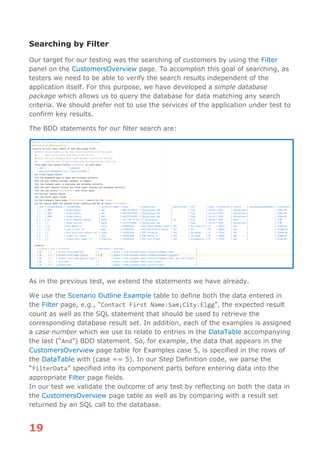
The BDD statements for our filter search are:
As in the previous test, we extend the statements we have already.
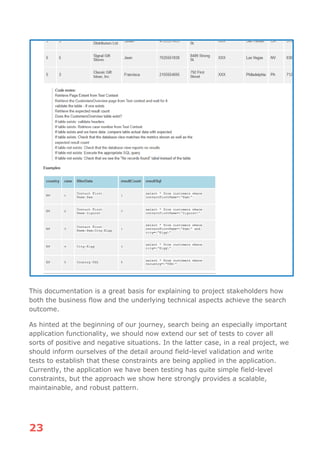
We use the Scenario Outline Example table to define both the data entered in
the Filter page, e.g., “Contact First Name:Sam;City:Elgg”, the expected result
count as well as the SQL statement that should be used to retrieve the
corresponding database result set. In addition, each of the examples is assigned
a case number which we use to relate to entries in the DataTable accompanying
the last (“And”) BDD statement. So, for example, the data that appears in the
CustomersOverview page table for Examples case 5, is specified in the rows of
the DataTable with (case == 5). In our Step Definition code, we parse the
“filterData” specified into its component parts before entering data into the
appropriate Filter page fields.
In our test we validate the outcome of any test by reflecting on both the data in
the CustomersOverview page table as well as by comparing with a result set
returned by an SQL call to the database.
20
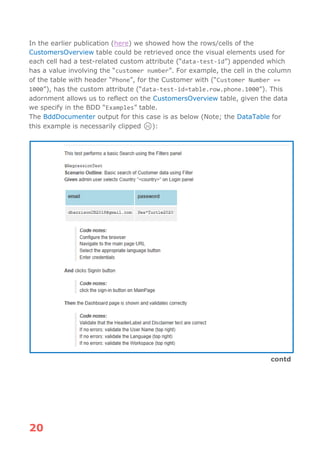
In the earlier publication (here) we showed how the rows/cells of the
CustomersOverview table could be retrieved once the visual elements used for
each cell had a test-related custom attribute (“data-test-id”) appended which
has a value involving the “customer number”. For example, the cell in the column
of the table with header “Phone”, for the Customer with (“Customer Number ==
1000”), has the custom attribute (“data-test-id=table.row.phone.1000”). This
adornment allows us to reflect on the CustomersOverview table, given the data
we specify in the BDD “Examples” table.
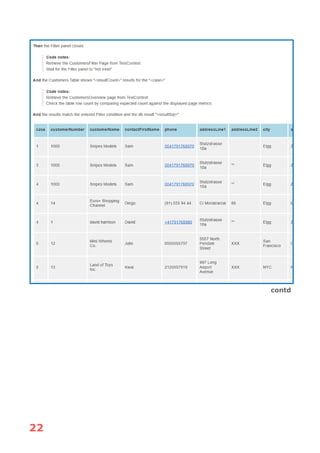
The BddDocumenter output for this case is as below (Note; the DataTable for
this example is necessarily clipped ☹):
contd
21
contd
22
contd
23
This documentation is a great basis for explaining to project stakeholders how
both the business flow and the underlying technical aspects achieve the search
outcome.
As hinted at the beginning of our journey, search being an especially important
application functionality, we should now extend our set of tests to cover all
sorts of positive and negative situations. In the latter case, in a real project, we
should inform ourselves of the detail around field-level validation and write
tests to establish that these constraints are being applied in the application.
Currently, the application we have been testing has quite simple field-level
constraints, but the approach we show here strongly provides a scalable,
maintainable, and robust pattern.
24
The Time Has Come…
In the sections above we have built up a working pattern for testing the search
functionality of our application.
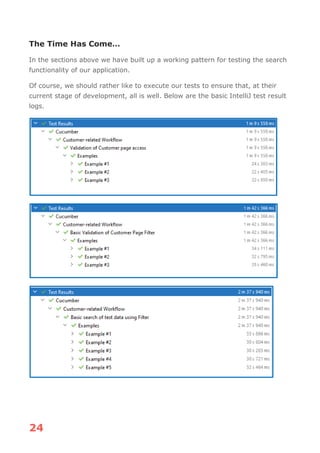
Of course, we should rather like to execute our tests to ensure that, at their
current stage of development, all is well. Below are the basic IntelliJ test result
logs.
25
Remarks
We have shown how the two views, one high-level business, and the other a
more developer level one, can be brought together to provide a richer
documentation for BDD-based test automation.
Using BddDocumenter either the BDD statements, the business view, or the
decorated comments from the Step Definition file(s), can be changed fluently,
as needed. The documentation can always be re-generated.
Given that the outcome of BddDocumenter is a Markdown file, it could easily be
displayed in Microsoft Word, for example. Unfortunately, using Markdown in a
project sharing space such as Confluence is still problematic, even in 2020 ☹
Developing a test automation solution, on-project for a real application, is a
task always full of surprises. The test automation engineer should expect some
“special features” that need to be catered for to get a reliable, scalable, and
maintainable solution.
Using Se34, BddDocumenter and the general pattern presented in this and the
earlier publication, provides a solid basis for putting in place a scalable,
maintainable, and reliable solution. In addition, the Se34 tool allows the task of
automating tests to be sprintable in agile projects. The work involved in
producing, and as importantly, maintaining Page Objects, becomes an “effort
boxed” task which the test automator can estimate with more confidence in
real-world agile project settings.

Bdd Show and Tell

  • 1.
    SHOW & TELL BDDDocumentation for the Team D. Harrison December 2020 © 2020, David Harrison, All Rights Reserved
  • 2.
    Table of CONTENTS Introduction.............................................................................1 The Context.............................................................................1 WeAre Testing ........................................................................4 First Steps...............................................................................4 Under the Hood........................................................................5 Telling the Whole Story ........................................................... 13 Bdd Documenter .................................................................... 13 Does the Filter Work? ............................................................. 15 Searching by Filter ................................................................. 19 The Time Has Come… ............................................................. 24 Remarks ............................................................................... 25
  • 3.
    INTRODUCTION In the publication“UI Testing Pattern” (here) an approach to agile test automation was described. One of the components of the proposal, along with the use of the Se34 tool, was the use of BDD (Behaviour Driven Development, Cucumber [here]). Behaviour Driven Development, which in the case of test automation might be better termed Behaviour Driven Test Automation (BDTA), relies on the use of a spoken language-style set of statements as the starting point in the development of an application test functionality. In writing BDD the test automator is attempting to capture, at a high level, a key piece of business functionality exposed by the target application. The beauty of this approach is that it reads very well for business actors, they can see clearly what is being tested, and how key pieces of data enter the picture during testing. Of course, this relative simplicity of test specification acts like a façade over code which enacts in the application what is described. To understand clearly what is actually happening behind this façade, the project team need a different description geared to the coding side of things, what actions are being taken in the test and what assertions are being performed to assert that a step in the specification is actually successfully completed. In project-level discussions both sides, the business and developer actors, need to be able to understand test automation stories using different viewports which help them clearly understand what is happening. The challenge, that this publication addresses, is how to bring together these markedly different views into a single narrative that serves both parties at the project table. Satisfying both parties needs would be a major assistance to the test automator when required to describe what has been achieved in a sprint or test campaign, perhaps as part of a demo or retrospective session. The Context In the earlier work we looked at a single area of a business application and developed UI tests to exemplify a proposed general pattern of test development. The application under test was one based on the React development framework [here]. In addition, the UI makes use of the Material- UI [here] element library. The tests and the associated Page Objects are written/generated in Kotlin [here]. The main landing page of this multi-lingual application is shown below:
  • 4.
    2 Whilst the generalitiesof this application will not be described again here, suffice it to say that when a user has logged in with valid credentials, a so- called Dashboard page is displayed: On the left-hand side of this page is a SidebarMenu which gives access to various business-related pages and functionality, for example “Customers”. Clicking the “Customers” link in the SidebarMenu, brings the CustomerOverview page:
  • 5.
    3 As noted inthe earlier publication, one of the key functionalities of CRUD applications is that of searching. In this respect, the application we have in view here is no different. Searching is a topic that is often defective in early-day product increments, so testing needs to give it some focus as early as possible in the project testing timetable. In our application, searching is performed by a “filter” mechanism. This mechanism is activated by clicking on the Filter bar just below the “NEW/IMPORT” buttons: In doing this an Accordion panel is expanded out which permits the actual filter condition to be defined:
  • 6.
    4 Once the filteringdata is entered and the “SEARCH” button is clicked the accordion panel auto-closes and the relevant results are displayed in the CustomerOverview table. As a first step we need to test that this micro-workflow, from Sign-In to seeing the Filter panel, is working as expected. But first let us remind ourselves what should be our focus when automating tests. WE ARE TESTING Often in test automation examples, ensuring the correct operation of an application functionality, primary focus seems to be on moving through the steps by just performing the necessary actions and, if completed without the application complaining, then taking this as meaning a successful test. This “robotic” approach misses the point of what we should be doing when developing an automated testing solution, we should still be validating, validating, and then validating what we see and what we expect to happen. Often defects that appear as product increments are delivered in a project are relatively small and unexpected. This, as every manual tester knows, means that we must still scrutinise areas of an application that we might have seen many times before, which is, naturally, very repetitive. In our automated solution we should take this strong validation message to heart and not find ourselves developing an application robot. FIRST STEPS In developing our Customer/Search tests, we move forward in steps, rather than engineering one huge “solution”. Let us first check that we can get to the
  • 7.
    5 CustomerOverview page ofour target application. Below is a BDD specification that expresses the steps we will take: Here we have a Feature, “Customer-related Workflow”, containing a Scenario Outline, “Validation of Customer page access”, which establishes that getting the CustomerOverview page to display is correct. If we read this set of BDD statements with a robotic mindset, then things look quite simple indeed, a few clicks and we are done (if the application does not complain, of course). If we keep focused on a validation-centric approach, hinted at using the phrase “…and validates correctly”, then we have a different level of complexity. BDD statements such as shown above are entirely satisfactory for the purpose of establishing, perhaps with the collaboration of a project Product Owner & Developer, the basis for tests and the scope of data to be applied. But are these, as non-robotic tests, telling the whole story? The inner detail of how steps are actually performed and what key validations are performed as we go, represents the other puzzle piece that needs to be brought into view in order to get the benefits of a holistic picture. UNDER THE HOOD The Step Definitions associated with our test design for the scenario “Validation of Customer page access” are as follows:
  • 8.
  • 9.
    7 In this stepthe main validations that are performed relate to the labels that appear on the Sign-In page after the language selection has been made. In addition, we check that the text of the buttons is correct. Note that we perform validations after selecting the spoken language. Once validations are completed, we enter the Sign-In credentials, as specified in the BDD statements. Note how the credentials are saved in the Test Context, shared across steps. AND In this Step the only action performed is to click the MainPage Sign-In button. To improve reliability of the transition from this step to the next it was found necessary to put an explicit wait after the button click (just the sort of real- world effect we need to be alert to).
  • 10.
  • 11.
    9 Quite some activitiesare going on this Step. Firstly, we construct the DashboardPage Page Object and proceed to validate some of its key features. If there are no errors found, then use is made of the dynamic validation functions of the page to verify the username, language, and workspace text, shown at the top right of the DashboardPage. We then save the page in the Test Context. This persistence of data in the Test Context is a key part of the overall test pattern. At each stage, we react to errors by printing appropriate messages to the output stream.
  • 12.
  • 13.
    11 This step isanother quite substantial piece of code. It starts by retrieving the DashboardPage object from the Test Context and validating some of its key features. If this shows no errors, we then proceed to construct the SidebarMenuPage and validate all the links that we expect to be there. These allow access to the individual business-related sections of the applications, so represents a key aspect of the application that we need to validate. Our focus is on the Customers part. If the latter check produces no errors, we then click the Customers link. This is expected to bring us to the CustomerOverview page, as shown above in the section “INTRODUCTION”. THEN contd
  • 14.
    12 The “THEN” statementterminates our test, but again you can see that there is a lot going on to achieve the intended outcome. Firstly, we construct the CustomersOverview page, saving it in the Test Context, and then proceed to validate its key features. If no errors are encountered, we check the page extent signal, which is shown to the bottom right below the table (“Per page: 10 1-10 of 16”). To do this we use functions both internal to the Page Object as well as external (see earlier publication for an explanation of these terms). It should be noted that at this point we have a direct dependency on the data held in the application MySql database backend.
  • 15.
    13 Telling the WholeStory From the previous section and comparing the Step Definition view with the corresponding BDD statements it should be clear that there is quite a gulf between the two. When discussing with business stakeholders any test using BDD view, which would be quite natural, of course, we need somehow to be able to talk through what is happening “under the hood”, to achieve the workflow. This would allow the “developer” side of any such discussion (3- Amigos) to be able to explain the underlying details and, indeed, comment on their appropriateness to the test automation engineer. The question now is, how to bring these two views into harmonious conjunction. Bdd Documenter The eagle-eyed reader will have noticed that in the Step Definitions we have been looking at, there appeared, throughout, what one might call “decorated comments”, i.e., statements with the prefix “//@”. In addition, the BDD specification contains a similar form, “#@”. These special comments are ones that are used to build the “combined view”. This combined view brings together the BDD statements and the special comments in the corresponding Step Definitions, interleaving the latter into the former, as appropriate. This is done using the BddDocumenter tool: the figure below shows how this tool is organised. Feature File Step Definition File(s) BddDocumenter # Project: React Test Automation `@REACT-MATERIAL-UI-1002` `@wip`<br> **Feature**: Customer-related Workflow<br> As an admin user I want to ensure that, for all… *** This test is intended to ensure that, for all… The access to the Customer page is working as… -etc- project-name_TD.md
  • 16.
    14 As can beseen, the output of BddDocumenter is an “md” file which represents the blended combined view of both the BDD statements as well as the key narrative from the Step Definitions. Let us now see some real output related to the Scenario Outline we have been looking at above: contd
  • 17.
    15 The above viewof the “md” file is as displayed in MarkUpDown (v1.5.6, here). Does the Filter Work? We now move forward with our testing by ensuring that the Filter (Accordion) panel works as expected, as this is the crucial basis for any searching. We still have our focus fully on validating things as we go, and in this test, as a first step on the road to real searching, we ensure that the Filter panel opens and closes as expected, and that all the expected text is correctly displayed (in the selected spoken language). The BDD for this test is shown below:
  • 18.
    16 In this testwe re-use several Step Definitions from the earlier test, “Validation of Customer page access”. Whilst the primary focus is to validate that we can reveal and close the Filter panel, we maintain our preoccupation on validation as we move through the new steps. As we did in the earlier test, use is made of the Cucumber TestContext object to persist items we need to share between steps, e.g., language setting, Page Objects and so on. This shared data is held in a mutable Map<String, String> object so we can access the data items simply by means of a textual key. To enable this sharing between Step Definitions our (Maven) test project contains the picocontainer package (here). Using the code annotations described in the earlier section, the output from BddDocumenter results in a combined “md” file view as shown below:
  • 19.
  • 20.
  • 21.
    19 Searching by Filter Ourtarget for our testing was the searching of customers by using the Filter panel on the CustomersOverview page. To accomplish this goal of searching, as testers we need to be able to verify the search results independent of the application itself. For this purpose, we have developed a simple database package which allows us to query the database for data matching any search criteria. We should prefer not to use the services of the application under test to confirm key results. The BDD statements for our filter search are: As in the previous test, we extend the statements we have already. We use the Scenario Outline Example table to define both the data entered in the Filter page, e.g., “Contact First Name:Sam;City:Elgg”, the expected result count as well as the SQL statement that should be used to retrieve the corresponding database result set. In addition, each of the examples is assigned a case number which we use to relate to entries in the DataTable accompanying the last (“And”) BDD statement. So, for example, the data that appears in the CustomersOverview page table for Examples case 5, is specified in the rows of the DataTable with (case == 5). In our Step Definition code, we parse the “filterData” specified into its component parts before entering data into the appropriate Filter page fields. In our test we validate the outcome of any test by reflecting on both the data in the CustomersOverview page table as well as by comparing with a result set returned by an SQL call to the database.
  • 22.
    20 In the earlierpublication (here) we showed how the rows/cells of the CustomersOverview table could be retrieved once the visual elements used for each cell had a test-related custom attribute (“data-test-id”) appended which has a value involving the “customer number”. For example, the cell in the column of the table with header “Phone”, for the Customer with (“Customer Number == 1000”), has the custom attribute (“data-test-id=table.row.phone.1000”). This adornment allows us to reflect on the CustomersOverview table, given the data we specify in the BDD “Examples” table. The BddDocumenter output for this case is as below (Note; the DataTable for this example is necessarily clipped ☹): contd
  • 23.
  • 24.
  • 25.
    23 This documentation isa great basis for explaining to project stakeholders how both the business flow and the underlying technical aspects achieve the search outcome. As hinted at the beginning of our journey, search being an especially important application functionality, we should now extend our set of tests to cover all sorts of positive and negative situations. In the latter case, in a real project, we should inform ourselves of the detail around field-level validation and write tests to establish that these constraints are being applied in the application. Currently, the application we have been testing has quite simple field-level constraints, but the approach we show here strongly provides a scalable, maintainable, and robust pattern.
  • 26.
    24 The Time HasCome… In the sections above we have built up a working pattern for testing the search functionality of our application. Of course, we should rather like to execute our tests to ensure that, at their current stage of development, all is well. Below are the basic IntelliJ test result logs.
  • 27.
    25 Remarks We have shownhow the two views, one high-level business, and the other a more developer level one, can be brought together to provide a richer documentation for BDD-based test automation. Using BddDocumenter either the BDD statements, the business view, or the decorated comments from the Step Definition file(s), can be changed fluently, as needed. The documentation can always be re-generated. Given that the outcome of BddDocumenter is a Markdown file, it could easily be displayed in Microsoft Word, for example. Unfortunately, using Markdown in a project sharing space such as Confluence is still problematic, even in 2020 ☹ Developing a test automation solution, on-project for a real application, is a task always full of surprises. The test automation engineer should expect some “special features” that need to be catered for to get a reliable, scalable, and maintainable solution. Using Se34, BddDocumenter and the general pattern presented in this and the earlier publication, provides a solid basis for putting in place a scalable, maintainable, and reliable solution. In addition, the Se34 tool allows the task of automating tests to be sprintable in agile projects. The work involved in producing, and as importantly, maintaining Page Objects, becomes an “effort boxed” task which the test automator can estimate with more confidence in real-world agile project settings.