FLOATING POINT
REPRESENTATION
RamaKrishna Reddy Bijjam
Avanthi pg college
Hyderabad
What about the other numbers?
So far we know how to store integers Whole
Numbers
But what ifwe want to store real numbers
Numbers with decimal fractions
Even 27.5 needs another way to represent it.
This method is called floating point representation
Fixed Notation
Weare accustomed to using a fixed notation where the decimal point is fixedand we
know that any numbers to the right of the decimal point are the decimal portion and to
theleft is the integer part
E.g.10.75
10 is the Integer Portion and 0.75 is the decimal portion
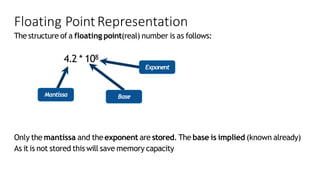
Only the mantissa and the exponent are stored. The base is implied (known already)
As itis not stored this will save memory capacity
Floating PointRepresentation
The structure of a floating point(real) number is as follows:
4.2 * 108
Exponent
Mantissa Base
IEEEstandard
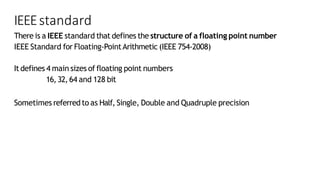
There is a IEEE standard that defines the structure of a floating point number
IEEE Standard for Floating-PointArithmetic (IEEE 754-2008)
It defines 4 main sizes of floating point numbers
16,32,64 and 128 bit
Sometimes referredto as Half, Single, Double and Quadruple precision
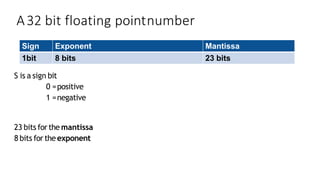
A32 bit floating pointnumber
S is a sign bit
0 =positive
1 =negative
23 bits for the mantissa
8 bits for theexponent
Sign Exponent Mantissa
1bit 8 bits 23 bits
Example
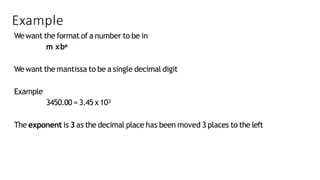
Wewant the format of a number to be in
m xbe
Wewant the mantissa to be a single decimal digit
Example
3450.00 = 3.45 x10³
The exponent is 3as the decimal place has been moved 3 places to the left
Decimal fractions
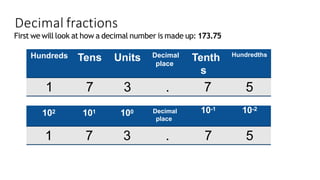
First we will look at how a decimal number is made up: 173.75
Hundreds Tens Units Decimal
place
Tenth
s
Hundredths
1 7 3 . 7 5
102 101 100 Decimal
place
10-1 10-2
1 7 3 . 7 5
Binary fractions
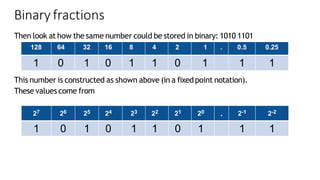
Then look at how the same number could be stored in binary: 1010 1101
This number is constructed as shown above (in a fixedpoint notation).
These values come from
128 64 32 16 8 4 2 1 . 0.5 0.25
1 0 1 0 1 1 0 1 1 1
27 26 25 24 23 22 21 20 . 2-1 2-2
1 0 1 0 1 1 0 1 1 1
But the problemis
W
edon’t actuallyhaveadecimalpoint in binary...
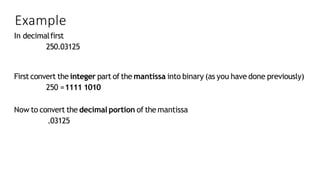
Example
In decimalfirst
250.03125
First convert the integer part of the mantissa into binary (as you have done previously)
250 =1111 1010
Now to convert the decimal portion of the mantissa
.03125
Example (cont)
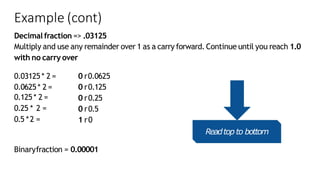
Decimal fraction => .03125
Multiply and use any remainder over 1 as a carry forward. Continue until you reach 1.0
with no carry over
0.03125* 2 =
0.0625 * 2 =
0.125* 2 =
0.25 * 2 =
0.5 *2 =
0 r0.0625
0 r0.125
0 r0.25
0 r0.5
1 r0
Binaryfraction = 0.00001
Readtop to bottom
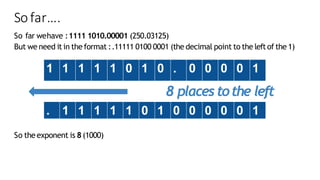
Sofar….
So far wehave :1111 1010.00001 (250.03125)
But we need it in the format :.11111 0100 0001 (the decimal point to the leftof the 1)
So the exponent is 8(1000)
8 placestothe left
1 1 1 1 1 0 1 0 . 0 0 0 0 1
. 1 1 1 1 1 0 1 0 0 0 0 0 1
Example
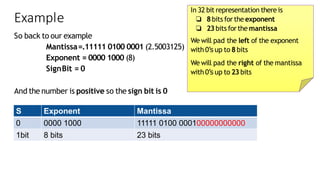
So back to our example
Mantissa=.11111 0100 0001 (2.5003125)
Exponent = 0000 1000 (8)
SignBit = 0
And the number is positive so the sign bit is 0
S Exponent Mantissa
0 0000 1000 11111 0100 000100000000000
1bit 8 bits 23 bits
In 32 bit representation there is
❏ 8bits for the exponent
❏ 23bits forthe mantissa
We will pad the left of the exponent
with 0’sup to 8bits
We will pad the right of the mantissa
with 0’sup to 23 bits
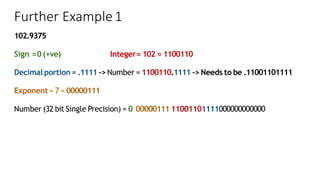
Further Example1
102.9375
Sign =0(+ve) Integer= 102 = 1100110
Decimal portion = .1111 -> Number = 1100110.1111 -> Needs to be .11001101111
Exponent = 7 = 00000111
Number (32 bit Single Precision) = 0 00000111 11001101111000000000000
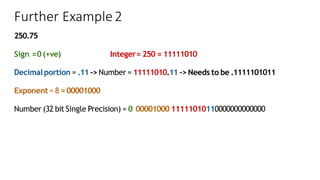
Further Example2
250.75
Sign =0(+ve) Integer= 250 = 11111010
Decimal portion = .11-> Number = 11111010.11 -> Needs to be .1111101011
Exponent = 8 =00001000
Number (32 bit Single Precision) = 0 00001000 11111010110000000000000
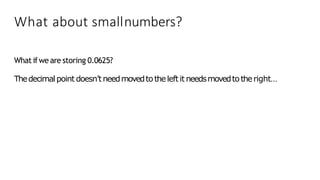
What about smallnumbers?
What ifwe are storing 0.0625?
Thedecimalpoint doesn’tneedmovedtotheleftit needsmovedtotheright…
Example (cont)
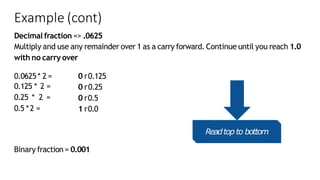
Decimal fraction => .0625
Multiply and use any remainder over 1 as a carry forward. Continue until you reach 1.0
with no carry over
0.0625* 2 =
0.125 * 2 =
0.25 * 2 =
0.5 *2 =
0 r0.125
0 r0.25
0 r0.5
1 r0.0
Binary fraction = 0.001
Readtop to bottom
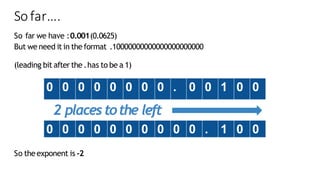
Sofar….
So far we have :0.001(0.0625)
But we need it in the format .10000000000000000000000
(leading bit after the .has to be a 1)
So the exponent is -2
2 placestothe left
0 0 0 0 0 0 0 0 . 0 0 1 0 0
0 0 0 0 0 0 0 0 0 0 . 1 0 0
Example
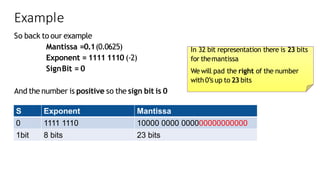
So back to our example
Mantissa =0.1(0.0625)
Exponent = 1111 1110 (-2)
SignBit = 0
And the number is positive so the sign bit is 0
S Exponent Mantissa
0 1111 1110 10000 0000 000000000000000
1bit 8 bits 23 bits
In 32 bit representation there is 23 bits
for themantissa
We will pad the right of the number
with 0’sup to 23 bits
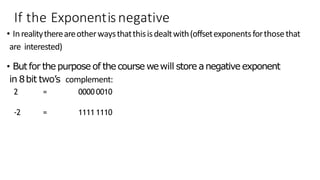
If the Exponentisnegative
• Inrealitythereareotherwaysthatthisisdealtwith(offsetexponentsforthosethat
are interested)
• But for the purpose of the course wewill store anegative exponent
in 8bit two’s complement:
2 = 0000 0010
-2 = 1111 1110
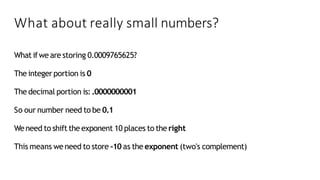
What about really small numbers?
What ifwe are storing 0.0009765625?
The integer portion is 0
The decimal portion is:.0000000001
So our number need to be 0.1
Weneed to shift the exponent 10 places to the right
This means we need to store -10 as the exponent (two's complement)
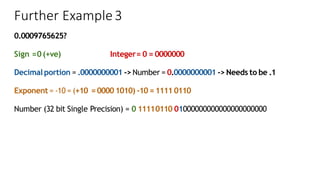
Further Example3
0.0009765625?
Sign =0(+ve) Integer= 0 = 0000000
Decimal portion = .0000000001 -> Number = 0.0000000001 -> Needs to be .1
Exponent = -10 = (+10 =00001010) -10 =1111 0110
Number (32 bit Single Precision) = 0 11110110 01000000000000000000000
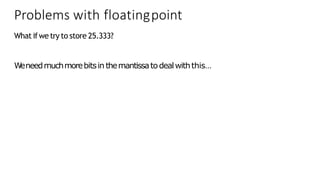
Problems with floatingpoint
What ifwe try to store 25.333?
W
eneedmuchmorebitsin themantissatodealwiththis…
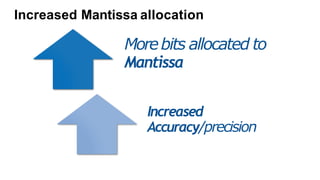
Increased Mantissa allocation
Morebits allocated to
Mantissa
Increased
Accuracy/precision
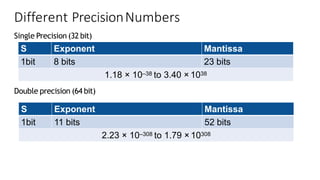
Different PrecisionNumbers
Single Precision (32 bit)
Double precision (64 bit)
S Exponent Mantissa
1bit 8 bits 23 bits
1.18 × 10–38 to 3.40 × 1038
S Exponent Mantissa
1bit 11 bits 52 bits
2.23 × 10–308 to 1.79 × 10308
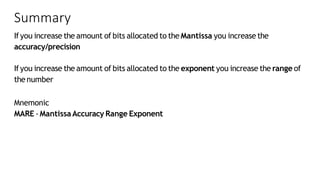
Summary
Ifyou increase the amount of bits allocated to the Mantissa you increase the
accuracy/precision
Ifyou increase the amount of bits allocated to the exponent you increase the range of
thenumber
Mnemonic
MARE -MantissaAccuracy Range Exponent
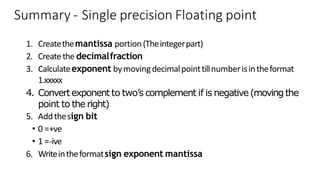
Summary - Single precision Floating point
1. Createthemantissa portion(Theintegerpart)
2. Createthe decimalfraction
3. Calculateexponent bymovingdecimalpointtillnumberisintheformat
1.xxxxx
4. Convertexponent to two’s complement if is negative(moving the
point to the right)
5. Addthesign bit
• 0 =+ve
• 1 =-ive
6. Writeintheformatsign exponent mantissa

FIXED and FLOATING-POINT-REPRESENTATION.pdf

  • 1.
    FLOATING POINT REPRESENTATION RamaKrishna ReddyBijjam Avanthi pg college Hyderabad
  • 2.
    What about theother numbers? So far we know how to store integers Whole Numbers But what ifwe want to store real numbers Numbers with decimal fractions Even 27.5 needs another way to represent it. This method is called floating point representation
  • 3.
    Fixed Notation Weare accustomedto using a fixed notation where the decimal point is fixedand we know that any numbers to the right of the decimal point are the decimal portion and to theleft is the integer part E.g.10.75 10 is the Integer Portion and 0.75 is the decimal portion
  • 4.
    Only the mantissaand the exponent are stored. The base is implied (known already) As itis not stored this will save memory capacity Floating PointRepresentation The structure of a floating point(real) number is as follows: 4.2 * 108 Exponent Mantissa Base
  • 5.
    IEEEstandard There is aIEEE standard that defines the structure of a floating point number IEEE Standard for Floating-PointArithmetic (IEEE 754-2008) It defines 4 main sizes of floating point numbers 16,32,64 and 128 bit Sometimes referredto as Half, Single, Double and Quadruple precision
  • 6.
    A32 bit floatingpointnumber S is a sign bit 0 =positive 1 =negative 23 bits for the mantissa 8 bits for theexponent Sign Exponent Mantissa 1bit 8 bits 23 bits
  • 7.
    Example Wewant the formatof a number to be in m xbe Wewant the mantissa to be a single decimal digit Example 3450.00 = 3.45 x10³ The exponent is 3as the decimal place has been moved 3 places to the left
  • 8.
    Decimal fractions First wewill look at how a decimal number is made up: 173.75 Hundreds Tens Units Decimal place Tenth s Hundredths 1 7 3 . 7 5 102 101 100 Decimal place 10-1 10-2 1 7 3 . 7 5
  • 9.
    Binary fractions Then lookat how the same number could be stored in binary: 1010 1101 This number is constructed as shown above (in a fixedpoint notation). These values come from 128 64 32 16 8 4 2 1 . 0.5 0.25 1 0 1 0 1 1 0 1 1 1 27 26 25 24 23 22 21 20 . 2-1 2-2 1 0 1 0 1 1 0 1 1 1
  • 10.
    But the problemis W edon’tactuallyhaveadecimalpoint in binary...
  • 11.
    Example In decimalfirst 250.03125 First convertthe integer part of the mantissa into binary (as you have done previously) 250 =1111 1010 Now to convert the decimal portion of the mantissa .03125
  • 12.
    Example (cont) Decimal fraction=> .03125 Multiply and use any remainder over 1 as a carry forward. Continue until you reach 1.0 with no carry over 0.03125* 2 = 0.0625 * 2 = 0.125* 2 = 0.25 * 2 = 0.5 *2 = 0 r0.0625 0 r0.125 0 r0.25 0 r0.5 1 r0 Binaryfraction = 0.00001 Readtop to bottom
  • 13.
    Sofar…. So far wehave:1111 1010.00001 (250.03125) But we need it in the format :.11111 0100 0001 (the decimal point to the leftof the 1) So the exponent is 8(1000) 8 placestothe left 1 1 1 1 1 0 1 0 . 0 0 0 0 1 . 1 1 1 1 1 0 1 0 0 0 0 0 1
  • 14.
    Example So back toour example Mantissa=.11111 0100 0001 (2.5003125) Exponent = 0000 1000 (8) SignBit = 0 And the number is positive so the sign bit is 0 S Exponent Mantissa 0 0000 1000 11111 0100 000100000000000 1bit 8 bits 23 bits In 32 bit representation there is ❏ 8bits for the exponent ❏ 23bits forthe mantissa We will pad the left of the exponent with 0’sup to 8bits We will pad the right of the mantissa with 0’sup to 23 bits
  • 15.
    Further Example1 102.9375 Sign =0(+ve)Integer= 102 = 1100110 Decimal portion = .1111 -> Number = 1100110.1111 -> Needs to be .11001101111 Exponent = 7 = 00000111 Number (32 bit Single Precision) = 0 00000111 11001101111000000000000
  • 16.
    Further Example2 250.75 Sign =0(+ve)Integer= 250 = 11111010 Decimal portion = .11-> Number = 11111010.11 -> Needs to be .1111101011 Exponent = 8 =00001000 Number (32 bit Single Precision) = 0 00001000 11111010110000000000000
  • 17.
    What about smallnumbers? Whatifwe are storing 0.0625? Thedecimalpoint doesn’tneedmovedtotheleftit needsmovedtotheright…
  • 18.
    Example (cont) Decimal fraction=> .0625 Multiply and use any remainder over 1 as a carry forward. Continue until you reach 1.0 with no carry over 0.0625* 2 = 0.125 * 2 = 0.25 * 2 = 0.5 *2 = 0 r0.125 0 r0.25 0 r0.5 1 r0.0 Binary fraction = 0.001 Readtop to bottom
  • 19.
    Sofar…. So far wehave :0.001(0.0625) But we need it in the format .10000000000000000000000 (leading bit after the .has to be a 1) So the exponent is -2 2 placestothe left 0 0 0 0 0 0 0 0 . 0 0 1 0 0 0 0 0 0 0 0 0 0 0 0 . 1 0 0
  • 20.
    Example So back toour example Mantissa =0.1(0.0625) Exponent = 1111 1110 (-2) SignBit = 0 And the number is positive so the sign bit is 0 S Exponent Mantissa 0 1111 1110 10000 0000 000000000000000 1bit 8 bits 23 bits In 32 bit representation there is 23 bits for themantissa We will pad the right of the number with 0’sup to 23 bits
  • 21.
    If the Exponentisnegative •Inrealitythereareotherwaysthatthisisdealtwith(offsetexponentsforthosethat are interested) • But for the purpose of the course wewill store anegative exponent in 8bit two’s complement: 2 = 0000 0010 -2 = 1111 1110
  • 22.
    What about reallysmall numbers? What ifwe are storing 0.0009765625? The integer portion is 0 The decimal portion is:.0000000001 So our number need to be 0.1 Weneed to shift the exponent 10 places to the right This means we need to store -10 as the exponent (two's complement)
  • 23.
    Further Example3 0.0009765625? Sign =0(+ve)Integer= 0 = 0000000 Decimal portion = .0000000001 -> Number = 0.0000000001 -> Needs to be .1 Exponent = -10 = (+10 =00001010) -10 =1111 0110 Number (32 bit Single Precision) = 0 11110110 01000000000000000000000
  • 24.
    Problems with floatingpoint Whatifwe try to store 25.333? W eneedmuchmorebitsin themantissatodealwiththis…
  • 25.
    Increased Mantissa allocation Morebitsallocated to Mantissa Increased Accuracy/precision
  • 26.
    Different PrecisionNumbers Single Precision(32 bit) Double precision (64 bit) S Exponent Mantissa 1bit 8 bits 23 bits 1.18 × 10–38 to 3.40 × 1038 S Exponent Mantissa 1bit 11 bits 52 bits 2.23 × 10–308 to 1.79 × 10308
  • 27.
    Summary Ifyou increase theamount of bits allocated to the Mantissa you increase the accuracy/precision Ifyou increase the amount of bits allocated to the exponent you increase the range of thenumber Mnemonic MARE -MantissaAccuracy Range Exponent
  • 28.
    Summary - Singleprecision Floating point 1. Createthemantissa portion(Theintegerpart) 2. Createthe decimalfraction 3. Calculateexponent bymovingdecimalpointtillnumberisintheformat 1.xxxxx 4. Convertexponent to two’s complement if is negative(moving the point to the right) 5. Addthesign bit • 0 =+ve • 1 =-ive 6. Writeintheformatsign exponent mantissa