



Five Ways to Make
SharePoint Your Intranet
Home
Robert Bogue
Shepherd@SharePointShepherd.com
(317) 572-5310
Who am I?
• I’ve been making
technology easier to
understand for 22 years
• I’ve helped dozens of
clients implement
SharePoint.
• Certifiable technical
skills
Agenda
• Themes
• Pages
• Managing the Home
Page
• SharePoint Add-Ons
• Super Tips
Themes
What is a Theme?
• A set of colors and
fonts
• Can be used inside of
office applications –
and SharePoint
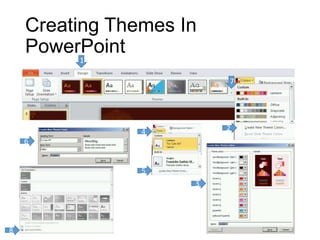
Creating Themes In
PowerPoint
1
2
3
4
6
7
8
5
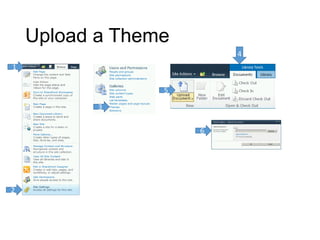
Upload a Theme
2
1
3
4
5
6
4
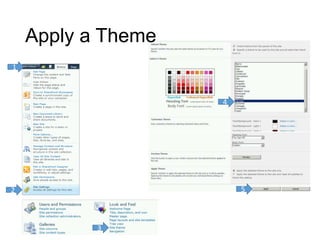
Apply a Theme
2
1
3
5
Demo: Create a Theme
Demo: Upload the Theme
Demo: Apply the Theme
Pages
Wiki Page
• Definition
• Unstructured content
pages
• Can include Web Parts
• Hawaiian for “quick”
• When to use
• When you need to
deliver unstructured
content
• When you need to
deliver code and
content seamlessly
Page Layout
• Definition
• Web Content Management
(WCM) feature
• Used to ensure consistency
across content
• Mixed structured and
unstructured content
• When to Use
• Create consistency across a
large number of contributors
• Plan for changes of content
structure in the future
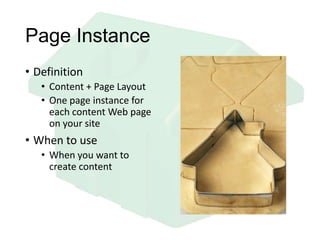
Page Instance
• Definition
• Content + Page Layout
• One page instance for
each content Web page
on your site
• When to use
• When you want to
create content
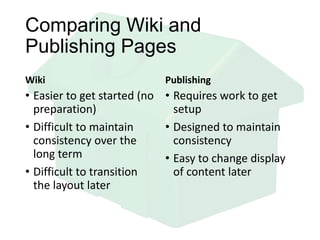
Comparing Wiki and
Publishing Pages
Wiki
• Easier to get started (no
preparation)
• Difficult to maintain
consistency over the
long term
• Difficult to transition
the layout later
Publishing
• Requires work to get
setup
• Designed to maintain
consistency
• Easy to change display
of content later
Demo: Create a Page
Demo: Create a Page Layout
Demo: Changing a Page Layout
Managing the Home
Page
How do I put content on the
page?
• On Publishing Pages
• Field Controls
• On a Wiki Page
• Body Content
• On a Web Part Page
• Content Editor Web Part
(ick!)
What is a Web Part?
• A piece of code that
can be placed on a page
by the administrator.
• Can be used to do
anything including
• Executing a search
• Issuing a Query
• Displaying static content
Demo: Add a Content Query
Demo: Add a Twitter Feed
SharePoint Add-ons
What is a SharePoint
Solution?
• A .WSP file that
contains XML and
sometimes compiled
code to be run
• Can be scoped at a
farm or site collection
level
• Site collection solutions
are called Sandboxed
solutions
User Code Host
• Sandboxed Solutions
with compiled code
require that the user
code host service be
running.
• They represent no
threat to the health of
SharePoint – but
SharePoint is frequently
not configured
correctly.
JavaScript and the CEWP
• CEWP = Content Editor
Web Part
• JavaScript – One bad
apple spoils the whole
bunch
Super Tips
Something is Broken
• Nothing in the site
works
• Try
_layouts/settings.aspx
• Check the master page
• The page is broken
• Try adding ?Contents=1
• Can’t add a web part
• Try adding
?ToolPaneView=2
Remove Menus and Embed
• Add ?IsDlg=1 to remove
header and menus
• Use the resulting page
in the page viewer web
part to create
embedded views
Demo: CEWP Good Use
Demo: Page Viewer
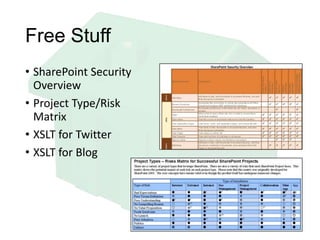
Free Stuff
• SharePoint Security
Overview
• Project Type/Risk
Matrix
• XSLT for Twitter
• XSLT for Blog
Thank You
Robert L Bogue
Shepherd@SharePointShepherd.com
(317) 572-5310

Five Ways to Make SharePoint Your Intranet Home

  • 1.
    Five Ways toMake SharePoint Your Intranet Home Robert Bogue Shepherd@SharePointShepherd.com (317) 572-5310
  • 2.
    Who am I? •I’ve been making technology easier to understand for 22 years • I’ve helped dozens of clients implement SharePoint. • Certifiable technical skills
  • 3.
    Agenda • Themes • Pages •Managing the Home Page • SharePoint Add-Ons • Super Tips
  • 4.
  • 5.
    What is aTheme? • A set of colors and fonts • Can be used inside of office applications – and SharePoint
  • 6.
  • 7.
  • 8.
  • 9.
    Demo: Create aTheme Demo: Upload the Theme Demo: Apply the Theme
  • 10.
  • 11.
    Wiki Page • Definition •Unstructured content pages • Can include Web Parts • Hawaiian for “quick” • When to use • When you need to deliver unstructured content • When you need to deliver code and content seamlessly
  • 12.
    Page Layout • Definition •Web Content Management (WCM) feature • Used to ensure consistency across content • Mixed structured and unstructured content • When to Use • Create consistency across a large number of contributors • Plan for changes of content structure in the future
  • 13.
    Page Instance • Definition •Content + Page Layout • One page instance for each content Web page on your site • When to use • When you want to create content
  • 14.
    Comparing Wiki and PublishingPages Wiki • Easier to get started (no preparation) • Difficult to maintain consistency over the long term • Difficult to transition the layout later Publishing • Requires work to get setup • Designed to maintain consistency • Easy to change display of content later
  • 15.
    Demo: Create aPage Demo: Create a Page Layout Demo: Changing a Page Layout
  • 16.
  • 17.
    How do Iput content on the page? • On Publishing Pages • Field Controls • On a Wiki Page • Body Content • On a Web Part Page • Content Editor Web Part (ick!)
  • 18.
    What is aWeb Part? • A piece of code that can be placed on a page by the administrator. • Can be used to do anything including • Executing a search • Issuing a Query • Displaying static content
  • 19.
    Demo: Add aContent Query Demo: Add a Twitter Feed
  • 20.
  • 21.
    What is aSharePoint Solution? • A .WSP file that contains XML and sometimes compiled code to be run • Can be scoped at a farm or site collection level • Site collection solutions are called Sandboxed solutions
  • 22.
    User Code Host •Sandboxed Solutions with compiled code require that the user code host service be running. • They represent no threat to the health of SharePoint – but SharePoint is frequently not configured correctly.
  • 23.
    JavaScript and theCEWP • CEWP = Content Editor Web Part • JavaScript – One bad apple spoils the whole bunch
  • 24.
  • 25.
    Something is Broken •Nothing in the site works • Try _layouts/settings.aspx • Check the master page • The page is broken • Try adding ?Contents=1 • Can’t add a web part • Try adding ?ToolPaneView=2
  • 26.
    Remove Menus andEmbed • Add ?IsDlg=1 to remove header and menus • Use the resulting page in the page viewer web part to create embedded views
  • 27.
    Demo: CEWP GoodUse Demo: Page Viewer
  • 28.
    Free Stuff • SharePointSecurity Overview • Project Type/Risk Matrix • XSLT for Twitter • XSLT for Blog
  • 29.
    Thank You Robert LBogue Shepherd@SharePointShepherd.com (317) 572-5310

Editor's Notes

  • #12 Web Part Pages minus structure and plus contentSimplified url syntax … [[ text ]] …Automatic creation of pagesQuestion: How does a Wiki make it easier to collaborate?Answer: Ease of linking and automatic creation of pages.
  • #13 Consistency is key to help people consume information.Page Layouts are the way that consistency is enforced.Question: Where might a page layout be more appropriate than a wiki page?Answer: In a structured publishing situation where the consistency of the data is more important than the speed at which it can be added to the system.Need to emphasis why page layouts help?
  • #14 Consider how Wiki pages and page instances are different.Wiki – Unstructured content anywherePage instance – Controlled metadata at specific points in the pageThink about navigation. We’ve settled that. Global navigation is across the top. Local navigation is on the left.What happens when you come to a site where this isn’t the case?Output can be regenerated when the page layout is changed.Question: Why do page instances make sense from a design perspective?Answer: Because the pages can be re-merged as soon as the page layout changes to adapt to a new layout, a new branding, or a new set of fields added to the page.