
















Card Sorting
Your Way to
Meaningful
Metadata
Robert Bogue
(317) 572-5310
Rob.Bogue@ThorProjects.com
Objective
• Why card sorting is important
• What it is
• How to do it
Agenda
• The Findability Challenge
• The Great Debates
• Information Architecture
• Card Sorting
The Findability Challenge
Meet Alice
• Just joined the company as a
field service rep
• Mother of three toddlers
• Experienced professional
Suffer with Alice
• Alice needs to know where to
find:
• Employee Handbook
• Vacation Request Form
• Expense Report Form
• Sales Training
• She wants to find:
• How to get connected to the
organization
• What her benefits are
Expense Report Form
• Who owns it?
• Accounting
• Payroll
• Human Resources
• What are the rules?
• When do I have to turn it in?
• What is (and isn’t allowed)?
Sales Training
• Learning Management System
• Where is it?
• What does it have (and not have)
in it?
• PowerPoint Templates
• Where are they?
• Are there template decks?
• Resources
• Where are they?
The Great Debates
Creator Versus Consumer
• Creators are interested in EASE to
STORE.
• Consumers are interested in EASE to
RETRIEVE.
• Departmental taxonomies focus on EASE
to STORE.
• Functional taxonomies focus on EASE to
RETRIEVE.
Departmental Structures
• Most common intranet
organizational structure
• Easy for the CREATOR
• Difficult for the Consumer
Functional
Structures
• My “Organization”
• Benefits
• Payroll
• Health
• Retirement
• Facilities
• Physical Access
• Cleanliness
• Technology
• PC
• Remote Access
• At “Organization”
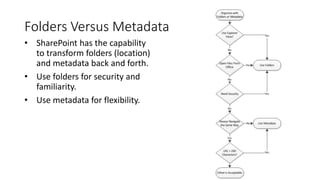
Folders Versus Metadata
• SharePoint has the capability
to transform folders (location)
and metadata back and forth.
• Use folders for security and
familiarity.
• Use metadata for flexibility.
Search vs. Navigation
• 50% of users Navigate, 50% of
users Search
• Users are interested in the
results – not the path
• Highly relevant search may be
faster than navigation
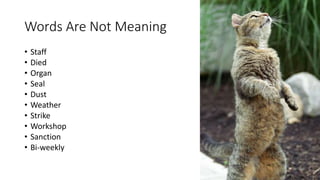
Words Are Not Meaning
• Staff
• Died
• Organ
• Seal
• Dust
• Weather
• Strike
• Workshop
• Sanction
• Bi-weekly
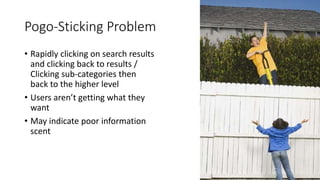
Pogo-Sticking Problem
• Rapidly clicking on search results
and clicking back to results /
Clicking sub-categories then
back to the higher level
• Users aren’t getting what they
want
• May indicate poor information
scent
Information Scent
• From 1970s optimal foraging
theory
• Cue to indicate whether the
information sought is in this
direction
• Ambient / environmental feel
Folksonomy
• Collaborative Tagging
• Free Vocabulary
• Emergent
• Issues
• Synonyms – multiple tags, same concept
• Homonymy – same tag, different
meaning
• Polysemy – same tag, multiple related
meanings
• Specificity – level of details
• Examples
• Delicious
• Flicker
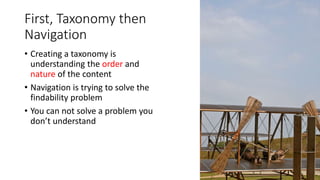
First, Taxonomy then
Navigation
• Creating a taxonomy is
understanding the order and
nature of the content
• Navigation is trying to solve the
findability problem
• You can not solve a problem you
don’t understand
Information Architecture
Content Inventory
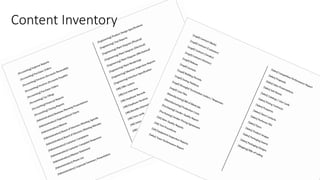
• Collect classes of documents
• Identify those classes which are
“important”
• Frequently used
• Required/Important
• Identify metadata
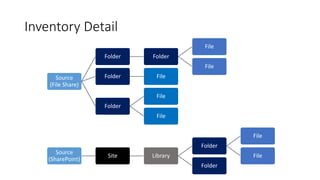
Inventory Detail
Source
(File Share)
Folder Folder
File
File
Folder File
Folder
File
File
Source
(SharePoint)
Site Library
Folder
File
File
Folder
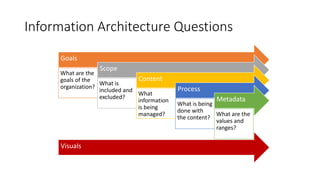
Information Architecture Questions
Goals
What are the
goals of the
organization?
Scope
What is
included and
excluded?
Content
What
information
is being
managed?
Process
What is being
done with
the content?
Metadata
What are the
values and
ranges?
Visuals
Target Usage
Communication
• One-to-Many
• Controlled
• Feeling “in the know”
Collaboration
• Many-to-Many
• Uncontrolled
• Working together towards a goal
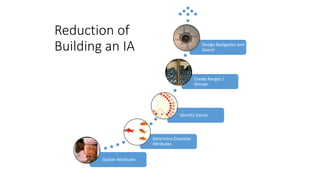
Gather Attributes
Determine Essential
Attributes
Identify Values
Create Ranges /
Groups
Design Navigation and
Search
Reduction of
Building an IA
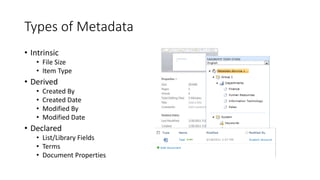
Types of Metadata
• Intrinsic
• File Size
• Item Type
• Derived
• Created By
• Created Date
• Modified By
• Modified Date
• Declared
• List/Library Fields
• Terms
• Document Properties
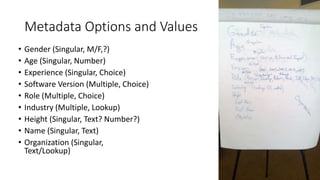
Metadata Options and Values
• Gender (Singular, M/F,?)
• Age (Singular, Number)
• Experience (Singular, Choice)
• Software Version (Multiple, Choice)
• Role (Multiple, Choice)
• Industry (Multiple, Lookup)
• Height (Singular, Text? Number?)
• Name (Singular, Text)
• Organization (Singular,
Text/Lookup)
Staffing an Information
Architecture Project
• Phases
• Content Inventory
• IA leading BAs
• Card Sorting
• IA leading, 1 BA supporting
• Fine Tuning
• IA Performs / Leads
• Depends on
• Experience
• Quality desired
Card Sorting
• The most effective exercise for
creating a taxonomy
• Often need to nudge/push out
of current thinking
• Need clarity of audience and
purpose
Card Sorting - Open
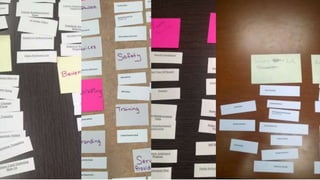
• Get multiple groups of 2-5 to
process separately
• Hand them “cards” of categories
of documents
• Ask them to create categories to
organize “cards”
Taxonomy Validation
• Intuitive – Easy to navigate and
use
• Unambiguous – Doesn’t offer
alternatives
• Hospitable – Can accommodate
all content
• Consistent and Predictable –
provides context / follows a
single model
Card Sorting - Closed
• Different people than used for
Open Card Sort
• Hand them the “cards” and the
categories
• Ask them to put “cards” into
categories
• Score
• -1 for “cards” they can’t file
• -2 for “cards” they put in the
wrong spot
Content Inventory
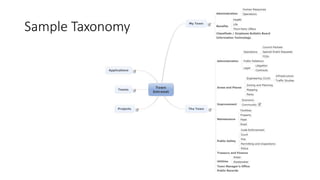
Sample Taxonomy
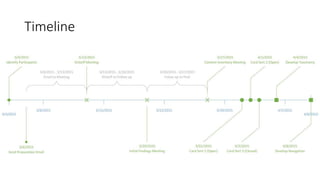
Timeline
Questions and Answers

Card Sorting Your Way to Meaningful Metadata

  • 1.
    Card Sorting Your Wayto Meaningful Metadata Robert Bogue (317) 572-5310 Rob.Bogue@ThorProjects.com
  • 2.
    Objective • Why cardsorting is important • What it is • How to do it
  • 3.
    Agenda • The FindabilityChallenge • The Great Debates • Information Architecture • Card Sorting
  • 4.
  • 5.
    Meet Alice • Justjoined the company as a field service rep • Mother of three toddlers • Experienced professional
  • 6.
    Suffer with Alice •Alice needs to know where to find: • Employee Handbook • Vacation Request Form • Expense Report Form • Sales Training • She wants to find: • How to get connected to the organization • What her benefits are
  • 7.
    Expense Report Form •Who owns it? • Accounting • Payroll • Human Resources • What are the rules? • When do I have to turn it in? • What is (and isn’t allowed)?
  • 8.
    Sales Training • LearningManagement System • Where is it? • What does it have (and not have) in it? • PowerPoint Templates • Where are they? • Are there template decks? • Resources • Where are they?
  • 9.
  • 10.
    Creator Versus Consumer •Creators are interested in EASE to STORE. • Consumers are interested in EASE to RETRIEVE. • Departmental taxonomies focus on EASE to STORE. • Functional taxonomies focus on EASE to RETRIEVE.
  • 11.
    Departmental Structures • Mostcommon intranet organizational structure • Easy for the CREATOR • Difficult for the Consumer
  • 12.
    Functional Structures • My “Organization” •Benefits • Payroll • Health • Retirement • Facilities • Physical Access • Cleanliness • Technology • PC • Remote Access • At “Organization”
  • 13.
    Folders Versus Metadata •SharePoint has the capability to transform folders (location) and metadata back and forth. • Use folders for security and familiarity. • Use metadata for flexibility.
  • 14.
    Search vs. Navigation •50% of users Navigate, 50% of users Search • Users are interested in the results – not the path • Highly relevant search may be faster than navigation
  • 15.
    Words Are NotMeaning • Staff • Died • Organ • Seal • Dust • Weather • Strike • Workshop • Sanction • Bi-weekly
  • 16.
    Pogo-Sticking Problem • Rapidlyclicking on search results and clicking back to results / Clicking sub-categories then back to the higher level • Users aren’t getting what they want • May indicate poor information scent
  • 17.
    Information Scent • From1970s optimal foraging theory • Cue to indicate whether the information sought is in this direction • Ambient / environmental feel
  • 18.
    Folksonomy • Collaborative Tagging •Free Vocabulary • Emergent • Issues • Synonyms – multiple tags, same concept • Homonymy – same tag, different meaning • Polysemy – same tag, multiple related meanings • Specificity – level of details • Examples • Delicious • Flicker
  • 19.
    First, Taxonomy then Navigation •Creating a taxonomy is understanding the order and nature of the content • Navigation is trying to solve the findability problem • You can not solve a problem you don’t understand
  • 20.
  • 21.
    Content Inventory • Collectclasses of documents • Identify those classes which are “important” • Frequently used • Required/Important • Identify metadata
  • 22.
    Inventory Detail Source (File Share) FolderFolder File File Folder File Folder File File Source (SharePoint) Site Library Folder File File Folder
  • 23.
    Information Architecture Questions Goals Whatare the goals of the organization? Scope What is included and excluded? Content What information is being managed? Process What is being done with the content? Metadata What are the values and ranges? Visuals
  • 24.
    Target Usage Communication • One-to-Many •Controlled • Feeling “in the know” Collaboration • Many-to-Many • Uncontrolled • Working together towards a goal
  • 25.
    Gather Attributes Determine Essential Attributes IdentifyValues Create Ranges / Groups Design Navigation and Search Reduction of Building an IA
  • 26.
    Types of Metadata •Intrinsic • File Size • Item Type • Derived • Created By • Created Date • Modified By • Modified Date • Declared • List/Library Fields • Terms • Document Properties
  • 27.
    Metadata Options andValues • Gender (Singular, M/F,?) • Age (Singular, Number) • Experience (Singular, Choice) • Software Version (Multiple, Choice) • Role (Multiple, Choice) • Industry (Multiple, Lookup) • Height (Singular, Text? Number?) • Name (Singular, Text) • Organization (Singular, Text/Lookup)
  • 28.
    Staffing an Information ArchitectureProject • Phases • Content Inventory • IA leading BAs • Card Sorting • IA leading, 1 BA supporting • Fine Tuning • IA Performs / Leads • Depends on • Experience • Quality desired
  • 29.
    Card Sorting • Themost effective exercise for creating a taxonomy • Often need to nudge/push out of current thinking • Need clarity of audience and purpose
  • 30.
    Card Sorting -Open • Get multiple groups of 2-5 to process separately • Hand them “cards” of categories of documents • Ask them to create categories to organize “cards”
  • 32.
    Taxonomy Validation • Intuitive– Easy to navigate and use • Unambiguous – Doesn’t offer alternatives • Hospitable – Can accommodate all content • Consistent and Predictable – provides context / follows a single model
  • 33.
    Card Sorting -Closed • Different people than used for Open Card Sort • Hand them the “cards” and the categories • Ask them to put “cards” into categories • Score • -1 for “cards” they can’t file • -2 for “cards” they put in the wrong spot
  • 34.
  • 36.
  • 37.
  • 38.

Editor's Notes

  • #3 Story – JFK mission to the moon.
  • #10 Time: 1 minute “Lets get ready to rumble…” Fights with relatively easy answers
  • #11 Time: 3 minutes Common Question: “… but how do we organize if we don’t organize by department”?
  • #14 Time: 5 minutes Information Architect purists will say always use metadata – except when you can’t Why metadata – Men vs. Women buying shoes
  • #15 Time: 1 minute Internet navigation… Type a company name in search rather than trying to guess their web site address
  • #16 Time: 3 minutes Staff Stick Employees Infection Died Colored Death Organ Musical Instrument Body Part Seal Marine Mammal Navy Special Operations Dust To remove To Cover Weather To withstand a storm To wear away Strike To Hit To Miss Workshop A place where work is done A place where you learn hands on
  • #17 Time: 1 minute Look for it. Frustrating experience
  • #18 Time: 1 minute Optimal foraging theory – animals want to expend the minimum energy with the greatest chance of return. (Kind of like a teenager that wants to do the minimum) You would be amazed at what we get from the ambient environment.
  • #19 Time: 3 minutes Net: “Individual Results may vary, past performance is not guarantee of future returns, void where prohibited, etc.” Note: Requires “largish communities” Story: Nursing …
  • #20 Samuel Langley – Studied physics of flight (aerodynamics) but not as intently or correctly as the Wright brothers.
  • #22 Time: 2 minutes Identifying content management options
  • #24 Time: 2 minutes The context of IA evaluation is what is the user doing? REMEMBER: Our goal is to make it easy to find things – thus how we represent it visually maters
  • #26 Time: 2 minutes
  • #27 Time: 2 minutes Metadata in SharePoint is exposed as column data in lists and libraries. There are three main types of metadata: Intrinsic, Derived and Declared. Intrinsic metadata is comprised of properties associated with the underlying object type. A document, for example, will have a file type and size, the values for which are not supplied by the user. Derived metadata is information about the item that is captured or set automatically, such as the creation date, author, modification date, workflow associations, etc. These values may be modified programmatically or promoted from document properties but are not directly editable by the user. Declared metadata is any information associated with an item that may be supplied by the user. It can be entered manually, created automatically based on document properties, or set programmatically in workflows or code. Declared metadata is the most common type of information used in classification and taxonomy. It can vary greatly from list to list or site to site and is often grouped together in content types. Structured metadata can be defined on a global level within a term store and shared between site collections or declared locally for use within a specific site. Unstructured metadata in the form of social tags and ratings is supplied directly by users on an ad-hoc basis.
  • #30 Time: 5 minutes Open Card Sort Closed Card Sort
  • #32 Getting the right name for a category is difficult.
  • #33 Time: 2 minutes