Finding and using web widgets
for self-regulated learning

Diana Dikke, imc AG


                          © www.role-project.eu
Contents


1. Responsive Open Learning Environments (ROLE)

2. Widgets and their use for self-regulated learning

3. Demo 1: Finding widgets in a Widget Store

4. Demo 2: Using widgets in a PLMS

5. Perspectives and advantages


19.10.2011                                             © www.role-project.eu
Responsive Open Learning Environments (ROLE)

Responsive:
      • Responsiveness to learners‘ needs, wishes and preferences
      • Individually-adapted learning tools, services and resources
Open:
     •       Open social system based on Web 2.0 technology
     •       Interoperable between software systems and technology
Learning:
      • Supports individual and collaborative learning processes
      • Serves to assist lifelong learning
Environment:
      • Brings together multiple target groups
      • Includes various tools, services and resources


19.10.2011                                                           © www.role-project.eu
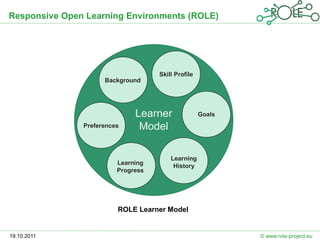
Responsive Open Learning Environments (ROLE)


                                    Skill Profile
                     Background


                              Learner               Goals
               Preferences     Model

                                        Learning
                         Learning        History
                         Progress


                         ROLE Learner Model


19.10.2011                                                  © www.role-project.eu
Widgets and their use for self-regulated learning

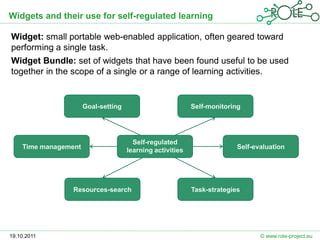
Widget: small portable web-enabled application, often geared toward
performing a single task.
Widget Bundle: set of widgets that have been found useful to be used
together in the scope of a single or a range of learning activities.


                      Goal-setting                         Self-monitoring


                                       Self-regulated
    Time management                                                      Self-evaluation
                                     learning activities


                 Resources-search                          Task-strategies


19.10.2011                                                                      © www.role-project.eu
Widgets and their use for self-regulated learning


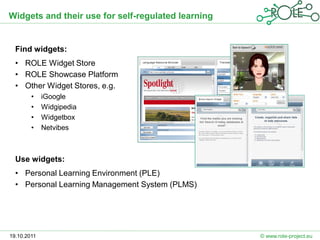
  Find widgets:
  • ROLE Widget Store
  • ROLE Showcase Platform
  • Other Widget Stores, e.g.
        •    iGoogle
        •    Widgipedia
        •    Widgetbox
        •    Netvibes


  Use widgets:
  • Personal Learning Environment (PLE)
  • Personal Learning Management System (PLMS)


19.10.2011                                          © www.role-project.eu
Demo 1: Finding widgets in a Widget Store

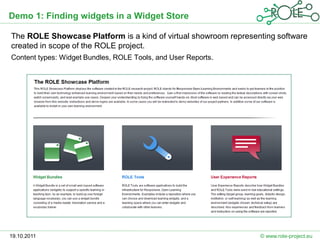
The ROLE Showcase Platform is a kind of virtual showroom representing software
created in scope of the ROLE project.
Content types: Widget Bundles, ROLE Tools, and User Reports.


19.10.2011                                                       © www.role-project.eu
Demo 1: Finding widgets in a Widget Store

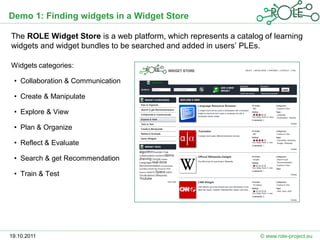
The ROLE Widget Store is a web platform, which represents a catalog of learning
widgets and widget bundles to be searched and added in users’ PLEs.

Widgets categories:

 • Collaboration & Communication

 • Create & Manipulate

 • Explore & View

 • Plan & Organize

 • Reflect & Evaluate

 • Search & get Recommendation

 • Train & Test


19.10.2011                                                         © www.role-project.eu
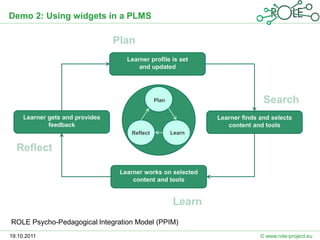
Demo 2: Using widgets in a PLMS


                                   Learner profile is set
                                       and updated


                                              Plan


     Learner gets and provides                               Learner finds and selects
             feedback                                           content and tools
                                    Reflect          Learn


                                 Learner works on selected
                                     content and tools


ROLE Psycho-Pedagogical Integration Model (PPIM)
19.10.2011                                                                 © www.role-project.eu
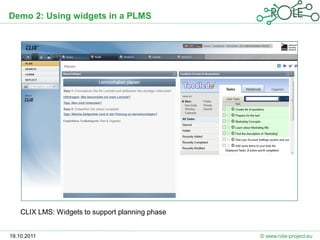
Demo 2: Using widgets in a PLMS


    CLIX LMS: Widgets to support planning phase


19.10.2011                                        © www.role-project.eu
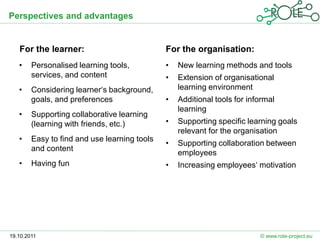
Perspectives and advantages


   For the learner:                           For the organisation:
   •    Personalised learning tools,          •   New learning methods and tools
        services, and content                 •   Extension of organisational
   •    Considering learner‘s background,         learning environment
        goals, and preferences                •   Additional tools for informal
                                                  learning
   •    Supporting collaborative learning
        (learning with friends, etc.)         •   Supporting specific learning goals
                                                  relevant for the organisation
   •    Easy to find and use learning tools
                                              •   Supporting collaboration between
        and content
                                                  employees
   •    Having fun                            •   Increasing employees‘ motivation


19.10.2011                                                                © www.role-project.eu
Thank you
             for the attention


19.10.2011                       © www.role-project.eu

Finding and using web widgets for self-regulated learning

  • 1.
    Finding and usingweb widgets for self-regulated learning Diana Dikke, imc AG © www.role-project.eu
  • 2.
    Contents 1. Responsive OpenLearning Environments (ROLE) 2. Widgets and their use for self-regulated learning 3. Demo 1: Finding widgets in a Widget Store 4. Demo 2: Using widgets in a PLMS 5. Perspectives and advantages 19.10.2011 © www.role-project.eu
  • 3.
    Responsive Open LearningEnvironments (ROLE) Responsive: • Responsiveness to learners‘ needs, wishes and preferences • Individually-adapted learning tools, services and resources Open: • Open social system based on Web 2.0 technology • Interoperable between software systems and technology Learning: • Supports individual and collaborative learning processes • Serves to assist lifelong learning Environment: • Brings together multiple target groups • Includes various tools, services and resources 19.10.2011 © www.role-project.eu
  • 4.
    Responsive Open LearningEnvironments (ROLE) Skill Profile Background Learner Goals Preferences Model Learning Learning History Progress ROLE Learner Model 19.10.2011 © www.role-project.eu
  • 5.
    Widgets and theiruse for self-regulated learning Widget: small portable web-enabled application, often geared toward performing a single task. Widget Bundle: set of widgets that have been found useful to be used together in the scope of a single or a range of learning activities. Goal-setting Self-monitoring Self-regulated Time management Self-evaluation learning activities Resources-search Task-strategies 19.10.2011 © www.role-project.eu
  • 6.
    Widgets and theiruse for self-regulated learning Find widgets: • ROLE Widget Store • ROLE Showcase Platform • Other Widget Stores, e.g. • iGoogle • Widgipedia • Widgetbox • Netvibes Use widgets: • Personal Learning Environment (PLE) • Personal Learning Management System (PLMS) 19.10.2011 © www.role-project.eu
  • 7.
    Demo 1: Findingwidgets in a Widget Store The ROLE Showcase Platform is a kind of virtual showroom representing software created in scope of the ROLE project. Content types: Widget Bundles, ROLE Tools, and User Reports. 19.10.2011 © www.role-project.eu
  • 8.
    Demo 1: Findingwidgets in a Widget Store The ROLE Widget Store is a web platform, which represents a catalog of learning widgets and widget bundles to be searched and added in users’ PLEs. Widgets categories: • Collaboration & Communication • Create & Manipulate • Explore & View • Plan & Organize • Reflect & Evaluate • Search & get Recommendation • Train & Test 19.10.2011 © www.role-project.eu
  • 9.
    Demo 2: Usingwidgets in a PLMS Learner profile is set and updated Plan Learner gets and provides Learner finds and selects feedback content and tools Reflect Learn Learner works on selected content and tools ROLE Psycho-Pedagogical Integration Model (PPIM) 19.10.2011 © www.role-project.eu
  • 10.
    Demo 2: Usingwidgets in a PLMS CLIX LMS: Widgets to support planning phase 19.10.2011 © www.role-project.eu
  • 11.
    Perspectives and advantages For the learner: For the organisation: • Personalised learning tools, • New learning methods and tools services, and content • Extension of organisational • Considering learner‘s background, learning environment goals, and preferences • Additional tools for informal learning • Supporting collaborative learning (learning with friends, etc.) • Supporting specific learning goals relevant for the organisation • Easy to find and use learning tools • Supporting collaboration between and content employees • Having fun • Increasing employees‘ motivation 19.10.2011 © www.role-project.eu
  • 12.
    Thank you for the attention 19.10.2011 © www.role-project.eu