Best Practices in Widget Development
Examples and Counterexamples


Daniel Dahrendorf (IMC)

ROLE Developer Camp,
Lausanne, Switzerland
August 23, 2010


                               © www.role-project.eu
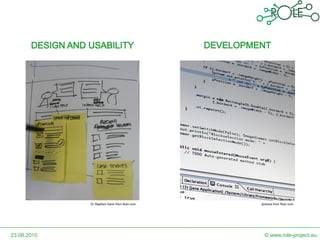
Dr Stephen Dann from flickr.com   jbvkoos from flickr.com


23.08.2010                                       © www.role-project.eu
DESIGN AND USABILITY


23.08.2010                   © www.role-project.eu
In General

• Focus on a single task
     – Give your end user a single functionality
• Own added Value
     – Do not create a Widget which requires a second widget
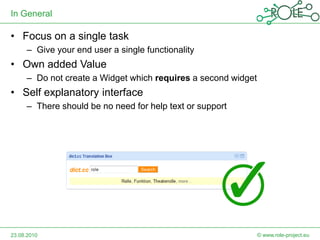
• Self explanatory interface
     – There should be no need for help text or support


23.08.2010                                                     © www.role-project.eu
Size of Widgets

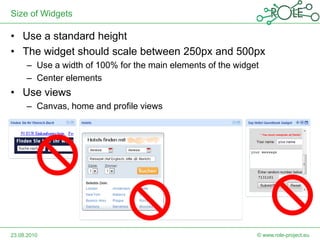
• Use a standard height
• The widget should scale between 250px and 500px
     – Use a width of 100% for the main elements of the widget
     – Center elements
• Use views
     – Canvas, home and profile views


23.08.2010                                                   © www.role-project.eu
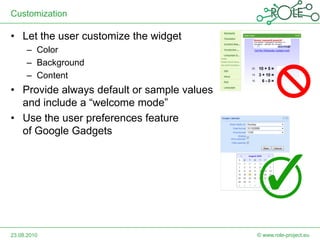
Customization

• Let the user customize the widget
     – Color
     – Background
     – Content
• Provide always default or sample values
  and include a “welcome mode”
• Use the user preferences feature
  of Google Gadgets


23.08.2010                                  © www.role-project.eu
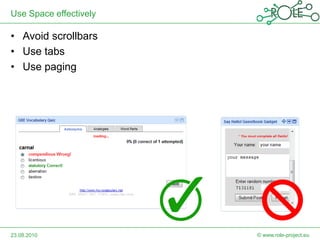
Use Space effectively

• Avoid scrollbars
• Use tabs
• Use paging


23.08.2010              © www.role-project.eu
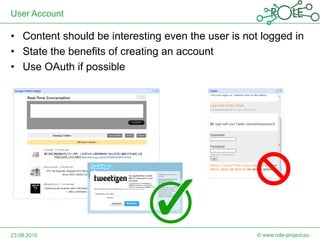
User Account

• Content should be interesting even the user is not logged in
• State the benefits of creating an account
• Use OAuth if possible


23.08.2010                                          © www.role-project.eu
DEVELOPMENT


23.08.2010          © www.role-project.eu
Development Environment

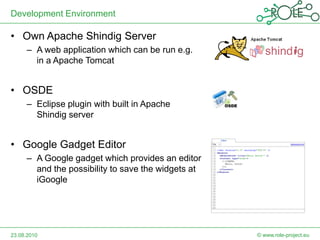
• Own Apache Shindig Server
     – A web application which can be run e.g.
       in a Apache Tomcat


• OSDE
     – Eclipse plugin with built in Apache
       Shindig server


• Google Gadget Editor
     – A Google gadget which provides an editor
       and the possibility to save the widgets at
       iGoogle


23.08.2010                                          © www.role-project.eu
Development Environment

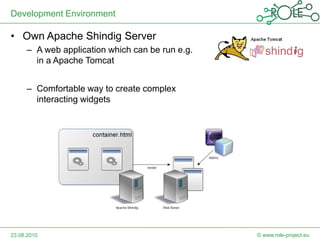
• Own Apache Shindig Server
     – A web application which can be run e.g.
       in a Apache Tomcat


     – Comfortable way to create complex
       interacting widgets


23.08.2010                                       © www.role-project.eu
Using the features provided by the gadget API

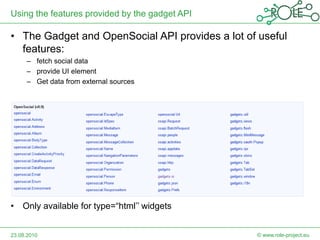
• The Gadget and OpenSocial API provides a lot of useful
  features:
     – fetch social data
     – provide UI element
     – Get data from external sources


• Only available for type=“html’’ widgets


23.08.2010                                       © www.role-project.eu
Selected Features:

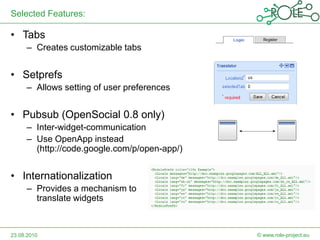
• Tabs
     – Creates customizable tabs


• Setprefs
     – Allows setting of user preferences


• Pubsub (OpenSocial 0.8 only)
     – Inter-widget-communication
     – Use OpenApp instead
       (http://code.google.com/p/open-app/)


• Internationalization
     – Provides a mechanism to
       translate widgets


23.08.2010                                    © www.role-project.eu
makeRequest and the Same Origin Policy

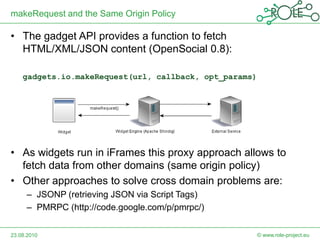
• The gadget API provides a function to fetch
  HTML/XML/JSON content (OpenSocial 0.8):

    gadgets.io.makeRequest(url, callback, opt_params)


• As widgets run in iFrames this proxy approach allows to
  fetch data from other domains (same origin policy)
• Other approaches to solve cross domain problems are:
     – JSONP (retrieving JSON via Script Tags)
     – PMRPC (http://code.google.com/p/pmrpc/)


23.08.2010                                              © www.role-project.eu
Caching Problems


• If you are using makeRequest() to fetch content that is
  updated more than once an hour, such as feed data, you
  might not get the latest updates


23.08.2010                                       © www.role-project.eu
Refreshing the Content Cache

• Solution: create a wrapper with a refresh interval

 function makeCachedRequest(url, callback, params,
    refreshInterval) {

      var timestamp = new Date().getTime();
      var sep = "?";
      if (refreshInterval && refreshInterval > 0) {
         timestamp =
            Math.floor(timestamp / (refreshInterval * 1000));
      }
      if (url.indexOf("?") > -1) {
         sep = "&";
      }
      url = [ url, sep, "nocache=", timestamp ].join("");
      gadgets.io.makeRequest(url, callback, params);
 }


23.08.2010                                             © www.role-project.eu
Caching of external files

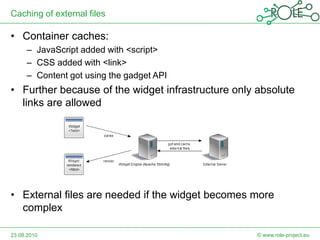
• Container caches:
     – JavaScript added with <script>
     – CSS added with <link>
     – Content got using the gadget API
• Further because of the widget infrastructure only absolute
  links are allowed


• External files are needed if the widget becomes more
  complex

23.08.2010                                          © www.role-project.eu
Loading JavaScript / CSS dynamically
                                                         http://www.bitsbythepound.com/include-
1. Determine the location of the xml                     external-javascript-and-css-files-with-a-
                                                         google-wave-gadget-249.html
function getModuleBase() {
    if (window.__moduleBase)
        return window.__moduleBase;
    if (_args){
        var moduleBase = _args()['url'];
        moduleBase = moduleBase.substring(0, moduleBase.lastIndexOf('/') + 1);
        window.__moduleBase = moduleBase;
        return window.__moduleBase;
    }
    alert('Can not find module base. Gadget may not work properly.');
    return '';
};

2. Create mechanism for loading JS and CSS
      jQuery provides a cross-browser require script plugin (requireScript)
3. Load the js/css in gadget init
function init() {
   var useCaching = false;
   addScript("js/default.js",useCaching);
   addStylesheet("css/style.css",useCaching);
};
gadgets.util.registerOnLoadHandler(init);

23.08.2010                                                            © www.role-project.eu
Performance

• Goal: Reduce size of the files and number of HTTP requests

• Minify JavaScript code
     – E.g. http://www.crockford.com/javascript/jsmin.html
• Pack all stuff in one XML file
     – Suggestion of Google
• Use the containers’ cache
     – gadgets.io.getProxyUrl
• More sources for optimization:
     – http://code.google.com/intl/de-DE/apis/gadgets/docs/publish.html
     – http://wiki.opensocial.org/index.php?title=OpenSocial_Latency_Meas
       urement

             Maintainability VS. Performance?
23.08.2010                                                   © www.role-project.eu
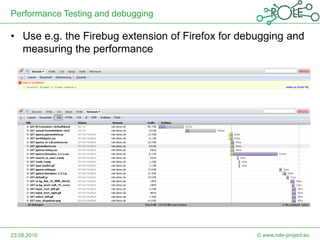
Performance Testing and debugging

• Use e.g. the Firebug extension of Firefox for debugging and
  measuring the performance


23.08.2010                                         © www.role-project.eu
Conclusions

• Guidelines are helping to provide a user friendly interface
• Customizations allows users to personalize their widgets
• An own Apache Shindig server can be used to develop
  interacting widgets
• Using the Gadget API prevents to “reinvent the wheel”
• Caching and cross domain problems can be handled with
  several methods
• A widget can be optimized regarding its performance
• Tools are available for debugging and performance
  measuring


23.08.2010                                           © www.role-project.eu
ROLE ALLIANCE PROGRAM


                  What is the Alliance Program?
       A partner network of strategic users, vendors and other
                             stakeholder

                Why should I become a member?
       As a member you have a lot of benefits e.g., access to our
         showcase platform, free visit of specific workshops, test
         of prototypes or attendance at Alliance Partner meetings

        How can I become part of the Alliance Program?
                        Please register under
              http://www.roleproject.eu/AllianceProgram


23.08.2010                                             © www.role-project.eu
References

• http://www.google.com/webmasters/gadgets/guidelines.html
• http://www.seoish.com/how-to-internationalize-google-
  gadgets/
• Lal, R. and Chava, L. C. 2010 Developing Web Widget with
  Html, Css, JSON and Ajax: a Complete Guide to Web
  Widget. CreateSpace.
• http://www.bitsbythepound.com/include-external-javascript-
  and-css-files-with-a-google-wave-gadget-249.html
• http://code.google.com/intl/de/apis/gadgets/docs/remote-
  content.html


23.08.2010                                        © www.role-project.eu

Best Practices in Widget Development - Examples and Counterexamples

  • 1.
    Best Practices inWidget Development Examples and Counterexamples Daniel Dahrendorf (IMC) ROLE Developer Camp, Lausanne, Switzerland August 23, 2010 © www.role-project.eu
  • 2.
    Dr Stephen Dannfrom flickr.com jbvkoos from flickr.com 23.08.2010 © www.role-project.eu
  • 3.
    DESIGN AND USABILITY 23.08.2010 © www.role-project.eu
  • 4.
    In General • Focuson a single task – Give your end user a single functionality • Own added Value – Do not create a Widget which requires a second widget • Self explanatory interface – There should be no need for help text or support 23.08.2010 © www.role-project.eu
  • 5.
    Size of Widgets •Use a standard height • The widget should scale between 250px and 500px – Use a width of 100% for the main elements of the widget – Center elements • Use views – Canvas, home and profile views 23.08.2010 © www.role-project.eu
  • 6.
    Customization • Let theuser customize the widget – Color – Background – Content • Provide always default or sample values and include a “welcome mode” • Use the user preferences feature of Google Gadgets 23.08.2010 © www.role-project.eu
  • 7.
    Use Space effectively •Avoid scrollbars • Use tabs • Use paging 23.08.2010 © www.role-project.eu
  • 8.
    User Account • Contentshould be interesting even the user is not logged in • State the benefits of creating an account • Use OAuth if possible 23.08.2010 © www.role-project.eu
  • 9.
    DEVELOPMENT 23.08.2010 © www.role-project.eu
  • 10.
    Development Environment • OwnApache Shindig Server – A web application which can be run e.g. in a Apache Tomcat • OSDE – Eclipse plugin with built in Apache Shindig server • Google Gadget Editor – A Google gadget which provides an editor and the possibility to save the widgets at iGoogle 23.08.2010 © www.role-project.eu
  • 11.
    Development Environment • OwnApache Shindig Server – A web application which can be run e.g. in a Apache Tomcat – Comfortable way to create complex interacting widgets 23.08.2010 © www.role-project.eu
  • 12.
    Using the featuresprovided by the gadget API • The Gadget and OpenSocial API provides a lot of useful features: – fetch social data – provide UI element – Get data from external sources • Only available for type=“html’’ widgets 23.08.2010 © www.role-project.eu
  • 13.
    Selected Features: • Tabs – Creates customizable tabs • Setprefs – Allows setting of user preferences • Pubsub (OpenSocial 0.8 only) – Inter-widget-communication – Use OpenApp instead (http://code.google.com/p/open-app/) • Internationalization – Provides a mechanism to translate widgets 23.08.2010 © www.role-project.eu
  • 14.
    makeRequest and theSame Origin Policy • The gadget API provides a function to fetch HTML/XML/JSON content (OpenSocial 0.8): gadgets.io.makeRequest(url, callback, opt_params) • As widgets run in iFrames this proxy approach allows to fetch data from other domains (same origin policy) • Other approaches to solve cross domain problems are: – JSONP (retrieving JSON via Script Tags) – PMRPC (http://code.google.com/p/pmrpc/) 23.08.2010 © www.role-project.eu
  • 15.
    Caching Problems • Ifyou are using makeRequest() to fetch content that is updated more than once an hour, such as feed data, you might not get the latest updates 23.08.2010 © www.role-project.eu
  • 16.
    Refreshing the ContentCache • Solution: create a wrapper with a refresh interval function makeCachedRequest(url, callback, params, refreshInterval) { var timestamp = new Date().getTime(); var sep = "?"; if (refreshInterval && refreshInterval > 0) { timestamp = Math.floor(timestamp / (refreshInterval * 1000)); } if (url.indexOf("?") > -1) { sep = "&"; } url = [ url, sep, "nocache=", timestamp ].join(""); gadgets.io.makeRequest(url, callback, params); } 23.08.2010 © www.role-project.eu
  • 17.
    Caching of externalfiles • Container caches: – JavaScript added with <script> – CSS added with <link> – Content got using the gadget API • Further because of the widget infrastructure only absolute links are allowed • External files are needed if the widget becomes more complex 23.08.2010 © www.role-project.eu
  • 18.
    Loading JavaScript /CSS dynamically http://www.bitsbythepound.com/include- 1. Determine the location of the xml external-javascript-and-css-files-with-a- google-wave-gadget-249.html function getModuleBase() { if (window.__moduleBase) return window.__moduleBase; if (_args){ var moduleBase = _args()['url']; moduleBase = moduleBase.substring(0, moduleBase.lastIndexOf('/') + 1); window.__moduleBase = moduleBase; return window.__moduleBase; } alert('Can not find module base. Gadget may not work properly.'); return ''; }; 2. Create mechanism for loading JS and CSS jQuery provides a cross-browser require script plugin (requireScript) 3. Load the js/css in gadget init function init() { var useCaching = false; addScript("js/default.js",useCaching); addStylesheet("css/style.css",useCaching); }; gadgets.util.registerOnLoadHandler(init); 23.08.2010 © www.role-project.eu
  • 19.
    Performance • Goal: Reducesize of the files and number of HTTP requests • Minify JavaScript code – E.g. http://www.crockford.com/javascript/jsmin.html • Pack all stuff in one XML file – Suggestion of Google • Use the containers’ cache – gadgets.io.getProxyUrl • More sources for optimization: – http://code.google.com/intl/de-DE/apis/gadgets/docs/publish.html – http://wiki.opensocial.org/index.php?title=OpenSocial_Latency_Meas urement Maintainability VS. Performance? 23.08.2010 © www.role-project.eu
  • 20.
    Performance Testing anddebugging • Use e.g. the Firebug extension of Firefox for debugging and measuring the performance 23.08.2010 © www.role-project.eu
  • 21.
    Conclusions • Guidelines arehelping to provide a user friendly interface • Customizations allows users to personalize their widgets • An own Apache Shindig server can be used to develop interacting widgets • Using the Gadget API prevents to “reinvent the wheel” • Caching and cross domain problems can be handled with several methods • A widget can be optimized regarding its performance • Tools are available for debugging and performance measuring 23.08.2010 © www.role-project.eu
  • 22.
    ROLE ALLIANCE PROGRAM What is the Alliance Program? A partner network of strategic users, vendors and other stakeholder Why should I become a member? As a member you have a lot of benefits e.g., access to our showcase platform, free visit of specific workshops, test of prototypes or attendance at Alliance Partner meetings How can I become part of the Alliance Program? Please register under http://www.roleproject.eu/AllianceProgram 23.08.2010 © www.role-project.eu
  • 23.
    References • http://www.google.com/webmasters/gadgets/guidelines.html • http://www.seoish.com/how-to-internationalize-google- gadgets/ • Lal, R. and Chava, L. C. 2010 Developing Web Widget with Html, Css, JSON and Ajax: a Complete Guide to Web Widget. CreateSpace. • http://www.bitsbythepound.com/include-external-javascript- and-css-files-with-a-google-wave-gadget-249.html • http://code.google.com/intl/de/apis/gadgets/docs/remote- content.html 23.08.2010 © www.role-project.eu