The Financial Impact of Cloud
Kris Bliesner
CEO
•Defining Cloud
•Public Cloud vs. Private Cloud
•Cloud Use Cases
•Financial Impacts of Cloud
Topics
Defining Cloud
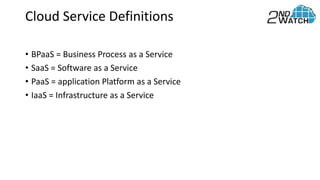
• BPaaS = Business Process as a Service
• SaaS = Software as a Service
• PaaS = application Platform as a Service
• IaaS = Infrastructure as a Service
Cloud Service Definitions
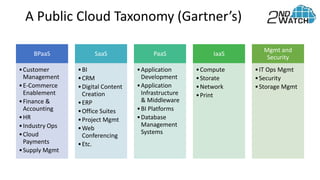
BPaaS
•Customer
Management
•E-Commerce
Enablement
•Finance &
Accounting
•HR
•Industry Ops
•Cloud
Payments
•Supply Mgmt
SaaS
•BI
•CRM
•Digital Content
Creation
•ERP
•Office Suites
•Project Mgmt
•Web
Conferencing
•Etc.
PaaS
•Application
Development
•Application
Infrastructure
& Middleware
•BI Platforms
•Database
Management
Systems
IaaS
•Compute
•Storate
•Network
•Print
Mgmt and
Security
•IT Ops Mgmt
•Security
•Storage Mgmt
A Public Cloud Taxonomy (Gartner’s)
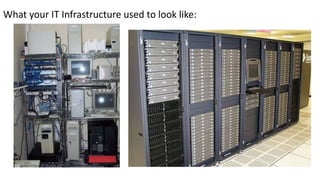
What your IT Infrastructure used to look like:
What Cloud IT Infrastructure looks like:
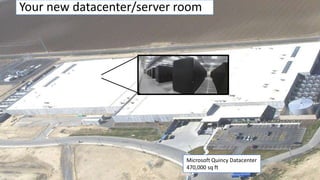
Your new datacenter/server room
Microsoft Quincy Datacenter
470,000 sq ft
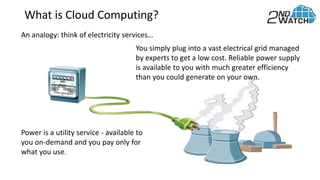
What is Cloud Computing?
An analogy: think of electricity services…
Power is a utility service - available to
you on-demand and you pay only for
what you use.
You simply plug into a vast electrical grid managed
by experts to get a low cost. Reliable power supply
is available to you with much greater efficiency
than you could generate on your own.
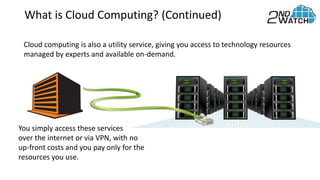
What is Cloud Computing? (Continued)
Cloud computing is also a utility service, giving you access to technology resources
managed by experts and available on-demand.
You simply access these services
over the internet or via VPN, with no
up-front costs and you pay only for the
resources you use.
Drivers of Cloud Adoption
• Mobility
• Innovation
• Lower costs
• Need for agility
• Business continuity
• Core competencies
Attributes of Public Cloud IaaS
 No capital expenditure
 Pay as you go and pay only for what you use
 True elastic capacity; scale up and down
 Improves time to market
 You get to focus your engineering resources on what
differentiates you vs. managing the undifferentiated
infrastructure resources
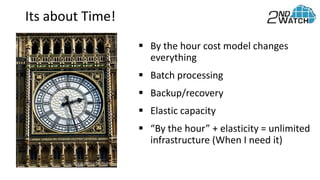
 By the hour cost model changes
everything
 Batch processing
 Backup/recovery
 Elastic capacity
 “By the hour” + elasticity = unlimited
infrastructure (When I need it)
Its about Time!
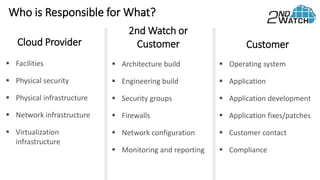
Who is Responsible for What?
Cloud Provider
 Facilities
 Physical security
 Physical infrastructure
 Network infrastructure
 Virtualization
infrastructure
2nd Watch or
Customer
 Architecture build
 Engineering build
 Security groups
 Firewalls
 Network configuration
 Monitoring and reporting
Customer
 Operating system
 Application
 Application development
 Application fixes/patches
 Customer contact
 Compliance
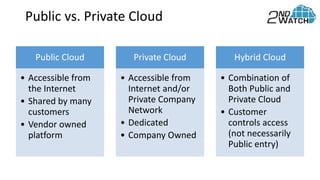
Public Cloud vs. Private Cloud
Public Cloud
• Accessible from
the Internet
• Shared by many
customers
• Vendor owned
platform
Private Cloud
• Accessible from
Internet and/or
Private Company
Network
• Dedicated
• Company Owned
Hybrid Cloud
• Combination of
Both Public and
Private Cloud
• Customer
controls access
(not necessarily
Public entry)
Public vs. Private Cloud
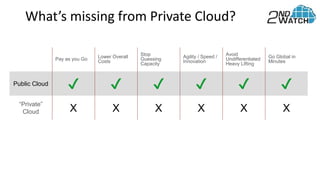
What’s missing from Private Cloud?
Pay as you Go Lower Overall
Costs
Stop
Guessing
Capacity
Agility / Speed /
Innovation
Avoid
Undifferentiated
Heavy Lifting
Go Global in
Minutes
Public Cloud ✔ ✔ ✔ ✔ ✔ ✔
“Private”
Cloud X X X X X X
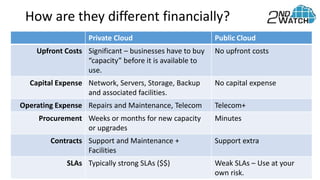
How are they different financially?
Private Cloud Public Cloud
Upfront Costs Significant – businesses have to buy
“capacity” before it is available to
use.
No upfront costs
Capital Expense Network, Servers, Storage, Backup
and associated facilities.
No capital expense
Operating Expense Repairs and Maintenance, Telecom Telecom+
Procurement Weeks or months for new capacity
or upgrades
Minutes
Contracts Support and Maintenance +
Facilities
Support extra
SLAs Typically strong SLAs ($$) Weak SLAs – Use at your
own risk.
Common Use Cases
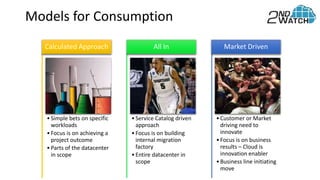
Models for Consumption
•Simple bets on specific
workloads
•Focus is on achieving a
project outcome
•Parts of the datacenter
in scope
Calculated Approach
•Service Catalog driven
approach
•Focus is on building
internal migration
factory
•Entire datacenter in
scope
All In
•Customer or Market
driving need to
innovate
•Focus is on business
results – Cloud is
innovation enabler
•Business line initiating
move
Market Driven
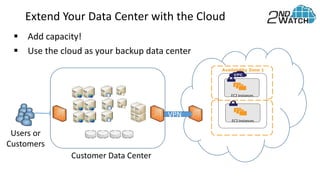
Extend Your Data Center with the Cloud
Users or
Customers
Customer Data Center
VPN
EC2 Instances
EC2 Instances
Availability Zone 1
 Add capacity!
 Use the cloud as your backup data center
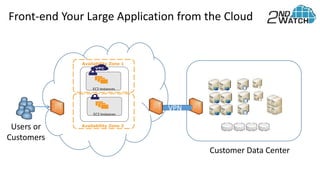
Front-end Your Large Application from the Cloud
Users or
Customers
Availability Zone 1
EC2 Instances
EC2 Instances
Availability Zone 2
VPN
Customer Data Center
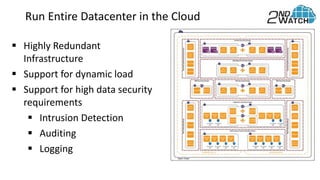
Run Entire Datacenter in the Cloud
 Highly Redundant
Infrastructure
 Support for dynamic load
 Support for high data security
requirements
 Intrusion Detection
 Auditing
 Logging
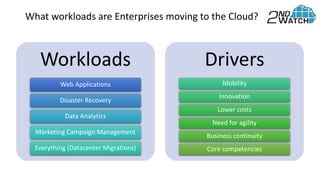
Workloads
Web Applications
Disaster Recovery
Data Analytics
Marketing Campaign Management
Everything (Datacenter Migrations)
Drivers
Mobility
Innovation
Lower costs
Need for agility
Business continuity
Core competencies
What workloads are Enterprises moving to the Cloud?
Confidential. Property of 2nd Watch, Inc.
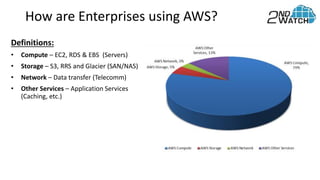
How are Enterprises using AWS?
Definitions:
• Compute – EC2, RDS & EBS (Servers)
• Storage – S3, RRS and Glacier (SAN/NAS)
• Network – Data transfer (Telecomm)
• Other Services – Application Services
(Caching, etc.)
Confidential. Property of 2nd Watch, Inc.
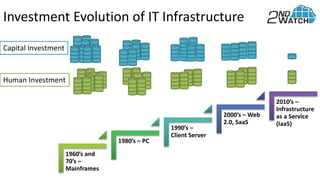
1960’s and
70’s –
Mainframes
1980’s – PC
1990’s –
Client Server
2000’s – Web
2.0, SaaS
2010’s –
Infrastructure
as a Service
(IaaS)
Capital Investment
Human Investment
Investment Evolution of IT Infrastructure
Financial Impact of Cloud
• Massive changes to IT Total Cost of Ownership
• Opex vs. Capex
• Time to market/revenue
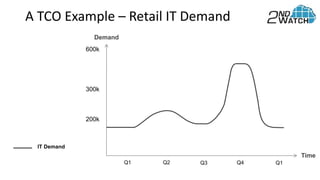
Demand
Q1 Q2 Q3 Q4 Q1
200k
300k
600k
Time
IT Demand
A TCO Example – Retail IT Demand
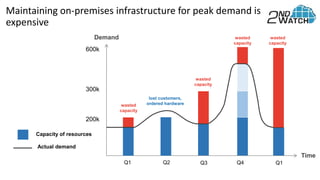
Demand
Q1 Q2 Q3 Q4 Q1
wasted
capacity
lost customers,
ordered hardware
wasted
capacity
wasted
capacity
wasted
capacity
200k
300k
600k
Time
Capacity of resources
Actual demand
Maintaining on-premises infrastructure for peak demand is
expensive
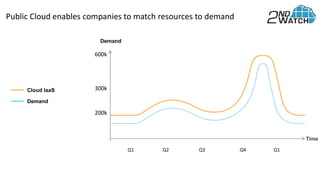
Demand
Cloud IaaS
Public Cloud enables companies to match resources to demand
Q1 Q2 Q3 Q4 Q1
200k
300k
600k
Demand
Time
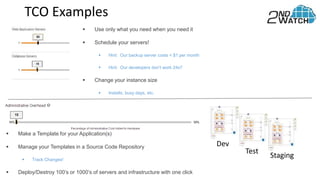
TCO Examples
 Use only what you need when you need it
 Schedule your servers!
 Hint: Our backup server costs < $1 per month
 Hint: Our developers don’t work 24x7
 Change your instance size
 Installs, busy days, etc.
 Make a Template for your Application(s)
 Manage your Templates in a Source Code Repository
 Track Changes!
 Deploy/Destroy 100’s or 1000’s of servers and infrastructure with one click
Dev
Test
Staging
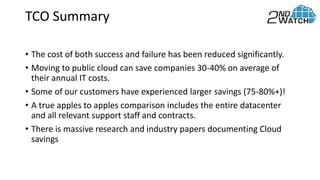
TCO Summary
• The cost of both success and failure has been reduced significantly.
• Moving to public cloud can save companies 30-40% on average of
their annual IT costs.
• Some of our customers have experienced larger savings (75-80%+)!
• A true apples to apples comparison includes the entire datacenter
and all relevant support staff and contracts.
• There is massive research and industry papers documenting Cloud
savings
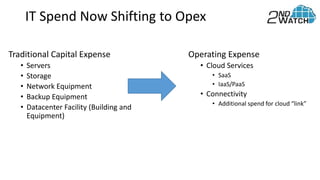
IT Spend Now Shifting to Opex
Traditional Capital Expense
• Servers
• Storage
• Network Equipment
• Backup Equipment
• Datacenter Facility (Building and
Equipment)
Operating Expense
• Cloud Services
• SaaS
• IaaS/PaaS
• Connectivity
• Additional spend for cloud “link”
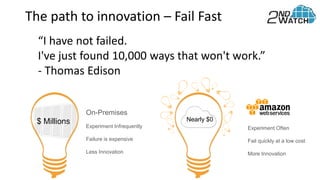
On-Premises
Experiment Infrequently
Failure is expensive
Less Innovation
Experiment Often
Fail quickly at a low cost
More Innovation
$ Millions Nearly $0
The path to innovation – Fail Fast
“I have not failed.

I've just found 10,000 ways that won't work.”
- Thomas Edison
Things to Watch
• Spending Controls
• Who is authorized to “buy”
• Monitoring and alerting for account thresholds (e.g. dev/test or
backup)
• Segregation of Duties
• Anyone can start using Cloud – and they do
• How do you ensure things are tested before release?
• Security and Compliance
• You can never outsource ownership
• Periodically check with vendors for ROC reports
1) Enterprise Systems Integrator for AWS
2) Over 300 projects on AWS since 2011
3) Focus on Enterprise IT Operations
4) Enterprise Office 365 Partner
5) Azure for dev/test workloads
A Leader in Cloud Implementations
Contact Info
Kris Bliesner
CEO
kris@2ndwatch.com
425-224-3127
www.2ndwatch.com

Financial impact of Cloud Computing

  • 1.
    The Financial Impactof Cloud Kris Bliesner CEO
  • 2.
    •Defining Cloud •Public Cloudvs. Private Cloud •Cloud Use Cases •Financial Impacts of Cloud Topics
  • 3.
  • 4.
    • BPaaS =Business Process as a Service • SaaS = Software as a Service • PaaS = application Platform as a Service • IaaS = Infrastructure as a Service Cloud Service Definitions
  • 5.
    BPaaS •Customer Management •E-Commerce Enablement •Finance & Accounting •HR •Industry Ops •Cloud Payments •SupplyMgmt SaaS •BI •CRM •Digital Content Creation •ERP •Office Suites •Project Mgmt •Web Conferencing •Etc. PaaS •Application Development •Application Infrastructure & Middleware •BI Platforms •Database Management Systems IaaS •Compute •Storate •Network •Print Mgmt and Security •IT Ops Mgmt •Security •Storage Mgmt A Public Cloud Taxonomy (Gartner’s)
  • 6.
    What your ITInfrastructure used to look like:
  • 7.
    What Cloud ITInfrastructure looks like:
  • 8.
    Your new datacenter/serverroom Microsoft Quincy Datacenter 470,000 sq ft
  • 9.
    What is CloudComputing? An analogy: think of electricity services… Power is a utility service - available to you on-demand and you pay only for what you use. You simply plug into a vast electrical grid managed by experts to get a low cost. Reliable power supply is available to you with much greater efficiency than you could generate on your own.
  • 10.
    What is CloudComputing? (Continued) Cloud computing is also a utility service, giving you access to technology resources managed by experts and available on-demand. You simply access these services over the internet or via VPN, with no up-front costs and you pay only for the resources you use.
  • 11.
    Drivers of CloudAdoption • Mobility • Innovation • Lower costs • Need for agility • Business continuity • Core competencies
  • 12.
    Attributes of PublicCloud IaaS  No capital expenditure  Pay as you go and pay only for what you use  True elastic capacity; scale up and down  Improves time to market  You get to focus your engineering resources on what differentiates you vs. managing the undifferentiated infrastructure resources
  • 13.
     By thehour cost model changes everything  Batch processing  Backup/recovery  Elastic capacity  “By the hour” + elasticity = unlimited infrastructure (When I need it) Its about Time!
  • 14.
    Who is Responsiblefor What? Cloud Provider  Facilities  Physical security  Physical infrastructure  Network infrastructure  Virtualization infrastructure 2nd Watch or Customer  Architecture build  Engineering build  Security groups  Firewalls  Network configuration  Monitoring and reporting Customer  Operating system  Application  Application development  Application fixes/patches  Customer contact  Compliance
  • 15.
    Public Cloud vs.Private Cloud
  • 16.
    Public Cloud • Accessiblefrom the Internet • Shared by many customers • Vendor owned platform Private Cloud • Accessible from Internet and/or Private Company Network • Dedicated • Company Owned Hybrid Cloud • Combination of Both Public and Private Cloud • Customer controls access (not necessarily Public entry) Public vs. Private Cloud
  • 17.
    What’s missing fromPrivate Cloud? Pay as you Go Lower Overall Costs Stop Guessing Capacity Agility / Speed / Innovation Avoid Undifferentiated Heavy Lifting Go Global in Minutes Public Cloud ✔ ✔ ✔ ✔ ✔ ✔ “Private” Cloud X X X X X X
  • 18.
    How are theydifferent financially? Private Cloud Public Cloud Upfront Costs Significant – businesses have to buy “capacity” before it is available to use. No upfront costs Capital Expense Network, Servers, Storage, Backup and associated facilities. No capital expense Operating Expense Repairs and Maintenance, Telecom Telecom+ Procurement Weeks or months for new capacity or upgrades Minutes Contracts Support and Maintenance + Facilities Support extra SLAs Typically strong SLAs ($$) Weak SLAs – Use at your own risk.
  • 19.
  • 20.
    Models for Consumption •Simplebets on specific workloads •Focus is on achieving a project outcome •Parts of the datacenter in scope Calculated Approach •Service Catalog driven approach •Focus is on building internal migration factory •Entire datacenter in scope All In •Customer or Market driving need to innovate •Focus is on business results – Cloud is innovation enabler •Business line initiating move Market Driven
  • 21.
    Extend Your DataCenter with the Cloud Users or Customers Customer Data Center VPN EC2 Instances EC2 Instances Availability Zone 1  Add capacity!  Use the cloud as your backup data center
  • 22.
    Front-end Your LargeApplication from the Cloud Users or Customers Availability Zone 1 EC2 Instances EC2 Instances Availability Zone 2 VPN Customer Data Center
  • 23.
    Run Entire Datacenterin the Cloud  Highly Redundant Infrastructure  Support for dynamic load  Support for high data security requirements  Intrusion Detection  Auditing  Logging
  • 24.
    Workloads Web Applications Disaster Recovery DataAnalytics Marketing Campaign Management Everything (Datacenter Migrations) Drivers Mobility Innovation Lower costs Need for agility Business continuity Core competencies What workloads are Enterprises moving to the Cloud? Confidential. Property of 2nd Watch, Inc.
  • 25.
    How are Enterprisesusing AWS? Definitions: • Compute – EC2, RDS & EBS (Servers) • Storage – S3, RRS and Glacier (SAN/NAS) • Network – Data transfer (Telecomm) • Other Services – Application Services (Caching, etc.) Confidential. Property of 2nd Watch, Inc.
  • 26.
    1960’s and 70’s – Mainframes 1980’s– PC 1990’s – Client Server 2000’s – Web 2.0, SaaS 2010’s – Infrastructure as a Service (IaaS) Capital Investment Human Investment Investment Evolution of IT Infrastructure
  • 27.
  • 28.
    Financial Impact ofCloud • Massive changes to IT Total Cost of Ownership • Opex vs. Capex • Time to market/revenue
  • 29.
    Demand Q1 Q2 Q3Q4 Q1 200k 300k 600k Time IT Demand A TCO Example – Retail IT Demand
  • 30.
    Demand Q1 Q2 Q3Q4 Q1 wasted capacity lost customers, ordered hardware wasted capacity wasted capacity wasted capacity 200k 300k 600k Time Capacity of resources Actual demand Maintaining on-premises infrastructure for peak demand is expensive
  • 31.
    Demand Cloud IaaS Public Cloudenables companies to match resources to demand Q1 Q2 Q3 Q4 Q1 200k 300k 600k Demand Time
  • 32.
    TCO Examples  Useonly what you need when you need it  Schedule your servers!  Hint: Our backup server costs < $1 per month  Hint: Our developers don’t work 24x7  Change your instance size  Installs, busy days, etc.  Make a Template for your Application(s)  Manage your Templates in a Source Code Repository  Track Changes!  Deploy/Destroy 100’s or 1000’s of servers and infrastructure with one click Dev Test Staging
  • 33.
    TCO Summary • Thecost of both success and failure has been reduced significantly. • Moving to public cloud can save companies 30-40% on average of their annual IT costs. • Some of our customers have experienced larger savings (75-80%+)! • A true apples to apples comparison includes the entire datacenter and all relevant support staff and contracts. • There is massive research and industry papers documenting Cloud savings
  • 34.
    IT Spend NowShifting to Opex Traditional Capital Expense • Servers • Storage • Network Equipment • Backup Equipment • Datacenter Facility (Building and Equipment) Operating Expense • Cloud Services • SaaS • IaaS/PaaS • Connectivity • Additional spend for cloud “link”
  • 35.
    On-Premises Experiment Infrequently Failure isexpensive Less Innovation Experiment Often Fail quickly at a low cost More Innovation $ Millions Nearly $0 The path to innovation – Fail Fast “I have not failed. I've just found 10,000 ways that won't work.” - Thomas Edison
  • 36.
    Things to Watch •Spending Controls • Who is authorized to “buy” • Monitoring and alerting for account thresholds (e.g. dev/test or backup) • Segregation of Duties • Anyone can start using Cloud – and they do • How do you ensure things are tested before release? • Security and Compliance • You can never outsource ownership • Periodically check with vendors for ROC reports
  • 37.
    1) Enterprise SystemsIntegrator for AWS 2) Over 300 projects on AWS since 2011 3) Focus on Enterprise IT Operations 4) Enterprise Office 365 Partner 5) Azure for dev/test workloads A Leader in Cloud Implementations
  • 38.