©The McGraw-Hill Companies, 2005
1
Software Project
Management
4th Edition
Step Wise: An
approach to
planning software
projects
Chapter 2
©The McGraw-Hill Companies, 2005
2
‘Step Wise’ - aspirations
• Practicality
– tries to answer the question ‘what do I do
now?’
• Scalability
– useful for small project as well as large
• Range of application
• Accepted techniques
– e.g. borrowed from PRINCE etc
©The McGraw-Hill Companies, 2005
3
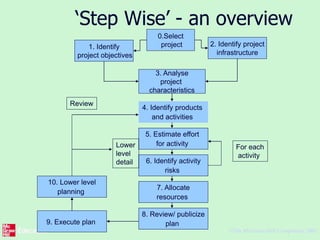
‘Step Wise’ - an overview
0.Select
project1. Identify
project objectives
2. Identify project
infrastructure
3. Analyse
project
characteristics
4. Identify products
and activities
5. Estimate effort
for activity
8. Review/ publicize
plan
6. Identify activity
risks
7. Allocate
resources
9. Execute plan
10. Lower level
planning
Review
Lower
level
detail
For each
activity
©The McGraw-Hill Companies, 2005
4
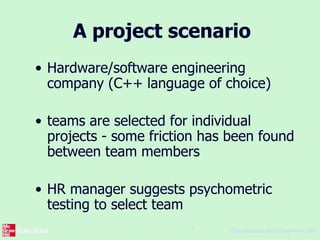
A project scenario
• Hardware/software engineering
company (C++ language of choice)
• teams are selected for individual
projects - some friction has been found
between team members
• HR manager suggests psychometric
testing to select team
©The McGraw-Hill Companies, 2005
5
Project scenario - continued
• Software package to be used to test
staff
• Visual basic suggested as a vehicle for
implementation
• usability is important - decision to carry
out usability tests
©The McGraw-Hill Companies, 2005
6
Step 1 establish project
scope and objectives
• 1.1 Identify objectives and measures of
effectiveness
– ‘how do we know if we have succeeded?’
• 1.2 Establish a project authority
– ‘who is the boss?’
• 1.3 Identify all stakeholders in the project and
their interests
– ‘who will be affected/involved in the project?’
©The McGraw-Hill Companies, 2005
7
Step 1 continued
• 1.4 Modify objectives in the light of
stakeholder analysis
– ‘do we need to do things to win over
stakeholders?’
• 1.5 Establish methods of
communication with all parties
– ‘how do we keep in contact?’
©The McGraw-Hill Companies, 2005
8
Back to the scenario
• Project authority
– should be a project manager rather than
HR manager?
• Stakeholders
– project team members to complete on-
line questionnaires: concern about
results?
• Revision to objectives
– provide feedback to team members on
results
©The McGraw-Hill Companies, 2005
9
Step 2 Establish project
infrastructure
• 2.1 Establish link between project and
any strategic plan
– ‘why did they want the project?’
• 2.2 Identify installation standards and
procedures
– ‘what standards do we have to follow?’
• 2.3. Identify project team organization
– ‘where do I fit in?’
©The McGraw-Hill Companies, 2005
10
Step 3 Analysis of project
characteristics
• 3.1 Distinguish the project as either
objective or product-based.
• 3.2 Analyse other project characteristics
(including quality based ones)
– what is different about this project?
©The McGraw-Hill Companies, 2005
11
Step 3 continued
• Identify high level project risks
– ‘what could go wrong?’
– ‘what can we do to stop it?’
• Take into account user requirements
concerning implementation
• Select general life cycle approach
– waterfall? Increments? Prototypes?
• Review overall resource estimates
– ‘does all this increase the cost?’
©The McGraw-Hill Companies, 2005
12
Back to the scenario
• Objectives vs. products
• Some risks
– team members worried about implications
and do no co-operate
– project managers unwilling to try out
application
– Developer not familiar with features of VB
• Answer? - evolutionary prototype?
©The McGraw-Hill Companies, 2005
13
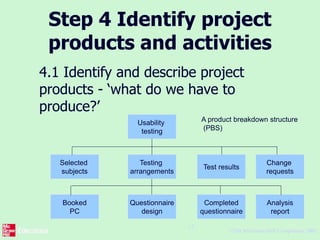
Step 4 Identify project
products and activities
4.1 Identify and describe project
products - ‘what do we have to
produce?’
Usability
testing
Change
requests
Test results
Testing
arrangements
Selected
subjects
Completed
questionnaire
Questionnaire
design
Booked
PC
Analysis
report
A product breakdown structure
(PBS)
©The McGraw-Hill Companies, 2005
14
Products
• The result of an activity
• Could be (among other things)
– physical thing (‘installed pc’),
– a document (‘logical data structure’)
– a person (‘trained user’)
– a new version of an old product (‘updated
software’)
©The McGraw-Hill Companies, 2005
15
Products
• The following are NOT normally
products:
– activities (e.g. ‘training’)
– events (e.g. ‘interviews completed’)
– resources and actors (e.g. ‘software
developer’) - may be exceptions to this
• Products CAN BE deliverable or
intermediate
©The McGraw-Hill Companies, 2005
16
Product description (PD)
• Product identity
• Description - what
is it?
• Derivation - what is
it based on?
• Composition - what
does it contain?
• Format
• Relevant standards
• Quality criteria
Create a PD for ‘test
data’
©The McGraw-Hill Companies, 2005
17
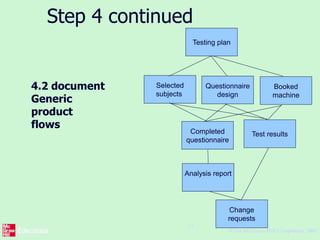
Step 4 continued
4.2 document
Generic
product
flows
Testing plan
Selected
subjects
Questionnaire
design
Booked
machine
Completed
questionnaire
Analysis report
Test results
Change
requests
©The McGraw-Hill Companies, 2005
18
Step 4.3 Recognize product
instances
• The PBS and PFD will probably have
identified generic products e.g.
‘software modules’
• It might be possible to identify specific
instances e.g. ‘module A’, ‘module B’ …
• But in many cases this will have to be
left to later, more detailed, planning
©The McGraw-Hill Companies, 2005
19
4.4. Produce ideal activity
network
• Identify the activities needed to create
each product in the PFD
• More than one activity might be needed
to create a single product
• Hint: Identify activities by verb + noun
but avoid ‘produce…’ (too vague)
• Draw up activity network
©The McGraw-Hill Companies, 2005
20
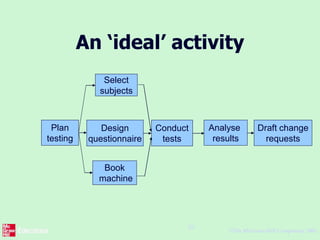
An ‘ideal’ activity
Plan
testing
Design
questionnaire
Select
subjects
Book
machine
Conduct
tests
Analyse
results
Draft change
requests
©The McGraw-Hill Companies, 2005
21
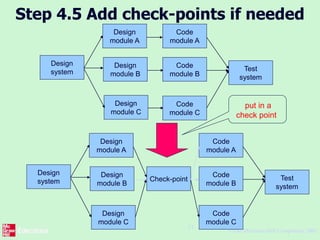
Step 4.5 Add check-points if needed
Design
module A
Design
module B
Design
system
Design
module C
Code
module A
Code
module B
Code
module C
Test
system
Design
module A
Design
module B
Design
system
Design
module C
Code
module A
Code
module B
Code
module C
Test
system
Check-point
put in a
check point
©The McGraw-Hill Companies, 2005
22
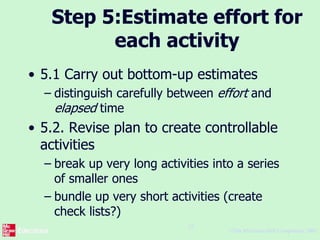
Step 5:Estimate effort for
each activity
• 5.1 Carry out bottom-up estimates
– distinguish carefully between effort and
elapsed time
• 5.2. Revise plan to create controllable
activities
– break up very long activities into a series
of smaller ones
– bundle up very short activities (create
check lists?)
©The McGraw-Hill Companies, 2005
23
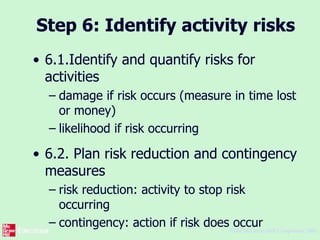
Step 6: Identify activity risks
• 6.1.Identify and quantify risks for
activities
– damage if risk occurs (measure in time lost
or money)
– likelihood if risk occurring
• 6.2. Plan risk reduction and contingency
measures
– risk reduction: activity to stop risk
occurring
– contingency: action if risk does occur
©The McGraw-Hill Companies, 2005
24
• 6.3 Adjust overall plans and estimates
to take account of risks
– e.g. add new activities which reduce risks
associated with other activities e.g.
training, pilot trials, information gathering
©The McGraw-Hill Companies, 2005
25
Step 7: Allocate resources
• 7.1 Identify and allocate resources to
activities
• 7.2 Revise plans and estimates to take
into account resource constraints
– e.g. staff not being available until a later
date
– non-project activities
©The McGraw-Hill Companies, 2005
26
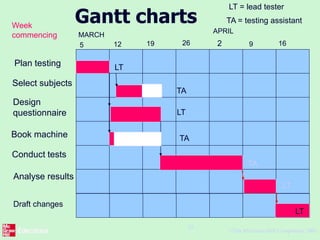
Gantt charts
Select subjects
Design
questionnaire
Book machine
Conduct tests
Analyse results
Week
commencing
5 12 19 26
MARCH
APRIL
9 16
Plan testing
2
Draft changes
LT
TA
LT
TA
LT
LT
TA
LT = lead tester
TA = testing assistant
©The McGraw-Hill Companies, 2005
27
Step 8: Review/publicise
plan
• 8.1 Review quality aspects of project
plan
• 8.2 Document plan and obtain
agreement
Step 9 and 10: Execute plan
and create lower level plans

Spm

  • 1.
    ©The McGraw-Hill Companies,2005 1 Software Project Management 4th Edition Step Wise: An approach to planning software projects Chapter 2
  • 2.
    ©The McGraw-Hill Companies,2005 2 ‘Step Wise’ - aspirations • Practicality – tries to answer the question ‘what do I do now?’ • Scalability – useful for small project as well as large • Range of application • Accepted techniques – e.g. borrowed from PRINCE etc
  • 3.
    ©The McGraw-Hill Companies,2005 3 ‘Step Wise’ - an overview 0.Select project1. Identify project objectives 2. Identify project infrastructure 3. Analyse project characteristics 4. Identify products and activities 5. Estimate effort for activity 8. Review/ publicize plan 6. Identify activity risks 7. Allocate resources 9. Execute plan 10. Lower level planning Review Lower level detail For each activity
  • 4.
    ©The McGraw-Hill Companies,2005 4 A project scenario • Hardware/software engineering company (C++ language of choice) • teams are selected for individual projects - some friction has been found between team members • HR manager suggests psychometric testing to select team
  • 5.
    ©The McGraw-Hill Companies,2005 5 Project scenario - continued • Software package to be used to test staff • Visual basic suggested as a vehicle for implementation • usability is important - decision to carry out usability tests
  • 6.
    ©The McGraw-Hill Companies,2005 6 Step 1 establish project scope and objectives • 1.1 Identify objectives and measures of effectiveness – ‘how do we know if we have succeeded?’ • 1.2 Establish a project authority – ‘who is the boss?’ • 1.3 Identify all stakeholders in the project and their interests – ‘who will be affected/involved in the project?’
  • 7.
    ©The McGraw-Hill Companies,2005 7 Step 1 continued • 1.4 Modify objectives in the light of stakeholder analysis – ‘do we need to do things to win over stakeholders?’ • 1.5 Establish methods of communication with all parties – ‘how do we keep in contact?’
  • 8.
    ©The McGraw-Hill Companies,2005 8 Back to the scenario • Project authority – should be a project manager rather than HR manager? • Stakeholders – project team members to complete on- line questionnaires: concern about results? • Revision to objectives – provide feedback to team members on results
  • 9.
    ©The McGraw-Hill Companies,2005 9 Step 2 Establish project infrastructure • 2.1 Establish link between project and any strategic plan – ‘why did they want the project?’ • 2.2 Identify installation standards and procedures – ‘what standards do we have to follow?’ • 2.3. Identify project team organization – ‘where do I fit in?’
  • 10.
    ©The McGraw-Hill Companies,2005 10 Step 3 Analysis of project characteristics • 3.1 Distinguish the project as either objective or product-based. • 3.2 Analyse other project characteristics (including quality based ones) – what is different about this project?
  • 11.
    ©The McGraw-Hill Companies,2005 11 Step 3 continued • Identify high level project risks – ‘what could go wrong?’ – ‘what can we do to stop it?’ • Take into account user requirements concerning implementation • Select general life cycle approach – waterfall? Increments? Prototypes? • Review overall resource estimates – ‘does all this increase the cost?’
  • 12.
    ©The McGraw-Hill Companies,2005 12 Back to the scenario • Objectives vs. products • Some risks – team members worried about implications and do no co-operate – project managers unwilling to try out application – Developer not familiar with features of VB • Answer? - evolutionary prototype?
  • 13.
    ©The McGraw-Hill Companies,2005 13 Step 4 Identify project products and activities 4.1 Identify and describe project products - ‘what do we have to produce?’ Usability testing Change requests Test results Testing arrangements Selected subjects Completed questionnaire Questionnaire design Booked PC Analysis report A product breakdown structure (PBS)
  • 14.
    ©The McGraw-Hill Companies,2005 14 Products • The result of an activity • Could be (among other things) – physical thing (‘installed pc’), – a document (‘logical data structure’) – a person (‘trained user’) – a new version of an old product (‘updated software’)
  • 15.
    ©The McGraw-Hill Companies,2005 15 Products • The following are NOT normally products: – activities (e.g. ‘training’) – events (e.g. ‘interviews completed’) – resources and actors (e.g. ‘software developer’) - may be exceptions to this • Products CAN BE deliverable or intermediate
  • 16.
    ©The McGraw-Hill Companies,2005 16 Product description (PD) • Product identity • Description - what is it? • Derivation - what is it based on? • Composition - what does it contain? • Format • Relevant standards • Quality criteria Create a PD for ‘test data’
  • 17.
    ©The McGraw-Hill Companies,2005 17 Step 4 continued 4.2 document Generic product flows Testing plan Selected subjects Questionnaire design Booked machine Completed questionnaire Analysis report Test results Change requests
  • 18.
    ©The McGraw-Hill Companies,2005 18 Step 4.3 Recognize product instances • The PBS and PFD will probably have identified generic products e.g. ‘software modules’ • It might be possible to identify specific instances e.g. ‘module A’, ‘module B’ … • But in many cases this will have to be left to later, more detailed, planning
  • 19.
    ©The McGraw-Hill Companies,2005 19 4.4. Produce ideal activity network • Identify the activities needed to create each product in the PFD • More than one activity might be needed to create a single product • Hint: Identify activities by verb + noun but avoid ‘produce…’ (too vague) • Draw up activity network
  • 20.
    ©The McGraw-Hill Companies,2005 20 An ‘ideal’ activity Plan testing Design questionnaire Select subjects Book machine Conduct tests Analyse results Draft change requests
  • 21.
    ©The McGraw-Hill Companies,2005 21 Step 4.5 Add check-points if needed Design module A Design module B Design system Design module C Code module A Code module B Code module C Test system Design module A Design module B Design system Design module C Code module A Code module B Code module C Test system Check-point put in a check point
  • 22.
    ©The McGraw-Hill Companies,2005 22 Step 5:Estimate effort for each activity • 5.1 Carry out bottom-up estimates – distinguish carefully between effort and elapsed time • 5.2. Revise plan to create controllable activities – break up very long activities into a series of smaller ones – bundle up very short activities (create check lists?)
  • 23.
    ©The McGraw-Hill Companies,2005 23 Step 6: Identify activity risks • 6.1.Identify and quantify risks for activities – damage if risk occurs (measure in time lost or money) – likelihood if risk occurring • 6.2. Plan risk reduction and contingency measures – risk reduction: activity to stop risk occurring – contingency: action if risk does occur
  • 24.
    ©The McGraw-Hill Companies,2005 24 • 6.3 Adjust overall plans and estimates to take account of risks – e.g. add new activities which reduce risks associated with other activities e.g. training, pilot trials, information gathering
  • 25.
    ©The McGraw-Hill Companies,2005 25 Step 7: Allocate resources • 7.1 Identify and allocate resources to activities • 7.2 Revise plans and estimates to take into account resource constraints – e.g. staff not being available until a later date – non-project activities
  • 26.
    ©The McGraw-Hill Companies,2005 26 Gantt charts Select subjects Design questionnaire Book machine Conduct tests Analyse results Week commencing 5 12 19 26 MARCH APRIL 9 16 Plan testing 2 Draft changes LT TA LT TA LT LT TA LT = lead tester TA = testing assistant
  • 27.
    ©The McGraw-Hill Companies,2005 27 Step 8: Review/publicise plan • 8.1 Review quality aspects of project plan • 8.2 Document plan and obtain agreement Step 9 and 10: Execute plan and create lower level plans