Say Hi to our Tech Core Lead,
Rajdip Bhattacharya
Scan to Connect
Narula Institute of Technology
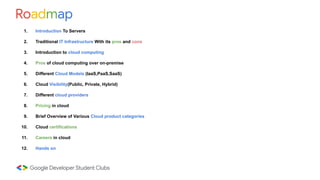
Roadmap
1. Introduction To Servers
2. Traditional IT Infrastructure With its pros and cons
3. Introduction to cloud computing
4. Pros of cloud computing over on-premise
5. Different Cloud Models (IaaS,PaaS,SaaS)
6. Cloud Visibility(Public, Private, Hybrid)
7. Different cloud providers
8. Pricing in cloud
9. Brief Overview of Various Cloud product categories
10. Cloud certifications
11. Careers in cloud
12. Hands on
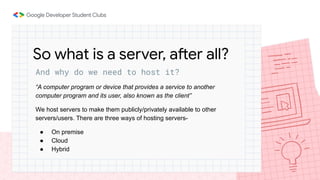
And why do we need to host it?
“A computer program or device that provides a service to another
computer program and its user, also known as the client”
We host servers to make them publicly/privately available to other
servers/users. There are three ways of hosting servers-
● On premise
● Cloud
● Hybrid
So what is a server, after all?
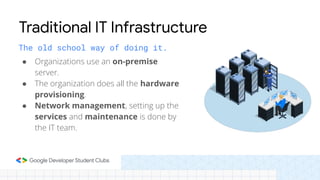
The old school way of doing it.
● Organizations use an on-premise
server.
● The organization does all the hardware
provisioning.
● Network management, setting up the
services and maintenance is done by
the IT team.
Traditional IT Infrastructure
Pros of on-premise
● Control over server hardware
● Security of data
● Low latency
But there are cons as well
● Capital expenditure: Companies need to make a capital investment to set up
the server beforehand.
● Estimation problems: There can be overestimation/underestimation in
hardware choice, thereby leading to cost issues.
● Scalability: You can not just add another server or remove servers as you want
to.
● Increased management cost: Professional IT people are required to maintain
and monitor the servers all the time. If any component needs replacement, the
company has to bear the cost.
● Risk of data loss: In case a server holding business data crashes, entire data
would be lost.
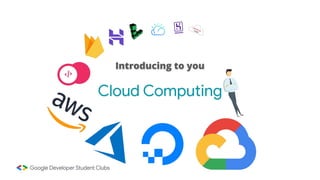
Introducing to you
Cloud Computing
Cloud computing is the on-demand delivery of IT
resources over the Internet with pay-as-you-go pricing.
Instead of buying, owning, and maintaining physical data
centres and servers, you can access technology
services, such as computing power, storage, and
databases, on an as-needed basis from a cloud provider.
—Amazon Web Services (AWS)
● Cost savings: Cloud uses the pay-as-you-go model, which means, we pay for only
what we use. This shifts us from capital expenditure (CapEx) to operational
expenditure (OpEx)
● No maintenance cost: The cloud providers are responsible for maintaining the
servers. Hence, we do not pay for it.
● Scalability and flexibility: We can provision more cloud resources or remove
them as and when needed.
● Data loss prevention: Cloud providers provides us with data backup and
recovery options so that we never lose our data.
Pros of cloud computing
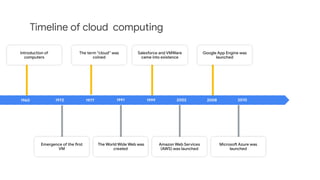
Timeline of cloud computing
1960 1999 2002 2010
Introduction of
computers
Salesforce and VMWare
came into existence
Google App Engine was
launched
Emergence of the rst
VM
1972 1977 1991 2008
The term “cloud” was
coined
The World Wide Web was
created
Amazon Web Services
(AWS) was launched
Microso Azure was
launched
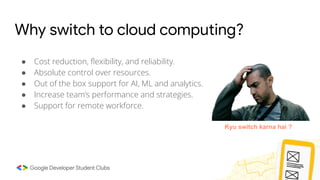
Why switch to cloud computing?
● Cost reduction, flexibility, and reliability.
● Absolute control over resources.
● Out of the box support for AI, ML and analytics.
● Increase team’s performance and strategies.
● Support for remote workforce.
Kyu switch karna hai ?
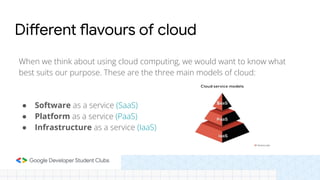
When we think about using cloud computing, we would want to know what
best suits our purpose. These are the three main models of cloud:
● Software as a service (SaaS)
● Platform as a service (PaaS)
● Infrastructure as a service (IaaS)
Different flavours of cloud
SaaS
● An application software deployed on the cloud
● Accessed via browsers or client side applications
● Manages all of its data on the cloud
● User is not responsible for maintaining the application
● Example: G Suit, Zoom, Dropbox
Software as a service
PaaS
● Provides the runtime environment
● We can easily create, deploy and run web application on such
places.
● Services like these gives the user the ability to manage the
application and the data the application holds.
● Scalability, operating system, and networking is managed by the
cloud provider.
● Example: AWS Lambda, Google App Engine, Heroku
Platform as a service
IaaS
● Companies outsource IT resources such as servers, storage,
networking, etc from cloud providers.
● The company is responsible for managing the servers, hard drives,
networking, and storage, but not the hardware of the server.
● Most flexible model
● Example: DigitalOcean, AWS, GCE, Microsoft Azure
Infrastructure as a service
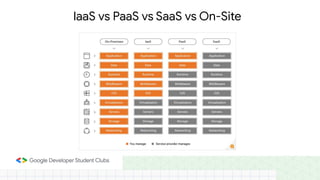
IaaS vs PaaS vs SaaS vs On-Site
Visibility of cloud infrastructure
While IaaS, PaaS, and SaaS focus on how content and infrastructure is
managed, another kind of classication of cloud can be its visibility.
● Public cloud are those that can be accessed by any individual with
appropriate permissions.
● Private cloud can be accessed only by employees of an organization.
● Hybrid cloud, as the name suggests, mixes up the two approaches and
is the most prevalent form.
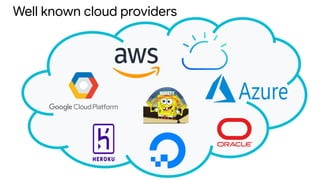
Well known cloud providers
Pricing in cloud computing
Now that we are familiar with cloud computing, we should also understand a bit about the pricing
model. Any major cloud provider charges their customers in the following ways,
● Free tier
● Pay-as-you-go
● Full upfront
● Partial upfront
● No upfront
While free tier and pay-as-you-go might be a good choice for experimentation, for the long run,
reservation of your hardware is recommended.
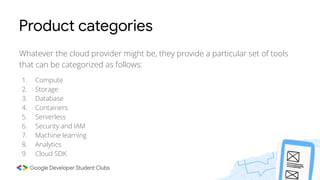
Product categories
Whatever the cloud provider might be, they provide a particular set of tools
that can be categorized as follows:
1. Compute
2. Storage
3. Database
4. Containers
5. Serverless
6. Security and IAM
7. Machine learning
8. Analytics
9. Cloud SDK
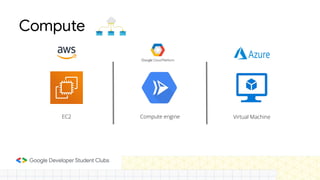
Compute
EC2 Compute engine Virtual Machine
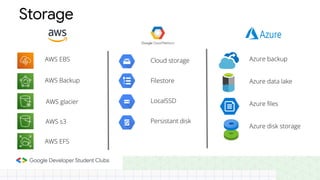
Cloud storage
Filestore
LocalSSD
Persistant disk
Azure backup
Azure data lake
Azure les
Azure disk storage
Storage
AWS EBS
AWS Backup
AWS glacier
AWS s3
AWS EFS
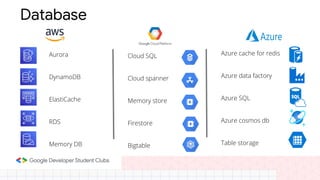
Database
Aurora
DynamoDB
ElastiCache
RDS
Memory DB
Cloud SQL
Cloud spanner
Memory store
Firestore
Bigtable
Azure cache for redis
Azure data factory
Azure SQL
Azure cosmos db
Table storage
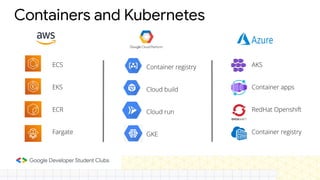
Containers and Kubernetes
Container registry
Cloud build
Cloud run
GKE
AKS
Container apps
RedHat Openshift
Container registry
ECS
EKS
ECR
Fargate
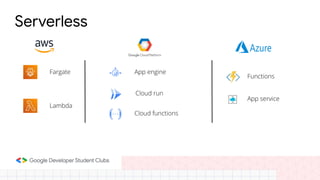
Serverless
App engine
Functions
App service
Fargate
Cloud run
Cloud functions
Lambda
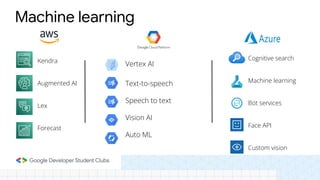
Machine learning
Vertex AI
Text-to-speech
Speech to text
Vision AI
Auto ML
Cognitive search
Machine learning
Bot services
Face API
Custom vision
Kendra
Augmented AI
Lex
Forecast
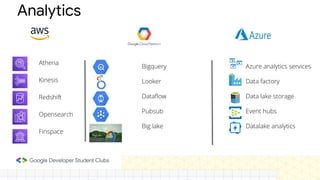
Analytics
Bigquery
Looker
Dataflow
Pubsub
Big lake
Azure analytics services
Data factory
Data lake storage
Event hubs
Datalake analytics
Athena
Kinesis
Redshift
Opensearch
Finspace
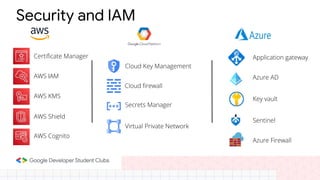
Security and IAM
Certicate Manager
AWS IAM
AWS KMS
AWS Shield
AWS Cognito
Cloud Key Management
Cloud rewall
Secrets Manager
Virtual Private Network
Application gateway
Azure AD
Key vault
Sentinel
Azure Firewall
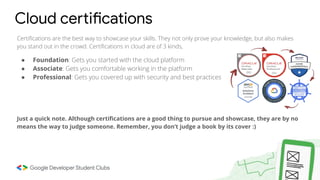
Certications are the best way to showcase your skills. They not only prove your knowledge, but also makes
you stand out in the crowd. Certications in cloud are of 3 kinds,
● Foundation: Gets you started with the cloud platform
● Associate: Gets you comfortable working in the platform
● Professional: Gets you covered up with security and best practices
Just a quick note. Although certications are a good thing to pursue and showcase, they are by no
means the way to judge someone. Remember, you don’t judge a book by its cover :)
Cloud certifications
Cloud computing is one of the top demanding and high paying careers you can have in this era. From
small startups to government agencies, all have started migrating to cloud. Even this meeting is being
held with the help of cloud computing. These are some careers you might want to look into.
1) Cloud Engineer
2) Cloud Architect
3) Cloud Security Engineer
4) DevOps Cloud Engineer
5) Cloud Infrastructure Engineer
6) Full Stack Developer
7) Cloud System Administrator
8) Cloud Consultant
Careers in cloud computing
Enough chit-chat, let’s
see the real magic now!
Thank You

Intro to cloud.pdf

  • 2.
    Say Hi toour Tech Core Lead, Rajdip Bhattacharya Scan to Connect Narula Institute of Technology
  • 3.
    Roadmap 1. Introduction ToServers 2. Traditional IT Infrastructure With its pros and cons 3. Introduction to cloud computing 4. Pros of cloud computing over on-premise 5. Different Cloud Models (IaaS,PaaS,SaaS) 6. Cloud Visibility(Public, Private, Hybrid) 7. Different cloud providers 8. Pricing in cloud 9. Brief Overview of Various Cloud product categories 10. Cloud certifications 11. Careers in cloud 12. Hands on
  • 4.
    And why dowe need to host it? “A computer program or device that provides a service to another computer program and its user, also known as the client” We host servers to make them publicly/privately available to other servers/users. There are three ways of hosting servers- ● On premise ● Cloud ● Hybrid So what is a server, after all?
  • 5.
    The old schoolway of doing it. ● Organizations use an on-premise server. ● The organization does all the hardware provisioning. ● Network management, setting up the services and maintenance is done by the IT team. Traditional IT Infrastructure
  • 6.
    Pros of on-premise ●Control over server hardware ● Security of data ● Low latency
  • 7.
    But there arecons as well ● Capital expenditure: Companies need to make a capital investment to set up the server beforehand. ● Estimation problems: There can be overestimation/underestimation in hardware choice, thereby leading to cost issues. ● Scalability: You can not just add another server or remove servers as you want to. ● Increased management cost: Professional IT people are required to maintain and monitor the servers all the time. If any component needs replacement, the company has to bear the cost. ● Risk of data loss: In case a server holding business data crashes, entire data would be lost.
  • 8.
  • 9.
    Cloud computing isthe on-demand delivery of IT resources over the Internet with pay-as-you-go pricing. Instead of buying, owning, and maintaining physical data centres and servers, you can access technology services, such as computing power, storage, and databases, on an as-needed basis from a cloud provider. —Amazon Web Services (AWS)
  • 10.
    ● Cost savings:Cloud uses the pay-as-you-go model, which means, we pay for only what we use. This shifts us from capital expenditure (CapEx) to operational expenditure (OpEx) ● No maintenance cost: The cloud providers are responsible for maintaining the servers. Hence, we do not pay for it. ● Scalability and flexibility: We can provision more cloud resources or remove them as and when needed. ● Data loss prevention: Cloud providers provides us with data backup and recovery options so that we never lose our data. Pros of cloud computing
  • 11.
    Timeline of cloudcomputing 1960 1999 2002 2010 Introduction of computers Salesforce and VMWare came into existence Google App Engine was launched Emergence of the rst VM 1972 1977 1991 2008 The term “cloud” was coined The World Wide Web was created Amazon Web Services (AWS) was launched Microso Azure was launched
  • 12.
    Why switch tocloud computing? ● Cost reduction, flexibility, and reliability. ● Absolute control over resources. ● Out of the box support for AI, ML and analytics. ● Increase team’s performance and strategies. ● Support for remote workforce. Kyu switch karna hai ?
  • 13.
    When we thinkabout using cloud computing, we would want to know what best suits our purpose. These are the three main models of cloud: ● Software as a service (SaaS) ● Platform as a service (PaaS) ● Infrastructure as a service (IaaS) Different flavours of cloud
  • 14.
    SaaS ● An applicationsoftware deployed on the cloud ● Accessed via browsers or client side applications ● Manages all of its data on the cloud ● User is not responsible for maintaining the application ● Example: G Suit, Zoom, Dropbox Software as a service
  • 15.
    PaaS ● Provides theruntime environment ● We can easily create, deploy and run web application on such places. ● Services like these gives the user the ability to manage the application and the data the application holds. ● Scalability, operating system, and networking is managed by the cloud provider. ● Example: AWS Lambda, Google App Engine, Heroku Platform as a service
  • 16.
    IaaS ● Companies outsourceIT resources such as servers, storage, networking, etc from cloud providers. ● The company is responsible for managing the servers, hard drives, networking, and storage, but not the hardware of the server. ● Most flexible model ● Example: DigitalOcean, AWS, GCE, Microsoft Azure Infrastructure as a service
  • 17.
    IaaS vs PaaSvs SaaS vs On-Site
  • 18.
    Visibility of cloudinfrastructure While IaaS, PaaS, and SaaS focus on how content and infrastructure is managed, another kind of classification of cloud can be its visibility. ● Public cloud are those that can be accessed by any individual with appropriate permissions. ● Private cloud can be accessed only by employees of an organization. ● Hybrid cloud, as the name suggests, mixes up the two approaches and is the most prevalent form.
  • 19.
  • 20.
    Pricing in cloudcomputing Now that we are familiar with cloud computing, we should also understand a bit about the pricing model. Any major cloud provider charges their customers in the following ways, ● Free tier ● Pay-as-you-go ● Full upfront ● Partial upfront ● No upfront While free tier and pay-as-you-go might be a good choice for experimentation, for the long run, reservation of your hardware is recommended.
  • 21.
    Product categories Whatever thecloud provider might be, they provide a particular set of tools that can be categorized as follows: 1. Compute 2. Storage 3. Database 4. Containers 5. Serverless 6. Security and IAM 7. Machine learning 8. Analytics 9. Cloud SDK
  • 22.
  • 23.
    Cloud storage Filestore LocalSSD Persistant disk Azurebackup Azure data lake Azure les Azure disk storage Storage AWS EBS AWS Backup AWS glacier AWS s3 AWS EFS
  • 24.
    Database Aurora DynamoDB ElastiCache RDS Memory DB Cloud SQL Cloudspanner Memory store Firestore Bigtable Azure cache for redis Azure data factory Azure SQL Azure cosmos db Table storage
  • 25.
    Containers and Kubernetes Containerregistry Cloud build Cloud run GKE AKS Container apps RedHat Openshift Container registry ECS EKS ECR Fargate
  • 26.
  • 27.
    Machine learning Vertex AI Text-to-speech Speechto text Vision AI Auto ML Cognitive search Machine learning Bot services Face API Custom vision Kendra Augmented AI Lex Forecast
  • 28.
    Analytics Bigquery Looker Dataflow Pubsub Big lake Azure analyticsservices Data factory Data lake storage Event hubs Datalake analytics Athena Kinesis Redshift Opensearch Finspace
  • 29.
    Security and IAM CerticateManager AWS IAM AWS KMS AWS Shield AWS Cognito Cloud Key Management Cloud rewall Secrets Manager Virtual Private Network Application gateway Azure AD Key vault Sentinel Azure Firewall
  • 30.
    Certifications are thebest way to showcase your skills. They not only prove your knowledge, but also makes you stand out in the crowd. Certifications in cloud are of 3 kinds, ● Foundation: Gets you started with the cloud platform ● Associate: Gets you comfortable working in the platform ● Professional: Gets you covered up with security and best practices Just a quick note. Although certifications are a good thing to pursue and showcase, they are by no means the way to judge someone. Remember, you don’t judge a book by its cover :) Cloud certifications
  • 31.
    Cloud computing isone of the top demanding and high paying careers you can have in this era. From small startups to government agencies, all have started migrating to cloud. Even this meeting is being held with the help of cloud computing. These are some careers you might want to look into. 1) Cloud Engineer 2) Cloud Architect 3) Cloud Security Engineer 4) DevOps Cloud Engineer 5) Cloud Infrastructure Engineer 6) Full Stack Developer 7) Cloud System Administrator 8) Cloud Consultant Careers in cloud computing
  • 32.
  • 33.