


Filesystem Showdown
What a difference a decade makes
Matt Janulewicz & Steve Oddo
Dolby Labs
2
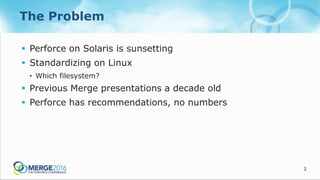
The Problem
 Perforce on Solaris is sunsetting
 Standardizing on Linux
• Which filesystem?
 Previous Merge presentations a decade old
 Perforce has recommendations, no numbers
3
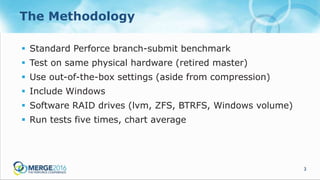
The Methodology
 Standard Perforce branch-submit benchmark
 Test on same physical hardware (retired master)
 Use out-of-the-box settings (aside from compression)
 Include Windows
 Software RAID drives (lvm, ZFS, BTRFS, Windows volume)
 Run tests five times, chart average
4
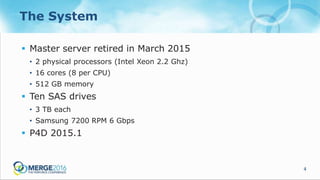
The System
 Master server retired in March 2015
• 2 physical processors (Intel Xeon 2.2 Ghz)
• 16 cores (8 per CPU)
• 512 GB memory
 Ten SAS drives
• 3 TB each
• Samsung 7200 RPM 6 Gbps
 P4D 2015.1
5
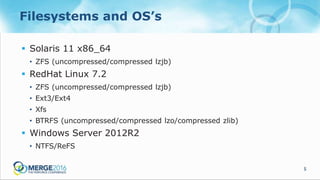
Filesystems and OS’s
 Solaris 11 x86_64
• ZFS (uncompressed/compressed lzjb)
 RedHat Linux 7.2
• ZFS (uncompressed/compressed lzjb)
• Ext3/Ext4
• Xfs
• BTRFS (uncompressed/compressed lzo/compressed zlib)
 Windows Server 2012R2
• NTFS/ReFS
6
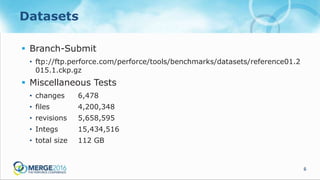
Datasets
 Branch-Submit
• ftp://ftp.perforce.com/perforce/tools/benchmarks/datasets/reference01.2
015.1.ckp.gz
 Miscellaneous Tests
• changes 6,478
• files 4,200,348
• revisions 5,658,595
• Integs 15,434,516
• total size 112 GB
7
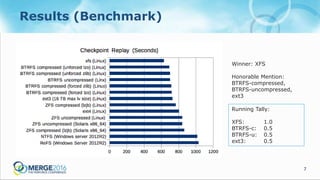
Results (Benchmark)
Winner: XFS
Honorable Mention:
BTRFS-compressed,
BTRFS-uncompressed,
ext3
Running Tally:
XFS: 1.0
BTRFS-c: 0.5
BTRFS-u: 0.5
ext3: 0.5
8
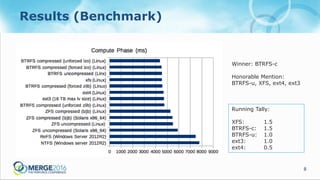
Results (Benchmark)
Winner: BTRFS-c
Honorable Mention:
BTRFS-u, XFS, ext4, ext3
Running Tally:
XFS: 1.5
BTRFS-c: 1.5
BTRFS-u: 1.0
ext3: 1.0
ext4: 0.5
9
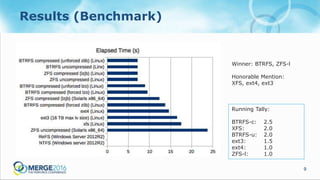
Results (Benchmark)
Winner: BTRFS, ZFS-l
Honorable Mention:
XFS, ext4, ext3
Running Tally:
BTRFS-c: 2.5
XFS: 2.0
BTRFS-u: 2.0
ext3: 1.5
ext4: 1.0
ZFS-l: 1.0
10
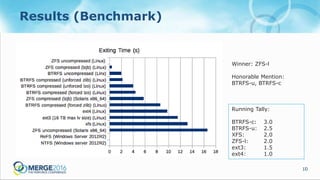
Results (Benchmark)
Winner: ZFS-l
Honorable Mention:
BTRFS-u, BTRFS-c
Running Tally:
BTRFS-c: 3.0
BTRFS-u: 2.5
XFS: 2.0
ZFS-l: 2.0
ext3: 1.5
ext4: 1.0
11
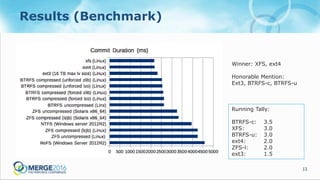
Results (Benchmark)
Winner: XFS, ext4
Honorable Mention:
Ext3, BTRFS-c, BTRFS-u
Running Tally:
BTRFS-c: 3.5
XFS: 3.0
BTRFS-u: 3.0
ext4: 2.0
ZFS-l: 2.0
ext3: 1.5
12
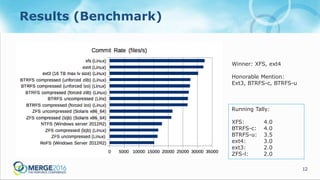
Results (Benchmark)
Winner: XFS, ext4
Honorable Mention:
Ext3, BTRFS-c, BTRFS-u
Running Tally:
XFS: 4.0
BTRFS-c: 4.0
BTRFS-u: 3.5
ext4: 3.0
ext3: 2.0
ZFS-l: 2.0
13
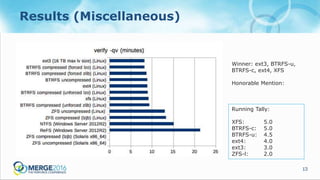
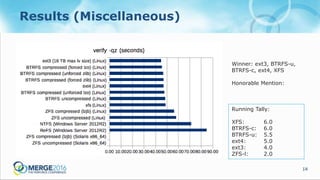
Results (Miscellaneous)
Winner: ext3, BTRFS-u,
BTRFS-c, ext4, XFS
Honorable Mention:
Running Tally:
XFS: 5.0
BTRFS-c: 5.0
BTRFS-u: 4.5
ext4: 4.0
ext3: 3.0
ZFS-l: 2.0
14
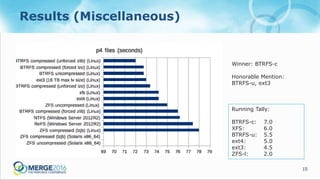
Results (Miscellaneous)
Winner: ext3, BTRFS-u,
BTRFS-c, ext4, XFS
Honorable Mention:
Running Tally:
XFS: 6.0
BTRFS-c: 6.0
BTRFS-u: 5.5
ext4: 5.0
ext3: 4.0
ZFS-l: 2.0
15
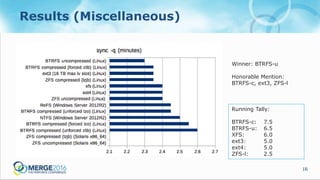
Results (Miscellaneous)
Winner: BTRFS-c
Honorable Mention:
BTRFS-u, ext3
Running Tally:
BTRFS-c: 7.0
XFS: 6.0
BTRFS-u: 5.5
ext4: 5.0
ext3: 4.5
ZFS-l: 2.0
16
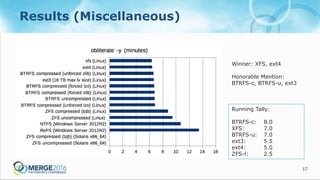
Results (Miscellaneous)
Winner: BTRFS-u
Honorable Mention:
BTRFS-c, ext3, ZFS-l
Running Tally:
BTRFS-c: 7.5
BTRFS-u: 6.5
XFS: 6.0
ext3: 5.0
ext4: 5.0
ZFS-l: 2.5
17
Results (Miscellaneous)
Winner: XFS, ext4
Honorable Mention:
BTRFS-c, BTRFS-u, ext3
Running Tally:
BTRFS-c: 8.0
XFS: 7.0
BTRFS-u: 7.0
ext3: 5.5
ext4: 5.0
ZFS-l: 2.5
Poor Performers:
Windows, ZFS
Better Performers:
Linux (anything)
19
Final Thoughts
 Windows performs generally worse when compared to
almost any Linux filesystem.
 XFS is a solid choice. Supported, mature, fast.
 BTRFS compressed vs uncompressed not hugely different.
 Ext3 holds up surprisingly well. Go figure.
20
Questions For You
 Are ZFS features worth the performance hit? (likely)
 Is BTRFS ready for primetime? (perhaps)
 Is Windows performance poor enough to justify introducing
Linux into your data center? (yes, yes it is)
Contact us for raw data
or further questions.
majanu@dolby.com
sjo@dolby.com

Filesystem Showdown: What a Difference a Decade Makes