Built-in Functions in VBScript
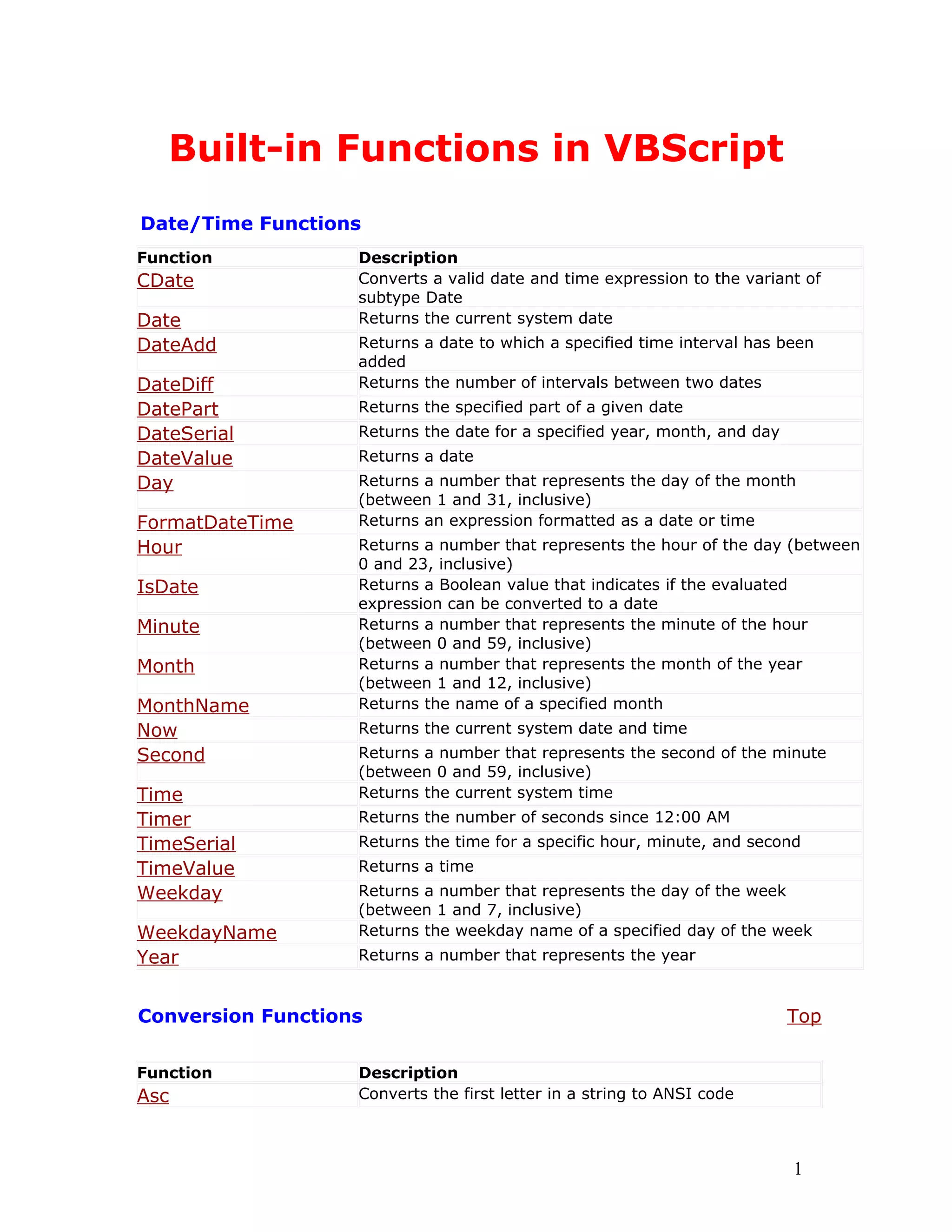
Date/Time Functions
Function Description
CDate Converts a valid date and time expression to the variant of
subtype Date
Date Returns the current system date
DateAdd Returns a date to which a specified time interval has been
added
DateDiff Returns the number of intervals between two dates
DatePart Returns the specified part of a given date
DateSerial Returns the date for a specified year, month, and day
DateValue Returns a date
Day Returns a number that represents the day of the month
(between 1 and 31, inclusive)
FormatDateTime Returns an expression formatted as a date or time
Hour Returns a number that represents the hour of the day (between
0 and 23, inclusive)
IsDate Returns a Boolean value that indicates if the evaluated
expression can be converted to a date
Minute Returns a number that represents the minute of the hour
(between 0 and 59, inclusive)
Month Returns a number that represents the month of the year
(between 1 and 12, inclusive)
MonthName Returns the name of a specified month
Now Returns the current system date and time
Second Returns a number that represents the second of the minute
(between 0 and 59, inclusive)
Time Returns the current system time
Timer Returns the number of seconds since 12:00 AM
TimeSerial Returns the time for a specific hour, minute, and second
TimeValue Returns a time
Weekday Returns a number that represents the day of the week
(between 1 and 7, inclusive)
WeekdayName Returns the weekday name of a specified day of the week
Year Returns a number that represents the year
Conversion Functions Top
Function Description
Asc Converts the first letter in a string to ANSI code
1
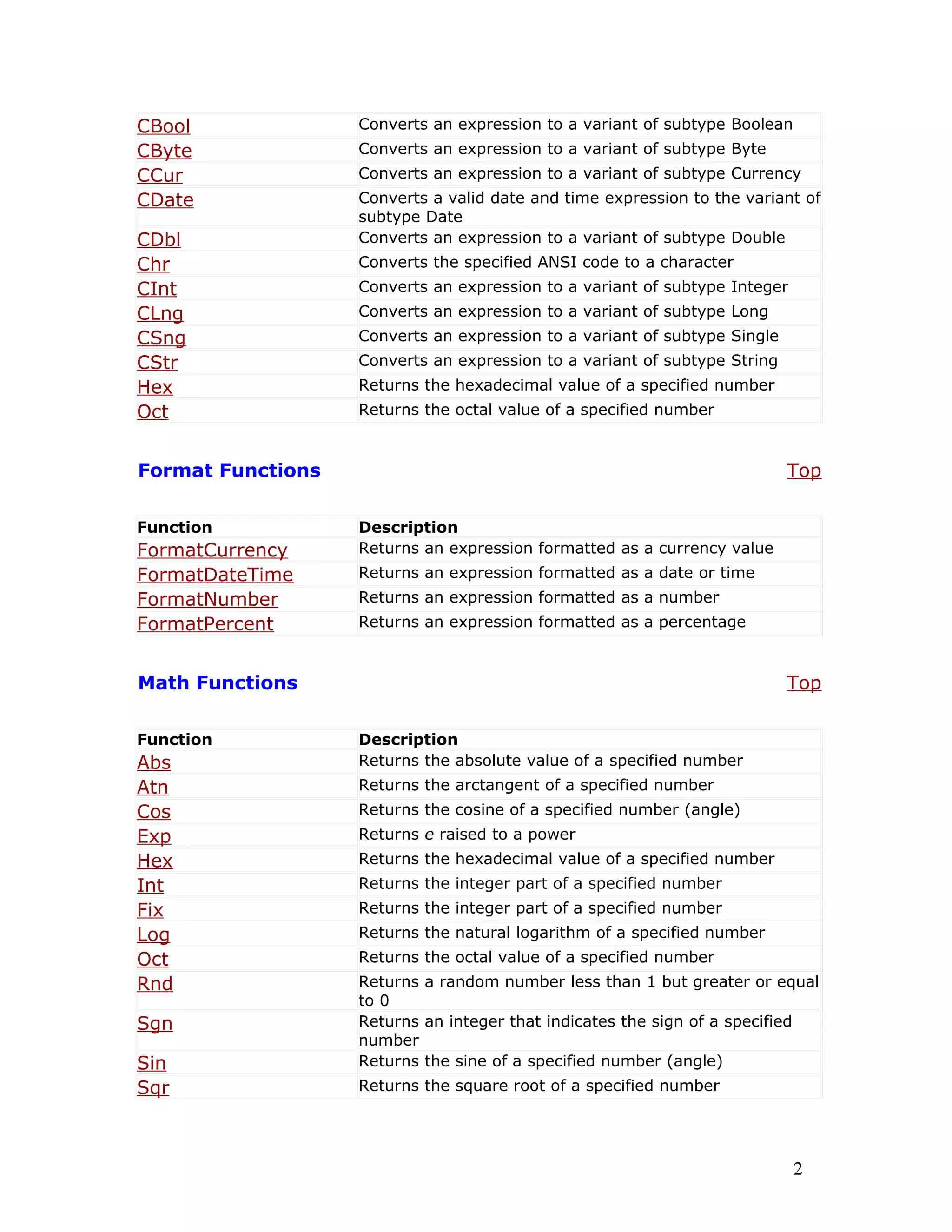
CBool Converts an expression to a variant of subtype Boolean
CByte Converts an expression to a variant of subtype Byte
CCur Converts an expression to a variant of subtype Currency
CDate Converts a valid date and time expression to the variant of
subtype Date
CDbl Converts an expression to a variant of subtype Double
Chr Converts the specified ANSI code to a character
CInt Converts an expression to a variant of subtype Integer
CLng Converts an expression to a variant of subtype Long
CSng Converts an expression to a variant of subtype Single
CStr Converts an expression to a variant of subtype String
Hex Returns the hexadecimal value of a specified number
Oct Returns the octal value of a specified number
Format Functions Top
Function Description
FormatCurrency Returns an expression formatted as a currency value
FormatDateTime Returns an expression formatted as a date or time
FormatNumber Returns an expression formatted as a number
FormatPercent Returns an expression formatted as a percentage
Math Functions Top
Function Description
Abs Returns the absolute value of a specified number
Atn Returns the arctangent of a specified number
Cos Returns the cosine of a specified number (angle)
Exp Returns e raised to a power
Hex Returns the hexadecimal value of a specified number
Int Returns the integer part of a specified number
Fix Returns the integer part of a specified number
Log Returns the natural logarithm of a specified number
Oct Returns the octal value of a specified number
Rnd Returns a random number less than 1 but greater or equal
to 0
Sgn Returns an integer that indicates the sign of a specified
number
Sin Returns the sine of a specified number (angle)
Sqr Returns the square root of a specified number
2
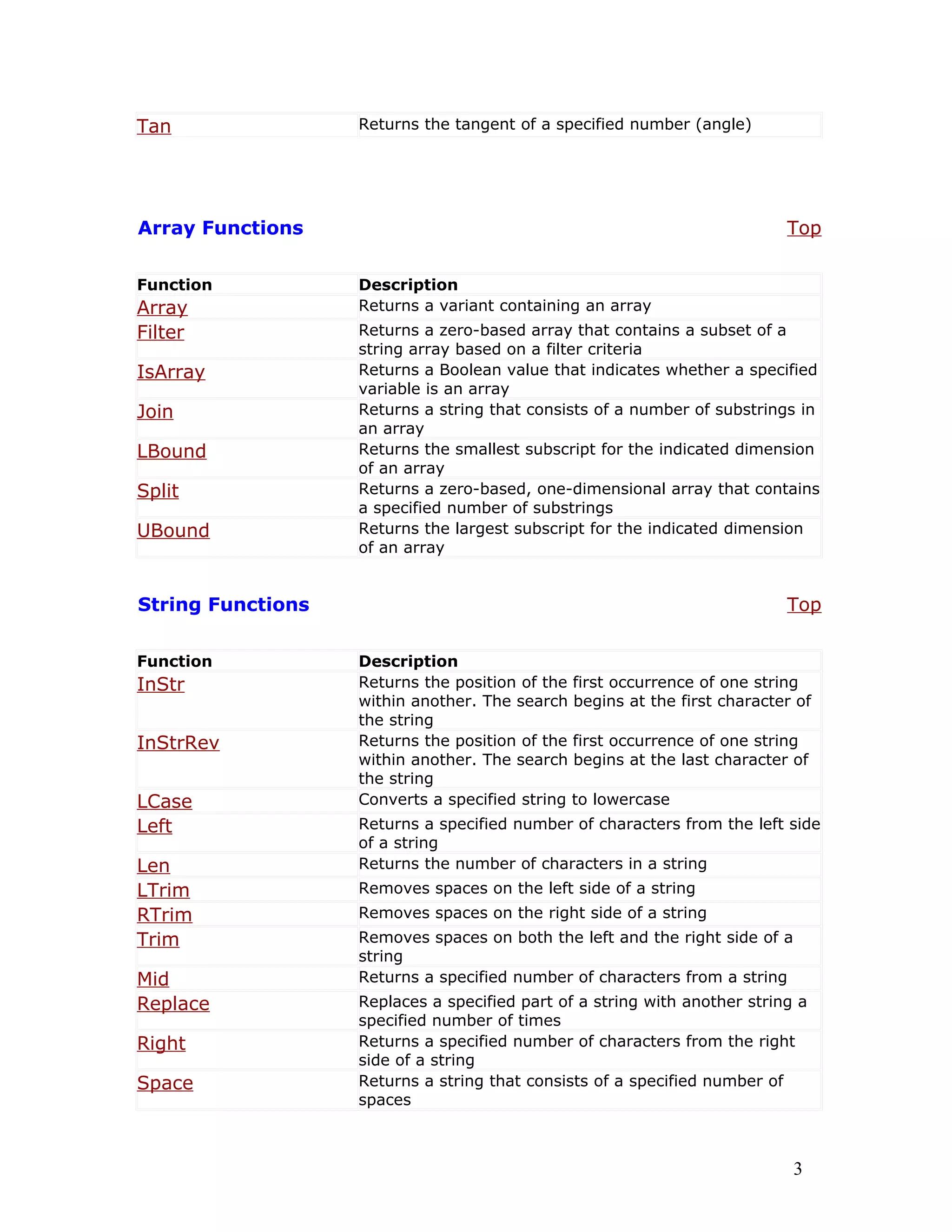
Tan Returns the tangent of a specified number (angle)
Array Functions Top
Function Description
Array Returns a variant containing an array
Filter Returns a zero-based array that contains a subset of a
string array based on a filter criteria
IsArray Returns a Boolean value that indicates whether a specified
variable is an array
Join Returns a string that consists of a number of substrings in
an array
LBound Returns the smallest subscript for the indicated dimension
of an array
Split Returns a zero-based, one-dimensional array that contains
a specified number of substrings
UBound Returns the largest subscript for the indicated dimension
of an array
String Functions Top
Function Description
InStr Returns the position of the first occurrence of one string
within another. The search begins at the first character of
the string
InStrRev Returns the position of the first occurrence of one string
within another. The search begins at the last character of
the string
LCase Converts a specified string to lowercase
Left Returns a specified number of characters from the left side
of a string
Len Returns the number of characters in a string
LTrim Removes spaces on the left side of a string
RTrim Removes spaces on the right side of a string
Trim Removes spaces on both the left and the right side of a
string
Mid Returns a specified number of characters from a string
Replace Replaces a specified part of a string with another string a
specified number of times
Right Returns a specified number of characters from the right
side of a string
Space Returns a string that consists of a specified number of
spaces
3
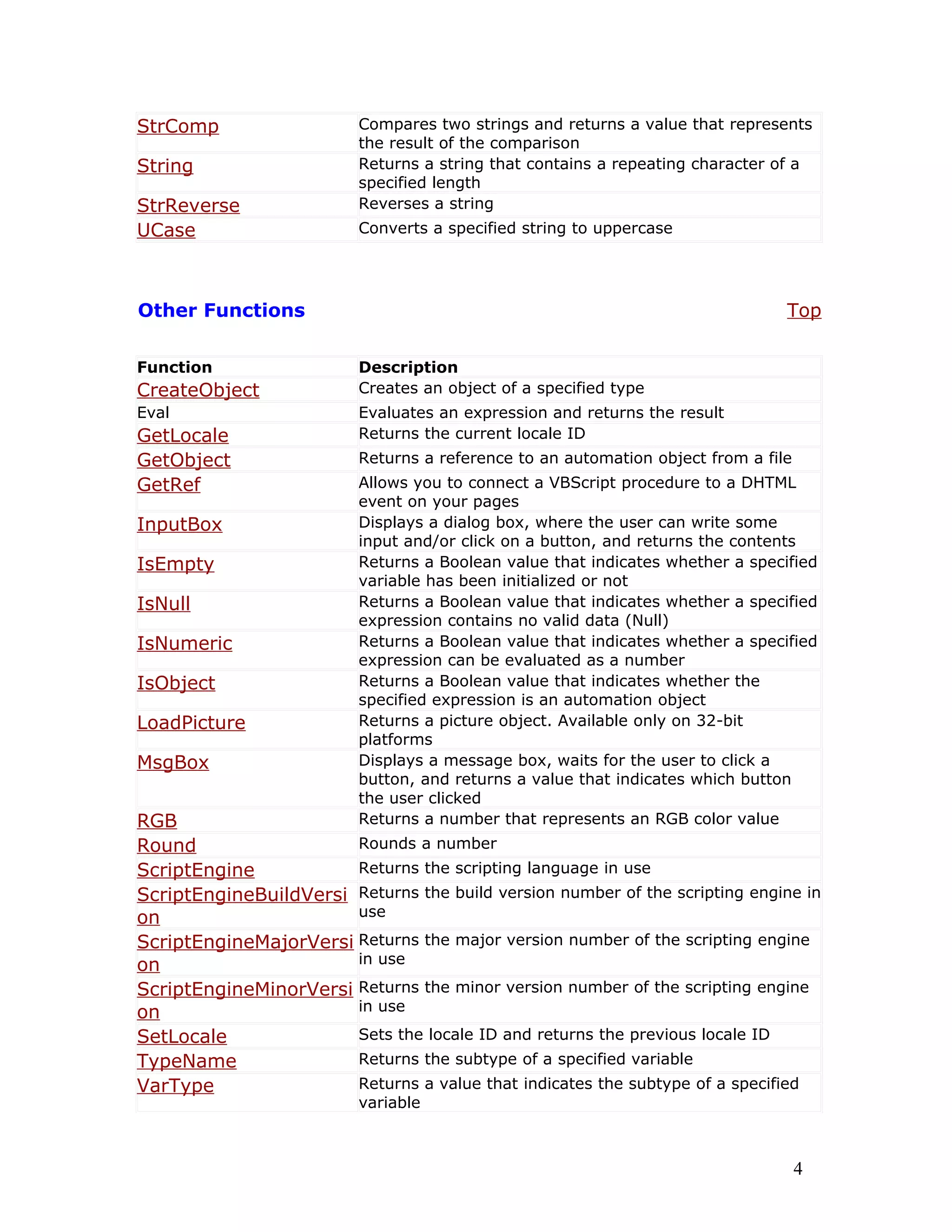
StrComp Compares two strings and returns a value that represents
the result of the comparison
String Returns a string that contains a repeating character of a
specified length
StrReverse Reverses a string
UCase Converts a specified string to uppercase
Other Functions Top
Function Description
CreateObject Creates an object of a specified type
Eval Evaluates an expression and returns the result
GetLocale Returns the current locale ID
GetObject Returns a reference to an automation object from a file
GetRef Allows you to connect a VBScript procedure to a DHTML
event on your pages
InputBox Displays a dialog box, where the user can write some
input and/or click on a button, and returns the contents
IsEmpty Returns a Boolean value that indicates whether a specified
variable has been initialized or not
IsNull Returns a Boolean value that indicates whether a specified
expression contains no valid data (Null)
IsNumeric Returns a Boolean value that indicates whether a specified
expression can be evaluated as a number
IsObject Returns a Boolean value that indicates whether the
specified expression is an automation object
LoadPicture Returns a picture object. Available only on 32-bit
platforms
MsgBox Displays a message box, waits for the user to click a
button, and returns a value that indicates which button
the user clicked
RGB Returns a number that represents an RGB color value
Round Rounds a number
ScriptEngine Returns the scripting language in use
ScriptEngineBuildVersi
on
Returns the build version number of the scripting engine in
use
ScriptEngineMajorVersi
on
Returns the major version number of the scripting engine
in use
ScriptEngineMinorVersi
on
Returns the minor version number of the scripting engine
in use
SetLocale Sets the locale ID and returns the previous locale ID
TypeName Returns the subtype of a specified variable
VarType Returns a value that indicates the subtype of a specified
variable
4
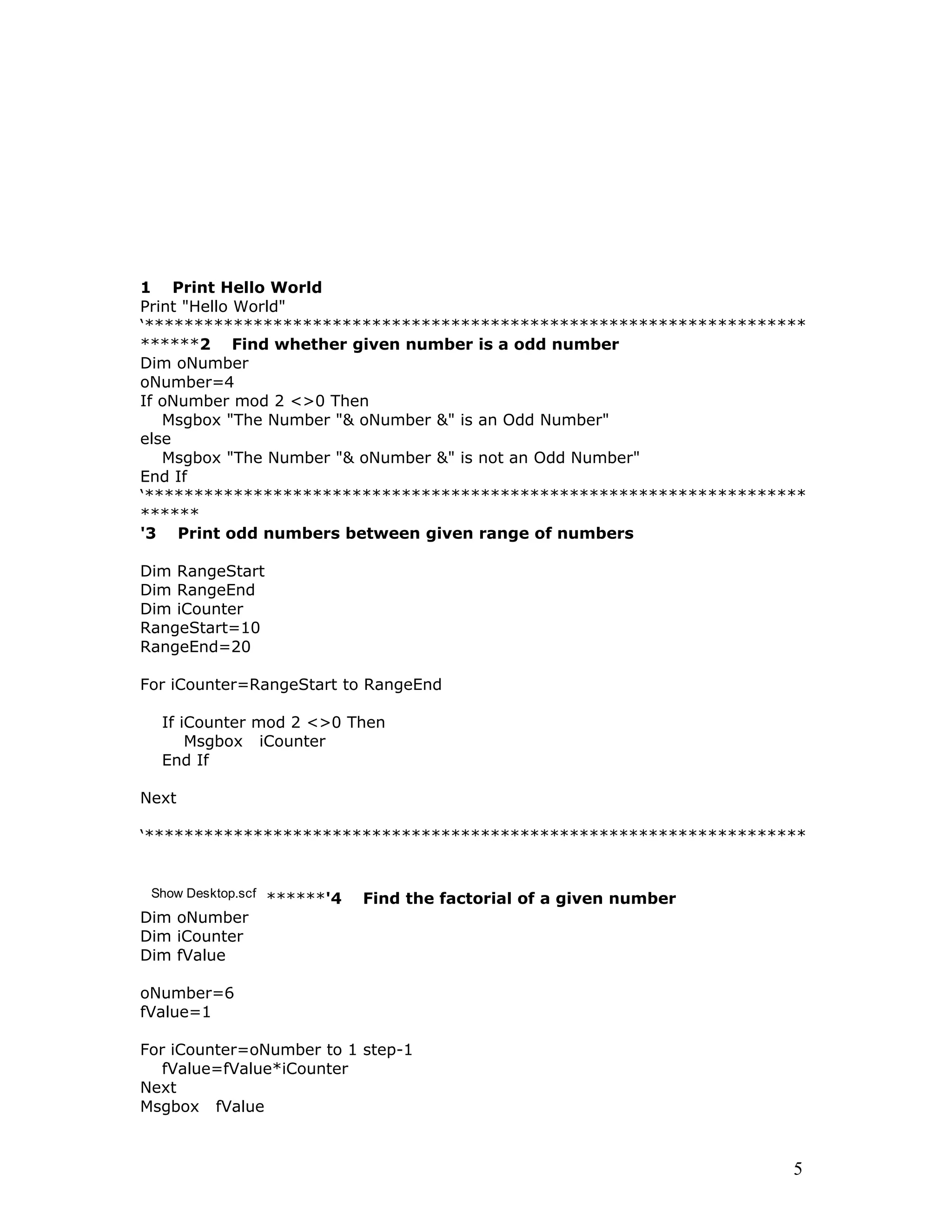
1 Print Hello World
Print "Hello World"
‘*******************************************************************
******2 Find whether given number is a odd number
Dim oNumber
oNumber=4
If oNumber mod 2 <>0 Then
Msgbox "The Number "& oNumber &" is an Odd Number"
else
Msgbox "The Number "& oNumber &" is not an Odd Number"
End If
‘*******************************************************************
******
'3 Print odd numbers between given range of numbers
Dim RangeStart
Dim RangeEnd
Dim iCounter
RangeStart=10
RangeEnd=20
For iCounter=RangeStart to RangeEnd
If iCounter mod 2 <>0 Then
Msgbox iCounter
End If
Next
‘*******************************************************************
Show Desktop.scf ******'4 Find the factorial of a given number
Dim oNumber
Dim iCounter
Dim fValue
oNumber=6
fValue=1
For iCounter=oNumber to 1 step-1
fValue=fValue*iCounter
Next
Msgbox fValue
5
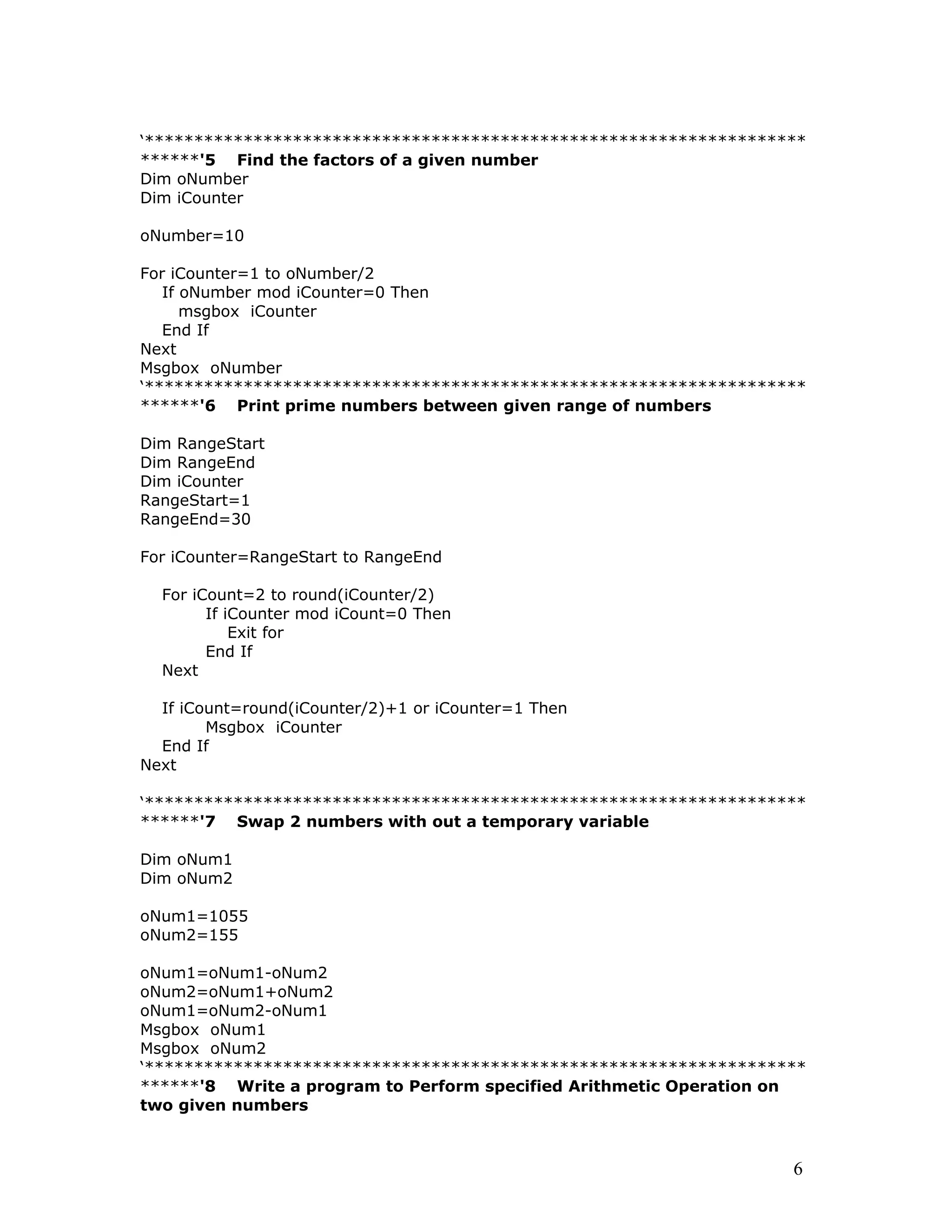
‘*******************************************************************
******'5 Find the factors of a given number
Dim oNumber
Dim iCounter
oNumber=10
For iCounter=1 to oNumber/2
If oNumber mod iCounter=0 Then
msgbox iCounter
End If
Next
Msgbox oNumber
‘*******************************************************************
******'6 Print prime numbers between given range of numbers
Dim RangeStart
Dim RangeEnd
Dim iCounter
RangeStart=1
RangeEnd=30
For iCounter=RangeStart to RangeEnd
For iCount=2 to round(iCounter/2)
If iCounter mod iCount=0 Then
Exit for
End If
Next
If iCount=round(iCounter/2)+1 or iCounter=1 Then
Msgbox iCounter
End If
Next
‘*******************************************************************
******'7 Swap 2 numbers with out a temporary variable
Dim oNum1
Dim oNum2
oNum1=1055
oNum2=155
oNum1=oNum1-oNum2
oNum2=oNum1+oNum2
oNum1=oNum2-oNum1
Msgbox oNum1
Msgbox oNum2
‘*******************************************************************
******'8 Write a program to Perform specified Arithmetic Operation on
two given numbers
6
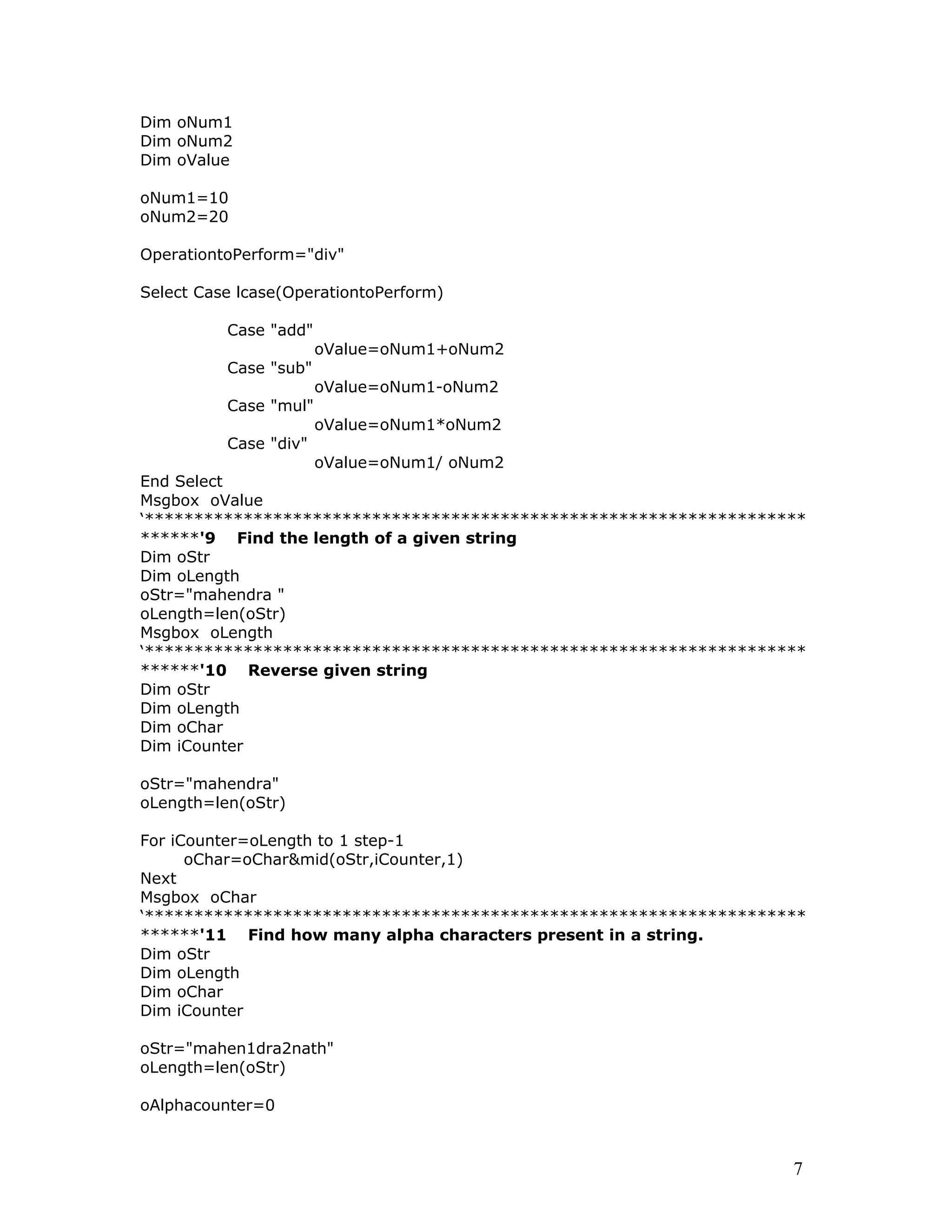
Dim oNum1
Dim oNum2
Dim oValue
oNum1=10
oNum2=20
OperationtoPerform="div"
Select Case lcase(OperationtoPerform)
Case "add"
oValue=oNum1+oNum2
Case "sub"
oValue=oNum1-oNum2
Case "mul"
oValue=oNum1*oNum2
Case "div"
oValue=oNum1/ oNum2
End Select
Msgbox oValue
‘*******************************************************************
******'9 Find the length of a given string
Dim oStr
Dim oLength
oStr="mahendra "
oLength=len(oStr)
Msgbox oLength
‘*******************************************************************
******'10 Reverse given string
Dim oStr
Dim oLength
Dim oChar
Dim iCounter
oStr="mahendra"
oLength=len(oStr)
For iCounter=oLength to 1 step-1
oChar=oChar&mid(oStr,iCounter,1)
Next
Msgbox oChar
‘*******************************************************************
******'11 Find how many alpha characters present in a string.
Dim oStr
Dim oLength
Dim oChar
Dim iCounter
oStr="mahen1dra2nath"
oLength=len(oStr)
oAlphacounter=0
7
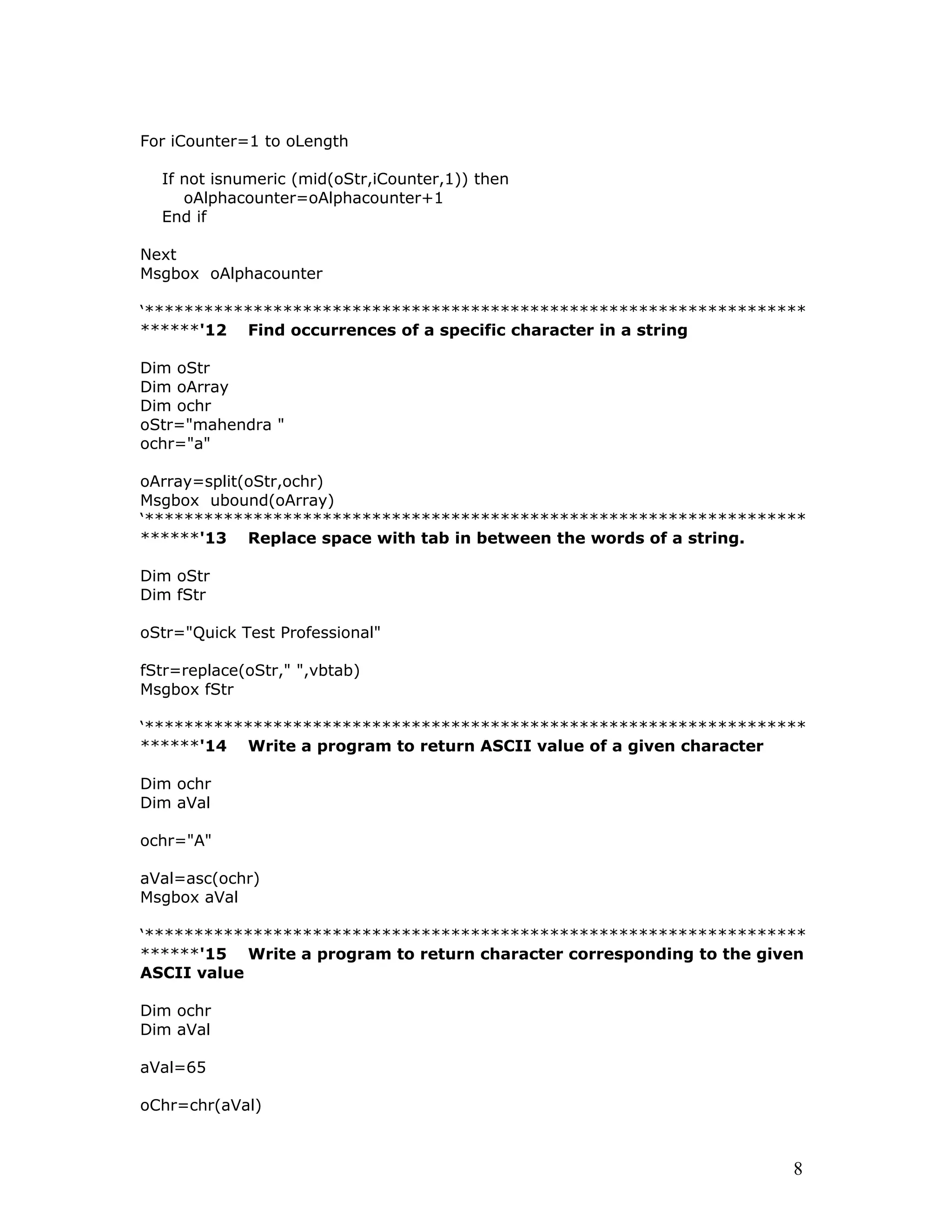
For iCounter=1 to oLength
If not isnumeric (mid(oStr,iCounter,1)) then
oAlphacounter=oAlphacounter+1
End if
Next
Msgbox oAlphacounter
‘*******************************************************************
******'12 Find occurrences of a specific character in a string
Dim oStr
Dim oArray
Dim ochr
oStr="mahendra "
ochr="a"
oArray=split(oStr,ochr)
Msgbox ubound(oArray)
‘*******************************************************************
******'13 Replace space with tab in between the words of a string.
Dim oStr
Dim fStr
oStr="Quick Test Professional"
fStr=replace(oStr," ",vbtab)
Msgbox fStr
‘*******************************************************************
******'14 Write a program to return ASCII value of a given character
Dim ochr
Dim aVal
ochr="A"
aVal=asc(ochr)
Msgbox aVal
‘*******************************************************************
******'15 Write a program to return character corresponding to the given
ASCII value
Dim ochr
Dim aVal
aVal=65
oChr=chr(aVal)
8
Msgbox oChr
‘*******************************************************************
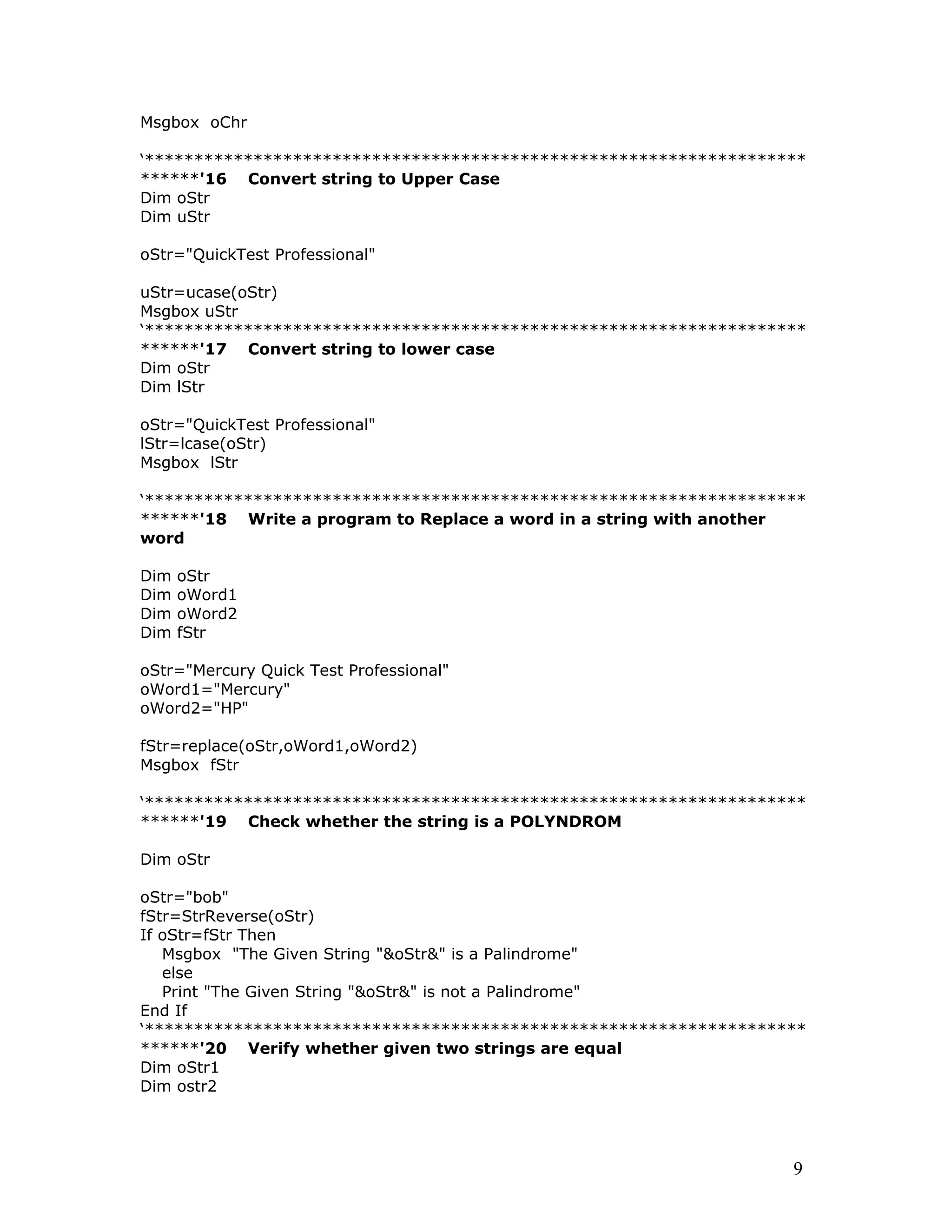
******'16 Convert string to Upper Case
Dim oStr
Dim uStr
oStr="QuickTest Professional"
uStr=ucase(oStr)
Msgbox uStr
‘*******************************************************************
******'17 Convert string to lower case
Dim oStr
Dim lStr
oStr="QuickTest Professional"
lStr=lcase(oStr)
Msgbox lStr
‘*******************************************************************
******'18 Write a program to Replace a word in a string with another
word
Dim oStr
Dim oWord1
Dim oWord2
Dim fStr
oStr="Mercury Quick Test Professional"
oWord1="Mercury"
oWord2="HP"
fStr=replace(oStr,oWord1,oWord2)
Msgbox fStr
‘*******************************************************************
******'19 Check whether the string is a POLYNDROM
Dim oStr
oStr="bob"
fStr=StrReverse(oStr)
If oStr=fStr Then
Msgbox "The Given String "&oStr&" is a Palindrome"
else
Print "The Given String "&oStr&" is not a Palindrome"
End If
‘*******************************************************************
******'20 Verify whether given two strings are equal
Dim oStr1
Dim ostr2
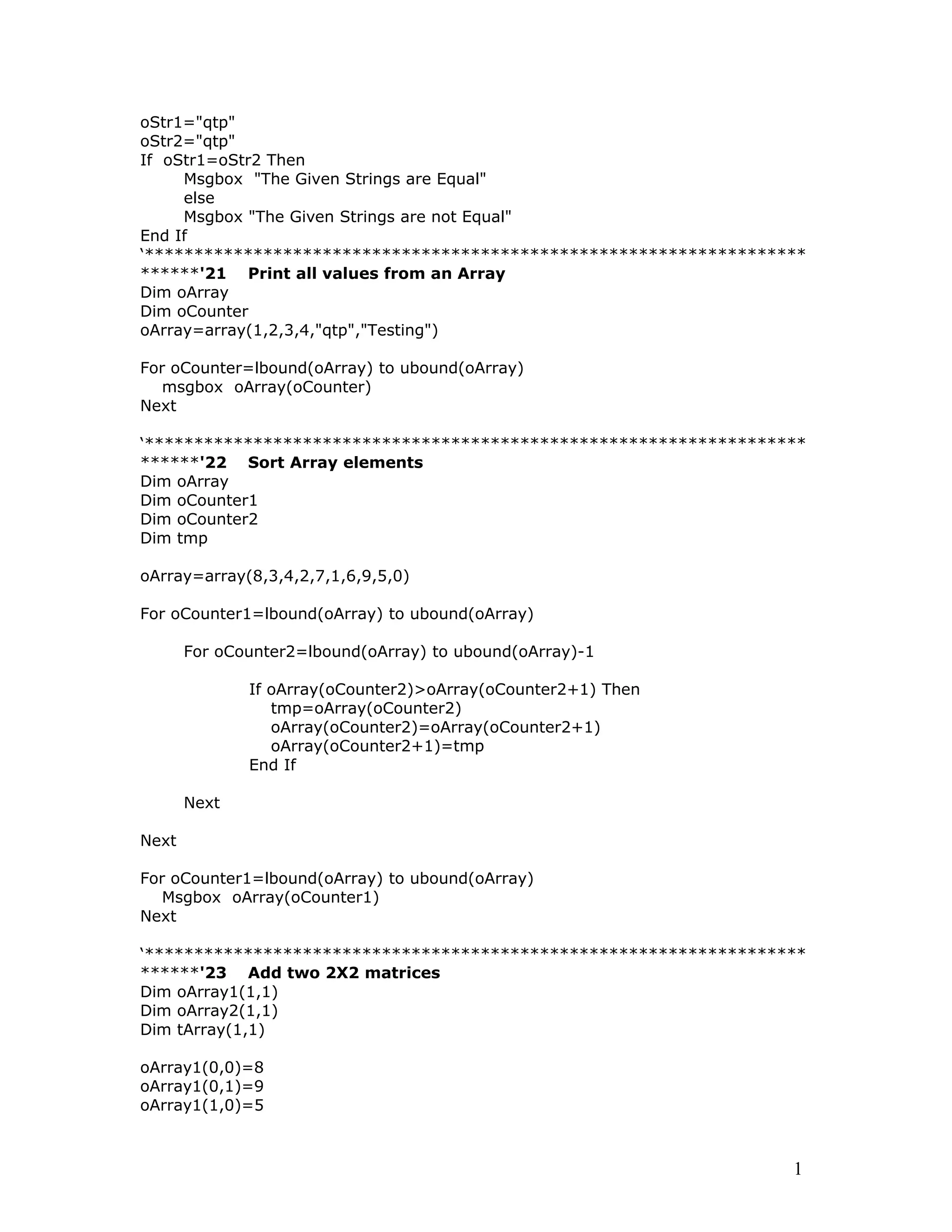
9
oStr1="qtp"
oStr2="qtp"
If oStr1=oStr2 Then
Msgbox "The Given Strings are Equal"
else
Msgbox "The Given Strings are not Equal"
End If
‘*******************************************************************
******'21 Print all values from an Array
Dim oArray
Dim oCounter
oArray=array(1,2,3,4,"qtp","Testing")
For oCounter=lbound(oArray) to ubound(oArray)
msgbox oArray(oCounter)
Next
‘*******************************************************************
******'22 Sort Array elements
Dim oArray
Dim oCounter1
Dim oCounter2
Dim tmp
oArray=array(8,3,4,2,7,1,6,9,5,0)
For oCounter1=lbound(oArray) to ubound(oArray)
For oCounter2=lbound(oArray) to ubound(oArray)-1
If oArray(oCounter2)>oArray(oCounter2+1) Then
tmp=oArray(oCounter2)
oArray(oCounter2)=oArray(oCounter2+1)
oArray(oCounter2+1)=tmp
End If
Next
Next
For oCounter1=lbound(oArray) to ubound(oArray)
Msgbox oArray(oCounter1)
Next
‘*******************************************************************
******'23 Add two 2X2 matrices
Dim oArray1(1,1)
Dim oArray2(1,1)
Dim tArray(1,1)
oArray1(0,0)=8
oArray1(0,1)=9
oArray1(1,0)=5
1
oArray1(1,1)=-1
oArray2(0,0)=-2
oArray2(0,1)=3
oArray2(1,0)=4
oArray2(1,1)=0
tArray(0,0)=oArray1(0,0)+ oArray2(0,0)
tArray(0,1)=oArray1(0,1)+oArray2(0,1)
tArray(1,0)=oArray1(1,0)+oArray2(1,0)
tArray(1,1)=oArray1(1,1)+oArray2(1,1)
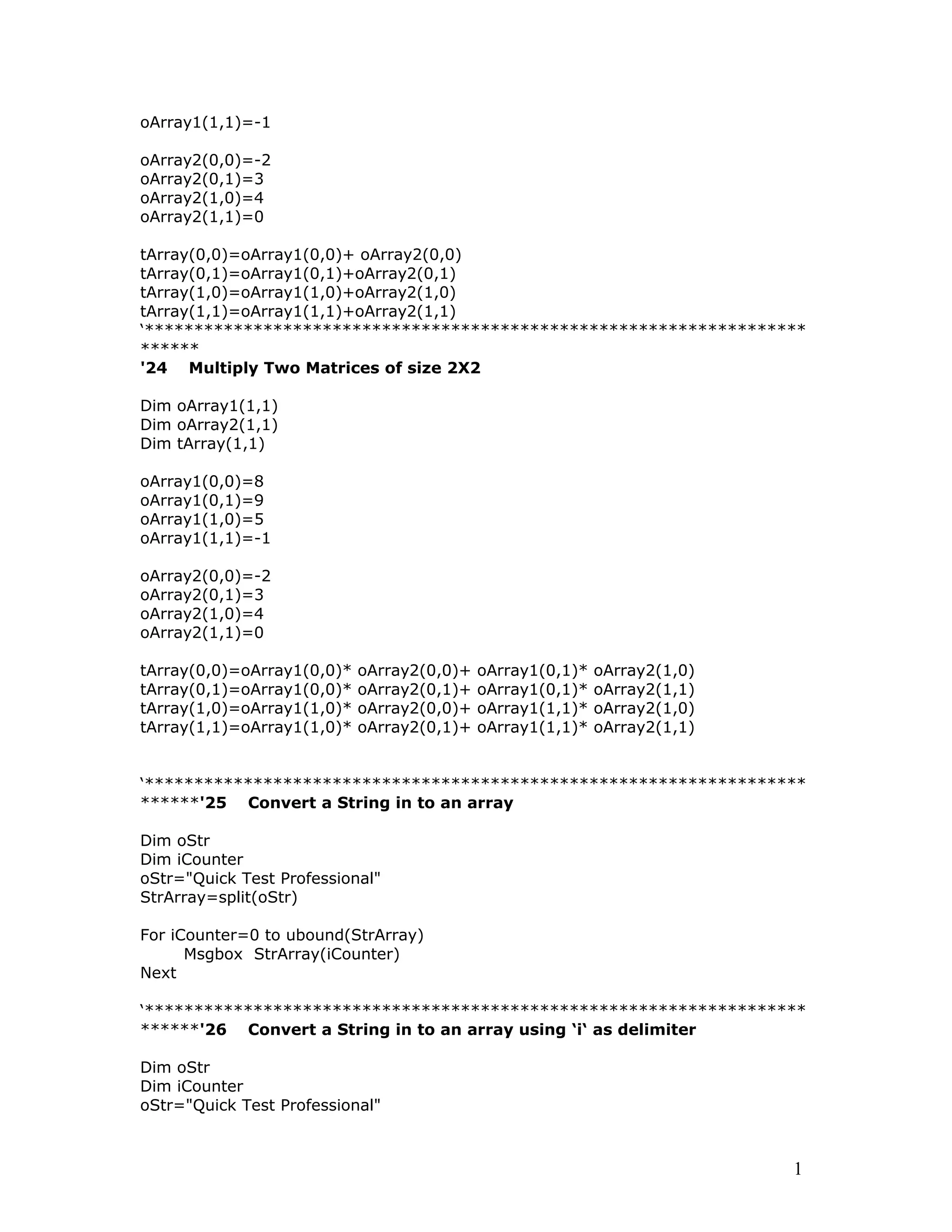
‘*******************************************************************
******
'24 Multiply Two Matrices of size 2X2
Dim oArray1(1,1)
Dim oArray2(1,1)
Dim tArray(1,1)
oArray1(0,0)=8
oArray1(0,1)=9
oArray1(1,0)=5
oArray1(1,1)=-1
oArray2(0,0)=-2
oArray2(0,1)=3
oArray2(1,0)=4
oArray2(1,1)=0
tArray(0,0)=oArray1(0,0)* oArray2(0,0)+ oArray1(0,1)* oArray2(1,0)
tArray(0,1)=oArray1(0,0)* oArray2(0,1)+ oArray1(0,1)* oArray2(1,1)
tArray(1,0)=oArray1(1,0)* oArray2(0,0)+ oArray1(1,1)* oArray2(1,0)
tArray(1,1)=oArray1(1,0)* oArray2(0,1)+ oArray1(1,1)* oArray2(1,1)
‘*******************************************************************
******'25 Convert a String in to an array
Dim oStr
Dim iCounter
oStr="Quick Test Professional"
StrArray=split(oStr)
For iCounter=0 to ubound(StrArray)
Msgbox StrArray(iCounter)
Next
‘*******************************************************************
******'26 Convert a String in to an array using ‘i‘ as delimiter
Dim oStr
Dim iCounter
oStr="Quick Test Professional"
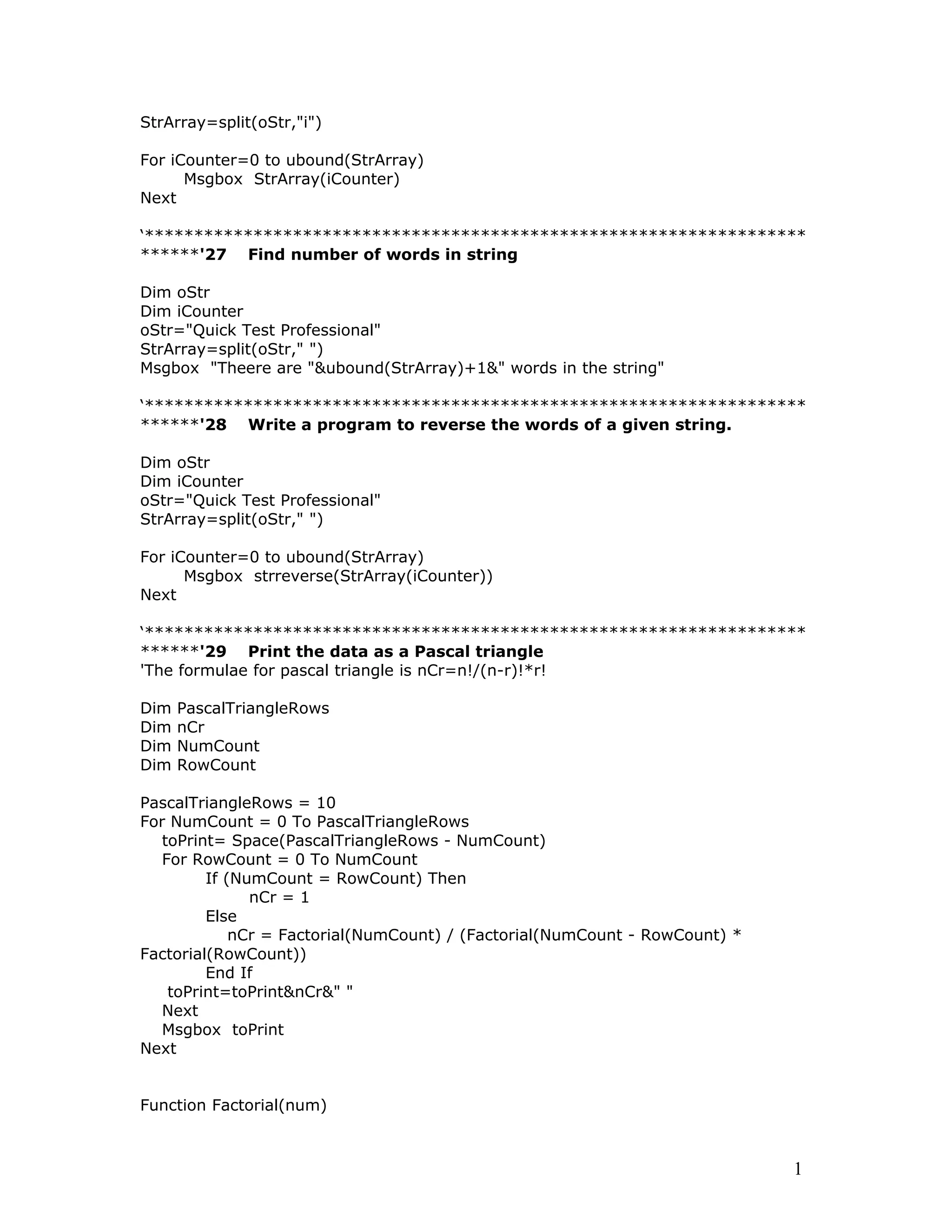
1
StrArray=split(oStr,"i")
For iCounter=0 to ubound(StrArray)
Msgbox StrArray(iCounter)
Next
‘*******************************************************************
******'27 Find number of words in string
Dim oStr
Dim iCounter
oStr="Quick Test Professional"
StrArray=split(oStr," ")
Msgbox "Theere are "&ubound(StrArray)+1&" words in the string"
‘*******************************************************************
******'28 Write a program to reverse the words of a given string.
Dim oStr
Dim iCounter
oStr="Quick Test Professional"
StrArray=split(oStr," ")
For iCounter=0 to ubound(StrArray)
Msgbox strreverse(StrArray(iCounter))
Next
‘*******************************************************************
******'29 Print the data as a Pascal triangle
'The formulae for pascal triangle is nCr=n!/(n-r)!*r!
Dim PascalTriangleRows
Dim nCr
Dim NumCount
Dim RowCount
PascalTriangleRows = 10
For NumCount = 0 To PascalTriangleRows
toPrint= Space(PascalTriangleRows - NumCount)
For RowCount = 0 To NumCount
If (NumCount = RowCount) Then
nCr = 1
Else
nCr = Factorial(NumCount) / (Factorial(NumCount - RowCount) *
Factorial(RowCount))
End If
toPrint=toPrint&nCr&" "
Next
Msgbox toPrint
Next
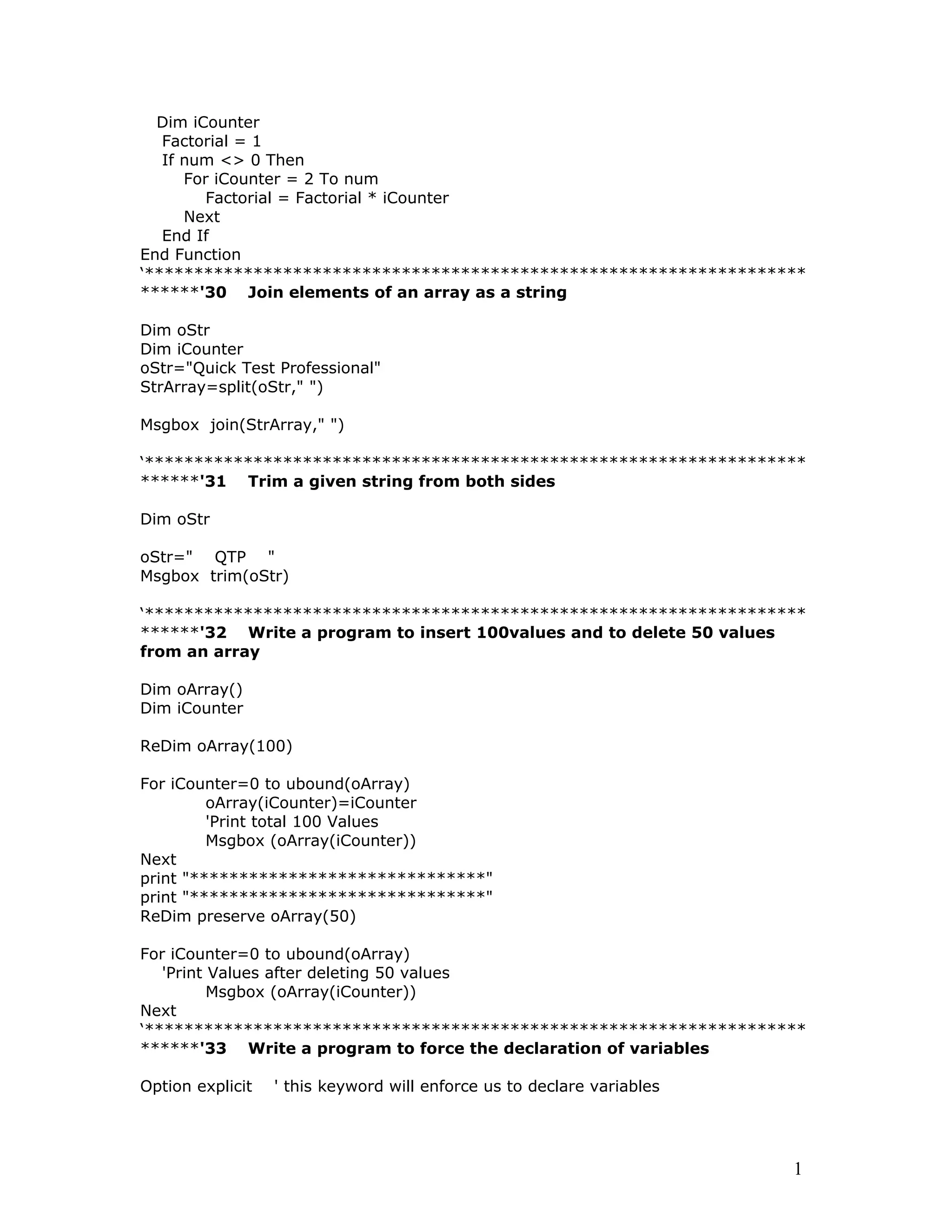
Function Factorial(num)
1
Dim iCounter
Factorial = 1
If num <> 0 Then
For iCounter = 2 To num
Factorial = Factorial * iCounter
Next
End If
End Function
‘*******************************************************************
******'30 Join elements of an array as a string
Dim oStr
Dim iCounter
oStr="Quick Test Professional"
StrArray=split(oStr," ")
Msgbox join(StrArray," ")
‘*******************************************************************
******'31 Trim a given string from both sides
Dim oStr
oStr=" QTP "
Msgbox trim(oStr)
‘*******************************************************************
******'32 Write a program to insert 100values and to delete 50 values
from an array
Dim oArray()
Dim iCounter
ReDim oArray(100)
For iCounter=0 to ubound(oArray)
oArray(iCounter)=iCounter
'Print total 100 Values
Msgbox (oArray(iCounter))
Next
print "******************************"
ReDim preserve oArray(50)
For iCounter=0 to ubound(oArray)
'Print Values after deleting 50 values
Msgbox (oArray(iCounter))
Next
‘*******************************************************************
******'33 Write a program to force the declaration of variables
Option explicit ' this keyword will enforce us to declare variables
1
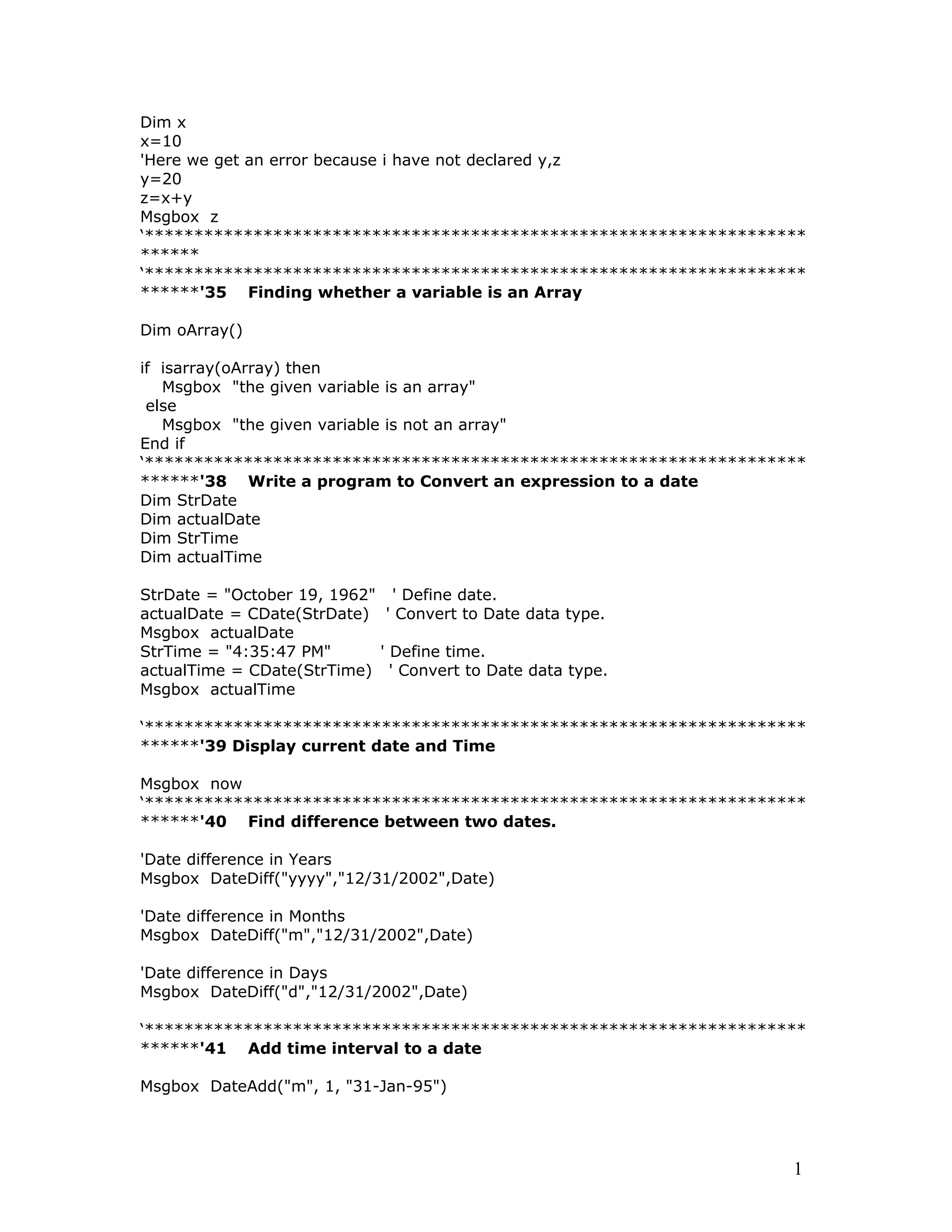
Dim x
x=10
'Here we get an error because i have not declared y,z
y=20
z=x+y
Msgbox z
‘*******************************************************************
******
‘*******************************************************************
******'35 Finding whether a variable is an Array
Dim oArray()
if isarray(oArray) then
Msgbox "the given variable is an array"
else
Msgbox "the given variable is not an array"
End if
‘*******************************************************************
******'38 Write a program to Convert an expression to a date
Dim StrDate
Dim actualDate
Dim StrTime
Dim actualTime
StrDate = "October 19, 1962" ' Define date.
actualDate = CDate(StrDate) ' Convert to Date data type.
Msgbox actualDate
StrTime = "4:35:47 PM" ' Define time.
actualTime = CDate(StrTime) ' Convert to Date data type.
Msgbox actualTime
‘*******************************************************************
******'39 Display current date and Time
Msgbox now
‘*******************************************************************
******'40 Find difference between two dates.
'Date difference in Years
Msgbox DateDiff("yyyy","12/31/2002",Date)
'Date difference in Months
Msgbox DateDiff("m","12/31/2002",Date)
'Date difference in Days
Msgbox DateDiff("d","12/31/2002",Date)
‘*******************************************************************
******'41 Add time interval to a date
Msgbox DateAdd("m", 1, "31-Jan-95")
1
‘*******************************************************************
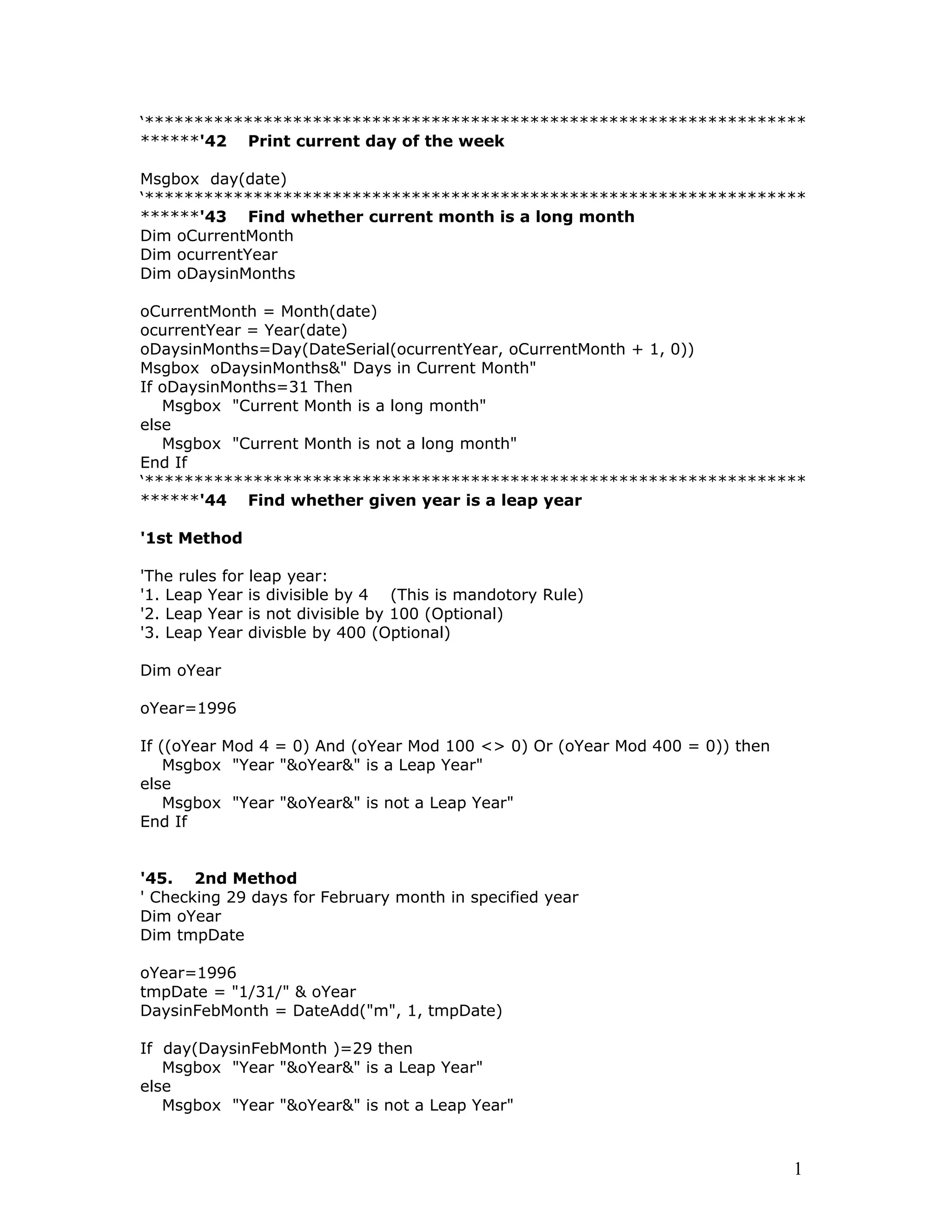
******'42 Print current day of the week
Msgbox day(date)
‘*******************************************************************
******'43 Find whether current month is a long month
Dim oCurrentMonth
Dim ocurrentYear
Dim oDaysinMonths
oCurrentMonth = Month(date)
ocurrentYear = Year(date)
oDaysinMonths=Day(DateSerial(ocurrentYear, oCurrentMonth + 1, 0))
Msgbox oDaysinMonths&" Days in Current Month"
If oDaysinMonths=31 Then
Msgbox "Current Month is a long month"
else
Msgbox "Current Month is not a long month"
End If
‘*******************************************************************
******'44 Find whether given year is a leap year
'1st Method
'The rules for leap year:
'1. Leap Year is divisible by 4 (This is mandotory Rule)
'2. Leap Year is not divisible by 100 (Optional)
'3. Leap Year divisble by 400 (Optional)
Dim oYear
oYear=1996
If ((oYear Mod 4 = 0) And (oYear Mod 100 <> 0) Or (oYear Mod 400 = 0)) then
Msgbox "Year "&oYear&" is a Leap Year"
else
Msgbox "Year "&oYear&" is not a Leap Year"
End If
'45. 2nd Method
' Checking 29 days for February month in specified year
Dim oYear
Dim tmpDate
oYear=1996
tmpDate = "1/31/" & oYear
DaysinFebMonth = DateAdd("m", 1, tmpDate)
If day(DaysinFebMonth )=29 then
Msgbox "Year "&oYear&" is a Leap Year"
else
Msgbox "Year "&oYear&" is not a Leap Year"
1
End If
‘*******************************************************************
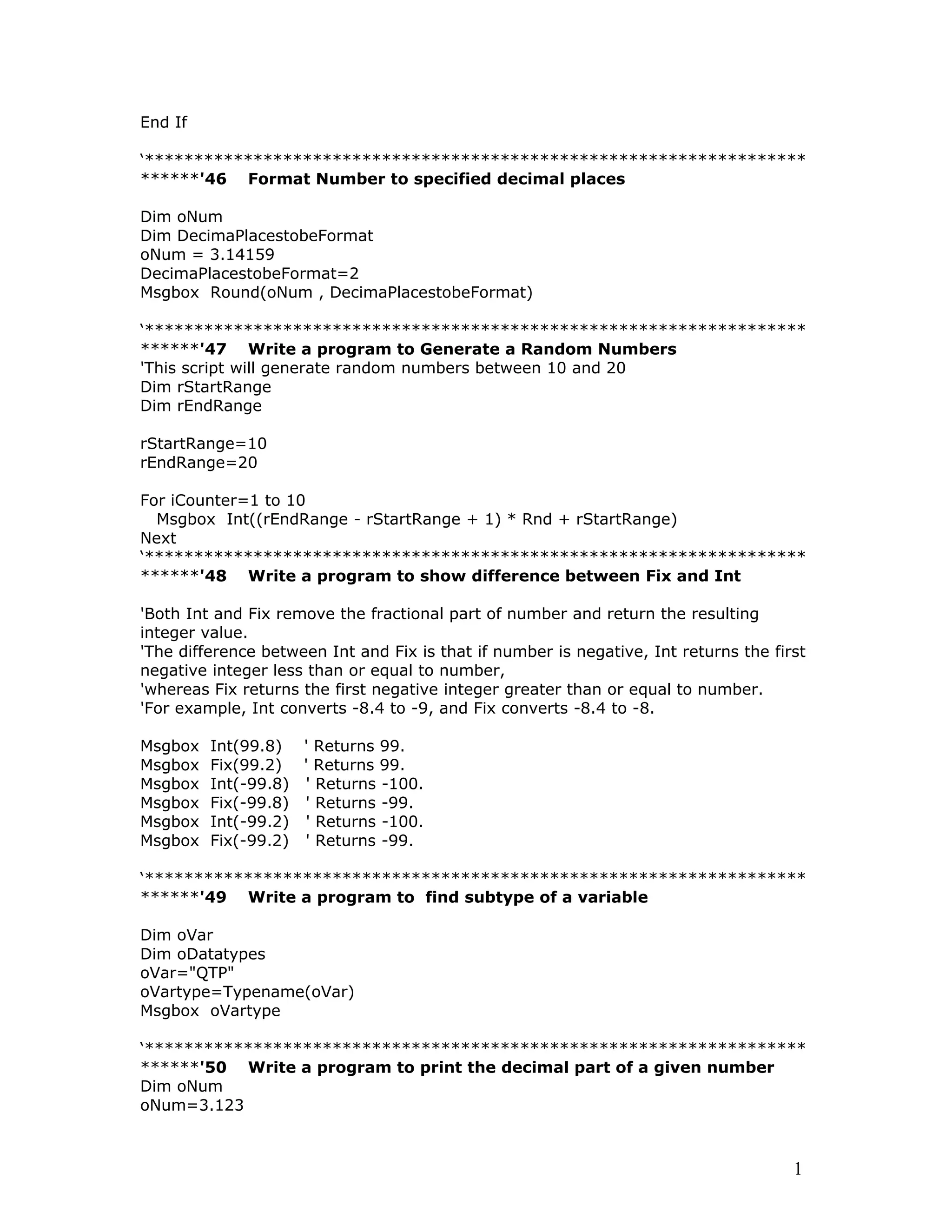
******'46 Format Number to specified decimal places
Dim oNum
Dim DecimaPlacestobeFormat
oNum = 3.14159
DecimaPlacestobeFormat=2
Msgbox Round(oNum , DecimaPlacestobeFormat)
‘*******************************************************************
******'47 Write a program to Generate a Random Numbers
'This script will generate random numbers between 10 and 20
Dim rStartRange
Dim rEndRange
rStartRange=10
rEndRange=20
For iCounter=1 to 10
Msgbox Int((rEndRange - rStartRange + 1) * Rnd + rStartRange)
Next
‘*******************************************************************
******'48 Write a program to show difference between Fix and Int
'Both Int and Fix remove the fractional part of number and return the resulting
integer value.
'The difference between Int and Fix is that if number is negative, Int returns the first
negative integer less than or equal to number,
'whereas Fix returns the first negative integer greater than or equal to number.
'For example, Int converts -8.4 to -9, and Fix converts -8.4 to -8.
Msgbox Int(99.8) ' Returns 99.
Msgbox Fix(99.2) ' Returns 99.
Msgbox Int(-99.8) ' Returns -100.
Msgbox Fix(-99.8) ' Returns -99.
Msgbox Int(-99.2) ' Returns -100.
Msgbox Fix(-99.2) ' Returns -99.
‘*******************************************************************
******'49 Write a program to find subtype of a variable
Dim oVar
Dim oDatatypes
oVar="QTP"
oVartype=Typename(oVar)
Msgbox oVartype
‘*******************************************************************
******'50 Write a program to print the decimal part of a given number
Dim oNum
oNum=3.123
1
oDecNum=oNum- int(oNum)
Msgbox oDecNum
‘*******************************************************************
*****
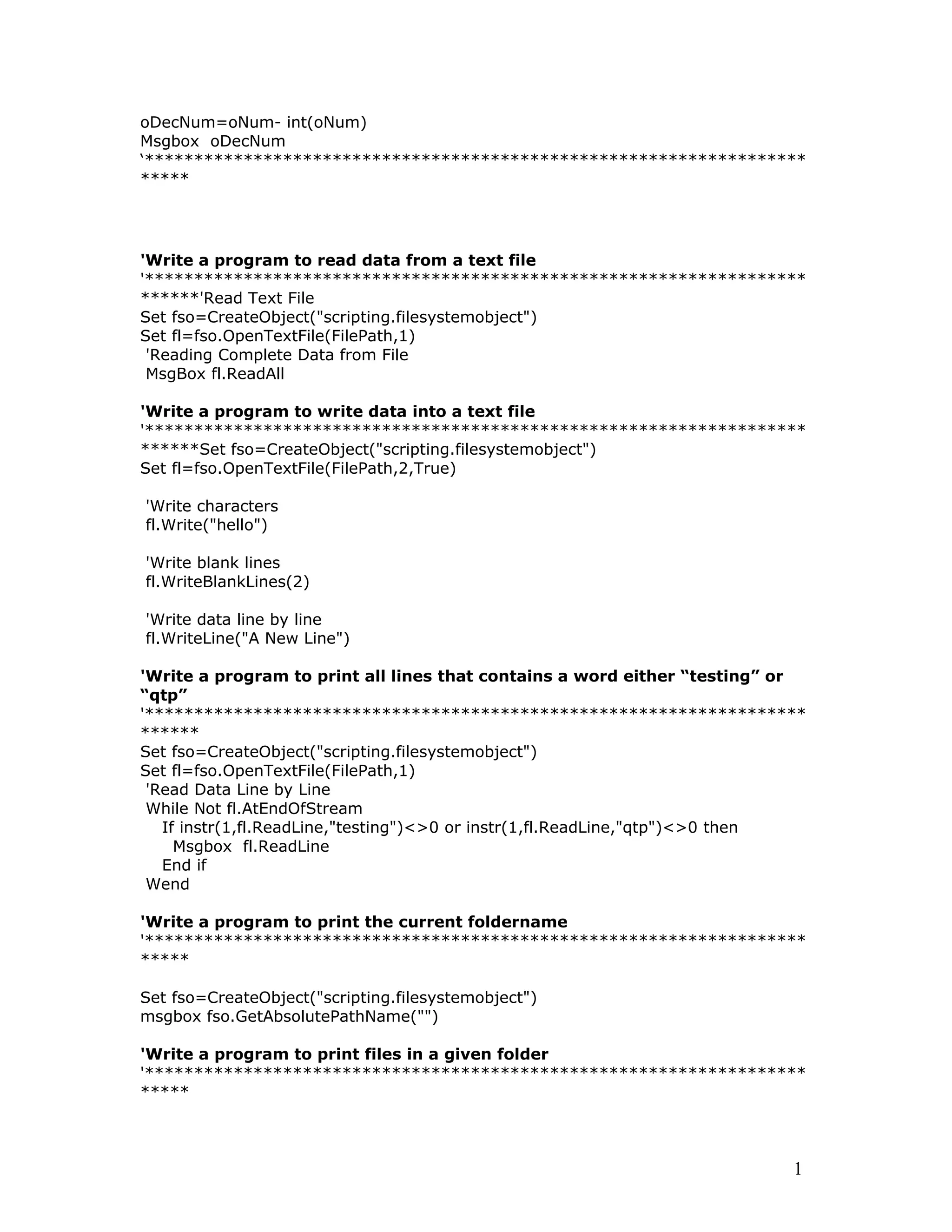
'Write a program to read data from a text file
'*******************************************************************
******'Read Text File
Set fso=CreateObject("scripting.filesystemobject")
Set fl=fso.OpenTextFile(FilePath,1)
'Reading Complete Data from File
MsgBox fl.ReadAll
'Write a program to write data into a text file
'*******************************************************************
******Set fso=CreateObject("scripting.filesystemobject")
Set fl=fso.OpenTextFile(FilePath,2,True)
'Write characters
fl.Write("hello")
'Write blank lines
fl.WriteBlankLines(2)
'Write data line by line
fl.WriteLine("A New Line")
'Write a program to print all lines that contains a word either “testing” or
“qtp”
'*******************************************************************
******
Set fso=CreateObject("scripting.filesystemobject")
Set fl=fso.OpenTextFile(FilePath,1)
'Read Data Line by Line
While Not fl.AtEndOfStream
If instr(1,fl.ReadLine,"testing")<>0 or instr(1,fl.ReadLine,"qtp")<>0 then
Msgbox fl.ReadLine
End if
Wend
'Write a program to print the current foldername
'*******************************************************************
*****
Set fso=CreateObject("scripting.filesystemobject")
msgbox fso.GetAbsolutePathName("")
'Write a program to print files in a given folder
'*******************************************************************
*****
1
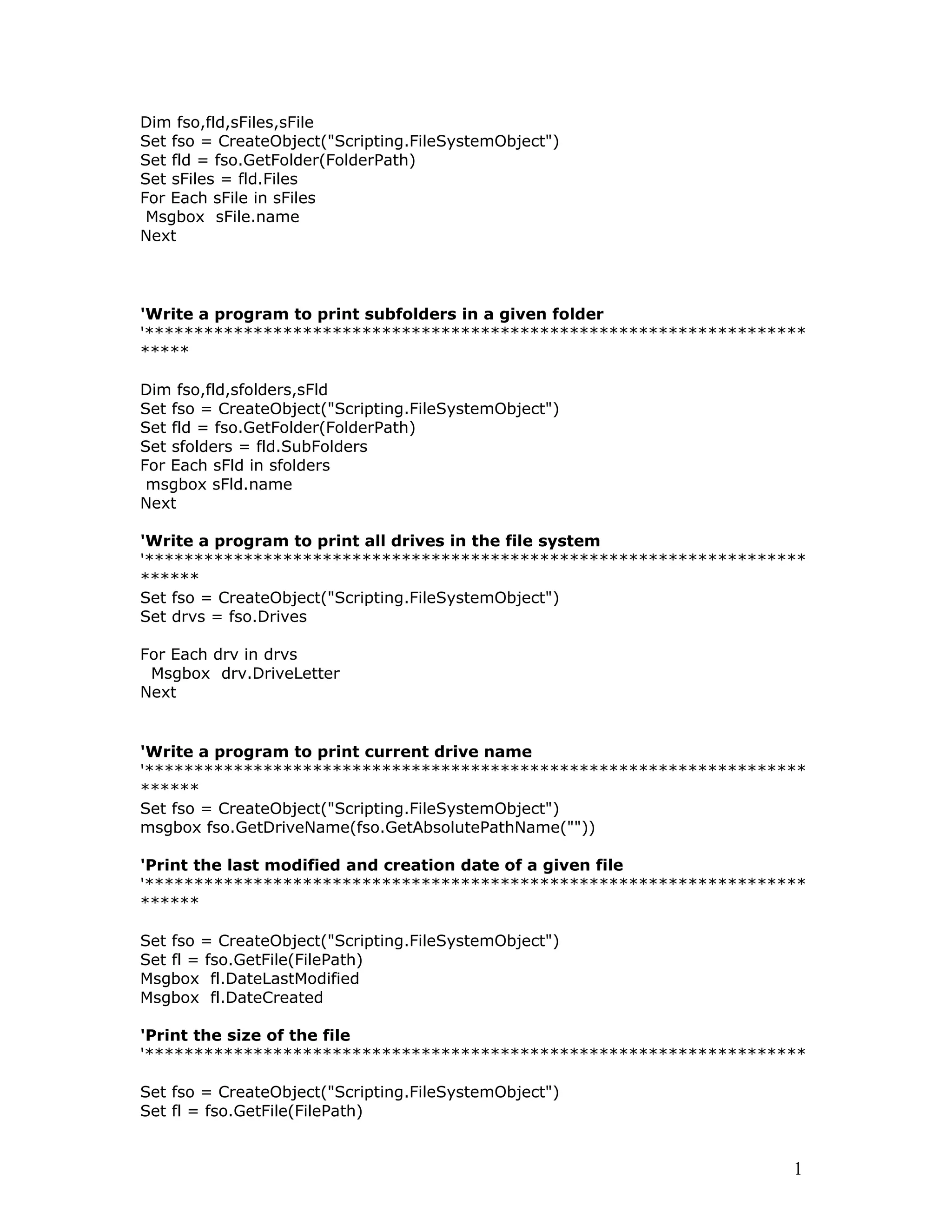
Dim fso,fld,sFiles,sFile
Set fso = CreateObject("Scripting.FileSystemObject")
Set fld = fso.GetFolder(FolderPath)
Set sFiles = fld.Files
For Each sFile in sFiles
Msgbox sFile.name
Next
'Write a program to print subfolders in a given folder
'*******************************************************************
*****
Dim fso,fld,sfolders,sFld
Set fso = CreateObject("Scripting.FileSystemObject")
Set fld = fso.GetFolder(FolderPath)
Set sfolders = fld.SubFolders
For Each sFld in sfolders
msgbox sFld.name
Next
'Write a program to print all drives in the file system
'*******************************************************************
******
Set fso = CreateObject("Scripting.FileSystemObject")
Set drvs = fso.Drives
For Each drv in drvs
Msgbox drv.DriveLetter
Next
'Write a program to print current drive name
'*******************************************************************
******
Set fso = CreateObject("Scripting.FileSystemObject")
msgbox fso.GetDriveName(fso.GetAbsolutePathName(""))
'Print the last modified and creation date of a given file
'*******************************************************************
******
Set fso = CreateObject("Scripting.FileSystemObject")
Set fl = fso.GetFile(FilePath)
Msgbox fl.DateLastModified
Msgbox fl.DateCreated
'Print the size of the file
'*******************************************************************
Set fso = CreateObject("Scripting.FileSystemObject")
Set fl = fso.GetFile(FilePath)
1
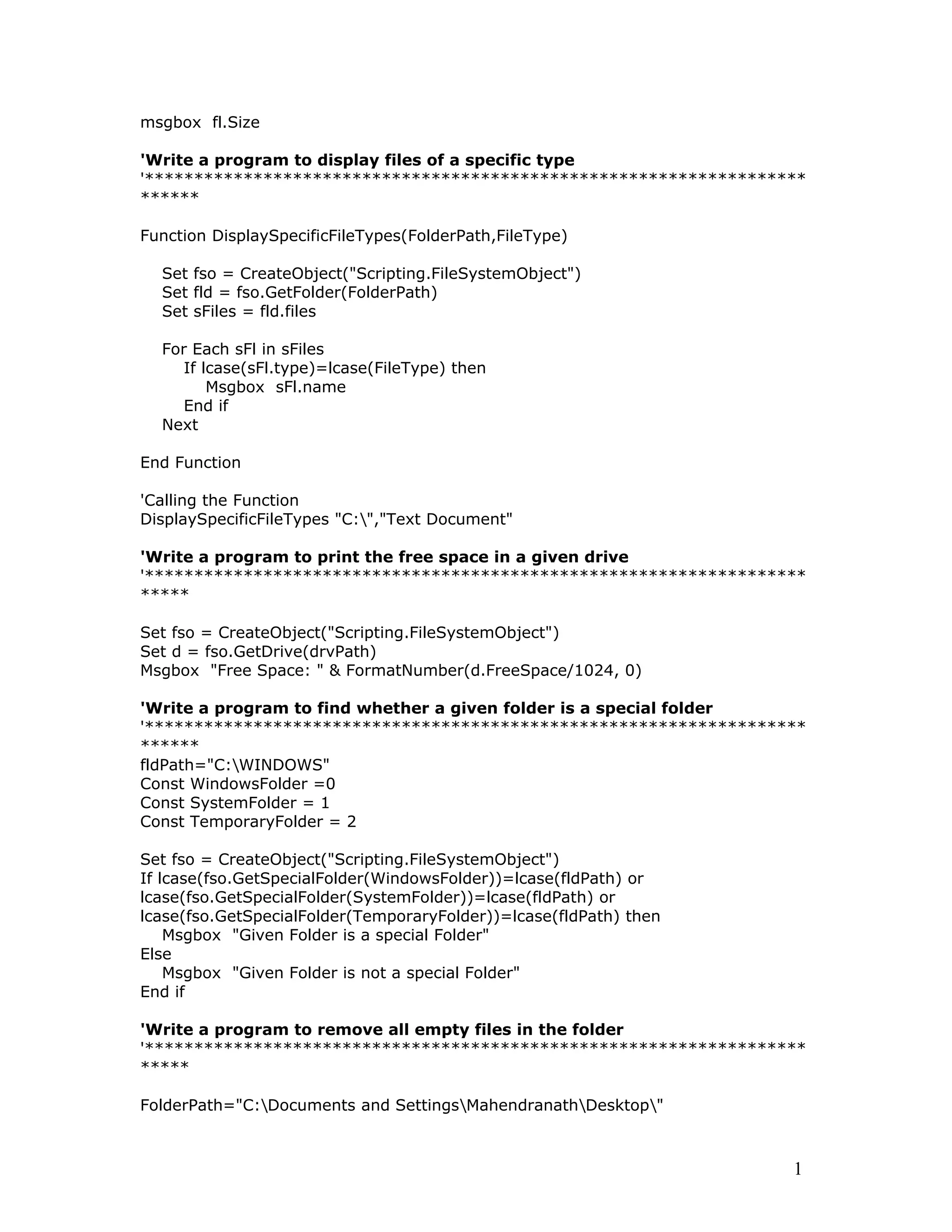
msgbox fl.Size
'Write a program to display files of a specific type
'*******************************************************************
******
Function DisplaySpecificFileTypes(FolderPath,FileType)
Set fso = CreateObject("Scripting.FileSystemObject")
Set fld = fso.GetFolder(FolderPath)
Set sFiles = fld.files
For Each sFl in sFiles
If lcase(sFl.type)=lcase(FileType) then
Msgbox sFl.name
End if
Next
End Function
'Calling the Function
DisplaySpecificFileTypes "C:","Text Document"
'Write a program to print the free space in a given drive
'*******************************************************************
*****
Set fso = CreateObject("Scripting.FileSystemObject")
Set d = fso.GetDrive(drvPath)
Msgbox "Free Space: " & FormatNumber(d.FreeSpace/1024, 0)
'Write a program to find whether a given folder is a special folder
'*******************************************************************
******
fldPath="C:WINDOWS"
Const WindowsFolder =0
Const SystemFolder = 1
Const TemporaryFolder = 2
Set fso = CreateObject("Scripting.FileSystemObject")
If lcase(fso.GetSpecialFolder(WindowsFolder))=lcase(fldPath) or
lcase(fso.GetSpecialFolder(SystemFolder))=lcase(fldPath) or
lcase(fso.GetSpecialFolder(TemporaryFolder))=lcase(fldPath) then
Msgbox "Given Folder is a special Folder"
Else
Msgbox "Given Folder is not a special Folder"
End if
'Write a program to remove all empty files in the folder
'*******************************************************************
*****
FolderPath="C:Documents and SettingsMahendranathDesktop"
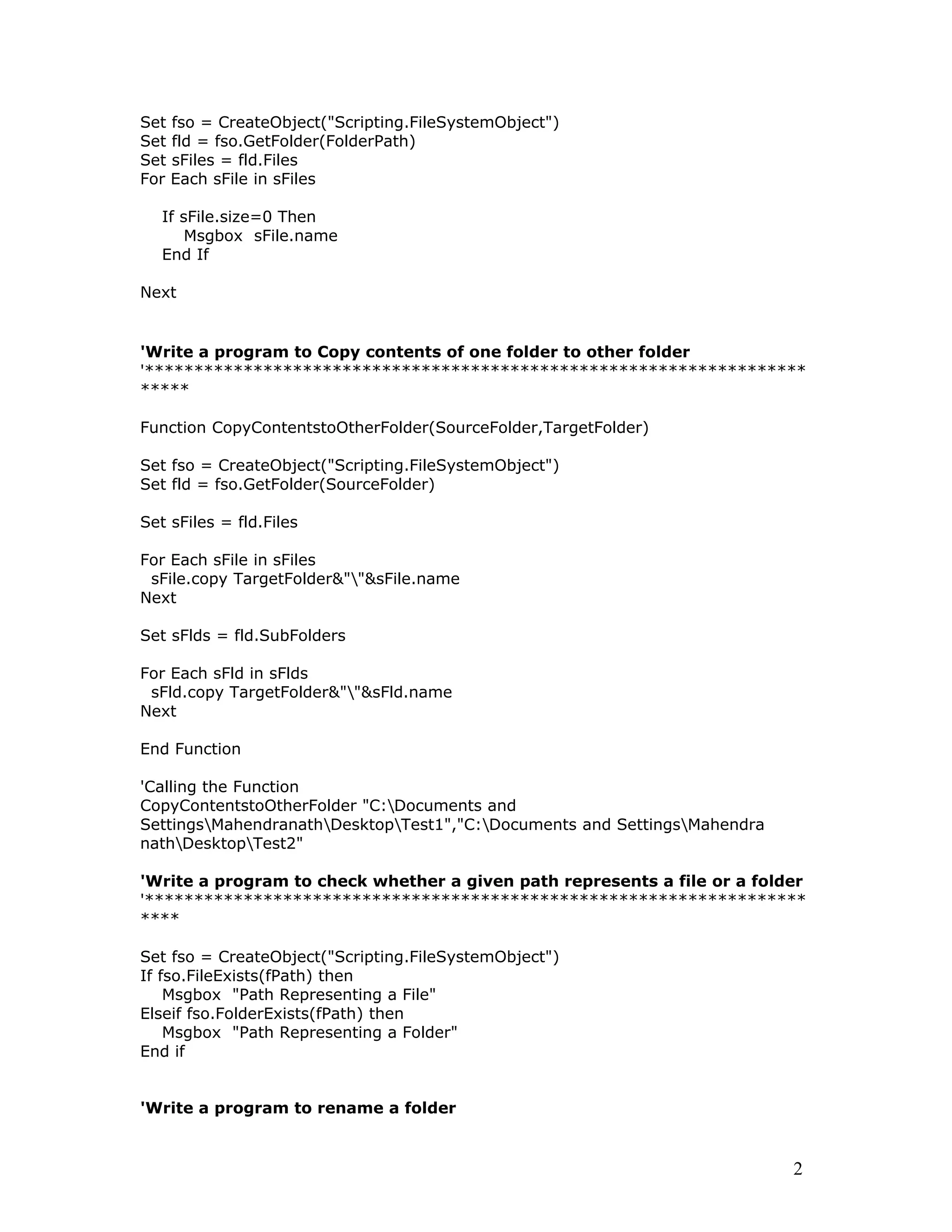
1
Set fso = CreateObject("Scripting.FileSystemObject")
Set fld = fso.GetFolder(FolderPath)
Set sFiles = fld.Files
For Each sFile in sFiles
If sFile.size=0 Then
Msgbox sFile.name
End If
Next
'Write a program to Copy contents of one folder to other folder
'*******************************************************************
*****
Function CopyContentstoOtherFolder(SourceFolder,TargetFolder)
Set fso = CreateObject("Scripting.FileSystemObject")
Set fld = fso.GetFolder(SourceFolder)
Set sFiles = fld.Files
For Each sFile in sFiles
sFile.copy TargetFolder&""&sFile.name
Next
Set sFlds = fld.SubFolders
For Each sFld in sFlds
sFld.copy TargetFolder&""&sFld.name
Next
End Function
'Calling the Function
CopyContentstoOtherFolder "C:Documents and
SettingsMahendranathDesktopTest1","C:Documents and SettingsMahendra
nathDesktopTest2"
'Write a program to check whether a given path represents a file or a folder
'*******************************************************************
****
Set fso = CreateObject("Scripting.FileSystemObject")
If fso.FileExists(fPath) then
Msgbox "Path Representing a File"
Elseif fso.FolderExists(fPath) then
Msgbox "Path Representing a Folder"
End if
'Write a program to rename a folder
2
'*******************************************************************
*****
CreateObject("Scripting.FileSystemObject").GetFolder("C:Documents and
SettingsMahendranathDesktopTest1").Name="New Name"
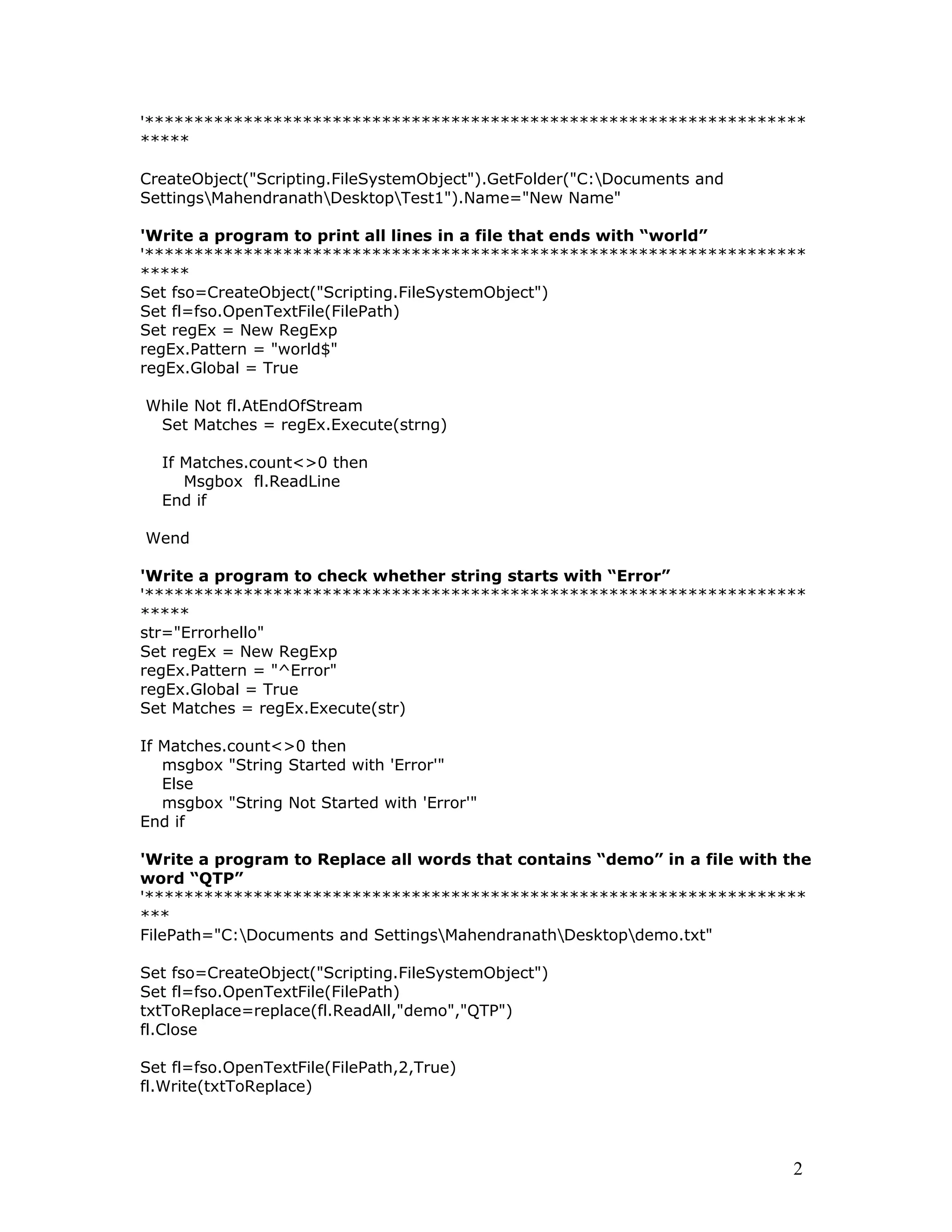
'Write a program to print all lines in a file that ends with “world”
'*******************************************************************
*****
Set fso=CreateObject("Scripting.FileSystemObject")
Set fl=fso.OpenTextFile(FilePath)
Set regEx = New RegExp
regEx.Pattern = "world$"
regEx.Global = True
While Not fl.AtEndOfStream
Set Matches = regEx.Execute(strng)
If Matches.count<>0 then
Msgbox fl.ReadLine
End if
Wend
'Write a program to check whether string starts with “Error”
'*******************************************************************
*****
str="Errorhello"
Set regEx = New RegExp
regEx.Pattern = "^Error"
regEx.Global = True
Set Matches = regEx.Execute(str)
If Matches.count<>0 then
msgbox "String Started with 'Error'"
Else
msgbox "String Not Started with 'Error'"
End if
'Write a program to Replace all words that contains “demo” in a file with the
word “QTP”
'*******************************************************************
***
FilePath="C:Documents and SettingsMahendranathDesktopdemo.txt"
Set fso=CreateObject("Scripting.FileSystemObject")
Set fl=fso.OpenTextFile(FilePath)
txtToReplace=replace(fl.ReadAll,"demo","QTP")
fl.Close
Set fl=fso.OpenTextFile(FilePath,2,True)
fl.Write(txtToReplace)
2
fl.Close
'Write a program to check whether a string contains only alpha numerics
'*******************************************************************
*****
str="xyz123!!"
Set regEx = New RegExp
regEx.Pattern = "[^A-Za-z0-9]"
regEx.Global = True
Set Matches = regEx.Execute(str)
If Matches.count=0 then
msgbox "String Contains only alpha numerics"
Else
msgbox "String Contains other characters"
End if
'Write a program to check whether given string is in date format
'*****************************************************************
MyDate = "October 19, 1962"
If isdate(MyDate) Then
msgbox "Given String is in Date Format"
else
msgbox "Given String is not in Date Format"
End If
'Write a program to Invoke command prompt and execute dir command
from the shell
'*******************************************************************
**
Dim oShell
Set oShell = WScript.CreateObject ("WSCript.shell")
oShell.run "cmd /K CD C: & Dir"
Set oShell = Nothing
2

vbscripting

  • 1.
    Built-in Functions inVBScript Date/Time Functions Function Description CDate Converts a valid date and time expression to the variant of subtype Date Date Returns the current system date DateAdd Returns a date to which a specified time interval has been added DateDiff Returns the number of intervals between two dates DatePart Returns the specified part of a given date DateSerial Returns the date for a specified year, month, and day DateValue Returns a date Day Returns a number that represents the day of the month (between 1 and 31, inclusive) FormatDateTime Returns an expression formatted as a date or time Hour Returns a number that represents the hour of the day (between 0 and 23, inclusive) IsDate Returns a Boolean value that indicates if the evaluated expression can be converted to a date Minute Returns a number that represents the minute of the hour (between 0 and 59, inclusive) Month Returns a number that represents the month of the year (between 1 and 12, inclusive) MonthName Returns the name of a specified month Now Returns the current system date and time Second Returns a number that represents the second of the minute (between 0 and 59, inclusive) Time Returns the current system time Timer Returns the number of seconds since 12:00 AM TimeSerial Returns the time for a specific hour, minute, and second TimeValue Returns a time Weekday Returns a number that represents the day of the week (between 1 and 7, inclusive) WeekdayName Returns the weekday name of a specified day of the week Year Returns a number that represents the year Conversion Functions Top Function Description Asc Converts the first letter in a string to ANSI code 1
  • 2.
    CBool Converts anexpression to a variant of subtype Boolean CByte Converts an expression to a variant of subtype Byte CCur Converts an expression to a variant of subtype Currency CDate Converts a valid date and time expression to the variant of subtype Date CDbl Converts an expression to a variant of subtype Double Chr Converts the specified ANSI code to a character CInt Converts an expression to a variant of subtype Integer CLng Converts an expression to a variant of subtype Long CSng Converts an expression to a variant of subtype Single CStr Converts an expression to a variant of subtype String Hex Returns the hexadecimal value of a specified number Oct Returns the octal value of a specified number Format Functions Top Function Description FormatCurrency Returns an expression formatted as a currency value FormatDateTime Returns an expression formatted as a date or time FormatNumber Returns an expression formatted as a number FormatPercent Returns an expression formatted as a percentage Math Functions Top Function Description Abs Returns the absolute value of a specified number Atn Returns the arctangent of a specified number Cos Returns the cosine of a specified number (angle) Exp Returns e raised to a power Hex Returns the hexadecimal value of a specified number Int Returns the integer part of a specified number Fix Returns the integer part of a specified number Log Returns the natural logarithm of a specified number Oct Returns the octal value of a specified number Rnd Returns a random number less than 1 but greater or equal to 0 Sgn Returns an integer that indicates the sign of a specified number Sin Returns the sine of a specified number (angle) Sqr Returns the square root of a specified number 2
  • 3.
    Tan Returns thetangent of a specified number (angle) Array Functions Top Function Description Array Returns a variant containing an array Filter Returns a zero-based array that contains a subset of a string array based on a filter criteria IsArray Returns a Boolean value that indicates whether a specified variable is an array Join Returns a string that consists of a number of substrings in an array LBound Returns the smallest subscript for the indicated dimension of an array Split Returns a zero-based, one-dimensional array that contains a specified number of substrings UBound Returns the largest subscript for the indicated dimension of an array String Functions Top Function Description InStr Returns the position of the first occurrence of one string within another. The search begins at the first character of the string InStrRev Returns the position of the first occurrence of one string within another. The search begins at the last character of the string LCase Converts a specified string to lowercase Left Returns a specified number of characters from the left side of a string Len Returns the number of characters in a string LTrim Removes spaces on the left side of a string RTrim Removes spaces on the right side of a string Trim Removes spaces on both the left and the right side of a string Mid Returns a specified number of characters from a string Replace Replaces a specified part of a string with another string a specified number of times Right Returns a specified number of characters from the right side of a string Space Returns a string that consists of a specified number of spaces 3
  • 4.
    StrComp Compares twostrings and returns a value that represents the result of the comparison String Returns a string that contains a repeating character of a specified length StrReverse Reverses a string UCase Converts a specified string to uppercase Other Functions Top Function Description CreateObject Creates an object of a specified type Eval Evaluates an expression and returns the result GetLocale Returns the current locale ID GetObject Returns a reference to an automation object from a file GetRef Allows you to connect a VBScript procedure to a DHTML event on your pages InputBox Displays a dialog box, where the user can write some input and/or click on a button, and returns the contents IsEmpty Returns a Boolean value that indicates whether a specified variable has been initialized or not IsNull Returns a Boolean value that indicates whether a specified expression contains no valid data (Null) IsNumeric Returns a Boolean value that indicates whether a specified expression can be evaluated as a number IsObject Returns a Boolean value that indicates whether the specified expression is an automation object LoadPicture Returns a picture object. Available only on 32-bit platforms MsgBox Displays a message box, waits for the user to click a button, and returns a value that indicates which button the user clicked RGB Returns a number that represents an RGB color value Round Rounds a number ScriptEngine Returns the scripting language in use ScriptEngineBuildVersi on Returns the build version number of the scripting engine in use ScriptEngineMajorVersi on Returns the major version number of the scripting engine in use ScriptEngineMinorVersi on Returns the minor version number of the scripting engine in use SetLocale Sets the locale ID and returns the previous locale ID TypeName Returns the subtype of a specified variable VarType Returns a value that indicates the subtype of a specified variable 4
  • 5.
    1 Print HelloWorld Print "Hello World" ‘******************************************************************* ******2 Find whether given number is a odd number Dim oNumber oNumber=4 If oNumber mod 2 <>0 Then Msgbox "The Number "& oNumber &" is an Odd Number" else Msgbox "The Number "& oNumber &" is not an Odd Number" End If ‘******************************************************************* ****** '3 Print odd numbers between given range of numbers Dim RangeStart Dim RangeEnd Dim iCounter RangeStart=10 RangeEnd=20 For iCounter=RangeStart to RangeEnd If iCounter mod 2 <>0 Then Msgbox iCounter End If Next ‘******************************************************************* Show Desktop.scf ******'4 Find the factorial of a given number Dim oNumber Dim iCounter Dim fValue oNumber=6 fValue=1 For iCounter=oNumber to 1 step-1 fValue=fValue*iCounter Next Msgbox fValue 5
  • 6.
    ‘******************************************************************* ******'5 Find thefactors of a given number Dim oNumber Dim iCounter oNumber=10 For iCounter=1 to oNumber/2 If oNumber mod iCounter=0 Then msgbox iCounter End If Next Msgbox oNumber ‘******************************************************************* ******'6 Print prime numbers between given range of numbers Dim RangeStart Dim RangeEnd Dim iCounter RangeStart=1 RangeEnd=30 For iCounter=RangeStart to RangeEnd For iCount=2 to round(iCounter/2) If iCounter mod iCount=0 Then Exit for End If Next If iCount=round(iCounter/2)+1 or iCounter=1 Then Msgbox iCounter End If Next ‘******************************************************************* ******'7 Swap 2 numbers with out a temporary variable Dim oNum1 Dim oNum2 oNum1=1055 oNum2=155 oNum1=oNum1-oNum2 oNum2=oNum1+oNum2 oNum1=oNum2-oNum1 Msgbox oNum1 Msgbox oNum2 ‘******************************************************************* ******'8 Write a program to Perform specified Arithmetic Operation on two given numbers 6
  • 7.
    Dim oNum1 Dim oNum2 DimoValue oNum1=10 oNum2=20 OperationtoPerform="div" Select Case lcase(OperationtoPerform) Case "add" oValue=oNum1+oNum2 Case "sub" oValue=oNum1-oNum2 Case "mul" oValue=oNum1*oNum2 Case "div" oValue=oNum1/ oNum2 End Select Msgbox oValue ‘******************************************************************* ******'9 Find the length of a given string Dim oStr Dim oLength oStr="mahendra " oLength=len(oStr) Msgbox oLength ‘******************************************************************* ******'10 Reverse given string Dim oStr Dim oLength Dim oChar Dim iCounter oStr="mahendra" oLength=len(oStr) For iCounter=oLength to 1 step-1 oChar=oChar&mid(oStr,iCounter,1) Next Msgbox oChar ‘******************************************************************* ******'11 Find how many alpha characters present in a string. Dim oStr Dim oLength Dim oChar Dim iCounter oStr="mahen1dra2nath" oLength=len(oStr) oAlphacounter=0 7
  • 8.
    For iCounter=1 tooLength If not isnumeric (mid(oStr,iCounter,1)) then oAlphacounter=oAlphacounter+1 End if Next Msgbox oAlphacounter ‘******************************************************************* ******'12 Find occurrences of a specific character in a string Dim oStr Dim oArray Dim ochr oStr="mahendra " ochr="a" oArray=split(oStr,ochr) Msgbox ubound(oArray) ‘******************************************************************* ******'13 Replace space with tab in between the words of a string. Dim oStr Dim fStr oStr="Quick Test Professional" fStr=replace(oStr," ",vbtab) Msgbox fStr ‘******************************************************************* ******'14 Write a program to return ASCII value of a given character Dim ochr Dim aVal ochr="A" aVal=asc(ochr) Msgbox aVal ‘******************************************************************* ******'15 Write a program to return character corresponding to the given ASCII value Dim ochr Dim aVal aVal=65 oChr=chr(aVal) 8
  • 9.
    Msgbox oChr ‘******************************************************************* ******'16 Convertstring to Upper Case Dim oStr Dim uStr oStr="QuickTest Professional" uStr=ucase(oStr) Msgbox uStr ‘******************************************************************* ******'17 Convert string to lower case Dim oStr Dim lStr oStr="QuickTest Professional" lStr=lcase(oStr) Msgbox lStr ‘******************************************************************* ******'18 Write a program to Replace a word in a string with another word Dim oStr Dim oWord1 Dim oWord2 Dim fStr oStr="Mercury Quick Test Professional" oWord1="Mercury" oWord2="HP" fStr=replace(oStr,oWord1,oWord2) Msgbox fStr ‘******************************************************************* ******'19 Check whether the string is a POLYNDROM Dim oStr oStr="bob" fStr=StrReverse(oStr) If oStr=fStr Then Msgbox "The Given String "&oStr&" is a Palindrome" else Print "The Given String "&oStr&" is not a Palindrome" End If ‘******************************************************************* ******'20 Verify whether given two strings are equal Dim oStr1 Dim ostr2 9
  • 10.
    oStr1="qtp" oStr2="qtp" If oStr1=oStr2 Then Msgbox"The Given Strings are Equal" else Msgbox "The Given Strings are not Equal" End If ‘******************************************************************* ******'21 Print all values from an Array Dim oArray Dim oCounter oArray=array(1,2,3,4,"qtp","Testing") For oCounter=lbound(oArray) to ubound(oArray) msgbox oArray(oCounter) Next ‘******************************************************************* ******'22 Sort Array elements Dim oArray Dim oCounter1 Dim oCounter2 Dim tmp oArray=array(8,3,4,2,7,1,6,9,5,0) For oCounter1=lbound(oArray) to ubound(oArray) For oCounter2=lbound(oArray) to ubound(oArray)-1 If oArray(oCounter2)>oArray(oCounter2+1) Then tmp=oArray(oCounter2) oArray(oCounter2)=oArray(oCounter2+1) oArray(oCounter2+1)=tmp End If Next Next For oCounter1=lbound(oArray) to ubound(oArray) Msgbox oArray(oCounter1) Next ‘******************************************************************* ******'23 Add two 2X2 matrices Dim oArray1(1,1) Dim oArray2(1,1) Dim tArray(1,1) oArray1(0,0)=8 oArray1(0,1)=9 oArray1(1,0)=5 1
  • 11.
    oArray1(1,1)=-1 oArray2(0,0)=-2 oArray2(0,1)=3 oArray2(1,0)=4 oArray2(1,1)=0 tArray(0,0)=oArray1(0,0)+ oArray2(0,0) tArray(0,1)=oArray1(0,1)+oArray2(0,1) tArray(1,0)=oArray1(1,0)+oArray2(1,0) tArray(1,1)=oArray1(1,1)+oArray2(1,1) ‘******************************************************************* ****** '24 MultiplyTwo Matrices of size 2X2 Dim oArray1(1,1) Dim oArray2(1,1) Dim tArray(1,1) oArray1(0,0)=8 oArray1(0,1)=9 oArray1(1,0)=5 oArray1(1,1)=-1 oArray2(0,0)=-2 oArray2(0,1)=3 oArray2(1,0)=4 oArray2(1,1)=0 tArray(0,0)=oArray1(0,0)* oArray2(0,0)+ oArray1(0,1)* oArray2(1,0) tArray(0,1)=oArray1(0,0)* oArray2(0,1)+ oArray1(0,1)* oArray2(1,1) tArray(1,0)=oArray1(1,0)* oArray2(0,0)+ oArray1(1,1)* oArray2(1,0) tArray(1,1)=oArray1(1,0)* oArray2(0,1)+ oArray1(1,1)* oArray2(1,1) ‘******************************************************************* ******'25 Convert a String in to an array Dim oStr Dim iCounter oStr="Quick Test Professional" StrArray=split(oStr) For iCounter=0 to ubound(StrArray) Msgbox StrArray(iCounter) Next ‘******************************************************************* ******'26 Convert a String in to an array using ‘i‘ as delimiter Dim oStr Dim iCounter oStr="Quick Test Professional" 1
  • 12.
    StrArray=split(oStr,"i") For iCounter=0 toubound(StrArray) Msgbox StrArray(iCounter) Next ‘******************************************************************* ******'27 Find number of words in string Dim oStr Dim iCounter oStr="Quick Test Professional" StrArray=split(oStr," ") Msgbox "Theere are "&ubound(StrArray)+1&" words in the string" ‘******************************************************************* ******'28 Write a program to reverse the words of a given string. Dim oStr Dim iCounter oStr="Quick Test Professional" StrArray=split(oStr," ") For iCounter=0 to ubound(StrArray) Msgbox strreverse(StrArray(iCounter)) Next ‘******************************************************************* ******'29 Print the data as a Pascal triangle 'The formulae for pascal triangle is nCr=n!/(n-r)!*r! Dim PascalTriangleRows Dim nCr Dim NumCount Dim RowCount PascalTriangleRows = 10 For NumCount = 0 To PascalTriangleRows toPrint= Space(PascalTriangleRows - NumCount) For RowCount = 0 To NumCount If (NumCount = RowCount) Then nCr = 1 Else nCr = Factorial(NumCount) / (Factorial(NumCount - RowCount) * Factorial(RowCount)) End If toPrint=toPrint&nCr&" " Next Msgbox toPrint Next Function Factorial(num) 1
  • 13.
    Dim iCounter Factorial =1 If num <> 0 Then For iCounter = 2 To num Factorial = Factorial * iCounter Next End If End Function ‘******************************************************************* ******'30 Join elements of an array as a string Dim oStr Dim iCounter oStr="Quick Test Professional" StrArray=split(oStr," ") Msgbox join(StrArray," ") ‘******************************************************************* ******'31 Trim a given string from both sides Dim oStr oStr=" QTP " Msgbox trim(oStr) ‘******************************************************************* ******'32 Write a program to insert 100values and to delete 50 values from an array Dim oArray() Dim iCounter ReDim oArray(100) For iCounter=0 to ubound(oArray) oArray(iCounter)=iCounter 'Print total 100 Values Msgbox (oArray(iCounter)) Next print "******************************" print "******************************" ReDim preserve oArray(50) For iCounter=0 to ubound(oArray) 'Print Values after deleting 50 values Msgbox (oArray(iCounter)) Next ‘******************************************************************* ******'33 Write a program to force the declaration of variables Option explicit ' this keyword will enforce us to declare variables 1
  • 14.
    Dim x x=10 'Here weget an error because i have not declared y,z y=20 z=x+y Msgbox z ‘******************************************************************* ****** ‘******************************************************************* ******'35 Finding whether a variable is an Array Dim oArray() if isarray(oArray) then Msgbox "the given variable is an array" else Msgbox "the given variable is not an array" End if ‘******************************************************************* ******'38 Write a program to Convert an expression to a date Dim StrDate Dim actualDate Dim StrTime Dim actualTime StrDate = "October 19, 1962" ' Define date. actualDate = CDate(StrDate) ' Convert to Date data type. Msgbox actualDate StrTime = "4:35:47 PM" ' Define time. actualTime = CDate(StrTime) ' Convert to Date data type. Msgbox actualTime ‘******************************************************************* ******'39 Display current date and Time Msgbox now ‘******************************************************************* ******'40 Find difference between two dates. 'Date difference in Years Msgbox DateDiff("yyyy","12/31/2002",Date) 'Date difference in Months Msgbox DateDiff("m","12/31/2002",Date) 'Date difference in Days Msgbox DateDiff("d","12/31/2002",Date) ‘******************************************************************* ******'41 Add time interval to a date Msgbox DateAdd("m", 1, "31-Jan-95") 1
  • 15.
    ‘******************************************************************* ******'42 Print currentday of the week Msgbox day(date) ‘******************************************************************* ******'43 Find whether current month is a long month Dim oCurrentMonth Dim ocurrentYear Dim oDaysinMonths oCurrentMonth = Month(date) ocurrentYear = Year(date) oDaysinMonths=Day(DateSerial(ocurrentYear, oCurrentMonth + 1, 0)) Msgbox oDaysinMonths&" Days in Current Month" If oDaysinMonths=31 Then Msgbox "Current Month is a long month" else Msgbox "Current Month is not a long month" End If ‘******************************************************************* ******'44 Find whether given year is a leap year '1st Method 'The rules for leap year: '1. Leap Year is divisible by 4 (This is mandotory Rule) '2. Leap Year is not divisible by 100 (Optional) '3. Leap Year divisble by 400 (Optional) Dim oYear oYear=1996 If ((oYear Mod 4 = 0) And (oYear Mod 100 <> 0) Or (oYear Mod 400 = 0)) then Msgbox "Year "&oYear&" is a Leap Year" else Msgbox "Year "&oYear&" is not a Leap Year" End If '45. 2nd Method ' Checking 29 days for February month in specified year Dim oYear Dim tmpDate oYear=1996 tmpDate = "1/31/" & oYear DaysinFebMonth = DateAdd("m", 1, tmpDate) If day(DaysinFebMonth )=29 then Msgbox "Year "&oYear&" is a Leap Year" else Msgbox "Year "&oYear&" is not a Leap Year" 1
  • 16.
    End If ‘******************************************************************* ******'46 FormatNumber to specified decimal places Dim oNum Dim DecimaPlacestobeFormat oNum = 3.14159 DecimaPlacestobeFormat=2 Msgbox Round(oNum , DecimaPlacestobeFormat) ‘******************************************************************* ******'47 Write a program to Generate a Random Numbers 'This script will generate random numbers between 10 and 20 Dim rStartRange Dim rEndRange rStartRange=10 rEndRange=20 For iCounter=1 to 10 Msgbox Int((rEndRange - rStartRange + 1) * Rnd + rStartRange) Next ‘******************************************************************* ******'48 Write a program to show difference between Fix and Int 'Both Int and Fix remove the fractional part of number and return the resulting integer value. 'The difference between Int and Fix is that if number is negative, Int returns the first negative integer less than or equal to number, 'whereas Fix returns the first negative integer greater than or equal to number. 'For example, Int converts -8.4 to -9, and Fix converts -8.4 to -8. Msgbox Int(99.8) ' Returns 99. Msgbox Fix(99.2) ' Returns 99. Msgbox Int(-99.8) ' Returns -100. Msgbox Fix(-99.8) ' Returns -99. Msgbox Int(-99.2) ' Returns -100. Msgbox Fix(-99.2) ' Returns -99. ‘******************************************************************* ******'49 Write a program to find subtype of a variable Dim oVar Dim oDatatypes oVar="QTP" oVartype=Typename(oVar) Msgbox oVartype ‘******************************************************************* ******'50 Write a program to print the decimal part of a given number Dim oNum oNum=3.123 1
  • 17.
    oDecNum=oNum- int(oNum) Msgbox oDecNum ‘******************************************************************* ***** 'Writea program to read data from a text file '******************************************************************* ******'Read Text File Set fso=CreateObject("scripting.filesystemobject") Set fl=fso.OpenTextFile(FilePath,1) 'Reading Complete Data from File MsgBox fl.ReadAll 'Write a program to write data into a text file '******************************************************************* ******Set fso=CreateObject("scripting.filesystemobject") Set fl=fso.OpenTextFile(FilePath,2,True) 'Write characters fl.Write("hello") 'Write blank lines fl.WriteBlankLines(2) 'Write data line by line fl.WriteLine("A New Line") 'Write a program to print all lines that contains a word either “testing” or “qtp” '******************************************************************* ****** Set fso=CreateObject("scripting.filesystemobject") Set fl=fso.OpenTextFile(FilePath,1) 'Read Data Line by Line While Not fl.AtEndOfStream If instr(1,fl.ReadLine,"testing")<>0 or instr(1,fl.ReadLine,"qtp")<>0 then Msgbox fl.ReadLine End if Wend 'Write a program to print the current foldername '******************************************************************* ***** Set fso=CreateObject("scripting.filesystemobject") msgbox fso.GetAbsolutePathName("") 'Write a program to print files in a given folder '******************************************************************* ***** 1
  • 18.
    Dim fso,fld,sFiles,sFile Set fso= CreateObject("Scripting.FileSystemObject") Set fld = fso.GetFolder(FolderPath) Set sFiles = fld.Files For Each sFile in sFiles Msgbox sFile.name Next 'Write a program to print subfolders in a given folder '******************************************************************* ***** Dim fso,fld,sfolders,sFld Set fso = CreateObject("Scripting.FileSystemObject") Set fld = fso.GetFolder(FolderPath) Set sfolders = fld.SubFolders For Each sFld in sfolders msgbox sFld.name Next 'Write a program to print all drives in the file system '******************************************************************* ****** Set fso = CreateObject("Scripting.FileSystemObject") Set drvs = fso.Drives For Each drv in drvs Msgbox drv.DriveLetter Next 'Write a program to print current drive name '******************************************************************* ****** Set fso = CreateObject("Scripting.FileSystemObject") msgbox fso.GetDriveName(fso.GetAbsolutePathName("")) 'Print the last modified and creation date of a given file '******************************************************************* ****** Set fso = CreateObject("Scripting.FileSystemObject") Set fl = fso.GetFile(FilePath) Msgbox fl.DateLastModified Msgbox fl.DateCreated 'Print the size of the file '******************************************************************* Set fso = CreateObject("Scripting.FileSystemObject") Set fl = fso.GetFile(FilePath) 1
  • 19.
    msgbox fl.Size 'Write aprogram to display files of a specific type '******************************************************************* ****** Function DisplaySpecificFileTypes(FolderPath,FileType) Set fso = CreateObject("Scripting.FileSystemObject") Set fld = fso.GetFolder(FolderPath) Set sFiles = fld.files For Each sFl in sFiles If lcase(sFl.type)=lcase(FileType) then Msgbox sFl.name End if Next End Function 'Calling the Function DisplaySpecificFileTypes "C:","Text Document" 'Write a program to print the free space in a given drive '******************************************************************* ***** Set fso = CreateObject("Scripting.FileSystemObject") Set d = fso.GetDrive(drvPath) Msgbox "Free Space: " & FormatNumber(d.FreeSpace/1024, 0) 'Write a program to find whether a given folder is a special folder '******************************************************************* ****** fldPath="C:WINDOWS" Const WindowsFolder =0 Const SystemFolder = 1 Const TemporaryFolder = 2 Set fso = CreateObject("Scripting.FileSystemObject") If lcase(fso.GetSpecialFolder(WindowsFolder))=lcase(fldPath) or lcase(fso.GetSpecialFolder(SystemFolder))=lcase(fldPath) or lcase(fso.GetSpecialFolder(TemporaryFolder))=lcase(fldPath) then Msgbox "Given Folder is a special Folder" Else Msgbox "Given Folder is not a special Folder" End if 'Write a program to remove all empty files in the folder '******************************************************************* ***** FolderPath="C:Documents and SettingsMahendranathDesktop" 1
  • 20.
    Set fso =CreateObject("Scripting.FileSystemObject") Set fld = fso.GetFolder(FolderPath) Set sFiles = fld.Files For Each sFile in sFiles If sFile.size=0 Then Msgbox sFile.name End If Next 'Write a program to Copy contents of one folder to other folder '******************************************************************* ***** Function CopyContentstoOtherFolder(SourceFolder,TargetFolder) Set fso = CreateObject("Scripting.FileSystemObject") Set fld = fso.GetFolder(SourceFolder) Set sFiles = fld.Files For Each sFile in sFiles sFile.copy TargetFolder&""&sFile.name Next Set sFlds = fld.SubFolders For Each sFld in sFlds sFld.copy TargetFolder&""&sFld.name Next End Function 'Calling the Function CopyContentstoOtherFolder "C:Documents and SettingsMahendranathDesktopTest1","C:Documents and SettingsMahendra nathDesktopTest2" 'Write a program to check whether a given path represents a file or a folder '******************************************************************* **** Set fso = CreateObject("Scripting.FileSystemObject") If fso.FileExists(fPath) then Msgbox "Path Representing a File" Elseif fso.FolderExists(fPath) then Msgbox "Path Representing a Folder" End if 'Write a program to rename a folder 2
  • 21.
    '******************************************************************* ***** CreateObject("Scripting.FileSystemObject").GetFolder("C:Documents and SettingsMahendranathDesktopTest1").Name="New Name" 'Writea program to print all lines in a file that ends with “world” '******************************************************************* ***** Set fso=CreateObject("Scripting.FileSystemObject") Set fl=fso.OpenTextFile(FilePath) Set regEx = New RegExp regEx.Pattern = "world$" regEx.Global = True While Not fl.AtEndOfStream Set Matches = regEx.Execute(strng) If Matches.count<>0 then Msgbox fl.ReadLine End if Wend 'Write a program to check whether string starts with “Error” '******************************************************************* ***** str="Errorhello" Set regEx = New RegExp regEx.Pattern = "^Error" regEx.Global = True Set Matches = regEx.Execute(str) If Matches.count<>0 then msgbox "String Started with 'Error'" Else msgbox "String Not Started with 'Error'" End if 'Write a program to Replace all words that contains “demo” in a file with the word “QTP” '******************************************************************* *** FilePath="C:Documents and SettingsMahendranathDesktopdemo.txt" Set fso=CreateObject("Scripting.FileSystemObject") Set fl=fso.OpenTextFile(FilePath) txtToReplace=replace(fl.ReadAll,"demo","QTP") fl.Close Set fl=fso.OpenTextFile(FilePath,2,True) fl.Write(txtToReplace) 2
  • 22.
    fl.Close 'Write a programto check whether a string contains only alpha numerics '******************************************************************* ***** str="xyz123!!" Set regEx = New RegExp regEx.Pattern = "[^A-Za-z0-9]" regEx.Global = True Set Matches = regEx.Execute(str) If Matches.count=0 then msgbox "String Contains only alpha numerics" Else msgbox "String Contains other characters" End if 'Write a program to check whether given string is in date format '***************************************************************** MyDate = "October 19, 1962" If isdate(MyDate) Then msgbox "Given String is in Date Format" else msgbox "Given String is not in Date Format" End If 'Write a program to Invoke command prompt and execute dir command from the shell '******************************************************************* ** Dim oShell Set oShell = WScript.CreateObject ("WSCript.shell") oShell.run "cmd /K CD C: & Dir" Set oShell = Nothing 2