Facelets
Agenda
 JSF and JSP
 Facelets
 Jsfc and inline texts
 Templating
 Composition Components
 EL Functions
 JSTL Support
 Custom Logic Tags
JSF and JSP
 JSP is the default view technology
 JSP tags refer to JSF components
 h:commandButton =
HtmlCommandButton
 Mixing them brings overhead because of two
different lifecycles
JSF and JSP (Advantages)
 JSP is well adopted, reduces learning
curve of JSF.
 Above is the only advantage
JSF and JSP (Disadvantages)
 JSP is created to generate dynamic
output not to create component trees
 Two different lifecycles (overhead)
 Content Interweaving Issues
JSF and JSP
 JSF 1.1 - Initial request (e.g. index.jsf)
1. FacesServlet gets the request and JSF lifecycle begins
2. restoreState returns null and a new view is created (createView)
with view id = index.jsp (jsp is the default suffix)
3. lifecycle jumps to renderResponse
4. renderView is called that dispatches index.jsp to the container
5. Container traverses all the tags, tags call component’s encode
methods during component tree is created
6. State is saved via writeState and buffered output is rendered to
the client.
 JSF 1.2 - a servletwrapper is used instead of f:view to
buffer the content and component tree is created before
rendering
Facelets
 A viewhandler purely created for JSF
 No more JSP
 .xhtml instead of .jsp
 No tld files and no tag classes to
defined a UIComponent
 Faster than using JSP&JSF
Migrating from JSP to Facelets
 <%@ taglib uri="http://java.sun.com/jsf/html"
prefix="h"%>
<%@ taglib uri="http://java.sun.com/jsf/core"
prefix="f"%>
 <html xmlns="http://www.w3.org/1999/xhtml"
xmlns:h="http://java.sun.com/jsf/html"
xmlns:f="http://java.sun.com/jsf/core">
Installation
 Add jsf-facelets.jar to the classpath
 Add viewhandler config to faces-config.xml
 Change javax.faces.DEFAULT_SUFFIX to .xhtml
*.taglib.xml
 Concept similar to tld but lightweight
 Used to define components,
converters, validators, composition
components, custom logic tags,
functions and etc.
Jsfc
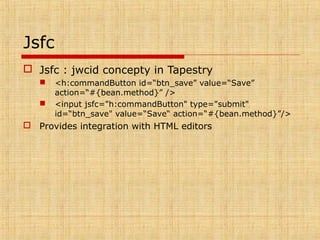
 Jsfc : jwcid concepty in Tapestry
 <h:commandButton id=“btn_save” value=“Save”
action=“#{bean.method}” />
 <input jsfc="h:commandButton" type="submit"
id=“btn_save" value=“Save“ action=“#{bean.method}”/>
 Provides integration with HTML editors
Inline Texts
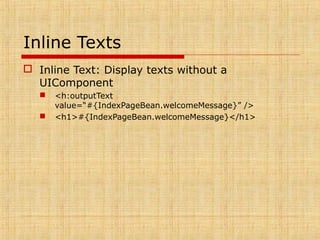
 Inline Text: Display texts without a
UIComponent
 <h:outputText
value=“#{IndexPageBean.welcomeMessage}” />
 <h1>#{IndexPageBean.welcomeMessage}</h1>
Support for Unified EL
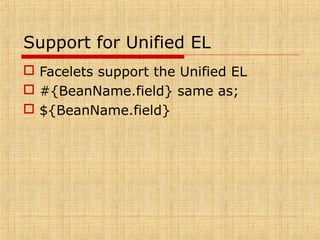
 Facelets support the Unified EL
 #{BeanName.field} same as;
 ${BeanName.field}
Templating
 A template is an xhtml with placeholders
 Placeholders are marked with ui:insert
 Fragment from Template.xhtml
 <title>
<ui:insert name="title">Default Title</ui:insert>
</title>
 In order to use the template ui:composition is needed.
 Fragment from index.xhtml
 <ui:composition template="/template.xhtml">
<ui:define name="title">
Welcome to index page
</ui:define>
Composition Components
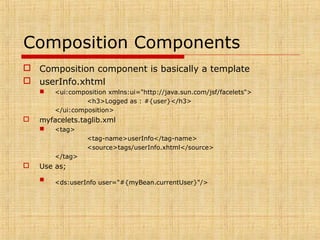
 Composition component is basically a template
 userInfo.xhtml
 <ui:composition xmlns:ui="http://java.sun.com/jsf/facelets">
<h3>Logged as : #{user}</h3>
</ui:composition>
 myfacelets.taglib.xml
 <tag>
<tag-name>userInfo</tag-name>
<source>tags/userInfo.xhtml</source>
</tag>
 Use as;
 <ds:userInfo user="#{myBean.currentUser}"/>
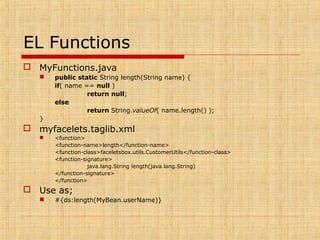
EL Functions
 MyFunctions.java
 public static String length(String name) {
if( name == null )
return null;
else
return String.valueOf( name.length() );
}
 myfacelets.taglib.xml
 <function>
<function-name>length</function-name>
<function-class>faceletsbox.utils.CustomerUtils</function-class>
<function-signature>
java.lang.String length(java.lang.String)
</function-signature>
</function>
 Use as;
 #{ds:length(MyBean.userName)}
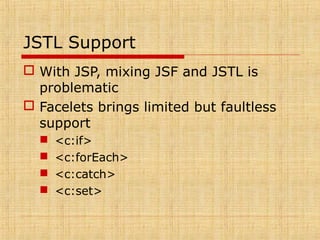
JSTL Support
 With JSP, mixing JSF and JSTL is
problematic
 Facelets brings limited but faultless
support
 <c:if>
 <c:forEach>
 <c:catch>
 <c:set>
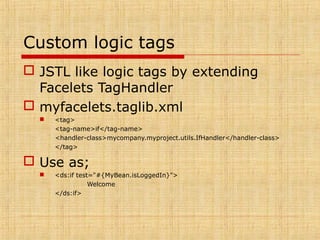
Custom logic tags
 JSTL like logic tags by extending
Facelets TagHandler
 myfacelets.taglib.xml
 <tag>
<tag-name>if</tag-name>
<handler-class>mycompany.myproject.utils.IfHandler</handler-class>
</tag>
 Use as;
 <ds:if test="#{MyBean.isLoggedIn}">
Welcome
</ds:if>
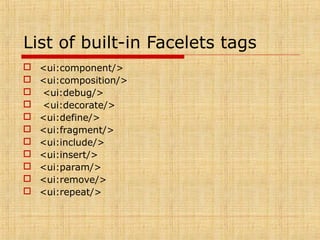
List of built-in Facelets tags
 <ui:component/>
 <ui:composition/>
 <ui:debug/>
 <ui:decorate/>
 <ui:define/>
 <ui:fragment/>
 <ui:include/>
 <ui:insert/>
 <ui:param/>
 <ui:remove/>
 <ui:repeat/>
Summary
 Facelets saves JSF from the burden of
JSP
 Great for templating and composition
components plus bonuses like el
functions
 IDE support is not wide, only Exadel
support facelets for now

Facelets

  • 1.
  • 2.
    Agenda  JSF andJSP  Facelets  Jsfc and inline texts  Templating  Composition Components  EL Functions  JSTL Support  Custom Logic Tags
  • 3.
    JSF and JSP JSP is the default view technology  JSP tags refer to JSF components  h:commandButton = HtmlCommandButton  Mixing them brings overhead because of two different lifecycles
  • 4.
    JSF and JSP(Advantages)  JSP is well adopted, reduces learning curve of JSF.  Above is the only advantage
  • 5.
    JSF and JSP(Disadvantages)  JSP is created to generate dynamic output not to create component trees  Two different lifecycles (overhead)  Content Interweaving Issues
  • 6.
    JSF and JSP JSF 1.1 - Initial request (e.g. index.jsf) 1. FacesServlet gets the request and JSF lifecycle begins 2. restoreState returns null and a new view is created (createView) with view id = index.jsp (jsp is the default suffix) 3. lifecycle jumps to renderResponse 4. renderView is called that dispatches index.jsp to the container 5. Container traverses all the tags, tags call component’s encode methods during component tree is created 6. State is saved via writeState and buffered output is rendered to the client.  JSF 1.2 - a servletwrapper is used instead of f:view to buffer the content and component tree is created before rendering
  • 7.
    Facelets  A viewhandlerpurely created for JSF  No more JSP  .xhtml instead of .jsp  No tld files and no tag classes to defined a UIComponent  Faster than using JSP&JSF
  • 8.
    Migrating from JSPto Facelets  <%@ taglib uri="http://java.sun.com/jsf/html" prefix="h"%> <%@ taglib uri="http://java.sun.com/jsf/core" prefix="f"%>  <html xmlns="http://www.w3.org/1999/xhtml" xmlns:h="http://java.sun.com/jsf/html" xmlns:f="http://java.sun.com/jsf/core">
  • 9.
    Installation  Add jsf-facelets.jarto the classpath  Add viewhandler config to faces-config.xml  Change javax.faces.DEFAULT_SUFFIX to .xhtml
  • 10.
    *.taglib.xml  Concept similarto tld but lightweight  Used to define components, converters, validators, composition components, custom logic tags, functions and etc.
  • 11.
    Jsfc  Jsfc :jwcid concepty in Tapestry  <h:commandButton id=“btn_save” value=“Save” action=“#{bean.method}” />  <input jsfc="h:commandButton" type="submit" id=“btn_save" value=“Save“ action=“#{bean.method}”/>  Provides integration with HTML editors
  • 12.
    Inline Texts  InlineText: Display texts without a UIComponent  <h:outputText value=“#{IndexPageBean.welcomeMessage}” />  <h1>#{IndexPageBean.welcomeMessage}</h1>
  • 13.
    Support for UnifiedEL  Facelets support the Unified EL  #{BeanName.field} same as;  ${BeanName.field}
  • 14.
    Templating  A templateis an xhtml with placeholders  Placeholders are marked with ui:insert  Fragment from Template.xhtml  <title> <ui:insert name="title">Default Title</ui:insert> </title>  In order to use the template ui:composition is needed.  Fragment from index.xhtml  <ui:composition template="/template.xhtml"> <ui:define name="title"> Welcome to index page </ui:define>
  • 15.
    Composition Components  Compositioncomponent is basically a template  userInfo.xhtml  <ui:composition xmlns:ui="http://java.sun.com/jsf/facelets"> <h3>Logged as : #{user}</h3> </ui:composition>  myfacelets.taglib.xml  <tag> <tag-name>userInfo</tag-name> <source>tags/userInfo.xhtml</source> </tag>  Use as;  <ds:userInfo user="#{myBean.currentUser}"/>
  • 16.
    EL Functions  MyFunctions.java public static String length(String name) { if( name == null ) return null; else return String.valueOf( name.length() ); }  myfacelets.taglib.xml  <function> <function-name>length</function-name> <function-class>faceletsbox.utils.CustomerUtils</function-class> <function-signature> java.lang.String length(java.lang.String) </function-signature> </function>  Use as;  #{ds:length(MyBean.userName)}
  • 17.
    JSTL Support  WithJSP, mixing JSF and JSTL is problematic  Facelets brings limited but faultless support  <c:if>  <c:forEach>  <c:catch>  <c:set>
  • 18.
    Custom logic tags JSTL like logic tags by extending Facelets TagHandler  myfacelets.taglib.xml  <tag> <tag-name>if</tag-name> <handler-class>mycompany.myproject.utils.IfHandler</handler-class> </tag>  Use as;  <ds:if test="#{MyBean.isLoggedIn}"> Welcome </ds:if>
  • 19.
    List of built-inFacelets tags  <ui:component/>  <ui:composition/>  <ui:debug/>  <ui:decorate/>  <ui:define/>  <ui:fragment/>  <ui:include/>  <ui:insert/>  <ui:param/>  <ui:remove/>  <ui:repeat/>
  • 20.
    Summary  Facelets savesJSF from the burden of JSP  Great for templating and composition components plus bonuses like el functions  IDE support is not wide, only Exadel support facelets for now