JSF
WEB ENGINEERING
JavaServer Faces
• It is a server side component based user interface framework. It is used to
develop web applications. It provides a well-defined programming model
and consists of rich API and tag libraries. The latest version JSF 2 uses
Facelets as its default templating system. It is written in Java.
• The JSF API provides components (inputText, commandButton etc) and
helps to manage their states. It also provides server-side validation, data
conversion, defining page navigation, provides extensibility, supports for
internationalization, accessibility etc.
• The JSF Tag libraries are used to add components on the web pages and
connect components with objects on the server. It also contains tag
handlers that implements the component tag.
• With the help of these features and tools, you can easily and effortlessly
create server-side user interface.
JSF application life cycle consists of six phases which are as follows
• Restore view phase
• Apply request values phase; process events
• Process validations phase; process events
• Update model values phase; process events
• Invoke application phase; process events
• Render response phase
Phase 1: Restore view
• JSF begins the restore view phase as soon as a link or a button is
clicked and JSF receives a request.
• During this phase, JSF builds the view, wires event handlers and
validators to UI components and saves the view in the FacesContext
instance. The FacesContext instance will now contain all the
information required to process a reques
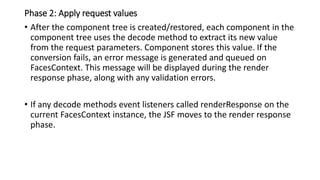
Phase 2: Apply request values
• After the component tree is created/restored, each component in the
component tree uses the decode method to extract its new value
from the request parameters. Component stores this value. If the
conversion fails, an error message is generated and queued on
FacesContext. This message will be displayed during the render
response phase, along with any validation errors.
• If any decode methods event listeners called renderResponse on the
current FacesContext instance, the JSF moves to the render response
phase.
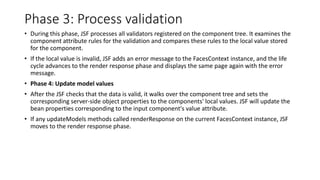
Phase 3: Process validation
• During this phase, JSF processes all validators registered on the component tree. It examines the
component attribute rules for the validation and compares these rules to the local value stored
for the component.
• If the local value is invalid, JSF adds an error message to the FacesContext instance, and the life
cycle advances to the render response phase and displays the same page again with the error
message.
• Phase 4: Update model values
• After the JSF checks that the data is valid, it walks over the component tree and sets the
corresponding server-side object properties to the components' local values. JSF will update the
bean properties corresponding to the input component's value attribute.
• If any updateModels methods called renderResponse on the current FacesContext instance, JSF
moves to the render response phase.
Phase 5: Invoke application
• During this phase, JSF handles any application-level events, such as submitting a
form/linking to another page.
• Phase 6: Render response
• During this phase, JSF asks container/application server to render the page if the
application is using JSP pages. For initial request, the components represented on
the page will be added to the component tree as JSP container executes the page.
• If this is not an initial request, the component tree is already built so components
need not be added again. In either case, the components will render themselves
as the JSP container/Application server traverses the tags in the page.
• After the content of the view is rendered, the response state is saved so that
subsequent requests can access it and it is available to the restore view phase.
JSF User Interface Components
• Java Server Faces HTML tag library represents HTML form
components and other basic HTML elements, which are used to
display or accept data from the user. A JSF form send this data to the
server after submitting the form.
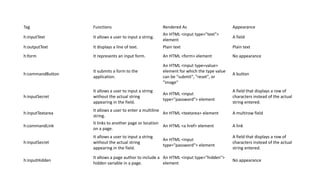
Tag Functions Rendered As Appearance
h:inputText It allows a user to input a string.
An HTML <input type="text">
element
A field
h:outputText It displays a line of text. Plain text Plain text
h:form It represents an input form. An HTML <form> element No appearance
h:commandButton
It submits a form to the
application.
An HTML <input type=value>
element for which the type value
can be "submit", "reset", or
"image"
A button
h:inputSecret
It allows a user to input a string
without the actual string
appearing in the field.
An HTML <input
type="password"> element
A field that displays a row of
characters instead of the actual
string entered.
h:inputTextarea
It allows a user to enter a multiline
string.
An HTML <textarea> element A multirow field
h:commandLink
It links to another page or location
on a page.
An HTML <a href> element A link
h:inputSecret
It allows a user to input a string
without the actual string
appearing in the field.
An HTML <input
type="password"> element
A field that displays a row of
characters instead of the actual
string entered.
h:inputHidden
It allows a page author to include a
hidden variable in a page.
An HTML <input type="hidden">
element
No appearance

JSF.pptx

  • 1.
  • 2.
    JavaServer Faces • Itis a server side component based user interface framework. It is used to develop web applications. It provides a well-defined programming model and consists of rich API and tag libraries. The latest version JSF 2 uses Facelets as its default templating system. It is written in Java. • The JSF API provides components (inputText, commandButton etc) and helps to manage their states. It also provides server-side validation, data conversion, defining page navigation, provides extensibility, supports for internationalization, accessibility etc. • The JSF Tag libraries are used to add components on the web pages and connect components with objects on the server. It also contains tag handlers that implements the component tag. • With the help of these features and tools, you can easily and effortlessly create server-side user interface.
  • 3.
    JSF application lifecycle consists of six phases which are as follows • Restore view phase • Apply request values phase; process events • Process validations phase; process events • Update model values phase; process events • Invoke application phase; process events • Render response phase
  • 4.
    Phase 1: Restoreview • JSF begins the restore view phase as soon as a link or a button is clicked and JSF receives a request. • During this phase, JSF builds the view, wires event handlers and validators to UI components and saves the view in the FacesContext instance. The FacesContext instance will now contain all the information required to process a reques
  • 5.
    Phase 2: Applyrequest values • After the component tree is created/restored, each component in the component tree uses the decode method to extract its new value from the request parameters. Component stores this value. If the conversion fails, an error message is generated and queued on FacesContext. This message will be displayed during the render response phase, along with any validation errors. • If any decode methods event listeners called renderResponse on the current FacesContext instance, the JSF moves to the render response phase.
  • 6.
    Phase 3: Processvalidation • During this phase, JSF processes all validators registered on the component tree. It examines the component attribute rules for the validation and compares these rules to the local value stored for the component. • If the local value is invalid, JSF adds an error message to the FacesContext instance, and the life cycle advances to the render response phase and displays the same page again with the error message. • Phase 4: Update model values • After the JSF checks that the data is valid, it walks over the component tree and sets the corresponding server-side object properties to the components' local values. JSF will update the bean properties corresponding to the input component's value attribute. • If any updateModels methods called renderResponse on the current FacesContext instance, JSF moves to the render response phase.
  • 7.
    Phase 5: Invokeapplication • During this phase, JSF handles any application-level events, such as submitting a form/linking to another page. • Phase 6: Render response • During this phase, JSF asks container/application server to render the page if the application is using JSP pages. For initial request, the components represented on the page will be added to the component tree as JSP container executes the page. • If this is not an initial request, the component tree is already built so components need not be added again. In either case, the components will render themselves as the JSP container/Application server traverses the tags in the page. • After the content of the view is rendered, the response state is saved so that subsequent requests can access it and it is available to the restore view phase.
  • 8.
    JSF User InterfaceComponents • Java Server Faces HTML tag library represents HTML form components and other basic HTML elements, which are used to display or accept data from the user. A JSF form send this data to the server after submitting the form.
  • 9.
    Tag Functions RenderedAs Appearance h:inputText It allows a user to input a string. An HTML <input type="text"> element A field h:outputText It displays a line of text. Plain text Plain text h:form It represents an input form. An HTML <form> element No appearance h:commandButton It submits a form to the application. An HTML <input type=value> element for which the type value can be "submit", "reset", or "image" A button h:inputSecret It allows a user to input a string without the actual string appearing in the field. An HTML <input type="password"> element A field that displays a row of characters instead of the actual string entered. h:inputTextarea It allows a user to enter a multiline string. An HTML <textarea> element A multirow field h:commandLink It links to another page or location on a page. An HTML <a href> element A link h:inputSecret It allows a user to input a string without the actual string appearing in the field. An HTML <input type="password"> element A field that displays a row of characters instead of the actual string entered. h:inputHidden It allows a page author to include a hidden variable in a page. An HTML <input type="hidden"> element No appearance