Facebook Messenger Bot
With Flask & Google App Engine
Nazrul Kamaruddin
nazroll@gmail.com
PyCon Malaysia 2016
Who am i?
@nazroll
Software Engineer, Sparkline Pte. Ltd.
Organizer, Google Developer Groups Kuala Lumpur
Previously: Media Prima Digital (Digital Media & Online Services),
Chalkboard (Hyperlocal Ad Network) & a long list of adventures.
Building software for the World Wide Web since 1999.
First things first...
Local development setup
Python (2.7 and above)
pip
virtualenv
Google Cloud SDK (http://cloud.google.com/sdk)
Install the Python component from Google Cloud SDK
First things first...
Facebook Page & Messenger API setup
It takes about 5 steps.
RTFM PLZ http://goo.gl/gUKgA0
Create an Facebook App & a Page
http://goo.gl/gUKgA0
Setup a Webhook
http://goo.gl/gUKgA0
Caveats
Testing your code with localhost:8080 does not work with Facebook Messenger
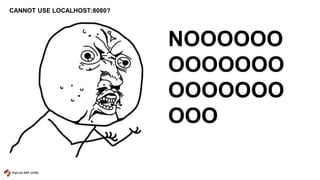
CANNOT USE LOCALHOST:8080?
NOOOOOO
OOOOOOO
OOOOOOO
OOO
Caveats
Testing your code with localhost:8080 does not work with Facebook Messenger
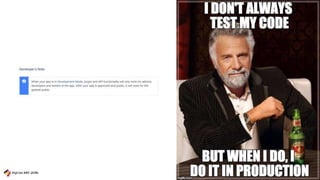
Testing your bot can only happen in a live environment. Literally.
Create a Google Cloud project
Why Google App Engine?
It just scale for you automatically.
That’s it.
Nothing else to say.
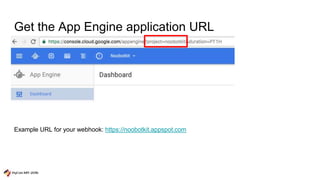
Get the App Engine application URL
Example URL for your webhook: https://noobotkit.appspot.com
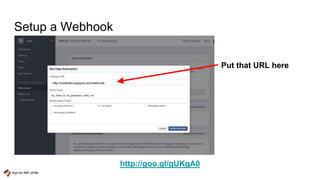
Setup a Webhook
http://goo.gl/gUKgA0
Put that URL here
http://noobotkit.appspot.com/webhook
Get FB Page Access Token
http://goo.gl/gUKgA0
Subscribe the App to a Page
http://goo.gl/gUKgA0
Summary
1. Setup local development with Google Cloud SDK installed
2. Setup your Google Cloud project.
a. Save the project URL for App Engine: https://myprojectname.appspot.com
3. Setup your Facebook Messenger App
a. Use the URL, e.g http://myprojectname.appspot.com, as the webhook URL.
Let’s build something
Clone the repo
https://github.com/nazroll/noobotkit
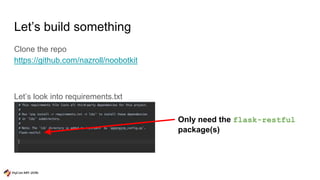
Let’s look into requirements.txt
Only need the flask-restful
package(s)
main.py
Create a RESTful
URL route
Why Flask? Why RESTful?
Flask is a framework that with a small footprint IMHO
You can use other frameworks like Bottle, etc. Your choice amigo.
flask-restful allows me to have a clean structure.
HTTP request as a method. Example:
HTTP POST > def post:
HTTP GET > def get:
bot/facebook.py
Handle GET requests.
Only useful for token
verification.
Handle POST requests.
This is where the action
is. FB only send payload
as HTTP POST to the bot
app.
bot/facebook.py
Handling text inputs
It’s like a SMS shortcode.
A set of text commands to
request for data (news stories,
event schedule, etc).
bot/facebook.py
example_message_text
Text only reply from the app.
recipient_id:
Facebook ID of the user
message:
The text message that you want
respond back to the user.
bot/facebook.py example_message_image
Text + Image reply from the
app.
recipient_id:
Facebook ID of the user
message:
The image payload that you
want to send to user and display
on the Messenger app(s).
attachment
type:
payload:
url:
bot/facebook.py
Sending the response back to FB
Must include the Facebook Page access token
Use urlfetch to make those requests
DEMO
Summary
1. Setup local development with Google Cloud SDK installed
2. Setup your Google Cloud project.
a. Save the project URL for App Engine: https://myprojectname.appspot.com
3. Setup your Facebook Messenger App
a. Use the URL, e.g http://myprojectname.appspot.com, as the webhook URL.
4. To test your bot, you have to push it to a live instance.
5. Flask’s flask-restful library gives you a production ready interface to build RESTful endpoints
References
noobotkit
https://github.com/nazroll/noobotkit
facebook-chatbot-python
https://github.com/hult/facebook-chatbot-python
PyMessenger
https://github.com/enginebai/PyMessager
How to build and deploy a Facebook Messenger bot with Python and Flask
http://goo.gl/LS6Qgg
Facebook Messenger API docs
https://developers.facebook.com/docs/messenger-platform
Thank you!
nazroll@gmail.com
nazroll.com
https://github.com/nazroll/noobotkit

Facebook Messenger Bot with Flask & Google App Engine

Editor's Notes

  • #7 http://goo.gl/gUKgA0
  • #13 NEXT: Create a google cloud project to give you a “LIVE” url.
  • #25 Show demo
  • #26 Show demo
  • #27 Show demo
  • #28 Show demo