Intro to Chatbot
development for Facebook
Messenger using Python
oleh
M. Saad Nurul Ishlah
Qiscus - https://goo.gl/UyM5Li
Introduction
M. Saad Nurul Ishlah - Frontend Developer
● Ilkomerz42
● nurul.ishlah@gmail.com | nurul.ishlah@qiscus.co
● @nurulishlah
● http://www.ishlah.co
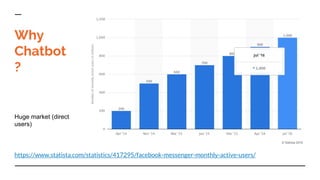
https://www.statista.com/statistics/417295/facebook-messenger-monthly-active-users/
Huge market (direct
users)
Why
Chatbot
?
Quick
Intro to
Chatbot
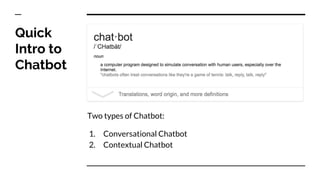
Two types of Chatbot:
1. Conversational Chatbot
2. Contextual Chatbot
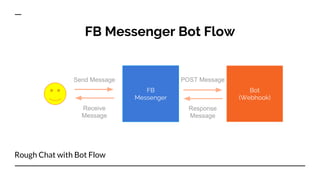
FB Messenger Bot Flow
FB
Messenger
Bot
(Webhook)
Send Message
Receive
Message
POST Message
Response
Message
Rough Chat with Bot Flow
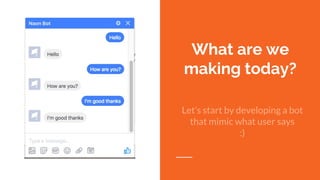
What are we
making today?
Let’s start by developing a bot
that mimic what user says
:)
What do we need?
Basic Requirements
- Git
- Check its availability, open terminal then type “$ which git”
- Otherwise, download at https://git-scm.com/ or package installer
- Heroku Account
- https://signup.heroku.com
- Heroku Toolbelt, https://devcenter.heroku.com/articles/heroku-cli
- Python, version 2.7+
- Facebook Page
- https://www.facebook.com/pages/create
- Facebook App
- https://developers.facebook.com/
Setup Webhook
“
A WebHook is an HTTP callback: an
HTTP POST that occurs when
something happens; a simple
event-notification via HTTP POST.
https://webhooks.pbworks.com/w/page/13385124/F
rontPage
What is webhook?
Setup Webhook
We are using Python Flask
(microframework) to do this
Step 1 - Create virtualenv dir and
activate it
- Open your terminal
- Create a new directory and go to that directory
- $ mkdir bot && cd bot
- Generate Virtual Environment directory
- $ virtualenv venv
- Activate the virtual env
- $ source venv/bin/activate
- (venv) $
- (venv) $ deactivate # this command is used to deactivate
virtualenv
Step 2 - Install Flask
In the same directory, let’s install Flask
- (venv) $ [sudo] pip install flask
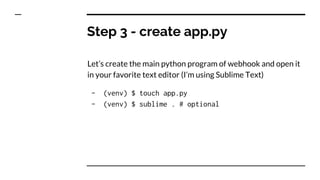
Step 3 - create app.py
Let’s create the main python program of webhook and open it
in your favorite text editor (I’m using Sublime Text)
- (venv) $ touch app.py
- (venv) $ sublime . # optional
Let’s create Flask app instance. In your app.py add this:
- from flask import Flask, request
- app = Flask(__name__)
-
- if __name__ == '__main__':
app.run(debug=True)
Step 3 (cont) - create app.py
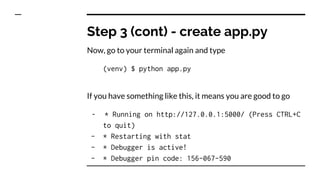
Now, go to your terminal again and type
(venv) $ python app.py
If you have something like this, it means you are good to go
- * Running on http://127.0.0.1:5000/ (Press CTRL+C
to quit)
- * Restarting with stat
- * Debugger is active!
- * Debugger pin code: 156-067-590
Step 3 (cont) - create app.py
In the app.py, let’s add these lines
- import os
-
- @app.route('/', methods=['GET'])
- def verify():
- # when the endpoint is registered as a webhook, it must echo back
- # the 'hub.challenge' value it receives in the query arguments
- if request.args.get("hub.mode") == "subscribe" and
request.args.get("hub.challenge"):
- if not request.args.get("hub.verify_token") ==
os.environ["VERIFY_TOKEN"]:
- return "Verification token mismatch", 403
- return request.args["hub.challenge"], 200
- return "Hello world", 200
Step 4 - Add verify function
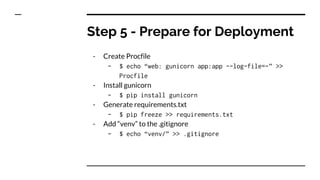
- Create Procfile
- $ echo “web: gunicorn app:app --log-file=-” >>
Procfile
- Install gunicorn
- $ pip install gunicorn
- Generate requirements.txt
- $ pip freeze >> requirements.txt
- Add “venv” to the .gitignore
- $ echo “venv/” >> .gitignore
Step 5 - Prepare for Deployment
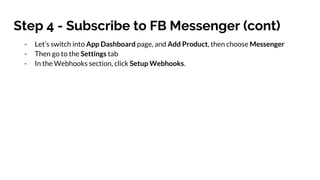
- Let’s switch into App Dashboard page, and Add Product, then choose Messenger
- Then go to the Settings tab
- In the Webhooks section, click Setup Webhooks.
Step 4 - Subscribe to FB Messenger (cont)
Webhook
Full webhook can be seen at https://gist.github.com/nurulishlah/ece5d23f90ca27b81cb3e373236cfbbd
Our bot is still dumb? We need a
brain!
- wit.ai
- api.ai
- ibm watson
- etc
Thanks

Introduction to Chatbot Development for Facebook Messenger using Python

  • 1.
    Intro to Chatbot developmentfor Facebook Messenger using Python oleh M. Saad Nurul Ishlah Qiscus - https://goo.gl/UyM5Li
  • 2.
    Introduction M. Saad NurulIshlah - Frontend Developer ● Ilkomerz42 ● nurul.ishlah@gmail.com | nurul.ishlah@qiscus.co ● @nurulishlah ● http://www.ishlah.co
  • 3.
  • 4.
    Quick Intro to Chatbot Two typesof Chatbot: 1. Conversational Chatbot 2. Contextual Chatbot
  • 5.
    FB Messenger BotFlow FB Messenger Bot (Webhook) Send Message Receive Message POST Message Response Message Rough Chat with Bot Flow
  • 6.
    What are we makingtoday? Let’s start by developing a bot that mimic what user says :)
  • 7.
    What do weneed? Basic Requirements - Git - Check its availability, open terminal then type “$ which git” - Otherwise, download at https://git-scm.com/ or package installer - Heroku Account - https://signup.heroku.com - Heroku Toolbelt, https://devcenter.heroku.com/articles/heroku-cli - Python, version 2.7+ - Facebook Page - https://www.facebook.com/pages/create - Facebook App - https://developers.facebook.com/
  • 8.
    Setup Webhook “ A WebHookis an HTTP callback: an HTTP POST that occurs when something happens; a simple event-notification via HTTP POST. https://webhooks.pbworks.com/w/page/13385124/F rontPage What is webhook?
  • 9.
    Setup Webhook We areusing Python Flask (microframework) to do this
  • 10.
    Step 1 -Create virtualenv dir and activate it - Open your terminal - Create a new directory and go to that directory - $ mkdir bot && cd bot - Generate Virtual Environment directory - $ virtualenv venv - Activate the virtual env - $ source venv/bin/activate - (venv) $ - (venv) $ deactivate # this command is used to deactivate virtualenv
  • 11.
    Step 2 -Install Flask In the same directory, let’s install Flask - (venv) $ [sudo] pip install flask
  • 12.
    Step 3 -create app.py Let’s create the main python program of webhook and open it in your favorite text editor (I’m using Sublime Text) - (venv) $ touch app.py - (venv) $ sublime . # optional
  • 13.
    Let’s create Flaskapp instance. In your app.py add this: - from flask import Flask, request - app = Flask(__name__) - - if __name__ == '__main__': app.run(debug=True) Step 3 (cont) - create app.py
  • 14.
    Now, go toyour terminal again and type (venv) $ python app.py If you have something like this, it means you are good to go - * Running on http://127.0.0.1:5000/ (Press CTRL+C to quit) - * Restarting with stat - * Debugger is active! - * Debugger pin code: 156-067-590 Step 3 (cont) - create app.py
  • 15.
    In the app.py,let’s add these lines - import os - - @app.route('/', methods=['GET']) - def verify(): - # when the endpoint is registered as a webhook, it must echo back - # the 'hub.challenge' value it receives in the query arguments - if request.args.get("hub.mode") == "subscribe" and request.args.get("hub.challenge"): - if not request.args.get("hub.verify_token") == os.environ["VERIFY_TOKEN"]: - return "Verification token mismatch", 403 - return request.args["hub.challenge"], 200 - return "Hello world", 200 Step 4 - Add verify function
  • 16.
    - Create Procfile -$ echo “web: gunicorn app:app --log-file=-” >> Procfile - Install gunicorn - $ pip install gunicorn - Generate requirements.txt - $ pip freeze >> requirements.txt - Add “venv” to the .gitignore - $ echo “venv/” >> .gitignore Step 5 - Prepare for Deployment
  • 17.
    - Let’s switchinto App Dashboard page, and Add Product, then choose Messenger - Then go to the Settings tab - In the Webhooks section, click Setup Webhooks. Step 4 - Subscribe to FB Messenger (cont)
  • 18.
    Webhook Full webhook canbe seen at https://gist.github.com/nurulishlah/ece5d23f90ca27b81cb3e373236cfbbd
  • 19.
    Our bot isstill dumb? We need a brain! - wit.ai - api.ai - ibm watson - etc
  • 20.