Idea behind the topic / Identifying Problems
How to Solve
Benefits
Caution
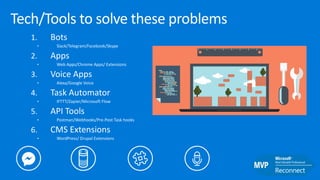
1. Bots
• Slack/Telegram/Facebook/Skype
2. Apps
• Web Apps/Chrome Apps/ Extensions
3. Voice Apps
• Alexa/Google Voice
4. Task Automator
• IFTTT/Zapier/Microsoft Flow
5. API Tools
• Postman/Webhooks/Pre-Post Task hooks
6. CMS Extensions
• WordPress/ Drupal Extensions
Tech/Tools to solve these problems
Story – DevRel Bot
Monitor channels
• Stackoverflow
• Github
• Twitter
Challenges
• Multiple Repos
• Too many clicks
• Finding relevant information wasn’t easy
• Time consuming
Bots
Early disruptors in bots domain
Bot Platform to order from
marketplaces(2016)
TacoBot within the
Slack (2016)
Twitter Bot to order Pizza by
Tweeting Pizza Emoji (2015)
Slackbot capabilities
Slack Bot interact with a user on a Slack team by
1. Connecting to Slack’s Real time Messaging (RTM )API and opening
a web-socket connection with Slack.
• Bot user will Monitor and process channel activity
• Post messages and react to users
• Web API to post formatted messages, attachments, emoji
• Make messages interactive with buttons
2. Listening to Slack Events via HTTP based Events API aka Slack
Webhooks . Configure events at https://api.slack.com/events
Types of Slack bot you can develop :
Slack Bot interact with a user on a Slack team by
Custom Bots
1. Custom for a team’s requirements
2. Can be used for company’s process automation etc.
Bot Users attached to Slack App
1. For distribution to other teams
2. Governed by OAuth permission scopes
3. Distributed via Slack Button or Slack Appstore
Apps generally start as custom bots and evolve into a Slack App.
Ways to create a Slack bot
1. Make authenticated API calls and consume Slack RTM API
2. Use existing library or SDKs (such as node-slack-client)
https://github.com/slackhq/node-slack-client
3. Botkit Framework :
• Does heavy lifting for Slack API interaction
• Open source bot builder platform for Node.js
• Works for Slack, Facebook, Twilio, Microsoft Teams, Cisco
Spark/Jabber currently
• Write once run anywhere style
• http://howdy.ai/botkit
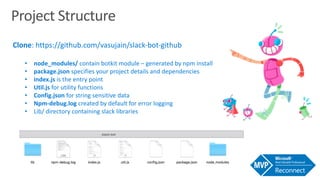
Project Structure
Clone: https://github.com/vasujain/slack-bot-github
• node_modules/ contain botkit module – generated by npm install
• package.json specifies your project details and dependencies
• index.js is the entry point
• Util.js for utility functions
• Config.json for string sensitive data
• Npm-debug.log created by default for error logging
• Lib/ directory containing slack libraries
Developing a Custom Slack Bot - Setup
1. Install Botkit
• From NPM
• npm install --save botkit
• From Github
• git clone git@github.com:howdyai/botkit.git
• npm install
2. Create a new bot user integration and customize it
https://my.slack.com/services/new/bot
Developing a Custom Slack Bot - Setup
3. Capture token generated in #1, to be used to connect
to Slack API
4. Constructs base 64 encoded value and add it to
config.json (not mandatory for regular bots)
5. Run a sample bot
• npm start index.js
6. Invite Bot to your team
7. Say Hello to your Bot
Lets Integrate an API in our bot
1. API to integrate – Github
2. Get tokens and make first successful API call
3. Convert REST Call into Node Code
4. Write a controller using Intents from Slack input and parsing
them for API call
5. Integrate Node code
6. Parse API Response and construct Slack Response
7. Happy Bot-ing !!
„ https://martechtoday.com/wp-content/uploads/2017/06/bot-builder-1200.png
„ https://www.efficise.com/assets/image-resources/objects/busy-man.png
„ https://qph.fs.quoracdn.net/main-qimg-95b64fdabe299f7a071d8ef5debd081c.web
„ http://blog.flatironschool.com/wp-content/uploads/2016/10/Code-Background.jpg
„ http://www.techshines.com/wp-content/uploads/2017/10/profession-for-a-polyglot-programmer-game-developer.jpg
„ https://www.pinterest.com/pin/416371928035551016/
„ http://www.greenmellenmedia.com/wp-content/uploads/slack-chat.png
„ https://tctechcrunch2011.files.wordpress.com/2016/05/robot-customer-service.png
„ https://blog.zipfworks.com/content/images/2016/06/1-6J2T-ftDoHNGEvuMQiuWLA.jpeg
„ https://www.wired.com/wp-content/uploads/2015/08/SlackBot-featured1.jpg
„ https://cdn-images-1.medium.com/max/800/1*SRq8BmUQl1YWXTCbO859kw.png
„ https://robotsandpencils.com/wp-content/uploads/2016/03/Hero_graphic_BeepBoop@2x.png
„ https://beepboophq.storage.googleapis.com/_web/en_US/grande.edeb24.png
„ https://beepboophq.storage.googleapis.com/_web/en_US/venti.dba620.png
Chrome Extension

Identifying and solving enterprise problems

  • 3.
    Idea behind thetopic / Identifying Problems
  • 4.
  • 5.
  • 6.
  • 7.
    1. Bots • Slack/Telegram/Facebook/Skype 2.Apps • Web Apps/Chrome Apps/ Extensions 3. Voice Apps • Alexa/Google Voice 4. Task Automator • IFTTT/Zapier/Microsoft Flow 5. API Tools • Postman/Webhooks/Pre-Post Task hooks 6. CMS Extensions • WordPress/ Drupal Extensions Tech/Tools to solve these problems
  • 9.
    Story – DevRelBot Monitor channels • Stackoverflow • Github • Twitter Challenges • Multiple Repos • Too many clicks • Finding relevant information wasn’t easy • Time consuming
  • 14.
  • 15.
    Early disruptors inbots domain Bot Platform to order from marketplaces(2016) TacoBot within the Slack (2016) Twitter Bot to order Pizza by Tweeting Pizza Emoji (2015)
  • 16.
    Slackbot capabilities Slack Botinteract with a user on a Slack team by 1. Connecting to Slack’s Real time Messaging (RTM )API and opening a web-socket connection with Slack. • Bot user will Monitor and process channel activity • Post messages and react to users • Web API to post formatted messages, attachments, emoji • Make messages interactive with buttons 2. Listening to Slack Events via HTTP based Events API aka Slack Webhooks . Configure events at https://api.slack.com/events
  • 17.
    Types of Slackbot you can develop : Slack Bot interact with a user on a Slack team by Custom Bots 1. Custom for a team’s requirements 2. Can be used for company’s process automation etc. Bot Users attached to Slack App 1. For distribution to other teams 2. Governed by OAuth permission scopes 3. Distributed via Slack Button or Slack Appstore Apps generally start as custom bots and evolve into a Slack App.
  • 18.
    Ways to createa Slack bot 1. Make authenticated API calls and consume Slack RTM API 2. Use existing library or SDKs (such as node-slack-client) https://github.com/slackhq/node-slack-client 3. Botkit Framework : • Does heavy lifting for Slack API interaction • Open source bot builder platform for Node.js • Works for Slack, Facebook, Twilio, Microsoft Teams, Cisco Spark/Jabber currently • Write once run anywhere style • http://howdy.ai/botkit
  • 20.
    Project Structure Clone: https://github.com/vasujain/slack-bot-github •node_modules/ contain botkit module – generated by npm install • package.json specifies your project details and dependencies • index.js is the entry point • Util.js for utility functions • Config.json for string sensitive data • Npm-debug.log created by default for error logging • Lib/ directory containing slack libraries
  • 21.
    Developing a CustomSlack Bot - Setup 1. Install Botkit • From NPM • npm install --save botkit • From Github • git clone git@github.com:howdyai/botkit.git • npm install 2. Create a new bot user integration and customize it https://my.slack.com/services/new/bot
  • 22.
    Developing a CustomSlack Bot - Setup 3. Capture token generated in #1, to be used to connect to Slack API 4. Constructs base 64 encoded value and add it to config.json (not mandatory for regular bots) 5. Run a sample bot • npm start index.js 6. Invite Bot to your team 7. Say Hello to your Bot
  • 23.
    Lets Integrate anAPI in our bot 1. API to integrate – Github 2. Get tokens and make first successful API call 3. Convert REST Call into Node Code 4. Write a controller using Intents from Slack input and parsing them for API call 5. Integrate Node code 6. Parse API Response and construct Slack Response 7. Happy Bot-ing !!
  • 26.
    „ https://martechtoday.com/wp-content/uploads/2017/06/bot-builder-1200.png „ https://www.efficise.com/assets/image-resources/objects/busy-man.png „https://qph.fs.quoracdn.net/main-qimg-95b64fdabe299f7a071d8ef5debd081c.web „ http://blog.flatironschool.com/wp-content/uploads/2016/10/Code-Background.jpg „ http://www.techshines.com/wp-content/uploads/2017/10/profession-for-a-polyglot-programmer-game-developer.jpg „ https://www.pinterest.com/pin/416371928035551016/ „ http://www.greenmellenmedia.com/wp-content/uploads/slack-chat.png „ https://tctechcrunch2011.files.wordpress.com/2016/05/robot-customer-service.png „ https://blog.zipfworks.com/content/images/2016/06/1-6J2T-ftDoHNGEvuMQiuWLA.jpeg „ https://www.wired.com/wp-content/uploads/2015/08/SlackBot-featured1.jpg „ https://cdn-images-1.medium.com/max/800/1*SRq8BmUQl1YWXTCbO859kw.png „ https://robotsandpencils.com/wp-content/uploads/2016/03/Hero_graphic_BeepBoop@2x.png „ https://beepboophq.storage.googleapis.com/_web/en_US/grande.edeb24.png „ https://beepboophq.storage.googleapis.com/_web/en_US/venti.dba620.png
  • 28.