
Exploring Digital Badging
The What, Why and Some of the How
Kelsey O’Brien and Trudi Jacobson
CLRC Workshop
April 19, 2016
Have you…
 Earned a badge?
 Created a badge?
Learning Objectives
At the end of this session, participants will be able to:
 Share information about the background, value, and issues
connected to digital badging in higher education
 Contribute to an assessment of the potential value of
digital badging in their work situations
 Demonstrate knowledge of resources that provide
additional information about digital badging
Agenda: Overview of badges
Explore a badging system
Break
Create a badge
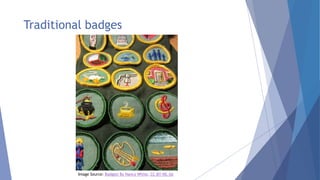
Traditional badges
Image Source: Badges! By Nancy White, CC-BY-NC-SA
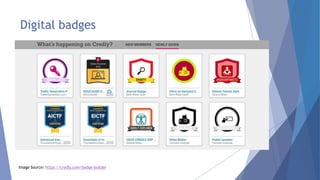
Digital badges
Image Source: https://credly.com/badge-builder
What is a digital badge?
 A record of achievement
 Acknowledgement of an accomplishment
 Indication of a proven a skill or ability
 Evidence of learning
 Verification of competency
 Validation of non-traditional skills or experiences
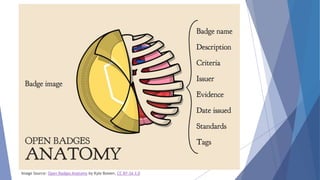
Image Source: Open Badges Anatomy by Kyle Bowen, CC BY-SA 3.0
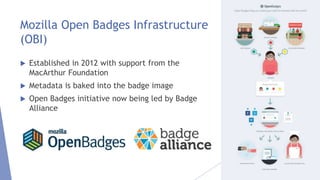
Mozilla Open Badges Infrastructure
(OBI)
 Established in 2012 with support from the
MacArthur Foundation
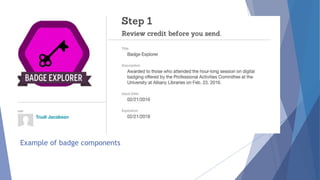
 Metadata is baked into the badge image
 Open Badges initiative now being led by Badge
Alliance
Example of badge components
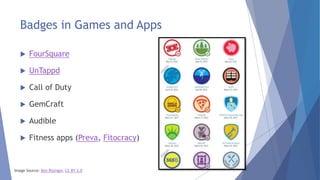
Badges in Games and Apps
 FourSquare
 UnTappd
 Call of Duty
 GemCraft
 Audible
 Fitness apps (Preva, Fitocracy)
Image Source: Ben Risinger, CC BY 2.0
Badges in the Workplace and
Professional Organizations
 Digital Promise – professional development for teachers
 YALSA –professional development for librarians
 Microsoft Educator Network
 Badges for Vets – veteran employment
 IBM – training for IT professionals
 Educause
Badges in Public Libraries and
Communities
 Loveland Public Library – summer reading program
 Chicago City of Learning – city-wide initiative in which the
Chicago Public Library participates
 Detroit Digital Adventure – another city-wide program
with library participation. “Connected learning for all
ages”
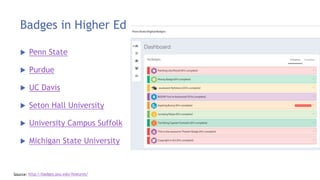
Badges in Higher Ed
 Penn State
 Purdue
 UC Davis
 Seton Hall University
 University Campus Suffolk
 Michigan State University
Source: http://badges.psu.edu/features/
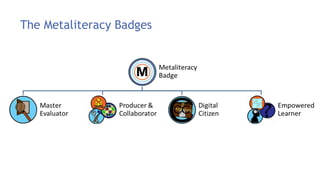
The Metaliteracy Badges
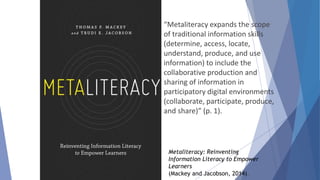
Metaliteracy: Reinventing
Information Literacy to Empower
Learners
(Mackey and Jacobson, 2014).
“Metaliteracy expands the scope
of traditional information skills
(determine, access, locate,
understand, produce, and use
information) to include the
collaborative production and
sharing of information in
participatory digital environments
(collaborate, participate, produce,
and share)” (p. 1).
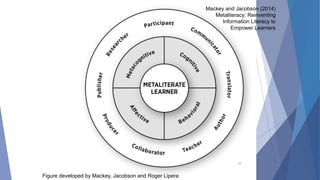
16
Figure developed by Mackey, Jacobson and Roger Lipera
Mackey and Jacobson (2014)
Metaliteracy: Reinventing
Information Literacy to
Empower Learners
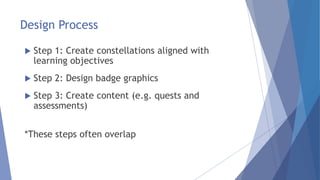
Design Process
 Step 1: Create constellations aligned with
learning objectives
 Step 2: Design badge graphics
 Step 3: Create content (e.g. quests and
assessments)
*These steps often overlap
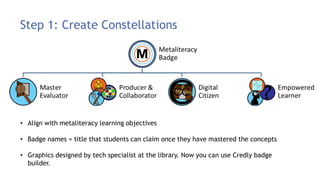
Step 1: Create Constellations
• Align with metaliteracy learning objectives
• Badge names = title that students can claim once they have mastered the concepts
• Graphics designed by tech specialist at the library. Now you can use Credly badge
builder.
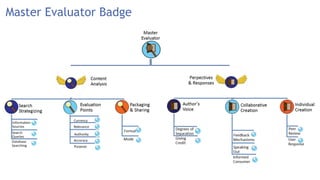
Master Evaluator Badge
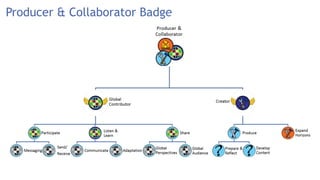
Producer & Collaborator Badge
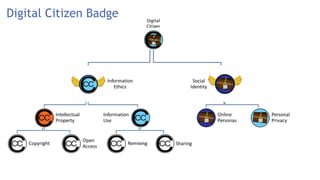
Digital Citizen Badge
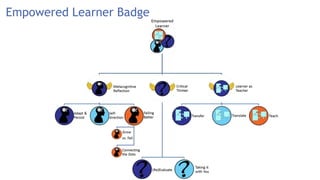
Empowered Learner Badge
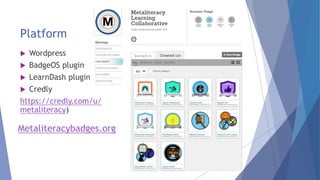
Platform
 Wordpress
 BadgeOS plugin
 LearnDash plugin
 Credly
https://credly.com/u/
metaliteracy)
Metaliteracybadges.org
Implementations
 ECPY204U: Principles of Career and Life Planning
 UUNI 110: Writing and Critical Inquiry
 AENG 240V: Writing America
 UNL 207: Information Literacy
 ESPY 120: Psychology of Academic and Personal Effectiveness
 Honors Students
 ERDG 500
 IINF 200: Research Methods
It’s time for a break
Step 2: Creating Badge Content
You might want to create quests (which lead to
badges) or badges themselves for:
 Library activities completion or participation
 Demonstrations of knowledge
 Proficiency with resources
Considerations
 What are your goals?
 What will motivate your learners?
 Do you want to recognize new accomplishments or
existing knowledge/skills?
 What is possible on your end?
Automatic award or proof of accomplishment
needed?
A couple of examples
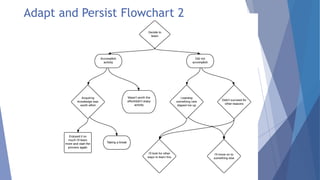
 Adapt and Persist quest (Producer and
Collaborator)
 The Search Strategizing series (Master Evaluator)
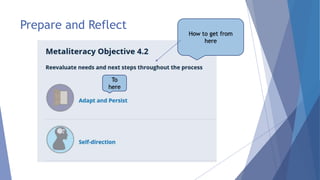
Prepare and Reflect
How to get from
here
To
here
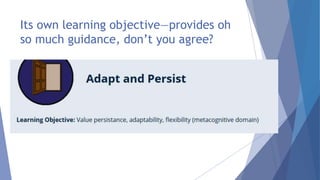
Its own learning objective—provides oh
so much guidance, don’t you agree?
Thought process
 Where on earth do I start?
 What do I know about?
 What might potentially be interesting?
 Can I show myself in a situation where I have to adapt
and persist?
 How can I make it harder for myself?
 Why did I make it harder for myself?
Your projects will probably have far more
focus!
Result (Adapt and Persist Quest)
 Told a story
 Showed myself learning something new to enhance
the quest (adapt)
 Tried to show it wasn’t easy (persist)
 Had some fun
 Modeled the process, then asked students to reflect
on their experience adapting and persisting
Ideally, I would have been able to test this out on
students before implementation
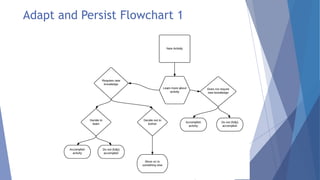
Adapt and Persist Flowchart 1
Adapt and Persist Flowchart 2
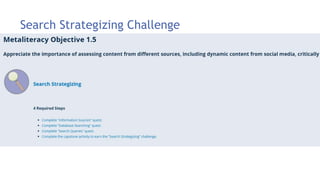
Search Strategizing Challenge
 Learning Objective: Evaluate content critically, including dynamic, online
content that changes and evolves, such as article preprints, blogs, and wikis
Process
 Meet students where they are
 Tried to convey the bigger picture (vs. “how to”
tutorial)
 Wrote out the full activity and then broke up into
smaller chunks
 Presented information in a variety of ways, tried to
make it interactive
 Assignment revised to focus on own topic
Quest Elements
 PIL video – What are your frustrations when researching?
Helped students reflect on where they are & revisited at
the end of the challenge
 Started with what they know: Google
 Showed them what they don’t know, encouraged a
“deeper dive” into familiar tools (e.g. more efficient web
and database searching)
 Search Strategizing worksheet – apply what they’ve
learned to their own research
Badge Creation Tips
 Would someone want to display this on a digital
portfolio?
Make it a mastery title that the earner can claim
(e.g. Digital Citizen, Empowered Learner,
Producer and Collaborator)
 Is it worth putting a badge on it?
Make it meaningful and substantial (i.e. not just
“I completed a quiz” or “I attended an event.”).
Indication of mastery vs. participation.
Develop a badging idea
 How might a badge fit in with your library’s
program or goals?
 Is there an existing activity or program?
 Would you want to design a new activity
that would result in an earned badge?
Develop a badge plan
 First work individually
 Decide on a learning activity appropriate to your library for which people might
earn badges
 Flesh out the idea
 What is the activity or learning experience?
 What resources would you provide—if any are needed?
 What would participants do to show they have learned?
 Group with individuals from similar types of libraries to discuss your plan
 Select one plan from your group to share with everyone
Learn More
 Badge Alliance
 Educause badging library
 MacArthur Foundation video: What is a badge?
 Tutorial: Open Badges 101
 Canvas Course: Badging with Purpose
 Diaz, V., Finkelstein, J. & Manning, S. (2015). Developing
a Higher Education Badging Initiative.
 Grant, S. & Shawgo, K.E. (2013). Digital Badges: An
Annotated Research Bibliography.

Exploring Digital Badging

  • 1.
    Exploring Digital Badging TheWhat, Why and Some of the How Kelsey O’Brien and Trudi Jacobson CLRC Workshop April 19, 2016
  • 2.
    Have you…  Earneda badge?  Created a badge?
  • 3.
    Learning Objectives At theend of this session, participants will be able to:  Share information about the background, value, and issues connected to digital badging in higher education  Contribute to an assessment of the potential value of digital badging in their work situations  Demonstrate knowledge of resources that provide additional information about digital badging Agenda: Overview of badges Explore a badging system Break Create a badge
  • 4.
    Traditional badges Image Source:Badges! By Nancy White, CC-BY-NC-SA
  • 5.
    Digital badges Image Source:https://credly.com/badge-builder
  • 6.
    What is adigital badge?  A record of achievement  Acknowledgement of an accomplishment  Indication of a proven a skill or ability  Evidence of learning  Verification of competency  Validation of non-traditional skills or experiences
  • 7.
    Image Source: OpenBadges Anatomy by Kyle Bowen, CC BY-SA 3.0
  • 8.
    Mozilla Open BadgesInfrastructure (OBI)  Established in 2012 with support from the MacArthur Foundation  Metadata is baked into the badge image  Open Badges initiative now being led by Badge Alliance
  • 9.
    Example of badgecomponents
  • 10.
    Badges in Gamesand Apps  FourSquare  UnTappd  Call of Duty  GemCraft  Audible  Fitness apps (Preva, Fitocracy) Image Source: Ben Risinger, CC BY 2.0
  • 11.
    Badges in theWorkplace and Professional Organizations  Digital Promise – professional development for teachers  YALSA –professional development for librarians  Microsoft Educator Network  Badges for Vets – veteran employment  IBM – training for IT professionals  Educause
  • 12.
    Badges in PublicLibraries and Communities  Loveland Public Library – summer reading program  Chicago City of Learning – city-wide initiative in which the Chicago Public Library participates  Detroit Digital Adventure – another city-wide program with library participation. “Connected learning for all ages”
  • 13.
    Badges in HigherEd  Penn State  Purdue  UC Davis  Seton Hall University  University Campus Suffolk  Michigan State University Source: http://badges.psu.edu/features/
  • 14.
  • 15.
    Metaliteracy: Reinventing Information Literacyto Empower Learners (Mackey and Jacobson, 2014). “Metaliteracy expands the scope of traditional information skills (determine, access, locate, understand, produce, and use information) to include the collaborative production and sharing of information in participatory digital environments (collaborate, participate, produce, and share)” (p. 1).
  • 16.
    16 Figure developed byMackey, Jacobson and Roger Lipera Mackey and Jacobson (2014) Metaliteracy: Reinventing Information Literacy to Empower Learners
  • 17.
    Design Process  Step1: Create constellations aligned with learning objectives  Step 2: Design badge graphics  Step 3: Create content (e.g. quests and assessments) *These steps often overlap
  • 18.
    Step 1: CreateConstellations • Align with metaliteracy learning objectives • Badge names = title that students can claim once they have mastered the concepts • Graphics designed by tech specialist at the library. Now you can use Credly badge builder.
  • 19.
  • 20.
  • 21.
  • 22.
  • 23.
    Platform  Wordpress  BadgeOSplugin  LearnDash plugin  Credly https://credly.com/u/ metaliteracy) Metaliteracybadges.org
  • 24.
    Implementations  ECPY204U: Principlesof Career and Life Planning  UUNI 110: Writing and Critical Inquiry  AENG 240V: Writing America  UNL 207: Information Literacy  ESPY 120: Psychology of Academic and Personal Effectiveness  Honors Students  ERDG 500  IINF 200: Research Methods
  • 25.
  • 26.
    Step 2: CreatingBadge Content You might want to create quests (which lead to badges) or badges themselves for:  Library activities completion or participation  Demonstrations of knowledge  Proficiency with resources
  • 27.
    Considerations  What areyour goals?  What will motivate your learners?  Do you want to recognize new accomplishments or existing knowledge/skills?  What is possible on your end? Automatic award or proof of accomplishment needed?
  • 28.
    A couple ofexamples  Adapt and Persist quest (Producer and Collaborator)  The Search Strategizing series (Master Evaluator)
  • 29.
    Prepare and Reflect Howto get from here To here
  • 30.
    Its own learningobjective—provides oh so much guidance, don’t you agree?
  • 31.
    Thought process  Whereon earth do I start?  What do I know about?  What might potentially be interesting?  Can I show myself in a situation where I have to adapt and persist?  How can I make it harder for myself?  Why did I make it harder for myself? Your projects will probably have far more focus!
  • 32.
    Result (Adapt andPersist Quest)  Told a story  Showed myself learning something new to enhance the quest (adapt)  Tried to show it wasn’t easy (persist)  Had some fun  Modeled the process, then asked students to reflect on their experience adapting and persisting Ideally, I would have been able to test this out on students before implementation
  • 33.
    Adapt and PersistFlowchart 1
  • 34.
    Adapt and PersistFlowchart 2
  • 35.
    Search Strategizing Challenge Learning Objective: Evaluate content critically, including dynamic, online content that changes and evolves, such as article preprints, blogs, and wikis
  • 36.
    Process  Meet studentswhere they are  Tried to convey the bigger picture (vs. “how to” tutorial)  Wrote out the full activity and then broke up into smaller chunks  Presented information in a variety of ways, tried to make it interactive  Assignment revised to focus on own topic
  • 37.
    Quest Elements  PILvideo – What are your frustrations when researching? Helped students reflect on where they are & revisited at the end of the challenge  Started with what they know: Google  Showed them what they don’t know, encouraged a “deeper dive” into familiar tools (e.g. more efficient web and database searching)  Search Strategizing worksheet – apply what they’ve learned to their own research
  • 38.
    Badge Creation Tips Would someone want to display this on a digital portfolio? Make it a mastery title that the earner can claim (e.g. Digital Citizen, Empowered Learner, Producer and Collaborator)  Is it worth putting a badge on it? Make it meaningful and substantial (i.e. not just “I completed a quiz” or “I attended an event.”). Indication of mastery vs. participation.
  • 39.
    Develop a badgingidea  How might a badge fit in with your library’s program or goals?  Is there an existing activity or program?  Would you want to design a new activity that would result in an earned badge?
  • 40.
    Develop a badgeplan  First work individually  Decide on a learning activity appropriate to your library for which people might earn badges  Flesh out the idea  What is the activity or learning experience?  What resources would you provide—if any are needed?  What would participants do to show they have learned?  Group with individuals from similar types of libraries to discuss your plan  Select one plan from your group to share with everyone
  • 41.
    Learn More  BadgeAlliance  Educause badging library  MacArthur Foundation video: What is a badge?  Tutorial: Open Badges 101  Canvas Course: Badging with Purpose  Diaz, V., Finkelstein, J. & Manning, S. (2015). Developing a Higher Education Badging Initiative.  Grant, S. & Shawgo, K.E. (2013). Digital Badges: An Annotated Research Bibliography.

Editor's Notes

  • #2 Trudi
  • #3 Trudi
  • #4 Trudi Poll – what kinds of libraries are people coming from?
  • #5 Merit badges Skepticism, especially in higher ed, but gaining traction in academia and other educational institutions
  • #6 Credly is a popular badge issuing platform and badge repository/backpack Anyone can use free account to create and issue badges and add required metadata Visit Credly page to see more examples from a variety of organizations.
  • #7 Non-traditional experiences (e.g. volunteer work) and competencies (e.g. teamwork, critical thinking, leadership) All of these definitions go along with the traditional idea of a badge as a reward, acknowledgement of a job well done - which has value in itself. What distinguishes a digital badge from traditional badge is that it is hyperlinked with valuable metadata: evidence, verification, validation of skills.
  • #8 Kelsey Kyle Bowen: Director of ed tech services as Penn state
  • #9 Trend largely initiated with Mozilla Foundation Open Badges project (2011) - sought to create a standard - envisioned badges as a tool for opening up education and recognizing informal learning that was already taking place Open digital badges include information about the learning experience that is portable Make learning visible and verifiable OBI technology infrastructure is open for others to use – third party tools like Credly make it easy to create badges with this criteria
  • #11 Digital badges are becoming commonplace as a way to recognize achievements Social aspect, connecting with friends, bragging rights, perks and rewards for loyal customers, way to show your expertise (e.g. "brew master," "historian" "far far away" world traveller,) Gamification – adding gaming elements to common activities
  • #12 Professional development, Training programs - credentials being used by hiring employers to easily identify discreet skills or competencies Veterans - may not have workplace experience, badge helps articulate relevant workplace skills gained from their military experience Goes further than item listed on a resume - evidence, validation - More complete credential
  • #13 Loveland, Colorado PL: badges for reading for a certain number of minutes, attending library and community events - point system – rewarded with a free book once enough points are accumulated City-wide programs – participating organizations in the community (e.g. libraries, museums, art centers) Goal: to break down barriers between in-school and out of school learning – recognize and validate all different kinds of learning – discover local resources
  • #14 Links to all badging systems if you’d like to explore further Best use of badges in education is not as a replacement of traditional grades, but as a way to enhance recognition and documentation of a student’s learning experience – students learn in many ways, often outside of the classroom, picking and choosing what they want to learn – a lot of these experiences are not reflected on a transcript. Bullet points on a resume do not tell the full story. Digital badges are a reflection of the way students are learning now. Effort to match credentials with learning trends. Empowering for individuals to choose the achievements that they want to showcase, and to have verifiable metadata to back it up.
  • #15  Trudi
  • #17 Tom: behavioral (what students should be able to do upon successful completion of learning activities—skills, competencies), cognitive (what students should know upon successful completion of learning activities—comprehension, organization, application, evaluation), affective (changes in learners’ emotions or attitudes through engagement with learning activities), and metacognitive (what learners think about their own thinking—a reflective understanding of how and why they learn, what they do and do not know, their preconceptions, and how to continue to learn).  Understands the process of creating and sharing information Recognizes gaps in knowledge Seeks new knowledge to adjust to challenging situations Adapts to changing technologies Continuously self-reflects Demonstrates empowerment through interaction, communication, and presentation Reflects on production and participation
  • #18 Kelsey Trudi can mention more about design process, graphics, etc.
  • #19 The Metaliteracy learning objectives were used as the foundation for the design of the badging system, which includes four digital badges. Set of constellations = galaxy. Continues to evolve. Top level badges = where we want to end up – indication of mastery – backwards design While some badges are standalone, we created a full badging ecosystem Achievements along the way Different types of badges Badge overload – diminishes value
  • #20 Might complete a series (e.g. search strategizing quests and capstone) or jump around Flexibility - complete pieces or the larger whole
  • #21 Scaffolding: Planning out learning activities from introductory and building to advanced concepts. Activities start out more practical and basic, meet the students where they are (e.g. Messaging). As they progress the activities become more reflective, metacognitive and synthesizing. Constellations represent a flexible learning model: There is some flexibility with the path that students take (have to start at bottom but can jump around and focus on particular areas, pick a few lower level activities or pursue a higher level activity). Room for mistakes - students can resubmit. Rather than failing and giving up, instructors provide feedback for how they can improve. Don’t move on until they are ready. We have assigned the entire Master evaluator badge for Info Lit courses, but instructors can also pick and choose standalone quests and challenges.
  • #24 plugins/add-ons - third party tools Wordpress and basic version of BadgeOS and Credly are free LD was necessary for us to manage student work – needed LMS features. May want to start with an LMS if you are planning on managing a lot of student work, open ended reviews, etc. Credly - badge issuer, badge backpack/repository (antoher example: Mozilla Backpack)
  • #27 Trudi
  • #36 Most requested by faculty
  • #40 Trudi