
SQL Server on Linux Overview
SQL Server v.Next
Travis Wright
Principal Program Manager
Presenter
SQL Server on Linux Agenda
• Why SQL Server on Linux?
• Scope
• Architecture
• Demos
• Schedule
• How to get involved
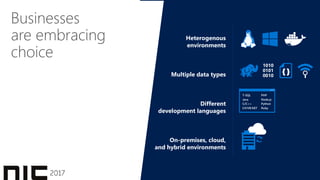
Businesses
are embracing
choice
1010
0101
0010
{ }
T-SQL
Java
C/C++
C#/VB.NET
PHP
Node.js
Python
Ruby
Heterogenous
environments
Multiple data types
Different
development languages
On-premises, cloud,
and hybrid environments
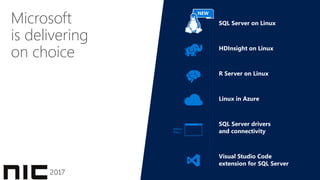
Microsoft
is delivering
on choice
SQL Server on Linux
HDInsight on Linux
R Server on Linux
Linux in Azure
SQL Server drivers
and connectivity
Visual Studio Code
extension for SQL Server
Python,
Ruby, …
NEW
National Institute of Standards and Technology Comprehensive Vulnerability Database update 12/2016.
Everything built-inTPC-H
Oracle
is #5#2
SQL Server
#1
SQL Server
#3
SQL Server
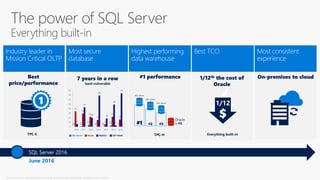
The power of SQL Server
Everything built-in
June 2016
SQL Server 2016
TPC-E
0 1
4
0 0
3
0
34
29
22
15
5
22
16
6
43
20
69
18
49
74
3
0
10
20
30
40
50
60
70
80
2010 2011 2012 2013 2014 2015 2016
SQL Server Oracle MySQL2 SAP HANA
1/12
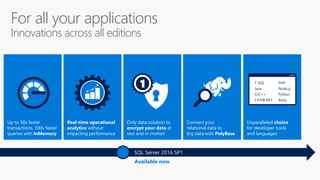
Only data solution to
encrypt your data at
rest and in motion
Connect your
relational data to
big data with PolyBase
Real-time operational
analytics without
impacting performance
Up to 30x faster
transactions, 100x faster
queries with InMemory
Unparalleled choice
for developer tools
and languages
1 T-SQL
Java
C/C++
C#/VB.NET
PHP
Node.js
Python
Ruby
For all your applications
Innovations across all editions
Available now
SQL Server 2016 SP1
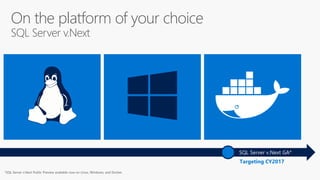
On the platform of your choice
SQL Server v.Next
Targeting CY2017
SQL Server v.Next GA*
SQL Server v.Next Public Preview available now on Linux, Windows, and Docker.
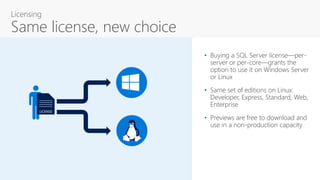
• Buying a SQL Server license—per-
server or per-core—grants the
option to use it on Windows Server
or Linux
• Same set of editions on Linux:
Developer, Express, Standard, Web,
Enterprise
• Previews are free to download and
use in a non-production capacity
LICENSE
Licensing
Same license, new choice
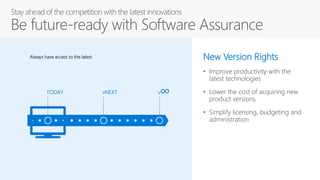
Stay ahead of the competition with the latest innovations
Be future-ready with Software Assurance
TODAY vNEXT v∞
Always have access to the latest New Version Rights
• Improve productivity with the
latest technologies
• Lower the cost of acquiring new
product versions
• Simplify licensing, budgeting and
administration
Scope
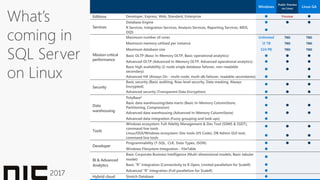
Windows
Public Preview
on Linux
Linux GA
Developer, Express, Web, Standard, Enterprise  Preview 
Database Engine   
R Services, Integration Services, Analysis Services, Reporting Services, MDS,
DQS

Maximum number of cores Unlimited TBD TBD
Maximum memory utilized per instance 12 TB TBD TBD
Maximum database size 524 PB TBD TBD
Basic OLTP (Basic In-Memory OLTP, Basic operational analytics)   
Advanced OLTP (Advanced In-Memory OLTP, Advanced operational analytics)   
Basic high availability (2-node single database failover, non-readable
secondary)
  
Advanced HA (Always On - multi-node, multi-db failover, readable secondaries)  
Security
Basic security (Basic auditing, Row-level security, Data masking, Always
Encrypted)
  
Advanced security (Transparent Data Encryption)   
Data
warehousing
PolyBase2 
Basic data warehousing/data marts (Basic In-Memory ColumnStore,
Partitioning, Compression)
  
Advanced data warehousing (Advanced In-Memory ColumnStore)   
Advanced data integration (Fuzzy grouping and look ups) 
Tools
Windows ecosystem: Full-fidelity Management & Dev Tool (SSMS & SSDT),
command line tools
  
Linux/OSX/Windows ecosystem: Dev tools (VS Code), DB Admin GUI tool,
command line tools
  
Developer
Programmability (T-SQL, CLR, Data Types, JSON)   
Windows Filesystem Integration - FileTable 
BI & Advanced
Analytics
Basic Corporate Business Intelligence (Multi-dimensional models, Basic tabular
model)

Basic “R” integration (Connectivity to R Open, Limited parallelism for ScaleR) 
Advanced “R” integration (Full parallelism for ScaleR) 
Hybrid cloud Stretch Database 
What’s
coming in
SQL Server
on Linux
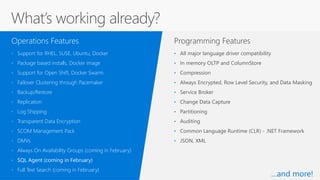
Programming Features
• Support for RHEL, SUSE, Ubuntu, Docker
• Package based installs, Docker image
• Support for Open Shift, Docker Swarm
• Failover Clustering through Pacemaker
• Backup/Restore
• Replication
• Log Shipping
• Transparent Data Encryption
• SCOM Management Pack
• DMVs
• Always On Availability Groups (coming in February)
• SQL Agent (coming in February)
• Full Text Search (coming in February)
Operations Features
• All major language driver compatibility
• In memory OLTP and ColumnStore
• Compression
• Always Encrypted, Row Level Security, and Data Masking
• Service Broker
• Change Data Capture
• Partitioning
• Auditing
• Common Language Runtime (CLR) - .NET Framework
• JSON, XML
What’s working already?
…and more!
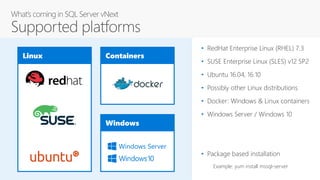
Linux Containers
Windows
Windows Server
• RedHat Enterprise Linux (RHEL) 7.3
• SUSE Enterprise Linux (SLES) v12 SP2
• Ubuntu 16.04, 16.10
• Possibly other Linux distributions
• Docker: Windows & Linux containers
• Windows Server / Windows 10
• Package based installation
Example: yum install mssql-server
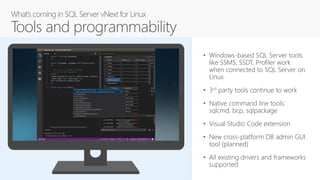
• Windows-based SQL Server tools
like SSMS, SSDT, Profiler work
when connected to SQL Server on
Linux
• 3rd party tools continue to work
• Native command line tools:
sqlcmd, bcp, sqlpackage
• Visual Studio Code extension
• New cross-platform DB admin GUI
tool (planned)
• All existing drivers and frameworks
supported
Demo – Getting Started
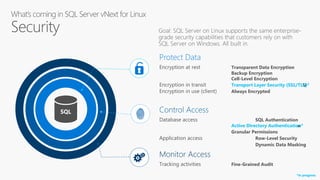
SQL Control Access
Database access SQL Authentication
Active Directory Authentication
Granular Permissions
Application access Row-Level Security
Dynamic Data Masking
Monitor Access
Tracking activities Fine-Grained Audit
Protect Data
Encryption at rest Transparent Data Encryption
Backup Encryption
Cell-Level Encryption
Encryption in transit Transport Layer Security (SSL/TLS)
Encryption in use (client) Always Encrypted
Protect Data
Encryption at rest Transparent Data Encryption
Backup Encryption
Cell-Level Encryption
Encryption in transit Transport Layer Security (SSL/TLS)*
Encryption in use (client) Always Encrypted
Control Access
Database access SQL Authentication
Active Directory Authentication*
Granular Permissions
Application access Row-Level Security
Dynamic Data Masking
*In progress
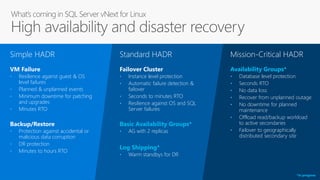
• Resilience against guest & OS
level failures
• Planned & unplanned events
• Minimum downtime for patching
and upgrades
• Minutes RTO
Simple HADR
VM Failure
• Protection against accidental or
malicious data corruption
• DR protection
• Minutes to hours RTO
Backup/Restore
• Instance level protection
• Automatic failure detection &
failover
• Seconds to minutes RTO
• Resilience against OS and SQL
Server failures
Standard HADR
Failover Cluster
• AG with 2 replicas
Basic Availability Groups*
• Warm standbys for DR
Log Shipping*
• Database level protection
• Seconds RTO
• No data loss
• Recover from unplanned outage
• No downtime for planned
maintenance
• Offload read/backup workload
to active secondaries
• Failover to geographically
distributed secondary site
Availability Groups*
Mission-Critical HADR
*In progress
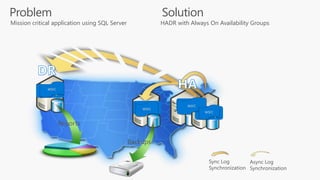
Solution
Backups
Sync Log
Synchronization
Async Log
Synchronization
Reports
Linux
Clustering
Linux
Clustering
Linux
Clustering
Linux
Clustering
WSFC
WSFC
WSFC
WSFC
HADR with Always On Availability GroupsMission critical application using SQL Server
Problem
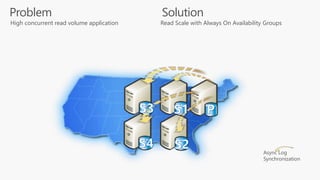
Async Log
Synchronization
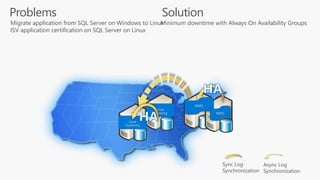
Solution
Read Scale with Always On Availability GroupsHigh concurrent read volume application
Problem
Sync Log
Synchronization
Async Log
Synchronization
Linux
Clustering
WSFC
WSFC
Linux
Clustering
Solution
Minimum downtime with Always On Availability GroupsMigrate application from SQL Server on Windows to Linux
ISV application certification on SQL Server on Linux
Problems
CTP1 By CTP2
High Availability
VM w/ durable storage ● ●
Failover Clustering ● ●
Always On Availability Groups ○In Progress ●
Disaster Recovery
Backup & Restore ● ●
Log shipping ○In Progress ●
Always On Availability Groups ○In Progress ●
Migration
Always On Availability Groups ○In Progress ●
Demo – Failover Clustering
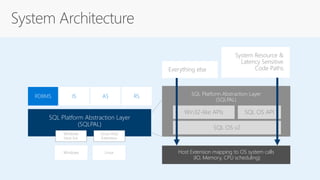
Architecture
SQL Platform Abstraction Layer
(SQLPAL)
RDBMS IS AS RS
Windows Linux
Windows
Host Ext.
Linux Host
Extension
SQL Platform Abstraction Layer
(SQLPAL)
Win32-like APIs
Host Extension mapping to OS system calls
(IO, Memory, CPU scheduling)
SQL OS API
SQL OS v2
Everything else
System Resource &
Latency Sensitive
Code Paths
Demo - Performance
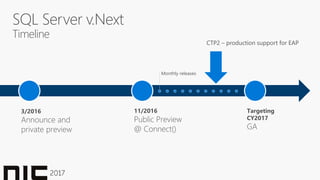
SQL Server v.Next
Timeline
3/2016
Announce and
private preview
11/2016
Public Preview
@ Connect()
Targeting
CY2017
GA
Monthly releases
CTP2 – production support for EAP
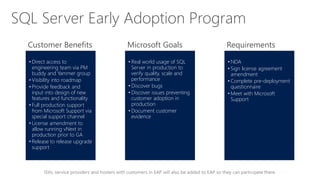
ISVs, service providers and hosters with customers in EAP will also be added to EAP so they can participate there.
• Direct access to
engineering team via PM
buddy and Yammer group
• Visibility into roadmap
• Provide feedback and
input into design of new
features and functionality
• Full production support
from Microsoft Support via
special support channel
• License amendment to
allow running vNext in
production prior to GA
• Release to release upgrade
support
• Real world usage of SQL
Server in production to
verify quality, scale and
performance
• Discover bugs
• Discover issues preventing
customer adoption in
production
• Document customer
evidence
• NDA
• Sign license agreement
amendment
• Complete pre-deployment
questionnaire
• Meet with Microsoft
Support
Customer Benefits Microsoft Goals Requirements
SQL Server Early Adoption Program
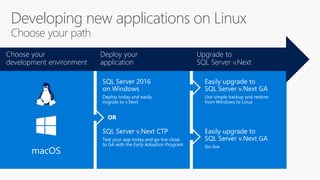
Developing new applications on Linux
Choose your path
Deploy your
application
Choose your
development environment
Upgrade to
SQL Server v.Next
Use simple backup and restore
from Windows to Linux
Go-live
Deploy today and easily
migrate to v.Next
Test your app today and go live close
to GA with the Early Adoption Program
OR
macOS
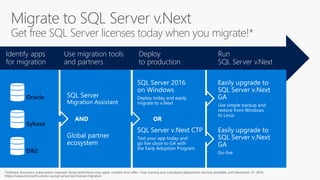
Migrate to SQL Server v.Next
Get free SQL Server licenses today when you migrate!*
Use migration tools
and partners
Identify apps
for migration
Run
SQL Server v.Next
Deploy
to production
Oracle
Sybase
DB2
AND OR
Use simple backup and
restore from Windows
to Linux
Go-live
Deploy today and easily
migrate to v.Next
Test your app today and
go live close to GA with
the Early Adoption Program
Software Assurance subscription required. Some restrictions may apply. Limited time offer—free training and subsidized deployment services available until December 31, 2016.
Download the bits
http://sqlserveronlinux.com
Apply to join the
SQL Early Adoption Program
https://aka.ms/eapsignup
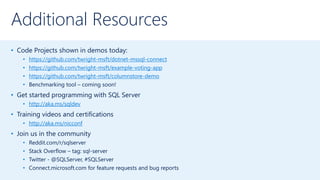
Additional Resources
• Code Projects shown in demos today:
• https://github.com/twright-msft/dotnet-mssql-connect
• https://github.com/twright-msft/example-voting-app
• https://github.com/twright-msft/columnstore-demo
• Benchmarking tool – coming soon!
• Get started programming with SQL Server
• http://aka.ms/sqldev
• Training videos and certifications
• http://aka.ms/nicconf
• Join us in the community
• Reddit.com/r/sqlserver
• Stack Overflow – tag: sql-server
• Twitter - @SQLServer, #SQLServer
• Connect.microsoft.com for feature requests and bug reports
Nordic infrastructure Conference 2017 - SQL Server on Linux Overview

Nordic infrastructure Conference 2017 - SQL Server on Linux Overview

  • 2.
    SQL Server onLinux Overview
  • 3.
    SQL Server v.Next TravisWright Principal Program Manager Presenter
  • 4.
    SQL Server onLinux Agenda • Why SQL Server on Linux? • Scope • Architecture • Demos • Schedule • How to get involved
  • 5.
  • 6.
    Microsoft is delivering on choice SQLServer on Linux HDInsight on Linux R Server on Linux Linux in Azure SQL Server drivers and connectivity Visual Studio Code extension for SQL Server Python, Ruby, … NEW
  • 7.
    National Institute ofStandards and Technology Comprehensive Vulnerability Database update 12/2016. Everything built-inTPC-H Oracle is #5#2 SQL Server #1 SQL Server #3 SQL Server The power of SQL Server Everything built-in June 2016 SQL Server 2016 TPC-E 0 1 4 0 0 3 0 34 29 22 15 5 22 16 6 43 20 69 18 49 74 3 0 10 20 30 40 50 60 70 80 2010 2011 2012 2013 2014 2015 2016 SQL Server Oracle MySQL2 SAP HANA 1/12
  • 8.
    Only data solutionto encrypt your data at rest and in motion Connect your relational data to big data with PolyBase Real-time operational analytics without impacting performance Up to 30x faster transactions, 100x faster queries with InMemory Unparalleled choice for developer tools and languages 1 T-SQL Java C/C++ C#/VB.NET PHP Node.js Python Ruby For all your applications Innovations across all editions Available now SQL Server 2016 SP1
  • 9.
    On the platformof your choice SQL Server v.Next Targeting CY2017 SQL Server v.Next GA* SQL Server v.Next Public Preview available now on Linux, Windows, and Docker.
  • 10.
    • Buying aSQL Server license—per- server or per-core—grants the option to use it on Windows Server or Linux • Same set of editions on Linux: Developer, Express, Standard, Web, Enterprise • Previews are free to download and use in a non-production capacity LICENSE Licensing Same license, new choice
  • 11.
    Stay ahead ofthe competition with the latest innovations Be future-ready with Software Assurance TODAY vNEXT v∞ Always have access to the latest New Version Rights • Improve productivity with the latest technologies • Lower the cost of acquiring new product versions • Simplify licensing, budgeting and administration
  • 12.
  • 13.
    Windows Public Preview on Linux LinuxGA Developer, Express, Web, Standard, Enterprise  Preview  Database Engine    R Services, Integration Services, Analysis Services, Reporting Services, MDS, DQS  Maximum number of cores Unlimited TBD TBD Maximum memory utilized per instance 12 TB TBD TBD Maximum database size 524 PB TBD TBD Basic OLTP (Basic In-Memory OLTP, Basic operational analytics)    Advanced OLTP (Advanced In-Memory OLTP, Advanced operational analytics)    Basic high availability (2-node single database failover, non-readable secondary)    Advanced HA (Always On - multi-node, multi-db failover, readable secondaries)   Security Basic security (Basic auditing, Row-level security, Data masking, Always Encrypted)    Advanced security (Transparent Data Encryption)    Data warehousing PolyBase2  Basic data warehousing/data marts (Basic In-Memory ColumnStore, Partitioning, Compression)    Advanced data warehousing (Advanced In-Memory ColumnStore)    Advanced data integration (Fuzzy grouping and look ups)  Tools Windows ecosystem: Full-fidelity Management & Dev Tool (SSMS & SSDT), command line tools    Linux/OSX/Windows ecosystem: Dev tools (VS Code), DB Admin GUI tool, command line tools    Developer Programmability (T-SQL, CLR, Data Types, JSON)    Windows Filesystem Integration - FileTable  BI & Advanced Analytics Basic Corporate Business Intelligence (Multi-dimensional models, Basic tabular model)  Basic “R” integration (Connectivity to R Open, Limited parallelism for ScaleR)  Advanced “R” integration (Full parallelism for ScaleR)  Hybrid cloud Stretch Database  What’s coming in SQL Server on Linux
  • 14.
    Programming Features • Supportfor RHEL, SUSE, Ubuntu, Docker • Package based installs, Docker image • Support for Open Shift, Docker Swarm • Failover Clustering through Pacemaker • Backup/Restore • Replication • Log Shipping • Transparent Data Encryption • SCOM Management Pack • DMVs • Always On Availability Groups (coming in February) • SQL Agent (coming in February) • Full Text Search (coming in February) Operations Features • All major language driver compatibility • In memory OLTP and ColumnStore • Compression • Always Encrypted, Row Level Security, and Data Masking • Service Broker • Change Data Capture • Partitioning • Auditing • Common Language Runtime (CLR) - .NET Framework • JSON, XML What’s working already? …and more!
  • 15.
    Linux Containers Windows Windows Server •RedHat Enterprise Linux (RHEL) 7.3 • SUSE Enterprise Linux (SLES) v12 SP2 • Ubuntu 16.04, 16.10 • Possibly other Linux distributions • Docker: Windows & Linux containers • Windows Server / Windows 10 • Package based installation Example: yum install mssql-server
  • 16.
    • Windows-based SQLServer tools like SSMS, SSDT, Profiler work when connected to SQL Server on Linux • 3rd party tools continue to work • Native command line tools: sqlcmd, bcp, sqlpackage • Visual Studio Code extension • New cross-platform DB admin GUI tool (planned) • All existing drivers and frameworks supported
  • 17.
  • 18.
    SQL Control Access Databaseaccess SQL Authentication Active Directory Authentication Granular Permissions Application access Row-Level Security Dynamic Data Masking Monitor Access Tracking activities Fine-Grained Audit Protect Data Encryption at rest Transparent Data Encryption Backup Encryption Cell-Level Encryption Encryption in transit Transport Layer Security (SSL/TLS) Encryption in use (client) Always Encrypted Protect Data Encryption at rest Transparent Data Encryption Backup Encryption Cell-Level Encryption Encryption in transit Transport Layer Security (SSL/TLS)* Encryption in use (client) Always Encrypted Control Access Database access SQL Authentication Active Directory Authentication* Granular Permissions Application access Row-Level Security Dynamic Data Masking *In progress
  • 19.
    • Resilience againstguest & OS level failures • Planned & unplanned events • Minimum downtime for patching and upgrades • Minutes RTO Simple HADR VM Failure • Protection against accidental or malicious data corruption • DR protection • Minutes to hours RTO Backup/Restore • Instance level protection • Automatic failure detection & failover • Seconds to minutes RTO • Resilience against OS and SQL Server failures Standard HADR Failover Cluster • AG with 2 replicas Basic Availability Groups* • Warm standbys for DR Log Shipping* • Database level protection • Seconds RTO • No data loss • Recover from unplanned outage • No downtime for planned maintenance • Offload read/backup workload to active secondaries • Failover to geographically distributed secondary site Availability Groups* Mission-Critical HADR *In progress
  • 20.
  • 21.
    Async Log Synchronization Solution Read Scalewith Always On Availability GroupsHigh concurrent read volume application Problem
  • 22.
    Sync Log Synchronization Async Log Synchronization Linux Clustering WSFC WSFC Linux Clustering Solution Minimumdowntime with Always On Availability GroupsMigrate application from SQL Server on Windows to Linux ISV application certification on SQL Server on Linux Problems
  • 23.
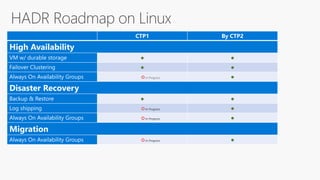
    CTP1 By CTP2 HighAvailability VM w/ durable storage ● ● Failover Clustering ● ● Always On Availability Groups ○In Progress ● Disaster Recovery Backup & Restore ● ● Log shipping ○In Progress ● Always On Availability Groups ○In Progress ● Migration Always On Availability Groups ○In Progress ●
  • 24.
  • 25.
  • 26.
    SQL Platform AbstractionLayer (SQLPAL) RDBMS IS AS RS Windows Linux Windows Host Ext. Linux Host Extension SQL Platform Abstraction Layer (SQLPAL) Win32-like APIs Host Extension mapping to OS system calls (IO, Memory, CPU scheduling) SQL OS API SQL OS v2 Everything else System Resource & Latency Sensitive Code Paths
  • 27.
  • 28.
    SQL Server v.Next Timeline 3/2016 Announceand private preview 11/2016 Public Preview @ Connect() Targeting CY2017 GA Monthly releases CTP2 – production support for EAP
  • 29.
    ISVs, service providersand hosters with customers in EAP will also be added to EAP so they can participate there. • Direct access to engineering team via PM buddy and Yammer group • Visibility into roadmap • Provide feedback and input into design of new features and functionality • Full production support from Microsoft Support via special support channel • License amendment to allow running vNext in production prior to GA • Release to release upgrade support • Real world usage of SQL Server in production to verify quality, scale and performance • Discover bugs • Discover issues preventing customer adoption in production • Document customer evidence • NDA • Sign license agreement amendment • Complete pre-deployment questionnaire • Meet with Microsoft Support Customer Benefits Microsoft Goals Requirements SQL Server Early Adoption Program
  • 30.
    Developing new applicationson Linux Choose your path Deploy your application Choose your development environment Upgrade to SQL Server v.Next Use simple backup and restore from Windows to Linux Go-live Deploy today and easily migrate to v.Next Test your app today and go live close to GA with the Early Adoption Program OR macOS
  • 31.
    Migrate to SQLServer v.Next Get free SQL Server licenses today when you migrate!* Use migration tools and partners Identify apps for migration Run SQL Server v.Next Deploy to production Oracle Sybase DB2 AND OR Use simple backup and restore from Windows to Linux Go-live Deploy today and easily migrate to v.Next Test your app today and go live close to GA with the Early Adoption Program Software Assurance subscription required. Some restrictions may apply. Limited time offer—free training and subsidized deployment services available until December 31, 2016.
  • 32.
    Download the bits http://sqlserveronlinux.com Applyto join the SQL Early Adoption Program https://aka.ms/eapsignup
  • 33.
    Additional Resources • CodeProjects shown in demos today: • https://github.com/twright-msft/dotnet-mssql-connect • https://github.com/twright-msft/example-voting-app • https://github.com/twright-msft/columnstore-demo • Benchmarking tool – coming soon! • Get started programming with SQL Server • http://aka.ms/sqldev • Training videos and certifications • http://aka.ms/nicconf • Join us in the community • Reddit.com/r/sqlserver • Stack Overflow – tag: sql-server • Twitter - @SQLServer, #SQLServer • Connect.microsoft.com for feature requests and bug reports

Editor's Notes

  • #4 Lets talk about SQL Server v.Next, the next major release of SQL Server, currently in public preview, which brings the power and innovation of SQL Server, for any application, to the platform of your choice.
  • #6 The business landscape is becoming increasingly diverse Development and deployment environments include Windows, Linux, macOS, and Docker Data is no longer relational, with companies accessing diverse data, including video, streaming, documents, relational, both external data and data internal to their org Languages and frameworks are also expanding with the poularity of Node.js, Python, Ruby and others Companies deploy on-premises, in the cloud, or both, with a hybrid solution
  • #7 Microsoft has delivered a number of products enabling choice for customers, including: HD Insight on Linux - a managed Apache Hadoop, Spark, R, HBase, and Storm cloud service made easy R Server on Linux - Use R—the powerful, statistical programming language—in an enterprise-class, big data analytics platform. Microsoft R Server is your flexible choice for analyzing data at scale, building intelligent apps, and discovering valuable insights across your business (https://www.microsoft.com/en-us/cloud-platform/r-server) Linux in Azure – run Linux-based virtual machines in Microsoft Azure (IaaS) Customers can take advantage of Microsoft–created database connectivity drivers and open-source drivers that enable developers to build any application using the platforms and tools of their choice, including Python, Ruby, and Node.js
  • #8 SQL Server is the new industry leader and SQL Server 2016 is packed with value for customers and as with our history, that value is built-in to a single enterprise sku with no additional add-ons. Let’s take a look at the top 5 reasons why you want to bet your business needs on SQL Server. If you are on SQL Server 2005 there is no better time to modernize your apps. If you are on Oracle or IBM, no better time to look again at the value you can gain today at a much lower TCO. <click> Industry leader in mission critical OLTP In case you missed, there is a new leader in Gartner’s core database MQ, where SQL Server for the first time has de-throned Oracle in both execution and vision! Microsoft SQL Server has been the industry leader for two years in a row! Customers are realizing the value that Microsoft is delivering at a rapid pace and in a customer friendly way by building-in innovation verses requiring add-ons. SQL Server also has #1 rankings across a number of TPC-E and TPC-H performance benchmarks Speaking of security and performance, let’s take a look at how we fair against the competition.<click> Most secure database SQL Server continues to be the least vulnerable database 6 years in a row. NIST (National Institute of Standards and Technology) tracks database vulnerabilities and shows SQL as the lowest even though we have more units deployed in production than both Oracle and IBM combined. So what does that mean, if you look at the chart you will see Oracle has many more vulnerabilities, this doesn’t mean that Oracle didn’t address them, but until the vulnerability patch is released and you implement it your data is at risk. Fewer vulnerabilities means fewer patches and your data is less exposed to attack. In addition, SQL Server 2016 delivers layers of protection with capabilities that can protect your data at rest and in motion, even in the memory buffer pool, without impacting database performance, along with the ability to control access and monitor threats. This multi-layered approach combined with proven track record of being least vulnerable provide you with the most secure database on the planet. <click> Highest performing data warehouse From a performance perspective, looking at TPC-H a standard benchmark particularly for Data Warehousing workloads, SQL holds the number #1, #2, and #3 spots for non-clustered scale up performance on multiple hardware platforms including HP, Lenovo and Cisco and for multiple data sizes including 1TB, 3TB and 10TB.  Oracle comes in at #4.  This not only showcases SQL Server performance, but performance at scale for data warehousing. SQL Server 2016 can scale from data marts to the biggest DW workloads.  With SQL Server 2016 enterprise you also get the rights to deploy our scale out MPP (massive parallel processing) data warehousing appliance, so again incredible value out of a single sku. <click> End to end mobile BI on any device Now let’s take a look at end to end mobile BI solution. Many of you may have heard about the Datazen acquisition we made to provide our customer with mobile BI on any device. Well in SQL Server 2016 this will be integrated into Reporting Services, which we are enhancing in a big way. What this means is you can now publish modern reports using PowerBI or Excel 2016 to an iPhone, Android phone, as well as Windows phone. Best of all its built-in so no need to buy a separate product. With the new integration of Power BI and SQL Server you can enable self-service BI in addition to mobility. Even if you choose to enable self-service BI you are doing it at a fraction of the cost of Tableau and Oracle. Even though Tableau has added mobile it’s only iOS and not Android, which is important outside of the US and Tableau is only a point solution for BI, where as SQL Server can tackle all data workloads give you BI and Advanced Analytics built-in. <click> In-database Advanced Analytics Many customers are exploring going beyond BI into predicative analytics where they want to proactively pave their businesses future with data rather than react to data. With SQL Server 2016 you can now accomplish this with built-in in-database advanced analytics. Again the key here is in-database, because when you talk to customers trying to implement advanced analytics the number one challenge is moving the data out of your database to do perform open source R models. In addition, customers want to perform analysis using R models on the latest data which you can do quickly by combining R with SQL Server in-memory technology. With 2016 you can perform R models directly in the database. In addition, customer want to run their R models on the latest data and you can do this quickly with SQL Server 2016 by combining the power of open source R with SQL Server in-memory technology for incredibly fast reads and writes. <click> In-memory across workloads In addition to these top 5 reasons, our optimized in-memory technology is fueling performance across all workloads from our in-memory OLTP that provides up to 30x transactional performance to our in-memory columnstore that give over 100x faster queries for data warehouse and BI workloads. Now with SQL Server 2016, you also have the ability to combine in-memory technologies to give you super-fast reads on top of super-fast writes to enable real-time operational analytics.<click> Consistent Experience from on-premises to cloud In addition to in-memory across all of these workloads, we can also deliver these capabilities with a consistent experience both on-premises and cloud with common development and management tools and common T-SQL. Our goal is to provide you a great experience with data no matter where you choose to implement it! <click to next slide>
  • #9 With SQL Server 2016 Service Pack 1, innovative features are now available across editions, so companies can scale across editions with a consistent programming surface area.
  • #10 With SQL Server v.Next, now in public preview, and generally available to purchase targeting mid-calendar year 2017, the power of SQL Server is available on the platform of your choice.
  • #14 Collapse BI and AA into one single row AA: “single R integration BI: Corporate business intelligence and mobile BI
  • #19 So that’s High Availability and Disaster Recovery for SQL Server on Linux. Let’s look at another aspect of SQL Server that is also critically important for enterprises – security. Our goal is for SQL Server on Linux to support the same enterprise-grade security capabilities that customers rely on with SQL Server on Windows today. [click] We think about security for SQL Server in terms of layers. At the center, you have your data and how you protect the data itself, typically using encryption. SQL Server supports a variety of encryption features to help protect your data against different types of threats. Transparent Data Encryption (TDE) encrypts your whole database at rest, without requiring any application changes. Backup Encryption encrypts your backup files, and Cell-Level Encryption gives you granular control over the encryption of individual cells of data. To encrypt data in transit to and from the database, SQL Server supports the industry-standard TLS 1.2 protocol. And finally, Always Encrypted enables you to encrypt sensitive data client-side, so that even privileged SQL Server administrators are unable to see it in plaintext. [click] The next layer is about controlling access to the data. SQL Authentication allows users to authenticate via a username and password, while Active Directory Authentication allows users to authenticate using single sign-on through Active Directory and Kerberos. Granular permissions enable you to control access to individual tables or even columns of data. Row-Level Security allows you to control read- and write-access to individual rows of data based on a customizable policy, and Dynamic Data Masking allows you to easily mask fields (such as account numbers) so that only part of the data can be seen. [click] The last layer is about monitoring who accesses the data. SQL Server’s Fine-Grained Audit feature allows you to enforce a data audit policy and track which users are doing which actions. [click] So that’s where we’re going with security for SQL Server on Linux. Almost all of these features are already available for you to try in the CTP1 preview release, please try them out and share your feedback with us. Support for TLS is in progress and will become available in an upcoming build. Similarly, Active Directory Authentication is one of our most requested features and will become available in an upcoming build.
  • #20 Add diagram from Travis
  • #28 Install on RHEL Show nodejs app running in Docker compose VS code extension Open Shift Baby Benchcraft – performance HA- AG??
  • #29 In March 2016, we announced our intention to bring SQL Server to Linux, starting with a private preview effective immediately. In November, we launched our SQL Server v.Next public preview for both Windows and Linux. In the coming year, we will have updated previews approximately every month. Finally, targeting calendar year 2017, SQL Server will be generally available to purchase on Windows and Linux.
  • #30 Get rid of icons, go with simple 3 box format
  • #31 When developing a new application on Linux, start your journey by developing locally on Linux, Windows, or macOS (via Docker). Then, deploy today on Windows via SQL Server 2016 or Linux with the public preview, and the adoption of engineering support for production with the SQL Server Adoption Program. Then, when SQL Server v.Next is available targeting mid-calendar year 2017, either do a simple backup and restore from SQL 2016 on Windows to SQL Server v.Next, or easily upgrade from the SQL Server on Linux public preview to the SQL Server v.Next GA.
  • #32 SQL Server leads the industry on security, performance, and price. And we want to prove to you that there is no equal. Move your Oracle databases to SQL Server and receive the necessary licenses of SQL Server—free with software assurance. Take advantage of this offer and get the one data solution that has everything you need built in. When you migrate, take advantage of our SQL Server Migration Assistant tool, and leverage our vast global partner ecosystem.
  • #33 Get started today with the SQL Server v.Next public preview by going to www.sqlserveronlinux.com, where you’ll find instructions for Red Hat Enterprise Linux, Ubuntu Linux, SQL Server on Linux-based Azure Virtual Machines, and Docker. Coming soon, the preview will include SUSE Linux as well. SQL EAP (pronounced “SQL Leap”) is a Microsoft program to help customers and partners adopt the next version of SQL Server.