Travis Wright Shreya Verma Nellie Gustafsson Tobias Ternstrom
Program Managers
Database Systems, Microsoft
SQL Server 2017
Deep Dive
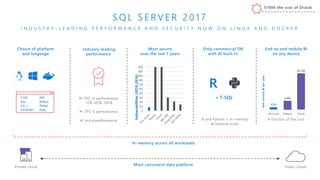
End-to-end mobile BI
on any device
Choice of platform
and language
Most secure
over the last 7 years
0
20
40
60
80
100
120
140
160
180
200
Vulnerabilities(2010-2016)
A fraction of the cost
Self-serviceBIperuser
Only commercial DB
with AI built-in
Microsoft Tableau Oracle
$120
$480
$2,230
Industry-leading
performance
1/10
Most consistent data platform
#1 TPC-H performance
1TB, 10TB, 30TB
#1 TPC-E performance
#1 price/performance
T-SQL
Java
C/C++
C#/VB.NET
PHP
Node.js
Python
Ruby
R
R and Python + in-memory
at massive scale
S Q L S E R V E R 2 0 1 7
I N D U S T R Y - L E A D I N G P E R F O R M A N C E A N D S E C U R I T Y N O W O N L I N U X A N D D O C K E R
Private cloud Public cloud
+ T-SQL
In-memory across all workloads
1/10th the cost of Oracle
F L E X I B L E , R E L I A B L E
D ATA M A N A G E M E N T
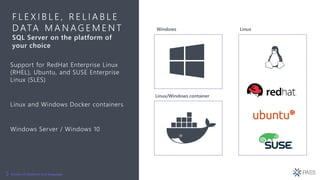
SQL Server on the platform of
your choice
Support for RedHat Enterprise Linux
(RHEL), Ubuntu, and SUSE Enterprise
Linux (SLES)
Linux and Windows Docker containers
Windows Server / Windows 10
Choice of platform and language
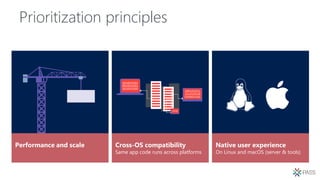
Prioritization principles
Performance and scale Cross-OS compatibility
Same app code runs across platforms
Native user experience
On Linux and macOS (server & tools)
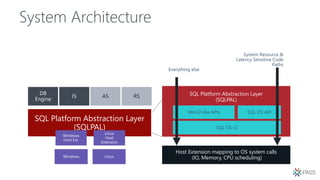
System Architecture
SQL Platform Abstraction Layer
(SQLPAL)
DB
Engine
IS AS RS
Windows Linux
Windows
Host Ext.
Linux
Host
Extension
SQL Platform Abstraction Layer
(SQLPAL)
Win32-like APIs
Host Extension mapping to OS system calls
(IO, Memory, CPU scheduling)
SQL OS API
SQL OS v2
Everything else
System Resource &
Latency Sensitive Code
Paths
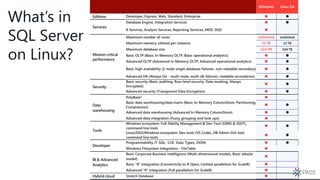
Windows Linux GA
Developer, Express, Web, Standard, Enterprise  
Database Engine, Integration Services  
R Services, Analysis Services, Reporting Services, MDS, DQS 
Maximum number of cores Unlimited Unlimited
Maximum memory utilized per instance 12 TB 12 TB
Maximum database size 524 PB 524 TB
Basic OLTP (Basic In-Memory OLTP, Basic operational analytics)  
Advanced OLTP (Advanced In-Memory OLTP, Advanced operational analytics)  
Basic high availability (2-node single database failover, non-readable secondary)  
Advanced HA (Always On - multi-node, multi-db failover, readable secondaries)  
Security
Basic security (Basic auditing, Row-level security, Data masking, Always
Encrypted)
 
Advanced security (Transparent Data Encryption)  
Data
warehousing
PolyBase2 
Basic data warehousing/data marts (Basic In-Memory ColumnStore, Partitioning,
Compression)
 
Advanced data warehousing (Advanced In-Memory ColumnStore)  
Advanced data integration (Fuzzy grouping and look ups) 
Tools
Windows ecosystem: Full-fidelity Management & Dev Tool (SSMS & SSDT),
command line tools
 
Linux/OSX/Windows ecosystem: Dev tools (VS Code), DB Admin GUI tool,
command line tools
 
Developer
Programmability (T-SQL, CLR, Data Types, JSON)  
Windows Filesystem Integration - FileTable 
BI & Advanced
Analytics
Basic Corporate Business Intelligence (Multi-dimensional models, Basic tabular
model)

Basic “R” integration (Connectivity to R Open, Limited parallelism for ScaleR) 
Advanced “R” integration (Full parallelism for ScaleR) 
Hybrid cloud Stretch Database 
What’s in
SQL Server
on Linux?
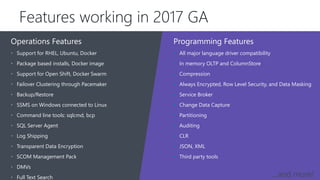
Programming Features
• Support for RHEL, Ubuntu, Docker
• Package based installs, Docker image
• Support for Open Shift, Docker Swarm
• Failover Clustering through Pacemaker
• Backup/Restore
• SSMS on Windows connected to Linux
• Command line tools: sqlcmd, bcp
• SQL Server Agent
• Log Shipping
• Transparent Data Encryption
• SCOM Management Pack
• DMVs
• Full Text Search
Operations Features
• All major language driver compatibility
• In memory OLTP and ColumnStore
• Compression
• Always Encrypted, Row Level Security, and Data Masking
• Service Broker
• Change Data Capture
• Partitioning
• Auditing
• CLR
• JSON, XML
• Third party tools
Features working in 2017 GA
…and more!
Demo
Getting Started with SQL Server
on Linux and Containers
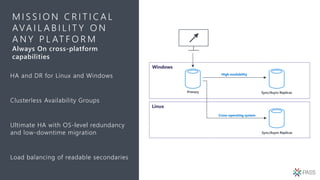
M I S S I O N C R I T I C A L
AVA I L A B I L I T Y O N
A N Y P L AT F O R M
Always On cross-platform
capabilities
HA and DR for Linux and Windows
Clusterless Availability Groups
Ultimate HA with OS-level redundancy
and low-downtime migration
Load balancing of readable secondaries
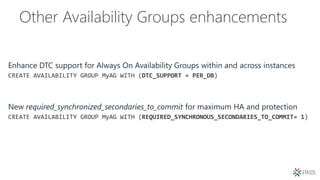
Other Availability Groups enhancements
Demo
Hybrid Always On Availability
Groups
Machine Learning
& Graph
Shreya Verma, Program Manager, Microsoft
Nellie Gustafsson, Program Manager, Microsoft
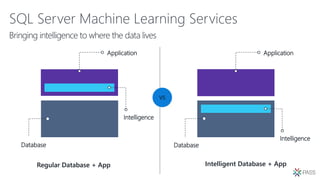
SQL Server Machine Learning Services
VS
Intelligence
Database
Application
Database
Application
Intelligence
Intelligent Database + AppRegular Database + App
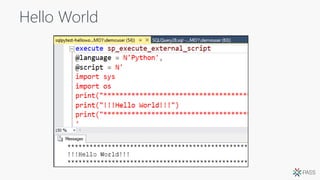
Hello World
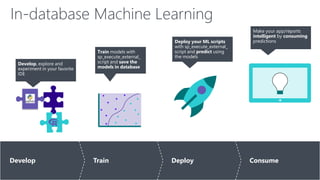
In-database Machine Learning
Develop Train Deploy Consume
Develop, explore and
experiment in your favorite
IDE
Train models with
sp_execute_external_
script and save the
models in database
Deploy your ML scripts
with sp_execute_external_
script and predict using
the models
Make your app/reports
intelligent by consuming
predictions
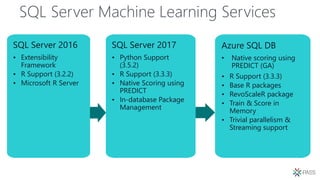
SQL Server Machine Learning Services
SQL Server 2016
• Extensibility
Framework
• R Support (3.2.2)
• Microsoft R Server
SQL Server 2017
• Python Support
(3.5.2)
• R Support (3.3.3)
• Native Scoring using
PREDICT
• In-database Package
Management
Azure SQL DB
• Native scoring using
PREDICT (GA)
• R Support (3.3.3)
• Base R packages
• RevoScaleR package
• Train & Score in
Memory
• Trivial parallelism &
Streaming support
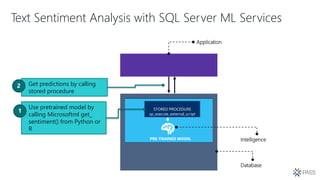
Text Sentiment Analysis with SQL Server ML Services
Use pretrained model by
calling Microsoftml get_
sentiment() from Python or
R
Database
Application
Intelligence
STORED PROCEDURE
sp_execute_external_script
PRE-TRAINED MODEL
Get predictions by calling
stored procedure
Sentiment
Analysis
Demo
Graph Extensions
in SQL Server
2017
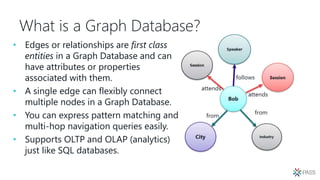
What is a Graph Database?
• Edges or relationships are first class
entities in a Graph Database and can
have attributes or properties
associated with them.
• A single edge can flexibly connect
multiple nodes in a Graph Database.
• You can express pattern matching and
multi-hop navigation queries easily.
• Supports OLTP and OLAP (analytics)
just like SQL databases.
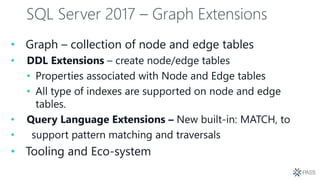
SQL Server 2017 – Graph Extensions
• Graph – collection of node and edge tables
• DDL Extensions – create node/edge tables
• Properties associated with Node and Edge tables
• All type of indexes are supported on node and edge
tables.
• Query Language Extensions – New built-in: MATCH, to
• support pattern matching and traversals
• Tooling and Eco-system
DDL Extensions
CREATE NODE
CREATE TABLE [dbo].[Attendee](
[Attendee_Id] [uniqueidentifier] PRIMARY KEY,
[Ateendee_FName] varchar(100),
[Attendee_LName] varchar(100)
) AS NODE
GO
SELECT TOP 10 * FROM Attendee;
DDL Extensions
CREATE TABLE attends (Rating int) AS EDGE;
CREATE TABLE [from] AS EDGE;
• CREATE EDGE
SELECT TOP 10 * FROM [from];
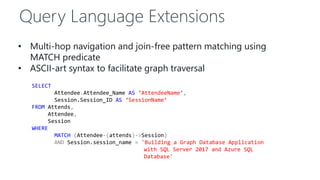
Query Language Extensions
• Multi-hop navigation and join-free pattern matching using
MATCH predicate
• ASCII-art syntax to facilitate graph traversal
SELECT
Attendee.Attendee_Name AS ‘AttendeeName’,
Session.Session_ID AS ‘SessionName’
FROM Attends,
Attendee,
Session
WHERE
MATCH (Attendee-(attends)->Session)
AND Session.session_name = 'Building a Graph Database Application
with SQL Server 2017 and Azure SQL
Database'
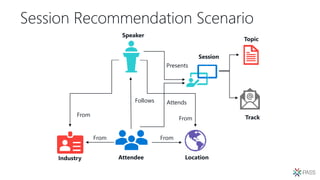
Session Recommendation Scenario
Speaker
Attendee Location
Follows
From
Industry
From
Session
Presents
Attends
Track
Topic
From
From
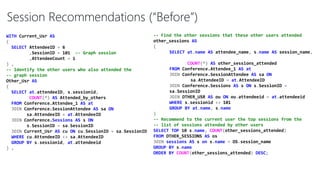
-- Find the other sessions that these other users attended
other_sessions AS
(
SELECT at.name AS attendee_name, s.name AS session_name,
COUNT(*) AS other_sessions_attended
FROM Conference.Attendee_1 AS at
JOIN Conference.SessionAttendee AS sa ON
sa.AttendeeID = at.AttendeeID
JOIN Conference.Sessions AS s ON s.SessionID =
sa.SessionID
JOIN OTHER_USR AS ou ON ou.attendeeid = at.attendeeid
WHERE s.sessionid <> 101
GROUP BY at.name, s.name
)
-- Recommend to the current user the top sessions from the
-- list of sessions attended by other users
SELECT TOP 10 s.name, COUNT(other_sessions_attended)
FROM OTHER_SESSIONS AS os
JOIN sessions AS s on s.name = OS.session_name
GROUP BY s.name
ORDER BY COUNT(other_sessions_attended) DESC;
WITH Current_Usr AS
(
SELECT AttendeeID = 6
,SessionID = 101 -- Graph session
,AttendeeCount = 1
) ,
-- Identify the other users who also attended the
-- graph session
Other_Usr AS
(
SELECT at.attendeeID, s.sessionid,
COUNT(*) AS Attended_by_others
FROM Conference.Attendee_1 AS at
JOIN Conference.SessionAttendee AS sa ON
sa.AttendeeID = at.AttendeeID
JOIN Conference.Sessions AS s ON
s.SessionID = sa.SessionID
JOIN Current_Usr AS cu ON cu.SessionID = sa.SessionID
WHERE cu.AttendeeID <> sa.AttendeeID
GROUP BY s.sessionid, at.attendeeid
) ,
Session Recommendations (“Before”)
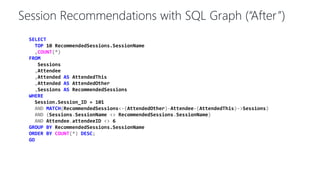
SELECT
TOP 10 RecommendedSessions.SessionName
,COUNT(*)
FROM
Sessions
,Attendee
,Attended AS AttendedThis
,Attended AS AttendedOther
,Sessions AS RecommendedSessions
WHERE
Session.Session_ID = 101
AND MATCH(RecommendedSessions<-(AttendedOther)-Attendee-(AttendedThis)->Sessions)
AND (Sessions.SessionName <> RecommendedSessions.SessionName)
AND Attendee.attendeeID <> 6
GROUP BY RecommendedSessions.SessionName
ORDER BY COUNT(*) DESC;
GO
Session Recommendations with SQL Graph (“After”)
Fraud detection using
SQL Graph and Machine
Learning Services with
Python
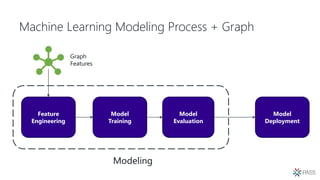
Machine Learning Modeling Process + Graph
Feature
Engineering
Model
Training
Model
Evaluation
Modeling
Model
Deployment
Graph
Features
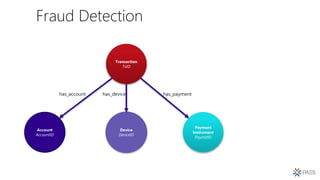
Fraud Detection
Transaction
TxID
Payment
Instrument
PayInstID
Device
DeviceID
Account
AccountID
has_account has_paymenthas_device
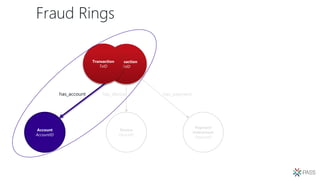
Fraud Rings
Transaction
TxID
Payment
Instrument
PayInstID
Device
DeviceID
Account
AccountID
has_account has_paymenthas_device
Transaction
TxID
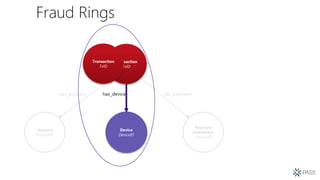
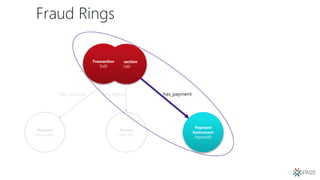
Fraud Rings
Transaction
TxID
Payment
Instrument
PayInstID
Account
AccountID
has_account has_payment
Transaction
TxID
Device
DeviceID
has_device
Fraud Rings
Transaction
TxID
Device
DeviceID
Account
AccountID
has_account has_device
Transaction
TxID
Payment
Instrument
PayInstID
has_payment
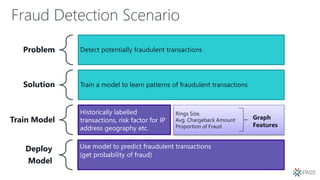
Fraud Detection Scenario
Problem Detect potentially fraudulent transactions
Solution Train a model to learn patterns of fraudulent transactions
Train Model
Historically labelled
transactions, risk factor for IP
address geography etc.
Deploy
Model
Use model to predict fraudulent transactions
(get probability of fraud)
Rings Size,
Avg. Chargeback Amount
Proportion of Fraud
Graph
Features
Fraud Detection
Demo
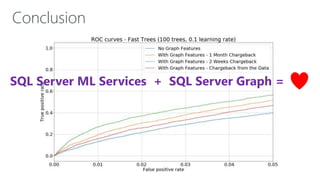
Conclusion
SQL Server ML Services + SQL Server Graph =
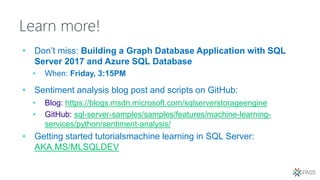
Learn more!
• Don’t miss: Building a Graph Database Application with SQL
Server 2017 and Azure SQL Database
• When: Friday, 3:15PM
• Sentiment analysis blog post and scripts on GitHub:
• Blog: https://blogs.msdn.microsoft.com/sqlserverstorageengine
• GitHub: sql-server-samples/samples/features/machine-learning-
services/python/sentiment-analysis/
• Getting started tutorialsmachine learning in SQL Server:
AKA.MS/MLSQLDEV
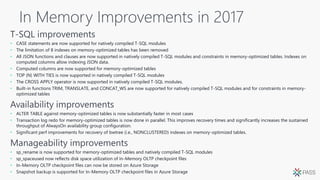
In Memory Improvements in 2017
• CASE statements are now supported for natively compiled T-SQL modules
• The limitation of 8 indexes on memory-optimized tables has been removed
• All JSON functions and clauses are now supported in natively compiled T-SQL modules and constraints in memory-optimized tables. Indexes on
computed columns allow indexing JSON data.
• Computed columns are now supported for memory-optimized tables
• TOP (N) WITH TIES is now supported in natively compiled T-SQL modules
• The CROSS APPLY operator is now supported in natively compiled T-SQL modules.
• Built-in functions TRIM, TRANSLATE, and CONCAT_WS are now supported for natively compiled T-SQL modules and for constraints in memory-
optimized tables
• ALTER TABLE against memory-optimized tables is now substantially faster in most cases
• Transaction log redo for memory-optimized tables is now done in parallel. This improves recovery times and significantly increases the sustained
throughput of AlwaysOn availability group configuration.
• Significant perf improvements for recovery of bwtree (i.e., NONCLUSTERED) indexes on memory-optimized tables.
• sp_rename is now supported for memory-optimized tables and natively compiled T-SQL modules
• sp_spaceused now reflects disk space utilization of In-Memory OLTP checkpoint files
• In-Memory OLTP checkpoint files can now be stored on Azure Storage
• Snapshot backup is supported for In-Memory OLTP checkpoint files in Azure Storage
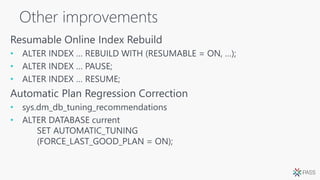
Other improvements
•
•
•
•
•
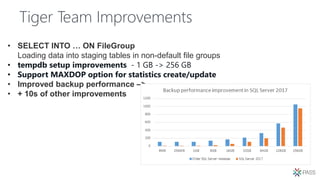
Tiger Team Improvements
• SELECT INTO … ON FileGroup
Loading data into staging tables in non-default file groups
• tempdb setup improvements - 1 GB -> 256 GB
• Support MAXDOP option for statistics create/update
• Improved backup performance –>
• + 10s of other improvements
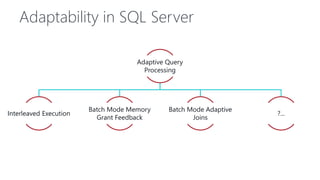
Adaptability in SQL Server
Adaptive Query
Processing
Interleaved Execution
Batch Mode Memory
Grant Feedback
Batch Mode Adaptive
Joins
?...
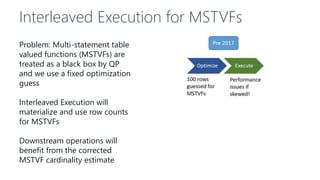
Interleaved Execution for MSTVFs
Problem: Multi-statement table
valued functions (MSTVFs) are
treated as a black box by QP
and we use a fixed optimization
guess
Interleaved Execution will
materialize and use row counts
for MSTVFs
Downstream operations will
benefit from the corrected
MSTVF cardinality estimate
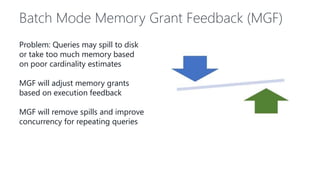
Batch Mode Memory Grant Feedback (MGF)
Problem: Queries may spill to disk
or take too much memory based
on poor cardinality estimates
MGF will adjust memory grants
based on execution feedback
MGF will remove spills and improve
concurrency for repeating queries
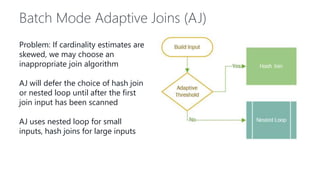
Batch Mode Adaptive Joins (AJ)
Problem: If cardinality estimates are
skewed, we may choose an
inappropriate join algorithm
AJ will defer the choice of hash join
or nested loop until after the first
join input has been scanned
AJ uses nested loop for small
inputs, hash joins for large inputs
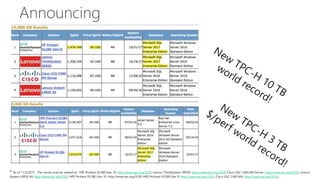
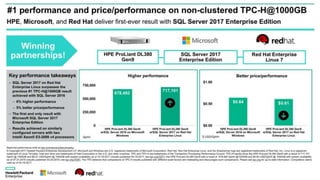
Announcing
* As of 11/2/2017. The results may be viewed at: HPE Proliant DL580 Gen 10: http://www.tpc.org/3329; Lenovo ThinkSystem SR950: http://www.tpc.org/3328; Cisco USC C460 M4 Server: http://www.tpc.org/3326; Lenovo
System x3850 X6: http://www.tpc.org/3325; HPE Proliant DL380 Gen 10: http://www.tpc.org/3330; HPE ProLiant DL580 Gen 9: http://www.tpc.org/3323; Cisco USC C460 M4: http://www.tpc.org/3323;
Thank You
Hit us up!
tobiast@microsoft.com@tobiassql
twright@microsoft.com@radtravis
Session evaluations
Download the GuideBook App
and search: PASS Summit 2017
Follow the QR code link
displayed on session signage
throughout the conference
venue and in the program guide
Your feedback is important and valuable.
Go to passSummit.com
Submit by 5pm Friday, November 10th to win prizes. 3 Ways to Access:

PASS Summit - SQL Server 2017 Deep Dive

  • 1.
    Travis Wright ShreyaVerma Nellie Gustafsson Tobias Ternstrom Program Managers Database Systems, Microsoft SQL Server 2017 Deep Dive
  • 2.
    End-to-end mobile BI onany device Choice of platform and language Most secure over the last 7 years 0 20 40 60 80 100 120 140 160 180 200 Vulnerabilities(2010-2016) A fraction of the cost Self-serviceBIperuser Only commercial DB with AI built-in Microsoft Tableau Oracle $120 $480 $2,230 Industry-leading performance 1/10 Most consistent data platform #1 TPC-H performance 1TB, 10TB, 30TB #1 TPC-E performance #1 price/performance T-SQL Java C/C++ C#/VB.NET PHP Node.js Python Ruby R R and Python + in-memory at massive scale S Q L S E R V E R 2 0 1 7 I N D U S T R Y - L E A D I N G P E R F O R M A N C E A N D S E C U R I T Y N O W O N L I N U X A N D D O C K E R Private cloud Public cloud + T-SQL In-memory across all workloads 1/10th the cost of Oracle
  • 3.
    F L EX I B L E , R E L I A B L E D ATA M A N A G E M E N T SQL Server on the platform of your choice Support for RedHat Enterprise Linux (RHEL), Ubuntu, and SUSE Enterprise Linux (SLES) Linux and Windows Docker containers Windows Server / Windows 10 Choice of platform and language
  • 4.
    Prioritization principles Performance andscale Cross-OS compatibility Same app code runs across platforms Native user experience On Linux and macOS (server & tools)
  • 5.
    System Architecture SQL PlatformAbstraction Layer (SQLPAL) DB Engine IS AS RS Windows Linux Windows Host Ext. Linux Host Extension SQL Platform Abstraction Layer (SQLPAL) Win32-like APIs Host Extension mapping to OS system calls (IO, Memory, CPU scheduling) SQL OS API SQL OS v2 Everything else System Resource & Latency Sensitive Code Paths
  • 7.
    Windows Linux GA Developer,Express, Web, Standard, Enterprise   Database Engine, Integration Services   R Services, Analysis Services, Reporting Services, MDS, DQS  Maximum number of cores Unlimited Unlimited Maximum memory utilized per instance 12 TB 12 TB Maximum database size 524 PB 524 TB Basic OLTP (Basic In-Memory OLTP, Basic operational analytics)   Advanced OLTP (Advanced In-Memory OLTP, Advanced operational analytics)   Basic high availability (2-node single database failover, non-readable secondary)   Advanced HA (Always On - multi-node, multi-db failover, readable secondaries)   Security Basic security (Basic auditing, Row-level security, Data masking, Always Encrypted)   Advanced security (Transparent Data Encryption)   Data warehousing PolyBase2  Basic data warehousing/data marts (Basic In-Memory ColumnStore, Partitioning, Compression)   Advanced data warehousing (Advanced In-Memory ColumnStore)   Advanced data integration (Fuzzy grouping and look ups)  Tools Windows ecosystem: Full-fidelity Management & Dev Tool (SSMS & SSDT), command line tools   Linux/OSX/Windows ecosystem: Dev tools (VS Code), DB Admin GUI tool, command line tools   Developer Programmability (T-SQL, CLR, Data Types, JSON)   Windows Filesystem Integration - FileTable  BI & Advanced Analytics Basic Corporate Business Intelligence (Multi-dimensional models, Basic tabular model)  Basic “R” integration (Connectivity to R Open, Limited parallelism for ScaleR)  Advanced “R” integration (Full parallelism for ScaleR)  Hybrid cloud Stretch Database  What’s in SQL Server on Linux?
  • 8.
    Programming Features • Supportfor RHEL, Ubuntu, Docker • Package based installs, Docker image • Support for Open Shift, Docker Swarm • Failover Clustering through Pacemaker • Backup/Restore • SSMS on Windows connected to Linux • Command line tools: sqlcmd, bcp • SQL Server Agent • Log Shipping • Transparent Data Encryption • SCOM Management Pack • DMVs • Full Text Search Operations Features • All major language driver compatibility • In memory OLTP and ColumnStore • Compression • Always Encrypted, Row Level Security, and Data Masking • Service Broker • Change Data Capture • Partitioning • Auditing • CLR • JSON, XML • Third party tools Features working in 2017 GA …and more!
  • 9.
    Demo Getting Started withSQL Server on Linux and Containers
  • 10.
    M I SS I O N C R I T I C A L AVA I L A B I L I T Y O N A N Y P L AT F O R M Always On cross-platform capabilities HA and DR for Linux and Windows Clusterless Availability Groups Ultimate HA with OS-level redundancy and low-downtime migration Load balancing of readable secondaries
  • 11.
  • 13.
    Demo Hybrid Always OnAvailability Groups
  • 14.
    Machine Learning & Graph ShreyaVerma, Program Manager, Microsoft Nellie Gustafsson, Program Manager, Microsoft
  • 15.
    SQL Server MachineLearning Services VS Intelligence Database Application Database Application Intelligence Intelligent Database + AppRegular Database + App
  • 16.
  • 17.
    In-database Machine Learning DevelopTrain Deploy Consume Develop, explore and experiment in your favorite IDE Train models with sp_execute_external_ script and save the models in database Deploy your ML scripts with sp_execute_external_ script and predict using the models Make your app/reports intelligent by consuming predictions
  • 18.
    SQL Server MachineLearning Services SQL Server 2016 • Extensibility Framework • R Support (3.2.2) • Microsoft R Server SQL Server 2017 • Python Support (3.5.2) • R Support (3.3.3) • Native Scoring using PREDICT • In-database Package Management Azure SQL DB • Native scoring using PREDICT (GA) • R Support (3.3.3) • Base R packages • RevoScaleR package • Train & Score in Memory • Trivial parallelism & Streaming support
  • 19.
    Text Sentiment Analysiswith SQL Server ML Services Use pretrained model by calling Microsoftml get_ sentiment() from Python or R Database Application Intelligence STORED PROCEDURE sp_execute_external_script PRE-TRAINED MODEL Get predictions by calling stored procedure
  • 20.
  • 21.
  • 22.
    What is aGraph Database? • Edges or relationships are first class entities in a Graph Database and can have attributes or properties associated with them. • A single edge can flexibly connect multiple nodes in a Graph Database. • You can express pattern matching and multi-hop navigation queries easily. • Supports OLTP and OLAP (analytics) just like SQL databases.
  • 23.
    SQL Server 2017– Graph Extensions • Graph – collection of node and edge tables • DDL Extensions – create node/edge tables • Properties associated with Node and Edge tables • All type of indexes are supported on node and edge tables. • Query Language Extensions – New built-in: MATCH, to • support pattern matching and traversals • Tooling and Eco-system
  • 24.
    DDL Extensions CREATE NODE CREATETABLE [dbo].[Attendee]( [Attendee_Id] [uniqueidentifier] PRIMARY KEY, [Ateendee_FName] varchar(100), [Attendee_LName] varchar(100) ) AS NODE GO SELECT TOP 10 * FROM Attendee;
  • 25.
    DDL Extensions CREATE TABLEattends (Rating int) AS EDGE; CREATE TABLE [from] AS EDGE; • CREATE EDGE SELECT TOP 10 * FROM [from];
  • 26.
    Query Language Extensions •Multi-hop navigation and join-free pattern matching using MATCH predicate • ASCII-art syntax to facilitate graph traversal SELECT Attendee.Attendee_Name AS ‘AttendeeName’, Session.Session_ID AS ‘SessionName’ FROM Attends, Attendee, Session WHERE MATCH (Attendee-(attends)->Session) AND Session.session_name = 'Building a Graph Database Application with SQL Server 2017 and Azure SQL Database'
  • 27.
    Session Recommendation Scenario Speaker AttendeeLocation Follows From Industry From Session Presents Attends Track Topic From From
  • 28.
    -- Find theother sessions that these other users attended other_sessions AS ( SELECT at.name AS attendee_name, s.name AS session_name, COUNT(*) AS other_sessions_attended FROM Conference.Attendee_1 AS at JOIN Conference.SessionAttendee AS sa ON sa.AttendeeID = at.AttendeeID JOIN Conference.Sessions AS s ON s.SessionID = sa.SessionID JOIN OTHER_USR AS ou ON ou.attendeeid = at.attendeeid WHERE s.sessionid <> 101 GROUP BY at.name, s.name ) -- Recommend to the current user the top sessions from the -- list of sessions attended by other users SELECT TOP 10 s.name, COUNT(other_sessions_attended) FROM OTHER_SESSIONS AS os JOIN sessions AS s on s.name = OS.session_name GROUP BY s.name ORDER BY COUNT(other_sessions_attended) DESC; WITH Current_Usr AS ( SELECT AttendeeID = 6 ,SessionID = 101 -- Graph session ,AttendeeCount = 1 ) , -- Identify the other users who also attended the -- graph session Other_Usr AS ( SELECT at.attendeeID, s.sessionid, COUNT(*) AS Attended_by_others FROM Conference.Attendee_1 AS at JOIN Conference.SessionAttendee AS sa ON sa.AttendeeID = at.AttendeeID JOIN Conference.Sessions AS s ON s.SessionID = sa.SessionID JOIN Current_Usr AS cu ON cu.SessionID = sa.SessionID WHERE cu.AttendeeID <> sa.AttendeeID GROUP BY s.sessionid, at.attendeeid ) , Session Recommendations (“Before”)
  • 29.
    SELECT TOP 10 RecommendedSessions.SessionName ,COUNT(*) FROM Sessions ,Attendee ,AttendedAS AttendedThis ,Attended AS AttendedOther ,Sessions AS RecommendedSessions WHERE Session.Session_ID = 101 AND MATCH(RecommendedSessions<-(AttendedOther)-Attendee-(AttendedThis)->Sessions) AND (Sessions.SessionName <> RecommendedSessions.SessionName) AND Attendee.attendeeID <> 6 GROUP BY RecommendedSessions.SessionName ORDER BY COUNT(*) DESC; GO Session Recommendations with SQL Graph (“After”)
  • 30.
    Fraud detection using SQLGraph and Machine Learning Services with Python
  • 31.
    Machine Learning ModelingProcess + Graph Feature Engineering Model Training Model Evaluation Modeling Model Deployment Graph Features
  • 32.
  • 33.
  • 34.
  • 35.
  • 36.
    Fraud Detection Scenario ProblemDetect potentially fraudulent transactions Solution Train a model to learn patterns of fraudulent transactions Train Model Historically labelled transactions, risk factor for IP address geography etc. Deploy Model Use model to predict fraudulent transactions (get probability of fraud) Rings Size, Avg. Chargeback Amount Proportion of Fraud Graph Features
  • 37.
  • 38.
    Conclusion SQL Server MLServices + SQL Server Graph =
  • 39.
    Learn more! • Don’tmiss: Building a Graph Database Application with SQL Server 2017 and Azure SQL Database • When: Friday, 3:15PM • Sentiment analysis blog post and scripts on GitHub: • Blog: https://blogs.msdn.microsoft.com/sqlserverstorageengine • GitHub: sql-server-samples/samples/features/machine-learning- services/python/sentiment-analysis/ • Getting started tutorialsmachine learning in SQL Server: AKA.MS/MLSQLDEV
  • 40.
    In Memory Improvementsin 2017 • CASE statements are now supported for natively compiled T-SQL modules • The limitation of 8 indexes on memory-optimized tables has been removed • All JSON functions and clauses are now supported in natively compiled T-SQL modules and constraints in memory-optimized tables. Indexes on computed columns allow indexing JSON data. • Computed columns are now supported for memory-optimized tables • TOP (N) WITH TIES is now supported in natively compiled T-SQL modules • The CROSS APPLY operator is now supported in natively compiled T-SQL modules. • Built-in functions TRIM, TRANSLATE, and CONCAT_WS are now supported for natively compiled T-SQL modules and for constraints in memory- optimized tables • ALTER TABLE against memory-optimized tables is now substantially faster in most cases • Transaction log redo for memory-optimized tables is now done in parallel. This improves recovery times and significantly increases the sustained throughput of AlwaysOn availability group configuration. • Significant perf improvements for recovery of bwtree (i.e., NONCLUSTERED) indexes on memory-optimized tables. • sp_rename is now supported for memory-optimized tables and natively compiled T-SQL modules • sp_spaceused now reflects disk space utilization of In-Memory OLTP checkpoint files • In-Memory OLTP checkpoint files can now be stored on Azure Storage • Snapshot backup is supported for In-Memory OLTP checkpoint files in Azure Storage
  • 41.
  • 42.
    Tiger Team Improvements •SELECT INTO … ON FileGroup Loading data into staging tables in non-default file groups • tempdb setup improvements - 1 GB -> 256 GB • Support MAXDOP option for statistics create/update • Improved backup performance –> • + 10s of other improvements
  • 43.
    Adaptability in SQLServer Adaptive Query Processing Interleaved Execution Batch Mode Memory Grant Feedback Batch Mode Adaptive Joins ?...
  • 44.
    Interleaved Execution forMSTVFs Problem: Multi-statement table valued functions (MSTVFs) are treated as a black box by QP and we use a fixed optimization guess Interleaved Execution will materialize and use row counts for MSTVFs Downstream operations will benefit from the corrected MSTVF cardinality estimate
  • 45.
    Batch Mode MemoryGrant Feedback (MGF) Problem: Queries may spill to disk or take too much memory based on poor cardinality estimates MGF will adjust memory grants based on execution feedback MGF will remove spills and improve concurrency for repeating queries
  • 46.
    Batch Mode AdaptiveJoins (AJ) Problem: If cardinality estimates are skewed, we may choose an inappropriate join algorithm AJ will defer the choice of hash join or nested loop until after the first join input has been scanned AJ uses nested loop for small inputs, hash joins for large inputs
  • 47.
    Announcing * As of11/2/2017. The results may be viewed at: HPE Proliant DL580 Gen 10: http://www.tpc.org/3329; Lenovo ThinkSystem SR950: http://www.tpc.org/3328; Cisco USC C460 M4 Server: http://www.tpc.org/3326; Lenovo System x3850 X6: http://www.tpc.org/3325; HPE Proliant DL380 Gen 10: http://www.tpc.org/3330; HPE ProLiant DL580 Gen 9: http://www.tpc.org/3323; Cisco USC C460 M4: http://www.tpc.org/3323;
  • 48.
    Thank You Hit usup! tobiast@microsoft.com@tobiassql twright@microsoft.com@radtravis
  • 49.
    Session evaluations Download theGuideBook App and search: PASS Summit 2017 Follow the QR code link displayed on session signage throughout the conference venue and in the program guide Your feedback is important and valuable. Go to passSummit.com Submit by 5pm Friday, November 10th to win prizes. 3 Ways to Access: