https://www.facebook.com/groups/sqlserverindonesia/
01/11/2017 2
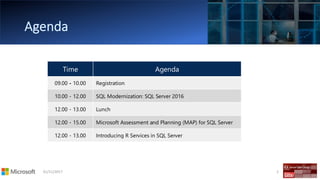
Time Agenda
09.00 - 10.00 Registration
10.00 - 12.00 SQL Modernization: SQL Server 2016
12.00 - 13.00 Lunch
12.00 - 15.00 Microsoft Assessment and Planning (MAP) for SQL Server
12.00 - 13.00 Introducing R Services in SQL Server
http://www.Kwad5.com
Kiki.Rizki.Noviandi @KikiNoviandi krn@kwad5.com
https://mvp.microsoft.com/en-
us/PublicProfile/33869?fullName=Kiki%20Rizki%20Noviandi
Kiki Noviandi
@Executrain-Jakarta | 19 – Sep- 2017
01/11/2017 4
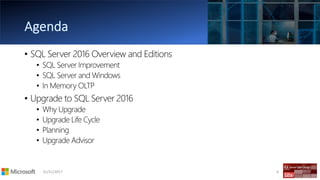
• SQL Server 2016 Overview and Editions
• SQL Server Improvement
• SQL Server and Windows
• In Memory OLTP
• Upgrade to SQL Server 2016
• Why Upgrade
• Upgrade Life Cycle
• Planning
• Upgrade Advisor
The Evolution & Improvement of
SQL Server
01/11/2017 7
SQL Server
2008
SQL Server
2008 R2
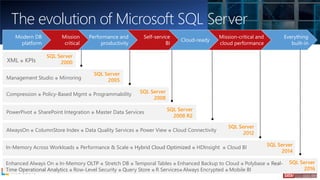
SQL Server
2000XML ● KPIs
Compression ● Policy-Based Mgmt ● Programmability
PowerPivot ● SharePoint Integration ● Master Data Services
SQL Server
2012
AlwaysOn ● ColumnStore Index ● Data Quality Services ● Power View ● Cloud Connectivity
SQL Server
2014
In-Memory Across Workloads ● Performance & Scale ● Hybrid Cloud Optimized ● HDInsight ● Cloud BI
Management Studio ● Mirroring
SQL Server
2005
SQL Server
2016
Enhanced Always On ● In-Memory OLTP ● Stretch DB ● Temporal Tables ● Enhanced Backup to Cloud ● Polybase ● Real-
Time Operational Analytics ● Row-Level Security ● Query Store ● R Services● Always Encrypted ● Mobile BI
The evolution of Microsoft SQL Server
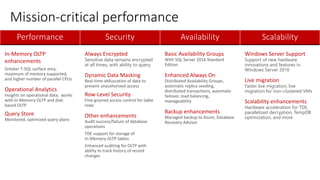
Mission-critical performance
Performance Security Availability Scalability
In-Memory OLTP
enhancements
Greater T-SQL surface area,
maximum of memory supported,
and higher number of parallel CPUs
Operational Analytics
Insights on operational data; works
with In-Memory OLTP and disk-
based OLTP
Query Store
Monitored, optimized query plans
Always Encrypted
Sensitive data remains encrypted
at all times, with ability to query
Dynamic Data Masking
Real-time obfuscation of data to
prevent unauthorized access
Row-Level Security
Fine-grained access control for table
rows
Other enhancements
Audit success/failure of database
operations
TDE support for storage of
In-Memory OLTP tables
Enhanced auditing for OLTP with
ability to track history of record
changes
Basic Availability Groups
With SQL Server 2016 Standard
Edition
Enhanced Always On
Distributed Availability Groups,
automatic replica seeding,
distributed transactions, automatic
failover, load balancing,
manageability
Backup enhancements
Managed backup to Azure, Database
Recovery Advisor
Windows Server Support
Support of new hardware
innovations and features in
Windows Server 2016
Live migration
Faster live migration, live
migration for non-clustered VMs
Scalability enhancements
Hardware acceleration for TDE,
parallelized decryption, TempDB
optimization, and more
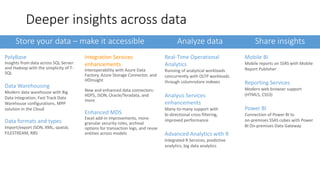
Store your data – make it accessible Analyze data Share insights
PolyBase
Insights from data across SQL Server
and Hadoop with the simplicity of T-
SQL
Data Warehousing
Modern data warehouse with Big
Data integration, Fast Track Data
Warehouse configurations, MPP
solution in the Cloud
Data formats and types
Import/export JSON, XML, spatial,
FILESTREAM, RBS
Integration Services
enhancements
Interoperability with Azure Data
Factory, Azure Storage Connector, and
HDInsight
New and enhanced data connectors:
HDFS, JSON, Oracle/Teradata, and
more
Enhanced MDS
Excel add-in improvements, more-
granular security roles, archival
options for transaction logs, and reuse
entities across models
Real-Time Operational
Analytics
Running of analytical workloads
concurrently with OLTP workloads
through columnstore indexes
Analysis Services
enhancements
Many-to-many support with
bi-directional cross filtering,
improved performance
Advanced Analytics with R
Integrated R Services, predictive
analytics, big data analytics
Mobile BI
Mobile reports on SSRS with Mobile
Report Publisher
Reporting Services
Modern web browser support
(HTML5, CSS3)
Power BI
Connection of Power BI to
on-premises SSAS cubes with Power
BI On-premises Data Gateway
Deeper insights across data
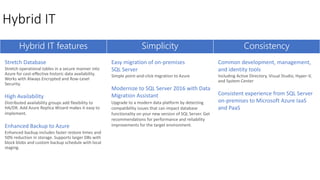
Hybrid IT features Simplicity Consistency
Stretch Database
Stretch operational tables in a secure manner into
Azure for cost-effective historic data availability.
Works with Always Encrypted and Row-Level
Security.
High Availability
Distributed availability groups add flexibility to
HA/DR. Add Azure Replica Wizard makes it easy to
implement.
Enhanced Backup to Azure
Enhanced backup includes faster restore times and
50% reduction in storage. Supports larger DBs with
block blobs and custom backup schedule with local
staging.
Easy migration of on-premises
SQL Server
Simple point-and-click migration to Azure
Modernize to SQL Server 2016 with Data
Migration Assistant
Upgrade to a modern data platform by detecting
compatibility issues that can impact database
functionality on your new version of SQL Server. Get
recommendations for performance and reliability
improvements for the target environment.
Common development, management,
and identity tools
Including Active Directory, Visual Studio, Hyper-V,
and System Center
Consistent experience from SQL Server
on-premises to Microsoft Azure IaaS
and PaaS
Hybrid IT
SQL Server 2016 SP1
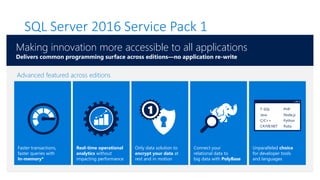
SQL Server 2016 Service Pack 1
Only data solution to
encrypt your data at
rest and in motion
Connect your
relational data to
big data with PolyBase
Real-time operational
analytics without
impacting performance
Faster transactions,
faster queries with
In-memory*
Unparalleled choice
for developer tools
and languages
1 T-SQL
Java
C/C++
C#/VB.NET
PHP
Node.js
Python
Ruby
Advanced featured across editions
Making innovation more accessible to all applications
Delivers common programming surface across editions—no application re-write
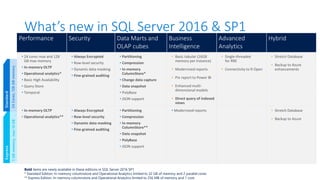
What’s new in SQL Server 2016 & SP1
Performance Security Data Marts and
OLAP cubes
Business
Intelligence
Advanced
Analytics
Hybrid
• 24 cores max and 128
GB max memory
• In-memory OLTP
• Operational analytics*
• Basic High Availability
• Query Store
• Temporal
• Always Encrypted
• Row-level security
• Dynamic data masking
• Fine-grained auditing
• Partitioning
• Compression
• In-memory
ColumnStore*
• Change data capture
• Data snapshot
• PolyBase
• JSON support
• Basic tabular (16GB
memory per instance)
• Modernized reports
• Pin report to Power BI
• Enhanced multi-
dimensional models
• Direct query of indexed
views
• Single-threaded
for RRE
• Connectivity to R Open
• Stretch Database
• Backup to Azure
enhancements
• In-memory OLTP
• Operational analytics**
• Always Encrypted
• Row-level security
• Dynamic data masking
• Fine-grained auditing
• Partitioning
• Compression
• In-memory
ColumnStore**
• Data snapshot
• PolyBase
• JSON support
• Modernized reports • Stretch Database
• Backup to Azure
ExpressStandard
24Cores,128GBmemory1GBmemory,max10GB
Bold items are newly available in these editions in SQL Server 2016 SP1
* Standard Edition: In-memory columnstore and Operational Analytics limited to 32 GB of memory and 2 parallel cores
** Express Edition: In-memory columnstore and Operational Analytics limited to 256 MB of memory and 1 core
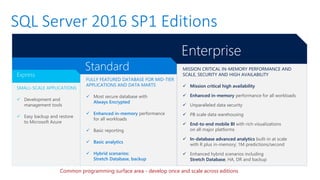
SQL Server 2016 SP1 Editions
Enterprise
Standard
Express
SMALL-SCALE APPLICATIONS
✓ Development and
management tools
✓ Easy backup and restore
to Microsoft Azure
FULLY FEATURED DATABASE FOR MID-TIER
APPLICATIONS AND DATA MARTS
✓ Most secure database with
Always Encrypted
✓ Enhanced in-memory performance
for all workloads
✓ Basic reporting
✓ Basic analytics
✓ Hybrid scenarios:
Stretch Database, backup
MISSION CRITICAL IN-MEMORY PERFORMANCE AND
SCALE, SECURITY AND HIGH AVAILABILITY
✓ Mission critical high availability
✓ Enhanced in-memory performance for all workloads
✓ Unparalleled data security
✓ PB scale data warehousing
✓ End-to-end mobile BI with rich visualizations
on all major platforms
✓ In-database advanced analytics built-in at scale
with R plus in-memory; 1M predictions/second
✓ Enhanced hybrid scenarios including
Stretch Database, HA, DR and backup
Common programming surface area - develop once and scale across editions
Scalability Enhancements in
Windows Server 2016
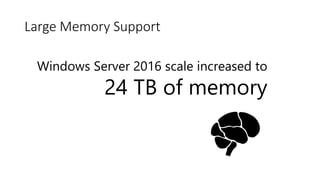
Windows Server 2016 scale increased to
24 TB of memory
Large Memory Support
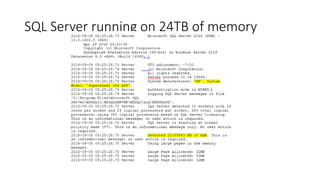
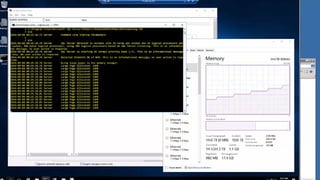
SQL Server running on 24TB of memory
Windows Server 2016 CPU scale increased to
640 cores
Increased CPU Support
Enhancements to
In-Memory OLTP
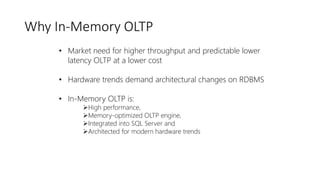
Why In-Memory OLTP
• Market need for higher throughput and predictable lower
latency OLTP at a lower cost
• Hardware trends demand architectural changes on RDBMS
• In-Memory OLTP is:
➢High performance,
➢Memory-optimized OLTP engine,
➢Integrated into SQL Server and
➢Architected for modern hardware trends
1
10
100
1000
10000
100000
1000000
1990
1991
1992
1993
1994
1994
1995
1996
1997
1998
1999
2000
2000
2001
2002
2004
2005
2007
2008
2009
2011
US$/GB
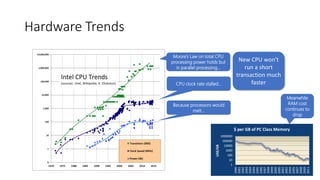
$ per GB of PC Class Memory
Meanwhile
RAM cost
continues to
drop
Moore’s Law on total CPU
processing power holds but
in parallel processing…
CPU clock rate stalled…
Because processors would
melt…
Hardware Trends
New CPU won’t
run a short
transaction much
faster
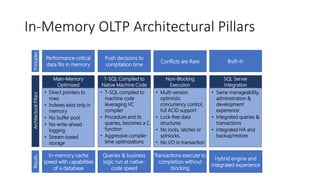
SQL Server
Integration
• Same manageability,
administration &
development
experience
• Integrated queries &
transactions
• Integrated HA and
backup/restore
Main-Memory
Optimized
• Direct pointers to
rows
• Indexes exist only in
memory
• No buffer pool
• No write-ahead
logging
• Stream-based
storage
Non-Blocking
Execution
• Multi-version
optimistic
concurrency control,
full ACID support
• Lock-free data
structures
• No locks, latches or
spinlocks,
• No I/O in transaction
T-SQL Compiled to
Native Machine Code
• T-SQL compiled to
machine code
leveraging VC
compiler
• Procedure and its
queries, becomes a C
function
• Aggressive compile-
time optimizations
In-Memory OLTP Architectural PillarsArchitecturalPillarsResults
Hybrid engine and
integrated experience
In-memory cache
speed with capabilities
of a database
Transactions execute to
completion without
blocking
Queries & business
logic run at native-
code speed
Principles
Performance-critical
data fits in memory
Conflicts are Rare
Push decisions to
compilation time
Built-In
Memory-optimized Table
Filegroup Data Filegroup
SQL Server.exe
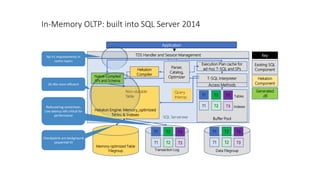
Hekaton Engine: Memory_optimized
Tables & Indexes
TDS Handler and Session Management
In-Memory OLTP: built into SQL Server 2014
Native-Compiled
SPs and Schema
Buffer Pool
Execution Plan cache for
ad-hoc T-SQL and SPs
Application
Transaction Log
Query
Interop
Non-durable
Table T1 T3T2
T1 T3T2
T1 T3T2
T1 T3T2
Tables
Indexes
T-SQL Interpreter
T1 T3T2
T1 T3T2
Access Methods
Parser,
Catalog,
Optimizer
Hekaton
Compiler
Hekaton
Component
Key
Existing SQL
Component
Generated
.dll
20-40x more efficient
Reduced log contention;
Low latency still critical for
performance
Checkpoints are background
sequential IO
No V1 improvements in
comm layers
SQL Server 2014
In-Memory OLTP (Hekaton)
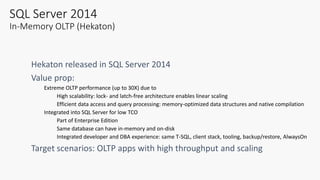
Extreme OLTP performance (up to 30X) due to
High scalability: lock- and latch-free architecture enables linear scaling
Efficient data access and query processing: memory-optimized data structures and native compilation
Integrated into SQL Server for low TCO
Part of Enterprise Edition
Same database can have in-memory and on-disk
Integrated developer and DBA experience: same T-SQL, client stack, tooling, backup/restore, AlwaysOn
SQL 2014 Feature Set
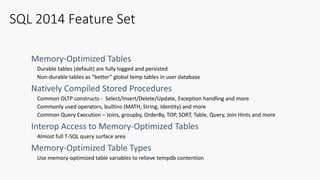
Durable tables (default) are fully logged and persisted
Non-durable tables as “better” global temp tables in user database
Common OLTP constructs - Select/Insert/Delete/Update, Exception handling and more
Commonly used operators, builtins (MATH, String, Identity) and more
Common Query Execution – Joins, groupby, OrderBy, TOP, SORT, Table, Query, Join Hints and more
Almost full T-SQL query surface area
Use memory-optimized table variables to relieve tempdb contention
01/11/2017 28
CREATE TABLE [Customer](
[CustomerID] INT NOT NULL
PRIMARY KEY NONCLUSTERED HASH WITH (BUCKET_COUNT = 1000000),
[Name] NVARCHAR(250) NOT NULL,
[CustomerSince] DATETIME NULL
INDEX [ICustomerSince] NONCLUSTERED
)
WITH (MEMORY_OPTIMIZED = ON, DURABILITY = SCHEMA_AND_DATA);
This table is memory
optimized
This table is durable
Non-durable tables:
DURABILITY=SCHEMA_ONLY
Indexes are specified inline
NONCLUSTERED indexes are
supported
Hash Index
BUCKET_COUNT 1-2X nr of
unique index key values
Demo
Table and Stored
Procedure Performance
Gain
01/11/2017 30
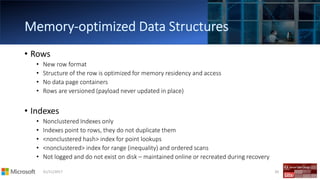
• Rows
• New row format
• Structure of the row is optimized for memory residency and access
• No data page containers
• Rows are versioned (payload never updated in place)
• Indexes
• Nonclustered Indexes only
• Indexes point to rows, they do not duplicate them
• <nonclustered hash> index for point lookups
• <nonclustered> index for range (inequality) and ordered scans
• Not logged and do not exist on disk – maintained online or recreated during recovery
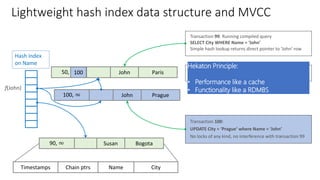
Lightweight hash index data structure and MVCC
50, ∞ John Paris
Timestamps NameChain ptrs City
Hash index
on Name
Transaction 100:
UPDATE City = ‘Prague’ where Name = ‘John’
No locks of any kind, no interference with transaction 99
100, ∞ John Prague
90, ∞ Susan Bogota
f(John)
100
Transaction 99: Running compiled query
SELECT City WHERE Name = ‘John’
Simple hash lookup returns direct pointer to ‘John’ row
Background operation will unlink and deallocate the old
‘John’ row after transaction 99 completes.
Hekaton Principle:
• Performance like a cache
• Functionality like a RDMBS
The Road Ahead:
In Memory OLTP in SQL 2016
01/11/2017 33
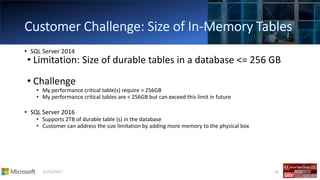
• SQL Server 2014
• Limitation: Size of durable tables in a database <= 256 GB
• Challenge
• My performance critical table(s) require > 256GB
• My performance critical tables are < 256GB but can exceed this limit in future
• SQL Server 2016
• Supports 2TB of durable table (s) in the database
• Customer can address the size limitation by adding more memory to the physical box
01/11/2017 34
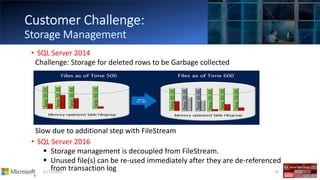
• SQL Server 2014
Challenge: Storage for deleted rows to be Garbage collected
Slow due to additional step with FileStream
• SQL Server 2016
▪ Storage management is decoupled from FileStream.
▪ Unused file(s) can be re-used immediately after they are de-referenced
from transaction log
•
01/11/2017 35
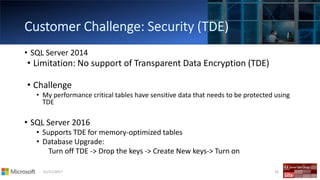
• SQL Server 2014
• Limitation: No support of Transparent Data Encryption (TDE)
• Challenge
• My performance critical tables have sensitive data that needs to be protected using
TDE
• SQL Server 2016
• Supports TDE for memory-optimized tables
• Database Upgrade:
Turn off TDE -> Drop the keys -> Create New keys-> Turn on
01/11/2017 36
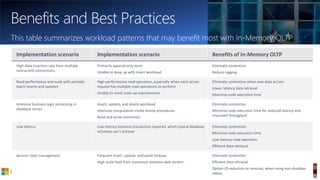
This table summarizes workload patterns that may benefit most with In-Memory OLTP
Implementation scenario Implementation scenario Benefits of In-Memory OLTP
High-data insertion rate from multiple
concurrent connections
Primarily append-only store
Unable to keep up with insert workload
Eliminate contention
Reduce logging
Read performance and scale with periodic
batch inserts and updates
High-performance read operation, especially when each server
request has multiple read operations to perform
Unable to meet scale-up requirements
Eliminate contention when new data arrives
Lower latency data retrieval
Minimize code execution time
Intensive business logic processing in
database server
Insert, update, and delete workload
Intensive computation inside stored procedures
Read and write contention
Eliminate contention
Minimize code execution time for reduced latency and
improved throughput
Low latency Low-latency business transaction required, which typical database
solutions can’t achieve
Eliminate contention
Minimize code execution time
Low-latency code execution
Efficient data retrieval
Session state management Frequent insert, update, and point lookups
High-scale load from numerous stateless web servers
Eliminate contention
Efficient data retrieval
Option IO reduction or removal, when using non-durables
tables
Benefits and Best Practices
01/11/2017 37
• Application development/modification
• Agile/iterative development methods
• Tuning application/database
• Responding to shifting data patterns
• Need to be able to modify the database schema
01/11/2017 39
• Covered
• Why Upgrade?
• Upgrade strategies
• Upgrade scenarios
• Lessons learned and recommended practices
• Not Covered
• End-to-end coverage or in-depth drilldown of all SQL Server features (2008 R2 to
2014/2016)
• Exhaustive list of all issues, no magic tricks
• Assumption
• Working knowledge – SQL Server 2000 & above…. ☺
• DBA/Developer/Architect/User/Geek
01/11/2017 40
• Why Upgrade?
• Building plan(s) & strateg(ies)…
• Upgrade Route….
• Tricks of the trade…..
• Best Practices……
• Round-up
01/11/2017 41
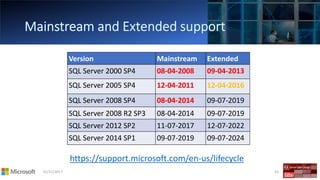
• End of mainstream support
• SQL Server 2000
• SQL Server 2005
• SQL Server 2008 & R2 …….(soon)
• Hardware upgrade
• Consolidation
• ….and
01/11/2017 42
Version Mainstream Extended
SQL Server 2000 SP4 08-04-2008 09-04-2013
SQL Server 2005 SP4 12-04-2011 12-04-2016
SQL Server 2008 SP4 08-04-2014 09-07-2019
SQL Server 2008 R2 SP3 08-04-2014 09-07-2019
SQL Server 2012 SP2 11-07-2017 12-07-2022
SQL Server 2014 SP1 09-07-2019 09-07-2024
https://support.microsoft.com/en-us/lifecycle
01/11/2017 43
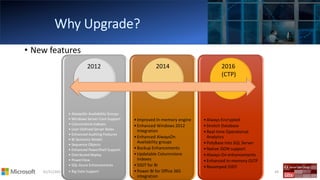
• New features
• AlwaysOn Availability Groups
• Windows Server Core Support
• Columnstore Indexes
• User-Defined Server Roles
• Enhanced Auditing Features
• BI Semantic Model
• Sequence Objects
• Enhanced PowerShell Support
• Distributed Replay
• PowerView
• SQL Azure Enhancements
• Big Data Support
•Improved In-memory engine
•Enhanced Windows 2012
Integration
•Enhanced AlwaysOn
Availability groups
•Backup Enhancements
•Updatable Columnstore
Indexes
•SSDT for BI
•Power BI for Office 365
integration
•Always Encrypted
•Stretch Database
•Real-time Operational
Analytics
•PolyBase into SQL Server
•Native JSON support
•Always-On enhancements
•Enhanced In-memory OLTP
•Revamped SSDT
2012 2014 2016
(CTP)
01/11/2017 44
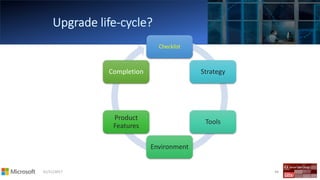
Checklist
Strategy
Tools
Environment
Product
Features
Completion
01/11/2017 45
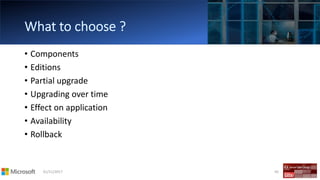
• Components
• Editions
• Partial upgrade
• Upgrading over time
• Effect on application
• Availability
• Rollback
01/11/2017 46
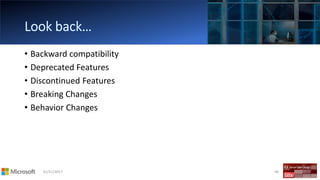
• Backward compatibility
• Deprecated Features
• Discontinued Features
• Breaking Changes
• Behavior Changes
01/11/2017 47
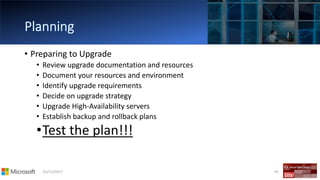
• Preparing to Upgrade
• Review upgrade documentation and resources
• Document your resources and environment
• Identify upgrade requirements
• Decide on upgrade strategy
• Upgrade High-Availability servers
• Establish backup and rollback plans
•Test the plan!!!
01/11/2017 48
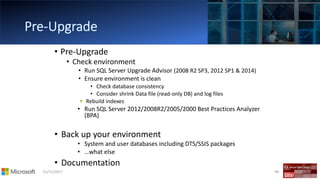
• Pre-Upgrade
• Check environment
• Run SQL Server Upgrade Advisor (2008 R2 SP3, 2012 SP1 & 2014)
• Ensure environment is clean
• Check database consistency
• Consider shrink Data file (read-only DB) and log files
Rebuild indexes
• Run SQL Server 2012/2008R2/2005/2000 Best Practices Analyzer
(BPA)
• Back up your environment
• System and user databases including DTS/SSIS packages
• …what else
• Documentation
01/11/2017 49
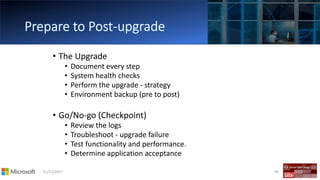
• The Upgrade
• Document every step
• System health checks
• Perform the upgrade - strategy
• Environment backup (pre to post)
• Go/No-go (Checkpoint)
• Review the logs
• Troubleshoot - upgrade failure
• Test functionality and performance.
• Determine application acceptance
01/11/2017 50
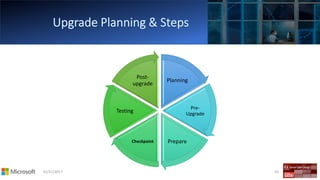
Planning
Pre-
Upgrade
PrepareCheckpoint
Testing
Post-
upgrade
01/11/2017 51
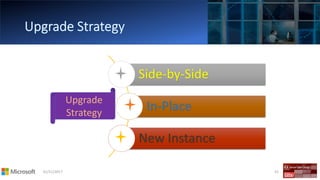
Side-by-Side
In-Place
New Instance
Upgrade
Strategy
01/11/2017 52
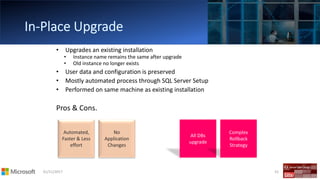
• Upgrades an existing installation
• Instance name remains the same after upgrade
• Old instance no longer exists
• User data and configuration is preserved
• Mostly automated process through SQL Server Setup
• Performed on same machine as existing installation
Pros & Cons.
01/11/2017 53
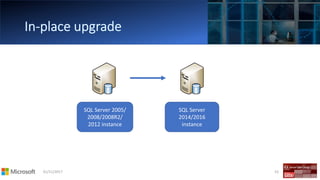
SQL Server 2005/
2008/2008R2/
2012 instance
SQL Server
2014/2016
instance
01/11/2017 54
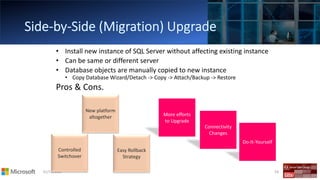
• Install new instance of SQL Server without affecting existing instance
• Can be same or different server
• Database objects are manually copied to new instance
• Copy Database Wizard/Detach -> Copy -> Attach/Backup -> Restore
Pros & Cons.
01/11/2017 55
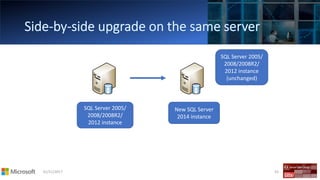
SQL Server 2005/
2008/2008R2/
2012 instance
New SQL Server
2014 instance
SQL Server 2005/
2008/2008R2/
2012 instance
(unchanged)
01/11/2017 56
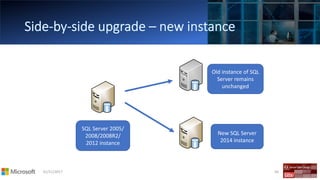
SQL Server 2005/
2008/2008R2/
2012 instance
New SQL Server
2014 instance
Old instance of SQL
Server remains
unchanged
01/11/2017 57
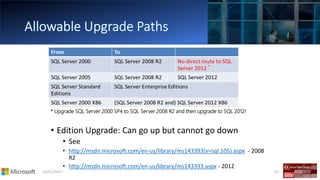
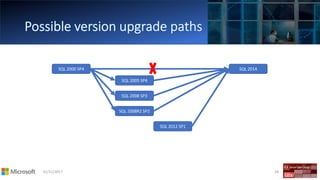
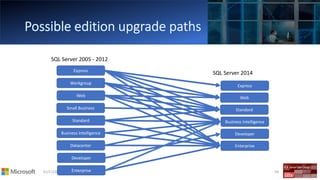
• Edition Upgrade: Can go up but cannot go down
• See
• http://msdn.microsoft.com/en-us/library/ms143393(v=sql.105).aspx - 2008
R2
• http://msdn.microsoft.com/en-us/library/ms143393.aspx - 2012
* Upgrade SQL Server 2000 SP4 to SQL Server 2008 R2 and then upgrade to SQL 2012!
01/11/2017 58
SQL 2000 SP4
SQL 2005 SP4
SQL 2008 SP3
SQL 2008R2 SP2
SQL 2012 SP1
SQL 2014
01/11/2017 59
Express
Workgroup
Web
Standard
Business Intelligence
Developer
Enterprise
Express
Web
Standard
Business Intelligence
Developer
Enterprise
Small Business
Datacenter
SQL Server 2014
SQL Server 2005 - 2012
01/11/2017 60
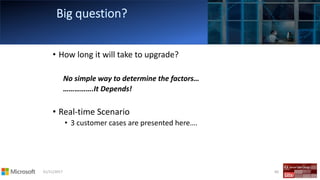
• How long it will take to upgrade?
No simple way to determine the factors…
…………….It Depends!
• Real-time Scenario
• 3 customer cases are presented here….
01/11/2017 61
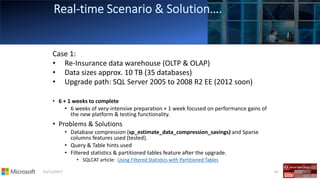
Case 1:
• Re-Insurance data warehouse (OLTP & OLAP)
• Data sizes approx. 10 TB (35 databases)
• Upgrade path: SQL Server 2005 to 2008 R2 EE (2012 soon)
• 6 + 1 weeks to complete
• 6 weeks of very-intensive preparation + 1 week focused on performance gains of
the new platform & testing functionality.
• Problems & Solutions
• Database compression (sp_estimate_data_compression_savings) and Sparse
columns features used (tested).
• Query & Table hints used
• Filtered statistics & partitioned tables feature after the upgrade.
• SQLCAT article: Using Filtered Statistics with Partitioned Tables
01/11/2017 62
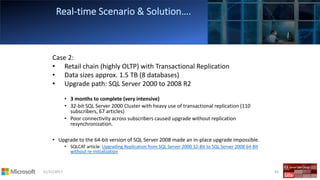
Case 2:
• Retail chain (highly OLTP) with Transactional Replication
• Data sizes approx. 1.5 TB (8 databases)
• Upgrade path: SQL Server 2000 to 2008 R2
• 3 months to complete (very intensive)
• 32-bit SQL Server 2000 Cluster with heavy use of transactional replication (110
subscribers, 67 articles)
• Poor connectivity across subscribers caused upgrade without replication
resynchronization.
• Upgrade to the 64-bit version of SQL Server 2008 made an in-place upgrade impossible.
• SQLCAT article: Upgrading Replication from SQL Server 2000 32-Bit to SQL Server 2008 64-Bit
without re-initialization
01/11/2017 63
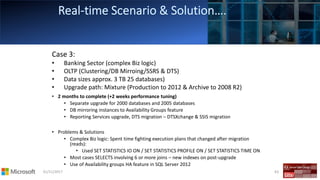
Case 3:
• Banking Sector (complex Biz logic)
• OLTP (Clustering/DB Mirroing/SSRS & DTS)
• Data sizes approx. 3 TB 25 databases)
• Upgrade path: Mixture (Production to 2012 & Archive to 2008 R2)
• 2 months to complete (+2 weeks performance tuning)
• Separate upgrade for 2000 databases and 2005 databases
• DB mirroring instances to Availability Groups feature
• Reporting Services upgrade, DTS migration – DTSXchange & SSIS migration
• Problems & Solutions
• Complex Biz logic: Spent time fighting execution plans that changed after migration
(reads):
• Used SET STATISTICS IO ON / SET STATISTICS PROFILE ON / SET STATISTICS TIME ON
• Most cases SELECTS involving 6 or more joins – new indexes on post-upgrade
• Use of Availability groups HA feature in SQL Server 2012
01/11/2017 64
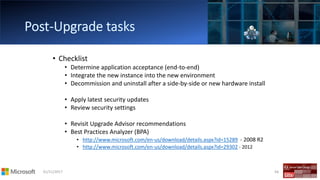
• Checklist
• Determine application acceptance (end-to-end)
• Integrate the new instance into the new environment
• Decommission and uninstall after a side-by-side or new hardware install
• Apply latest security updates
• Review security settings
• Revisit Upgrade Advisor recommendations
• Best Practices Analyzer (BPA)
• http://www.microsoft.com/en-us/download/details.aspx?id=15289 - 2008 R2
• http://www.microsoft.com/en-us/download/details.aspx?id=29302 - 2012
01/11/2017 65
01/11/2017 66
• Documented approach
• Review upgrade documentation and resources
• Document your resources and environment
• Identify upgrade requirements
• Decide on upgrade strategy
• Upgrade High-Availability servers
• Establish backup and rollback plans
•Test the plan!!!

Modernization sql server 2016

  • 1.
  • 2.
    01/11/2017 2 Time Agenda 09.00- 10.00 Registration 10.00 - 12.00 SQL Modernization: SQL Server 2016 12.00 - 13.00 Lunch 12.00 - 15.00 Microsoft Assessment and Planning (MAP) for SQL Server 12.00 - 13.00 Introducing R Services in SQL Server
  • 3.
  • 4.
    01/11/2017 4 • SQLServer 2016 Overview and Editions • SQL Server Improvement • SQL Server and Windows • In Memory OLTP • Upgrade to SQL Server 2016 • Why Upgrade • Upgrade Life Cycle • Planning • Upgrade Advisor
  • 6.
    The Evolution &Improvement of SQL Server
  • 7.
    01/11/2017 7 SQL Server 2008 SQLServer 2008 R2 SQL Server 2000XML ● KPIs Compression ● Policy-Based Mgmt ● Programmability PowerPivot ● SharePoint Integration ● Master Data Services SQL Server 2012 AlwaysOn ● ColumnStore Index ● Data Quality Services ● Power View ● Cloud Connectivity SQL Server 2014 In-Memory Across Workloads ● Performance & Scale ● Hybrid Cloud Optimized ● HDInsight ● Cloud BI Management Studio ● Mirroring SQL Server 2005 SQL Server 2016 Enhanced Always On ● In-Memory OLTP ● Stretch DB ● Temporal Tables ● Enhanced Backup to Cloud ● Polybase ● Real- Time Operational Analytics ● Row-Level Security ● Query Store ● R Services● Always Encrypted ● Mobile BI The evolution of Microsoft SQL Server
  • 8.
    Mission-critical performance Performance SecurityAvailability Scalability In-Memory OLTP enhancements Greater T-SQL surface area, maximum of memory supported, and higher number of parallel CPUs Operational Analytics Insights on operational data; works with In-Memory OLTP and disk- based OLTP Query Store Monitored, optimized query plans Always Encrypted Sensitive data remains encrypted at all times, with ability to query Dynamic Data Masking Real-time obfuscation of data to prevent unauthorized access Row-Level Security Fine-grained access control for table rows Other enhancements Audit success/failure of database operations TDE support for storage of In-Memory OLTP tables Enhanced auditing for OLTP with ability to track history of record changes Basic Availability Groups With SQL Server 2016 Standard Edition Enhanced Always On Distributed Availability Groups, automatic replica seeding, distributed transactions, automatic failover, load balancing, manageability Backup enhancements Managed backup to Azure, Database Recovery Advisor Windows Server Support Support of new hardware innovations and features in Windows Server 2016 Live migration Faster live migration, live migration for non-clustered VMs Scalability enhancements Hardware acceleration for TDE, parallelized decryption, TempDB optimization, and more
  • 9.
    Store your data– make it accessible Analyze data Share insights PolyBase Insights from data across SQL Server and Hadoop with the simplicity of T- SQL Data Warehousing Modern data warehouse with Big Data integration, Fast Track Data Warehouse configurations, MPP solution in the Cloud Data formats and types Import/export JSON, XML, spatial, FILESTREAM, RBS Integration Services enhancements Interoperability with Azure Data Factory, Azure Storage Connector, and HDInsight New and enhanced data connectors: HDFS, JSON, Oracle/Teradata, and more Enhanced MDS Excel add-in improvements, more- granular security roles, archival options for transaction logs, and reuse entities across models Real-Time Operational Analytics Running of analytical workloads concurrently with OLTP workloads through columnstore indexes Analysis Services enhancements Many-to-many support with bi-directional cross filtering, improved performance Advanced Analytics with R Integrated R Services, predictive analytics, big data analytics Mobile BI Mobile reports on SSRS with Mobile Report Publisher Reporting Services Modern web browser support (HTML5, CSS3) Power BI Connection of Power BI to on-premises SSAS cubes with Power BI On-premises Data Gateway Deeper insights across data
  • 10.
    Hybrid IT featuresSimplicity Consistency Stretch Database Stretch operational tables in a secure manner into Azure for cost-effective historic data availability. Works with Always Encrypted and Row-Level Security. High Availability Distributed availability groups add flexibility to HA/DR. Add Azure Replica Wizard makes it easy to implement. Enhanced Backup to Azure Enhanced backup includes faster restore times and 50% reduction in storage. Supports larger DBs with block blobs and custom backup schedule with local staging. Easy migration of on-premises SQL Server Simple point-and-click migration to Azure Modernize to SQL Server 2016 with Data Migration Assistant Upgrade to a modern data platform by detecting compatibility issues that can impact database functionality on your new version of SQL Server. Get recommendations for performance and reliability improvements for the target environment. Common development, management, and identity tools Including Active Directory, Visual Studio, Hyper-V, and System Center Consistent experience from SQL Server on-premises to Microsoft Azure IaaS and PaaS Hybrid IT
  • 11.
  • 12.
    SQL Server 2016Service Pack 1 Only data solution to encrypt your data at rest and in motion Connect your relational data to big data with PolyBase Real-time operational analytics without impacting performance Faster transactions, faster queries with In-memory* Unparalleled choice for developer tools and languages 1 T-SQL Java C/C++ C#/VB.NET PHP Node.js Python Ruby Advanced featured across editions Making innovation more accessible to all applications Delivers common programming surface across editions—no application re-write
  • 13.
    What’s new inSQL Server 2016 & SP1 Performance Security Data Marts and OLAP cubes Business Intelligence Advanced Analytics Hybrid • 24 cores max and 128 GB max memory • In-memory OLTP • Operational analytics* • Basic High Availability • Query Store • Temporal • Always Encrypted • Row-level security • Dynamic data masking • Fine-grained auditing • Partitioning • Compression • In-memory ColumnStore* • Change data capture • Data snapshot • PolyBase • JSON support • Basic tabular (16GB memory per instance) • Modernized reports • Pin report to Power BI • Enhanced multi- dimensional models • Direct query of indexed views • Single-threaded for RRE • Connectivity to R Open • Stretch Database • Backup to Azure enhancements • In-memory OLTP • Operational analytics** • Always Encrypted • Row-level security • Dynamic data masking • Fine-grained auditing • Partitioning • Compression • In-memory ColumnStore** • Data snapshot • PolyBase • JSON support • Modernized reports • Stretch Database • Backup to Azure ExpressStandard 24Cores,128GBmemory1GBmemory,max10GB Bold items are newly available in these editions in SQL Server 2016 SP1 * Standard Edition: In-memory columnstore and Operational Analytics limited to 32 GB of memory and 2 parallel cores ** Express Edition: In-memory columnstore and Operational Analytics limited to 256 MB of memory and 1 core
  • 14.
    SQL Server 2016SP1 Editions Enterprise Standard Express SMALL-SCALE APPLICATIONS ✓ Development and management tools ✓ Easy backup and restore to Microsoft Azure FULLY FEATURED DATABASE FOR MID-TIER APPLICATIONS AND DATA MARTS ✓ Most secure database with Always Encrypted ✓ Enhanced in-memory performance for all workloads ✓ Basic reporting ✓ Basic analytics ✓ Hybrid scenarios: Stretch Database, backup MISSION CRITICAL IN-MEMORY PERFORMANCE AND SCALE, SECURITY AND HIGH AVAILABILITY ✓ Mission critical high availability ✓ Enhanced in-memory performance for all workloads ✓ Unparalleled data security ✓ PB scale data warehousing ✓ End-to-end mobile BI with rich visualizations on all major platforms ✓ In-database advanced analytics built-in at scale with R plus in-memory; 1M predictions/second ✓ Enhanced hybrid scenarios including Stretch Database, HA, DR and backup Common programming surface area - develop once and scale across editions
  • 15.
  • 16.
    Windows Server 2016scale increased to 24 TB of memory Large Memory Support
  • 17.
    SQL Server runningon 24TB of memory
  • 19.
    Windows Server 2016CPU scale increased to 640 cores Increased CPU Support
  • 20.
  • 21.
    Why In-Memory OLTP •Market need for higher throughput and predictable lower latency OLTP at a lower cost • Hardware trends demand architectural changes on RDBMS • In-Memory OLTP is: ➢High performance, ➢Memory-optimized OLTP engine, ➢Integrated into SQL Server and ➢Architected for modern hardware trends
  • 22.
    1 10 100 1000 10000 100000 1000000 1990 1991 1992 1993 1994 1994 1995 1996 1997 1998 1999 2000 2000 2001 2002 2004 2005 2007 2008 2009 2011 US$/GB $ per GBof PC Class Memory Meanwhile RAM cost continues to drop Moore’s Law on total CPU processing power holds but in parallel processing… CPU clock rate stalled… Because processors would melt… Hardware Trends New CPU won’t run a short transaction much faster
  • 23.
    SQL Server Integration • Samemanageability, administration & development experience • Integrated queries & transactions • Integrated HA and backup/restore Main-Memory Optimized • Direct pointers to rows • Indexes exist only in memory • No buffer pool • No write-ahead logging • Stream-based storage Non-Blocking Execution • Multi-version optimistic concurrency control, full ACID support • Lock-free data structures • No locks, latches or spinlocks, • No I/O in transaction T-SQL Compiled to Native Machine Code • T-SQL compiled to machine code leveraging VC compiler • Procedure and its queries, becomes a C function • Aggressive compile- time optimizations In-Memory OLTP Architectural PillarsArchitecturalPillarsResults Hybrid engine and integrated experience In-memory cache speed with capabilities of a database Transactions execute to completion without blocking Queries & business logic run at native- code speed Principles Performance-critical data fits in memory Conflicts are Rare Push decisions to compilation time Built-In
  • 24.
    Memory-optimized Table Filegroup DataFilegroup SQL Server.exe Hekaton Engine: Memory_optimized Tables & Indexes TDS Handler and Session Management In-Memory OLTP: built into SQL Server 2014 Native-Compiled SPs and Schema Buffer Pool Execution Plan cache for ad-hoc T-SQL and SPs Application Transaction Log Query Interop Non-durable Table T1 T3T2 T1 T3T2 T1 T3T2 T1 T3T2 Tables Indexes T-SQL Interpreter T1 T3T2 T1 T3T2 Access Methods Parser, Catalog, Optimizer Hekaton Compiler Hekaton Component Key Existing SQL Component Generated .dll 20-40x more efficient Reduced log contention; Low latency still critical for performance Checkpoints are background sequential IO No V1 improvements in comm layers
  • 26.
    SQL Server 2014 In-MemoryOLTP (Hekaton) Extreme OLTP performance (up to 30X) due to High scalability: lock- and latch-free architecture enables linear scaling Efficient data access and query processing: memory-optimized data structures and native compilation Integrated into SQL Server for low TCO Part of Enterprise Edition Same database can have in-memory and on-disk Integrated developer and DBA experience: same T-SQL, client stack, tooling, backup/restore, AlwaysOn
  • 27.
    SQL 2014 FeatureSet Durable tables (default) are fully logged and persisted Non-durable tables as “better” global temp tables in user database Common OLTP constructs - Select/Insert/Delete/Update, Exception handling and more Commonly used operators, builtins (MATH, String, Identity) and more Common Query Execution – Joins, groupby, OrderBy, TOP, SORT, Table, Query, Join Hints and more Almost full T-SQL query surface area Use memory-optimized table variables to relieve tempdb contention
  • 28.
    01/11/2017 28 CREATE TABLE[Customer]( [CustomerID] INT NOT NULL PRIMARY KEY NONCLUSTERED HASH WITH (BUCKET_COUNT = 1000000), [Name] NVARCHAR(250) NOT NULL, [CustomerSince] DATETIME NULL INDEX [ICustomerSince] NONCLUSTERED ) WITH (MEMORY_OPTIMIZED = ON, DURABILITY = SCHEMA_AND_DATA); This table is memory optimized This table is durable Non-durable tables: DURABILITY=SCHEMA_ONLY Indexes are specified inline NONCLUSTERED indexes are supported Hash Index BUCKET_COUNT 1-2X nr of unique index key values
  • 29.
  • 30.
    01/11/2017 30 • Rows •New row format • Structure of the row is optimized for memory residency and access • No data page containers • Rows are versioned (payload never updated in place) • Indexes • Nonclustered Indexes only • Indexes point to rows, they do not duplicate them • <nonclustered hash> index for point lookups • <nonclustered> index for range (inequality) and ordered scans • Not logged and do not exist on disk – maintained online or recreated during recovery
  • 31.
    Lightweight hash indexdata structure and MVCC 50, ∞ John Paris Timestamps NameChain ptrs City Hash index on Name Transaction 100: UPDATE City = ‘Prague’ where Name = ‘John’ No locks of any kind, no interference with transaction 99 100, ∞ John Prague 90, ∞ Susan Bogota f(John) 100 Transaction 99: Running compiled query SELECT City WHERE Name = ‘John’ Simple hash lookup returns direct pointer to ‘John’ row Background operation will unlink and deallocate the old ‘John’ row after transaction 99 completes. Hekaton Principle: • Performance like a cache • Functionality like a RDMBS
  • 32.
    The Road Ahead: InMemory OLTP in SQL 2016
  • 33.
    01/11/2017 33 • SQLServer 2014 • Limitation: Size of durable tables in a database <= 256 GB • Challenge • My performance critical table(s) require > 256GB • My performance critical tables are < 256GB but can exceed this limit in future • SQL Server 2016 • Supports 2TB of durable table (s) in the database • Customer can address the size limitation by adding more memory to the physical box
  • 34.
    01/11/2017 34 • SQLServer 2014 Challenge: Storage for deleted rows to be Garbage collected Slow due to additional step with FileStream • SQL Server 2016 ▪ Storage management is decoupled from FileStream. ▪ Unused file(s) can be re-used immediately after they are de-referenced from transaction log •
  • 35.
    01/11/2017 35 • SQLServer 2014 • Limitation: No support of Transparent Data Encryption (TDE) • Challenge • My performance critical tables have sensitive data that needs to be protected using TDE • SQL Server 2016 • Supports TDE for memory-optimized tables • Database Upgrade: Turn off TDE -> Drop the keys -> Create New keys-> Turn on
  • 36.
    01/11/2017 36 This tablesummarizes workload patterns that may benefit most with In-Memory OLTP Implementation scenario Implementation scenario Benefits of In-Memory OLTP High-data insertion rate from multiple concurrent connections Primarily append-only store Unable to keep up with insert workload Eliminate contention Reduce logging Read performance and scale with periodic batch inserts and updates High-performance read operation, especially when each server request has multiple read operations to perform Unable to meet scale-up requirements Eliminate contention when new data arrives Lower latency data retrieval Minimize code execution time Intensive business logic processing in database server Insert, update, and delete workload Intensive computation inside stored procedures Read and write contention Eliminate contention Minimize code execution time for reduced latency and improved throughput Low latency Low-latency business transaction required, which typical database solutions can’t achieve Eliminate contention Minimize code execution time Low-latency code execution Efficient data retrieval Session state management Frequent insert, update, and point lookups High-scale load from numerous stateless web servers Eliminate contention Efficient data retrieval Option IO reduction or removal, when using non-durables tables Benefits and Best Practices
  • 37.
    01/11/2017 37 • Applicationdevelopment/modification • Agile/iterative development methods • Tuning application/database • Responding to shifting data patterns • Need to be able to modify the database schema
  • 39.
    01/11/2017 39 • Covered •Why Upgrade? • Upgrade strategies • Upgrade scenarios • Lessons learned and recommended practices • Not Covered • End-to-end coverage or in-depth drilldown of all SQL Server features (2008 R2 to 2014/2016) • Exhaustive list of all issues, no magic tricks • Assumption • Working knowledge – SQL Server 2000 & above…. ☺ • DBA/Developer/Architect/User/Geek
  • 40.
    01/11/2017 40 • WhyUpgrade? • Building plan(s) & strateg(ies)… • Upgrade Route…. • Tricks of the trade….. • Best Practices…… • Round-up
  • 41.
    01/11/2017 41 • Endof mainstream support • SQL Server 2000 • SQL Server 2005 • SQL Server 2008 & R2 …….(soon) • Hardware upgrade • Consolidation • ….and
  • 42.
    01/11/2017 42 Version MainstreamExtended SQL Server 2000 SP4 08-04-2008 09-04-2013 SQL Server 2005 SP4 12-04-2011 12-04-2016 SQL Server 2008 SP4 08-04-2014 09-07-2019 SQL Server 2008 R2 SP3 08-04-2014 09-07-2019 SQL Server 2012 SP2 11-07-2017 12-07-2022 SQL Server 2014 SP1 09-07-2019 09-07-2024 https://support.microsoft.com/en-us/lifecycle
  • 43.
    01/11/2017 43 • Newfeatures • AlwaysOn Availability Groups • Windows Server Core Support • Columnstore Indexes • User-Defined Server Roles • Enhanced Auditing Features • BI Semantic Model • Sequence Objects • Enhanced PowerShell Support • Distributed Replay • PowerView • SQL Azure Enhancements • Big Data Support •Improved In-memory engine •Enhanced Windows 2012 Integration •Enhanced AlwaysOn Availability groups •Backup Enhancements •Updatable Columnstore Indexes •SSDT for BI •Power BI for Office 365 integration •Always Encrypted •Stretch Database •Real-time Operational Analytics •PolyBase into SQL Server •Native JSON support •Always-On enhancements •Enhanced In-memory OLTP •Revamped SSDT 2012 2014 2016 (CTP)
  • 44.
  • 45.
    01/11/2017 45 • Components •Editions • Partial upgrade • Upgrading over time • Effect on application • Availability • Rollback
  • 46.
    01/11/2017 46 • Backwardcompatibility • Deprecated Features • Discontinued Features • Breaking Changes • Behavior Changes
  • 47.
    01/11/2017 47 • Preparingto Upgrade • Review upgrade documentation and resources • Document your resources and environment • Identify upgrade requirements • Decide on upgrade strategy • Upgrade High-Availability servers • Establish backup and rollback plans •Test the plan!!!
  • 48.
    01/11/2017 48 • Pre-Upgrade •Check environment • Run SQL Server Upgrade Advisor (2008 R2 SP3, 2012 SP1 & 2014) • Ensure environment is clean • Check database consistency • Consider shrink Data file (read-only DB) and log files Rebuild indexes • Run SQL Server 2012/2008R2/2005/2000 Best Practices Analyzer (BPA) • Back up your environment • System and user databases including DTS/SSIS packages • …what else • Documentation
  • 49.
    01/11/2017 49 • TheUpgrade • Document every step • System health checks • Perform the upgrade - strategy • Environment backup (pre to post) • Go/No-go (Checkpoint) • Review the logs • Troubleshoot - upgrade failure • Test functionality and performance. • Determine application acceptance
  • 50.
  • 51.
  • 52.
    01/11/2017 52 • Upgradesan existing installation • Instance name remains the same after upgrade • Old instance no longer exists • User data and configuration is preserved • Mostly automated process through SQL Server Setup • Performed on same machine as existing installation Pros & Cons.
  • 53.
    01/11/2017 53 SQL Server2005/ 2008/2008R2/ 2012 instance SQL Server 2014/2016 instance
  • 54.
    01/11/2017 54 • Installnew instance of SQL Server without affecting existing instance • Can be same or different server • Database objects are manually copied to new instance • Copy Database Wizard/Detach -> Copy -> Attach/Backup -> Restore Pros & Cons.
  • 55.
    01/11/2017 55 SQL Server2005/ 2008/2008R2/ 2012 instance New SQL Server 2014 instance SQL Server 2005/ 2008/2008R2/ 2012 instance (unchanged)
  • 56.
    01/11/2017 56 SQL Server2005/ 2008/2008R2/ 2012 instance New SQL Server 2014 instance Old instance of SQL Server remains unchanged
  • 57.
    01/11/2017 57 • EditionUpgrade: Can go up but cannot go down • See • http://msdn.microsoft.com/en-us/library/ms143393(v=sql.105).aspx - 2008 R2 • http://msdn.microsoft.com/en-us/library/ms143393.aspx - 2012 * Upgrade SQL Server 2000 SP4 to SQL Server 2008 R2 and then upgrade to SQL 2012!
  • 58.
    01/11/2017 58 SQL 2000SP4 SQL 2005 SP4 SQL 2008 SP3 SQL 2008R2 SP2 SQL 2012 SP1 SQL 2014
  • 59.
    01/11/2017 59 Express Workgroup Web Standard Business Intelligence Developer Enterprise Express Web Standard BusinessIntelligence Developer Enterprise Small Business Datacenter SQL Server 2014 SQL Server 2005 - 2012
  • 60.
    01/11/2017 60 • Howlong it will take to upgrade? No simple way to determine the factors… …………….It Depends! • Real-time Scenario • 3 customer cases are presented here….
  • 61.
    01/11/2017 61 Case 1: •Re-Insurance data warehouse (OLTP & OLAP) • Data sizes approx. 10 TB (35 databases) • Upgrade path: SQL Server 2005 to 2008 R2 EE (2012 soon) • 6 + 1 weeks to complete • 6 weeks of very-intensive preparation + 1 week focused on performance gains of the new platform & testing functionality. • Problems & Solutions • Database compression (sp_estimate_data_compression_savings) and Sparse columns features used (tested). • Query & Table hints used • Filtered statistics & partitioned tables feature after the upgrade. • SQLCAT article: Using Filtered Statistics with Partitioned Tables
  • 62.
    01/11/2017 62 Case 2: •Retail chain (highly OLTP) with Transactional Replication • Data sizes approx. 1.5 TB (8 databases) • Upgrade path: SQL Server 2000 to 2008 R2 • 3 months to complete (very intensive) • 32-bit SQL Server 2000 Cluster with heavy use of transactional replication (110 subscribers, 67 articles) • Poor connectivity across subscribers caused upgrade without replication resynchronization. • Upgrade to the 64-bit version of SQL Server 2008 made an in-place upgrade impossible. • SQLCAT article: Upgrading Replication from SQL Server 2000 32-Bit to SQL Server 2008 64-Bit without re-initialization
  • 63.
    01/11/2017 63 Case 3: •Banking Sector (complex Biz logic) • OLTP (Clustering/DB Mirroing/SSRS & DTS) • Data sizes approx. 3 TB 25 databases) • Upgrade path: Mixture (Production to 2012 & Archive to 2008 R2) • 2 months to complete (+2 weeks performance tuning) • Separate upgrade for 2000 databases and 2005 databases • DB mirroring instances to Availability Groups feature • Reporting Services upgrade, DTS migration – DTSXchange & SSIS migration • Problems & Solutions • Complex Biz logic: Spent time fighting execution plans that changed after migration (reads): • Used SET STATISTICS IO ON / SET STATISTICS PROFILE ON / SET STATISTICS TIME ON • Most cases SELECTS involving 6 or more joins – new indexes on post-upgrade • Use of Availability groups HA feature in SQL Server 2012
  • 64.
    01/11/2017 64 • Checklist •Determine application acceptance (end-to-end) • Integrate the new instance into the new environment • Decommission and uninstall after a side-by-side or new hardware install • Apply latest security updates • Review security settings • Revisit Upgrade Advisor recommendations • Best Practices Analyzer (BPA) • http://www.microsoft.com/en-us/download/details.aspx?id=15289 - 2008 R2 • http://www.microsoft.com/en-us/download/details.aspx?id=29302 - 2012
  • 65.
  • 66.
    01/11/2017 66 • Documentedapproach • Review upgrade documentation and resources • Document your resources and environment • Identify upgrade requirements • Decide on upgrade strategy • Upgrade High-Availability servers • Establish backup and rollback plans •Test the plan!!!