Q4: How did you use media
technologies in the construction
and research, planning and
evaluation stages?
Ellie de Rome and Katy Gopsill
Research and
Planning
Blogger
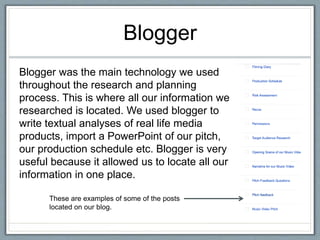
Blogger was the main technology we used
throughout the research and planning
process. This is where all our information we
researched is located. We used blogger to
write textual analyses of real life media
products, import a PowerPoint of our pitch,
our production schedule etc. Blogger is very
useful because it allowed us to locate all our
information in one place.
These are examples of some of the posts
located on our blog.
YouTube
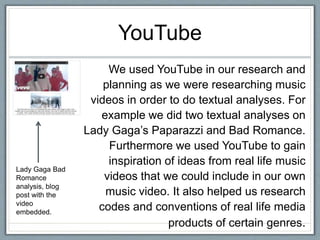
We used YouTube in our research and
planning as we were researching music
videos in order to do textual analyses. For
example we did two textual analyses on
Lady Gaga’s Paparazzi and Bad Romance.
Furthermore we used YouTube to gain
inspiration of ideas from real life music
videos that we could include in our own
music video. It also helped us research
codes and conventions of real life media
products of certain genres.
Lady Gaga Bad
Romance
analysis, blog
post with the
video
embedded.
Microsoft Word
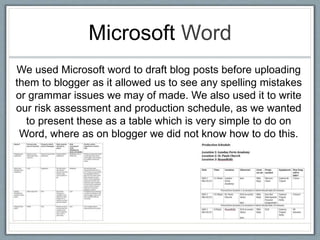
We used Microsoft word to draft blog posts before uploading
them to blogger as it allowed us to see any spelling mistakes
or grammar issues we may of made. We also used it to write
our risk assessment and production schedule, as we wanted
to present these as a table which is very simple to do on
Word, where as on blogger we did not know how to do this.
PowerPoint and
Slideshare
PowerPoint was used to create the
pitch which we presented to our
media class and teacher to gain
feedback. This was a good way of
presenting our ideas because it is
interesting to watch and an effective
way to present ideas and include
pictures. We then imported this
onto Slideshare, a website that
allowed us to upload the
PowerPoint directly onto blogger.
The PowerPoint can be
watched on blogger by
pressing the arrows to go
forward or back
Websites
Apart from YouTube, there were two other websites we
used during our research and planning stage.
YouGov: YouGov was used to
generate the typical target
audience for Beyoncé which then
gave us a rough idea on the type
of audience we would be targeting
with our music video.
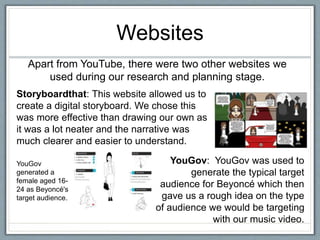
Storyboardthat: This website allowed us to
create a digital storyboard. We chose this
was more effective than drawing our own as
it was a lot neater and the narrative was
much clearer and easier to understand.
YouGov
generated a
female aged 16-
24 as Beyoncé's
target audience.
Construction
Camera
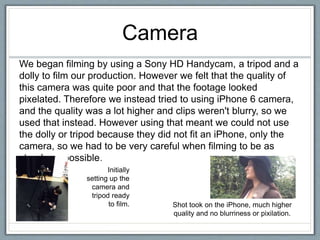
We began filming by using a Sony HD Handycam, a tripod and a
dolly to film our production. However we felt that the quality of
this camera was quite poor and that the footage looked
pixelated. Therefore we instead tried to using iPhone 6 camera,
and the quality was a lot higher and clips weren't blurry, so we
used that instead. However using that meant we could not use
the dolly or tripod because they did not fit an iPhone, only the
camera, so we had to be very careful when filming to be as
steady as possible.
Shot took on the iPhone, much higher
quality and no blurriness or pixilation.
Initially
setting up the
camera and
tripod ready
to film.
Premiere pro
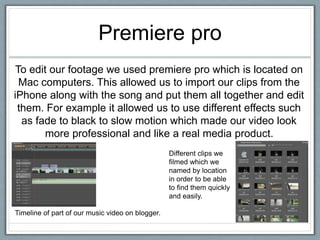
To edit our footage we used premiere pro which is located on
Mac computers. This allowed us to import our clips from the
iPhone along with the song and put them all together and edit
them. For example it allowed us to use different effects such
as fade to black to slow motion which made our video look
more professional and like a real media product.
Timeline of part of our music video on blogger.
Different clips we
filmed which we
named by location
in order to be able
to find them quickly
and easily.
Photoshop
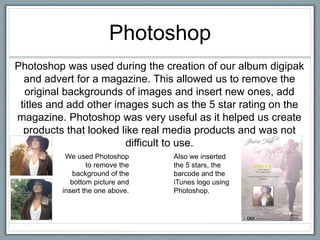
Photoshop was used during the creation of our album digipak
and advert for a magazine. This allowed us to remove the
original backgrounds of images and insert new ones, add
titles and add other images such as the 5 star rating on the
magazine. Photoshop was very useful as it helped us create
products that looked like real media products and was not
difficult to use.
We used Photoshop
to remove the
background of the
bottom picture and
insert the one above.
Also we inserted
the 5 stars, the
barcode and the
iTunes logo using
Photoshop.
1001fonts
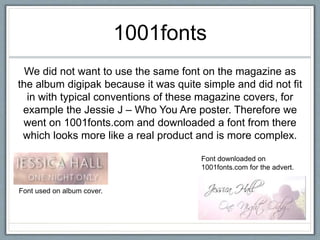
We did not want to use the same font on the magazine as
the album digipak because it was quite simple and did not fit
in with typical conventions of these magazine covers, for
example the Jessie J – Who You Are poster. Therefore we
went on 1001fonts.com and downloaded a font from there
which looks more like a real product and is more complex.
Font used on album cover.
Font downloaded on
1001fonts.com for the advert.
Evaluation
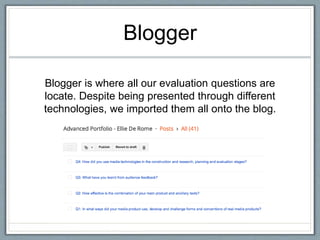
Blogger
Blogger is where all our evaluation questions are
locate. Despite being presented through different
technologies, we imported them all onto the blog.
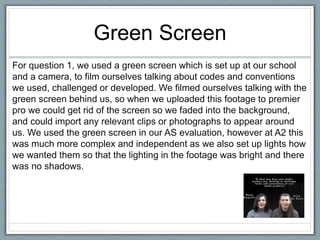
Green Screen
For question 1, we used a green screen which is set up at our school
and a camera, to film ourselves talking about codes and conventions
we used, challenged or developed. We filmed ourselves talking with the
green screen behind us, so when we uploaded this footage to premier
pro we could get rid of the screen so we faded into the background,
and could import any relevant clips or photographs to appear around
us. We used the green screen in our AS evaluation, however at A2 this
was much more complex and independent as we also set up lights how
we wanted them so that the lighting in the footage was bright and there
was no shadows.
Prezi
For question 2 we used a prezi
to present our ideas. A prezi is a
presentation tool that can be
used instead of traditional slide
making programs such as
PowerPoint. Instead of slides, a
prezi is one large canvas that
allows you to pan and zoom to
various parts of the canvas and
emphasize the ideas presented
there.
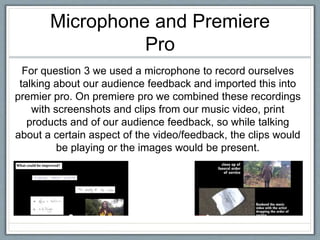
Microphone and Premiere
Pro
For question 3 we used a microphone to record ourselves
talking about our audience feedback and imported this into
premier pro. On premiere pro we combined these recordings
with screenshots and clips from our music video, print
products and of our audience feedback, so while talking
about a certain aspect of the video/feedback, the clips would
be playing or the images would be present.
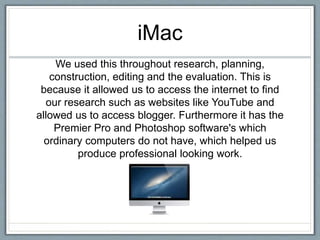
iMac
We used this throughout research, planning,
construction, editing and the evaluation. This is
because it allowed us to access the internet to find
our research such as websites like YouTube and
allowed us to access blogger. Furthermore it has the
Premier Pro and Photoshop software's which
ordinary computers do not have, which helped us
produce professional looking work.

Evaluation question 4

  • 1.
    Q4: How didyou use media technologies in the construction and research, planning and evaluation stages? Ellie de Rome and Katy Gopsill
  • 2.
  • 3.
    Blogger Blogger was themain technology we used throughout the research and planning process. This is where all our information we researched is located. We used blogger to write textual analyses of real life media products, import a PowerPoint of our pitch, our production schedule etc. Blogger is very useful because it allowed us to locate all our information in one place. These are examples of some of the posts located on our blog.
  • 4.
    YouTube We used YouTubein our research and planning as we were researching music videos in order to do textual analyses. For example we did two textual analyses on Lady Gaga’s Paparazzi and Bad Romance. Furthermore we used YouTube to gain inspiration of ideas from real life music videos that we could include in our own music video. It also helped us research codes and conventions of real life media products of certain genres. Lady Gaga Bad Romance analysis, blog post with the video embedded.
  • 5.
    Microsoft Word We usedMicrosoft word to draft blog posts before uploading them to blogger as it allowed us to see any spelling mistakes or grammar issues we may of made. We also used it to write our risk assessment and production schedule, as we wanted to present these as a table which is very simple to do on Word, where as on blogger we did not know how to do this.
  • 6.
    PowerPoint and Slideshare PowerPoint wasused to create the pitch which we presented to our media class and teacher to gain feedback. This was a good way of presenting our ideas because it is interesting to watch and an effective way to present ideas and include pictures. We then imported this onto Slideshare, a website that allowed us to upload the PowerPoint directly onto blogger. The PowerPoint can be watched on blogger by pressing the arrows to go forward or back
  • 7.
    Websites Apart from YouTube,there were two other websites we used during our research and planning stage. YouGov: YouGov was used to generate the typical target audience for Beyoncé which then gave us a rough idea on the type of audience we would be targeting with our music video. Storyboardthat: This website allowed us to create a digital storyboard. We chose this was more effective than drawing our own as it was a lot neater and the narrative was much clearer and easier to understand. YouGov generated a female aged 16- 24 as Beyoncé's target audience.
  • 8.
  • 9.
    Camera We began filmingby using a Sony HD Handycam, a tripod and a dolly to film our production. However we felt that the quality of this camera was quite poor and that the footage looked pixelated. Therefore we instead tried to using iPhone 6 camera, and the quality was a lot higher and clips weren't blurry, so we used that instead. However using that meant we could not use the dolly or tripod because they did not fit an iPhone, only the camera, so we had to be very careful when filming to be as steady as possible. Shot took on the iPhone, much higher quality and no blurriness or pixilation. Initially setting up the camera and tripod ready to film.
  • 10.
    Premiere pro To editour footage we used premiere pro which is located on Mac computers. This allowed us to import our clips from the iPhone along with the song and put them all together and edit them. For example it allowed us to use different effects such as fade to black to slow motion which made our video look more professional and like a real media product. Timeline of part of our music video on blogger. Different clips we filmed which we named by location in order to be able to find them quickly and easily.
  • 11.
    Photoshop Photoshop was usedduring the creation of our album digipak and advert for a magazine. This allowed us to remove the original backgrounds of images and insert new ones, add titles and add other images such as the 5 star rating on the magazine. Photoshop was very useful as it helped us create products that looked like real media products and was not difficult to use. We used Photoshop to remove the background of the bottom picture and insert the one above. Also we inserted the 5 stars, the barcode and the iTunes logo using Photoshop.
  • 12.
    1001fonts We did notwant to use the same font on the magazine as the album digipak because it was quite simple and did not fit in with typical conventions of these magazine covers, for example the Jessie J – Who You Are poster. Therefore we went on 1001fonts.com and downloaded a font from there which looks more like a real product and is more complex. Font used on album cover. Font downloaded on 1001fonts.com for the advert.
  • 13.
  • 14.
    Blogger Blogger is whereall our evaluation questions are locate. Despite being presented through different technologies, we imported them all onto the blog.
  • 15.
    Green Screen For question1, we used a green screen which is set up at our school and a camera, to film ourselves talking about codes and conventions we used, challenged or developed. We filmed ourselves talking with the green screen behind us, so when we uploaded this footage to premier pro we could get rid of the screen so we faded into the background, and could import any relevant clips or photographs to appear around us. We used the green screen in our AS evaluation, however at A2 this was much more complex and independent as we also set up lights how we wanted them so that the lighting in the footage was bright and there was no shadows.
  • 16.
    Prezi For question 2we used a prezi to present our ideas. A prezi is a presentation tool that can be used instead of traditional slide making programs such as PowerPoint. Instead of slides, a prezi is one large canvas that allows you to pan and zoom to various parts of the canvas and emphasize the ideas presented there.
  • 17.
    Microphone and Premiere Pro Forquestion 3 we used a microphone to record ourselves talking about our audience feedback and imported this into premier pro. On premiere pro we combined these recordings with screenshots and clips from our music video, print products and of our audience feedback, so while talking about a certain aspect of the video/feedback, the clips would be playing or the images would be present.
  • 18.
    iMac We used thisthroughout research, planning, construction, editing and the evaluation. This is because it allowed us to access the internet to find our research such as websites like YouTube and allowed us to access blogger. Furthermore it has the Premier Pro and Photoshop software's which ordinary computers do not have, which helped us produce professional looking work.