






Can You See What I See?
Mark Billinghurst
mark.billinghurst@hitlabnz.org
The HIT Lab NZ, University of Canterbury
May 3rd 2013
Augmented Reality
  Key Features
 Combines Real and Virtual Images
 Interactive in Real-Time
 Content Registered in 3D
Azuma, R., A Survey of Augmented Reality, Presence, Vol. 6, No. 4, August 1997, pp. 355-385.
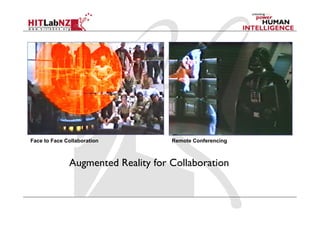
Augmented Reality for Collaboration
Remote ConferencingFace to Face Collaboration
Key Research Focus
Can Augmented Reality be used to enhance
face to face and remote collaboration?
  Reasons
  Provide enhanced spatial cues
  Anchor communication back in real world
  Features not available in normal collaboration
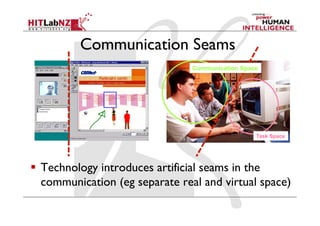
Communication Seams
  Technology introduces artificial seams in the
communication (eg separate real and virtual space)
Task Space
Communication Space
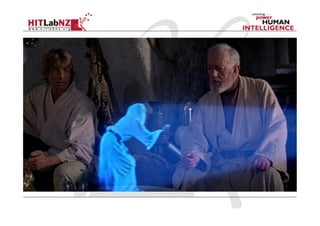
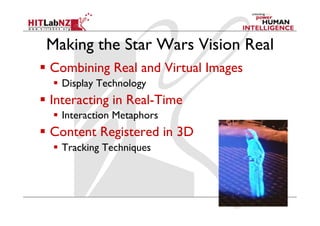
Making the Star Wars Vision Real
  Combining Real and Virtual Images
  Display Technology
  Interacting in Real-Time
  Interaction Metaphors
  Content Registered in 3D
  Tracking Techniques
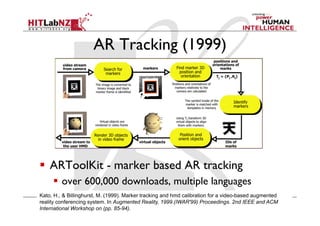
AR Tracking (1999)
  ARToolKit - marker based AR tracking
  over 600,000 downloads, multiple languages
Kato, H., & Billinghurst, M. (1999). Marker tracking and hmd calibration for a video-based augmented
reality conferencing system. In Augmented Reality, 1999.(IWAR'99) Proceedings. 2nd IEEE and ACM
International Workshop on (pp. 85-94).
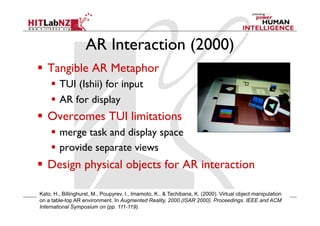
AR Interaction (2000)
  Tangible AR Metaphor
  TUI (Ishii) for input
  AR for display
  Overcomes TUI limitations
  merge task and display space
  provide separate views
  Design physical objects for AR interaction
Kato, H., Billinghurst, M., Poupyrev, I., Imamoto, K., & Tachibana, K. (2000). Virtual object manipulation
on a table-top AR environment. In Augmented Reality, 2000.(ISAR 2000). Proceedings. IEEE and ACM
International Symposium on (pp. 111-119).
Face to Face Collaboration
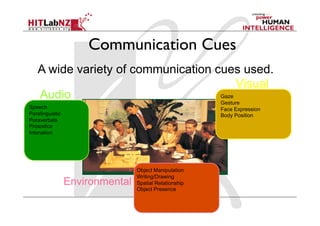
A wide variety of communication cues used.
Speech
Paralinguistic
Paraverbals
Prosodics
Intonation
Audio Gaze
Gesture
Face Expression
Body Position
Visual
Object Manipulation
Writing/Drawing
Spatial Relationship
Object Presence
Environmental
Communication Cues
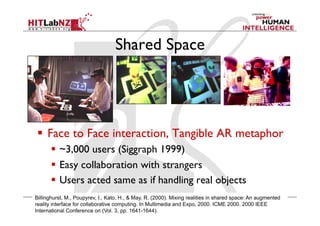
Shared Space
  Face to Face interaction, Tangible AR metaphor
  ~3,000 users (Siggraph 1999)
  Easy collaboration with strangers
  Users acted same as if handling real objects
Billinghurst, M., Poupyrev, I., Kato, H., & May, R. (2000). Mixing realities in shared space: An augmented
reality interface for collaborative computing. In Multimedia and Expo, 2000. ICME 2000. 2000 IEEE
International Conference on (Vol. 3, pp. 1641-1644).
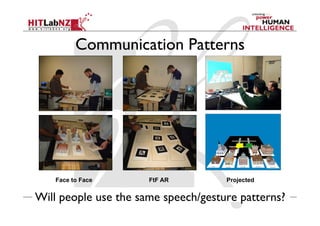
Communication Patterns
Will people use the same speech/gesture patterns?
Face to Face FtF AR Projected
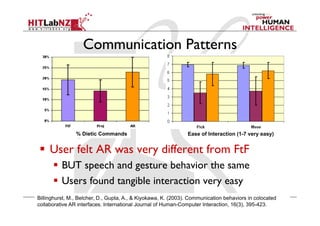
Communication Patterns
  User felt AR was very different from FtF
  BUT speech and gesture behavior the same
  Users found tangible interaction very easy
Billinghurst, M., Belcher, D., Gupta, A., & Kiyokawa, K. (2003). Communication behaviors in colocated
collaborative AR interfaces. International Journal of Human-Computer Interaction, 16(3), 395-423.
% Dietic Commands Ease of Interaction (1-7 very easy)
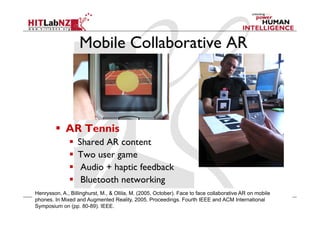
Mobile Collaborative AR
Henrysson, A., Billinghurst, M., & Ollila, M. (2005, October). Face to face collaborative AR on mobile
phones. In Mixed and Augmented Reality, 2005. Proceedings. Fourth IEEE and ACM International
Symposium on (pp. 80-89). IEEE.
  AR Tennis
  Shared AR content
  Two user game
  Audio + haptic feedback
  Bluetooth networking
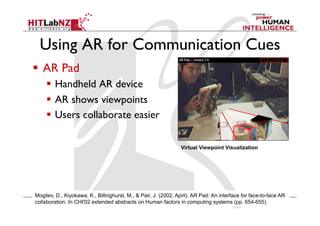
Using AR for Communication Cues
Virtual Viewpoint Visualization
Mogilev, D., Kiyokawa, K., Billinghurst, M., & Pair, J. (2002, April). AR Pad: An interface for face-to-face AR
collaboration. In CHI'02 extended abstracts on Human factors in computing systems (pp. 654-655).
  AR Pad
  Handheld AR device
  AR shows viewpoints
  Users collaborate easier
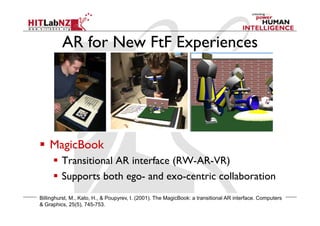
AR for New FtF Experiences
  MagicBook
  Transitional AR interface (RW-AR-VR)
  Supports both ego- and exo-centric collaboration
Billinghurst, M., Kato, H., & Poupyrev, I. (2001). The MagicBook: a transitional AR interface. Computers
& Graphics, 25(5), 745-753.
Lessons Learned
  Collaboration is a Perceptual task
  AR reduces perceptual cues -> Impacts collaboration
  Tangible AR metaphor enhances ease of interaction
  Users felt that AR collaboration different from Face to Face
  But user exhibit same speech and gesture as with real content
“AR’s biggest limit was lack of peripheral vision. The interaction was
natural, it was just difficult to see"
"Working Solo Together"
Thus we need to design AR interfaces that don’t reduce
perceptual cues, while keeping ease of interaction
Remote Collaboration
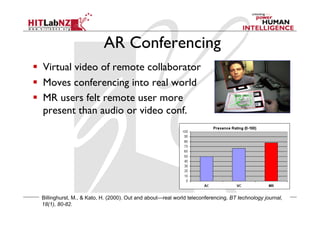
AR Conferencing
  Virtual video of remote collaborator
  Moves conferencing into real world
  MR users felt remote user more
present than audio or video conf.
Billinghurst, M., & Kato, H. (2000). Out and about—real world teleconferencing. BT technology journal,
18(1), 80-82.
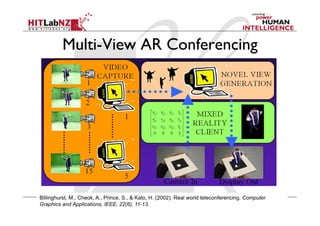
Multi-View AR Conferencing
Billinghurst, M., Cheok, A., Prince, S., & Kato, H. (2002). Real world teleconferencing. Computer
Graphics and Applications, IEEE, 22(6), 11-13.
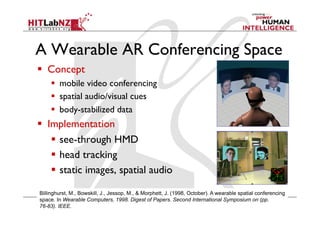
A Wearable AR Conferencing Space
  Concept
  mobile video conferencing
  spatial audio/visual cues
  body-stabilized data
  Implementation
  see-through HMD
  head tracking
  static images, spatial audio
Billinghurst, M., Bowskill, J., Jessop, M., & Morphett, J. (1998, October). A wearable spatial conferencing
space. In Wearable Computers, 1998. Digest of Papers. Second International Symposium on (pp.
76-83). IEEE.
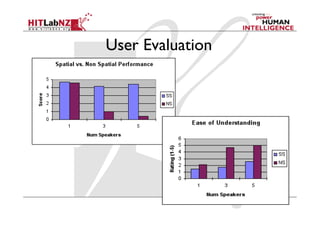
User Evaluation
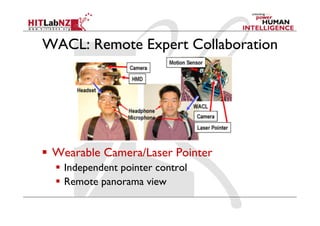
WACL: Remote Expert Collaboration
  Wearable Camera/Laser Pointer
  Independent pointer control
  Remote panorama view
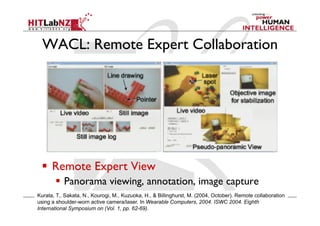
WACL: Remote Expert Collaboration
  Remote Expert View
  Panorama viewing, annotation, image capture
Kurata, T., Sakata, N., Kourogi, M., Kuzuoka, H., & Billinghurst, M. (2004, October). Remote collaboration
using a shoulder-worn active camera/laser. In Wearable Computers, 2004. ISWC 2004. Eighth
International Symposium on (Vol. 1, pp. 62-69).
Lessons Learned
  AR can provide cues that increase sense
of Presence
  Spatial audio and visual cues
  Providing good audio essential
  AR can enhance remote task space
collaboration
  Annotation directly on real world
  But: need good situational awareness
Current Work
Current Work
  Natural Interaction
  Speech, Gesture Input
  Real World Capture
  Remote scene sharing
  CityView AR
  Lightweight asynchronous collaboration
  Handheld AR
  Annotation based collaboration
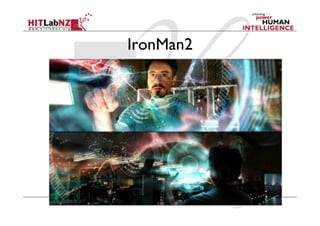
IronMan2
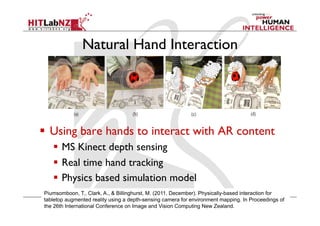
Natural Hand Interaction
  Using bare hands to interact with AR content
  MS Kinect depth sensing
  Real time hand tracking
  Physics based simulation model
Piumsomboon, T., Clark, A., & Billinghurst, M. (2011, December). Physically-based interaction for
tabletop augmented reality using a depth-sensing camera for environment mapping. In Proceedings of
the 26th International Conference on Image and Vision Computing New Zealand.
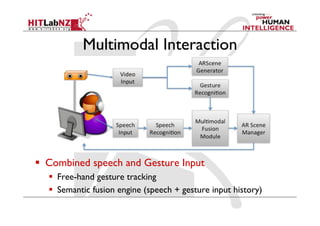
Multimodal Interaction
  Combined speech and Gesture Input
  Free-hand gesture tracking
  Semantic fusion engine (speech + gesture input history)
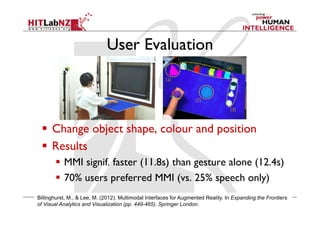
User Evaluation
  Change object shape, colour and position
  Results
  MMI signif. faster (11.8s) than gesture alone (12.4s)
  70% users preferred MMI (vs. 25% speech only)
Billinghurst, M., & Lee, M. (2012). Multimodal Interfaces for Augmented Reality. In Expanding the Frontiers
of Visual Analytics and Visualization (pp. 449-465). Springer London.
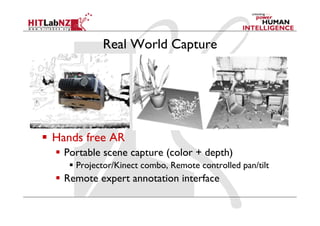
Real World Capture
  Hands free AR
  Portable scene capture (color + depth)
  Projector/Kinect combo, Remote controlled pan/tilt
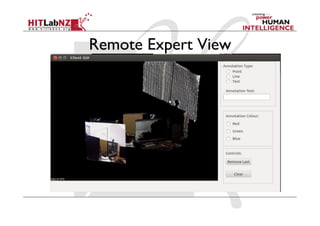
  Remote expert annotation interface
Remote Expert View
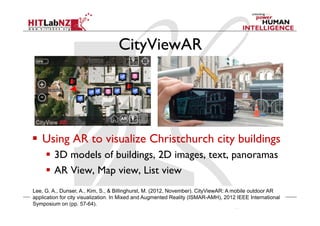
CityViewAR
  Using AR to visualize Christchurch city buildings
  3D models of buildings, 2D images, text, panoramas
  AR View, Map view, List view
Lee, G. A., Dunser, A., Kim, S., & Billinghurst, M. (2012, November). CityViewAR: A mobile outdoor AR
application for city visualization. In Mixed and Augmented Reality (ISMAR-AMH), 2012 IEEE International
Symposium on (pp. 57-64).
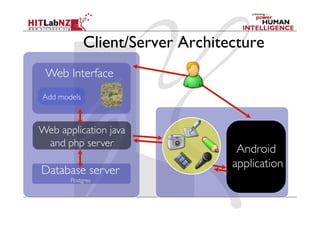
Client/Server Architecture
Android	

application	

Web application java
and php server	

Database server	

Postgres	

Web Interface	

Add models
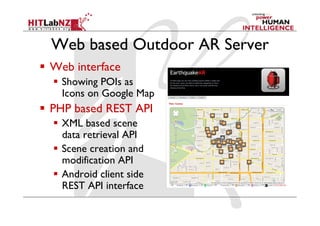
Web based Outdoor AR Server
  Web interface
  Showing POIs as
Icons on Google Map
  PHP based REST API
  XML based scene
data retrieval API
  Scene creation and
modification API
  Android client side
REST API interface
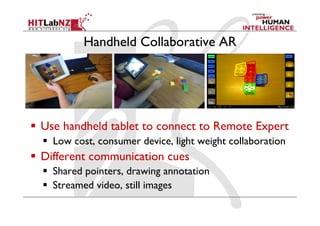
Handheld Collaborative AR
  Use handheld tablet to connect to Remote Expert
  Low cost, consumer device, light weight collaboration
  Different communication cues
  Shared pointers, drawing annotation
  Streamed video, still images
What's Next?
Future Research
  Ego-Vision collaboration
  Shared POV collaboration
  AR + Human Computation
  Crowd sourced expertise
  Scaling up
  City/Country scale augmentation
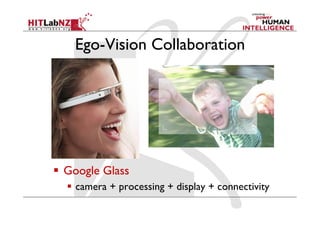
Ego-Vision Collaboration
  Google Glass
  camera + processing + display + connectivity
Ego-Vision Research
  System
  How do you capture the user's environment?
  How do you provide good quality of service?
  Interface
  What visual and audio cues provide best experience?
  How do you interact with the remote user?
  Evaluation
  How do you measure the quality of collaboration?
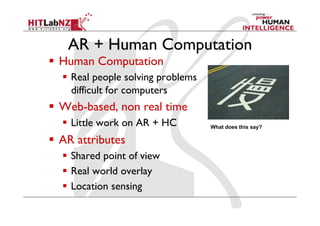
AR + Human Computation
  Human Computation
  Real people solving problems
difficult for computers
  Web-based, non real time
  Little work on AR + HC
  AR attributes
  Shared point of view
  Real world overlay
  Location sensing
What does this say?
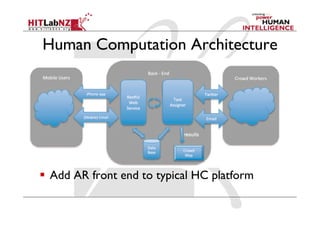
Human Computation Architecture
  Add AR front end to typical HC platform
AR + HC Research Questions
  System
  What architecture provides best performance?
  What data is needed to be shared?
  Interface
  What cues are needed by the human computers?
  What benefits does AR provide cf. web systems?
  Evaluation
  How can the system be evaluated?
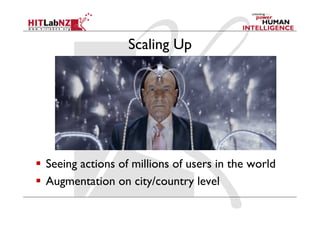
Scaling Up
  Seeing actions of millions of users in the world
  Augmentation on city/country level
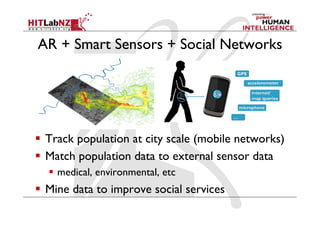
AR + Smart Sensors + Social Networks
  Track population at city scale (mobile networks)
  Match population data to external sensor data
  medical, environmental, etc
  Mine data to improve social services
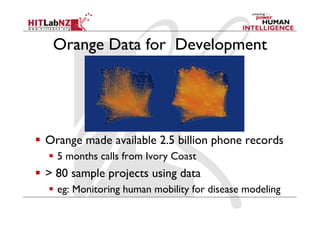
Orange Data for Development
  Orange made available 2.5 billion phone records
  5 months calls from Ivory Coast
  > 80 sample projects using data
  eg: Monitoring human mobility for disease modeling
Research Questions
  System
  How can you capture the data reliably?
  How can you aggregate and correlate the information?
  Interface
  What data provides the most values?
  How can you visualize the information?
  Evaluation
  How do you measure the accuracy of the model?
Conclusions
Conclusions
  Augmented Realty can enhance face to face and
remote collaboration
  spatial cues, seamless communication
  Current research opportunities in natural
interaction, environment capture, mobile AR
  gesture, multimodal interaction, depth sensing
  Future opportunities in large scale deployment
  Human computing, AR + sensors + social networks
More Information
•  Mark Billinghurst
–  mark.billinghurst@hitlabnz.org
•  Website
–  http://www.hitlabnz.org/

Can You See What I See?

  • 1.
    Can You SeeWhat I See? Mark Billinghurst mark.billinghurst@hitlabnz.org The HIT Lab NZ, University of Canterbury May 3rd 2013
  • 3.
    Augmented Reality   KeyFeatures  Combines Real and Virtual Images  Interactive in Real-Time  Content Registered in 3D Azuma, R., A Survey of Augmented Reality, Presence, Vol. 6, No. 4, August 1997, pp. 355-385.
  • 4.
    Augmented Reality forCollaboration Remote ConferencingFace to Face Collaboration
  • 5.
    Key Research Focus CanAugmented Reality be used to enhance face to face and remote collaboration?   Reasons   Provide enhanced spatial cues   Anchor communication back in real world   Features not available in normal collaboration
  • 6.
    Communication Seams   Technologyintroduces artificial seams in the communication (eg separate real and virtual space) Task Space Communication Space
  • 7.
    Making the StarWars Vision Real   Combining Real and Virtual Images   Display Technology   Interacting in Real-Time   Interaction Metaphors   Content Registered in 3D   Tracking Techniques
  • 8.
    AR Tracking (1999)  ARToolKit - marker based AR tracking   over 600,000 downloads, multiple languages Kato, H., & Billinghurst, M. (1999). Marker tracking and hmd calibration for a video-based augmented reality conferencing system. In Augmented Reality, 1999.(IWAR'99) Proceedings. 2nd IEEE and ACM International Workshop on (pp. 85-94).
  • 9.
    AR Interaction (2000)  Tangible AR Metaphor   TUI (Ishii) for input   AR for display   Overcomes TUI limitations   merge task and display space   provide separate views   Design physical objects for AR interaction Kato, H., Billinghurst, M., Poupyrev, I., Imamoto, K., & Tachibana, K. (2000). Virtual object manipulation on a table-top AR environment. In Augmented Reality, 2000.(ISAR 2000). Proceedings. IEEE and ACM International Symposium on (pp. 111-119).
  • 10.
    Face to FaceCollaboration
  • 11.
    A wide varietyof communication cues used. Speech Paralinguistic Paraverbals Prosodics Intonation Audio Gaze Gesture Face Expression Body Position Visual Object Manipulation Writing/Drawing Spatial Relationship Object Presence Environmental Communication Cues
  • 12.
    Shared Space   Faceto Face interaction, Tangible AR metaphor   ~3,000 users (Siggraph 1999)   Easy collaboration with strangers   Users acted same as if handling real objects Billinghurst, M., Poupyrev, I., Kato, H., & May, R. (2000). Mixing realities in shared space: An augmented reality interface for collaborative computing. In Multimedia and Expo, 2000. ICME 2000. 2000 IEEE International Conference on (Vol. 3, pp. 1641-1644).
  • 13.
    Communication Patterns Will peopleuse the same speech/gesture patterns? Face to Face FtF AR Projected
  • 14.
    Communication Patterns   Userfelt AR was very different from FtF   BUT speech and gesture behavior the same   Users found tangible interaction very easy Billinghurst, M., Belcher, D., Gupta, A., & Kiyokawa, K. (2003). Communication behaviors in colocated collaborative AR interfaces. International Journal of Human-Computer Interaction, 16(3), 395-423. % Dietic Commands Ease of Interaction (1-7 very easy)
  • 15.
    Mobile Collaborative AR Henrysson,A., Billinghurst, M., & Ollila, M. (2005, October). Face to face collaborative AR on mobile phones. In Mixed and Augmented Reality, 2005. Proceedings. Fourth IEEE and ACM International Symposium on (pp. 80-89). IEEE.   AR Tennis   Shared AR content   Two user game   Audio + haptic feedback   Bluetooth networking
  • 16.
    Using AR forCommunication Cues Virtual Viewpoint Visualization Mogilev, D., Kiyokawa, K., Billinghurst, M., & Pair, J. (2002, April). AR Pad: An interface for face-to-face AR collaboration. In CHI'02 extended abstracts on Human factors in computing systems (pp. 654-655).   AR Pad   Handheld AR device   AR shows viewpoints   Users collaborate easier
  • 17.
    AR for NewFtF Experiences   MagicBook   Transitional AR interface (RW-AR-VR)   Supports both ego- and exo-centric collaboration Billinghurst, M., Kato, H., & Poupyrev, I. (2001). The MagicBook: a transitional AR interface. Computers & Graphics, 25(5), 745-753.
  • 18.
    Lessons Learned   Collaborationis a Perceptual task   AR reduces perceptual cues -> Impacts collaboration   Tangible AR metaphor enhances ease of interaction   Users felt that AR collaboration different from Face to Face   But user exhibit same speech and gesture as with real content “AR’s biggest limit was lack of peripheral vision. The interaction was natural, it was just difficult to see" "Working Solo Together" Thus we need to design AR interfaces that don’t reduce perceptual cues, while keeping ease of interaction
  • 19.
  • 20.
    AR Conferencing   Virtualvideo of remote collaborator   Moves conferencing into real world   MR users felt remote user more present than audio or video conf. Billinghurst, M., & Kato, H. (2000). Out and about—real world teleconferencing. BT technology journal, 18(1), 80-82.
  • 21.
    Multi-View AR Conferencing Billinghurst,M., Cheok, A., Prince, S., & Kato, H. (2002). Real world teleconferencing. Computer Graphics and Applications, IEEE, 22(6), 11-13.
  • 22.
    A Wearable ARConferencing Space   Concept   mobile video conferencing   spatial audio/visual cues   body-stabilized data   Implementation   see-through HMD   head tracking   static images, spatial audio Billinghurst, M., Bowskill, J., Jessop, M., & Morphett, J. (1998, October). A wearable spatial conferencing space. In Wearable Computers, 1998. Digest of Papers. Second International Symposium on (pp. 76-83). IEEE.
  • 23.
  • 24.
    WACL: Remote ExpertCollaboration   Wearable Camera/Laser Pointer   Independent pointer control   Remote panorama view
  • 25.
    WACL: Remote ExpertCollaboration   Remote Expert View   Panorama viewing, annotation, image capture Kurata, T., Sakata, N., Kourogi, M., Kuzuoka, H., & Billinghurst, M. (2004, October). Remote collaboration using a shoulder-worn active camera/laser. In Wearable Computers, 2004. ISWC 2004. Eighth International Symposium on (Vol. 1, pp. 62-69).
  • 26.
    Lessons Learned   ARcan provide cues that increase sense of Presence   Spatial audio and visual cues   Providing good audio essential   AR can enhance remote task space collaboration   Annotation directly on real world   But: need good situational awareness
  • 27.
  • 28.
    Current Work   NaturalInteraction   Speech, Gesture Input   Real World Capture   Remote scene sharing   CityView AR   Lightweight asynchronous collaboration   Handheld AR   Annotation based collaboration
  • 29.
  • 30.
    Natural Hand Interaction  Using bare hands to interact with AR content   MS Kinect depth sensing   Real time hand tracking   Physics based simulation model Piumsomboon, T., Clark, A., & Billinghurst, M. (2011, December). Physically-based interaction for tabletop augmented reality using a depth-sensing camera for environment mapping. In Proceedings of the 26th International Conference on Image and Vision Computing New Zealand.
  • 31.
    Multimodal Interaction   Combinedspeech and Gesture Input   Free-hand gesture tracking   Semantic fusion engine (speech + gesture input history)
  • 32.
    User Evaluation   Changeobject shape, colour and position   Results   MMI signif. faster (11.8s) than gesture alone (12.4s)   70% users preferred MMI (vs. 25% speech only) Billinghurst, M., & Lee, M. (2012). Multimodal Interfaces for Augmented Reality. In Expanding the Frontiers of Visual Analytics and Visualization (pp. 449-465). Springer London.
  • 33.
    Real World Capture  Hands free AR   Portable scene capture (color + depth)   Projector/Kinect combo, Remote controlled pan/tilt   Remote expert annotation interface
  • 34.
  • 35.
    CityViewAR   Using ARto visualize Christchurch city buildings   3D models of buildings, 2D images, text, panoramas   AR View, Map view, List view Lee, G. A., Dunser, A., Kim, S., & Billinghurst, M. (2012, November). CityViewAR: A mobile outdoor AR application for city visualization. In Mixed and Augmented Reality (ISMAR-AMH), 2012 IEEE International Symposium on (pp. 57-64).
  • 36.
    Client/Server Architecture Android application Web applicationjava and php server Database server Postgres Web Interface Add models
  • 37.
    Web based OutdoorAR Server   Web interface   Showing POIs as Icons on Google Map   PHP based REST API   XML based scene data retrieval API   Scene creation and modification API   Android client side REST API interface
  • 38.
    Handheld Collaborative AR  Use handheld tablet to connect to Remote Expert   Low cost, consumer device, light weight collaboration   Different communication cues   Shared pointers, drawing annotation   Streamed video, still images
  • 39.
  • 40.
    Future Research   Ego-Visioncollaboration   Shared POV collaboration   AR + Human Computation   Crowd sourced expertise   Scaling up   City/Country scale augmentation
  • 41.
    Ego-Vision Collaboration   GoogleGlass   camera + processing + display + connectivity
  • 42.
    Ego-Vision Research   System  How do you capture the user's environment?   How do you provide good quality of service?   Interface   What visual and audio cues provide best experience?   How do you interact with the remote user?   Evaluation   How do you measure the quality of collaboration?
  • 43.
    AR + HumanComputation   Human Computation   Real people solving problems difficult for computers   Web-based, non real time   Little work on AR + HC   AR attributes   Shared point of view   Real world overlay   Location sensing What does this say?
  • 44.
    Human Computation Architecture  Add AR front end to typical HC platform
  • 45.
    AR + HCResearch Questions   System   What architecture provides best performance?   What data is needed to be shared?   Interface   What cues are needed by the human computers?   What benefits does AR provide cf. web systems?   Evaluation   How can the system be evaluated?
  • 46.
    Scaling Up   Seeingactions of millions of users in the world   Augmentation on city/country level
  • 47.
    AR + SmartSensors + Social Networks   Track population at city scale (mobile networks)   Match population data to external sensor data   medical, environmental, etc   Mine data to improve social services
  • 48.
    Orange Data forDevelopment   Orange made available 2.5 billion phone records   5 months calls from Ivory Coast   > 80 sample projects using data   eg: Monitoring human mobility for disease modeling
  • 49.
    Research Questions   System  How can you capture the data reliably?   How can you aggregate and correlate the information?   Interface   What data provides the most values?   How can you visualize the information?   Evaluation   How do you measure the accuracy of the model?
  • 50.
  • 51.
    Conclusions   Augmented Realtycan enhance face to face and remote collaboration   spatial cues, seamless communication   Current research opportunities in natural interaction, environment capture, mobile AR   gesture, multimodal interaction, depth sensing   Future opportunities in large scale deployment   Human computing, AR + sensors + social networks
  • 52.
    More Information •  MarkBillinghurst –  mark.billinghurst@hitlabnz.org •  Website –  http://www.hitlabnz.org/