Evaluating Web App, Mobile
App, and API Security
Standards &Tools
Clareity Consulting
Clareity.com
Matt Cohen
Matt.Cohen@clareity.com©2017 Clareity Consulting
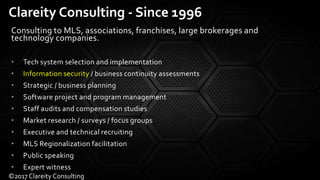
Consulting to MLS, associations, franchises, large brokerages and
technology companies.
• Tech system selection and implementation
• Information security / business continuity assessments
• Strategic / business planning
• Software project and program management
• Staff audits and compensation studies
• Market research / surveys / focus groups
• Executive and technical recruiting
• MLS Regionalization facilitation
• Public speaking
• Expert witness
Clareity Consulting - Since 1996
©2017 Clareity Consulting
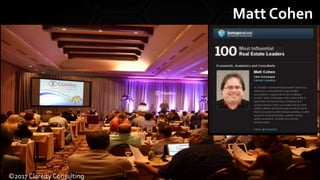
Matt Cohen
©2017 Clareity Consulting
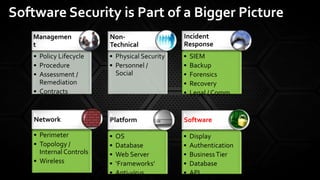
• Policy Lifecycle
• Procedure
• Assessment /
Remediation
• Contracts
Managemen
t
• Physical Security
• Personnel /
Social
Non-
Technical
• SIEM
• Backup
• Forensics
• Recovery
• Legal / Comm
Incident
Response
• Perimeter
• Topology /
Internal Controls
• Wireless
Network
• OS
• Database
• Web Server
• ‘Frameworks’
• Anti-virus
Platform
• Display
• Authentication
• BusinessTier
• Database
• API
Software
Software Security is Part of a Bigger Picture
Insecure coding practices have impacts:
1. Unauthorized use / theft of service
2. Authorized user access to unauthorized content
3. Theft of content
4. Attack infects other users / administrators
5. Interruption of application service
Customers don’t generally ask for security …
but they sure don’t like when they feel an impact
from not having it!
Why Put Resources on App Security?
©2017 Clareity Consulting
Open Web Application Security Project (OWASP)
OWASP.org
• Standard:Application SecurityVerification Standard (ASVS)
• Best Practice Countermeasures: e.g. OWASP AutomatedThreat
Handbook
• Language-specific Standard: e.g. CERT Secure Coding Standards,
Apple Secure Coding Guide.
• Purpose-specific Standards: e.g. PCI DSS
• Of course, there are many larger security standards that touch on application security.
Web Application Security Standards
Why I Love Standards
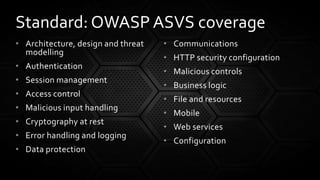
• Architecture, design and threat
modelling
• Authentication
• Session management
• Access control
• Malicious input handling
• Cryptography at rest
• Error handling and logging
• Data protection
• Communications
• HTTP security configuration
• Malicious controls
• Business logic
• File and resources
• Mobile
• Web services
• Configuration
Standard: OWASP ASVS coverage
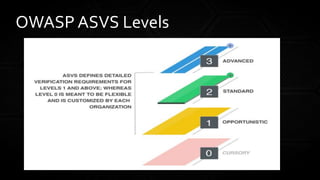
OWASP ASVS Levels
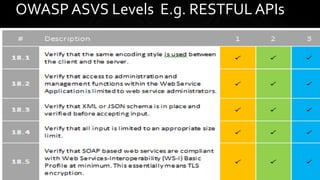
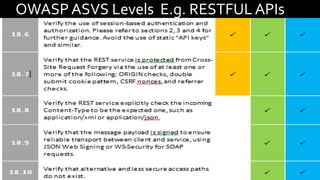
OWASP ASVS Levels E.g. RESTFUL APIs
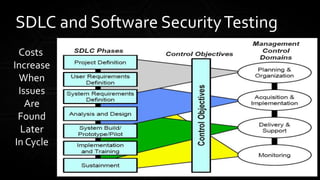
Testing as part of the SDLC
SDLC and Software SecurityTesting
Costs
Increase
When
Issues
Are
Found
Later
In Cycle
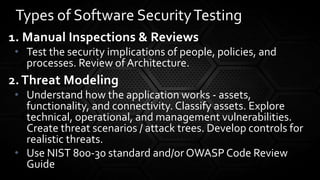
1. Manual Inspections & Reviews
• Test the security implications of people, policies, and
processes. Review of Architecture.
2. Threat Modeling
• Understand how the application works - assets,
functionality, and connectivity. Classify assets. Explore
technical, operational, and management vulnerabilities.
Create threat scenarios / attack trees. Develop controls for
realistic threats.
• Use NIST 800-30 standard and/or OWASP Code Review
Guide
Types of Software SecurityTesting
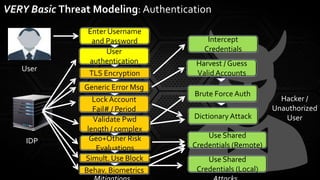
VERY Basic Threat Modeling: Authentication
Enter Username
and Password
User
User
authentication
Generic Error Msg
Lock Account
Fail# / Period
Validate Pwd
length / complex
Behav. Biometrics
Hacker /
Unauthorized
User
TLS Encryption
Geo+Other Risk
Evaluations
IDP
Brute Force Auth
Harvest / Guess
Valid Accounts
Dictionary Attack
Intercept
Credentials
Use Shared
Credentials (Remote)
Use Shared
Credentials (Local)
Simult. Use Block
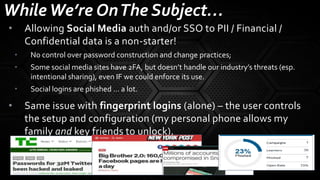
WhileWe’re OnThe Subject…
• Allowing Social Media auth and/or SSO to PII / Financial /
Confidential data is a non-starter!
• No control over password construction and change practices;
• Some social media sites have 2FA, but doesn’t handle our industry’s threats (esp.
intentional sharing), even IF we could enforce its use.
• Social logins are phished … a lot.
• Same issue with fingerprint logins (alone) – the user controls
the setup and configuration (my personal phone allows my
family and key friends to unlock).
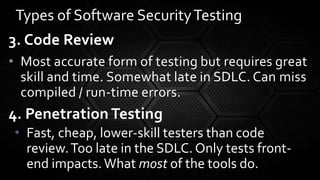
3. Code Review
• Most accurate form of testing but requires great
skill and time. Somewhat late in SDLC. Can miss
compiled / run-time errors.
4. Penetration Testing
• Fast, cheap, lower-skill testers than code
review.Too late in the SDLC. Only tests front-
end impacts.What most of the tools do.
Types of Software SecurityTesting
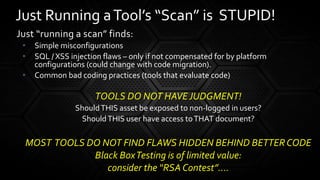
Just “running a scan” finds:
• Simple misconfigurations
• SQL / XSS injection flaws – only if not compensated for by platform
configurations (could change with code migration).
• Common bad coding practices (tools that evaluate code)
TOOLS DO NOT HAVEJUDGMENT!
ShouldTHIS asset be exposed to non-logged in users?
ShouldTHIS user have access toTHAT document?
MOST TOOLS DO NOT FIND FLAWS HIDDEN BEHIND BETTERCODE
Black BoxTesting is of limited value:
consider the “RSA Contest”….
Just Running aTool’s “Scan” is STUPID!
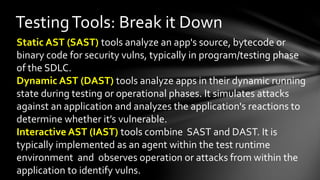
TestingTools: Break it Down
Static AST (SAST) tools analyze an app's source, bytecode or
binary code for security vulns, typically in program/testing phase
of the SDLC.
Dynamic AST (DAST) tools analyze apps in their dynamic running
state during testing or operational phases. It simulates attacks
against an application and analyzes the application's reactions to
determine whether it’s vulnerable.
Interactive AST (IAST) tools combine SAST and DAST. It is
typically implemented as an agent within the test runtime
environment and observes operation or attacks from within the
application to identify vulns.
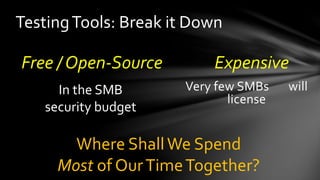
Free / Open-Source Expensive
Very few SMBs will
license
TestingTools: Break it Down
In the SMB
security budget
Where ShallWe Spend
Most of OurTimeTogether?
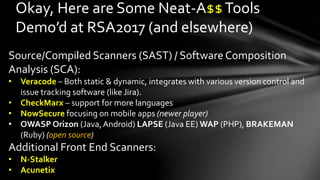
Okay, Here are Some Neat-A$$Tools
Demo’d at RSA2017 (and elsewhere)
Source/Compiled Scanners (SAST) / Software Composition
Analysis (SCA):
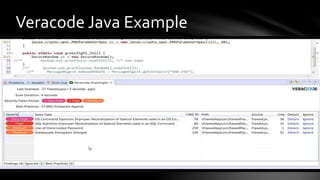
• Veracode – Both static & dynamic, integrates with various version control and
issue tracking software (like Jira).
• CheckMarx – support for more languages
• NowSecure focusing on mobile apps (newer player)
• OWASP Orizon (Java,Android) LAPSE (Java EE) WAP (PHP), BRAKEMAN
(Ruby) (open source)
Additional Front End Scanners:
• N-Stalker
• Acunetix
Veracode Java Example
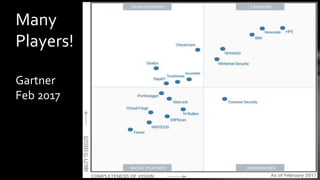
Many
Players!
Gartner
Feb 2017
The OWASP Zed Attack Proxy (ZAP) is an easy to use
integrated penetration testing tool for finding vulnerabilities
in web applications. It is designed to be used by people with
a wide range of security experience and as such is ideal for
developers and functional testers who are new to
penetration testing as well as being a useful addition to an
experienced pen testers toolbox.
This evolved from the “Paros Proxy” tool.
OWASP ZAP
• Intercepting Proxy
• Traditional and AJAX spiders
• Automated scanner
• Passive scanner
• Forced browsing
• Fuzzer
• Dynamic SSL certificates
• Smartcard and Client Digital
Certificates support
• Web sockets support
• Support for a wide range of
scripting languages
• Plug-n-Hack support
• Authentication and session
support
• Powerful REST based API
• Automatic updating option
• Integrated and growing
marketplace of add-ons
OWASP ZAP FEATURES
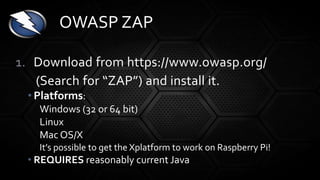
1. Download from https://www.owasp.org/
(Search for “ZAP”) and install it.
• Platforms:
Windows (32 or 64 bit)
Linux
Mac OS/X
It’s possible to get the Xplatform to work on Raspberry Pi!
• REQUIRES reasonably current Java
OWASP ZAP
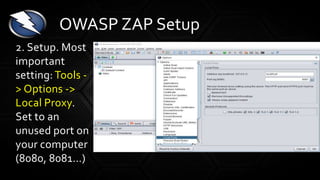
2. Setup. Most
important
setting: Tools -
> Options ->
Local Proxy.
Set to an
unused port on
your computer
(8080, 8081…)
OWASP ZAP Setup
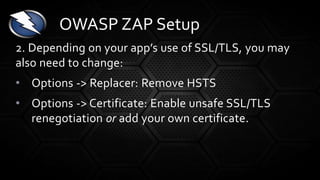
2. Depending on your app’s use of SSL/TLS, you may
also need to change:
• Options -> Replacer: Remove HSTS
• Options -> Certificate: Enable unsafe SSL/TLS
renegotiation or add your own certificate.
OWASP ZAP Setup
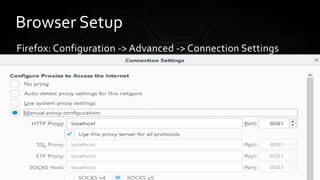
Firefox: Configuration -> Advanced -> Connection Settings
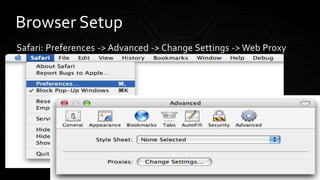
Browser Setup
Safari: Preferences -> Advanced -> Change Settings -> Web Proxy
Browser Setup
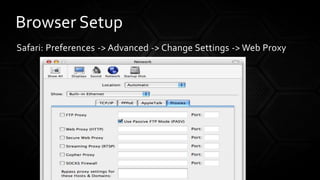
Safari: Preferences -> Advanced -> Change Settings -> Web Proxy
Browser Setup
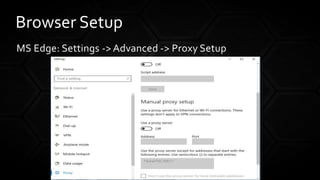
MS Edge: Settings -> Advanced -> Proxy Setup
Browser Setup
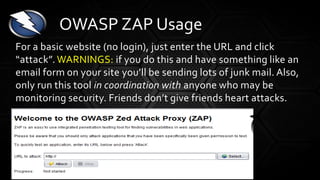
For a basic website (no login), just enter the URL and click
“attack”. WARNINGS: if you do this and have something like an
email form on your site you’ll be sending lots of junk mail. Also,
only run this tool in coordination with anyone who may be
monitoring security. Friends don’t give friends heart attacks.
OWASP ZAP Usage
Troubleshooting: HSTS (strict transport security)
Problem: If you have HSTS implemented, it can be a barrier (your
browser won’t connect through ZAP’s dynamic SSL proxy) – error
“Untrusted Connection”
Solution: Tools -> Options -> Dynamic SSL Certificates
1. Generate and Save a new certificate
2. Import it into your web browser
3. Restart both ZAP and browser
OWASP ZAP Usage
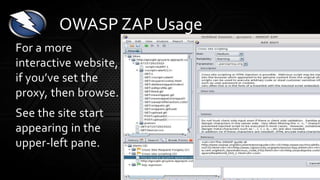
For a more
interactive website,
if you’ve set the
proxy, then browse.
See the site start
appearing in the
upper-left pane.
OWASP ZAP Usage
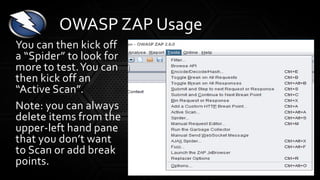
You can then kick off
a “Spider” to look for
more to test.You can
then kick off an
“Active Scan”.
Note: you can always
delete items from the
upper-left hand pane
that you don’t want
to Scan or add break
points.
OWASP ZAP Usage
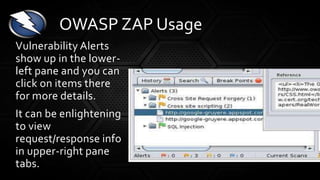
Vulnerability Alerts
show up in the lower-
left pane and you can
click on items there
for more details.
It can be enlightening
to view
request/response info
in upper-right pane
tabs.
OWASP ZAP Usage
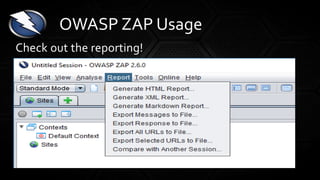
Check out the reporting!
OWASP ZAP Usage
This software has a LOT more features for more
advanced pen testing! Learning the “fuzzer” is a
great start.
For more info, source code, add-ons, user guide,
and so much more:
https://github.com/zaproxy/
zap-core-help/wiki/HelpIntro
OWASP ZAP – More Info
• Security Auditing is a larger endeavor – and most root
causes of issues I find are non-technical.
• Educate yourselves on ASVS countermeasures for
common software vulnerabilities. Dive deep!
• Engage in the SDLC and all 4 major types of software
security testing, if possible.
• Tools are a valuable part of the process – generally
finding most “opportunistic” and some “standard”
ASVS issues.
• Don’t Be a Fool – Don’t Just Run the Tool (Scan)
Remember:
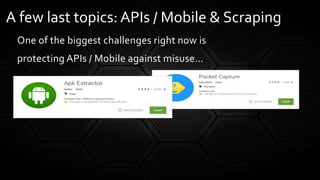
One of the biggest challenges right now is
protecting APIs / Mobile against misuse…
A few last topics: APIs / Mobile & Scraping
Protecting against automated attack is also needed for both
websites AND APIs. At least ALL of the following are needed to
prevent, detect and mitigate:
Fingerprinting. Identification and restriction of automated usage
by automation identification techniques, including utilization of
user agent string, and/or HTTP request format (e.g. header
ordering), and/or HTTP header anomalies (e.g. HTTP protocol,
header inconsistencies), dynamic injections, and/or device
fingerprint content to determine whether a user is likely to be a
human or not.
A few last topics…
As a result of these Fingerprinting countermeasures, for example,
browsers automated via tools such as Selenium must certainly be
blocked.The technology should use machine learning or
behavioral analysis utilized to detect automation patterns and
adapt to the evolving threat on an ongoing basis.
A few last topics…
Reputation. Identification and restriction of automated usage by
utilizing reputation analysis of user identity (e.g. web browser
fingerprint, device fingerprint, username, session, IP
address/range/geolocation), and/or user behavior (e.g. previous site,
entry point, time of day, rate of requests, rate of new session generation,
paths through application), and/or types of resources accessed (e.g.
static vs dynamic, invisible/ hidden links, robots.txt file, paths excluded in
robots.txt, honey trap resources, cache-defined resources), and/or types
of resources not accessed (e.g. JavaScript generated links), and/ or
types of resources repeatedly accessed. As a result of these
countermeasures, for example, known commercial scraping tools and the
use of data center IP addresses must certainly be identified and blocked.
A few last topics…
Rate. Set upper and/or lower limits and/or trend thresholds, and
limit number and/or rate of usage per user, per group of users, per
IP address/range, and per device ID/fingerprint. Note that this kind
of countermeasure cannot stand alone as hackers commonly utilize a
slow crawl from many rotating IP addresses that can simulate the
activity of legitimate users.
Monitoring. Monitor errors, anomalies, function
usage/sequencing, and provide alerting and/or monitoring
dashboard.
A few last topics…
Instrumentation. Build in application-wide instrumentation to
perform real-time attack detection and automated response
including locking users out, blocking, delaying, changing behavior,
altering capacity/capability, enhanced identity authentication,
CAPTCHA, penalty box, or other technique needed to ensure that
automated attacks are unsuccessful.
A few last topics…
Discussion?
Clareity Consulting
Clareity.com
Matt Cohen
Matt.Cohen@clareity.com
©2017 Clareity Consulting

Evaluating Web App, Mobile App, and API Security - Matt Cohen

  • 1.
    Evaluating Web App,Mobile App, and API Security Standards &Tools Clareity Consulting Clareity.com Matt Cohen Matt.Cohen@clareity.com©2017 Clareity Consulting
  • 2.
    Consulting to MLS,associations, franchises, large brokerages and technology companies. • Tech system selection and implementation • Information security / business continuity assessments • Strategic / business planning • Software project and program management • Staff audits and compensation studies • Market research / surveys / focus groups • Executive and technical recruiting • MLS Regionalization facilitation • Public speaking • Expert witness Clareity Consulting - Since 1996 ©2017 Clareity Consulting
  • 3.
  • 4.
    • Policy Lifecycle •Procedure • Assessment / Remediation • Contracts Managemen t • Physical Security • Personnel / Social Non- Technical • SIEM • Backup • Forensics • Recovery • Legal / Comm Incident Response • Perimeter • Topology / Internal Controls • Wireless Network • OS • Database • Web Server • ‘Frameworks’ • Anti-virus Platform • Display • Authentication • BusinessTier • Database • API Software Software Security is Part of a Bigger Picture
  • 5.
    Insecure coding practiceshave impacts: 1. Unauthorized use / theft of service 2. Authorized user access to unauthorized content 3. Theft of content 4. Attack infects other users / administrators 5. Interruption of application service Customers don’t generally ask for security … but they sure don’t like when they feel an impact from not having it! Why Put Resources on App Security? ©2017 Clareity Consulting
  • 6.
    Open Web ApplicationSecurity Project (OWASP) OWASP.org • Standard:Application SecurityVerification Standard (ASVS) • Best Practice Countermeasures: e.g. OWASP AutomatedThreat Handbook • Language-specific Standard: e.g. CERT Secure Coding Standards, Apple Secure Coding Guide. • Purpose-specific Standards: e.g. PCI DSS • Of course, there are many larger security standards that touch on application security. Web Application Security Standards
  • 7.
    Why I LoveStandards
  • 8.
    • Architecture, designand threat modelling • Authentication • Session management • Access control • Malicious input handling • Cryptography at rest • Error handling and logging • Data protection • Communications • HTTP security configuration • Malicious controls • Business logic • File and resources • Mobile • Web services • Configuration Standard: OWASP ASVS coverage
  • 9.
  • 10.
    OWASP ASVS LevelsE.g. RESTFUL APIs
  • 11.
    OWASP ASVS LevelsE.g. RESTFUL APIs
  • 12.
    Testing as partof the SDLC SDLC and Software SecurityTesting Costs Increase When Issues Are Found Later In Cycle
  • 13.
    1. Manual Inspections& Reviews • Test the security implications of people, policies, and processes. Review of Architecture. 2. Threat Modeling • Understand how the application works - assets, functionality, and connectivity. Classify assets. Explore technical, operational, and management vulnerabilities. Create threat scenarios / attack trees. Develop controls for realistic threats. • Use NIST 800-30 standard and/or OWASP Code Review Guide Types of Software SecurityTesting
  • 14.
    VERY Basic ThreatModeling: Authentication Enter Username and Password User User authentication Generic Error Msg Lock Account Fail# / Period Validate Pwd length / complex Behav. Biometrics Hacker / Unauthorized User TLS Encryption Geo+Other Risk Evaluations IDP Brute Force Auth Harvest / Guess Valid Accounts Dictionary Attack Intercept Credentials Use Shared Credentials (Remote) Use Shared Credentials (Local) Simult. Use Block
  • 15.
    WhileWe’re OnThe Subject… •Allowing Social Media auth and/or SSO to PII / Financial / Confidential data is a non-starter! • No control over password construction and change practices; • Some social media sites have 2FA, but doesn’t handle our industry’s threats (esp. intentional sharing), even IF we could enforce its use. • Social logins are phished … a lot. • Same issue with fingerprint logins (alone) – the user controls the setup and configuration (my personal phone allows my family and key friends to unlock).
  • 16.
    3. Code Review •Most accurate form of testing but requires great skill and time. Somewhat late in SDLC. Can miss compiled / run-time errors. 4. Penetration Testing • Fast, cheap, lower-skill testers than code review.Too late in the SDLC. Only tests front- end impacts.What most of the tools do. Types of Software SecurityTesting
  • 17.
    Just “running ascan” finds: • Simple misconfigurations • SQL / XSS injection flaws – only if not compensated for by platform configurations (could change with code migration). • Common bad coding practices (tools that evaluate code) TOOLS DO NOT HAVEJUDGMENT! ShouldTHIS asset be exposed to non-logged in users? ShouldTHIS user have access toTHAT document? MOST TOOLS DO NOT FIND FLAWS HIDDEN BEHIND BETTERCODE Black BoxTesting is of limited value: consider the “RSA Contest”…. Just Running aTool’s “Scan” is STUPID!
  • 18.
    TestingTools: Break itDown Static AST (SAST) tools analyze an app's source, bytecode or binary code for security vulns, typically in program/testing phase of the SDLC. Dynamic AST (DAST) tools analyze apps in their dynamic running state during testing or operational phases. It simulates attacks against an application and analyzes the application's reactions to determine whether it’s vulnerable. Interactive AST (IAST) tools combine SAST and DAST. It is typically implemented as an agent within the test runtime environment and observes operation or attacks from within the application to identify vulns.
  • 19.
    Free / Open-SourceExpensive Very few SMBs will license TestingTools: Break it Down In the SMB security budget Where ShallWe Spend Most of OurTimeTogether?
  • 20.
    Okay, Here areSome Neat-A$$Tools Demo’d at RSA2017 (and elsewhere) Source/Compiled Scanners (SAST) / Software Composition Analysis (SCA): • Veracode – Both static & dynamic, integrates with various version control and issue tracking software (like Jira). • CheckMarx – support for more languages • NowSecure focusing on mobile apps (newer player) • OWASP Orizon (Java,Android) LAPSE (Java EE) WAP (PHP), BRAKEMAN (Ruby) (open source) Additional Front End Scanners: • N-Stalker • Acunetix
  • 21.
  • 22.
  • 23.
    The OWASP ZedAttack Proxy (ZAP) is an easy to use integrated penetration testing tool for finding vulnerabilities in web applications. It is designed to be used by people with a wide range of security experience and as such is ideal for developers and functional testers who are new to penetration testing as well as being a useful addition to an experienced pen testers toolbox. This evolved from the “Paros Proxy” tool. OWASP ZAP
  • 24.
    • Intercepting Proxy •Traditional and AJAX spiders • Automated scanner • Passive scanner • Forced browsing • Fuzzer • Dynamic SSL certificates • Smartcard and Client Digital Certificates support • Web sockets support • Support for a wide range of scripting languages • Plug-n-Hack support • Authentication and session support • Powerful REST based API • Automatic updating option • Integrated and growing marketplace of add-ons OWASP ZAP FEATURES
  • 25.
    1. Download fromhttps://www.owasp.org/ (Search for “ZAP”) and install it. • Platforms: Windows (32 or 64 bit) Linux Mac OS/X It’s possible to get the Xplatform to work on Raspberry Pi! • REQUIRES reasonably current Java OWASP ZAP
  • 26.
    2. Setup. Most important setting:Tools - > Options -> Local Proxy. Set to an unused port on your computer (8080, 8081…) OWASP ZAP Setup
  • 27.
    2. Depending onyour app’s use of SSL/TLS, you may also need to change: • Options -> Replacer: Remove HSTS • Options -> Certificate: Enable unsafe SSL/TLS renegotiation or add your own certificate. OWASP ZAP Setup
  • 28.
    Firefox: Configuration ->Advanced -> Connection Settings Browser Setup
  • 29.
    Safari: Preferences ->Advanced -> Change Settings -> Web Proxy Browser Setup
  • 30.
    Safari: Preferences ->Advanced -> Change Settings -> Web Proxy Browser Setup
  • 31.
    MS Edge: Settings-> Advanced -> Proxy Setup Browser Setup
  • 32.
    For a basicwebsite (no login), just enter the URL and click “attack”. WARNINGS: if you do this and have something like an email form on your site you’ll be sending lots of junk mail. Also, only run this tool in coordination with anyone who may be monitoring security. Friends don’t give friends heart attacks. OWASP ZAP Usage
  • 33.
    Troubleshooting: HSTS (stricttransport security) Problem: If you have HSTS implemented, it can be a barrier (your browser won’t connect through ZAP’s dynamic SSL proxy) – error “Untrusted Connection” Solution: Tools -> Options -> Dynamic SSL Certificates 1. Generate and Save a new certificate 2. Import it into your web browser 3. Restart both ZAP and browser OWASP ZAP Usage
  • 34.
    For a more interactivewebsite, if you’ve set the proxy, then browse. See the site start appearing in the upper-left pane. OWASP ZAP Usage
  • 35.
    You can thenkick off a “Spider” to look for more to test.You can then kick off an “Active Scan”. Note: you can always delete items from the upper-left hand pane that you don’t want to Scan or add break points. OWASP ZAP Usage
  • 36.
    Vulnerability Alerts show upin the lower- left pane and you can click on items there for more details. It can be enlightening to view request/response info in upper-right pane tabs. OWASP ZAP Usage
  • 37.
    Check out thereporting! OWASP ZAP Usage
  • 38.
    This software hasa LOT more features for more advanced pen testing! Learning the “fuzzer” is a great start. For more info, source code, add-ons, user guide, and so much more: https://github.com/zaproxy/ zap-core-help/wiki/HelpIntro OWASP ZAP – More Info
  • 39.
    • Security Auditingis a larger endeavor – and most root causes of issues I find are non-technical. • Educate yourselves on ASVS countermeasures for common software vulnerabilities. Dive deep! • Engage in the SDLC and all 4 major types of software security testing, if possible. • Tools are a valuable part of the process – generally finding most “opportunistic” and some “standard” ASVS issues. • Don’t Be a Fool – Don’t Just Run the Tool (Scan) Remember:
  • 40.
    One of thebiggest challenges right now is protecting APIs / Mobile against misuse… A few last topics: APIs / Mobile & Scraping
  • 41.
    Protecting against automatedattack is also needed for both websites AND APIs. At least ALL of the following are needed to prevent, detect and mitigate: Fingerprinting. Identification and restriction of automated usage by automation identification techniques, including utilization of user agent string, and/or HTTP request format (e.g. header ordering), and/or HTTP header anomalies (e.g. HTTP protocol, header inconsistencies), dynamic injections, and/or device fingerprint content to determine whether a user is likely to be a human or not. A few last topics…
  • 42.
    As a resultof these Fingerprinting countermeasures, for example, browsers automated via tools such as Selenium must certainly be blocked.The technology should use machine learning or behavioral analysis utilized to detect automation patterns and adapt to the evolving threat on an ongoing basis. A few last topics…
  • 43.
    Reputation. Identification andrestriction of automated usage by utilizing reputation analysis of user identity (e.g. web browser fingerprint, device fingerprint, username, session, IP address/range/geolocation), and/or user behavior (e.g. previous site, entry point, time of day, rate of requests, rate of new session generation, paths through application), and/or types of resources accessed (e.g. static vs dynamic, invisible/ hidden links, robots.txt file, paths excluded in robots.txt, honey trap resources, cache-defined resources), and/or types of resources not accessed (e.g. JavaScript generated links), and/ or types of resources repeatedly accessed. As a result of these countermeasures, for example, known commercial scraping tools and the use of data center IP addresses must certainly be identified and blocked. A few last topics…
  • 44.
    Rate. Set upperand/or lower limits and/or trend thresholds, and limit number and/or rate of usage per user, per group of users, per IP address/range, and per device ID/fingerprint. Note that this kind of countermeasure cannot stand alone as hackers commonly utilize a slow crawl from many rotating IP addresses that can simulate the activity of legitimate users. Monitoring. Monitor errors, anomalies, function usage/sequencing, and provide alerting and/or monitoring dashboard. A few last topics…
  • 45.
    Instrumentation. Build inapplication-wide instrumentation to perform real-time attack detection and automated response including locking users out, blocking, delaying, changing behavior, altering capacity/capability, enhanced identity authentication, CAPTCHA, penalty box, or other technique needed to ensure that automated attacks are unsuccessful. A few last topics…
  • 46.