Bringing Information Literacy into the Social Sphere A Case Study Using Social Software to Teach Information Literacy at WFU
Plan for Today Overview History/Background Theoretical Framework Case Study Findings Future Plans
Who is Wake Forest University? Private, co-ed liberal arts institution Located in Winston-Salem, NC (since 1956) Total enrollment: 6700 FT faculty: 487 / Adjunct faculty: 267
History of IL @ WFU One-credit elective class began in 2003 with 9 sections 14 classes covered traditional IL topics Curriculum template developed for Blackboard Increased demand – now 12 classes per semester Over 1500 students so far
What is IL? A foundational approach to learning and education? Skills and competencies related to information seeking and use? Contextual skills Generalized process knowledge An dialogue between individuals, social contexts, and technology?
Models & meta-models Popular Models ACRL  Know, access, evaluate, use, and ethical/legal UNESCO   Process, information consumer Socio-technical model  Communication, connections, interactions Meta-models Shapiro-Hughes   Tool, resource, social- structural, research, publishing ,emerging tech, critical) Sundin  Source, behavioral, process, communication
Who are our Students & What Do They Know? Next generation information seeking "Why Professor Johnny can’t read" "Is Google making us stupid?" The Google generation Our philosophical assumptions They have specific but not generalized IL skills Research has changed, format driven IL is not relevant Focus on info current issues/context, use skills to connect concepts The course should occur in student’s information space
Our Emerging Model Our first classes “ instructors lacked enthusiasm for the topic” Tech-centric, but skill based EndNote Enters the Picture Continues to be “most valued” skill Student-Driven Attempt to leave instructor managed CMS behind Student shaped research on Information Issues Incorporated theoretical content Rapid course development Current issues Shared editing
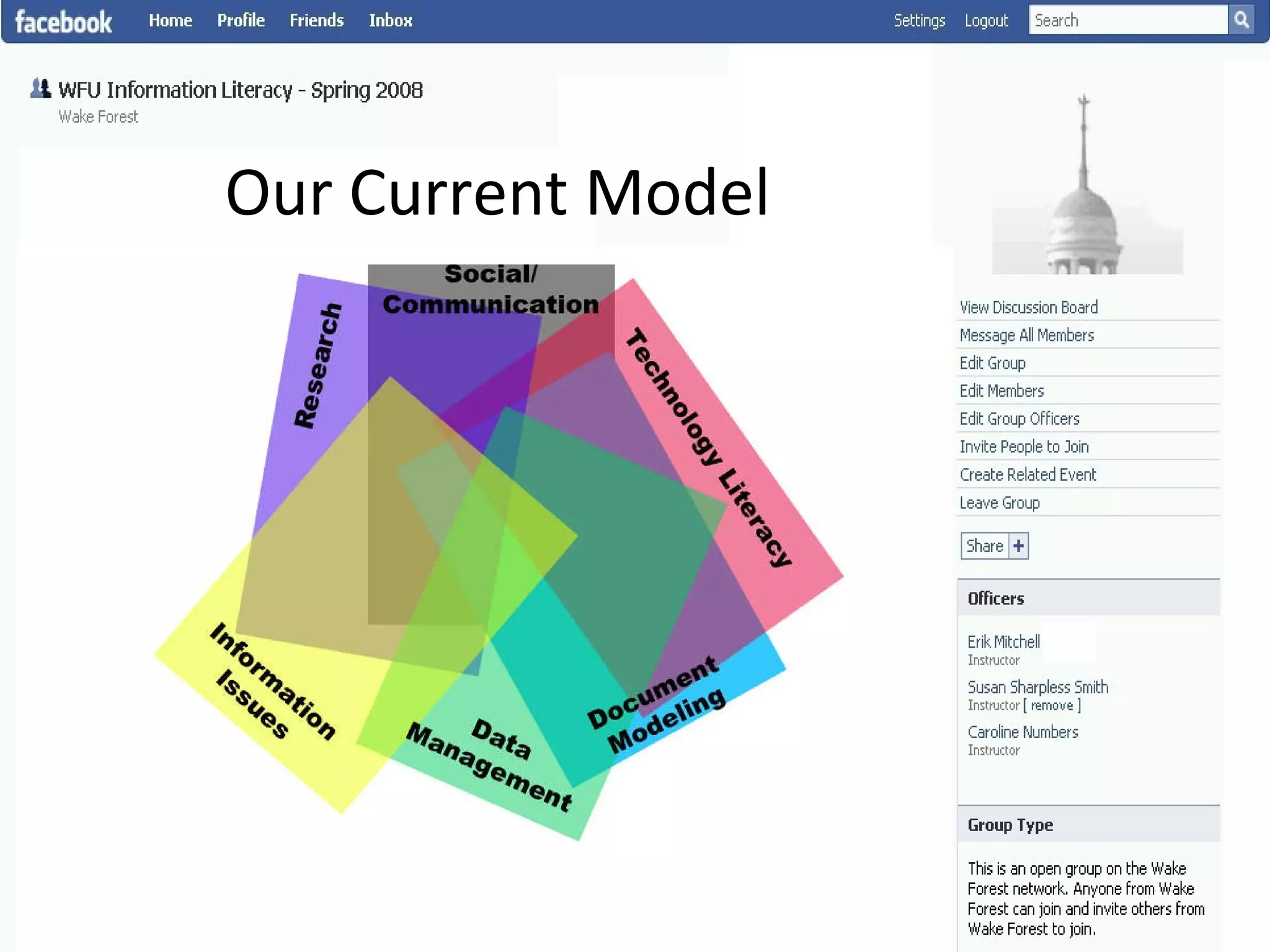
Our Current Model
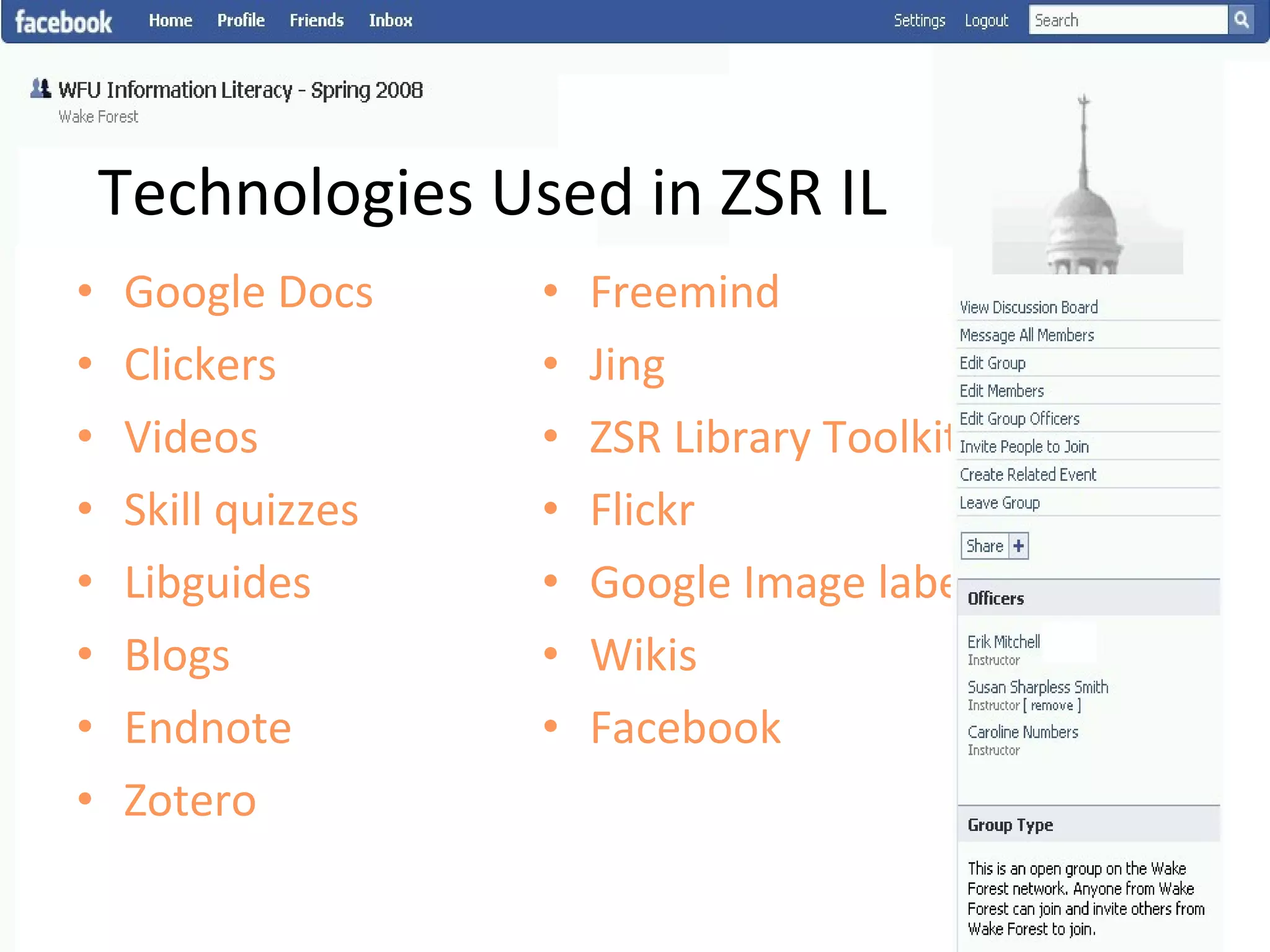
Technologies Used in ZSR IL Google Docs Clickers Videos Skill quizzes Libguides Blogs Endnote Zotero Freemind Jing ZSR Library Toolkit Flickr Google Image labeler Wikis Facebook
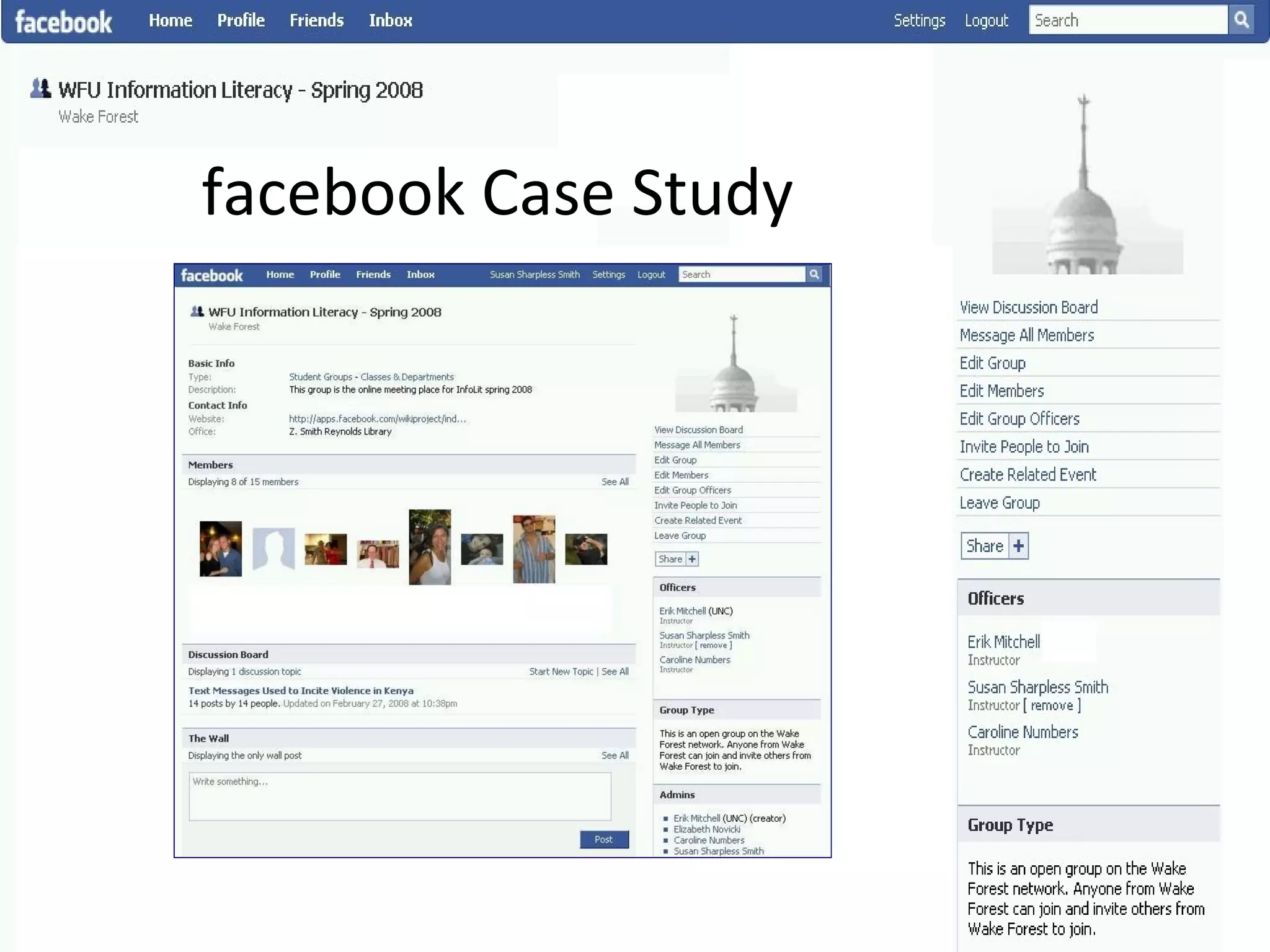
facebook Case Study
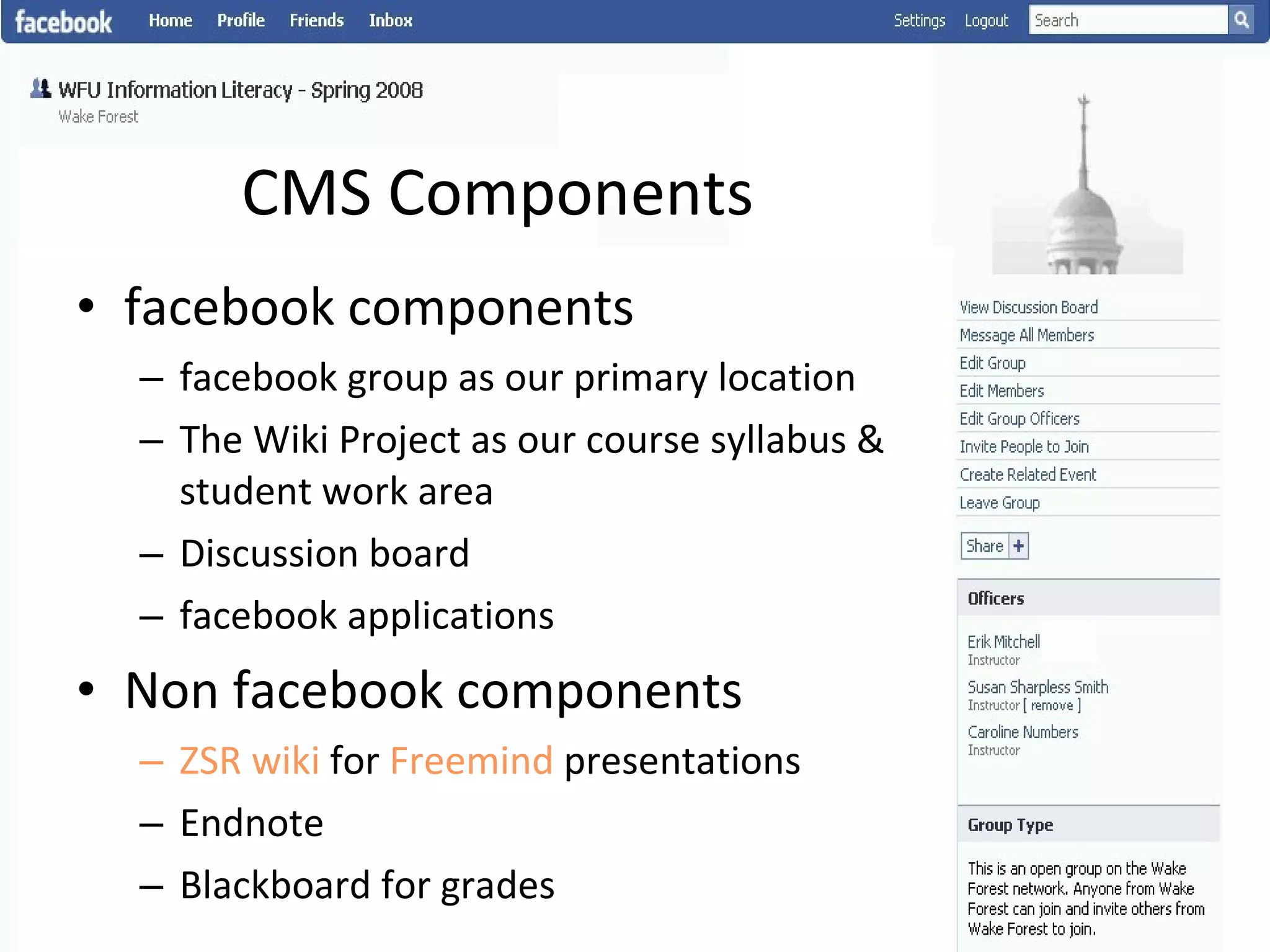
CMS Components facebook components facebook group as our primary location The Wiki Project as our course syllabus & student work area Discussion board facebook applications Non facebook components ZSR wiki  for  Freemind  presentations Endnote Blackboard for grades
Class Content Highlights Class 6 -  Remix Class  Concept: Intellectual property, Skill: Citation Class 7  -  Research Management  Concept: Research management Skill: Endnote Class 8 - Information Organization Concept: Indexing impacts discovery Skill: Connecting the descriptive act & complex searching,  Google image labeler
Assessments Mix of individual & group work Define a research question Scope statement/background information Find/evaluate/cite information resources Presentation and essay Blog posting/class discussion
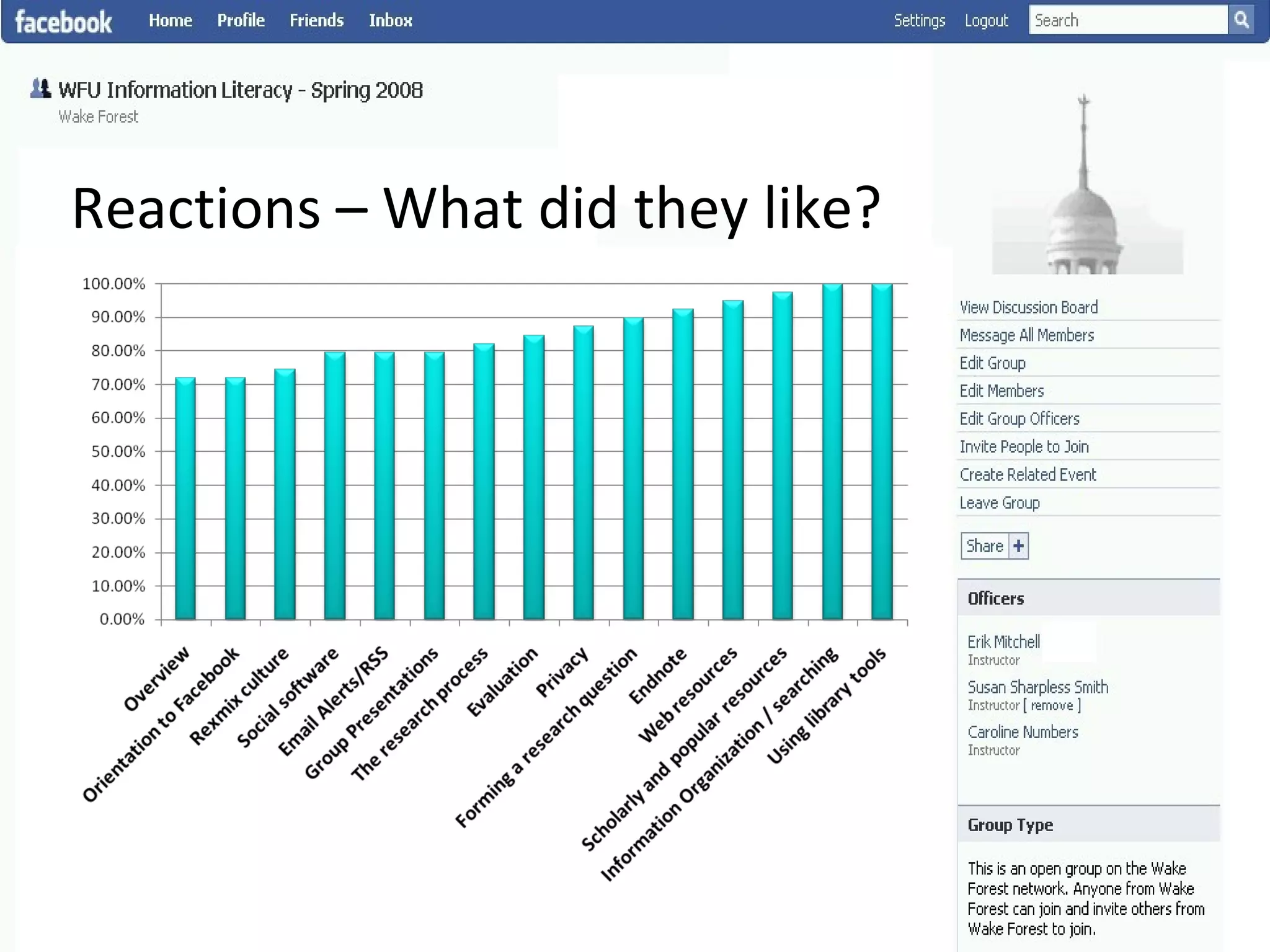
Reactions – What did they like? Research tools, organization/searching, scholarly vs. popular resources EndNote,  privacy, evaluation, research process Alerts/RSS, overviews, presentations, remix culture
Reactions – What did they like?
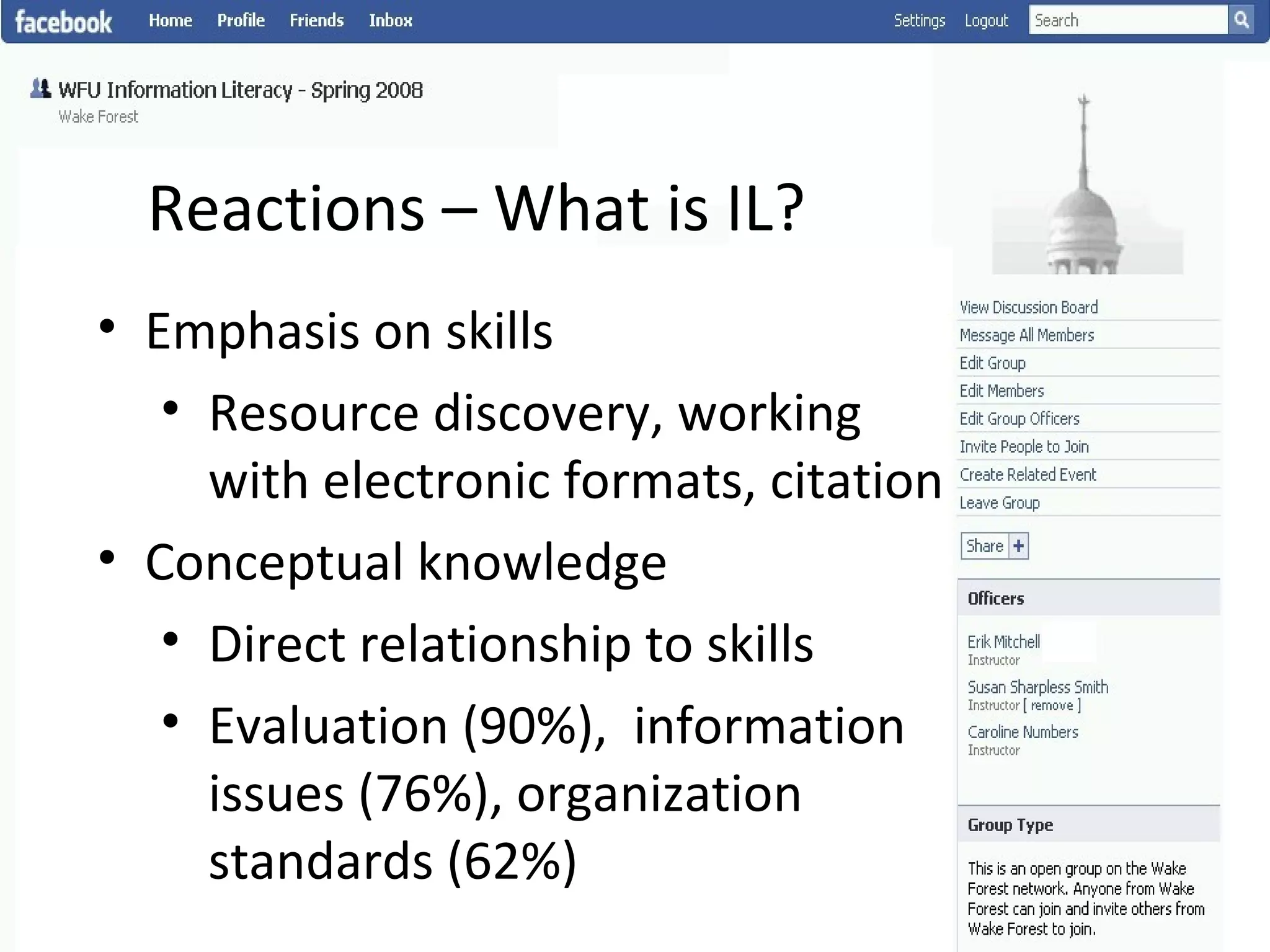
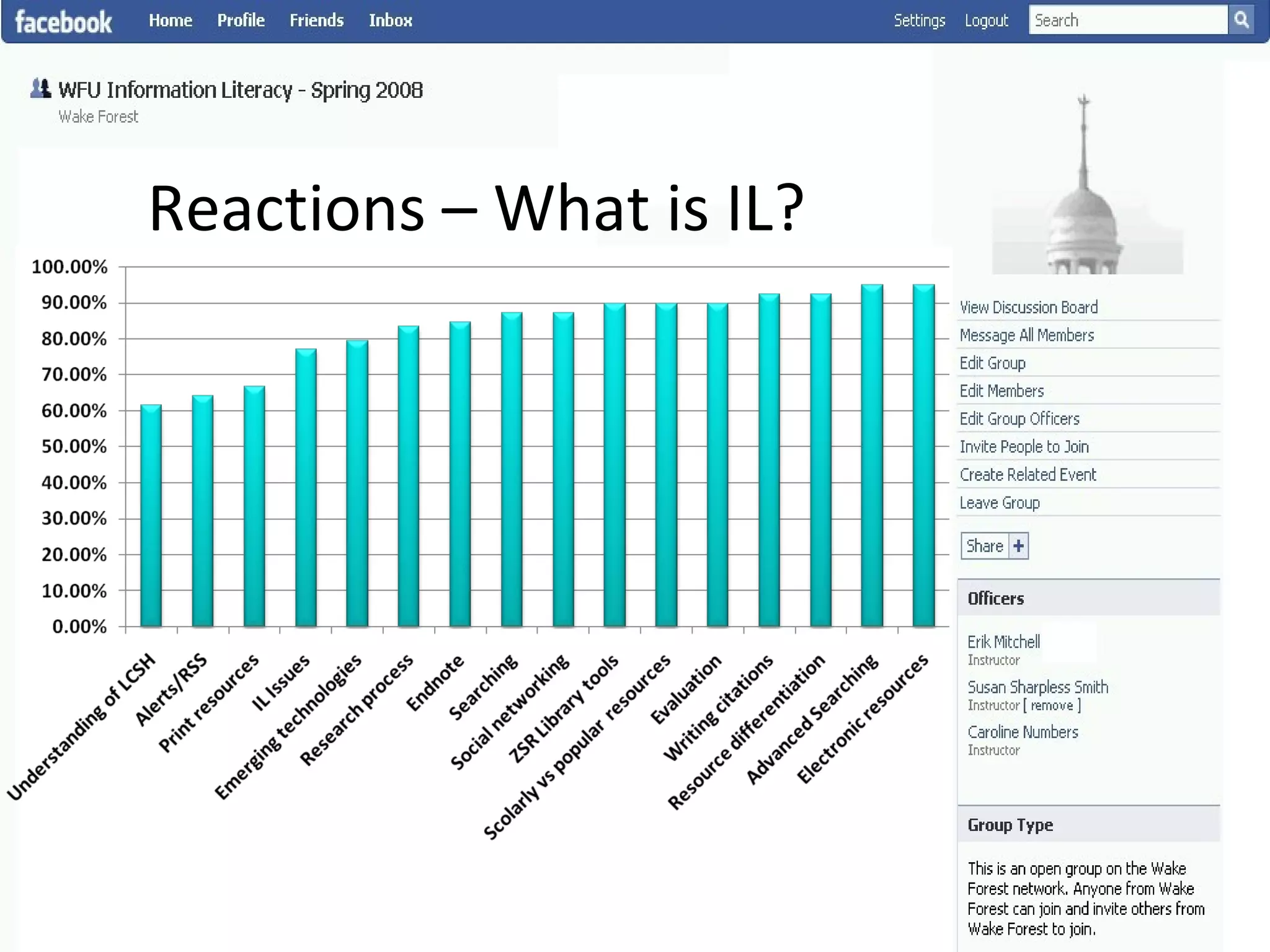
Reactions – What is IL? Emphasis on skills Resource discovery, working with electronic formats, citation Conceptual knowledge Direct relationship to skills Evaluation (90%),  information issues (76%), organization standards (62%)
Reactions – What is IL?
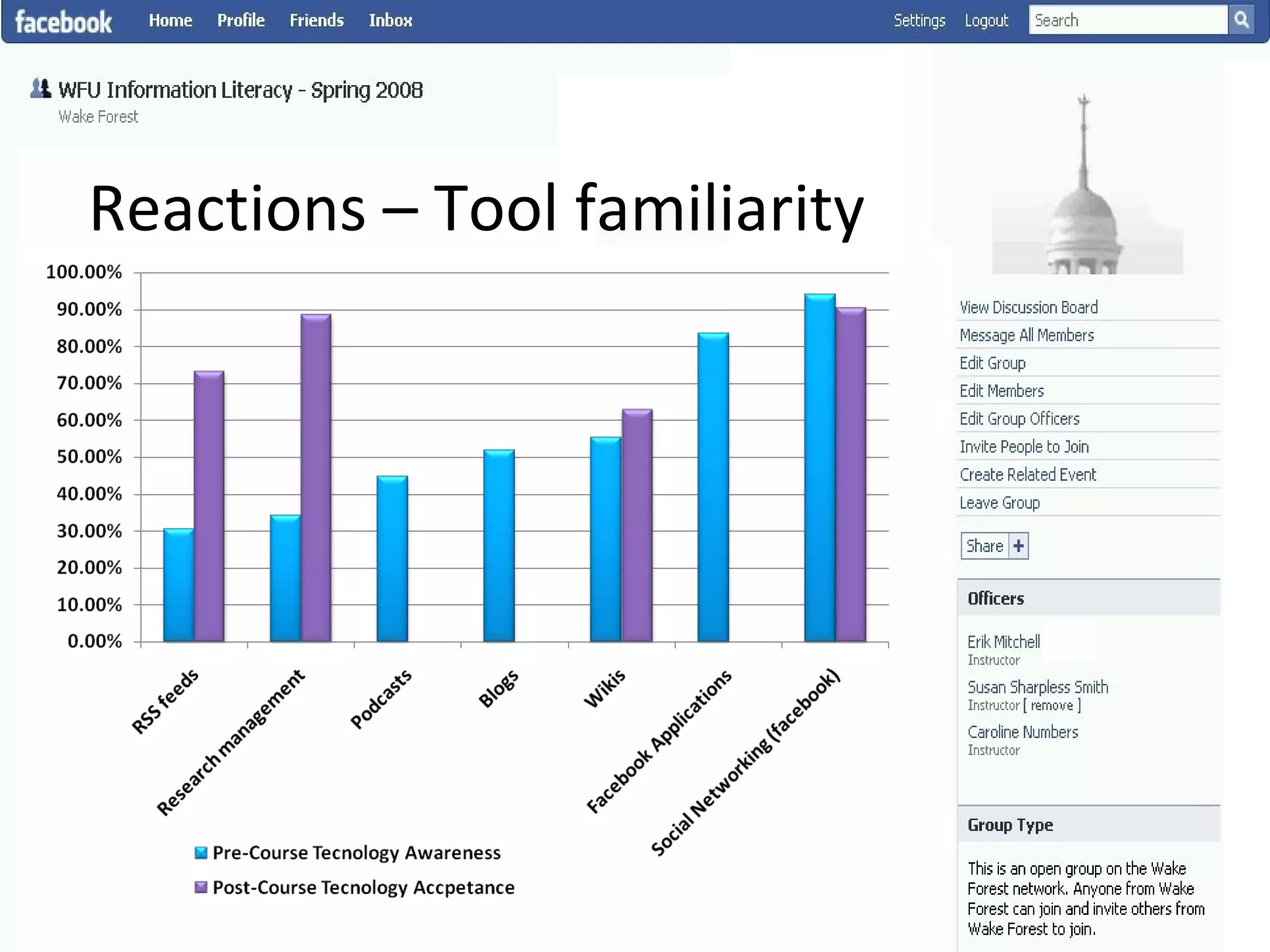
Reactions – Tool familiarity
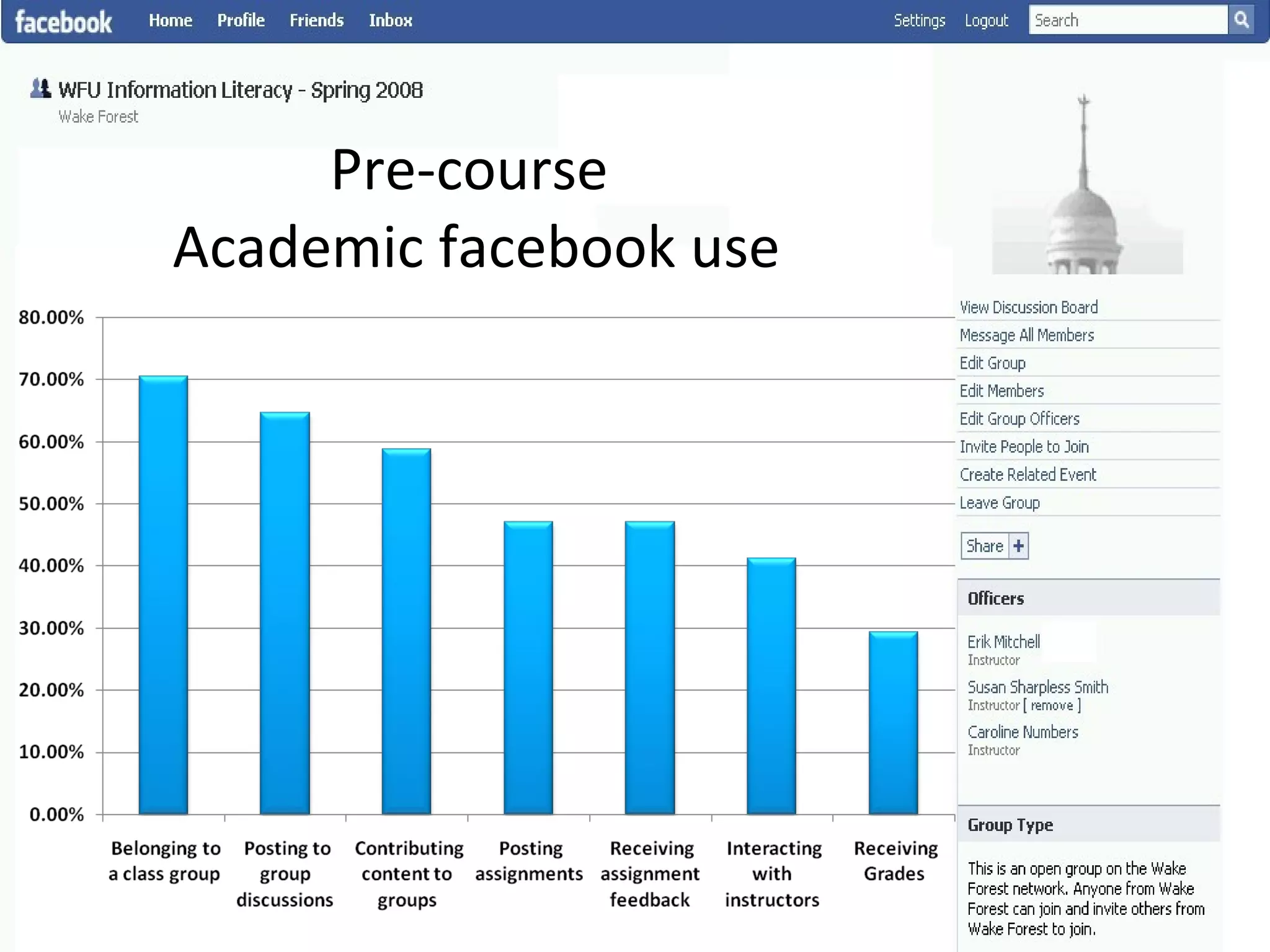
Pre-course  Academic facebook use
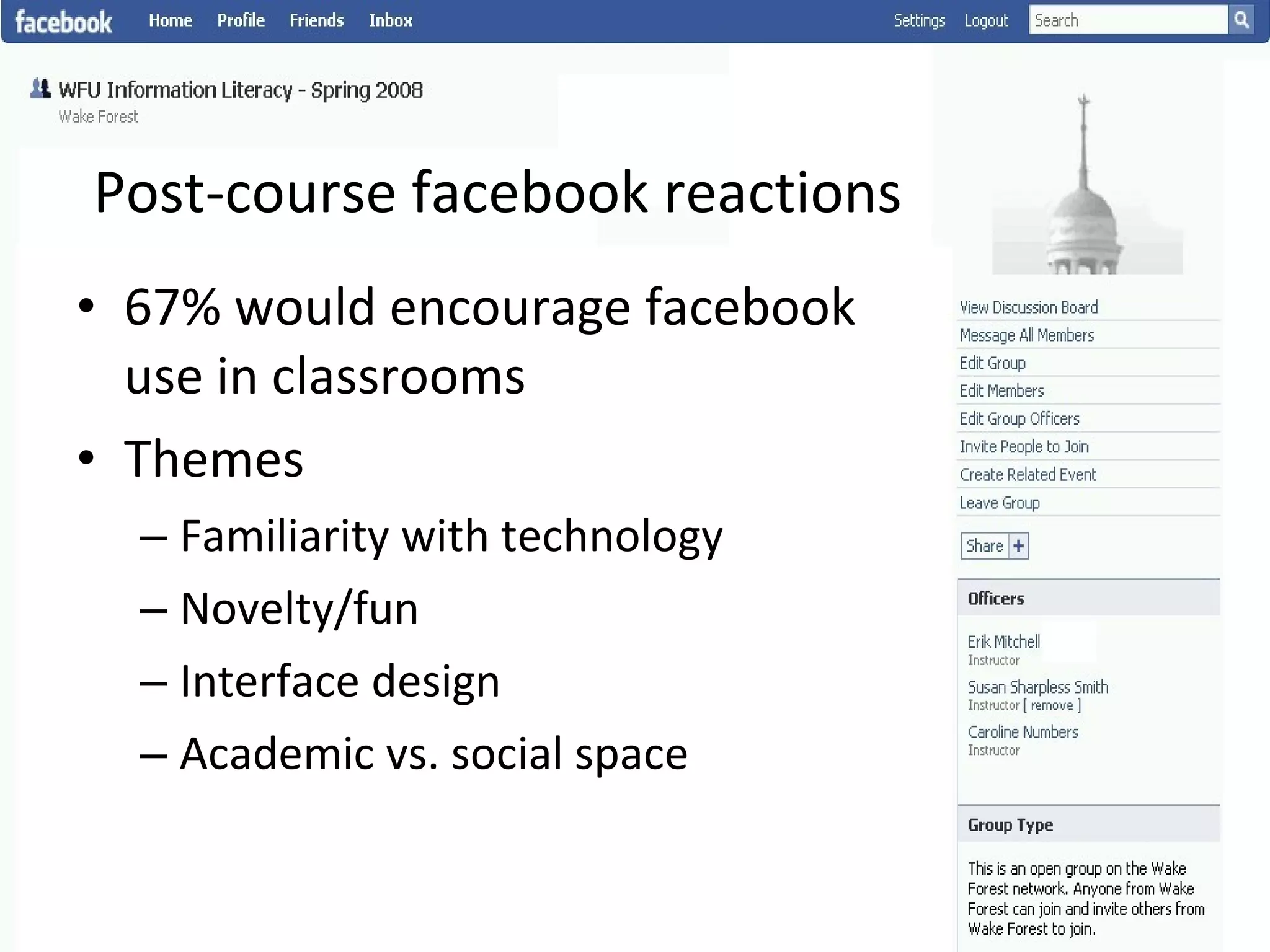
Post-course facebook reactions 67% would encourage facebook use in classrooms Themes Familiarity with technology Novelty/fun Interface design Academic vs. social space
Observations & Next Steps Building on overall positive feedback Problems with free platforms  How are we approaching this fall? Moving back into library owned/licensed space Keeping distributed CMS model facebook as launch point, blog platform Libguides as syllabus Wiki as collaborative workspace
Contact Information Erik Mitchell [email_address] Susan Smith [email_address]

Federated library services

  • 1.
    Bringing Information Literacyinto the Social Sphere A Case Study Using Social Software to Teach Information Literacy at WFU
  • 2.
    Plan for TodayOverview History/Background Theoretical Framework Case Study Findings Future Plans
  • 3.
    Who is WakeForest University? Private, co-ed liberal arts institution Located in Winston-Salem, NC (since 1956) Total enrollment: 6700 FT faculty: 487 / Adjunct faculty: 267
  • 4.
    History of IL@ WFU One-credit elective class began in 2003 with 9 sections 14 classes covered traditional IL topics Curriculum template developed for Blackboard Increased demand – now 12 classes per semester Over 1500 students so far
  • 5.
    What is IL?A foundational approach to learning and education? Skills and competencies related to information seeking and use? Contextual skills Generalized process knowledge An dialogue between individuals, social contexts, and technology?
  • 6.
    Models & meta-modelsPopular Models ACRL Know, access, evaluate, use, and ethical/legal UNESCO Process, information consumer Socio-technical model Communication, connections, interactions Meta-models Shapiro-Hughes Tool, resource, social- structural, research, publishing ,emerging tech, critical) Sundin Source, behavioral, process, communication
  • 7.
    Who are ourStudents & What Do They Know? Next generation information seeking "Why Professor Johnny can’t read" "Is Google making us stupid?" The Google generation Our philosophical assumptions They have specific but not generalized IL skills Research has changed, format driven IL is not relevant Focus on info current issues/context, use skills to connect concepts The course should occur in student’s information space
  • 8.
    Our Emerging ModelOur first classes “ instructors lacked enthusiasm for the topic” Tech-centric, but skill based EndNote Enters the Picture Continues to be “most valued” skill Student-Driven Attempt to leave instructor managed CMS behind Student shaped research on Information Issues Incorporated theoretical content Rapid course development Current issues Shared editing
  • 9.
  • 10.
    Technologies Used inZSR IL Google Docs Clickers Videos Skill quizzes Libguides Blogs Endnote Zotero Freemind Jing ZSR Library Toolkit Flickr Google Image labeler Wikis Facebook
  • 11.
  • 12.
    CMS Components facebookcomponents facebook group as our primary location The Wiki Project as our course syllabus & student work area Discussion board facebook applications Non facebook components ZSR wiki for Freemind presentations Endnote Blackboard for grades
  • 13.
    Class Content HighlightsClass 6 - Remix Class Concept: Intellectual property, Skill: Citation Class 7  - Research Management Concept: Research management Skill: Endnote Class 8 - Information Organization Concept: Indexing impacts discovery Skill: Connecting the descriptive act & complex searching, Google image labeler
  • 14.
    Assessments Mix ofindividual & group work Define a research question Scope statement/background information Find/evaluate/cite information resources Presentation and essay Blog posting/class discussion
  • 15.
    Reactions – Whatdid they like? Research tools, organization/searching, scholarly vs. popular resources EndNote, privacy, evaluation, research process Alerts/RSS, overviews, presentations, remix culture
  • 16.
    Reactions – Whatdid they like?
  • 17.
    Reactions – Whatis IL? Emphasis on skills Resource discovery, working with electronic formats, citation Conceptual knowledge Direct relationship to skills Evaluation (90%), information issues (76%), organization standards (62%)
  • 18.
  • 19.
    Reactions – Toolfamiliarity
  • 20.
    Pre-course Academicfacebook use
  • 21.
    Post-course facebook reactions67% would encourage facebook use in classrooms Themes Familiarity with technology Novelty/fun Interface design Academic vs. social space
  • 22.
    Observations & NextSteps Building on overall positive feedback Problems with free platforms How are we approaching this fall? Moving back into library owned/licensed space Keeping distributed CMS model facebook as launch point, blog platform Libguides as syllabus Wiki as collaborative workspace
  • 23.
    Contact Information ErikMitchell [email_address] Susan Smith [email_address]

Editor's Notes

  • #5 *Topics: select a research topic, prepare a search strategy, select the best information, use search engines and print material, determine scholarly information, decide if they are looking at misinformation. It also covered copyright, plagiarism, and freedom of information. *Goal of early model: streamline and standardize all sections * Deliverables: resource centric and citation heavy.
  • #6 Learning /education Christine Bruce – six frames - Content, context, an approach to learning, relevance – individual context, social impact, relational (objective/subjective) Kuhlthau/todd – guided inquiry – a means of engaging with information seeking to be informed Constructivism – “knowledge is personally developed in reaction to the external world (Bruner 1968)”, “the active construction of knowledge in the context of solving realistic problems where learners build knowledge and organize it in a personally meaningful form”(Lajoie & Azevedo 2006) Connectivisim – Siemens, learning is conneted with external environment, concept Skills ALA presidential report (1989) recognition of information need, ability to locate, evaluate, organize that information, and use information Types of literacies – digital, functional, technological, workplace literacy, survival literacy Actions/processes – know, evaluate, create, use, preserve Concepts Tuominen, Savolainen, and Talja – the way documents are created/used/shared, how text/tools help accomplish social action, element of individual/social in TAM, relationship of individual/social to EM, IA model which includes individual/social/deological/economic forces
  • #7 ACRL (Know, Access Evaluate, Use & Ethical/Legal) Criticized for being implemented in a “skills based approach” Driven by academic needs means that Literacy from this perspective is very research focused UNESCO (process, information consumer) Examines larger realm of information processes (including creation, use preservation) Realize that a need or problem exists that requires information its satisfactory resolution. Know how to accurately identify and define the information needed to meet the need, solve the problem, or make the decision. Know how to determine whether the needed information exists or not, and if it does not, know how to create, or cause to be created the unavailable information (also referred to as “creating new knowledge”). Know how to find the needed information if you have determined that it does, indeed, exist. Know how to create, or cause to be created, unavailable information that you need; sometimes called “creating new knowledge.” Know how to fully understand found information, or know where to go for help if needed to understand it. Know how to organize, analyze, interpret and evaluate information, including source reliability. Perspective from life-long learning, non-directed literacy Socio-technical model (communication, connection) Tuominen, Savolainen, and Talja – the way documents are created/used/shared, how text/tools help accomplish social action, element of individual/social in TAM, relationship of individual/social to EM, IA model which includes individual/social/ideological/economic forces Meta-models Shapiro-Hughes (tool, resource, social-structural, research, publishing, emerging tech, critical) Re-groups literacies to reflect balance of technology, research, social, creation, evaluation – mix of platform/process Sundin (source, behavioral, process, communication) Source – literacies driven by teaching formats Behavioral – the information seeking process, Belkin, Dervin, Erdelez Process – the research process Communication – the socio-technical approach
  • #8 Ithaka report (2008) Population groups – humanities, social science, science Scholarship, publishing preservation roles changing quickly Faculty are less dependent on the library, value library purchasing over gateway services Faculty are all transitioning to electronic Respond to the ‘invisibility of the library’ No longer a gateway, do not perceive library role in resource use, Role of disciplines in service definition Professor Johnny (Mabrito, medley) Net-Gen, N-Gen, “come of age in a digitally enhanced world”, “digital natives” “ developed specific skills to read, understand, create digital texts” Article argues that by ignoring these skills we are missing on a large part of IL Attributes Information seeking begins online Learning occurs non-linearly (multimedia, social network, multitask) Adaptive neuroplasticity, epigenetic rules Stigmergy – social behavior/ information encoded on environment Means we can observe net-gen patterns by examining their info environment Texts – collaborative, editable, multimodal, Q – do they understand the changing document models? Writing skills not grounded in book/paragraph form Distributed knowledge of equal importance Pedagogy Teach in their learning environment Incorporate social/identity elements to work Dialogue is a means of leaning (vygotsky/bruner) Need learning environment support – second life, facebook, etc. Google generation – Nicholas Carr Horizontal browsing Advanced document analysis or lacking in analytical efforts Reading more but less critically Medium dictates content/structure – Clock metaphor Frederick Taylor – father of automation, also focus of Google Are we better off with an “AI” or Extended Mind enhanced cognition? Argues that encoded information is not an accurate representation of knowledge Google Generation – Rowlands et al Digital transition has had a large impact on libraries/information use Horizontal information seeking Viewing of resources online is short Squirreling – download bits Young peoples info behavior IL is not automatically improved, facility with computers hides lack of literacies Speed of Internet use tied to lack of evaluation time (relevance, accuracy, authority) Poor understanding of information needs Tendency to express themselves in natural language Difficulty in assessing long lists of information Lack of adequate mental map of internet Brand based searching “google”, “yahoo” Ease of use, intuition drives information use behavior Likeliness of playing with libraries in social information space Cites OCLC 2007 survey – unlikely to participate Findings from meta-analysis More competent with technology (true) High expectations (true) Prefer interactive systems (true) Transitioned to digital forms of communication (open) – texting for example is driven by cost model not by format preference Multitask in all areas (open) - possible but no hard data, is this necessarily better than sequential skills (reading) They are used to being entertained and expect this in learning environments (open) – entertainment can impede info absorption Prefer visual over text – (yes) but at what cost Zero tolerance for delay, immediacy – (no) no hard evidence that net gen has no patience Peers more credible than authority figures (myth) – based more in nature of a teenager rather than information revolution Constant connectivity to web – (not a net gen specific feature) – individual background/tendency more important “ Cut and paste generation” – true – plagiarism Willing to do trial and error on computers – (myth) – Prefer quick information over full text – myth – everyone engages in horizontal information seeking – “society is dumbing down” They are expert searchers – (Dangerous Myth) – no improvement in information skills found They think everything is on the web (open) – not necessarily aware of library content Do not respect intellectual property – (partially true) – high levels of awareness of IP, just don’t agree with it Format agnostic – (true of some) = no longer a meaningful issue – “content is no longer format dependent in cyberspace” What do we know UK study showed only 27% of youth have deep interest in IT that label implies, 57% use it when needed, 20% are dissidents Skill gaps Lack of evaluation literacy An IL divide is opening, university age is too late to teach goo d IL skills, What do we look forward to? Unified web culture – for all ages The E-book More content formats/numbers New forms of scholarship/communication Virtual publication Semantic web Implications Internet is a background tool Raise site visibility Abandon hope of “one stop shop” Accept that some content will seldom be used Become e-consumer friendly Publishers / users coming together, dropping libraries -
  • #9 First classes Student generated annotated bibliography was cryptic, Student selected topics lacked real information need (lots of reports on sports) EndNote Tried in one semester to cover Endnote, Endnoteweb, Zotero – too much Student-Driven Move from blackboard to wiki then to facebook Blackboard lacked student ownership Fell short “knowledge creation” goal Student shaped research based on Information Issues (social networking, digital divide, internet privacy, identity theft Theoretical content: knowledge organization, ethics, connections
  • #10 Literacy layers Information Issues layer (presentations, group work, blog discussions) Research layer (Research process, Search/discovery, Evaluation, resource types) Technology literacy layer (Starting at their technological foundation, showing relationships, very tech literate (understand push technology but not rss) Data management layer (endnote, zotero, Alerts/feeds) Document modeling layer (wiki pages, rss feeds, freemind, container shouldn't drive use) - seven faces (bruce) IL as social/communication layer (group work, connecting research/academic with social, point is that IL is relevant in any information environment) Perspectives Technology should be low-barrier for students and instructors, easily adopted and easily abandoned Blackboard isn’t this, facebook was, Google image labeler was Why we tried “the wiki project” to simply wiki use – didn’t work Technology used by instructors should underscore Literacy skills Used freemind to show modeling/relationships Used wiki/face to show collaboration Used multi-media (youtube videos, music) to underscore digital media Remix culture – used grey album, Pual Anka & Akon Bring in current issues to discuss literacy topics Colbert – Wikiality theme, Facebook RSS feeds, Juicy Campus
  • #11 Curious about our lib100 program is diversity in technology adoption
  • #12 Why we chose facebook Universally used among students (only 1 didn’t have an account) Ideal example of student driven space Enough developed functionality to meet CMS needs (collaboration, document storage, could build application to mesh with library research tools) Hot topic What we wanted to find out Would facebook be a good CMS Would students accept the blending of Academic/Social space – would they enjoy it? Were students more engaged with the course as a result of this approach? Some initial challenges Added work in setting up group, inviting students One student had a group created ‘about him’ without his knowledge – almost deal killer The wiki project would not accept files, could not host freemind files or allow students to upload assignments
  • #13 Facebook uses Used a group as our CMS shell Discussion forum for commenting on information issues Used the wall to communicate with students Used posted links applications: JSTOR, library catalog, Worldcat, the wiki project What we didn’t use – Did not use bibliography generators because we wanted to emphasize Endnote Freemind – encouraged students to play along, allowed a multi-modal learning during class. (more info in freemind than we covered)
  • #14 class 1 - What is Information, what is literacy? (concept is intro, no skills) clas 2 - History of information (gopher & the WWW) (concept is history, skill is learning wiki structure) class 3 - defining your topic (concept res process, skill more wiki) class 4 - research management (concept res management, issues wikiality, skill is forming a research question) class 5 - Research process (concept doing research, evaluation, skill using tools to find info, using tools to evaluate) Class 6 - remix class (concept intellectual property, skill is citation) class 7 - Endnote (concept research management, skill is endnote) class 8 -Information Organization (concept is indexing impacts discovery, skill is connecting the descriptive act & complex searching, google imagelabler Class 9 - "scholarly resources"(concept - connections, skill - understanding relationship between discovery, selection ,management) Class 10 - "finding articles" (concepts - connections, search methods, skill openulr) class 11 - the "free web" (concept - discussing the source of info, skill - doing research on Google) class 12 - privacy (concept - privacy, skill - personal information management) class 13/14 - class presentations
  • #15 Building toward information issue presentation/essay
  • #18 *interestin issue betwee org standard
  • #23 enduring intellectual property, customization allowed control over environment, citaiton plugin. Positive feedback Keeping facebook but going back managed wiki Looking at current issues